A manufacturing company runs three Kubernetes clusters in its own datacenter — there is no cloud, by policy, because the workloads talk to PLCs on the factory floor and the latency and data-residency rules forbid leaving the building. The platform team stood up the clusters with kubeadm and immediately hit the wall every bare-metal operator hits: kubectl get svc shows their ingress controller stuck <pending> forever, because nothing on prem implements the LoadBalancer Service type the way a cloud controller-manager does. Worse, the API server is reachable only on one control-plane node’s IP, so a single reboot orphans every kubectl, every CI runner, and every Argo CD sync. This guide fixes both problems with two small, complementary projects: kube-vip for a highly-available control-plane VIP, and MetalLB to hand out real external IPs to Services — first the simple L2 way, then the production BGP way.
Prerequisites
- A working Kubernetes cluster (v1.27+) bootstrapped on bare metal or VMs — examples assume
kubeadm, three control-plane nodes and three workers. - A CNI installed and
Readynodes (Calico or Cilium; this matters for BGP, covered below). kubectlv1.27+ andhelmv3.12+ on your workstation, withKUBECONFIGpointing at the cluster.- A reserved, unused IP range on the node L2 network for Services — this guide uses
192.168.40.200-192.168.40.250. - One reserved IP for the control-plane VIP — this guide uses
192.168.40.10, resolvable ask8s-api.corp.local. - For BGP mode: access to your top-of-rack switch/router config and an ASN pair (cluster
64512, router64501in the examples). - Provisioning is GitOps-driven: cluster bootstrap by Ansible, switch and DNS infra by Terraform, manifests reconciled by Argo CD. Nothing here is applied by hand in production.
Target topology
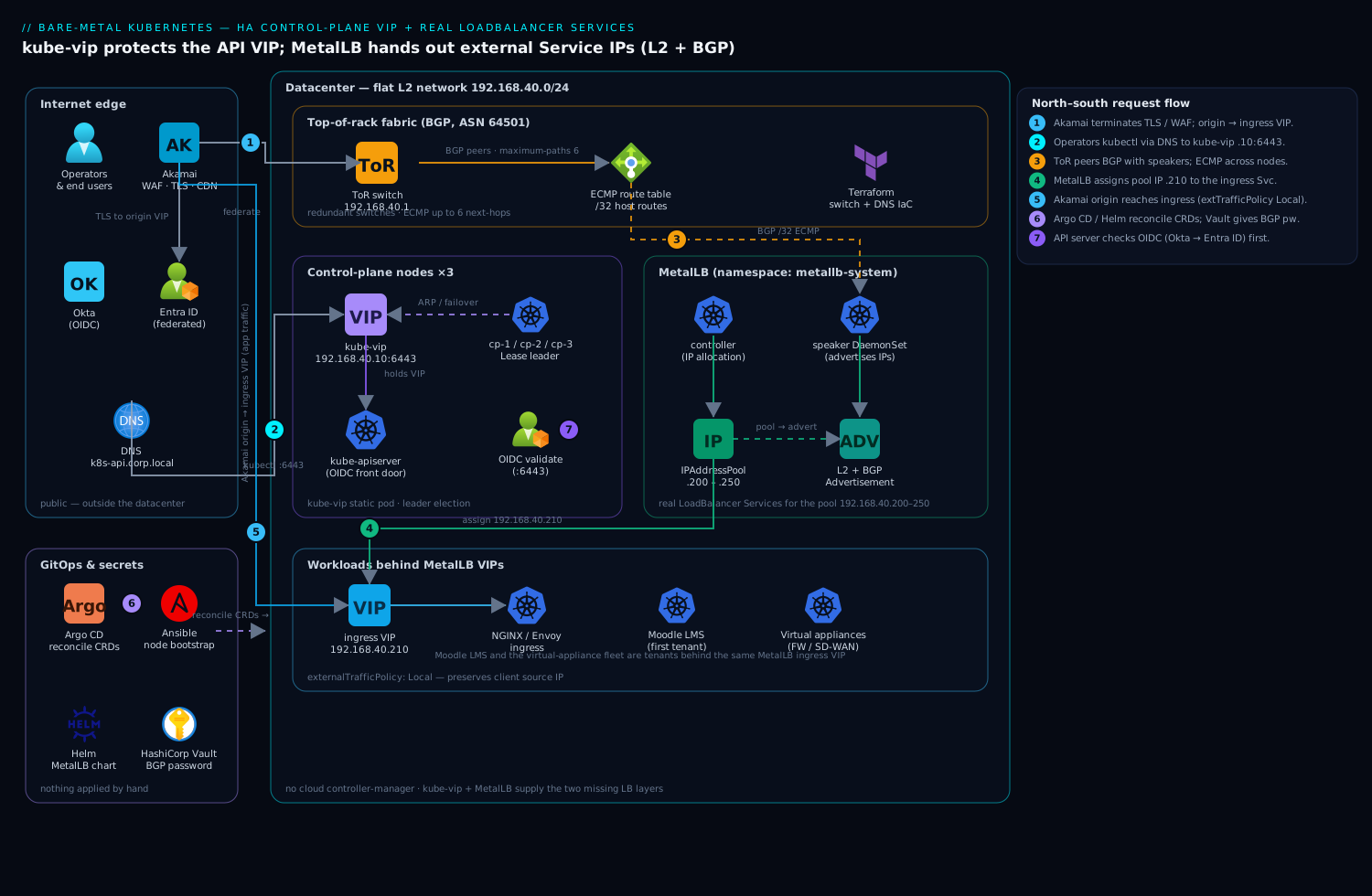
The two layers solve two different problems and must not be confused. kube-vip owns a single floating IP for the Kubernetes API server (192.168.40.10:6443); it runs as a static pod on every control-plane node, holds the VIP on whichever node currently leads a leader election, and moves it on failure. MetalLB owns the pool of external Service IPs (192.168.40.200-250); when you create a Service of type: LoadBalancer, MetalLB’s controller allocates an address from the pool and its speakers advertise it to the network — by gratuitous ARP in L2 mode, or by peering with your routers in BGP mode. Ingress (your NGINX or Envoy ingress controller) sits behind one of those MetalLB IPs; Akamai fronts the published apps at the internet edge for TLS, WAF and global caching, with its origin pointed at the MetalLB-assigned ingress VIP. North-south identity for cluster operators flows from Okta (federated to Entra ID) into the API server via OIDC, so the VIP that kube-vip protects is the single audited front door for every kubectl and every pipeline.
1. Provide a control-plane VIP with kube-vip
Generate the kube-vip static-pod manifest on the first control-plane node. kube-vip ships its own generator inside the container image, so you render the manifest with docker/crictl and drop it into the static-pod directory. Pick ARP mode for a flat L2 control-plane network (the common case); BGP for the API VIP is possible but most teams keep the API on ARP and reserve BGP for Services.
# On control-plane node #1, as root
export VIP=192.168.40.10
export INTERFACE=eth0           # the NIC on the node/API network
export KVVERSION=v0.8.7

# Render the static pod manifest using the kube-vip image itself
ctr image pull ghcr.io/kube-vip/kube-vip:$KVVERSION
ctr run --rm --net-host ghcr.io/kube-vip/kube-vip:$KVVERSION vip \
  /kube-vip manifest pod \
    --interface $INTERFACE \
    --address $VIP \
    --controlplane \
    --arp \
    --leaderElection \
  | tee /etc/kubernetes/manifests/kube-vip.yaml
The kubelet watches /etc/kubernetes/manifests/ and starts the static pod within seconds. Because this is a static pod, kube-vip comes up before the rest of the control plane is healthy, which is exactly what you want — the VIP must exist for kubeadm join --control-plane to work. Give kube-vip RBAC for the leader-election lease:
kubectl apply -f https://kube-vip.io/manifests/rbac.yaml
Crucial bootstrap detail: when you first ran kubeadm init, the --control-plane-endpoint must already point at the VIP (or its DNS name), not a node IP:
kubeadm init \
  --control-plane-endpoint "k8s-api.corp.local:6443" \
  --upload-certs \
  --pod-network-cidr=10.244.0.0/16
Repeat the static-pod manifest drop on control-plane nodes #2 and #3 (same command, same $VIP). The three kube-vip instances run a leader election over a Lease; only the leader answers ARP for 192.168.40.10. Reboot the leader and the VIP migrates in a couple of seconds — kubectl reconnects without you changing a thing.
2. Install MetalLB
Install MetalLB with Helm so upgrades are a chart bump in your GitOps repo rather than a hand-edited manifest. MetalLB has two workloads: a single controller Deployment (does IP allocation) and a speaker DaemonSet (advertises the IPs from every node).
helm repo add metallb https://metallb.github.io/metallb
helm repo update

helm install metallb metallb/metallb \
  --namespace metallb-system --create-namespace \
  --version 0.14.9 \
  --set speaker.frr.enabled=true        # enable the FRR backend now; needed for BGP later
Wait for the pods, then confirm the CRDs are present — all configuration in modern MetalLB is via CRDs (the old ConfigMap is removed):
kubectl -n metallb-system rollout status deploy/controller
kubectl -n metallb-system rollout status ds/speaker

kubectl get crds | grep metallb.io
# ipaddresspools.metallb.io
# l2advertisements.metallb.io
# bgpadvertisements.metallb.io
# bgppeers.metallb.io
Define the address pool now — it is shared by both L2 and BGP modes. This is the only place your reserved Service range lives; treat it as managed state in Terraform/Git, not tribal knowledge.
# metallb-pool.yaml
apiVersion: metallb.io/v1beta1
kind: IPAddressPool
metadata:
  name: prod-pool
  namespace: metallb-system
spec:
  addresses:
    - 192.168.40.200-192.168.40.250
  autoAssign: true
  avoidBuggyIPs: true        # skip .0 and .255 in any /24 it touches
kubectl apply -f metallb-pool.yaml
3. Mode A — Layer 2 (ARP) advertisement
L2 mode is the fastest path to a working LoadBalancer and needs zero network-team involvement: MetalLB simply answers ARP for the Service IP from one elected node. Apply an L2Advertisement that ties the pool to L2:
# metallb-l2.yaml
apiVersion: metallb.io/v1beta1
kind: L2Advertisement
metadata:
  name: l2-prod
  namespace: metallb-system
spec:
  ipAddressPools:
    - prod-pool
  interfaces:
    - eth0          # restrict ARP to the data network NIC
kubectl apply -f metallb-l2.yaml
Now create a test Service and watch it get a real IP instead of <pending>:
kubectl create deploy web --image=nginx --port=80
kubectl expose deploy web --type=LoadBalancer --port=80 --target-port=80

kubectl get svc web -w
# NAME   TYPE           EXTERNAL-IP      PORT(S)
# web    LoadBalancer   192.168.40.200   80:31234/TCP
From any host on the L2 network, curl http://192.168.40.200 now hits NGINX. Understand the tradeoff before you ship it: in L2 mode one node holds a given Service IP at a time, so it is a failover mechanism, not load-balancing — all traffic for that IP ingresses through the elected node, and bandwidth is capped at that node’s NIC. It is perfect for an ingress controller VIP (where the ingress itself spreads load internally) and fine for moderate throughput. When you outgrow it, move to BGP without touching your apps.
4. Mode B — BGP advertisement (production)
BGP mode is what you run at scale: MetalLB peers with your routers, advertises each Service IP as a /32 route, and the routers use ECMP to spread traffic across all speaker nodes simultaneously — true horizontal load-balancing with no single chokepoint. First define the peer (your top-of-rack switch) and a BGP-specific advertisement:
# metallb-bgp.yaml
apiVersion: metallb.io/v1beta1
kind: BGPPeer
metadata:
  name: tor-switch
  namespace: metallb-system
spec:
  myASN: 64512            # the cluster's ASN
  peerASN: 64501          # the router's ASN
  peerAddress: 192.168.40.1
  peerPort: 179
  holdTime: 90s
  keepaliveTime: 30s
  password: ""            # set from a Vault-injected secret in real deployments
---
apiVersion: metallb.io/v1beta1
kind: BGPAdvertisement
metadata:
  name: bgp-prod
  namespace: metallb-system
spec:
  ipAddressPools:
    - prod-pool
  aggregationLength: 32        # advertise each Service IP as a host route
  localPref: 100
kubectl apply -f metallb-bgp.yaml
# Remove the L2Advertisement so the pool is advertised one way only
kubectl delete l2advertisement l2-prod -n metallb-system
The matching side on a FRR/Cisco-style top-of-rack switch — managed by Terraform against the switch provider, never typed live:
router bgp 64501
  bgp router-id 192.168.40.1
  neighbor 192.168.40.0/24 peer-group K8S
  neighbor K8S remote-as 64512
  neighbor K8S passive            ! let the speakers initiate
  neighbor K8S timers 30 90
  address-family ipv4 unicast
    maximum-paths 6              ! ECMP across up to 6 speaker nodes
Confirm the sessions come up from MetalLB’s side:
kubectl get bgppeers -n metallb-system -o wide
# Check the FRR speaker for an Established session:
kubectl -n metallb-system exec ds/speaker -c frr -- vtysh -c "show bgp summary"
# Neighbor       V   AS   State/PfxRcd
# 192.168.40.1   4 64501   Established
Recreate the same Service from step 3 — apps are mode-agnostic, only the network plumbing changed. Now every speaker node advertises 192.168.40.200/32, the router installs ECMP next-hops, and traffic spreads across the cluster. One caveat with your CNI: if you also run BGP in Calico, give it and MetalLB different ASNs or scope them so they do not fight over the same sessions — a frequent and confusing outage.
5. Wire ingress, edge, and the operating model
Point your ingress controller’s Service at a stable MetalLB IP so DNS and the edge never chase a moving target. Pin it explicitly rather than letting MetalLB auto-assign:
# nginx-ingress-svc patch
apiVersion: v1
kind: Service
metadata:
  name: ingress-nginx-controller
  namespace: ingress-nginx
  annotations:
    metallb.io/loadBalancerIPs: 192.168.40.210     # stable, documented VIP
spec:
  type: LoadBalancer
  externalTrafficPolicy: Local    # preserve client source IP; only schedule to nodes with a pod
externalTrafficPolicy: Local matters: it preserves the real client IP (your WAF and audit logs need it) and, in BGP mode, makes the router advertise the IP only from nodes actually running an ingress pod — tighter, healthier routing. Now slot this into the wider operating model the platform team already runs:
- Edge & TLS — Akamai terminates TLS and runs WAF/bot rules at the internet edge, with its origin set to
192.168.40.210; the cluster never serves the public directly. - Operator identity — the API server (behind kube-vip’s VIP) is configured for OIDC against Okta, which is federated to Entra ID, so every
kubectlis an audited, MFA-backed human, not a shared kubeconfig. - Secrets — the BGP peer password and any ingress TLS keys come from HashiCorp Vault via the Vault Agent injector, never committed to the GitOps repo.
- GitOps — these CRDs live in Git; Argo CD reconciles them, and a Jenkins/ GitHub Actions pipeline runs the Ansible node bootstrap and Terraform switch/DNS changes that this all depends on.
- Posture & runtime — Wiz (with Wiz Code scanning the IaC in the repo) flags an over-broad
IPAddressPoolor a Service accidentally exposed on the public range before it merges; CrowdStrike Falcon sensors on every node catch runtime threats against the speaker pods that now carry north-south traffic. - Observability — Dynatrace (or Datadog) scrapes MetalLB’s and kube-vip’s Prometheus metrics, alerting on VIP failovers, BGP session drops, and pool exhaustion.
- ITSM — a VIP failover or a pool running low auto-raises a ServiceNow incident, so on-call gets a ticket, not just a dashboard blip.
Two workloads worth calling out as natural early tenants of this LB: a fleet of virtual appliances (firewalls, SD-WAN concentrators) that the team is migrating into the cluster as pods need stable external IPs MetalLB now provides; and Moodle, the company’s internal training LMS, which gets a dedicated MetalLB VIP behind Akamai as the first user-facing service proving the path end to end.
Validation
Run these after any change to prove both layers are healthy:
# 1. Control-plane VIP is live and owned by a leader
ping -c2 192.168.40.10
kubectl get lease -n kube-system kube-vip-cp -o wide      # who holds the VIP

# 2. MetalLB allocated an IP (no <pending>)
kubectl get svc -A | grep LoadBalancer

# 3. The IP is actually reachable
curl -sS -o /dev/null -w "%{http_code}\n" http://192.168.40.200

# 4. BGP sessions are Established and routes advertised
kubectl -n metallb-system exec ds/speaker -c frr -- vtysh -c "show bgp ipv4 unicast"

# 5. Failover test: drain the node holding a Service IP, confirm curl still answers
NODE=$(kubectl get svc web -o jsonpath='{.status.loadBalancer.ingress[0].ip}')
kubectl drain <speaker-node> --ignore-daemonsets --delete-emptydir-data
curl -sS http://$NODE      # should still return 200 via another node
kubectl uncordon <speaker-node>
A green run is: VIP pings and a Lease holder is shown, no Service is <pending>, the external IP returns 200, BGP shows Established, and the drain test keeps serving.
Rollback / teardown
Reverse cleanly — MetalLB first (it advertises live traffic), then kube-vip.
# Stop advertising and remove MetalLB config, then the chart
kubectl delete l2advertisement,bgpadvertisement,bgppeer,ipaddresspool -n metallb-system --all
helm uninstall metallb -n metallb-system
kubectl delete ns metallb-system

# Remove kube-vip from EACH control-plane node (kubelet stops the static pod on file removal)
rm -f /etc/kubernetes/manifests/kube-vip.yaml      # run on every control-plane node
kubectl delete -f https://kube-vip.io/manifests/rbac.yaml
Important ordering note: if the API server’s --control-plane-endpoint is the kube-vip VIP, do not tear down kube-vip while the cluster is in use — you would cut off the API. Migrate the endpoint to a real load balancer or a single node IP first, then remove kube-vip. Any Service of type: LoadBalancer reverts to <pending> once MetalLB is gone; switch those you still need to NodePort as an interim.
Common pitfalls
- IP range overlaps DHCP. If the MetalLB pool overlaps the network’s DHCP scope, two devices claim the same IP and traffic flaps. Reserve the range out of DHCP in your IPAM/Terraform first.
- L2 mode “isn’t load-balancing.” It is failover by design — one node per IP. If you need real spread, that is the cue to move to BGP, not to file a bug.
- BGP session stuck
Active/Connect. Almost always an ASN mismatch, a firewall blocking TCP/179, or the router not configuredpassivewhile the speaker also waits. Checkshow bgp summaryon both ends. - CNI and MetalLB both speaking BGP. Calico’s own BGP and MetalLB’s BGP collide if they share ASNs/sessions. Use distinct ASNs or disable Calico BGP for the Service range.
externalTrafficPolicy: Clusterhides client IPs. Fine for internal apps, wrong when a WAF or audit trail needs the real source — useLocalfor edge-facing Services.- kube-vip VIP not up before join. If
kubeadm join --control-planefails to reach the API, the static pod manifest is missing or the interface name is wrong — verify$INTERFACEmatches the node’s real NIC.
Security notes
The control-plane VIP is the cluster’s single most sensitive endpoint: lock the API server behind OIDC from Okta/ Entra ID so every operator is authenticated and MFA-gated, restrict :6443 to management networks, and put a password on the BGPPeer sourced from HashiCorp Vault so no rogue host can inject routes. MetalLB speakers run with elevated network capabilities (they manipulate ARP/BGP), so keep CrowdStrike Falcon runtime protection on those nodes and let Wiz Code gate the IaC against an IPAddressPool that accidentally spans a public or management subnet. Treat the Service pool as a security boundary, not just an allocation list.
Cost notes
This is the cheap part of bare metal: both MetalLB and kube-vip are free, open-source, and replace per-hour cloud load balancers entirely — there is no NLB/ALB bill and no per-rule charge. The only real costs are the reserved IP space (free, just planning) and the operational time to run BGP correctly. Budget for redundant top-of-rack switches if you go BGP — ECMP across speakers is only as available as the routers underneath — and fold the Akamai edge and Dynatrace/ Datadog monitoring into existing contracts rather than standing up new tooling. Compared to renting cloud load balancers for three clusters, this pays for the engineering time within the first month and then keeps paying every month after.