A regional hospital group gets a finding from its cyber-insurer that makes the renewal conditional: every backup repository must be immutable, demonstrably out of reach of a domain-admin credential, because the last three ransomware claims the insurer paid all started with an attacker encrypting or deleting the backups first and the production data second. The existing setup — Veeam writing to a dedup appliance over CIFS — fails the test, because anyone with the storage admin’s password can delete a backup file. The mandate is concrete: a backup target where, once a backup lands, nobody — not the backup admin, not a root user, not an attacker with stolen keys — can alter or delete it until its retention expires, and where a fire in the primary data centre does not take the only immutable copy with it. This guide builds exactly that on commodity hardware: a MinIO cluster with S3 Object Lock in compliance mode, replicated active-active to a second site, that Veeam, Commvault, or restic treats as a normal S3 bucket while the WORM guarantees hold underneath.
The reason this works where a CIFS share does not is the S3 Object Lock model. Object Lock is a per-object, time-bound legal hold enforced by the storage layer itself, not by filesystem permissions. In compliance mode the retention cannot be shortened or removed by any identity, including the MinIO root account — the bytes are frozen until the clock runs out. Layer site replication on top and the locked objects, the IAM policies, and the bucket configuration all propagate to a second cluster, giving you two independent immutable copies. That is the 3-2-1-1 backup rule’s final “1” — one immutable copy — satisfied by the storage, not by a promise.
Prerequisites
- Two sites (DC-A primary, DC-B DR) with low-latency L3 connectivity, each with 4 Linux hosts (Ubuntu 22.04 / RHEL 9), 4 raw data disks per host (16 drives per site; XFS, never a shared filesystem).
- DNS you control for round-robin or load-balancer hostnames:
minio-a.kloudvin.internal,minio-b.kloudvin.internal. - TLS certificates per node from your internal CA (or HashiCorp Vault PKI, used below) — Object Lock requires HTTPS in any serious deployment.
- The
mc(MinIO Client) admin CLI on a jump host. - An identity provider for operators: Microsoft Entra ID (or Okta) for OIDC SSO into the MinIO console — humans never use the root account.
- NTP in sync across all 8 nodes — retention math and replication ordering depend on clocks agreeing.
- Backup software that speaks S3 with Object Lock: Veeam 12+, Commvault, or
restic/kopia.
Target topology
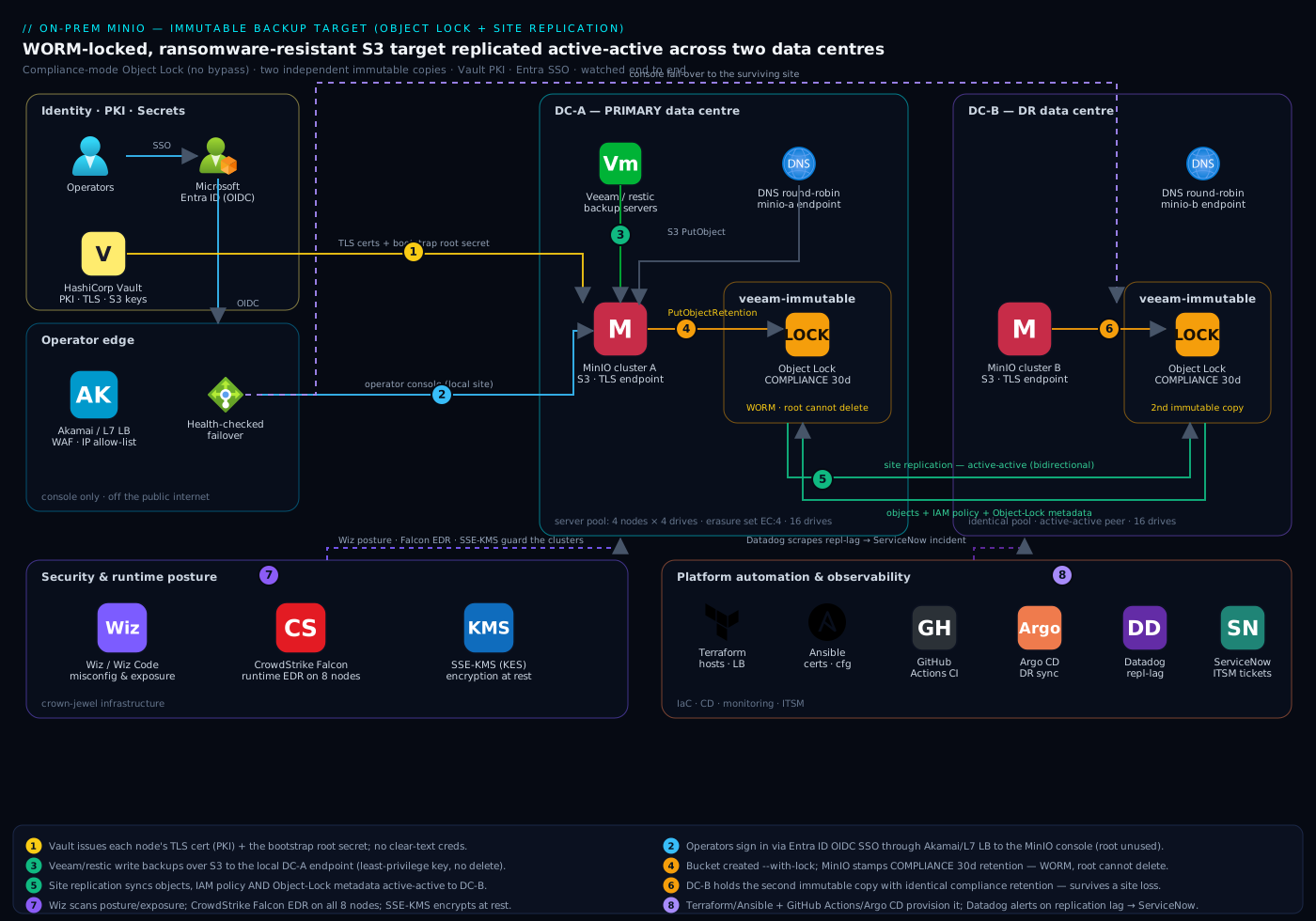
Two MinIO deployments, one per data centre, each a single server pool of 4 nodes × 4 drives running erasure-coded sets (EC:4 — survive two drive or two node failures per site). DC-A and DC-B are joined into a site-replication group: a bucket created on A appears on B, an IAM policy on A propagates to B, and — critically — an Object-Lock-protected object written on A is replicated to B with its retention metadata intact, so the immutability survives a site loss. The backup servers (Veeam/Commvault) point at a load-balanced or DNS-round-robin endpoint in their local site; Akamai (or any L7 LB with health checks) fronts the operator console for remote admins and fails console traffic over to the surviving site. The whole thing is fronted by Vault for TLS/PKI and S3 credential issuance, Entra ID for human SSO, and is watched by Wiz, CrowdStrike Falcon, and Datadog.
The non-negotiable property: buckets are created with Object Lock enabled at creation time and locked in compliance mode — Object Lock cannot be turned on after a bucket exists, so getting this right in step 4 is the entire point of the exercise.
1. Lay down storage and the systemd unit on every node
On each of the 4 nodes in a site, format the four raw disks as XFS and mount them at a predictable path. Do this identically on all nodes — MinIO requires symmetric layout.
# Run on every MinIO host (adjust device names to your hardware)
for i in b c d e; do
  sudo mkfs.xfs -f -L "DISK${i}" /dev/sd${i}
  sudo mkdir -p /mnt/disk${i}
done

# Persist mounts by label so device reordering never breaks the pool
cat <<'EOF' | sudo tee -a /etc/fstab
LABEL=DISKb /mnt/diskb xfs defaults,noatime 0 2
LABEL=DISKc /mnt/diskc xfs defaults,noatime 0 2
LABEL=DISKd /mnt/diskd xfs defaults,noatime 0 2
LABEL=DISKe /mnt/diske xfs defaults,noatime 0 2
EOF
sudo mount -a

# Create the MinIO service user
sudo useradd -r -s /sbin/nologin minio-user
sudo chown -R minio-user:minio-user /mnt/disk{b,c,d,e}
Install the server binary and a systemd unit on each node:
sudo curl -sSL https://dl.min.io/server/minio/release/linux-amd64/minio \
  -o /usr/local/bin/minio
sudo chmod +x /usr/local/bin/minio
sudo curl -sSL https://dl.min.io/client/mc/release/linux-amd64/mc \
  -o /usr/local/bin/mc
sudo chmod +x /usr/local/bin/mc
The environment file is identical on all four nodes in a site. The MINIO_VOLUMES line uses MinIO’s ellipsis expansion to declare the full distributed set in one string — every node sees the same topology.
# /etc/default/minio  — identical on all 4 nodes of DC-A
MINIO_VOLUMES="https://minio-a-node{1...4}.kloudvin.internal:9000/mnt/disk{b...e}"
MINIO_OPTS="--console-address :9001 --certs-dir /etc/minio/certs"
MINIO_ROOT_USER="kv-root-init"            # bootstrap only; disabled in step 7
MINIO_ROOT_PASSWORD="<from-Vault, see step 2>"
MINIO_SERVER_URL="https://minio-a.kloudvin.internal:9000"
MINIO_BROWSER_REDIRECT_URL="https://console-a.kloudvin.internal:9001"
Do not start the service yet — TLS certs come from Vault first.
2. Issue TLS and the root secret from HashiCorp Vault
Object Lock semantics and replication credentials both ride HTTPS, and you want short-lived, auditable material rather than a self-signed cert checked into a wiki. HashiCorp Vault does two jobs here: it is the PKI engine that issues each node’s TLS certificate, and it is the secrets store that holds the bootstrap root password and later the S3 access keys, so no long-lived credential sits in a config file in clear text.
# Enable a PKI role scoped to the cluster's internal domain (one-time)
vault secrets enable -path=pki_minio pki
vault write pki_minio/roles/minio-node \
  allowed_domains="kloudvin.internal" \
  allow_subdomains=true max_ttl="2160h"

# Issue a cert per node — run for each of node1..node4
vault write -format=json pki_minio/issue/minio-node \
  common_name="minio-a-node1.kloudvin.internal" ttl="720h" \
  > /tmp/node1.json

sudo mkdir -p /etc/minio/certs
jq -r .data.certificate /tmp/node1.json | sudo tee /etc/minio/certs/public.crt
jq -r .data.private_key  /tmp/node1.json | sudo tee /etc/minio/certs/private.key
jq -r .data.issuing_ca   /tmp/node1.json | sudo tee /etc/minio/certs/CAs/vault-ca.crt
sudo chown -R minio-user:minio-user /etc/minio/certs
Pull the bootstrap root password from a Vault KV secret rather than hardcoding it, then start the cluster:
# Inject the root password from Vault into the env file at boot
ROOT_PW=$(vault kv get -field=password secret/minio/dc-a/root)
sudo sed -i "s|<from-Vault, see step 2>|${ROOT_PW}|" /etc/default/minio

sudo systemctl daemon-reload
sudo systemctl enable --now minio
sudo systemctl status minio --no-pager
Repeat the whole of steps 1–2 on the four DC-B nodes with minio-b-node{1...4} names and secret/minio/dc-b/root. You now have two independent, TLS-secured, erasure-coded clusters.
3. Register cluster aliases and confirm health
From the jump host, register both clusters as mc aliases using the bootstrap root credentials, then verify each is healthy before you touch replication.
mc alias set dca https://minio-a.kloudvin.internal:9000 kv-root-init "${ROOT_PW_A}"
mc alias set dcb https://minio-b.kloudvin.internal:9000 kv-root-init "${ROOT_PW_B}"

# Both must report all drives Online and the expected erasure set
mc admin info dca
mc admin info dcb
You are looking for 4 nodes, 16 drives online, 0 offline on each side. If a drive is missing here, fix the hardware now — replication will faithfully copy a degraded topology.
4. Create the immutable bucket WITH Object Lock at creation time
This is the load-bearing step. Object Lock can only be enabled when the bucket is created — you cannot retrofit it. Create the bucket on DC-A with the lock flag, then set a default retention in COMPLIANCE mode. Compliance mode is the one that even root cannot override; GOVERNANCE mode would let a privileged user with a bypass permission delete early, which defeats the insurer’s requirement.
# --with-lock is irreversible and mandatory for immutability
mc mb --with-lock dca/veeam-immutable

# Default retention: every object frozen for 30 days, COMPLIANCE mode
mc retention set --default COMPLIANCE 30d dca/veeam-immutable

# Verify the lock configuration is live
mc retention info --default dca/veeam-immutable
Expected output confirms Mode: COMPLIANCE and Validity: 30d. Match the validity to your backup software’s retention policy — set the MinIO default equal to or slightly longer than the Veeam retention so jobs do not fail trying to overwrite a still-locked object. Enable versioning is implicit with Object Lock (it is required), so deleted objects become non-current versions rather than disappearing.
Optionally pin specific backup chains under a legal hold that ignores the clock entirely — useful for litigation or an active incident:
mc legalhold set dca/veeam-immutable/Backups/CriticalJob/
5. Join the two clusters into a site-replication group
Site replication makes A and B a single logical, active-active deployment: IAM, bucket config, and Object-Lock metadata all sync. Both clusters must be empty of user data when you enable it (the buckets and policies you create afterward replicate) — which is why we do this before any backup runs.
# One command bootstraps bidirectional, active-active replication
mc admin replicate add dca dcb

# Confirm both sites are in the group and in sync
mc admin replicate info dca
mc admin replicate status dca
After this, the veeam-immutable bucket and its compliance-mode lock configuration must appear on DC-B automatically:
mc retention info --default dcb/veeam-immutable # must show COMPLIANCE 30d
If the lock config did not propagate, stop — your MinIO version predates full Object-Lock replication support; upgrade before continuing. A retention setting that exists on A but not B is a false sense of immutability.
6. Wire identity: Entra ID SSO for humans, Vault-issued keys for backups
Two distinct identity paths, and conflating them is the classic mistake.
Human operators authenticate to the MinIO console through Microsoft Entra ID (or Okta) over OIDC, so admins log in with corporate SSO, MFA, and conditional access — and you can revoke an operator centrally. Configure the OIDC provider once; site replication propagates it to DC-B.
mc admin config set dca identity_openid \
  config_url="https://login.microsoftonline.com/<tenant-id>/v2.0/.well-known/openid-configuration" \
  client_id="<entra-app-client-id>" \
  client_secret="<from Vault: secret/minio/oidc>" \
  claim_name="minio_policy" \
  scopes="openid,profile,email"
mc admin service restart dca
Map an Entra app-role claim (minio_policy) to a MinIO policy so group membership grants console access — never a shared password.
Backup software uses a dedicated, least-privilege S3 service account whose keys are generated and stored in HashiCorp Vault, not typed into the Veeam UI from a sticky note. Create a tight policy that can write and read but explicitly cannot delete object versions or alter retention:
cat > /tmp/veeam-writer.json <<'EOF'
{
  "Version": "2012-10-17",
  "Statement": [
    {
      "Effect": "Allow",
      "Action": [
        "s3:PutObject", "s3:GetObject", "s3:ListBucket",
        "s3:GetBucketVersioning", "s3:PutObjectRetention",
        "s3:GetObjectRetention", "s3:GetBucketObjectLockConfiguration"
      ],
      "Resource": [
        "arn:aws:s3:::veeam-immutable",
        "arn:aws:s3:::veeam-immutable/*"
      ]
    }
  ]
}
EOF

mc admin policy create dca veeam-writer /tmp/veeam-writer.json
mc admin user svcacct add dca "<backup-identity>" \
  --policy veeam-writer
# Store the printed access/secret key pair straight into Vault
vault kv put secret/minio/dc-a/veeam-keys access_key=... secret_key=...
Note the policy grants PutObjectRetention (Veeam stamps each backup’s immutability flag) but never s3:BypassGovernanceRetention — there is no escape hatch.
7. Disable the bootstrap root account
The root account existed only to bootstrap. Now that humans use Entra SSO and backups use the scoped service account, disable interactive root login so a stolen kv-root-init credential is worthless. Set the root user to a Vault-rotated value and remove it from any human’s reach.
# Rotate root to a long random value held only in Vault, then forget it
NEWROOT=$(openssl rand -base64 48)
vault kv put secret/minio/dc-a/root password="${NEWROOT}"
# Update /etc/default/minio on all nodes from Vault and rolling-restart
From here, day-2 administration is done via Entra-authenticated console sessions and the scoped service accounts — the all-powerful key is parked in Vault and never used.
8. Point the backup software at the immutable target
In Veeam, add an S3-Compatible object storage repository pointing at the local site’s endpoint, paste the Vault-issued keys, select veeam-immutable, and tick “Make recent backups immutable for N days” — set N at or below the MinIO 30-day default so the two retention windows agree. Veeam then calls PutObjectRetention on every block it writes, and MinIO enforces it in compliance mode.
Repository type:   S3 Compatible
Service point:     https://minio-a.kloudvin.internal:9000
Region:            us-east-1            (any value; MinIO ignores it)
Bucket:            veeam-immutable
Folder:            VeeamBackups
Immutability:      Enabled, 30 days
For restic, the same target is just an S3 backend; immutability is enforced server-side regardless of client:
export AWS_ACCESS_KEY_ID=$(vault kv get -field=access_key secret/minio/dc-a/veeam-keys)
export AWS_SECRET_ACCESS_KEY=$(vault kv get -field=secret_key secret/minio/dc-a/veeam-keys)
restic -r s3:https://minio-a.kloudvin.internal:9000/veeam-immutable init
restic -r s3:https://minio-a.kloudvin.internal:9000/veeam-immutable backup /srv/data
Validation
Prove the immutability — do not assume it. The whole point fails silently if you skip this.
# 1. Write a test object, then TRY to delete it. The delete MUST be refused.
echo "ransomware-test" > /tmp/canary.txt
mc cp /tmp/canary.txt dca/veeam-immutable/canary.txt
mc rm dca/veeam-immutable/canary.txt
#   Expected: "Object is WORM protected and cannot be overwritten" / AccessDenied

# 2. Try to SHORTEN the retention as root — compliance mode must refuse.
mc retention set --bypass GOVERNANCE 1d dca/veeam-immutable/canary.txt
#   Expected: refused; compliance retention cannot be reduced by anyone

# 3. Confirm the object and its lock replicated to DC-B.
mc ls dcb/veeam-immutable/canary.txt
mc retention info dcb/veeam-immutable/canary.txt   # COMPLIANCE, same expiry

# 4. Check replication is keeping up (queued/failed counts should be ~0).
mc admin replicate status dca --buckets

# 5. Run a real Veeam restore from the MinIO repo to prove recoverability.
A backup target you have never restored from is a hypothesis, not a backup — step 5 is mandatory before you tell the insurer it works.
Rollback / teardown
Compliance mode means you cannot delete locked objects ahead of their retention even to tear down — that is by design. Plan teardown around it.
# 1. Stop new writes: remove the Veeam repo, then unhook replication.
mc admin replicate rm dca dcb --all --force

# 2. Locked objects remain until retention expires. To reclaim space sooner
#    the ONLY supported path is destroying the underlying drives/pool —
#    there is no "force delete" for compliance-locked data.

# 3. For a clean lab teardown of an UNLOADED cluster:
sudo systemctl disable --now minio        # on every node
sudo umount /mnt/disk{b,c,d,e}
sudo wipefs -a /dev/sd{b,c,d,e}           # destroys data; irreversible
To decommission a site while keeping immutability, remove only the failed peer with mc admin replicate rm dca dcb from the survivor and let DC-A continue standalone until DC-B is rebuilt and re-added.
Common pitfalls
- Enabling Object Lock too late. It is creation-time only. A bucket made without
--with-lockcan never become immutable — recreate it. This is the single most common and most painful mistake. - Using GOVERNANCE mode by habit. Governance lets a holder of
BypassGovernanceRetentiondelete early; for a ransomware/insurer requirement you need COMPLIANCE, which has no bypass. - Retention shorter than the backup chain. If MinIO’s lock expires before Veeam’s GFS chain needs the restore points, you lose recoverability; if it is far longer, you waste capacity. Align them deliberately.
- Skipping clock sync. Object Lock is a wall-clock contract. Drift between sites causes objects to unlock early or replication to reorder. NTP is not optional.
- Enabling site replication on a non-empty cluster. Replication setup requires empty clusters; bolting it on after data exists fails or silently diverges. Sequence it before backups (step 5 before step 8).
- Letting replication lag go unmonitored. A growing
mc admin replicate statusqueue means your “second immutable copy” is stale — alert on it (below).
Security notes
Immutability is one control; treat the cluster as crown-jewel infrastructure. Wiz (and Wiz Code scanning the Terraform/Ansible that provisions this) continuously checks the MinIO hosts and surrounding cloud for misconfiguration and exposure — flagging if a bucket policy widens, if the console endpoint becomes internet-reachable, or if Object Lock is ever disabled on a new bucket — as the independent posture backstop behind the policy controls. CrowdStrike Falcon sensors run on all 8 MinIO nodes for runtime threat detection, so an attacker who lands on a node and tries to tamper with the XFS volumes or the MinIO process is caught and the detection is piped to the SOC. Keep the MinIO console off the public internet, terminate operator TLS at Akamai/the L7 LB with WAF and IP allow-listing, and put the data endpoints on a segmented backup VLAN reachable only by the backup servers. Encryption-at-rest via SSE-KMS (MinIO KES backed by Vault Transit) protects the bytes on disk independently of the WORM lock. Air-gap the credentials: the root key lives only in Vault (step 7), and the backup service account can write but provably cannot delete.
Cost notes
The economics are the pitch to finance: this runs on commodity x86 servers and bulk SATA disks, not a six-figure purpose-built immutability appliance, and MinIO is open-source (a paid subscription buys support and the SUBNET portal, optional for a lab). Sixteen 20 TB drives per site at EC:4 yields roughly 240 TB usable per site after parity — sized to a few months of immutable retention for a mid-size estate. The recurring cost is 2× the raw capacity because every immutable object lives on both sites — that is the price of surviving a site loss with immutability intact, and it is far cheaper than a paid ransomware claim. Capacity-plan against your longest retention window times daily change rate, and watch utilisation in Datadog so you expand the pool before compliance-locked objects (which you cannot delete early) fill the drives. Right-size retention rather than over-provisioning; every extra day of compliance lock is capacity you cannot reclaim until it expires.
Operating it on day 2
Run this like production. Datadog (or Dynatrace) scrapes MinIO’s Prometheus endpoint for the metrics that actually matter — replication queue depth and lag, drive health and IOPS, bucket capacity versus the locked-object floor, and API error rates — with alerts on a rising replication backlog (your second copy going stale) and on capacity nearing the point where locked data cannot be evicted. The provisioning of all of this is codified: Terraform stands up the hosts, disks, DNS, and load balancers, while Ansible lays down the MinIO binary, the systemd units, the Vault-issued certs, and the mc bootstrap — so a rebuilt node is reproducible, not hand-crafted. That IaC runs through GitHub Actions (or Jenkins) on every change, and promotion to the DR site can be gated behind an Argo CD sync for the Kubernetes-resident pieces (the monitoring stack, KES). Operational changes — adding a new immutable bucket for a new backup tenant, extending retention for a legal hold — flow through a ServiceNow change request so there is an approved, audited record, and a replication-lag or capacity alert auto-raises a ServiceNow incident so the storage team gets a ticket, not just a dashboard blip. The win is the sentence the CISO repeats to the insurer: a backup target where, once written, the data cannot be deleted by anyone until its retention expires — proven by the canary test in Validation, replicated to a second site, and watched end to end — which is the control that turns a conditional renewal into a signed policy.