A payments company runs forty microservices on a 60-node EKS cluster, and every incident review ends the same way: the on-call engineer knew a pod was unhealthy but had no idea which downstream call was slow, because nobody had time to add tracing to forty services across four languages. The mandate from the platform team is blunt — full cluster visibility plus per-service request tracing, live in a week, without asking forty product teams to re-instrument their code. This guide does exactly that: it installs the New Relic Kubernetes integration for infrastructure and control-plane health, drops in language APM agents where deep code-level traces are wanted, and layers Pixie on top to capture HTTP, gRPC, DNS, and database telemetry from the whole cluster using eBPF — no code changes, no redeploys. By the end you have golden signals for every service and a teardown path that leaves no trace.
Prerequisites
- A Kubernetes cluster 1.27+ (EKS, AKS, or GKE) with kernel 4.14+ on Linux nodes — Pixie’s eBPF probes will not load on older kernels or on Windows/Fargate nodes.
kubectl(matching the server minor version),helm3.12+, and cluster-admin for the install (Pixie deploys a privileged DaemonSet).- A New Relic account with a License key (ingest) and a Pixie deploy key; both retrieved from the New Relic UI under Administration.
- Egress to
*.newrelic.comand*.nr-data.neton 443, or a network proxy if nodes are private. - Cluster nodes with at least 1 vCPU / 2 GiB headroom per node for the Pixie Vizier and the infra agent.
Target topology
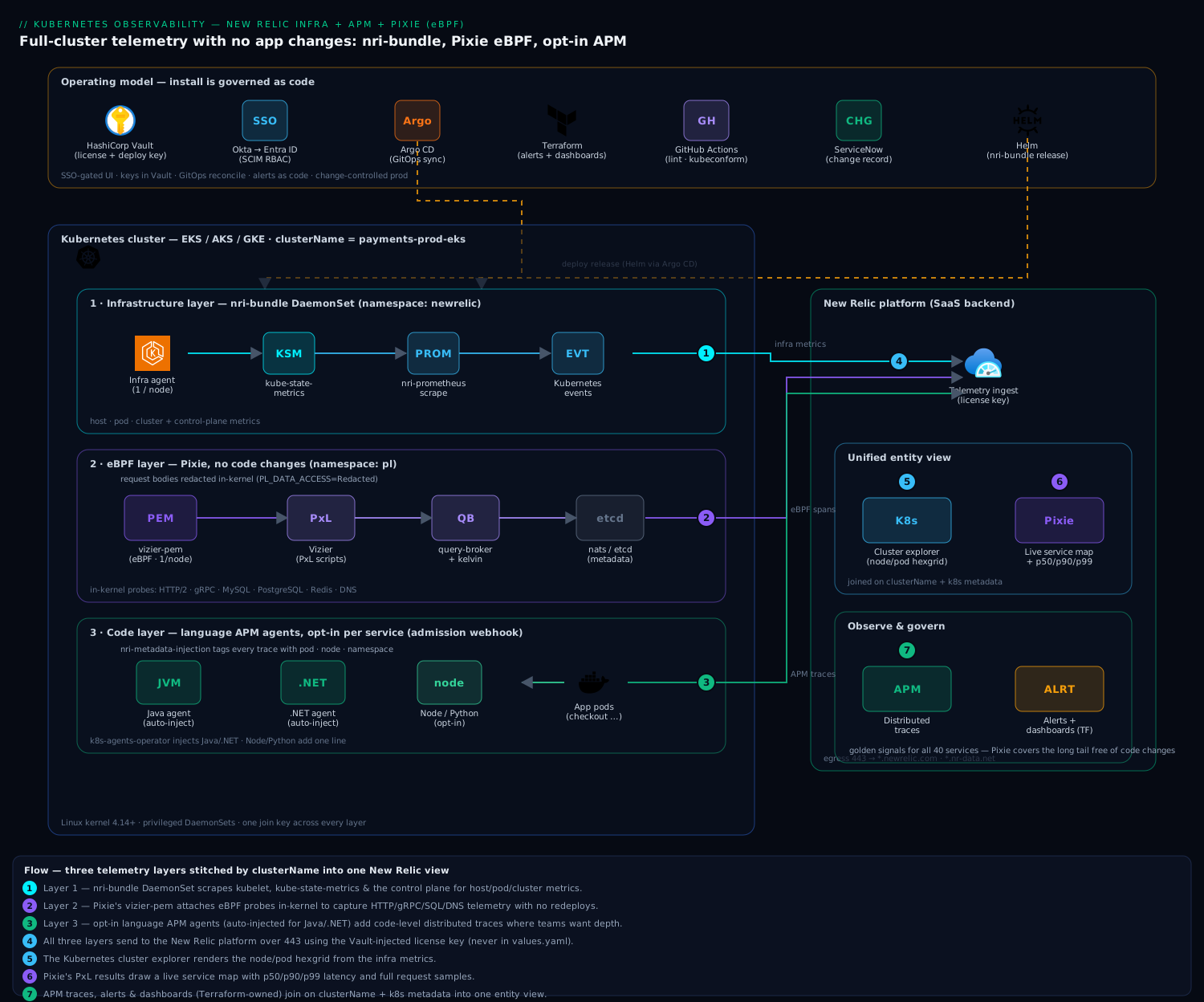
The design has three telemetry layers feeding one backend. The infrastructure layer is a New Relic DaemonSet (nri-bundle) on every node, scraping kubelet, kube-state-metrics, and the control plane for host, pod, and cluster metrics. The eBPF layer is Pixie — a per-node PEM (Pixie Edge Module) that attaches eBPF probes in-kernel to capture full-body request telemetry for HTTP/2, gRPC, MySQL, PostgreSQL, Redis, and DNS, with a per-cluster Vizier that runs PxL scripts and ships results to New Relic. The code layer is optional language APM agents, injected only into the services where a team wants distributed traces and code-level stack traces. All three send to the New Relic platform, where the same clusterName and Kubernetes metadata stitch them into one view.
Around that, the operating model is real: engineers reach the New Relic UI through Okta SSO federated to Entra ID for SCIM-provisioned RBAC; the License and Pixie keys live in HashiCorp Vault and are injected at deploy time, never committed; Argo CD reconciles the Helm release from Git; Terraform owns the alert policies and dashboards as code; and a ServiceNow change record gates the production rollout.
1. Stage the keys in Vault (never in Git)
The integration needs two secrets — the New Relic License key and the Pixie deploy key. Put them in HashiCorp Vault, which acts as the system of record for secrets here, and let the Vault Secrets Operator sync them into the cluster as a native Secret. Do not paste them into values.yaml.
Write the secrets to a KV-v2 mount:
vault kv put secret/observability/newrelic \
  license_key="$NEW_RELIC_LICENSE_KEY" \
  pixie_deploy_key="$PIXIE_DEPLOY_KEY"
Then have the Vault Secrets Operator materialize them into the target namespace as a Kubernetes Secret named newrelic-keys:
# vso-newrelic.yaml
apiVersion: secrets.hashicorp.com/v1beta1
kind: VaultStaticSecret
metadata:
  name: newrelic-keys
  namespace: newrelic
spec:
  type: kv-v2
  mount: secret
  path: observability/newrelic
  destination:
    name: newrelic-keys
    create: true
  refreshAfter: 1h
  vaultAuthRef: vault-auth-k8s
kubectl create namespace newrelic
kubectl apply -f vso-newrelic.yaml
kubectl get secret newrelic-keys -n newrelic   # confirm it exists before installing Helm
The Helm chart will reference this existing Secret rather than receiving raw key values, so rotation in Vault propagates without a redeploy.
2. Install the New Relic Kubernetes integration (infra + control plane)
The nri-bundle chart is the umbrella: it installs the infrastructure agent DaemonSet, the Kubernetes integration, kube-state-metrics (if you don’t already run it), the Prometheus agent, and the Kubernetes events forwarder. Add the repo and render a values file.
helm repo add newrelic https://helm-charts.newrelic.com
helm repo update
# nr-values.yaml
global:
  cluster: payments-prod-eks
  # Reference the Vault-synced Secret instead of inlining the key:
  customSecretName: newrelic-keys
  customSecretLicenseKey: license_key
  lowDataMode: true            # drops chatty default metrics; big cost lever

kube-state-metrics:
  enabled: true                # set false if KSM already runs in the cluster
newrelic-infrastructure:
  privileged: true             # needed for full host metrics
kubeEvents:
  enabled: true
nri-prometheus:
  enabled: true
nri-metadata-injection:
  enabled: true                # auto-links APM traces to pods/nodes
Install it into the newrelic namespace:
helm upgrade --install nri-bundle newrelic/nri-bundle \
  --namespace newrelic \
  --values nr-values.yaml \
  --version 5.x \
  --wait --timeout 5m
Within a minute or two, the Kubernetes cluster explorer in New Relic should show every node and pod. The cluster: payments-prod-eks value is the join key — keep it identical across every layer in this guide.
3. Add Pixie for eBPF auto-telemetry
Pixie is what gives you per-service request telemetry without touching application code: its PEM uses eBPF to trace syscalls and protocol traffic in-kernel, and the Vizier runs PxL scripts to turn that into service maps, latency, and full request samples. You can enable Pixie inside the same nri-bundle release.
Add to nr-values.yaml:
newrelic-pixie:
  enabled: true
  # apiKey injected from the Vault Secret, not inlined:
  customSecretApiKeyName: newrelic-keys
  customSecretApiKeyKey: pixie_deploy_key
pixie-chart:
  enabled: true
  deployKey: ""                # left blank; sourced from the Secret below
  clusterName: payments-prod-eks
  pixieDeployKeySecret: newrelic-keys
Re-run the same helm upgrade --install from step 2 so the chart reconciles with Pixie enabled. Then watch the Pixie components come up:
kubectl get pods -n pl                       # Pixie installs into the 'pl' namespace
# Expect: vizier-pem (one per node, DaemonSet), vizier-query-broker,
#         vizier-metadata, kelvin, and a nats/etcd pair.
The vizier-pem DaemonSet must be Running on every Linux node — if a pod is stuck, it is almost always the kernel-version or privileged-securityContext check (see Pitfalls). Once healthy, open the Kubernetes > Pixie tab in New Relic and run a script:
# Optional: install the px CLI to query the cluster directly
px run px/service_stats -- --cluster payments-prod-eks
# Shows per-service RPS, p50/p90/p99 latency, and error rate from eBPF data.
You now have HTTP/gRPC/SQL/DNS golden signals for all forty services without a single redeploy.
4. Inject APM agents where you want code-level traces
Pixie gives breadth; APM agents give depth — full distributed traces, transaction breakdowns, and error stack traces inside the code. Add them only to the services that need it. For JVM and .NET, the cleanest path is the New Relic Kubernetes APM auto-injection (an admission webhook), so teams don’t edit Dockerfiles.
Install the operator and a per-language instrumentation policy:
helm upgrade --install newrelic-apm-injection newrelic/nri-bundle \
  --namespace newrelic --reuse-values \
  --set k8s-agents-operator.enabled=true
# apm-instrumentation.yaml
apiVersion: newrelic.com/v1alpha1
kind: Instrumentation
metadata:
  name: payments-java
  namespace: newrelic
spec:
  agent:
    language: java
    image: newrelic/newrelic-java-init:latest
  podLabelSelector:
    matchLabels:
      newrelic-instrumentation: "java"   # opt-in per deployment
kubectl apply -f apm-instrumentation.yaml
# Teams opt a service in by labeling its pods:
kubectl patch deployment checkout -n payments \
  --type merge -p '{"spec":{"template":{"metadata":{"labels":{"newrelic-instrumentation":"java"}}}}}'
For a Node.js or Python service that prefers explicit control, the agent is a one-line addition instead:
# Node.js example
RUN npm install newrelic
ENV NEW_RELIC_APP_NAME="checkout-api" \
    NEW_RELIC_LICENSE_KEY_FROM_SECRET="newrelic-keys" \
    NODE_OPTIONS="-r newrelic"
Because nri-metadata-injection is enabled (step 2), every APM trace is automatically tagged with its pod, node, and namespace, so an APM transaction links straight to the Pixie service map and the infra dashboard.
5. Wire it into GitOps and govern as code
Manual helm upgrade is fine for the first cluster; production should be reconciled by Argo CD, which continuously syncs the Helm release from Git so the cluster state always matches the reviewed manifest. Define the release as an Argo CD Application:
# argocd-newrelic.yaml
apiVersion: argoproj.io/v1alpha1
kind: Application
metadata:
  name: newrelic-observability
  namespace: argocd
spec:
  project: platform
  source:
    repoURL: https://github.com/kloudvin/platform-observability
    targetRevision: main
    path: charts/nri-bundle
    helm:
      valueFiles: [values/payments-prod.yaml]
  destination:
    server: https://kubernetes.default.svc
    namespace: newrelic
  syncPolicy:
    automated: { prune: true, selfHeal: true }
A GitHub Actions pipeline lints the chart, runs helm template | kubeconform against the cluster’s API schema, and opens the PR; merging triggers Argo CD to roll it out. The alert policies, NRQL conditions, and dashboards are owned by Terraform using the New Relic provider, so observability config lives in version control beside everything else:
resource "newrelic_alert_policy" "k8s_golden" {
  name = "payments-prod-eks golden signals"
}

resource "newrelic_nrql_alert_condition" "pod_crashloop" {
  policy_id   = newrelic_alert_policy.k8s_golden.id
  name        = "Pod CrashLoopBackOff"
  nrql { query = "SELECT count(*) FROM K8sContainerSample WHERE clusterName = 'payments-prod-eks' AND status = 'Waiting' AND reason = 'CrashLoopBackOff'" }
  critical { operator = "above" threshold = 0 threshold_duration = 300 threshold_occurrences = "all" }
}
The production sync itself is gated by a ServiceNow change record — the GitHub Actions job will not promote to the prod cluster until the linked CHG ticket is in an approved state, giving you an auditable change trail per the platform’s controls.
6. Validation
Prove each layer independently before declaring victory.
# Infra agent: one pod per node, all Running
kubectl get pods -n newrelic -l app.kubernetes.io/name=newrelic-infrastructure -o wide

# Pixie PEM: one per node, all Running
kubectl get ds vizier-pem -n pl

# Confirm metrics are actually arriving (run in New Relic query builder):
#   FROM K8sNodeSample SELECT uniqueCount(nodeName) WHERE clusterName = 'payments-prod-eks'
#   FROM Span SELECT count(*) WHERE clusterName = 'payments-prod-eks' SINCE 5 minutes ago
In the New Relic UI: the Kubernetes cluster explorer should render the node/pod hexgrid; the Pixie tab should draw a live service map with latency; and any APM-instrumented service should appear under APM & Services with distributed traces that cross service boundaries. Generate a little load (kubectl run loadgen --image=busybox --restart=Never -- wget -q -O- http://checkout.payments) and watch the request appear in Pixie within seconds — that round trip is the end-to-end proof.
7. Rollback and teardown
Because everything went in through Helm and one namespace, removal is clean and leaves no orphaned privileged DaemonSets.
# Disable Pixie first (unloads eBPF probes), then remove the bundle:
helm upgrade nri-bundle newrelic/nri-bundle -n newrelic \
  --reuse-values --set newrelic-pixie.enabled=false --set pixie-chart.enabled=false --wait

helm uninstall nri-bundle -n newrelic
kubectl delete namespace pl          # Pixie's namespace
kubectl delete namespace newrelic    # infra agent + secrets

# If using GitOps, delete the Argo CD app so it doesn't re-create the release:
kubectl delete application newrelic-observability -n argocd
To roll back a single bad release instead of removing everything, use helm rollback nri-bundle <REVISION> -n newrelic after finding the revision with helm history nri-bundle -n newrelic. Revoke the Pixie deploy key in the New Relic UI and rotate the Vault entry if the cluster is being decommissioned.
Common pitfalls
- Pixie PEMs CrashLoopBackOff on certain nodes. Almost always an unsupported kernel (<4.14), a hardened node image that blocks eBPF, or missing privileged securityContext. Check
kubectl logs vizier-pem-xxxxx -n pland confirm the node kernel withuname -r. Fargate and Windows nodes are unsupported — taint them out of the DaemonSet. - Mismatched
clusterNameacross layers. If the infra agent, Pixie, and APM agents disagree onclusterName, the UI shows three disconnected datasets. Set it once and reuse it everywhere. - Cost blowout from default metrics. Leaving
lowDataMode: falseand enabling the full Prometheus scrape on a large cluster can multiply ingest. Start withlowDataMode: trueand add metrics deliberately. - Double kube-state-metrics. If KSM already runs in the cluster, setting
kube-state-metrics.enabled=truedeploys a second one and doubles those series. Point the integration at the existing KSM instead.
Security and cost notes
Security. Pixie’s PEM and the infra agent both run privileged with host access — that is inherent to eBPF and host-metric collection, so confine them to the pl/newrelic namespaces and keep the node images patched. Pixie samples request bodies, which can contain PII; enable its built-in data redaction (PL_DATA_ACCESS=Redacted) for regulated workloads so card numbers and tokens are scrubbed in-kernel before they ever leave the node. Keys live only in HashiCorp Vault and are injected as a synced Secret; UI access is through Okta-to-Entra ID SSO with SCIM-driven RBAC, so an engineer who leaves the org loses New Relic access automatically.
Cost. New Relic bills on data ingest and per-user seats, so the levers are lowDataMode, scoping the Prometheus scrape, and APM-instrumenting only the services that truly need code-level traces — let Pixie cover the long tail of services for free of code changes. Pixie’s own telemetry is sampled and short-retention by default; promote only the scripts you actually dashboard. On a 60-node cluster this typically lands an order of magnitude cheaper than per-service APM everywhere, which was the whole point of the eBPF-first design.