A 90-engineer product company has its builds wedged on the public internet. Every mvn install pulls straight from Maven Central, every npm ci hammers the public registry, and every docker pull hits Docker Hub — so the morning Docker Hub’s anonymous rate limit bites, half the CI fleet goes red at once and nobody can ship. Worse, the two internal Java libraries that three teams depend on are passed around as JARs in a shared drive, and there is no place to publish the private npm packages the platform team keeps threatening to extract. The mandate from the head of engineering is blunt: “One artifact server. Cache the public stuff so a Docker Hub outage can’t stop a release, give us a real private registry for our own packages, and don’t let the disk fill up.” This guide stands that up with Sonatype Nexus Repository — proxy repositories that cache Maven Central, npm, and Docker Hub; hosted repositories for the org’s own artifacts; group repositories that give every developer one URL to point at; file-backed blob stores; and scheduled cleanup so storage stops being a fire drill.
Prerequisites
- A Linux VM (Ubuntu 22.04 or RHEL 9) with 4 vCPU / 8 GB RAM minimum (Nexus wants
-Xmxof 2–4 GB plus OS headroom), and a separate data disk of 200 GB+ mounted at/opt/sonatype-workfor blob stores. - OpenJDK 17 (Nexus Repository 3.61+ runs on and requires Java 17).
- Docker Engine on developer and CI machines for the Docker repository walkthrough.
- DNS records you control:
nexus.kloudvin.internalfor the UI/API, plusdocker.kloudvin.internalas the connector hostname for the Docker registry (Docker needs a hostname, not a path). - A TLS certificate for those names (we terminate TLS at a reverse proxy / Akamai edge, not in Nexus).
- Admin access to your Okta or Microsoft Entra ID tenant if you want SSO, and a HashiCorp Vault instance for the publish credentials CI will use.
curlandjqon your workstation for the scripted steps.
Target topology
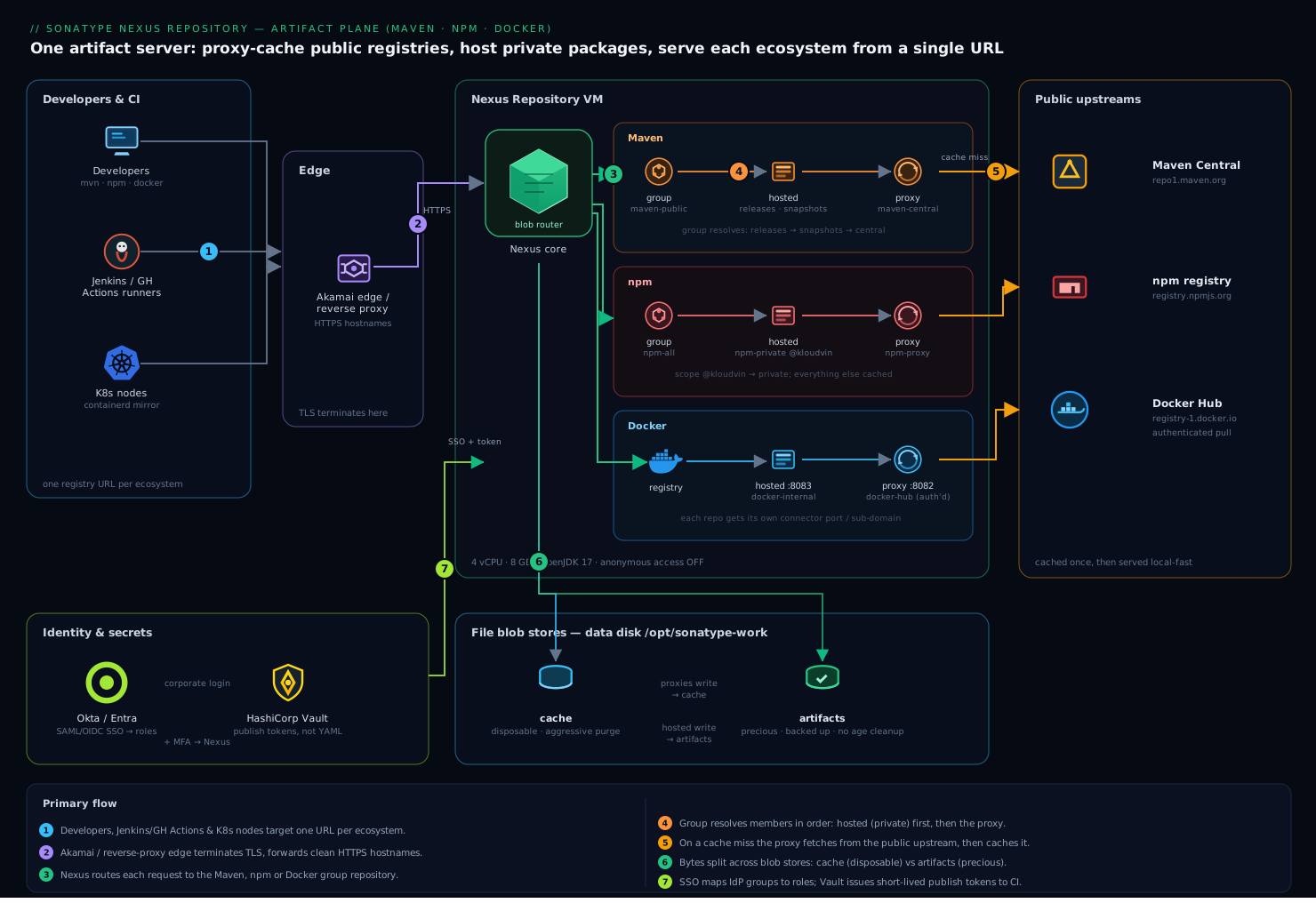
The shape is deliberately simple, because an artifact server that is hard to reason about is an artifact server people route around. Developers and Jenkins/GitHub Actions runners talk to a single Nexus instance behind a reverse proxy. For each ecosystem there are three logical repositories: a proxy that caches the public upstream, a hosted repo that holds the org’s own artifacts, and a group that unifies the two behind one URL so a developer configures one registry and gets both private and cached-public packages transparently. Underneath, two file blob stores separate concerns — one for cached public bytes (disposable, aggressively cleaned) and one for the org’s own published artifacts (precious, lightly cleaned). Identity federates from Okta/Entra so logins use corporate credentials and group membership maps to Nexus roles; publish tokens live in Vault, not in pipeline YAML.
We will deploy Nexus, lay down the blob stores first, then create the Maven, npm, and Docker repositories, point clients at them, attach cleanup policies, and finish with validation, rollback, security, and cost notes.
1. Install and start Nexus Repository
Create a dedicated service account and lay Nexus down under /opt. Never run it as root — Nexus will refuse some operations and it is a needless blast radius.
sudo useradd -r -m -U -d /opt/nexus -s /bin/bash nexus
sudo mkdir -p /opt/nexus /opt/sonatype-work
sudo chown -R nexus:nexus /opt/nexus /opt/sonatype-work

# Fetch the latest 3.x (pin a version in real life; latest shown for brevity)
cd /tmp
curl -fSL -o nexus.tar.gz \
  https://download.sonatype.com/nexus/3/nexus-unix.tar.gz
sudo tar -xzf nexus.tar.gz -C /opt/nexus --strip-components=1
sudo chown -R nexus:nexus /opt/nexus
Point the work directory at the data disk and size the heap. Edit /opt/nexus/bin/nexus.vmoptions so memory matches the box (these two lines, plus the data dir):
-Xms2703m
-Xmx2703m
-XX:MaxDirectMemorySize=2703m
-Dkaraf.data=/opt/sonatype-work/nexus3
-Djava.io.tmpdir=/opt/sonatype-work/nexus3/tmp
Run it as a systemd service rather than the bundled wrapper, so it restarts cleanly on reboot:
# /etc/systemd/system/nexus.service
[Unit]
Description=Sonatype Nexus Repository
After=network.target

[Service]
Type=forking
LimitNOFILE=65536
ExecStart=/opt/nexus/bin/nexus start
ExecStop=/opt/nexus/bin/nexus stop
User=nexus
Group=nexus
Restart=on-abort
TimeoutStartSec=180

[Install]
WantedBy=multi-user.target
sudo systemctl daemon-reload
sudo systemctl enable --now nexus
# First boot writes a one-time admin password; grab it:
sudo cat /opt/sonatype-work/nexus3/admin.password
Browse to http://nexus.kloudvin.internal:8081, sign in as admin with that password, complete the setup wizard, set a strong admin password, and disable anonymous access when prompted (we will hand out scoped accounts instead). From here on, every step works through either the UI (Administration → Repository) or the REST API; the API examples below are the reproducible path you would commit to Terraform/Ansible later.
2. Lay down file blob stores first
A blob store is where the bytes physically live, and you cannot move a repository to a different blob store after creation without a migration — so decide this up front. Create two file-backed stores: one for disposable cached public artifacts, one for the org’s own. Set the API base URL and admin credentials once:
NEXUS=http://nexus.kloudvin.internal:8081
AUTH='admin:CHANGE_ME_STRONG_ADMIN_PW'
# Disposable cache store (proxies write here)
curl -fsu "$AUTH" -X POST "$NEXUS/service/rest/v1/blobstores/file" \
  -H 'Content-Type: application/json' -d '{
    "name": "cache",
    "path": "/opt/sonatype-work/nexus3/blobs/cache",
    "softQuota": { "type": "spaceUsedQuota", "limit": 80000000000 }
  }'

# Precious store for hosted/published artifacts
curl -fsu "$AUTH" -X POST "$NEXUS/service/rest/v1/blobstores/file" \
  -H 'Content-Type: application/json' -d '{
    "name": "artifacts",
    "path": "/opt/sonatype-work/nexus3/blobs/artifacts",
    "softQuota": { "type": "spaceUsedQuota", "limit": 120000000000 }
  }'
The softQuota does not block writes; it raises an alert when the store crosses the limit so you fix storage on your schedule, not at 2 a.m. Splitting cache from artifacts is the move that makes cleanup safe later: you can wipe cached bytes aggressively without ever risking a published release.
3. Create the Maven proxy, hosted, and group
Maven needs three repos. The proxy caches Maven Central; the hosted repo holds your private libraries split into releases (immutable) and snapshots (mutable); the group stitches them into one URL.
# Proxy of Maven Central -> writes to the cache blob store
curl -fsu "$AUTH" -X POST "$NEXUS/service/rest/v1/repositories/maven/proxy" \
  -H 'Content-Type: application/json' -d '{
    "name": "maven-central",
    "online": true,
    "storage": { "blobStoreName": "cache", "strictContentTypeValidation": true },
    "proxy": { "remoteUrl": "https://repo1.maven.org/maven2/", "contentMaxAge": 1440, "metadataMaxAge": 1440 },
    "negativeCache": { "enabled": true, "timeToLive": 1440 },
    "httpClient": { "blocked": false, "autoBlock": true },
    "maven": { "versionPolicy": "RELEASE", "layoutPolicy": "STRICT", "contentDisposition": "INLINE" }
  }'

# Hosted releases (no redeploy -> releases are immutable)
curl -fsu "$AUTH" -X POST "$NEXUS/service/rest/v1/repositories/maven/hosted" \
  -H 'Content-Type: application/json' -d '{
    "name": "maven-releases",
    "online": true,
    "storage": { "blobStoreName": "artifacts", "strictContentTypeValidation": true, "writePolicy": "ALLOW_ONCE" },
    "maven": { "versionPolicy": "RELEASE", "layoutPolicy": "STRICT" }
  }'

# Hosted snapshots (redeploy allowed)
curl -fsu "$AUTH" -X POST "$NEXUS/service/rest/v1/repositories/maven/hosted" \
  -H 'Content-Type: application/json' -d '{
    "name": "maven-snapshots",
    "online": true,
    "storage": { "blobStoreName": "artifacts", "strictContentTypeValidation": true, "writePolicy": "ALLOW" },
    "maven": { "versionPolicy": "SNAPSHOT", "layoutPolicy": "STRICT" }
  }'

# Group: members resolved in order, first match wins
curl -fsu "$AUTH" -X POST "$NEXUS/service/rest/v1/repositories/maven/group" \
  -H 'Content-Type: application/json' -d '{
    "name": "maven-public",
    "online": true,
    "storage": { "blobStoreName": "cache", "strictContentTypeValidation": true },
    "group": { "memberNames": ["maven-releases", "maven-snapshots", "maven-central"] }
  }'
writePolicy: ALLOW_ONCE on maven-releases is the rule that makes a release version reproducible forever — once 1.4.0 is published it cannot be overwritten, which is exactly the guarantee the shared-drive JARs never had.
Now point Maven at the group for reads and at the hosted repos for deploys. In a developer’s ~/.m2/settings.xml:
<settings>
  <mirrors>
    <mirror>
      <id>nexus</id>
      <mirrorOf>*</mirrorOf>
      <url>http://nexus.kloudvin.internal:8081/repository/maven-public/</url>
    </mirror>
  </mirrors>
  <servers>
    <server><id>nexus-releases</id><username>ci-deployer</username><password>${env.NEXUS_TOKEN}</password></server>
    <server><id>nexus-snapshots</id><username>ci-deployer</username><password>${env.NEXUS_TOKEN}</password></server>
  </servers>
</settings>
And in the project pom.xml, the publish targets:
<distributionManagement>
  <repository>
    <id>nexus-releases</id>
    <url>http://nexus.kloudvin.internal:8081/repository/maven-releases/</url>
  </repository>
  <snapshotRepository>
    <id>nexus-snapshots</id>
    <url>http://nexus.kloudvin.internal:8081/repository/maven-snapshots/</url>
  </snapshotRepository>
</distributionManagement>
A mvn deploy now lands snapshots and releases in the right hosted repo automatically, version policy enforced by Nexus.
4. Create the npm proxy, hosted, and group
Same three-repo pattern for npm. The proxy caches the public registry; the hosted repo holds your scoped private packages; the group serves both from one registry URL.
curl -fsu "$AUTH" -X POST "$NEXUS/service/rest/v1/repositories/npm/proxy" \
  -H 'Content-Type: application/json' -d '{
    "name": "npm-proxy", "online": true,
    "storage": { "blobStoreName": "cache", "strictContentTypeValidation": true },
    "proxy": { "remoteUrl": "https://registry.npmjs.org", "contentMaxAge": 1440, "metadataMaxAge": 1440 },
    "negativeCache": { "enabled": true, "timeToLive": 1440 },
    "httpClient": { "blocked": false, "autoBlock": true }
  }'

curl -fsu "$AUTH" -X POST "$NEXUS/service/rest/v1/repositories/npm/hosted" \
  -H 'Content-Type: application/json' -d '{
    "name": "npm-private", "online": true,
    "storage": { "blobStoreName": "artifacts", "strictContentTypeValidation": true, "writePolicy": "ALLOW" }
  }'

curl -fsu "$AUTH" -X POST "$NEXUS/service/rest/v1/repositories/npm/group" \
  -H 'Content-Type: application/json' -d '{
    "name": "npm-all", "online": true,
    "storage": { "blobStoreName": "cache", "strictContentTypeValidation": true },
    "group": { "memberNames": ["npm-private", "npm-proxy"] }
  }'
Developers and CI point npm at the group for installs. Create a project .npmrc:
registry=http://nexus.kloudvin.internal:8081/repository/npm-all/
# scope private packages to the hosted repo so publishes land correctly
@kloudvin:registry=http://nexus.kloudvin.internal:8081/repository/npm-private/
always-auth=true
Get an auth token without pasting a password by hitting Nexus’s npm-compatible login endpoint, then npm ci resolves private @kloudvin/* packages and proxies everything else through the cache:
# Mint a bearer token for the configured registry
curl -fsu "ci-deployer:$NEXUS_TOKEN" -X PUT \
  "$NEXUS/repository/npm-private/-/user/org.couchdb.user:ci-deployer" \
  -H 'Content-Type: application/json' \
  -d '{"name":"ci-deployer","password":"'"$NEXUS_TOKEN"'"}'

# Publish a private package
npm publish --registry http://nexus.kloudvin.internal:8081/repository/npm-private/
5. Create the Docker Hub proxy and a hosted Docker registry
Docker is the one that bites teams, both because of Hub rate limits and because the Docker client addresses a registry by hostname, not a URL path — so each Docker repository needs its own HTTP connector port (or a unique sub-domain via the reverse proxy). We give the proxy port 8082 and the hosted registry port 8083, then map sub-domains in the proxy.
# Proxy of Docker Hub with anonymous-pull pre-auth to dodge rate limits
curl -fsu "$AUTH" -X POST "$NEXUS/service/rest/v1/repositories/docker/proxy" \
  -H 'Content-Type: application/json' -d '{
    "name": "docker-hub", "online": true,
    "storage": { "blobStoreName": "cache", "strictContentTypeValidation": true },
    "proxy": { "remoteUrl": "https://registry-1.docker.io", "contentMaxAge": 1440, "metadataMaxAge": 1440 },
    "negativeCache": { "enabled": true, "timeToLive": 1440 },
    "httpClient": { "blocked": false, "autoBlock": true },
    "dockerProxy": { "indexType": "HUB", "cacheForeignLayers": false },
    "docker": { "v1Enabled": false, "forceBasicAuth": true, "httpPort": 8082 }
  }'

# Hosted registry for the org's own images
curl -fsu "$AUTH" -X POST "$NEXUS/service/rest/v1/repositories/docker/hosted" \
  -H 'Content-Type: application/json' -d '{
    "name": "docker-internal", "online": true,
    "storage": { "blobStoreName": "artifacts", "strictContentTypeValidation": true, "writePolicy": "ALLOW" },
    "docker": { "v1Enabled": false, "forceBasicAuth": true, "httpPort": 8083 }
  }'
To avoid Docker Hub’s anonymous limit entirely, give the proxy a Docker Hub account to authenticate as: Administration → Repository → docker-hub → HTTP → set Authentication to Username with a Hub login. That converts your anonymous pulls into authenticated ones with a far higher ceiling, served once and cached forever after.
Front both connectors with the reverse proxy / Akamai edge so clients use clean HTTPS hostnames (docker-proxy.kloudvin.internal → :8082, docker.kloudvin.internal → :8083) and the Docker daemon never sees a plain-HTTP port. On the client:
# One-time login (token, not password, sourced from Vault in CI)
echo "$NEXUS_TOKEN" | docker login docker.kloudvin.internal -u ci-deployer --password-stdin

# Pull a public image THROUGH the cache
docker pull docker-proxy.kloudvin.internal/library/python:3.12-slim

# Tag and push an internal image to the hosted registry
docker tag myapp:1.0.0 docker.kloudvin.internal/myapp:1.0.0
docker push docker.kloudvin.internal/myapp:1.0.0
For the cluster side, point Kubernetes nodes’ containerd config (or the kubelet image pull secret) at docker-proxy.kloudvin.internal as a registry mirror so every node benefits from the cache, and store the pull secret in Vault with the Vault Agent injecting it — not as a long-lived Kubernetes Secret committed to a repo.
6. Attach cleanup policies and a compact task
Storage is the failure mode the head of engineering named, so make it self-managing. A cleanup policy is a rule (by age, last-download, or — for Docker — tag regex) that flags components for deletion; the actual reclamation happens when the Cleanup unused asset blobs task runs and compacts the blob store.
Create a cleanup policy via the API and assign it to the proxies (cached bytes nobody has pulled in 30 days are dead weight):
# Delete proxy components not downloaded in 30 days
curl -fsu "$AUTH" -X POST "$NEXUS/service/rest/v1/cleanup-policies" \
  -H 'Content-Type: application/json' -d '{
    "name": "purge-stale-proxy-cache",
    "format": "ALL",
    "criteriaLastBlobUpdated": null,
    "criteriaLastDownloaded": 30,
    "criteriaReleaseType": null
  }'
Then add it to each proxy repo (set "cleanup": { "policyNames": ["purge-stale-proxy-cache"] } in the repository’s config via a PUT, or tick it in the UI under the repo’s Cleanup section). For the Docker hosted registry, add a second policy keyed on prerelease/snapshot tags so untagged and -rc images don’t accumulate, while keeping released tags. Critically, do not put a download-age cleanup on maven-releases or npm-private — a release that is simply unpopular for a year is still a release someone may pin tomorrow.
Schedule the reclamation tasks (Administration → System → Tasks → Create task), or by API:
# Nightly cleanup-policy execution
curl -fsu "$AUTH" -X POST "$NEXUS/service/rest/v1/tasks" \
  -H 'Content-Type: application/json' -d '{
    "name": "cleanup-policies-nightly",
    "type": "repository.cleanup",
    "schedule": { "type": "daily", "startTime": "02:00" }
  }' 2>/dev/null || echo "Create via UI if task REST is unavailable on your version"
Also enable Admin - Compact blob store on each store (weekly, off-hours) — cleanup only marks assets deleted; compaction is what returns the space to the filesystem.
Validation
Prove every path end to end before you tell teams to switch:
# 1. Maven group resolves a public artifact through the proxy
mvn -s ~/.m2/settings.xml dependency:get \
  -Dartifact=org.apache.commons:commons-lang3:3.14.0
# then confirm it is cached:
curl -fsI -u "$AUTH" \
  "$NEXUS/repository/maven-central/org/apache/commons/commons-lang3/3.14.0/commons-lang3-3.14.0.jar"

# 2. npm group serves both private and public
npm view @kloudvin/internal-utils --registry http://nexus.kloudvin.internal:8081/repository/npm-all/
npm view lodash --registry http://nexus.kloudvin.internal:8081/repository/npm-all/

# 3. Docker proxy cache hit (second pull is local-fast, no Hub traffic)
docker rmi docker-proxy.kloudvin.internal/library/python:3.12-slim
time docker pull docker-proxy.kloudvin.internal/library/python:3.12-slim

# 4. Health + repository inventory
curl -fsu "$AUTH" "$NEXUS/service/rest/v1/status/check" | jq .
curl -fsu "$AUTH" "$NEXUS/service/rest/v1/repositories" | jq -r '.[].name'

# 5. Blob store space accounting reflects the cache filling up
curl -fsu "$AUTH" "$NEXUS/service/rest/v1/blobstores" | jq -r '.[] | "\(.name): \(.totalSizeInBytes) bytes"'
A green status/check, an artifact landing in the proxy after first use, a fast second Docker pull with zero Hub egress, and both blob stores reporting sane sizes mean the platform is doing its job. Wire the same status/check into Dynatrace or Datadog as a synthetic so you find out about a wedged blob store before a developer does.
Rollback / teardown
Because everything was created through the REST API, teardown is scriptable and clean. Delete in dependency order — a blob store cannot be removed while a repository still references it, and a group cannot be removed… actually groups go first since members can’t be deleted while grouped.
# 1. Remove groups first (they reference members)
for r in maven-public npm-all; do
  curl -fsu "$AUTH" -X DELETE "$NEXUS/service/rest/v1/repositories/$r"; done

# 2. Remove member repositories
for r in maven-central maven-releases maven-snapshots \
         npm-proxy npm-private docker-hub docker-internal; do
  curl -fsu "$AUTH" -X DELETE "$NEXUS/service/rest/v1/repositories/$r"; done

# 3. Now the blob stores are unreferenced and can go
for b in cache artifacts; do
  curl -fsu "$AUTH" -X DELETE "$NEXUS/service/rest/v1/blobstores/$b"; done

# 4. Full host teardown
sudo systemctl disable --now nexus
sudo rm -rf /opt/nexus /opt/sonatype-work
For a partial rollback (say, a bad cleanup policy ate something), the durable safety net is the database/blob backup: Nexus’s Admin - Backup task writes a consistent DB snapshot, and the blob stores on the data disk hold the bytes. Restore is “stop Nexus, drop the backup over db/, restart.” Take that backup before you ever run a destructive cleanup the first time.
Common pitfalls
- Forgetting
strictContentTypeValidationor the right Maven version policy. ASNAPSHOTartifact pushed to aRELEASE-policy hosted repo is rejected, and teams blame Nexus — it is working as designed. MatchversionPolicyto intent. - One Docker port for everything. The Docker client cannot disambiguate two registries on the same hostname/port. Give each Docker repo its own connector port (or sub-domain) — this is the single most common Docker-on-Nexus mistake.
cacheForeignLayers: trueby accident. It re-hosts Docker’s foreign (Windows base) layers and quietly balloons your blob store. Leave it off unless you specifically need air-gapped Windows images.- Cleanup on hosted release repos. A download-age policy on
maven-releaseswill eventually delete a release nobody fetched recently but everyone’s lockfile still pins. Cleanup belongs on proxies and snapshot/prerelease tags, never on immutable releases. - Heap mis-sized. Leaving the default
-Xmx2703mon a busy multi-format instance causes GC stalls; size it to ~half of RAM with direct memory to match, and never exceed the documented ceiling. - Anonymous Docker Hub proxy. If you leave the proxy unauthenticated, you inherit Hub’s anonymous rate limit and the original outage simply moves behind Nexus. Authenticate the proxy to a Hub account.
Security notes
Turn off anonymous access and disable the legacy Docker v1 API and Bearer-token shortcuts (forceBasicAuth: true, set above). Federate logins to Okta or Microsoft Entra ID via Nexus’s SAML/OIDC support so engineers authenticate with corporate credentials and MFA, and map IdP groups to Nexus roles — developers get read on the groups and publish on snapshots, only CI’s ci-deployer role can deploy releases. The CI publish credential is a Nexus user token, minted short-lived and stored in HashiCorp Vault, injected into Jenkins/GitHub Actions at job time rather than living in pipeline YAML — so a leaked repo never leaks a publish key. Run Wiz / Wiz Code against the Nexus VM and its IaC to catch a blob disk that drifts to public or an over-broad role binding, and put CrowdStrike Falcon on the host for runtime threat detection since this server now sits on the critical path of every release. A failed login spike or a quarantined artifact raises a ServiceNow incident so security gets a ticket, not just a log line. If you license Nexus Firewall / Repository Pro, enable policy-based quarantine so a known-vulnerable or malicious package is blocked at proxy time before it ever enters a build.
Cost notes
The biggest lever is the cache itself: every artifact served from a Nexus proxy is bandwidth you do not pay to egress repeatedly and a Docker Hub pull that does not count against a rate limit — one mid-size org typically recovers the VM cost in saved CI minutes and avoided Hub Pro seats within a quarter. Keep the running cost honest with the blob-store split and cleanup policies from Step 6: disposable cache on cheap storage with aggressive purging, precious artifacts on durable storage with backups and no age-based deletion. Right-size the VM — 4 vCPU / 8 GB comfortably serves ~100 engineers; scale up only when status/check or Datadog shows real pressure. For HA or very large estates, Sonatype offers a clustered Pro deployment and S3-backed blob stores, but for the scenario here a single well-backed VM with file blob stores is the correct, cheap answer. Provision the whole thing with Terraform (VM, disk, DNS) and Ansible (install, repos via the same REST calls) so the box is reproducible and a rebuild is a pipeline run, not a memory test.