A regional university IT team is told to retire a pair of aging VMware ESXi hosts whose vSphere renewal quote just doubled, and the brief is uncompromising: keep the campus Moodle learning platform, the student records app, and a dozen departmental VMs running through the migration, survive a single host failure without a 2 a.m. callout, and do it on hardware they already own. The answer is a Proxmox VE cluster with Ceph providing hyperconverged storage on the same three nodes — no separate SAN to buy, VM disks replicated across hosts, and any VM able to live-migrate or be auto-restarted by the HA stack when a node dies. This guide builds that cluster end to end and, more importantly, teaches you to operate it: cluster creation and corosync quorum, the network design that keeps Ceph and corosync from sabotaging each other, the Ceph data path from MON to OSD to PG to CRUSH, HA groups with real watchdog fencing, live migration, backups with Proxmox Backup Server, rolling upgrades, and the failure scenarios that decide whether your “HA cluster” actually survives an outage.
The economics are the whole point. A traditional design splits compute and storage — hypervisor hosts plus a dual-controller SAN — and you pay for the array, its support contract, and the SAN fabric. Hyperconvergence collapses that: each node contributes CPU, RAM, and disks, Ceph stitches the disks into one replicated pool every node can read and write, and you scale by adding nodes. But the model has teeth. Ceph is a distributed, strongly-consistent storage system that punishes latency, clock skew, and shared NICs; corosync is a real-time membership protocol that fences a node off the cluster if a ring goes quiet for a couple of seconds; and “three nodes” is a hard mathematical floor for both corosync quorum (you need a majority to stay up when one is lost) and Ceph’s default size=3/min_size=2 replication. Get those wrong and you build something less reliable than the two ESXi hosts you replaced — a cluster that flaps under load, blocks I/O on a single disk failure, or splits brain and corrupts a VM disk. This article is the difference between a demo and a platform a dozen departmental services can sit on. You will run real pvecm, pveceph, ceph, qm, and ha-manager commands, read their real output, and learn which line tells the truth during an incident — including why corosync wants its own low-latency network and what a QDevice buys a small cluster, how many PGs a pool needs, what min_size=1 really costs you, which watchdog actually fences, and what a node failure looks like minute by minute.
What problem this solves
The pain is concrete and shows up at renewal time. A small-to-mid environment running 20–60 VMs on a legacy hypervisor faces recurring per-socket licensing, a SAN with a dual-controller array and its support contract, the SAN fabric (FC switches or a dedicated iSCSI network), and the fragility of a single array that, if its controllers or support lapse, takes every VM down at once. That SAN is also a capital cliff: when it fills, you forklift-upgrade the whole array rather than adding a shelf, at list price.
What breaks without a proper hyperconverged design: teams either (a) keep paying the SAN-plus-licensing tax, (b) build a “Proxmox cluster” that is really three independent nodes with local storage — no shared storage, so no live migration and no HA, just three single points of failure with a shared web UI, or © build Proxmox + Ceph wrong — Ceph and VM traffic on one NIC, two nodes instead of three, min_size=1 to “keep writing during an outage” — and discover at the first real failure that the cluster flaps, blocks, or loses data. The cruelty is that all three look like a working cluster in a demo; they only fail under a real node loss or real load.
Who hits this: on-prem and edge teams retiring VMware, ESXi, or Hyper-V; labs and SMBs that cannot justify a SAN; providers building multi-tenant compute; anyone needing VM-level HA and live migration on owned hardware with no per-socket licence and no separate array. The fix is not “install Proxmox and tick the Ceph box” — it is a deliberate design across five planes (cluster membership, network, storage, availability, operations), each with its own failure modes and quorum math. This article enumerates all five.
To frame the whole field before the deep dive, here is every plane this article covers, the question it forces, and the single command that tells you its truth:
| Plane | What it provides | The failure if you skip it | First question to ask | Command of record |
|---|---|---|---|---|
| Cluster membership (corosync) | Quorum, config sync (pmxcfs) |
Split-brain, read-only /etc/pve, fence storms |
Is the cluster quorate, and on how many links? | pvecm status |
| Network design | Separate Ceph public/cluster + corosync rings, bonding, MTU | Ceph recovery saturates the link → corosync flaps → cluster fences itself | Is each traffic class on its own fault domain? | corosync-cfgtool -s |
| Ceph storage | Replicated RBD pool, CephFS, CRUSH placement | min_size=1 data loss, PG misplacement, full OSDs blocking I/O |
Is Ceph HEALTH_OK, and are PGs active+clean? |
ceph -s |
| High availability | HA groups, restart policy, watchdog fencing | Two nodes write the same RBD image → corruption | Does a dead node actually self-fence before restart? | ha-manager status |
| Operations | Backups (PBS), upgrades, capacity, migration | Unrecoverable VMs, broken rolling upgrade, full pool | Can you restore a VM, and can you upgrade without downtime? | proxmox-backup-client / pvesm status |
Learning objectives
By the end of this article you can:
- Form a 3+ node Proxmox VE cluster with
pvecm, explain corosync quorum math, and decide when a small cluster needs a QDevice (a tie-breaker vote) versus a true third node. - Design the cluster network correctly: a separate Ceph public and cluster network, redundant corosync rings on their own low-latency links, LACP bonding for throughput, and MTU 9000 on the storage fabric — and explain why mixing these planes flaps the cluster.
- Install Ceph with
pveceph, place MON/MGR/OSD/MDS daemons for control-plane HA, and reason about CRUSH, placement groups (PGs), the autoscaler, andsize/min_sizeso the pool stays writable through a node loss without risking split-brain. - Create a replicated RBD pool for VM disks and a CephFS for ISOs/templates, register them as cluster-wide Proxmox storage, and read
ceph osd df,ceph osd tree, andceph pg statto confirm placement and balance. - Configure HA groups, restart/relocate policy, and watchdog-based fencing (IPMI vs softdog) so a dead node releases its disks before the HA manager restarts its VMs — the mechanism that prevents RBD corruption.
- Perform live migration (shared-storage, zero-copy) and offline/storage migration, and explain when each applies and what limits it.
- Protect the cluster with Proxmox Backup Server: deduplicated incremental backups, retention/prune/GC, namespaces, verify jobs, and bare-VM restore.
- Run a rolling, no-downtime upgrade (PVE minor and major, plus the Ceph release upgrade order) and walk through the major failure scenarios — node loss, OSD/disk loss, network partition, full pool — with the exact
ceph/pvecm/ha-manageroutput each produces and the recovery steps.
Prerequisites & where this fits
You should be comfortable on a Linux server shell (Proxmox VE is Debian under the hood), understand basic networking (VLANs, CIDRs, bonding, MTU), and grasp the idea of a hypervisor running guest VMs. Familiarity with the difference between block storage (a virtual disk) and file/object storage helps, because Ceph provides all three (RBD block, CephFS file, RGW object) and you will use the first two. You do not need prior Ceph experience — this article builds the mental model — but you do need to respect that Ceph is a real distributed system with real quorum and consistency rules, not a NAS.
Hardware floor for a production-credible build (a lab can shrink this, noted in the Cost section):
| Resource | Per-node minimum | Recommended | Why it matters for Ceph/HA |
|---|---|---|---|
| Nodes | 3 | 3–5 (odd counts) | Quorum needs a majority; Ceph needs 3 failure domains for size=3 |
| CPU | 8 cores | 16+ cores | OSDs are CPU-hungry during recovery; reserve headroom for VMs |
| RAM | 64 GB | 128 GB+ | Rule of thumb ~4–5 GB RAM per OSD plus VM memory plus MON/MGR |
| OS disk | 1× SSD | 2× SSD (ZFS/HW mirror) | A dead OS disk takes a node out; mirror it |
| Ceph data disks | 2× SSD/NVMe, unpartitioned | 4+× NVMe enterprise (PLP) | Ceph is latency-sensitive; consumer SSDs without power-loss protection are slow and unsafe for the WAL |
| NICs | 2× 10 GbE (storage) + 2× 1/10 GbE (mgmt/corosync) | 2× 25 GbE storage + dedicated corosync | Ceph replication must not share a NIC with VM or corosync traffic |
| IPMI/BMC | Yes (for hardware watchdog) | Redundant power + IPMI | Real fencing relies on the hardware watchdog; softdog is a fallback |
This sits in the on-prem / private-cloud compute track. It builds on Linux fundamentals — the network design leans on Modern Linux Networking: Bonding, VLANs, and Firewalls with nftables and firewalld, the OS-disk and local-storage choices touch Advanced LVM: Thin Provisioning, Snapshots, and Cache Pools and Building Resilient Linux Storage with mdadm Software RAID, and the clock discipline Ceph and corosync both demand is exactly Accurate Hybrid Time Sync: chrony on Linux and w32time in Active Directory. Conceptually it parallels the Microsoft world’s Windows Failover Clustering and Storage Spaces Direct: A Production Build and Hyper-V Live Migration and Replica for Zero-Downtime VM Mobility — the same HA goals, a different stack.
Core concepts
Six mental models make every later decision obvious. Internalize these and the rest of the article is detail.
Two independent clusters live on the same hardware. Proxmox runs a corosync cluster (membership, quorum, and the synchronized config filesystem pmxcfs at /etc/pve); Ceph runs its own cluster of monitors with its own quorum (Paxos over the MONs). Separate systems, separate quorum rules, co-resident. A node can be in the Proxmox cluster but have a down Ceph OSD, or Ceph can be HEALTH_OK while corosync has lost a ring. Always ask which cluster is unhealthy — pvecm status for corosync, ceph -s for Ceph.
Quorum is a majority vote, and a tie is fatal. Corosync stays quorate only while a strict majority of votes is present. Three nodes (3 votes) survive losing one (2 of 3 = majority); two nodes losing one is 1 of 2 — not a majority — so it goes non-quorate and /etc/pve becomes read-only. This is by design: a non-quorate partition must not act, or two partitions could both act and split-brain. A QDevice (an external daemon on a tiny always-on box) adds one tie-breaker vote so two nodes can survive one loss, but it does not fix Ceph — Ceph still needs three MONs and three OSD failure domains.
Ceph places data by computation, not by lookup. There is no central index saying “object X is on disk Y.” CRUSH (Controlled Replication Under Scalable Hashing) is an algorithm every client and OSD runs: given an object name and the cluster map (hosts/OSDs and weights), it computes which OSDs hold the replicas. Data is grouped into placement groups (PGs) — a PG is a shard of a pool, and CRUSH maps PGs (not individual objects) to OSDs; replication, recovery, and rebalancing operate per-PG. Hence PG count matters: too few and data is lumpy with poor parallelism, too many and MONs/OSDs drown in peering overhead.
size and min_size are the whole reliability story. A replicated pool keeps size=N copies and accepts writes only while at least min_size=M copies are available. The safe production setting on three nodes is size=3, min_size=2: three copies on three hosts, writable while any two are up. min_size=1 is the classic catastrophe — it lets a single surviving copy accept writes, so if that OSD then dies or a stale copy returns, you get silent split-brain divergence and unrecoverable corruption. The rule is absolute: never run min_size=1 except momentarily under expert guidance during a disaster.
The platform fences a dead node by making it kill itself. Proxmox HA does not use a PDU or network fence agent — it uses self-fencing via a hardware watchdog. Each node’s pve-ha-lrm pets a watchdog timer only while the node is quorate and healthy; lose quorum (partition, hang) and it stops petting, and the watchdog hard-resets the node within ~60 seconds. That guaranteed reset means the dead node has released its RBD locks before the HA manager restarts its VMs elsewhere — the only thing preventing two nodes from mounting the same disk and corrupting it. The watchdog is the fence; without a working watchdog, HA failover is unsafe.
Live migration is free because the disk never moves. With shared Ceph storage a VM’s disk already lives on every node, so live migration copies only the running state — RAM pages and CPU registers — over the network while the VM runs, then cuts over in milliseconds. No disk copy, no downtime. (Contrast storage migration, which moves the disk between storages and is slow.) This is the biggest day-to-day benefit of shared storage and why “three nodes with local disks” is not a cluster: without shared storage you can only offline-migrate with a full disk copy.
The vocabulary in one table
Before the deep sections, pin down every moving part. The glossary repeats these for lookup; this is the model side by side:
| Term | One-line definition | Plane | Why it matters |
|---|---|---|---|
| corosync | Cluster membership + messaging layer | Membership | Loses a ring → node fenced |
pmxcfs (/etc/pve) |
Quorum-gated synced config FS | Membership | Read-only when non-quorate |
| Quorum | Majority of votes present | Membership | No quorum → no VM ops |
| QDevice | External tie-breaker vote | Membership | Lets 2-node survive 1 loss |
| MON (monitor) | Holds cluster map, runs Paxos | Ceph | Needs 3 for HA; clock-sensitive |
| MGR (manager) | Metrics, dashboard, autoscaler | Ceph | One active, rest standby |
| OSD | One daemon per data disk | Ceph | Stores objects; CPU/RAM-hungry |
| MDS (metadata server) | CephFS metadata | Ceph | Only needed for CephFS |
| PG (placement group) | A shard of a pool | Ceph | Unit of replication/recovery |
| CRUSH | Placement algorithm + map | Ceph | Computes which OSDs hold data |
| RBD | Ceph block device (VM disks) | Ceph | The shared VM storage |
size/min_size |
Copies kept / min for writes | Ceph | 3/2 safe; 1 = corruption risk |
| HA group | Set of nodes a resource prefers | Availability | Controls where VMs restart |
| Watchdog | Timer that resets a hung/lost node | Availability | The actual fence |
| Live migration | Move running RAM state only | Operations | Zero-downtime move |
| PBS | Proxmox Backup Server (dedup) | Operations | Incremental backups + restore |
Plane 1 — Cluster membership: corosync, quorum, and QDevice
The Proxmox cluster is corosync plus pmxcfs. corosync provides totem-ring membership and ordered messaging; pmxcfs is a FUSE filesystem mounted at /etc/pve that is replicated to every node and only writable while the node is quorate. Everything Proxmox does — VM configs, storage definitions, user/ACL, the HA state — lives in /etc/pve, so losing quorum freezes the control plane on purpose.
Forming the cluster
Create the cluster on the first node, then join the others. Bind corosync’s first ring (link0) to a network — ideally a dedicated low-latency one (covered in Plane 2). From pve1:
# Create the cluster, naming corosync ring0 on the management/corosync net
pvecm create campus-cluster --link0 address=10.20.0.11
Join pve2, then pve3 (each SSHes to pve1 and prompts to accept the host key and the root password once):
# On pve2
pvecm add 10.20.0.11 --link0 address=10.20.0.12
# On pve3
pvecm add 10.20.0.11 --link0 address=10.20.0.13
Confirm membership and quorum:
pvecm status
# Expect: "Quorate: Yes", "Total votes: 3", "Expected votes: 3", three nodes Online
pvecm nodes        # lists node IDs, votes, names, and which links are up
corosync-cfgtool -s   # per-link ring status: "localhost ... ring 0 active no faults"
Quorum math, made concrete
Each node carries one vote by default. The cluster is quorate while present votes are a strict majority of expected votes. The table below is the entire reliability calculus of the membership plane:
| Cluster size | Expected votes | Votes to stay quorate | Survives N node losses | Notes |
|---|---|---|---|---|
| 2 nodes | 2 | 2 | 0 | Loss of one → non-quorate, /etc/pve read-only |
| 2 nodes + QDevice | 3 | 2 | 1 | QDevice tie-breaker keeps the survivor quorate |
| 3 nodes | 3 | 2 | 1 | The genuine minimum for Proxmox and Ceph |
| 4 nodes | 4 | 3 | 1 | Even count: a 2/2 split is a tie — avoid even sizes |
| 4 nodes + QDevice | 5 | 3 | 2 (asymmetric) | QDevice breaks the 2/2 tie |
| 5 nodes | 5 | 3 | 2 | Tolerates two simultaneous node losses |
| 7 nodes | 7 | 4 | 3 | Larger clusters: keep counts odd |
Two operational levers matter when the cluster is intentionally smaller than expected (e.g. a node is down for maintenance):
| Command | What it does | When to use | Danger |
|---|---|---|---|
pvecm expected 2 |
Lowers expected votes so a survivor is quorate | Planned: one node down for hours, you must run VMs | Set it back when the node returns, or you weaken split-brain protection |
pvecm delnode pve3 |
Permanently removes a node from membership | Decommissioning a node | Run from a surviving node with the target powered off; never re-add a deleted node’s old config |
pvecm qdevice setup <ip> |
Installs/registers the QDevice vote | Two-node or even clusters | The QDevice host must be independent of the cluster’s failure domains |
When to use a QDevice
A QDevice runs the corosync-qnetd daemon on an external always-on host (a Raspberry Pi, a management VM elsewhere, a NAS) and grants the cluster one extra vote arbitrated by that external witness. It exists for one purpose: let a cluster with an even number of votes (classically two nodes) survive a single failure without a tie. Decide with this table:
| Scenario | Use a QDevice? | Better alternative | Reasoning |
|---|---|---|---|
| 2-node cluster, must survive 1 node loss | Yes | A real 3rd node | QDevice gives corosync quorum, but Ceph still can’t do size=3 on two nodes |
2-node cluster, can tolerate a manual pvecm expected 1 during outage |
Optional | — | Acceptable only if downtime/manual intervention is OK |
| 3-node (odd) cluster | No | — | Already optimal; a QDevice adds risk, not value |
| 4-node (even) cluster | Yes | Add a 5th node | Breaks the 2/2 split tie; a 5th node is cleaner long-term |
| Stretched 2-site cluster | Yes, QDevice in a 3rd site | — | The witness in a neutral site decides which site survives a link cut |
The decisive caveat, repeated because teams forget it: a QDevice fixes corosync quorum only. It does nothing for Ceph. A two-node “cluster + QDevice” can keep Proxmox quorate, but Ceph cannot place three replicas across three failure domains on two hosts, so the storage is not HA. For real HA storage, three nodes is the floor — full stop.
Plane 2 — Network design: the part that decides whether your cluster is stable
More Proxmox+Ceph clusters fail on networking than anything else, because of a vicious coupling: Ceph recovery (re-replicating terabytes after a disk/node failure) saturates a link; if that link also carries corosync, totem packets get delayed; corosync reads the delay as a node being unreachable and fences it; the fence triggers more recovery; the cluster flaps and takes itself down. The fix is physical separation of traffic classes onto independent fault domains.
The traffic classes and where each belongs
Proxmox + Ceph has four distinct traffic classes with very different needs:
| Traffic class | What it carries | Bandwidth need | Latency sensitivity | Must be isolated from |
|---|---|---|---|---|
| Corosync (ring0/ring1) | Totem membership packets (tiny, frequent) | Very low (<1 Mbps) | Extreme (ms matters) | Everything bursty — especially Ceph |
| Ceph cluster network | OSD-to-OSD replication & recovery | Very high (saturates 10–25 GbE) | High | Corosync; ideally VM traffic |
| Ceph public network | Client (VM host) ↔ OSD/MON I/O | High | High | Corosync |
| VM / management | Guest traffic, web UI, migration | Variable | Low–medium | Corosync (share grudgingly) |
The canonical design on a node with four NICs (two 10/25 GbE for storage, two 1/10 GbE for everything else):
- Storage fabric: bond the two high-speed NICs with LACP (802.3ad) for throughput and failover, set MTU 9000 (jumbo frames) end to end including the switch, and carry both the Ceph public and Ceph cluster networks on it (separate subnets/VLANs). On larger clusters, give the cluster network its own physical pair.
- Corosync: put ring0 on the management network and ring1 on a second, independent link (even a cheap 1 GbE dedicated to corosync). Two rings means a single link failure does not lose membership.
- Management/VM: a bridge (
vmbr0) on the remaining NIC(s) for the web UI, VM guest traffic, and live-migration RAM transfer.
Configuring bonding and MTU
Edit /etc/network/interfaces on each node (IPs differ per node). This bonds ens2+ens3 into bond0 for storage at MTU 9000, defines the Ceph public/cluster subnets on VLAN sub-interfaces, and keeps vmbr0 for management/VM:
# --- Storage bond: LACP across two 25GbE NICs, jumbo frames ---
auto bond0
iface bond0 inet manual
    bond-slaves ens2 ens3
    bond-miimon 100
    bond-mode 802.3ad
    bond-xmit-hash-policy layer3+4
    mtu 9000

# Ceph PUBLIC network (clients/MONs <-> OSDs), VLAN 30
auto bond0.30
iface bond0.30 inet static
    address 10.20.30.11/24
    mtu 9000

# Ceph CLUSTER network (OSD replication/recovery), VLAN 40
auto bond0.40
iface bond0.40 inet static
    address 10.20.40.11/24
    mtu 9000

# --- Management / VM bridge ---
auto vmbr0
iface vmbr0 inet static
    address 10.20.0.11/24
    gateway 10.20.0.1
    bridge-ports ens1
    bridge-stp off
    bridge-fd 0

# --- Dedicated corosync ring1 link (independent 1GbE) ---
auto ens4
iface ens4 inet static
    address 10.20.50.11/24
Make hostname resolution deterministic on every node — corosync and Ceph both bind by name:
cat >> /etc/hosts <<'EOF'
10.20.0.11 pve1.lab.kloudvin.local pve1
10.20.0.12 pve2.lab.kloudvin.local pve2
10.20.0.13 pve3.lab.kloudvin.local pve3
EOF
Add the redundant corosync ring after the cluster exists (edit /etc/pve/corosync.conf, bumping config_version, and add a ring1_addr per node under each node {} plus a second interface { linknumber: 1 }). Verify both rings:
corosync-cfgtool -s
# Expect TWO rings, each "active no faults":
#   LINK ID 0  ... ring 0 active no faults
#   LINK ID 1  ... ring 1 active no faults
MTU and the silent jumbo-frame trap
MTU 9000 cuts per-packet overhead and is standard for Ceph, but it is all-or-nothing across the path: every NIC, bond, VLAN interface, and the switch ports must agree. A single device at MTU 1500 in the path causes large frames to be silently dropped — Ceph “works” for small I/O and stalls on large transfers, a maddening intermittent failure. Always validate end to end:
# 8972 payload + 28 ICMP/IP overhead = 9000; -M do forbids fragmentation
ping -M do -s 8972 10.20.40.12      # to another node's CLUSTER IP
# Success = jumbo path is clean end to end. "Frag needed" = an MTU mismatch in the path.
The MTU decision and its gotchas in one place:
| Setting | Value | Where to set | Gotcha |
|---|---|---|---|
| Storage MTU | 9000 | NIC, bond, VLAN ifaces, switch ports | One 1500 device anywhere → silent large-frame drops |
| Mgmt/VM MTU | 1500 | vmbr0, guest NICs |
Jumbo on the WAN-facing bridge breaks off-LAN traffic |
| Validation | ping -M do -s 8972 |
From every node to every other | Test the cluster subnet, not just public |
| Bond hash | layer3+4 |
Bond config | layer2 pins all OSD↔OSD traffic to one link — no spread |
Network design decision table
| If you have… | Corosync placement | Ceph networks | Bonding | Verdict |
|---|---|---|---|---|
| 4× NIC (2 storage, 2 mgmt) | ring0 mgmt, ring1 dedicated link | public+cluster co-on the storage bond (separate VLANs) | LACP storage pair | Production-credible |
| 2× 10 GbE only (lab) | ring0 on mgmt VLAN, ring1 on storage VLAN | public+cluster share the link | Optional | OK for lab; risky under heavy recovery |
| 6+ NIC (3 pairs) | dedicated corosync pair | separate physical public and cluster pairs | LACP each pair | Ideal large-cluster design |
| 1× NIC | — | — | — | Do not build a cluster — corosync will flap |
Plane 3 — Ceph: install, daemons, OSDs, pools, PGs, and CRUSH
Ceph is the storage engine. Proxmox wraps it with pveceph so you rarely touch raw ceph config files, but you must understand the daemons and the data model.
Install Ceph and bootstrap the config
Install the packages on all three nodes; initialize the cluster config once on pve1, pointing Ceph at the public and cluster networks defined in Plane 2. Pin a specific release (here Reef) so all nodes match:
# On ALL three nodes — install the Ceph packages from the no-subscription repo
pveceph install --repository no-subscription --version reef

# On pve1 ONLY — initialise Ceph, separating public and cluster networks
pveceph init --network 10.20.30.0/24 --cluster-network 10.20.40.0/24
Place the control-plane daemons (MON, MGR, MDS)
Ceph’s control plane must survive a node loss, so spread it:
# Create a MONITOR on each node (3 MONs = Paxos quorum survives 1 loss)
pveceph mon create        # run on pve1, then pve2, then pve3

# Create a MANAGER on each node (1 active, 2 standby)
pveceph mgr create        # run on each node

# (Only if you want CephFS) create a METADATA SERVER on each node
pveceph mds create        # run on each node for an HA MDS
Check the control plane is forming — expect HEALTH_WARN until OSDs exist, which is normal:
ceph -s
# services:
#   mon: 3 daemons, quorum pve1,pve2,pve3
#   mgr: pve1(active), standbys: pve2, pve3
The daemon roles, how many you need, and what each failure costs:
| Daemon | Role | Count for HA | If it’s lost | Resource cost |
|---|---|---|---|---|
| MON | Holds the cluster map; Paxos quorum | 3 (odd) | Lose quorum of MONs → cluster I/O blocks | Light CPU, modest RAM, clock-critical |
| MGR | Metrics, dashboard, PG autoscaler, balancer | 2–3 (1 active) | Standby promotes automatically; no I/O impact | Light |
| OSD | One per data disk; stores objects | All data disks | A down OSD → PGs degraded, Ceph re-replicates | ~4–5 GB RAM + a core under recovery |
| MDS | CephFS metadata | 2+ (1 active, standby) | CephFS pauses; RBD unaffected | Moderate RAM (metadata cache) |
Create OSDs from the data disks
An OSD is one daemon per physical data disk. Ceph will only consume whole disks with no partitions and no filesystem. Identify candidates, then create:
# Show which devices are available (no FS, no partitions)
ceph-volume inventory
lsblk -o NAME,SIZE,TYPE,FSTYPE,MOUNTPOINT

# Create an OSD per data disk (run on each node for ITS disks).
# On all-NVMe nodes the DB/WAL co-locate on the same fast device (default).
pveceph osd create /dev/nvme1n1
pveceph osd create /dev/nvme2n1
# Hybrid (HDD data + SSD DB/WAL): point the fast device explicitly
# pveceph osd create /dev/sdb --db_dev /dev/nvme0n1
Watch them come up and in:
ceph osd tree
# Each host lists its OSDs as "up" with a weight; tree shows the CRUSH hierarchy
ceph osd df
# Per-OSD %USE, size, PGs — confirm balance across hosts
The DB/WAL placement decision, which materially affects performance on hybrid disks:
| Disk layout | Where DB/WAL goes | Throughput | Cost | When to choose |
|---|---|---|---|---|
| All-NVMe (PLP) | Co-located on the same NVMe | Highest | Highest | Production default for performance tiers |
| All-SSD (PLP) | Co-located on the SSD | High | Moderate | General-purpose VM storage |
| HDD data + SSD DB/WAL | --db_dev on an enterprise SSD |
HDD capacity, near-SSD metadata latency | Capacity-optimized | Bulk/cold capacity pools |
| HDD only (no SSD DB) | On the HDD | Poor for VM workloads | Lowest | Avoid for VM disks; archive only |
Placement groups, the autoscaler, and CRUSH
A PG is a shard of a pool; CRUSH maps each PG to a set of OSDs (one per failure domain, by default per host). PG count is a tuning knob: too few and data clumps onto a few OSDs with unbalanced capacity/IOPS and slow recovery; too many and peering/recovery overhead balloons, exceeding the ~100–200 PGs-per-OSD healthy ceiling. The modern approach is the PG autoscaler (a MGR module): set pg_autoscale_mode on and Ceph picks pg_num from the pool’s data share and OSD count, scaling as the cluster grows. Hint it with target_size_ratio (the pool’s expected fraction of capacity) so it sizes correctly before data lands.
# See the autoscaler's recommendations vs current PG counts
ceph osd pool autoscale-status
# Columns: SIZE, TARGET RATIO, EFFECTIVE RATIO, PG_NUM, NEW PG_NUM, AUTOSCALE
PG sizing reference (rules of thumb; the autoscaler does the arithmetic for you):
| Concept | Rule of thumb | Why |
|---|---|---|
| Healthy PGs per OSD | ~100 (acceptable 50–200) | Balances parallelism vs peering overhead |
pg_num for a single big pool |
(OSDs × 100) / size, rounded to a power of 2 |
Even distribution; powers of 2 split cleanly |
| Multiple pools | Split the PG budget by each pool’s data share | The pool with most data needs the most PGs |
| Autoscaler hint | target_size_ratio per pool |
Lets Ceph pre-size PGs before data arrives |
Increasing pg_num |
Allowed online; triggers rebalancing | Do it during a maintenance window — it moves data |
Decreasing pg_num |
Allowed (modern Ceph), also rebalances | Rare; usually let the autoscaler manage |
CRUSH controls the failure domain — the level across which replicas are separated. The default rule separates by host, exactly what you want on three nodes: each copy lands on a different node, so a whole-node loss costs at most one copy. On larger clusters raise it to rack or room so a rack/room loss is survivable. Inspect it:
ceph osd crush rule ls
ceph osd crush rule dump replicated_rule    # shows "type host" as the failure domain
ceph osd getcrushmap -o /tmp/crush.bin && crushtool -d /tmp/crush.bin -o /tmp/crush.txt
# /tmp/crush.txt is human-readable: hosts, OSD weights, and the placement rules
The CRUSH failure-domain choice:
| Failure domain | Replicas separated by | Survives | Needs | Typical use |
|---|---|---|---|---|
| osd | Different OSDs (maybe same host) | A single disk | ≥ size OSDs |
Unsafe for multi-node — a host loss can lose all copies |
| host (default) | Different hosts | A whole node | ≥ size hosts (3) |
The standard 3-node design |
| rack | Different racks | A rack | ≥ size racks |
Larger clusters across racks |
| room / datacenter | Different rooms/DCs | A room/DC | ≥ size rooms |
Stretched / metro clusters |
Plane 3 (continued) — Pools: the RBD pool for VMs and CephFS for ISOs
With OSDs in and CRUSH understood, create the storage Proxmox will actually use.
The replicated RBD pool for VM disks
Create a replicated pool with the safe size=3/min_size=2, autoscaling PGs, and --add_storages so Proxmox registers it as cluster-wide storage automatically:
pveceph pool create vm-rbd \
  --application rbd \
  --size 3 --min_size 2 \
  --pg_autoscale_mode on \
  --add_storages 1
Verify the pool’s replication and that Proxmox sees it on every node:
ceph osd pool ls detail
# vm-rbd: replicated size 3 min_size 2 pg_autoscale_mode on application rbd
pvesm status
# vm-rbd  rbd  active  <total>  <used>  <avail>   (visible on all nodes)
The pool-creation parameters and the consequence of each:
| Parameter | Value | Default | Consequence if wrong |
|---|---|---|---|
--size |
3 | 3 | 2 halves redundancy; 1 = no redundancy at all |
--min_size |
2 | 2 | 1 = split-brain corruption risk; never set it |
--pg_autoscale_mode |
on | warn | off means you own PG sizing manually forever |
--application |
rbd | — | Wrong app tag confuses tooling/metrics |
--add_storages |
1 | — | 0 means you must register the storage by hand on each node |
--crush_rule |
replicated_rule (host) | host | An osd-domain rule is unsafe across nodes |
A note on erasure coding (EC) as an alternative to replication: EC (like RAID-5/6 for objects, e.g. k=4,m=2) gives far better usable capacity (~67% vs 33% for size=3) but adds write latency and CPU and needs more nodes (at least k+m failure domains, so 6 for 4+2). For VM disks on a 3-node cluster, replication is correct; reserve EC for large capacity/object pools on 6+ nodes.
| Redundancy scheme | Usable capacity | Min nodes | Write latency | Use for |
|---|---|---|---|---|
Replicated size=3 |
~33% | 3 | Lowest | VM disks (RBD) — the default |
Replicated size=2 |
~50% | 2 (unsafe) | Low | Avoid — a single failure during recovery loses data |
EC k=2,m=2 |
~50% | 4 | Higher | Capacity pools on ≥4 nodes |
EC k=4,m=2 |
~67% | 6 | Higher | Large object/CephFS capacity on ≥6 nodes |
CephFS for ISOs, templates, and snippets
A small CephFS gives every node a shared, replicated place for ISO images, container templates, and backup snippets — so you upload an ISO once and all nodes see it. It needs the MDS daemons created earlier plus two pools (data + metadata), which pveceph fs create builds:
pveceph fs create --name cephfs --pg_num 32 --add-storage 1
# Creates cephfs_data + cephfs_metadata pools, activates the MDS, and registers
# 'cephfs' as Proxmox storage (content: iso, vztmpl, snippets, backup) on all nodes
pvesm status
# cephfs  cephfs  active ...
Map Proxmox storage content types to the right Ceph storage so you put each artifact where it belongs:
| Proxmox content type | What it holds | Put it on | Why |
|---|---|---|---|
images (VM disks) |
qcow/raw VM disks | RBD pool (vm-rbd) |
Block performance, thin clones, snapshots |
rootdir (CT volumes) |
LXC container roots | RBD pool | Same block benefits |
iso |
Installer ISOs | CephFS | Shared file access, upload once |
vztmpl |
LXC templates | CephFS | Shared across nodes |
backup |
vzdump archives (if not using PBS) | CephFS or PBS | Prefer PBS for dedup/incremental |
snippets |
cloud-init/hook scripts | CephFS | Shared config |
Plane 4 — High availability: HA groups, restart policy, and fencing
Shared storage makes a VM movable; HA makes it self-healing. The Proxmox HA stack has two managers: the cluster-wide CRM (pve-ha-crm, runs on the quorate master node, decides what should run where) and a per-node LRM (pve-ha-lrm, executes start/stop/migrate on its node and pets the watchdog). You declare resources (VMs/containers) as HA-managed and optionally bind them to groups (preferred nodes).
Declaring HA resources and groups
# Manage VM 100 as HA: keep it started, allow up to 3 restarts and 3 relocations
ha-manager add vm:100 --state started --max_restart 3 --max_relocate 3

# A group: prefer pve1>pve2>pve3 by priority, allow failover anywhere, allow failback
ha-manager groupadd campus-ha --nodes "pve1:2,pve2:1,pve3:1" --nofailback 0
ha-manager set vm:100 --group campus-ha

# Inspect HA state
ha-manager status
# vm:100  started  pve1   (and the manager/lrm state per node)
The HA resource and group options that change behavior:
| Option | Values | Default | Effect |
|---|---|---|---|
--state |
started / stopped / disabled / ignored | started | Desired run state; ignored removes HA control without deleting config |
--max_restart |
integer | 1 | In-place restart attempts on the same node before relocating |
--max_relocate |
integer | 1 | Relocation attempts to other nodes before giving up (error state) |
group --nodes |
node[:priority],... |
— | Higher priority = preferred; VM runs on the highest-priority online node |
group --nofailback |
0 / 1 | 0 | 1 = stay on the failover node even when a higher-priority node returns (avoids a second disruption) |
group --restricted |
0 / 1 | 0 | 1 = the resource may run only on group nodes (never elsewhere) |
Fencing: the watchdog is the fence
This is the most misunderstood and most safety-critical part. Proxmox HA fences a node by self-reset via a watchdog timer, not a remote power agent:
- Each node’s LRM holds the watchdog and pets it only while the node is quorate and the LRM is healthy.
- Lose quorum (partition, kernel hang, LRM death) and the node stops petting the watchdog.
- The watchdog fires after its timeout (~60 s in the LRM logic) and hard-resets the node.
- The CRM, seeing the node gone for the fence period, marks it fenced and restarts its HA VMs on a survivor — safe because the dead node has rebooted and released its RBD locks.
The choice of watchdog device decides whether fencing is real:
| Watchdog | Source | Reliability | When it fails | Recommendation |
|---|---|---|---|---|
| IPMI/BMC hardware watchdog | Server BMC (ipmi_watchdog) |
High — independent of the OS/kernel | Almost never (separate hardware) | Use on all server-class gear |
| Other HW watchdog (TCO, iTCO) | Chipset | High | Chipset-specific quirks | Acceptable if IPMI absent |
| softdog (software) | Linux kernel module | Medium — relies on the very kernel that may be hung | A hard kernel hang can stop softdog from firing → no fence → unsafe failover | Fallback only; default in VMs/labs |
Enable the hardware watchdog explicitly so HA uses it instead of softdog:
# Prefer the IPMI watchdog; reset the node if it hangs
echo "options ipmi_watchdog action=reset panic_wdt_timeout=10" \
  > /etc/modprobe.d/ipmi-watchdog.conf

# Tell pve-ha-manager which module to arm
sed -i 's/^#\?WATCHDOG_MODULE=.*/WATCHDOG_MODULE=ipmi_watchdog/' /etc/default/pve-ha-manager
systemctl restart watchdog-mux

# Confirm the right device is in use
journalctl -u watchdog-mux -b | tail
lsmod | grep -E 'ipmi_watchdog|softdog'
The fencing failure modes you must rule out before trusting HA:
| Symptom | Root cause | Confirm | Fix |
|---|---|---|---|
| Dead node’s VMs never restart elsewhere | No working watchdog → CRM won’t fence | journalctl -u watchdog-mux; no ipmi_watchdog loaded |
Load/arm the hardware watchdog; verify watchdog-mux |
| VM appears to run on two nodes after a partition | Fencing didn’t actually reset the isolated node | qm status on both; RBD lock held by two |
This is the corruption case — ensure HW watchdog; never run softdog in prod |
| Node reboots unexpectedly under load | Corosync flap (shared NIC) made it lose quorum → self-fence | pvecm status history; corosync logs |
Separate corosync onto its own low-latency link (Plane 2) |
HA VM stuck in error state |
Exceeded max_relocate after repeated start failures |
ha-manager status shows error |
Fix the VM’s start problem, then ha-manager set vm:100 --state started to clear |
Plane 5 — Operations: live migration, backups, upgrades, capacity
A cluster you cannot operate is a liability. The operational disciplines are migration, backup/restore, upgrades, and capacity management.
Live and offline migration
# LIVE migration (shared storage = copy RAM state only, no disk move, ~0 downtime)
qm migrate 100 pve2 --online
# Watch the UI: VM keeps running on pve2; ping the guest throughout — no drops

# OFFLINE migration of a stopped VM
qm migrate 101 pve3

# STORAGE migration (move the disk between storages — slow, copies the disk)
qm move-disk 100 scsi0 other-storage
When each migration type applies:
| Migration type | VM state | What moves | Downtime | Requires |
|---|---|---|---|---|
| Live (online) | Running | RAM/CPU state only | ~Milliseconds | Shared storage (Ceph), compatible CPU |
| Offline | Stopped | Just the config (disk already shared) | The stop/start | Shared storage |
| Offline + disk copy | Stopped | Full disk + config | Long (copy time) | Local→local or storage change |
| Storage (live disk move) | Running | The disk, live | None to guest | Source+target storage both online |
A live-migration gotcha: a VM live-migrates only between hosts with compatible CPUs. Set the VM CPU type to a common baseline (e.g. x86-64-v2-AES) or a specific model present on all nodes; a host-passthrough CPU (host) ties the VM to identical hardware and can block migration across mixed nodes.
Backups with Proxmox Backup Server
vzdump to a CephFS works, but Proxmox Backup Server (PBS) is the right answer: it does client-side deduplication and incremental backups (only changed chunks after the first run), with verification and flexible retention. PBS runs on a separate host/VM (never on the cluster it protects). Add it as storage, then back up:
# Register the PBS datastore as Proxmox storage (run on one node; syncs cluster-wide)
pvesm add pbs pbs-main \
  --server pbs.lab.kloudvin.local --datastore campus \
  --username backup@pbs --password "$(cat /root/.pbs-pw)" \
  --fingerprint "AA:BB:...:FF"   # the PBS server's TLS fingerprint

# Back up VM 100 to PBS (snapshot mode = consistent, no guest downtime)
vzdump 100 --storage pbs-main --mode snapshot
Retention/prune and garbage collection (configured on the PBS side, shown here as the model):
| Retention knob | Example | Meaning |
|---|---|---|
keep-last |
3 | Always keep the 3 most recent backups |
keep-daily |
7 | Keep one backup per day for 7 days |
keep-weekly |
4 | One per week for 4 weeks |
keep-monthly |
6 | One per month for 6 months |
| Prune | (applies the above) | Marks older snapshots for removal (metadata only) |
| Garbage collection | weekly | Reclaims the disk space of unreferenced chunks (the dedup store) |
| Verify job | weekly | Re-reads chunks to detect bit-rot before you need a restore |
Backup mode matters for consistency:
| Mode | How it works | Guest impact | Consistency | Use when |
|---|---|---|---|---|
| snapshot | Storage/qemu snapshot, back up the frozen image | None (running) | Crash-consistent (app-consistent with QEMU guest agent + fs-freeze) | Default for running VMs |
| suspend | Pause the VM, back up, resume | Brief pause | Higher | When snapshot isn’t available |
| stop | Shut the VM down, back up, restart | Full downtime | Highest | Rarely; cold archival |
Restore is the part you must rehearse — an untested backup is a hope, not a backup:
# List available backups for VM 100 on PBS
pvesm list pbs-main | grep vm-100

# Restore to a NEW VMID (200) on the RBD pool — proves the backup is good
qmrestore pbs-main:backup/vm/100/2026-06-09T02:00:00Z 200 --storage vm-rbd
Rolling upgrades with zero downtime
Because the cluster is HA and shared-storage, you upgrade one node at a time, draining its VMs first. The order is strict, especially for a Ceph release upgrade.
PVE minor/patch upgrade (rolling), per node:
# 1) Drain the node: migrate its VMs away (or set HA group priority elsewhere)
ha-manager crm-command node-maintenance enable pve1   # marks pve1 for maintenance; HA moves VMs off
# (or manually: for each VM)  qm migrate <vmid> pve2 --online

# 2) Patch and reboot the now-empty node
apt update && apt -y dist-upgrade
reboot

# 3) After it rejoins and Ceph is HEALTH_OK, end maintenance and move to the next node
ha-manager crm-command node-maintenance disable pve1
ceph -s   # wait for HEALTH_OK before touching the next node
The Ceph release upgrade has its own daemon order — upgrade all of one daemon type before the next, and set flags to stop spurious rebalancing/recovery during the window:
| Step | Action | Command | Why this order |
|---|---|---|---|
| 1 | Set “do not rebalance” flags | ceph osd set noout; ceph osd set norebalance |
Prevents data movement while daemons restart |
| 2 | Upgrade MONs (all) | apt dist-upgrade then restart ceph-mon@* per node |
Map authority first; MONs must lead the version |
| 3 | Upgrade MGRs (all) | restart ceph-mgr@* |
Manager follows the MONs |
| 4 | Upgrade OSDs (all, one node at a time) | restart ceph-osd@* node by node |
The bulk; pace it to keep PGs available |
| 5 | Upgrade MDS (if CephFS) | restart ceph-mds@* |
Last of the daemons |
| 6 | Unset flags | ceph osd unset noout; ceph osd unset norebalance |
Resume normal balancing |
| 7 | Confirm version + health | ceph versions; ceph -s |
All daemons on the new release, HEALTH_OK |
PVE major version upgrades (e.g. 8 → 9) add steps — read the official upgrade guide for that jump, run pve8to9 (the pre-flight checker), upgrade the Debian base, and upgrade Ceph to the matching supported release first if needed. The rule: never straddle — get all nodes to the same PVE and Ceph version before considering the cluster upgraded.
Capacity management — expand before you hurt
Ceph’s recovery cost rises sharply as the pool fills, and crossing the full ratio blocks all writes. Manage capacity by the ratios, not by feel:
| Ceph fullness threshold | Default | What happens | Your action |
|---|---|---|---|
nearfull_ratio |
0.85 | HEALTH_WARN, “nearfull osd(s)” |
Plan to add OSDs/nodes now |
backfillfull_ratio |
0.90 | Backfill/recovery to that OSD stops | Add capacity urgently; rebalancing is impaired |
full_ratio |
0.95 | All writes blocked cluster-wide | Emergency: add OSDs or ceph osd reweight to shed data |
| Practical target | < 0.75 | Headroom for a node loss + recovery | Expand here — a 3-node cluster losing one must hold the data on two |
The crucial sizing insight for small clusters: on three nodes with size=3, a single node failure forces all data onto the remaining two — 70% across three becomes ~105% across two, which is impossible. So a 3-node size=3 cluster must run well under capacity (target ~50–65% of raw) to survive a node loss with recovery headroom. Expand by adding OSDs, or better, whole nodes (which also adds a failure domain):
# Add capacity: create OSDs on a new/expanded node, then let Ceph rebalance
pveceph osd create /dev/nvme3n1
ceph -s            # watch "objects misplaced" drop to 0 as backfill completes
ceph osd df        # confirm the new OSD took its share of PGs
Architecture at a glance
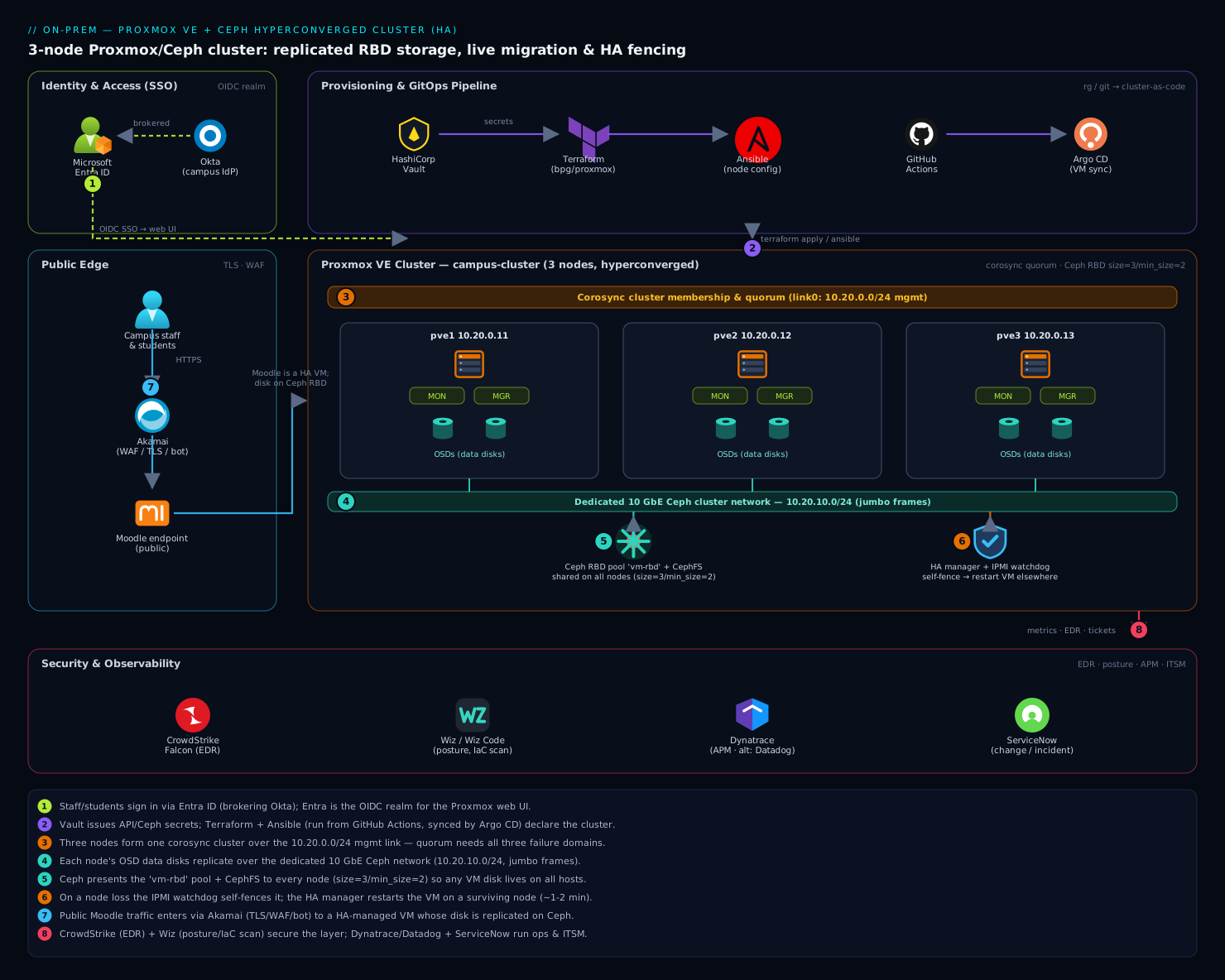
The diagram traces the cluster as it actually operates, plane by plane, so you can follow a request and a failure through it. Three Proxmox VE nodes (pve1/pve2/pve3) sit side by side, each contributing CPU, RAM, and disks. Read it as layers. At the bottom, every node runs OSD daemons (one per NVMe), and CRUSH stitches those OSDs into a single replicated RBD pool (size=3, min_size=2) plus a small CephFS — the green storage fabric that spans all three hosts, so any VM’s disk physically lives on every node. Riding above it, each node runs a Ceph MON and MGR (the control plane, with Paxos quorum across the three MONs) and the Proxmox corosync membership layer feeding pmxcfs at /etc/pve. The HA manager (CRM on the master, LRM on each node) watches the VMs and, on a node loss, fences the dead node via its watchdog and restarts its VMs on a survivor — possible only because the RBD disk is already on that survivor.
Follow the two networks the diagram separates deliberately: the storage fabric (bonded 25 GbE, MTU 9000, carrying the Ceph public and cluster subnets on distinct VLANs) handles OSD-to-OSD replication and VM-host-to-OSD I/O, while corosync rings ride independent low-latency links so a Ceph recovery storm cannot delay the totem packets and trigger a fence. Around the cluster sits the operating model: Microsoft Entra ID (brokering Okta for campus staff) as the SSO identity provider for the Proxmox UI via OpenID Connect; HashiCorp Vault issuing the API tokens and Ceph credentials that Terraform consumes so no secret is committed; Terraform and Ansible standing the cluster up declaratively; Proxmox Backup Server taking deduplicated incrementals off-cluster; GitHub Actions and Argo CD driving the VM-definition pipeline; Akamai fronting the public Moodle endpoint with TLS and WAF; CrowdStrike Falcon and Wiz for endpoint and posture security; and Dynatrace (with Datadog as an alternative) plus ServiceNow for observability and change/incident workflow. The single rule the picture teaches: each traffic class and each quorum lives on its own fault domain, and the watchdog is what makes failover safe.
Real-world scenario
Northvale University’s central IT runs the campus on two aging VMware ESXi 7 hosts and a 2018-vintage iSCSI SAN. The vSphere + vSAN renewal quote for the year lands at roughly ₹14 lakh, the SAN is out of hardware support, and the team is four engineers. The workload: Moodle (the LMS, the crown jewel during exam season), a student-records app, a library system, a print/file server, and about a dozen departmental VMs — 38 VMs total, ~6 TB of VM disk, peaking at ~900 concurrent Moodle users during exam weeks.
They build a 3-node Proxmox VE + Ceph cluster on refreshed hardware they already had budget for: three 2U nodes, each 2× 16-core EPYC, 256 GB RAM, 2× 1.92 TB enterprise NVMe (PLP) for Ceph, 2× 480 GB SSD mirrored for the OS, 2× 25 GbE for storage, and 2× 10 GbE for management/corosync. Total hardware: about ₹19 lakh one-time, versus ₹14 lakh per year for the VMware stack — payback inside 18 months, and no per-socket licence thereafter. The Ceph pool is size=3/min_size=2; raw capacity is ~11.5 TB, usable ~3.8 TB after 3× replication, and they deliberately keep it under 65% (~2.5 TB used) so a node loss is survivable.
The build went smoothly until the first load test, where they made the classic mistake: to save a switch, they had put corosync ring0 on the same 25 GbE storage bond as Ceph. During a synthetic OSD-failure drill, Ceph kicked off recovery, saturated the bond, corosync missed totem packets, and pve2 fenced itself mid-test — a self-inflicted outage. The fix was Plane 2 to the letter: corosync ring0 moved to the dedicated 10 GbE management link, ring1 added on a second independent link, and the storage bond left to Ceph alone. The re-run drill: pulled power on pve1 at 14:02; ha-manager status showed pve1 go fence then gone; the watchdog reset confirmed; Ceph went HEALTH_WARN with degraded PGs but I/O continued (min_size=2 satisfied on the two survivors); Moodle stayed up; VM 100 (the Moodle app) restarted on pve2 within ~90 seconds. pve1 powered back on, OSDs came up/in, Ceph backfilled to HEALTH_OK in ~25 minutes, and nothing was lost.
The second lesson came from capacity math, not failure. An over-eager admin grew the pool toward 78% usage during a data-import project. Ceph went nearfull, and the team realized that at 78% on three nodes, a single node loss could not be absorbed — the two survivors would exceed 100%. They added a fourth node (also gaining a failure domain), Ceph rebalanced PGs across four hosts, and usage dropped to ~52%, restoring node-loss headroom. The numbers that mattered after stabilization: live migration of the Moodle VM during patching took ~8 seconds of state transfer with zero dropped sessions; PBS backups of all 38 VMs ran nightly in ~22 minutes (incremental, deduplicated) to an off-cluster PBS box; a full Moodle VM restore test completed in ~6 minutes. The line the lead wrote in the runbook: “Three nodes is the floor, not the target — size for losing one and recovering, and never let corosync share a wire with Ceph.”
The migration and first-incident timeline, because the order of moves is the lesson:
| Time/phase | Event | Action taken | Effect | What it taught |
|---|---|---|---|---|
| Week 1 | Build cluster | corosync ring0 on the storage bond (to save a switch) | “Worked” in light testing | The trap is invisible at low load |
| Drill 1 | OSD-failure drill under load | Ceph recovery saturates bond | pve2 self-fences mid-test | Never share corosync with Ceph |
| Fix | Network redesign | ring0 → mgmt link; add ring1; bond = Ceph only | Stable under recovery | Plane 2 separation is non-negotiable |
| Drill 2 | Pull power on pve1 | (observe) | Fence → VM restarts on pve2 in ~90 s; I/O continues | HA + min_size=2 works as designed |
| Recovery | pve1 returns | OSDs up/in |
Backfill to HEALTH_OK in ~25 min |
Recovery is automatic but takes time |
| Later | Data import to 78% | (none at first) | nearfull; node-loss headroom gone |
Size for losing one of three |
| Fix | Add 4th node | pveceph osd create; rebalance |
Usage → 52%; headroom restored | Expand before ~75%, and add nodes for domains |
Advantages and disadvantages
Hyperconverged Proxmox + Ceph both grants HA on owned hardware and demands discipline the SAN-plus-hosts model hid. Weigh it honestly:
| Advantages | Disadvantages |
|---|---|
| No SAN, no SAN fabric, no per-socket hypervisor licence — capital and recurring cost collapse | Three-node floor and “size for losing one” mean usable capacity is ~33% of raw (replication overhead) |
| Scale by adding nodes (compute + storage + a failure domain together), not forklifting an array | Operationally heavier than a SAN: you run a distributed storage system, with its own quorum and tuning |
| VM live migration and self-healing HA are built in and free with shared storage | Network design is unforgiving — shared corosync/Ceph wires cause flapping and self-fencing |
| Open source and vendor-neutral; full Debian underneath; strong CLI/API | Ceph is latency-sensitive: consumer SSDs (no PLP) are slow/unsafe; needs enterprise NVMe + 10–25 GbE |
| Strong consistency and automatic recovery — a node/disk loss self-repairs without intervention | Recovery consumes bandwidth and CPU; capacity must stay well under full or recovery stalls/blocks |
| Snapshots, thin provisioning, and clones come from RBD; CephFS shares ISOs cluster-wide | A misconfigured min_size=1 or osd-domain CRUSH rule silently risks corruption — the footguns are real |
| One pane of glass (Proxmox UI/API) for compute, storage, HA, backup, and clustering | Steeper learning curve; the failure modes (PGs, quorum, fencing) require genuine understanding |
The model is right for on-prem/edge teams retiring expensive hypervisor+SAN stacks, labs and SMBs that cannot justify an array, and providers building multi-tenant compute on owned hardware — anywhere you want HA and live migration without per-socket licensing. It bites hardest when teams under-provision the network, run consumer disks, build two nodes “to save money,” or treat Ceph as a NAS. Every disadvantage is manageable — but only with the design discipline this article enumerates, which is exactly why so many casual Proxmox+Ceph builds disappoint under real load.
Hands-on lab
This lab builds a complete, working 3-node Proxmox VE + Ceph cluster, creates the RBD pool, runs a live migration, and then proves HA failover by killing a node — the centerpiece of the article. It is written for physical or virtual nodes (you can nest Proxmox in VMs for a lab; performance is poor but the mechanics are identical — note that in nested VMs you’ll use the softdog watchdog). Three nodes pve1/pve2/pve3 with the IPs from this article; run each step on the node indicated.
Step 1 — Base install and repos (all three nodes). Install Proxmox VE 8.x to the OS disk, set the static management IP, then move off the enterprise repo so apt works without a subscription:
# On EACH node
sed -i 's/^deb/#deb/' /etc/apt/sources.list.d/pve-enterprise.list 2>/dev/null
echo "deb http://download.proxmox.com/debian/pve bookworm pve-no-subscription" \
  > /etc/apt/sources.list.d/pve-no-subscription.list
# Also switch the Ceph repo to no-subscription (created by pveceph install later)
apt update && apt -y dist-upgrade
Expected: apt update succeeds with no 401 errors; dist-upgrade completes.
Step 2 — Time sync and /etc/hosts (all three nodes). Ceph and corosync both fail on clock skew. Confirm chrony is synced and add deterministic name resolution:
chronyc tracking | grep -E 'Leap status|System time'   # "Leap status: Normal", offset in ms
cat >> /etc/hosts <<'EOF'
10.20.0.11 pve1.lab.kloudvin.local pve1
10.20.0.12 pve2.lab.kloudvin.local pve2
10.20.0.13 pve3.lab.kloudvin.local pve3
EOF
Expected: Leap status: Normal, system-time offset well under a second on every node.
Step 3 — Form the corosync cluster (pve1, then pve2/pve3).
# On pve1
pvecm create campus-cluster --link0 address=10.20.0.11
# On pve2
pvecm add 10.20.0.11 --link0 address=10.20.0.12
# On pve3
pvecm add 10.20.0.11 --link0 address=10.20.0.13
Validate quorum (run on any node):
pvecm status
Expected: Quorate: Yes, Total votes: 3, Expected votes: 3, three nodes listed Online.
Step 4 — Install Ceph and bootstrap (all nodes install; init on pve1).
# On ALL three nodes
pveceph install --repository no-subscription --version reef
# On pve1 ONLY
pveceph init --network 10.20.30.0/24 --cluster-network 10.20.40.0/24
Expected: install completes; init writes /etc/ceph/ceph.conf with the two networks.
Step 5 — Create MONs and MGRs (run the matching command on each node).
pveceph mon create     # on pve1, then pve2, then pve3
pveceph mgr create     # on pve1, then pve2, then pve3
ceph -s
Expected: mon: 3 daemons, quorum pve1,pve2,pve3; mgr: pve1(active), standbys: pve2, pve3; health HEALTH_WARN (no OSDs yet — normal).
Step 6 — Create OSDs from the data disks (each node, its disks). Confirm the disks are empty first:
ceph-volume inventory            # the data disks must show "available"
pveceph osd create /dev/nvme1n1  # repeat per data disk, per node
pveceph osd create /dev/nvme2n1
ceph osd tree
Expected: every host shows its OSDs up with a weight; after all are in, ceph -s moves toward HEALTH_OK.
Step 7 — Create the RBD pool and verify cluster-wide storage (pve1).
pveceph pool create vm-rbd --application rbd \
  --size 3 --min_size 2 --pg_autoscale_mode on --add_storages 1
ceph osd pool ls detail
pvesm status
Expected: vm-rbd: replicated size 3 min_size 2; pvesm status lists vm-rbd rbd active (and Proxmox shows it on all three nodes).
Step 8 — Create a test VM on the Ceph pool (pve1). Download a small ISO (or use an existing one), create a VM whose disk lands on vm-rbd:
qm create 100 --name moodle-test --memory 4096 --cores 2 \
  --net0 virtio,bridge=vmbr0 --scsihw virtio-scsi-single
qm set 100 --scsi0 vm-rbd:32          # 32 GB disk on the replicated Ceph pool
qm set 100 --ide2 cephfs:iso/debian-12-netinst.iso,media=cdrom 2>/dev/null || true
qm set 100 --boot order=scsi0
qm start 100
qm status 100                         # status: running
Expected: the VM starts; rbd ls vm-rbd shows a vm-100-disk-0 image — the disk physically lives in Ceph, replicated across all nodes.
Step 9 — Live-migrate the running VM (pve1 → pve2). This proves shared storage gives zero-downtime mobility:
# From pve1
qm migrate 100 pve2 --online
# In another shell, ping the VM's IP continuously during the migration
Expected: migration transfers only RAM state; the VM ends up running on pve2; the ping stream shows no dropped packets (sub-second cutover).
Step 10 — Make it HA and configure the watchdog (run as noted).
# On any node: manage VM 100 as HA across all three nodes
ha-manager add vm:100 --state started --max_restart 3 --max_relocate 3
ha-manager groupadd campus-ha --nodes "pve1,pve2,pve3" --nofailback 0
ha-manager set vm:100 --group campus-ha
ha-manager status

# On EACH physical node: prefer the hardware watchdog (skip on nested-VM labs)
echo "options ipmi_watchdog action=reset panic_wdt_timeout=10" \
  > /etc/modprobe.d/ipmi-watchdog.conf
sed -i 's/^#\?WATCHDOG_MODULE=.*/WATCHDOG_MODULE=ipmi_watchdog/' /etc/default/pve-ha-manager
systemctl restart watchdog-mux
Expected: ha-manager status shows vm:100 started <node> and the per-node LRM active.
Step 11 — Prove HA failover (the payoff). Hard-kill the node currently running VM 100 (pull power on hardware, or echo c > /proc/sysrq-trigger to hang it). Then, from a surviving node, watch:
ha-manager status
# The lost node enters "fence", then disappears; after its watchdog reset,
# vm:100 transitions to "started" on a surviving node within ~1-2 minutes.
ceph -s
# HEALTH_WARN with degraded/undersized PGs while one node is down,
# but I/O CONTINUES because min_size=2 is satisfied on the two survivors.
Expected: VM 100 restarts on a survivor automatically; Ceph stays writable (degraded, not blocked).
Step 12 — Recover and confirm clean state. Power the killed node back on; it rejoins corosync and its OSDs come back:
ceph osd tree     # the returned OSDs go back "up/in"
ceph -s           # "objects misplaced" backfills to 0, then HEALTH_OK
pvecm status      # Quorate: Yes, Total votes: 3 again
Expected: full HEALTH_OK once backfill completes; quorum back to 3 votes.
Validation checklist — what each step proved:
| Step | What you did | What it proves |
|---|---|---|
| 3 | pvecm create/add → Quorate: Yes |
Corosync quorum across 3 nodes |
| 5 | 3 MONs in quorum, MGRs active+standby | Ceph control plane is HA |
| 7 | Pool size=3 min_size=2, visible cluster-wide |
Replicated shared storage exists |
| 9 | Live migration with zero dropped packets | Shared storage gives zero-downtime mobility |
| 10–11 | Kill a node, VM restarts on a survivor | HA + watchdog fencing self-heals VMs |
| 11 | Ceph stays writable while a node is down | min_size=2 keeps I/O alive through a node loss |
| 12 | OSDs return, backfill to HEALTH_OK | Automatic recovery with no data loss |
Teardown (lab cleanup — destroy in reverse order of creation):
ha-manager remove vm:100              # release HA management first
qm stop 100 && qm destroy 100 --destroy-unreferenced-disks 1
pveceph pool destroy vm-rbd --remove-storages 1
# pveceph fs destroy cephfs --remove-storages 1   # if you created CephFS
# To fully dismantle: drain OSDs, then rebuild each node from ISO if repurposing
Cost note. On owned hardware the lab costs only power; in nested VMs it costs nothing but a few hours. The mechanics are identical to production — only the watchdog (softdog in nested VMs) and performance differ.
Common mistakes & troubleshooting
This is the playbook you bookmark — first as a scannable symptom→cause→confirm→fix table, then the expanded reasoning for the entries that bite hardest.
| # | Symptom | Root cause | Confirm (exact command) | Fix |
|---|---|---|---|---|
| 1 | Node randomly reboots under load; cluster “flaps” | Corosync shares a NIC with Ceph; recovery saturates it → totem timeout → self-fence | pvecm status history; journalctl -u corosync shows “retransmit”/“token” loss correlated with Ceph recovery |
Move corosync to its own low-latency link; add ring1 (Plane 2) |
| 2 | /etc/pve is read-only; can’t start VMs or edit config |
Cluster lost quorum (a node down on a 2-node cluster, or 2/2 split) | pvecm status → Quorate: No |
Restore the missing node; or pvecm expected <n> to temporarily lower expected votes (then revert) |
| 3 | Ceph stuck HEALTH_WARN, PGs undersized/degraded long after a node returns |
Backfill in progress, or an OSD down/out, or too few hosts for size |
ceph -s; ceph osd tree (any down/out?); ceph pg stat |
Bring the OSD up/in; wait for backfill; ensure ≥ size hosts |
| 4 | Pool blocks all writes; guests hang on I/O | An OSD crossed full_ratio (0.95), or min_size not met (too many copies down) |
ceph osd df (any OSD ≥95%?); ceph health detail (“full”/“min_size”) |
Add OSDs/nodes; ceph osd reweight to shed; never set min_size=1 to “unblock” |
| 5 | Killed a node but its VMs never restart elsewhere | No working watchdog → CRM refuses to fence | journalctl -u watchdog-mux; `lsmod |
grep -E 'ipmi_watchdog |
| 6 | New OSD won’t create: “device in use” / “has a filesystem” | Disk has a partition table, old LVM, or a stale Ceph signature | lsblk, ceph-volume inventory (shows “rejected”), wipefs -n /dev/sdX |
ceph-volume lvm zap --destroy /dev/sdX (wipes it), then re-create |
| 7 | Ceph HEALTH_WARN: clock skew detected on mon |
Node clocks drift > ~50 ms; chrony not synced | ceph health detail; chronyc tracking (large offset) |
Fix NTP/chrony on the offending node; MON re-syncs |
| 8 | Large file copies/backups stall; small I/O is fine | MTU mismatch — one device at 1500 in the jumbo path silently drops large frames | ping -M do -s 8972 <other-node-cluster-ip> → “Frag needed” |
Set MTU 9000 consistently on NICs, bond, VLANs, and switch ports |
| 9 | Live migration fails: “CPU … not compatible” | VM uses host CPU or a model absent on the target node |
qm config <vmid> (cpu type); compare CPUs across nodes |
Set a common baseline CPU (e.g. x86-64-v2-AES); avoid host on mixed hardware |
| 10 | pveceph / ceph commands hang or time out |
MON quorum lost (≥2 of 3 MONs down) | ceph -s hangs; systemctl status ceph-mon@* on each node |
Restart down MONs; restore the nodes hosting them; check the public network |
| 11 | Removed a node but it still shows in the UI / corosync | pvecm delnode not run, or stale /etc/pve/nodes/<name> |
pvecm nodes; ls /etc/pve/nodes/ |
pvecm delnode <name> from a quorate node; never re-use a deleted node’s name without cleanup |
| 12 | PG count warning: “too many/few PGs per OSD” | Manual pg_num off, or autoscaler disabled |
ceph osd pool autoscale-status; ceph -s (PG warning) |
Enable pg_autoscale_mode on; or set pg_num to (OSDs×100)/size (power of 2) |
| 13 | VM disk on Ceph but VM won’t start: “rbd: error opening image” | Stale RBD lock from a previous host (ungraceful crash without fence) | rbd lock ls vm-rbd/vm-100-disk-0 (lock held by a dead host) |
Ensure the old host is truly fenced/down, then rbd lock rm; fix the fencing that failed |
| 14 | After adding a node, Ceph rebalances for hours and VMs feel slow | Backfill is competing with VM I/O on a shared/saturated network | ceph -s (% misplaced); check storage NIC utilization |
Throttle recovery (osd_max_backfills, osd_recovery_max_active lower); add bandwidth; schedule expansion off-peak |
The expanded reasoning for the worst offenders:
1. Node randomly reboots under load; the cluster flaps. Corosync shares a wire with Ceph: when Ceph recovers, OSD-to-OSD replication saturates the link, corosync’s totem packets are delayed past the token timeout, corosync declares the node unreachable, and the node self-fences — then the reboot triggers more recovery, a flap loop. Confirm: correlate journalctl -u corosync token-loss/retransmit messages with ceph -s recovery; check whether corosync.conf’s ring addresses sit on the storage subnet. Fix: Plane 2 — corosync on a dedicated low-latency link plus a second independent ring1; leave the storage bond to Ceph. This single change fixes most “unstable Proxmox cluster” reports.
4. Pool blocks all writes; guests hang. Either an OSD crossed full_ratio (0.95) — Ceph stops all writes cluster-wide to protect itself — or too many replicas are down to satisfy min_size. Confirm: ceph osd df for any OSD ≥95%; ceph health detail says full osd(s) or Reduced data availability ... min_size. Fix: add capacity or ceph osd reweight-by-utilization to shed data; if it’s min_size, restore the down OSDs/nodes. The dangerous “fix” people reach for is min_size 1 to unblock — do not; get a second copy back online instead.
5. Killed a node but its VMs never restart elsewhere. The CRM fences (and restarts VMs) only when certain the dead node is gone — which it knows because the node self-fenced via a working watchdog. No armed watchdog → no guaranteed reset → no safe fence → VMs stay put. Confirm: journalctl -u watchdog-mux shows no device and lsmod shows neither ipmi_watchdog nor softdog. Fix: arm the hardware watchdog (WATCHDOG_MODULE in /etc/default/pve-ha-manager, restart watchdog-mux); on lab VMs ensure softdog is loaded.
13. VM won’t start: stale RBD lock. A host crashed without being properly fenced (softdog failed under a hard hang), so it never released the exclusive lock on the VM’s RBD image; HA’s start attempt elsewhere is refused because the lock is still held by the dead host. Confirm: rbd lock ls vm-rbd/vm-<id>-disk-0 shows the dead node’s lock. Fix: verify the old host is truly down, then rbd lock rm and start the VM — then fix the fencing that allowed it. This is exactly why softdog-only fencing is unsafe in production.
Best practices
- Three nodes minimum, odd counts always. Three is the floor for both corosync quorum and Ceph
size=3. Grow to 5, 7 — never even counts (a 2/2 split is a tie). A QDevice is a patch for two-node corosync, not a substitute for a third node’s storage. - Physically separate every traffic class. Corosync on its own low-latency links (two rings), the Ceph public/cluster networks on a bonded high-speed fabric, VM/management apart. Never let corosync share a wire with Ceph — it is the number-one cause of instability.
- Bond with LACP and set MTU 9000 end to end on storage — including the switch ports. Validate with
ping -M do -s 8972; a single 1500 device silently breaks large I/O. - Keep
size=3/min_size=2; never runmin_size=1. This is the single most important storage rule.min_size=1trades momentary availability for the risk of unrecoverable split-brain corruption. - Use enterprise NVMe/SSD with power-loss protection (PLP). Consumer drives are slow and unsafe for Ceph’s WAL/DB. Match drive class across nodes for predictable performance.
- Arm the hardware (IPMI) watchdog, not softdog, in production. Fencing is the watchdog; a kernel hang can stop softdog from firing, making HA failover unsafe.
- Size for losing one node and recovering. On three nodes with
size=3, target ~50–65% of raw usage so the two survivors can hold all data during a node loss; expand before ~75%. - Set a common baseline CPU type on VMs so they live-migrate across mixed hardware; reserve
hostpassthrough for VMs that will never migrate. - Use Proxmox Backup Server, off-cluster, and test restores. Dedup + incrementals make nightly backups cheap; a verify job catches bit-rot; a quarterly restore drill proves the backup is real.
- Upgrade rolling, one node at a time, in the right Ceph daemon order (MON → MGR → OSD → MDS), with
noout/norebalanceset during the window; never straddle versions. - Monitor the leading indicators: Ceph
HEALTH_*, PG states (active+cleanvs degraded/misplaced), OSD%USEvs the full ratios, corosync ring status, and per-OSD latency — not just “is a VM down.” - Treat the cluster as code. Declare VMs/storage with Terraform (
bpg/proxmox), node config with Ansible, and pull every credential from Vault — so rebuilds are reproducible and no secret lands in git.
The leading-indicator alerts worth wiring before the next incident:
| Alert on | Signal | Threshold (starting point) | Why it’s leading |
|---|---|---|---|
| Ceph health | ceph -s not HEALTH_OK |
HEALTH_WARN sustained > 10 min |
Catches degraded/nearfull before it blocks I/O |
| OSD fullness | ceph osd df max %USE |
> 75% | Node-loss headroom is gone before nearfull |
| PG state | non-active+clean PGs |
any sustained > 30 min | Stuck peering/recovery needs a human |
| Corosync rings | corosync-cfgtool -s faults |
any ring “faulty” | One ring down = no redundancy left for membership |
| OSD latency | ceph osd perf apply/commit |
> your SLO (e.g. 20 ms) | Slow disk predicts VM I/O pain and recovery stalls |
| Node/quorum | pvecm status votes |
< expected for > 5 min | A node fell out before VMs notice |
Security notes
- Replace local logins with SSO. Add Microsoft Entra ID (brokering Okta for campus staff) as an OpenID Connect realm so admins authenticate with corporate MFA and group claims, not a shared
rootpassword. Map an Entra group to theAdministratorrole and stop handing out root.
pveum realm add entra-oidc --type openid \
  --issuer-url https://login.microsoftonline.com/<TENANT_ID>/v2.0 \
  --client-id <APP_CLIENT_ID> \
  --client-key "$(vault kv get -field=oidc_secret secret/proxmox/oidc)" \
  --username-claim email --autocreate 1
pveum acl modify / --roles Administrator --groups ProxmoxAdmins-entra-oidc
- Pull every secret from Vault with short TTLs. The Proxmox API token Terraform uses, the Ceph keyrings, the OIDC secret — issue them from HashiCorp Vault so nothing sensitive sits in git, Terraform state, or on disk. Rotate on a schedule.
- Isolate the management network. Keep the Proxmox web UI / SSH on its own VLAN, reachable only via an admin jump host; never expose
:8006or SSH to the internet. The Ceph networks are private by construction and must stay that way. - EDR on the hypervisors. Run CrowdStrike Falcon sensors on the nodes — the hypervisor is the most privileged layer in the building; a compromise there owns every VM. Scan the Terraform/Ansible/pipeline definitions with Wiz Code (and Wiz for running-posture) so an over-permissive token or open firewall rule is caught in the pull request, not after an incident.
- Front public services with a WAF. The public Moodle endpoint sits behind Akamai for TLS termination, WAF, and bot mitigation, so the cluster’s web tier is never directly exposed; the VM itself accepts traffic only from the front end.
- Least privilege in Proxmox itself. Use roles and ACLs (
PVEVMUser,PVEDatastoreUser, custom roles) scoped to pools/nodes rather than blanketAdministrator; separate operators from auditors. Enable two-factor on any local accounts that must remain. - Encrypt backups and protect the PBS datastore. PBS supports client-side encryption; keep the PBS box off-cluster, on a separate trust domain, ideally with immutable/append-only targets so ransomware on the cluster can’t delete its own backups — the pattern in Ransomware Resilience: Immutable Backups, Recovery Vaults, and Isolated Recovery Environments.
The security controls that also improve resilience — they pull in the same direction here:
| Control | Mechanism | Secures against | Also prevents |
|---|---|---|---|
| Entra ID OIDC SSO | pveum realm add ... openid |
Shared root passwords, no MFA | Orphaned local accounts during staff churn |
| Vault-issued secrets | KV engine + short TTLs | Secrets in git/state/disk | Stale long-lived tokens that never rotate |
| Mgmt VLAN + jump host | Network segmentation | Internet-exposed UI/SSH | Accidental public exposure of :8006 |
| Falcon EDR on nodes | Sensor on hypervisors | Hypervisor-layer compromise | Lateral movement from a guest to the host |
| Wiz Code in CI | IaC/posture scanning | Over-permissive tokens, open rules | Misconfigurations reaching production |
| Off-cluster, immutable PBS | Separate trust domain + object-lock | Backups deleted by an attacker | A single blast radius taking data + backups |
Cost & sizing
The hyperconverged win is capital and recurring: no SAN, no SAN fabric, no per-socket hypervisor licence. You buy nodes and scale by adding nodes. The bill drivers and how to right-size:
- Nodes dominate the capital cost. A production-credible node (16+ cores, 128–256 GB RAM, 2–4× enterprise NVMe, 2× 25 GbE) runs roughly ₹4–7 lakh depending on spec; three is the floor (~₹15–21 lakh one-time). Compare to a SAN-plus-hosts design where the array alone often exceeds that and carries an annual support contract.
- Replication overhead sets usable capacity.
size=3means usable ≈ 33% of raw, and you must keep usage well under full for node-loss recovery — so plan raw capacity at roughly 3× your data, divided by ~0.6 target utilization (i.e. size raw at ~5× your live data for a 3-node cluster). Erasure coding improves this but needs 6+ nodes. - Network is a real line item, not an afterthought. 25 GbE NICs and a switch with jumbo-frame support are mandatory for Ceph; under-spending here is the most common cause of a disappointing cluster. Budget for two switches (or a stacked pair) for redundancy.
- Drives: pay for enterprise NVMe with PLP. Consumer SSDs are a false economy — slow under Ceph’s sync writes and unsafe for the WAL. Match drive size/class across nodes.
- Proxmox subscription (optional but recommended for production). Proxmox VE is free; a subscription (per-socket, modest) buys the stable enterprise repo and support — far cheaper than vSphere and entirely optional for labs (use the no-subscription repo).
- Observability and operations. Dynatrace (or Datadog) watches OSD latency, pool capacity, and per-VM resource use so you provision the next node from data, not guesswork; drive change/incident workflow through ServiceNow so maintenance windows and the audit trail line up with the rest of the estate.
A rough sizing picture for the Northvale-style 38-VM, ~6 TB workload:
| Component | Spec | Rough cost | Notes |
|---|---|---|---|
| 3× compute/storage nodes | 16-core, 256 GB, 2× 1.92 TB NVMe, 2× 25 GbE | ~₹15–21 lakh one-time | The floor; 4th node adds headroom + a failure domain |
| 2× storage switches (jumbo) | 25 GbE, stacked | ~₹3–5 lakh | Redundancy for the storage fabric |
| Ceph raw → usable | ~11.5 TB raw → ~3.8 TB usable (size=3) |
(included) | Keep < 65% used (~2.5 TB) for node-loss recovery |
| Proxmox Backup Server | 1× node + bulk disk, off-cluster | ~₹2–4 lakh | Dedup means modest disk for many incrementals |
| Proxmox subscription (opt.) | per-socket, production | ~₹X/socket/yr | Optional; free no-subscription repo for labs |
| vs VMware vSphere+vSAN | per-socket licence + SAN support | ~₹14 lakh/yr recurring | The cost this design eliminates |
The capacity rule restated because it is the most common sizing error: on three nodes, size for losing one and recovering. At 70% across three nodes you cannot survive a node loss (the two survivors would need 105%). Target ~50–65% of raw, alert at 75%, and add a node (gaining a failure domain) rather than only adding disks when you approach it.
Interview & exam questions
1. Why is three nodes the minimum for a Proxmox + Ceph HA cluster, for two independent reasons? Corosync quorum needs a strict majority of votes; three nodes (3 votes) survive losing one (2 of 3), while two nodes cannot (1 of 2 is not a majority). Independently, Ceph’s safe default size=3/min_size=2 needs three failure domains (hosts) to place three replicas and stay writable when one is lost. A QDevice can fix corosync quorum on two nodes but does nothing for Ceph replication — so three nodes is the floor for both.
2. A node randomly reboots under heavy load and the cluster “flaps.” Most likely cause? Corosync is sharing a network link with Ceph. Ceph recovery/replication saturates the link, corosync’s totem packets are delayed past the token timeout, the node is declared unreachable and self-fences (watchdog reset) — and the reboot triggers more recovery, a flap loop. Fix by putting corosync on its own low-latency link with a redundant second ring, separate from the Ceph storage fabric.
3. What do size and min_size mean, and why is min_size=1 dangerous? size=N is how many replicas Ceph keeps; min_size=M is the minimum replicas that must be available for the pool to accept writes. size=3/min_size=2 keeps three copies and stays writable while two are up. min_size=1 lets a single surviving copy accept writes, so if that copy then fails or a stale copy returns, you get silent split-brain divergence and unrecoverable corruption — never run it as a steady state.
4. How does Proxmox HA fence a failed node, and why does it matter for storage? It uses self-fencing via a watchdog: each node pets a watchdog timer only while quorate and healthy; a node that loses quorum stops petting it and is hard-reset within ~60 s. The guaranteed reset means the dead node has released its RBD locks before the HA manager restarts its VMs elsewhere — preventing two nodes from mounting the same VM disk and corrupting it. Use the hardware/IPMI watchdog; softdog can fail to fire under a kernel hang.
5. Why is live migration zero-downtime on Ceph but slow on local storage? With shared Ceph storage the VM’s disk already exists on every node, so live migration copies only the running RAM/CPU state over the network and cuts over in milliseconds. On local storage the disk is on one node, so moving the VM requires copying the entire disk — only possible offline (or via slow live storage migration). Shared storage is what makes “three nodes” a cluster rather than three independent hosts.
6. What is a placement group (PG), and what happens if you have too few or too many? A PG is a shard of a pool; CRUSH maps PGs (not individual objects) to OSDs, and replication/recovery operate per-PG. Too few PGs → data clumps onto a few OSDs, poor balance and parallelism, slow recovery. Too many PGs → excessive peering and memory overhead on OSDs/MONs (the ~100–200 PGs-per-OSD ceiling). The PG autoscaler sizes pg_num automatically from the pool’s data share and OSD count.
7. Large file transfers stall but small I/O is fine. What do you check? An MTU mismatch on the storage network — jumbo frames (MTU 9000) must be set consistently on every NIC, bond, VLAN interface, and switch port; a single 1500-MTU device in the path silently drops large frames while small ones pass. Confirm with ping -M do -s 8972 <node-cluster-ip>; “Frag needed” means a mismatch. Fix the inconsistent device.
8. Ceph reports HEALTH_WARN: clock skew detected on mon. Cause and fix? The MONs run Paxos and require closely synchronized clocks (drift beyond ~50 ms triggers the warning). A node whose chrony/NTP has drifted causes it. Confirm with ceph health detail and chronyc tracking (a large offset on the offending node); fix the time sync on that node and the MON re-synchronizes. Both Ceph and corosync are unforgiving about clock skew.
9. On a 3-node size=3 cluster at 72% capacity, why can’t you survive a node loss, and what’s the fix? Losing one node forces all data onto the two survivors; 72% across three nodes becomes ~108% across two — impossible, so recovery cannot complete and the pool can hit the full ratio and block writes. The fix is to size for the failure: keep usage ~50–65% of raw, and add a node (which also adds a failure domain) before approaching ~75%, so two survivors can hold the data.
10. Describe the correct order to roll out a Ceph release upgrade. Set noout/norebalance to stop spurious data movement, then upgrade all daemons of one type before the next: MONs first (map authority), then MGRs, then OSDs (one node at a time to keep PGs available), then MDS (if CephFS). Unset the flags, then confirm ceph versions shows all daemons on the new release and ceph -s is HEALTH_OK. Never straddle versions across the cluster.
11. What’s the difference between the corosync cluster and the Ceph cluster on the same nodes? They are two independent distributed systems co-residing on the same hardware. Corosync provides Proxmox cluster membership/quorum and the synced config FS pmxcfs (/etc/pve), checked with pvecm status. Ceph runs its own MON quorum (Paxos) and stores data, checked with ceph -s. One can be healthy while the other is not — always diagnose the right one.
12. When does a Proxmox cluster need a QDevice, and what does it not fix? A QDevice adds one external tie-breaker vote so an even-vote cluster (classically two nodes) can survive a single failure without a tie — useful for a two-node or stretched cluster. It fixes corosync quorum only; it does nothing for Ceph, which still needs three MONs and three OSD failure domains for size=3. For real HA storage you still need three nodes.
These map to vendor-neutral on-prem/virtualization and storage competencies and to the Proxmox VE and Ceph ecosystems. A compact theme map for revision:
| Question theme | Domain | Why it’s asked |
|---|---|---|
| Quorum, 3-node floor, QDevice | Cluster membership | The single most-tested design constraint |
| corosync/Ceph network separation | Network design | The top real-world failure mode |
size/min_size, split-brain |
Storage safety | The footgun that loses data |
| Watchdog fencing | High availability | Why failover is (un)safe |
| PGs, CRUSH, autoscaler | Ceph internals | Distinguishes “ran the installer” from “understands Ceph” |
| Live vs offline/storage migration | Operations | Shared-storage value proposition |
| Capacity for node-loss recovery | Sizing | The most common sizing mistake |
| Rolling/Ceph upgrade order | Operations | Zero-downtime maintenance discipline |
Quick check
- You have a two-node Proxmox cluster and one node dies. Why does
/etc/pvebecome read-only, and what does a QDevice fix — and not fix? - A node keeps self-fencing under load. What is the single most likely root cause, and the design fix?
- True or false: setting
min_size=1during an outage is a safe way to keep the pool writable. Explain. - Live migration of a running VM takes 8 seconds with zero dropped packets, but moving it to a different storage takes 40 minutes. Why the difference?
- Your 3-node
size=3cluster is at 78% usage. Why is a single node failure now unrecoverable, and what’s the correct remedy?
Answers
- With two nodes (2 votes), losing one leaves 1 of 2 — not a majority, so corosync goes non-quorate and
pmxcfs(/etc/pve) becomes read-only to prevent split-brain; you can’t start VMs or change config. A QDevice adds a third tie-breaker vote so the survivor stays quorate (1 node + QDevice = 2 of 3) — it fixes corosync quorum but not Ceph, which still can’t place three replicas across three failure domains on two hosts. - Corosync is sharing a network link with Ceph. Under load, Ceph recovery/replication saturates the link, corosync totem packets are delayed past the token timeout, the node is judged unreachable and self-fences. The fix is to move corosync to its own low-latency link (with a redundant second ring), separate from the Ceph storage fabric.
- False.
min_size=1lets a single surviving replica accept writes; if that copy then fails, or a stale copy rejoins, you get silent split-brain divergence and unrecoverable corruption. The safe response to an outage is to restore a second replica (bring an OSD/node back), never to dropmin_sizeto 1. - With shared Ceph storage the disk already exists on every node, so live migration copies only RAM/CPU state (seconds, no downtime). Storage migration physically copies the entire disk to a different storage backend — bounded by disk size and throughput, hence ~40 minutes. The disk staying put is the whole point of shared storage.
- On three nodes with
size=3, a node loss forces all data onto the two survivors; 78% across three becomes ~117% across two — impossible, so recovery can’t complete and the pool can hitfull_ratioand block writes. Remedy: size for losing one — keep usage ~50–65% of raw, alert at 75%, and add a node (also adding a failure domain) to restore headroom.
Glossary
- Proxmox VE — open-source virtualization platform (Debian-based) running KVM VMs and LXC containers, with built-in clustering, HA, and Ceph integration.
- corosync — the cluster membership and messaging layer; provides quorum and ordered communication via totem rings. Loss of a ring/quorum triggers fencing.
- pmxcfs (
/etc/pve) — the Proxmox cluster filesystem: a FUSE-mounted, database-backed config store replicated to all nodes and writable only while quorate. - Quorum — the requirement that a strict majority of votes be present for the cluster to act; prevents split-brain.
- QDevice — an external
corosync-qnetdwitness granting one tie-breaker vote, letting an even-vote (e.g. two-node) cluster survive a single failure. Fixes corosync quorum only. - Ceph — a distributed, strongly-consistent storage system providing block (RBD), file (CephFS), and object (RGW) storage with automatic replication and recovery.
- MON (monitor) — Ceph daemon holding the cluster map and running Paxos; needs an odd quorum (3) to be HA; clock-sensitive.
- MGR (manager) — Ceph daemon for metrics, the dashboard, the PG autoscaler, and the balancer; one active, the rest standby.
- OSD (object storage daemon) — one daemon per data disk; stores objects and participates in replication/recovery; CPU- and RAM-hungry, especially during recovery.
- MDS (metadata server) — Ceph daemon serving CephFS metadata; needed only for CephFS, deployed active+standby.
- PG (placement group) — a shard of a pool; CRUSH maps PGs to OSDs, and replication/recovery operate per-PG. The PG count is a key tuning knob.
- CRUSH — Controlled Replication Under Scalable Hashing: the algorithm (and map) that computes which OSDs hold each PG’s replicas, separated by a configurable failure domain (host by default).
- RBD (RADOS Block Device) — Ceph’s block storage; the replicated pool that backs VM disks, supporting thin provisioning, snapshots, and clones.
- CephFS — Ceph’s POSIX filesystem; used here as shared storage for ISOs, templates, and snippets across all nodes.
size/min_size— replicas kept / minimum replicas required to accept writes.3/2is the safe default;min_size=1risks split-brain corruption.- PG autoscaler — a MGR module that picks and adjusts
pg_numautomatically based on a pool’s data share and the OSD count. - Full ratios — Ceph thresholds:
nearfull(0.85, warn),backfillfull(0.90, recovery to that OSD stops),full(0.95, all writes blocked). - HA group — a set of nodes (with priorities) a highly-available resource prefers, controlling where its VMs run and fail over.
- CRM / LRM — the cluster-wide HA manager (Cluster Resource Manager, on the master) and per-node Local Resource Manager that executes actions and pets the watchdog.
- Watchdog (fencing) — a timer that hard-resets a node that loses quorum; the mechanism that guarantees a dead node releases its disks before HA restarts its VMs. Hardware/IPMI watchdog preferred over softdog.
- Live migration — moving a running VM’s RAM/CPU state to another node with near-zero downtime; possible because shared storage keeps the disk in place.
- Proxmox Backup Server (PBS) — a separate server doing client-side deduplicated, incremental, verifiable backups of VMs/containers, with prune/GC retention.
Next steps
You can now build, secure, and operate a 3+ node Proxmox VE + Ceph hyperconverged cluster with HA and live migration. Build outward:
- Next: Modern Linux Networking: Bonding, VLANs, and Firewalls with nftables and firewalld — the bonding/VLAN/MTU foundation the cluster’s network design depends on.
- Related: Set Up Veeam Backup & Replication for VMware to Object Storage with Scale-Out Repositories — an alternative/complementary backup architecture and the VMware side you may be migrating from.
- Related: Deploy MinIO with Object Locking and Site Replication for Immutable Backup Targets — an immutable object target to point PBS or backups at.
- Related: Windows Failover Clustering and Storage Spaces Direct: A Production Build — the Microsoft equivalent of this hyperconverged HA pattern, for comparison.
- Related: Ransomware Resilience: Immutable Backups, Recovery Vaults, and Isolated Recovery Environments — protect the cluster’s backups so an attacker can’t delete them.
- Related: Designing Composable Terraform Modules: Interfaces, Versioning, and a Private Registry — package the VM/storage definitions so the cluster build is reproducible.