A mid-size SaaS company runs 180 Linux servers across three AWS accounts — application nodes, a few stateful boxes with Postgres data directories, build agents, and a couple of legacy virtual appliances nobody wants to touch. The “backup strategy” is a wiki page describing rsync to a single NFS share that filled up in March and silently stopped, which the platform team discovered the hard way when an engineer rm -rf’d the wrong data volume and there was nothing to restore from. The mandate after that incident is blunt: every Linux host backs up nightly to durable, encrypted, off-box storage; backups are deduplicated so the bill stays sane; old snapshots age out automatically; and — the part the last system never had — every backup is verified, because an unrestorable backup is just expensive disk usage. This guide builds exactly that with Restic to Amazon S3: client-side encrypted, deduplicated snapshots driven by systemd timers, retention via forget/prune, and check for integrity — rolled out across the fleet with Ansible and folded into the company’s existing security and observability stack.
Restic is the right tool here for concrete reasons. It does content-defined chunking and deduplication so a 50 GB data directory that changes by 200 MB a night costs ~200 MB per snapshot, not 50 GB. It encrypts client-side with AES-256 before anything leaves the host, so S3 never sees plaintext. It speaks S3 natively, ships as a single static Go binary with no runtime dependencies, and its check subcommand actually re-reads data to prove a repository is restorable. That last property is why it beats the rsync-to-NFS approach the company is replacing.
Prerequisites
- A Linux fleet (this guide assumes Ubuntu 22.04 / RHEL 9 hosts) with
systemdand outbound HTTPS to S3. - An AWS account with permission to create an S3 bucket, a KMS key, and IAM policies/roles.
- Ansible 2.15+ on a control node with SSH to the fleet (we use it to template units and roll the binary out).
- HashiCorp Vault reachable from the fleet (the company already runs it) to issue short-lived AWS credentials and hold the Restic repository password — no long-lived keys baked into hosts.
- Restic 0.16+ (the binary; we pin a version and verify its checksum during rollout).
- Optional but assumed in this environment: Datadog Agent on each host, CrowdStrike Falcon sensor, and a ServiceNow instance for change/incident records.
Target topology
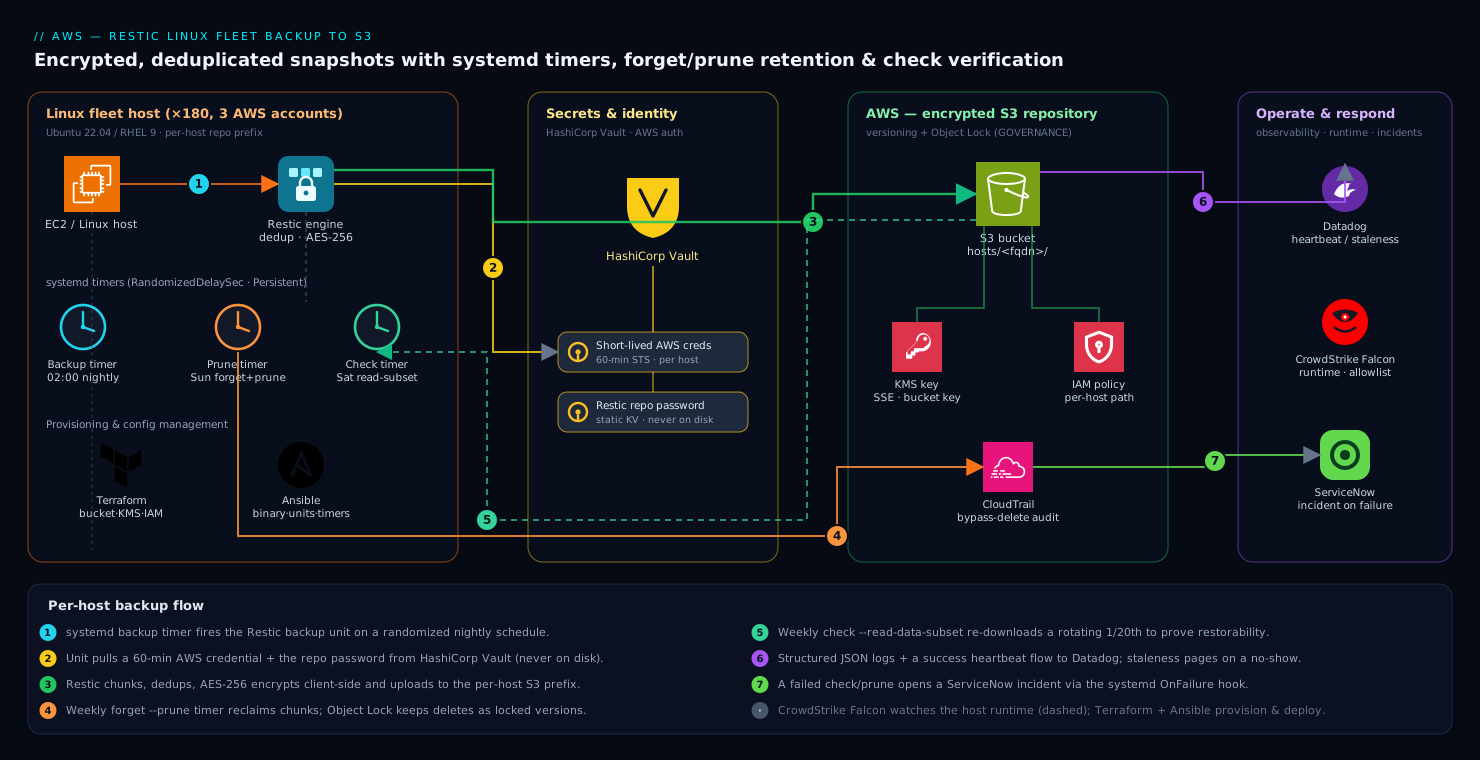
The shape is deliberately simple, which is the point — a backup system you cannot reason about is one you will not trust in an incident. Every Linux host runs the Restic binary locally and writes to one shared S3 bucket (or a small set, partitioned per environment), with each host isolated to its own prefix/path inside the repository layout so a compromised node cannot read or delete another host’s snapshots. The flow per host is: a systemd timer fires the backup unit on a randomized schedule; the unit pulls a short-lived AWS credential and the repo password from HashiCorp Vault; Restic chunks, dedups, encrypts, and uploads to S3; a separate timer runs forget --prune on a retention policy; and a weekly timer runs check to verify integrity. CrowdStrike Falcon watches the host runtime, Datadog ingests the structured run logs and a heartbeat metric so a missing backup pages someone, and a failed verification opens a ServiceNow incident. S3 itself enforces durability and immutability: versioning + Object Lock so even root on a host cannot truly destroy history. Terraform provisions the bucket, KMS key, IAM, and lock policy; Ansible owns everything on the host.
1. Provision the S3 bucket, KMS key, and IAM (Terraform)
Storage and access policy are infrastructure, so they live in Terraform, reviewed and applied through the normal pipeline rather than clicked together in the console. The non-negotiables: versioning on, Object Lock on (so deletes are tombstones, not destruction), default encryption with a customer-managed KMS key, public access fully blocked, and a lifecycle rule that pushes old versions to cheaper storage.
resource "aws_kms_key" "restic" {
  description             = "Restic backup repo encryption (S3 SSE)"
  deletion_window_in_days = 30
  enable_key_rotation     = true
}

resource "aws_s3_bucket" "restic" {
  bucket              = "acme-restic-fleet-prod-use1"
  object_lock_enabled = true   # must be set at creation
}

resource "aws_s3_bucket_versioning" "restic" {
  bucket = aws_s3_bucket.restic.id
  versioning_configuration { status = "Enabled" }
}

resource "aws_s3_bucket_object_lock_configuration" "restic" {
  bucket = aws_s3_bucket.restic.id
  rule {
    default_retention {
      mode = "GOVERNANCE"   # blocks deletes for users without the bypass permission
      days = 30
    }
  }
}

resource "aws_s3_bucket_server_side_encryption_configuration" "restic" {
  bucket = aws_s3_bucket.restic.id
  rule {
    apply_server_side_encryption_by_default {
      sse_algorithm     = "aws:kms"
      kms_master_key_id = aws_kms_key.restic.arn
    }
    bucket_key_enabled = true   # cuts KMS request cost dramatically
  }
}

resource "aws_s3_bucket_public_access_block" "restic" {
  bucket                  = aws_s3_bucket.restic.id
  block_public_acls       = true
  block_public_policy     = true
  ignore_public_acls      = true
  restrict_public_buckets = true
}

resource "aws_s3_bucket_lifecycle_configuration" "restic" {
  bucket = aws_s3_bucket.restic.id
  rule {
    id     = "transition-noncurrent"
    status = "Enabled"
    noncurrent_version_transition {
      noncurrent_days = 30
      storage_class   = "STANDARD_IA"
    }
  }
}
A note on encryption that trips people up: Restic already encrypts client-side, so the data in S3 is ciphertext regardless. The KMS SSE layer here is defense-in-depth and satisfies the “encryption at rest with our key” line in the company’s control framework — it is not what protects the data confidentiality (Restic’s repo password does that). Keep both.
For host access, define a least-privilege IAM policy. Each host should be able to read/write objects but not delete history outside the Object Lock window. Scope writes per host with a path condition.
{
  "Version": "2012-10-17",
  "Statement": [
    {
      "Sid": "ResticReadWrite",
      "Effect": "Allow",
      "Action": ["s3:GetObject", "s3:PutObject", "s3:ListBucket"],
      "Resource": [
        "arn:aws:s3:::acme-restic-fleet-prod-use1",
        "arn:aws:s3:::acme-restic-fleet-prod-use1/hosts/${aws:PrincipalTag/hostname}/*"
      ]
    },
    {
      "Sid": "KmsUse",
      "Effect": "Allow",
      "Action": ["kms:Decrypt", "kms:GenerateDataKey"],
      "Resource": "arn:aws:kms:us-east-1:111122223333:key/your-key-id"
    }
  ]
}
2. Issue short-lived credentials and the repo password from Vault
Long-lived AWS keys on 180 hosts are exactly the kind of credential sprawl the company is trying to kill. HashiCorp Vault solves two problems at once here: it issues short-lived AWS credentials through its AWS secrets engine (so each host gets a 60-minute STS-style credential, not a permanent key), and it stores the Restic repository password as a static secret that hosts read at runtime — never written to disk.
Configure the Vault AWS secrets engine to vend the IAM policy from Step 1:
vault secrets enable -path=aws-backup aws

vault write aws-backup/roles/restic-host \
  credential_type=assumed_role \
  role_arns=arn:aws:iam::111122223333:role/restic-fleet-host

# Store the repository password (generated once, kept secret forever)
vault kv put secret/restic/repo password="$(openssl rand -base64 48)"
On the host, a tiny wrapper script fetches both at backup time. Hosts authenticate to Vault with their AppRole or, better in AWS, the Vault AWS auth method tied to the instance’s IAM role — so identity is the machine itself, not a shared token.
#!/usr/bin/env bash
# /usr/local/bin/restic-env  — sourced by the systemd unit, never logs secrets
set -euo pipefail

VAULT_ADDR="https://vault.acme.internal:8200"
export VAULT_ADDR

# Authenticate as this EC2 instance (AWS auth method)
VAULT_TOKEN="$(vault login -method=aws -field=token role=restic-host 2>/dev/null)"
export VAULT_TOKEN

# Short-lived AWS creds for S3
creds="$(vault read -format=json aws-backup/creds/restic-host)"
export AWS_ACCESS_KEY_ID="$(jq -r .data.access_key <<<"$creds")"
export AWS_SECRET_ACCESS_KEY="$(jq -r .data.secret_key <<<"$creds")"
export AWS_SESSION_TOKEN="$(jq -r .data.security_token <<<"$creds")"

# Restic repository + password
export RESTIC_REPOSITORY="s3:s3.us-east-1.amazonaws.com/acme-restic-fleet-prod-use1/hosts/$(hostname -f)"
export RESTIC_PASSWORD="$(vault kv get -field=password secret/restic/repo)"
The RESTIC_REPOSITORY path embeds the FQDN, which is what gives each host its own isolated namespace inside the bucket and pairs with the IAM path condition.
3. Install and pin the Restic binary across the fleet (Ansible)
Roll the binary out with Ansible so all 180 hosts run a known, checksum-verified version — never a distro package that drifts. Pinning matters because repository format and prune behavior have changed across releases; you want the whole fleet identical.
# roles/restic/tasks/main.yml
- name: Install restic binary (pinned + checksum-verified)
  ansible.builtin.get_url:
    url: "https://github.com/restic/restic/releases/download/v0.16.4/restic_0.16.4_linux_amd64.bz2"
    dest: /tmp/restic.bz2
    checksum: "sha256:0e0a2b...full_hash_here"
    mode: "0644"

- name: Decompress and install
  ansible.builtin.shell: "bunzip2 -c /tmp/restic.bz2 > /usr/local/bin/restic"
  args: { creates: /usr/local/bin/restic }

- name: Set permissions and capability for reading all files
  ansible.builtin.file:
    path: /usr/local/bin/restic
    owner: root
    group: root
    mode: "0750"

- name: Allow restic to read protected files without full root at runtime
  community.general.capabilities:
    path: /usr/local/bin/restic
    capability: cap_dac_read_search+ep
    state: present

- name: Deploy the Vault env wrapper
  ansible.builtin.copy:
    src: restic-env
    dest: /usr/local/bin/restic-env
    mode: "0750"
The cap_dac_read_search capability lets Restic read every file it backs up (config under /etc, data dirs owned by service accounts) without running the backup as unrestricted root — a small but real least-privilege win.
Initialize each host’s repository once (idempotent — init is a no-op if it already exists):
source /usr/local/bin/restic-env
restic cat config >/dev/null 2>&1 || restic init
4. Define the backup unit and timer (systemd)
The fleet standard is systemd timers, not cron, for three concrete reasons: RandomizedDelaySec spreads 180 hosts across a window so they do not all hammer S3 at 02:00; Persistent=true runs a missed backup when a host that was off comes back; and journald gives structured, queryable logs that Datadog ingests cleanly. Ansible templates these per host.
# /etc/systemd/system/restic-backup.service
[Unit]
Description=Restic backup to S3
Wants=network-online.target
After=network-online.target

[Service]
Type=oneshot
EnvironmentFile=-/etc/restic/excludes.env
ExecStart=/usr/local/bin/restic-backup.sh
Nice=10
IOSchedulingClass=best-effort
IOSchedulingPriority=7
# Hardening
ProtectSystem=strict
ReadWritePaths=/var/cache/restic
PrivateTmp=true
NoNewPrivileges=true
# /etc/systemd/system/restic-backup.timer
[Unit]
Description=Nightly Restic backup

[Timer]
OnCalendar=*-*-* 02:00:00
RandomizedDelaySec=2700      # spread the fleet across 45 minutes
Persistent=true

[Install]
WantedBy=timers.target
The unit calls a wrapper that sources the Vault env, runs the backup with sane excludes, and tags the snapshot so you can later filter by host or environment:
#!/usr/bin/env bash
# /usr/local/bin/restic-backup.sh
set -euo pipefail
source /usr/local/bin/restic-env

restic backup \
  /etc /home /var/lib/myapp /var/lib/postgresql \
  --exclude-caches \
  --exclude /var/lib/myapp/tmp \
  --exclude-file /etc/restic/excludes.txt \
  --tag fleet --tag "$(hostname -s)" --tag prod \
  --host "$(hostname -f)" \
  --json | tee -a /var/log/restic-backup.json
For the stateful Postgres boxes, do not just copy a live data directory — that is a torn, unrestorable snapshot. Stream a consistent dump into Restic via stdin instead, which also dedups beautifully across nights:
sudo -u postgres pg_dumpall \
  | restic backup --stdin --stdin-filename pg_dumpall.sql \
      --tag postgres --host "$(hostname -f)"
Enable everything through Ansible:
- name: Enable and start backup timer
  ansible.builtin.systemd:
    name: restic-backup.timer
    enabled: true
    state: started
    daemon_reload: true
5. Automate retention with forget + prune
Without retention, the repository grows forever and the S3 bill with it. Restic’s forget applies a policy (keep N daily/weekly/monthly snapshots) and marks the rest unreferenced; prune then physically reclaims the freed chunks. The standard fleet policy keeps 7 daily, 4 weekly, 6 monthly — enough to satisfy the company’s RPO while controlling cost.
Run pruning on its own timer, offset from the backup window, because prune is I/O- and memory-heavy and you do not want it racing the nightly backup:
#!/usr/bin/env bash
# /usr/local/bin/restic-prune.sh
set -euo pipefail
source /usr/local/bin/restic-env

restic forget \
  --keep-daily 7 --keep-weekly 4 --keep-monthly 6 \
  --host "$(hostname -f)" \
  --prune \
  --json | tee -a /var/log/restic-prune.json
# /etc/systemd/system/restic-prune.timer
[Timer]
OnCalendar=Sun *-*-* 04:30:00   # weekly, well after the nightly backup
RandomizedDelaySec=3600
Persistent=true
One subtlety with Object Lock: prune issues S3 deletes for unreferenced pack files, but Object Lock in GOVERNANCE mode blocks deletes until the retention window (30 days) elapses. That is intentional and correct — the data is not lost, it becomes a non-current version that the lifecycle rule eventually expires. Size your KMS/storage budget knowing pruned-but-locked data lingers for the lock window. If you need pruning to actually free S3 space sooner, shorten the Object Lock default retention to match, and accept the weaker immutability guarantee — a deliberate tradeoff, not an accident.
6. Verify integrity weekly with check
This is the step the old rsync system never had and the reason this project exists. restic check re-reads the repository structure; check --read-data-subset actually downloads and re-hashes a fraction of the real data to prove it is restorable, catching bit-rot or a truncated upload that structure-only checks miss. Reading the entire repo weekly across 180 hosts would be expensive in S3 egress, so verify a rotating subset — over several weeks you cover everything.
#!/usr/bin/env bash
# /usr/local/bin/restic-check.sh
set -euo pipefail
source /usr/local/bin/restic-env

# Structure check every run; re-read 5% of data packs (rotates via the "n/100" form)
week="$(date +%V)"
subset="$(( (week % 20) + 1 ))/20"   # 1/20th each week => full coverage in 20 weeks

restic check --read-data-subset="${subset}" --json \
  | tee -a /var/log/restic-check.json
# /etc/systemd/system/restic-check.timer
[Timer]
OnCalendar=Sat *-*-* 05:00:00
RandomizedDelaySec=3600
Persistent=true
7. Wire backups into observability and incident response
A backup nobody watches is the rsync-to-full-disk failure again. Three integrations turn this into an operated system.
Datadog scrapes the structured JSON logs and, crucially, tracks a heartbeat — the absence of a successful backup is the alert that matters, since a host that never runs the unit emits no error at all. Emit a metric on success and alert on staleness:
# Appended to restic-backup.sh on success
echo "restic.backup.success:1|c|#host:$(hostname -s),env:prod" \
  | nc -u -w1 127.0.0.1 8125   # Datadog DogStatsD
Then a Datadog monitor of type metric alerts when restic.backup.success has no data for > 26 hours per host — catching both outright failures and silent no-shows.
A failed check or prune is a real problem that needs a human and a paper trail, so open a ServiceNow incident automatically from the systemd OnFailure= hook:
# add to restic-check.service
[Unit]
OnFailure=restic-incident@%n.service
# /usr/local/bin/restic-incident.sh — called by the OnFailure unit
curl -s -X POST "https://acme.service-now.com/api/now/table/incident" \
  -u "$SNOW_USER:$SNOW_PASS" -H "Content-Type: application/json" \
  -d "{\"short_description\":\"Restic verification FAILED on $(hostname -f)\",
       \"urgency\":\"2\",\"category\":\"backup\"}"
CrowdStrike Falcon is already on every host for runtime protection; the relevant move here is to allowlist the Restic binary and its expected S3 egress so the backup’s heavy filesystem reads and network activity do not generate false-positive detections, while still flagging anomalies like Restic being invoked from an unexpected parent process — which would be a real signal of an attacker abusing your backup tooling to exfiltrate data.
Validation
Prove the system works before you need it — a backup you have never restored is a hypothesis, not a backup.
source /usr/local/bin/restic-env

# 1. Snapshots exist and are tagged correctly
restic snapshots --host "$(hostname -f)" --tag fleet

# 2. Full structural + data integrity (one-off, read everything for a single host)
restic check --read-data

# 3. The real test: restore to a scratch dir and diff
restic restore latest --target /tmp/restore-test --include /etc
diff -r /etc /tmp/restore-test/etc && echo "RESTORE VERIFIED"

# 4. Postgres: restore the dump and confirm it loads
restic dump latest pg_dumpall.sql | sudo -u postgres psql -d postgres --set ON_ERROR_STOP=on

# 5. Confirm timers are scheduled fleet-wide (run via Ansible ad-hoc)
# ansible all -m command -a "systemctl list-timers restic-*"
Check that the heartbeat alert actually fires: stop the timer on one canary host, wait out the window, and confirm Datadog pages. An alert you have not tested is decoration.
Rollback / teardown
To safely remove a host from the fleet or roll the whole thing back:
# Per host: stop scheduling, leave data intact for the retention window
sudo systemctl disable --now restic-backup.timer restic-prune.timer restic-check.timer

# Remove only THIS host's snapshots (does not touch other hosts' paths)
source /usr/local/bin/restic-env
restic forget --host "$(hostname -f)" --keep-last 0 --prune
Tearing down the storage is intentionally hard, which is the safety feature working. Because Object Lock is on, you cannot simply delete the bucket until every object’s retention window has lapsed — or you delete versions with the s3:BypassGovernanceRetention permission, which only break-glass admins hold. Destroy the Terraform stack only after confirming no host still depends on it:
# Break-glass: only with the bypass IAM permission, logged in CloudTrail
aws s3api delete-objects --bucket acme-restic-fleet-prod-use1 \
  --bypass-governance-retention --delete "$(...)"
terraform destroy -target=aws_s3_bucket.restic
Keep the KMS key in its 30-day deletion window rather than force-deleting — if you destroy the key, every backup encrypted under it becomes permanently unreadable, including the SSE layer.
Common pitfalls
- One repository password for the whole fleet, lost. The repo password is unrecoverable by design — lose it and every snapshot is permanently undecryptable. That is exactly why it lives in Vault with versioning and backup, not in a host file or someone’s password manager.
- Concurrent
pruneandbackupon the same repo.prunetakes an exclusive lock; if a backup overlaps it, one fails. Offset the timers (Steps 4–6 do this) and never run them in the same window. - Backing up a live database directory. Copying
/var/lib/postgresqlwhile Postgres is writing produces a torn, unrestorable snapshot. Stream a consistentpg_dumpallvia--stdin(Step 4) instead. - Trusting
checkwithout--read-data. A plaincheckvalidates structure, not content; it will pass on a repo with silently corrupted data packs. The rotating--read-data-subset(Step 6) is what makes verification real. - Forgetting the heartbeat alert. A host that never runs its timer emits no error — so error-only alerting misses the worst failures. Alert on staleness, not just on failure.
- Surprise at S3 not shrinking after prune. Object Lock keeps pruned data as locked non-current versions for the retention window; storage frees on the lifecycle schedule, not instantly. Expected, not a bug.
Security notes
The data is encrypted client-side with AES-256 before it leaves the host, so S3 and AWS never see plaintext — the repo password is the root of that confidentiality, which is why it is Vault-held and never on disk. The KMS SSE layer is defense-in-depth and satisfies the “our key, at rest” control. Per-host path isolation (IAM path condition + per-host repo prefix) means a compromised node can read and write only its own snapshots, never the fleet’s. Object Lock in GOVERNANCE mode defeats ransomware that tries to delete backups — even host root cannot truly destroy history within the window. Vault-issued 60-minute AWS credentials mean a stolen host credential expires almost immediately and there is no long-lived key to find. CrowdStrike Falcon watches for Restic being abused as an exfiltration tool from an unexpected process tree.
Cost notes
Restic’s deduplication is the dominant cost lever: a fleet of mostly-similar Ubuntu hosts shares base-OS chunks, and incremental nightly deltas are tiny, so storage grows far slower than the raw data footprint. Push non-current (pruned, lock-held) versions to STANDARD_IA via the lifecycle rule for a ~40% storage saving on cold history. Enable S3 Bucket Keys (bucket_key_enabled = true) to collapse per-object KMS calls into per-bucket ones — on a fleet writing millions of small pack objects, this turns a meaningful KMS request bill into a rounding error. Verify with --read-data-subset rather than full --read-data every week to keep S3 egress (the sneaky line item) proportionate — a rotating 1/20th gives full coverage over the quarter at a twentieth of the transfer. Finally, the RandomizedDelaySec spread is a quiet cost control too: it avoids a thundering herd that would otherwise spike request rates and retries.