A mid-size payments company has three teams shipping forty microservices onto EKS, and the observability bill from their incumbent SaaS APM vendor has crossed the number that makes a CFO ask hard questions — usage-based ingest pricing turned a noisy quarter into a five-figure surprise. The platform team’s mandate is blunt: keep distributed tracing, metrics, and logs in one pane of glass, keep the data inside the company’s own VPC for a payments-compliance reason, and stop paying per-gigabyte to a vendor for telemetry the team generates itself. SigNoz fits the brief exactly — it is an open-source, OpenTelemetry-native APM that stores traces, metrics, and logs in a single ClickHouse columnar database you run yourself, with correlated trace-to-log navigation and service dashboards out of the box. This guide walks through standing it up on Kubernetes with the official Helm chart, pointing your workloads’ OTLP exporters at it, validating the pipeline end to end, and operating it like a service the on-call team can trust.
Prerequisites
- A Kubernetes cluster, 1.28+ (EKS/AKS/GKE or on-prem), with at least 3 worker nodes and ~8 vCPU / 16 GiB free for the stack; ClickHouse is the memory-hungry part.
kubectlandhelm3.13+ on your workstation, both pointed at the target cluster (kubectl config current-contextshows the right one).- A default StorageClass that provisions block volumes (gp3 on EKS, managed-csi on AKS, pd-ssd on GKE). ClickHouse needs durable PVs; do not run it on emptyDir.
- A namespace you control and cluster-admin (or enough RBAC to create CRDs, StatefulSets, and a LoadBalancer/Ingress).
- DNS you can point at an ingress (e.g.
signoz.internal.example.com) and a TLS certificate path if you terminate at the cluster. - At least one application emitting (or ready to emit) OTLP over gRPC/HTTP — or the OpenTelemetry demo, which we use to prove the pipeline.
Target topology
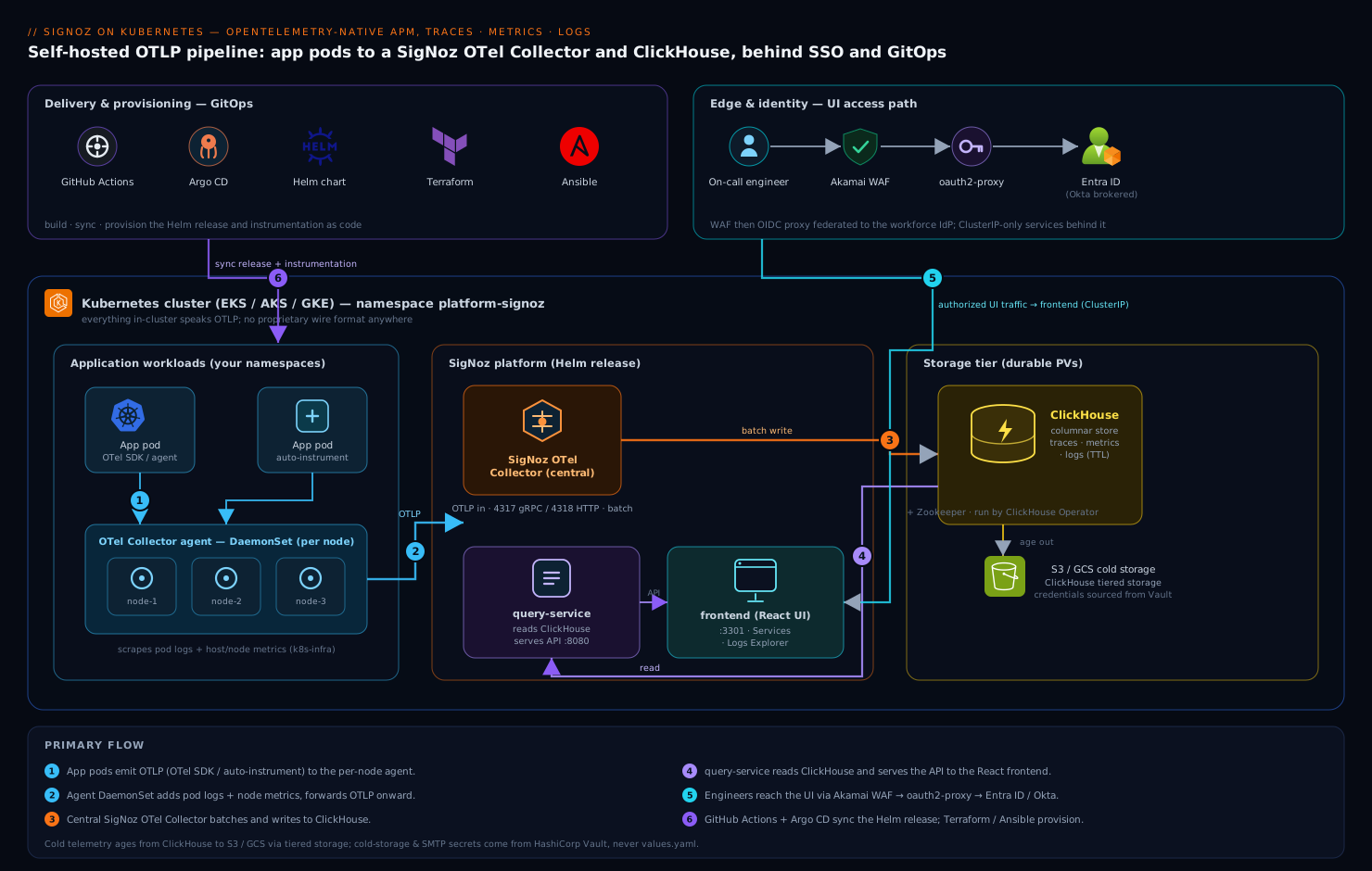
SigNoz on Kubernetes is four cooperating tiers, and keeping them straight in your head makes everything below obvious. At the bottom is ClickHouse (run by the ClickHouse Operator the chart bundles), the columnar store that holds traces, metrics, and logs in separate tables — this is the component that earns its keep, since columnar storage is why SigNoz can be cheap on disk and fast on aggregate queries. Above it sits the SigNoz OTel Collector, the cluster’s central ingest point: it receives OTLP on ports 4317 (gRPC) and 4318 (HTTP), batches, and writes to ClickHouse. Beside it the SigNoz query-service reads ClickHouse and serves the API; the frontend is the React UI. Around the edge, your application pods run the OpenTelemetry SDK (or an auto-instrumentation agent) and a per-node OTel Collector agent DaemonSet that scrapes pod logs and host metrics and forwards OTLP to the central collector. Everything in the cluster talks OTLP — there is no proprietary wire format anywhere in this picture, which is the whole point of choosing an OpenTelemetry-native tool.
1. Prepare the namespace, storage, and Helm repo
Create a dedicated namespace and confirm a default StorageClass exists before anything else — a missing default SC is the single most common reason the install hangs with pods stuck in Pending.
kubectl create namespace platform-signoz
kubectl get storageclass            # one row must show "(default)"

# If none is default, mark one (example: gp3 on EKS):
kubectl patch storageclass gp3 \
  -p '{"metadata":{"annotations":{"storageclass.kubernetes.io/is-default-class":"true"}}}'

helm repo add signoz https://charts.signoz.io
helm repo update
helm search repo signoz/signoz --versions | head
Pin a chart version rather than tracking latest, so a helm upgrade never surprises you with a ClickHouse schema bump during an incident:
export SIGNOZ_CHART_VERSION="0.60.0" # pick a concrete version from the search above
2. Write a values.yaml sized for production
The defaults run, but they run small. Create signoz-values.yaml with persistence, resource requests, and retention set deliberately. The retention numbers below are the lever that controls your disk bill — tune them to your compliance window, not higher.
# signoz-values.yaml
clickhouse:
  installCustomStorageClass: false
  persistence:
    enabled: true
    size: 100Gi               # traces+logs dominate; size to your ingest rate
  resourcesPreset: "large"    # ~ 4 CPU / 8Gi; ClickHouse wants headroom
  # Three replicas + zookeeper for HA in prod; single-node is fine to start
  replicasCount: 1

queryService:
  resources:
    requests: { cpu: "500m", memory: "1Gi" }
    limits:   { cpu: "1",    memory: "2Gi" }

otelCollector:
  resources:
    requests: { cpu: "500m", memory: "1Gi" }
    limits:   { cpu: "2",    memory: "4Gi" }
  # Expose OTLP inside the cluster only; ingress handles the UI (step 4)
  serviceType: ClusterIP

frontend:
  service:
    type: ClusterIP

# Retention (hours). 360h traces ≈ 15 days, 1080h metrics ≈ 45 days.
# These drive ClickHouse TTLs and therefore disk usage.
retention:
  totalRetentionPeriod: 360h
  metricsTotalRetentionPeriod: 1080h
  logsTotalRetentionPeriod: 360h
A note on secrets: SigNoz’s own components do not need external credentials to start, but do not bake any S3/GCS cold-storage keys or SMTP passwords into this file. Pull those from HashiCorp Vault — run the Vault Agent Injector and reference the secret via an annotation on the pod, or sync it with the Vault Secrets Operator into a Kubernetes Secret the chart consumes. Keeping cold-storage and alert-channel credentials out of values.yaml (and out of git) is the difference between a clean review and a leaked-credential incident.
3. Install the chart and watch it converge
Install into the namespace with your pinned version and values:
helm install signoz signoz/signoz \
  --namespace platform-signoz \
  --version "${SIGNOZ_CHART_VERSION}" \
  --values signoz-values.yaml \
  --wait --timeout 15m
ClickHouse and Zookeeper come up first; query-service and the collector wait on them. Watch the rollout:
kubectl -n platform-signoz get pods -w
# Expect, eventually all Running/Ready:
#   chi-signoz-clickhouse-cluster-0-0-0   Running
#   signoz-zookeeper-0                     Running
#   signoz-otel-collector-...              Running
#   signoz-query-service-0                 Running
#   signoz-frontend-...                    Running

# If a pod is Pending, it is almost always storage or resources:
kubectl -n platform-signoz describe pod -l app.kubernetes.io/component=clickhouse | tail -30
kubectl -n platform-signoz get pvc
The chart also installs the k8s-infra sub-chart — a DaemonSet of OTel Collector agents plus a cluster-metrics deployment — which immediately begins collecting node/pod metrics and pod logs and forwarding them to the central collector. That is why logs and infra metrics appear in the UI before you have instrumented a single application.
4. Expose the UI behind your ingress and SSO
Reach the UI quickly with a port-forward to confirm it is alive, then put it behind a real ingress — never expose query-service or the collector to the public internet directly.
# Quick smoke test only:
kubectl -n platform-signoz port-forward svc/signoz-frontend 3301:3301
# open http://localhost:3301
For durable access, front the frontend service with an Ingress and terminate TLS at the cluster. Authentication is the part that makes security sign off: SigNoz supports SAML/OIDC SSO on its paid tier, but the robust pattern that works on any edition is to put an OIDC-aware proxy in front of it and federate to your IdP. Wire oauth2-proxy to Microsoft Entra ID (or Okta as the workforce IdP, brokered to Entra) so only authenticated, group-scoped employees reach the dashboards:
# ingress-signoz.yaml
apiVersion: networking.k8s.io/v1
kind: Ingress
metadata:
  name: signoz
  namespace: platform-signoz
  annotations:
    nginx.ingress.kubernetes.io/auth-url: "https://oauth2.internal.example.com/oauth2/auth"
    nginx.ingress.kubernetes.io/auth-signin: "https://oauth2.internal.example.com/oauth2/start?rd=$scheme://$host$request_uri"
spec:
  ingressClassName: nginx
  tls:
    - hosts: ["signoz.internal.example.com"]
      secretName: signoz-tls
  rules:
    - host: signoz.internal.example.com
      http:
        paths:
          - path: /
            pathType: Prefix
            backend:
              service:
                name: signoz-frontend
                port: { number: 3301 }
kubectl apply -f ingress-signoz.yaml
Here oauth2-proxy validates the Entra/Okta token and only then lets the request reach SigNoz; group claims map to who may view production traces. Put Akamai (or your CDN/WAF) in front of the ingress for TLS, anycast, and bot/flood protection if the endpoint is reachable beyond the corporate network.
5. Point your applications’ OTLP exporters at SigNoz
Now feed it real telemetry. Every emitter — SDK or agent — sends OTLP to the central collector’s in-cluster DNS name: signoz-otel-collector.platform-signoz.svc.cluster.local, gRPC on 4317, HTTP on 4318. For a containerized service using the OpenTelemetry SDK, set the standard env vars (no vendor SDK, no API key — that portability is the dividend of OpenTelemetry):
# In your app Deployment's container spec:
env:
  - name: OTEL_EXPORTER_OTLP_ENDPOINT
    value: "http://signoz-otel-collector.platform-signoz.svc.cluster.local:4317"
  - name: OTEL_EXPORTER_OTLP_PROTOCOL
    value: "grpc"
  - name: OTEL_SERVICE_NAME
    value: "checkout-api"
  - name: OTEL_RESOURCE_ATTRIBUTES
    value: "deployment.environment=prod,service.namespace=payments,service.version=2.7.1"
  # Sample to control cost on high-traffic services:
  - name: OTEL_TRACES_SAMPLER
    value: "parentbased_traceidratio"
  - name: OTEL_TRACES_SAMPLER_ARG
    value: "0.1"           # 10% — raise for low-traffic, lower for firehose services
To instrument without touching app code, use the OpenTelemetry Operator’s auto-instrumentation: install the operator, create an Instrumentation CR pointing at the same collector endpoint, and annotate your pods. For a Java service:
kubectl apply -f https://github.com/open-telemetry/opentelemetry-operator/releases/latest/download/opentelemetry-operator.yaml
# instrumentation.yaml
apiVersion: opentelemetry.io/v1alpha1
kind: Instrumentation
metadata:
  name: otel-auto
  namespace: payments
spec:
  exporter:
    endpoint: "http://signoz-otel-collector.platform-signoz.svc.cluster.local:4317"
  propagators: ["tracecontext", "baggage"]
  sampler:
    type: parentbased_traceidratio
    argument: "0.1"
kubectl apply -f instrumentation.yaml
# Then add this annotation to the pod template of a Java workload:
#   instrumentation.opentelemetry.io/inject-java: "true"
Roll out the change through your existing delivery path — a GitHub Actions (or Jenkins) pipeline that builds and tests, with Argo CD syncing the updated manifests into the cluster — so the instrumentation env vars land via GitOps and are reviewable in a PR, not kubectl-applied by hand. Manage the SigNoz Helm release itself the same way: declare it in Terraform (the helm_release resource) or as an Argo CD Application, with Ansible handling any node-level prerequisites like sysctl tuning for ClickHouse on the worker nodes.
6. Verify traces, logs, and metrics in the UI
Generate load (deploy the OpenTelemetry demo or hit your instrumented service), then confirm all three signals correlate.
# Optional: the official OTel demo, repointed at SigNoz, is the fastest end-to-end proof.
helm install otel-demo open-telemetry/opentelemetry-demo \
  --namespace otel-demo --create-namespace \
  --set 'default.envOverrides[0].name=OTEL_EXPORTER_OTLP_ENDPOINT' \
  --set 'default.envOverrides[0].value=http://signoz-otel-collector.platform-signoz.svc.cluster.local:4317'
In the SigNoz UI: Services should list each service.name with p50/p99 latency, request rate, and error rate (the RED metrics) — this is your service-level dashboard, populated automatically from traces. Click a service → a slow trace → and use the trace-to-logs link to jump to that request’s logs in Logs Explorer, filtered by trace ID. That correlation — one click from a slow span to its logs — is the operational payoff and worth verifying explicitly.
Validation
Prove the pipeline from the wire up, not just from the UI:
# 1. The collector is receiving OTLP — send a synthetic trace with telemetrygen:
kubectl -n platform-signoz run telemetrygen --rm -it --restart=Never \
  --image=ghcr.io/open-telemetry/opentelemetry-collector-contrib/telemetrygen:latest -- \
  traces --otlp-endpoint signoz-otel-collector:4317 --otlp-insecure --traces 5

# 2. The collector's own metrics confirm accepted vs refused spans:
kubectl -n platform-signoz port-forward svc/signoz-otel-collector 8888:8888 &
curl -s localhost:8888/metrics | grep -E 'otelcol_receiver_accepted_spans|otelcol_exporter_send_failed'

# 3. Data actually landed in ClickHouse — query the traces table directly:
kubectl -n platform-signoz exec -it chi-signoz-clickhouse-cluster-0-0-0 -- \
  clickhouse-client --query \
  "SELECT count() FROM signoz_traces.signoz_index_v3 WHERE timestamp > now() - INTERVAL 10 MINUTE"

# 4. Query-service health and the API behind the UI:
kubectl -n platform-signoz exec -it signoz-query-service-0 -- wget -qO- localhost:8080/api/v1/health
A non-zero count in step 3 and accepted_spans rising in step 2 mean the path SDK → agent → collector → ClickHouse is intact. If send_failed climbs, the collector cannot reach ClickHouse — check the ClickHouse pod and the collector logs.
Rollback / teardown
Because the release is Helm-managed, rollback is clean. To revert a bad upgrade:
helm -n platform-signoz history signoz
helm -n platform-signoz rollback signoz <previous-revision> --wait
To remove SigNoz entirely — note that Helm does not delete PVCs, so storage (and your telemetry) survives an uninstall unless you remove the volumes explicitly:
helm -n platform-signoz uninstall signoz
helm -n otel-demo uninstall otel-demo            # if you installed the demo

# Data is still on disk until you delete the claims — do this only to wipe telemetry:
kubectl -n platform-signoz delete pvc -l app.kubernetes.io/instance=signoz
kubectl delete namespace platform-signoz otel-demo
Before any teardown, if the data matters, snapshot it: take a ClickHouse BACKUP to object storage, or snapshot the underlying PVs through your CSI driver.
Common pitfalls
- No default StorageClass → ClickHouse stuck
Pending. The most frequent failure. Mark a default SC (step 1) before installing. - Under-provisioned ClickHouse → OOMKills under query load. Aggregations are memory-intensive; give ClickHouse a real
resourcesPresetand limits, and watchkubectl top pod. - Exporting to the wrong endpoint. Apps must hit the in-cluster service DNS, not
localhost. gRPC is 4317, HTTP 4318 — mixing them up yields silent connection refusals. - No sampling on a firehose service. 100% trace ingest from a high-QPS service fills ClickHouse fast. Set
OTEL_TRACES_SAMPLER_ARGdeliberately per service. - Retention left at defaults. If you do not set the retention block, disk grows until the PV fills and ClickHouse wedges. Set TTLs to your compliance window in step 2.
helm upgradeacross a schema change mid-incident. Pin the chart version; test upgrades in staging first, since ClickHouse migrations run on upgrade.
Security notes
Keep the collector’s OTLP ports and query-service ClusterIP-only; never put a public LoadBalancer on them — telemetry often contains request paths, user IDs, and headers you do not want exposed. Gate the UI behind oauth2-proxy → Entra ID / Okta with group-based access so only authorized engineers see production traces, and front it with Akamai for WAF if it is internet-reachable. Source any cold-storage (S3/GCS) and SMTP credentials from HashiCorp Vault, never values.yaml or git. Scrub PII at the collector with a transform/redaction processor before it reaches ClickHouse. Treat the cluster itself as a workload to defend: Wiz (and Wiz Code on your IaC) continuously scans the manifests and live cluster for posture drift like an accidentally-public service or an over-broad RBAC role, while CrowdStrike Falcon sensors on the node pool provide runtime threat detection feeding your SOC. A NetworkPolicy restricting who may reach the collector closes the loop.
Cost notes
The entire reason this project exists is cost, so engineer for it. ClickHouse’s columnar compression plus tuned retention TTLs are the two biggest levers — 15 days of traces and 45 days of metrics is a defensible default that keeps disk small; lengthen only where compliance demands. Sampling at the SDK is the second lever: dropping high-volume traces to 10% cuts ingest and storage proportionally with negligible loss of signal on healthy services (keep error traces with a tail sampler). Move old data to S3/GCS cold storage via ClickHouse tiered storage so hot SSD holds only the recent window. Run ClickHouse on right-sized nodes (memory-optimized instances earn their price here) and scale replicas only when query concurrency demands it. The payoff is concrete: the same traces-metrics-logs coverage the team had on the SaaS vendor, on infrastructure they already pay for, with a bill that scales with disk and compute they control rather than per-gigabyte ingest — which is exactly the number that started the conversation.
Where this lands
When it is running, an on-call engineer paged at 2 a.m. opens one SigNoz tab, sees checkout-api error rate spiking on the Services dashboard, clicks into a failing trace, follows the trace-to-logs link to the exact stack trace, and confirms the bad deploy — all without leaving the tool and without the data ever leaving the company’s VPC. Optionally raise a ServiceNow incident from the alert so there is a ticket and an audit trail, not just a Slack ping. That single-pane, OpenTelemetry-native, self-hosted workflow — traces, metrics, and logs correlated in one ClickHouse-backed UI you own — is the destination. Start with a single-node ClickHouse and the demo to prove the pipeline, then scale ClickHouse to a replicated cluster, harden the ingress, and bring it under GitOps; that is the path from a weekend proof to a platform the whole engineering org relies on.