A retail analytics team is drowning in copy jobs. Their clickstream lives as Parquet in an S3 data lake behind a Hive metastore, their slowly-changing dimension tables were migrated to Apache Iceberg last quarter for time-travel and schema evolution, and the authoritative customer and order records still sit in an operational PostgreSQL instance the application team will not let anyone touch directly. Today every “join clicks to orders” question means a nightly Spark job that lands a third copy of the data, and analysts wait until tomorrow for an answer that is already stale. The ask from the head of data is blunt: “Let me write one SQL query that joins all three, today, without moving the data.” That is exactly what Trino’s federated query engine does — and this guide deploys it properly on Kubernetes, with a coordinator, an autoscaling worker pool, and three live catalogs, so the join runs in seconds against the data where it already lives.
We will use the official trinodb/charts Helm chart, because hand-rolling coordinator and worker Deployments leaves you maintaining config-map plumbing and discovery wiring that the chart already gets right. By the end you will have a working cluster you can query from the Trino CLI, a Hive catalog over object storage, an Iceberg catalog sharing the same metastore, a PostgreSQL catalog over the live OLTP database, horizontal pod autoscaling on the workers, SSO through Okta federated to Entra ID, and database credentials injected by HashiCorp Vault instead of baked into a manifest.
Prerequisites
- A Kubernetes cluster, 1.28+, with at least 4 schedulable worker nodes (8 vCPU / 32 GiB each is a sane starting point for the worker pool). EKS, AKS, and GKE all work; node-group autoscaling should already be enabled.
kubectlandhelmv3.14+ on your workstation,kubectlcontext pointed at the target cluster.- The Trino CLI (
trino-cli-<version>-executable.jar) for validation. - An existing Hive Metastore reachable from the cluster (Thrift on
9083), or accept the bundled metastore note in Step 4. Both Hive and Iceberg catalogs share it. - Object storage for the lake (S3, ADLS Gen2, or GCS) and a credential or workload-identity binding for it.
- A reachable PostgreSQL instance (host, port, a read-only role).
- A namespace you can deploy into and
cluster-adminor equivalent RBAC to install the chart and an HPA. - The metrics-server installed in the cluster (the HPA depends on it).
Target topology
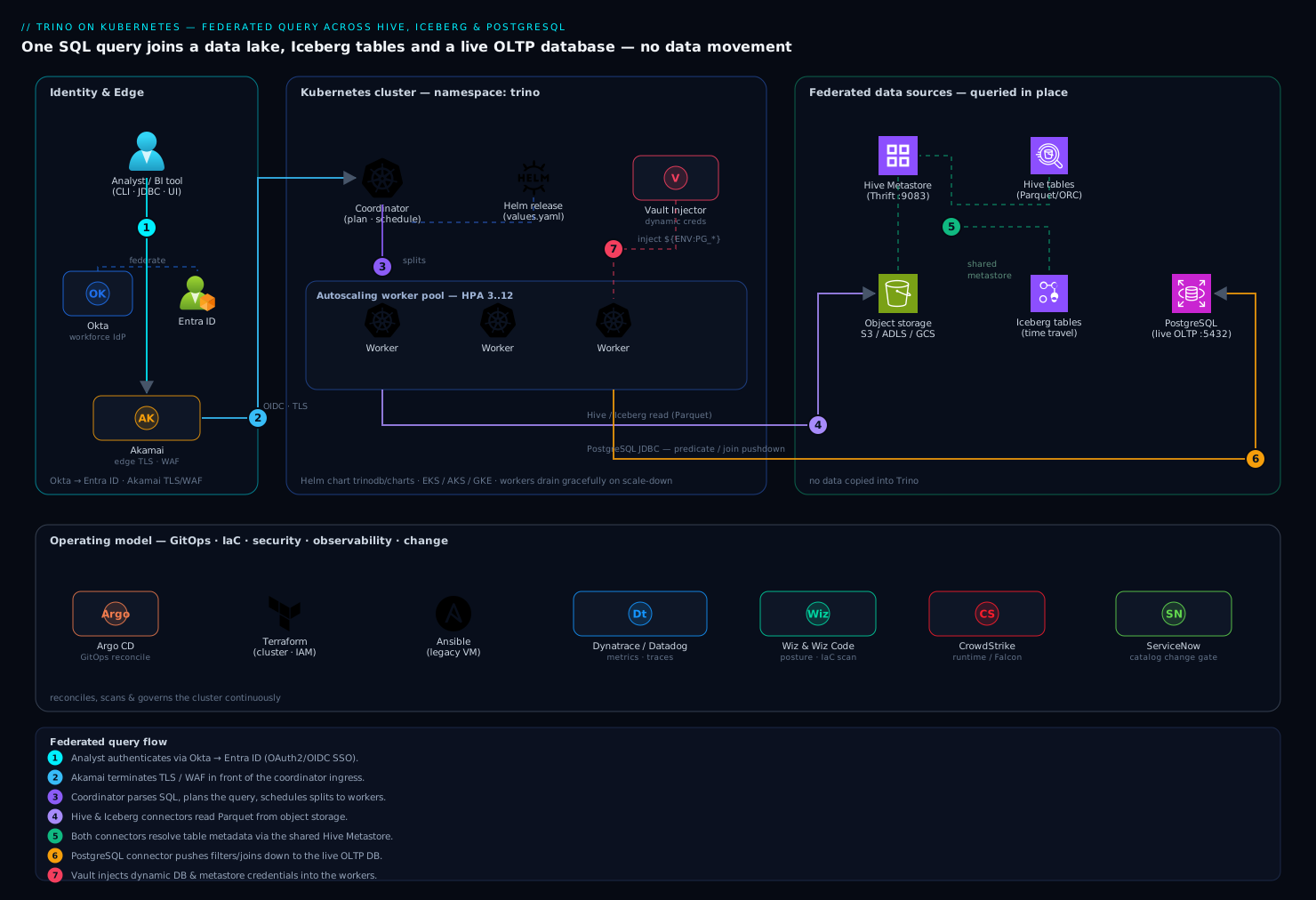
The cluster is a single coordinator Deployment and a pool of stateless worker Deployments. A client — BI tool, the CLI, or an application — authenticates at the coordinator, which parses the SQL, builds a distributed plan, and schedules splits across the workers. Each worker opens connections directly to the underlying systems through connectors: the Hive and Iceberg connectors read Parquet/ORC from object storage and resolve table metadata through the shared Hive Metastore; the PostgreSQL connector pushes filters down to the live OLTP database over JDBC. Nothing is copied into Trino — it is a query engine, not a store — so a three-way join streams partial results from three sources and assembles them in worker memory.
Around that core sits the operating model the platform team actually runs: Okta is the workforce IdP, federated to Microsoft Entra ID, so analysts get OAuth2 SSO into the coordinator UI and JDBC. HashiCorp Vault holds the PostgreSQL and metastore credentials and injects them as files via the Vault Agent sidecar, so no secret is ever written into a Helm value or a plain Kubernetes Secret. Akamai terminates TLS and provides WAF in front of the coordinator’s ingress. Dynatrace (or Datadog where a team standardizes there) scrapes the JMX/Prometheus metrics and traces query latency. Wiz and Wiz Code scan the cluster posture and the Terraform/Helm definitions in CI, CrowdStrike Falcon runs runtime protection on the nodes, ServiceNow is the change gate for catalog onboarding, and Argo CD reconciles the whole thing from Git, with Terraform owning the cluster and IAM and Ansible configuring any non-Kubernetes virtual appliances (a legacy metastore VM, for instance). We deploy the engine first, then layer those in.
1. Create the namespace and add the chart repo
Keep Trino in its own namespace so quotas, network policy, and RBAC are scoped cleanly.
kubectl create namespace trino

helm repo add trino https://trinodb.github.io/charts
helm repo update
helm search repo trino/trino --versions | head
Pin a chart version rather than tracking latest, so a helm upgrade is a deliberate act. Check what server image the chart defaults to and override it explicitly:
helm show values trino/trino | grep -A2 '^image:'
2. Author the base values file
The chart is driven by a values.yaml. Start with the coordinator/worker shape and resource requests; catalogs and autoscaling come next. Create trino-values.yaml:
image:
  repository: trinodb/trino
  tag: "447"            # pin a known-good Trino release

server:
  workers: 3            # initial floor; the HPA will manage the ceiling
  config:
    query.max-memory: "60GB"          # cluster-wide, across all workers
    query.max-memory-per-node: "12GB" # must be < worker JVM -Xmx

coordinator:
  jvm:
    maxHeapSize: "16G"
  resources:
    requests: { cpu: "2",  memory: "20Gi" }
    limits:   { cpu: "4",  memory: "20Gi" }

worker:
  jvm:
    maxHeapSize: "20G"
  resources:
    requests: { cpu: "6",  memory: "28Gi" }
    limits:   { cpu: "8",  memory: "28Gi" }

service:
  type: ClusterIP        # front it with an Ingress + Akamai, not a public LB
Two rules that bite people: set the JVM heap below the pod memory limit (leave headroom for off-heap and the OS, here 20 GiB heap under a 28 GiB limit), and keep query.max-memory-per-node comfortably under the worker heap. Mismatches here surface as OOMKilled workers under load, not as a clean error.
3. Wire the Hive catalog (object storage over the metastore)
Catalogs are .properties files; the chart materializes them from a catalogs: map. Add the Hive catalog pointing at your metastore and lake. Append to trino-values.yaml:
catalogs:
  hive: |
    connector.name=hive
    hive.metastore.uri=thrift://hive-metastore.data.svc.cluster.local:9083
    fs.native-s3.enabled=true
    s3.region=ap-south-1
    s3.path-style-access=false
    hive.recursive-directories=true
    hive.storage-format=PARQUET
For S3, prefer the cluster’s workload identity (IRSA on EKS, Workload Identity on GKE/AKS) over static keys so there is no access key in the file at all. Where a static key is unavoidable, it comes from Vault, not from this YAML — see Step 8. If your lake is ADLS Gen2, swap the fs.native-s3.* lines for fs.native-azure.enabled=true and the Azure auth properties; for GCS use fs.native-gcs.enabled=true.
4. Wire the Iceberg catalog (same metastore, table format that matters)
Iceberg gets its own catalog even though it shares the Hive Metastore — the connector is different and brings snapshot isolation, hidden partitioning, and time travel. Add to the catalogs: map:
  iceberg: |
    connector.name=iceberg
    iceberg.catalog.type=hive_metastore
    hive.metastore.uri=thrift://hive-metastore.data.svc.cluster.local:9083
    fs.native-s3.enabled=true
    s3.region=ap-south-1
    iceberg.file-format=PARQUET
Now a single Trino instance exposes the same physical metastore twice: hive.* reads the legacy Hive tables, iceberg.* reads the migrated Iceberg tables with FOR TIMESTAMP AS OF time-travel and $snapshots metadata. If you have no external metastore at all, the chart can deploy a bundled one for non-production, but for anything real run a dedicated metastore backed by its own database — a single shared metastore is the contract that lets both connectors agree on table locations.
5. Wire the PostgreSQL catalog (the live OLTP source)
This is the federation payoff — querying the operational database in place. Add to catalogs::
  postgresql: |
    connector.name=postgresql
    connection-url=jdbc:postgresql://orders-db.internal:5432/orders
    connection-user=${ENV:PG_USER}
    connection-password=${ENV:PG_PASSWORD}
    join-pushdown.enabled=true
    postgresql.array-mapping=AS_ARRAY
The ${ENV:...} references read environment variables the Vault sidecar will set (Step 8) — credentials never sit in the file. Use a read-only PostgreSQL role scoped to the tables analysts need; Trino’s predicate and join pushdown means it will hand WHERE clauses and even some joins back to PostgreSQL, so a misconfigured query will not table-scan your OLTP primary if you keep the role least-privileged and the application’s connection pool isolated.
6. Install the chart and bring the cluster up
With the values complete, install:
helm install trino trino/trino \
  --namespace trino \
  --version 0.34.0 \
  --values trino-values.yaml

kubectl -n trino rollout status deploy/trino-coordinator --timeout=180s
kubectl -n trino get pods -l app.kubernetes.io/name=trino
You should see one coordinator pod and three worker pods Running. Confirm the coordinator registered all the workers and loaded the catalogs from inside the cluster:
kubectl -n trino exec -it deploy/trino-coordinator -- \
  trino --execute "SELECT * FROM system.runtime.nodes"

kubectl -n trino exec -it deploy/trino-coordinator -- \
  trino --execute "SHOW CATALOGS"
SHOW CATALOGS must list hive, iceberg, postgresql, plus the built-in system, jmx, and tpch. If a catalog is missing, a properties file failed to parse — check the coordinator logs with kubectl -n trino logs deploy/trino-coordinator | grep -i catalog.
7. Enable autoscaling on the worker pool
Workers are stateless, which makes them a clean fit for the Horizontal Pod Autoscaler. The chart can render an HPA, but be deliberate: scaling Trino workers is not like scaling a web app, because a worker that disappears mid-query kills the splits assigned to it. Enable graceful shutdown so a scaled-down worker drains in-flight work first. Add to trino-values.yaml:
server:
  workerExtraConfig: |
    shutdown.grace-period=2m   # drain running splits before exit

worker:
  terminationGracePeriodSeconds: 150  # must exceed shutdown.grace-period

autoscaling:
  enabled: true
  minReplicas: 3
  maxReplicas: 12
  targetCPUUtilizationPercentage: 65
Apply it and verify the HPA is live and reading metrics:
helm upgrade trino trino/trino -n trino \
  --version 0.34.0 --values trino-values.yaml

kubectl -n trino get hpa trino-worker
The TARGETS column must show a real percentage, not <unknown> — <unknown> means metrics-server is missing or the pods declared no CPU requests. For bursty, query-depth-driven scaling rather than blunt CPU, many teams later replace this HPA with a KEDA ScaledObject reading the queued-query count from Trino’s JMX, but CPU-based HPA is the correct, simple starting point.
8. Inject credentials with Vault (no secrets in YAML)
The PostgreSQL user and password, and any static lake key, come from HashiCorp Vault via the Vault Agent Injector — they are mounted as files and exported into the catalog’s environment, so nothing sensitive lives in trino-values.yaml or a plain Secret. Assuming the Vault Agent Injector is installed and a Kubernetes auth role trino is bound to the workers’ service account, annotate the worker pods:
worker:
  annotations:
    vault.hashicorp.com/agent-inject: "true"
    vault.hashicorp.com/role: "trino"
    vault.hashicorp.com/agent-inject-secret-pg: "database/creds/orders-ro"
    vault.hashicorp.com/agent-inject-template-pg: |
      {{- with secret "database/creds/orders-ro" -}}
      export PG_USER="{{ .Data.username }}"
      export PG_PASSWORD="{{ .Data.password }}"
      {{- end -}}
Using Vault’s database secrets engine (database/creds/orders-ro) means the PostgreSQL credential is dynamic and short-lived — Vault creates a role in PostgreSQL on demand and revokes it on lease expiry, so a leaked credential is useless within the hour. The rendered file is sourced before Trino starts, populating the ${ENV:PG_USER} / ${ENV:PG_PASSWORD} references from Step 5. Roll the workers after applying:
helm upgrade trino trino/trino -n trino --version 0.34.0 --values trino-values.yaml
kubectl -n trino rollout restart deploy/trino-worker
9. Put SSO and TLS in front of the coordinator
Analysts should not share a static password. Enable OAuth2 on the coordinator and federate identity through Okta → Entra ID: Okta is the workforce IdP analysts already log into, federated to Microsoft Entra ID so the coordinator validates a standard OIDC token and group claims map to Trino roles. Configure the coordinator and front it with TLS:
coordinator:
  additionalExposedPorts: {}
  jvm:
    maxHeapSize: "16G"

server:
  coordinatorExtraConfig: |
    http-server.authentication.type=oauth2
    web-ui.authentication.type=oauth2
    http-server.authentication.oauth2.issuer=https://login.microsoftonline.com/<tenant-id>/v2.0
    http-server.authentication.oauth2.client-id=${ENV:OIDC_CLIENT_ID}
    http-server.authentication.oauth2.client-secret=${ENV:OIDC_CLIENT_SECRET}
    http-server.authentication.oauth2.scopes=openid,profile,email
    http-server.process-forwarded=true
TLS terminates at the ingress, with Akamai in front for WAF and edge TLS, so the coordinator trusts X-Forwarded-Proto (http-server.process-forwarded=true). The OIDC client secret is, again, a Vault-injected env var, never a literal. Map Entra group claims to Trino access with a file-based access-control or, at scale, Apache Ranger, so an analyst’s group decides which catalogs and schemas they can query.
Validation
Prove federation actually works — the whole point is one query across three sources. From the Trino CLI against the coordinator:
trino --server https://trino.internal.example.com --catalog iceberg --schema analytics
Run a three-way federated join: Iceberg dimension, Hive clickstream fact, live PostgreSQL orders, no data movement:
SELECT  o.customer_segment,
        count(*)              AS sessions,
        sum(ord.order_total)  AS revenue
FROM        hive.web.clickstream        c
JOIN        iceberg.analytics.dim_customer d  ON c.customer_id = d.customer_id
JOIN        postgresql.public.orders       ord ON ord.customer_id = d.customer_id
WHERE   c.event_date = DATE '2026-06-10'
GROUP BY    o.customer_segment
ORDER BY    revenue DESC;
Then confirm the engine pushed work down rather than dragging everything into Trino — check the plan and the per-source split counts:
EXPLAIN (TYPE DISTRIBUTED)
SELECT * FROM postgresql.public.orders WHERE order_total > 1000;
You want to see the order_total > 1000 predicate appear as a pushed-down filter on the PostgreSQL TableScan, not a full scan filtered in Trino. Finally, scale the workers under load and watch the HPA react:
kubectl -n trino get hpa trino-worker -w
# in another shell, run a heavy aggregation; REPLICAS should climb toward maxReplicas
For golden-path monitoring, point Dynatrace (OneAgent on the node pool, or the Prometheus scrape of Trino’s /metrics) — or Datadog with its Trino integration where a team standardizes there — at the coordinator. Track query latency, queued-query count, worker count, and failed-query rate. A guardrail breach (a query spilling to disk, a sustained 5xx on the coordinator) auto-raises a ServiceNow incident so on-call gets a ticket, not just a log line.
Rollback and teardown
Because Trino stores nothing itself, rollback is clean — there is no engine data to lose, only configuration. To revert a bad config change to the previous Helm release:
helm history trino -n trino
helm rollback trino <previous-revision> -n trino
kubectl -n trino rollout status deploy/trino-coordinator --timeout=180s
To tear the whole engine down without touching any underlying source data (the lake, the metastore, and PostgreSQL are all external and untouched):
helm uninstall trino -n trino
kubectl delete namespace trino
Revoke the Vault role and its leases as part of decommissioning so no dynamic PostgreSQL credential outlives the cluster:
vault lease revoke -prefix database/creds/orders-ro
In a GitOps setup the durable rollback is reverting the commit and letting Argo CD reconcile, with Terraform removing any cluster-level IAM it created; that keeps the change auditable instead of a one-off helm command nobody recorded.
Common pitfalls
- Heap larger than the pod limit. If JVM
-Xmxmeets or exceeds the container memory limit, workers get OOMKilled mid-query with no clean error. Keep heap well below the limit (we used 20 GiB heap under a 28 GiB limit). - Workers scaled down mid-query. Without
shutdown.grace-periodand a matchingterminationGracePeriodSeconds, the HPA kills a worker that still owns splits and the query fails. Always pair them. - Catalog file typos. A malformed
.propertiesvalue drops the catalog silently — it just will not appear inSHOW CATALOGS. Grep the coordinator log for the parse error. - Missing metrics-server. The HPA shows
<unknown>targets and never scales. Install metrics-server and confirm every Trino pod declares CPU requests. - No DNS/network path to the metastore or PostgreSQL. A connector that cannot reach its backend leaves queries hanging until timeout, not failing fast. Validate
9083and5432reachability from a worker pod before blaming Trino. - One metastore per connector. Pointing Hive and Iceberg at different metastores breaks the shared-table-location assumption; both must use the same Thrift URI.
- Predicate pushdown disabled. If you forget
join-pushdown.enabled=true, federated joins pull whole tables into Trino — slow, and hard on the OLTP source. Verify withEXPLAIN.
Security notes
The cluster is identity-gated by construction: OAuth2 through Okta federated to Entra ID, no shared passwords, and group-claim-driven access control (file-based, or Apache Ranger at scale) deciding which catalogs and schemas each analyst can touch. Database and lake credentials come exclusively from HashiCorp Vault — dynamic, short-lived, and never written into a manifest or plain Secret. The PostgreSQL role is read-only and least-privileged so federation cannot mutate the OLTP source. Akamai provides edge TLS and WAF in front of the coordinator ingress; in-cluster, enable internal TLS and a NetworkPolicy that only permits coordinator↔worker and worker↔backend traffic. Wiz runs continuous cluster posture and sensitive-data-exposure scanning while Wiz Code scans the Terraform and Helm definitions in the pull request before they merge; CrowdStrike Falcon sensors on the node pool provide runtime threat detection feeding the SOC; and every new catalog passes a ServiceNow change approval before it goes live, giving data governance a documented gate. Where a legacy virtual appliance still fronts the Hive Metastore, Ansible hardens and patches it on the same cadence as the rest of the estate.
Cost notes
Trino’s economics come from not copying data — you delete the nightly ETL jobs and the duplicate storage they produced, and you query the lake and the OLTP database in place. The dominant running cost is the worker compute, which is exactly why the HPA matters: floor the pool at a modest minReplicas for steady interactive load and let it burst to maxReplicas only under heavy aggregation, then scale back. On cloud node groups, schedule workers on spot/preemptible instances — they are stateless and the shutdown.grace-period already handles eviction gracefully — for a large discount on the burst capacity, while the coordinator stays on on-demand. Right-size the JVM heaps to the node so you are not paying for memory the workers never use, and tune query.max-memory so a single runaway query cannot force the whole cluster to scale. Pipe worker-count and query-cost telemetry to Dynatrace or Datadog for a chargeback view, and let Argo CD plus Terraform keep the footprint declared in Git so an idle environment can be scaled to zero between business hours instead of running an empty cluster overnight.