A payments platform team runs eleven product namespaces on a single AKS cluster — checkout, ledger, reconciliation, a fleet of stateful workers each backed by a Premium SSD PVC. The wake-up call arrives the usual way: a junior engineer runs helm uninstall against the wrong context and deletes the reconciliation namespace, ConfigMaps, Secrets, and three PersistentVolumeClaims with a day’s un-settled batch state. There is no backup. The cluster is the source of truth, and the source of truth is gone. The fix is not heroics — it is Velero: an open-source backup tool for Kubernetes that captures the API objects of a namespace and snapshots its persistent volumes, ships everything to durable object storage, runs on a schedule, and — the part most teams skip until it is too late — lets you rehearse the restore before you need it. This guide stands Velero up on AKS, targets Azure Blob Storage for the object backups, uses the Azure CSI driver’s volume snapshots for the disks, schedules per-namespace backups, and walks a real restore drill end to end.
Prerequisites
- An AKS cluster on Kubernetes 1.27+ with the CSI drivers enabled (
disk.csi.azure.comandsnapshot.csi.azure.com— default on AKS since 1.21, but the VolumeSnapshot CRDs and snapshot-controller must be present). kubectl(matching the cluster minor version), the Azure CLIaz2.55+,helm3.12+, and theveleroCLI v1.13+ installed locally.- Cluster-admin on the target cluster and Owner/Contributor on the resource group, or the equivalent scoped roles to create a storage account and a managed identity / role assignment.
- A subscription where you can create a Standard v2 storage account and grant
Storage Blob Data Contributor. - Workforce SSO via Entra ID (the operators who run restore drills authenticate to the cluster with
kubeloginagainst Entra; Okta federates to Entra upstream if that is your workforce IdP), so every restore is an attributable, MFA-gated action — not a shared kubeconfig.
Target topology
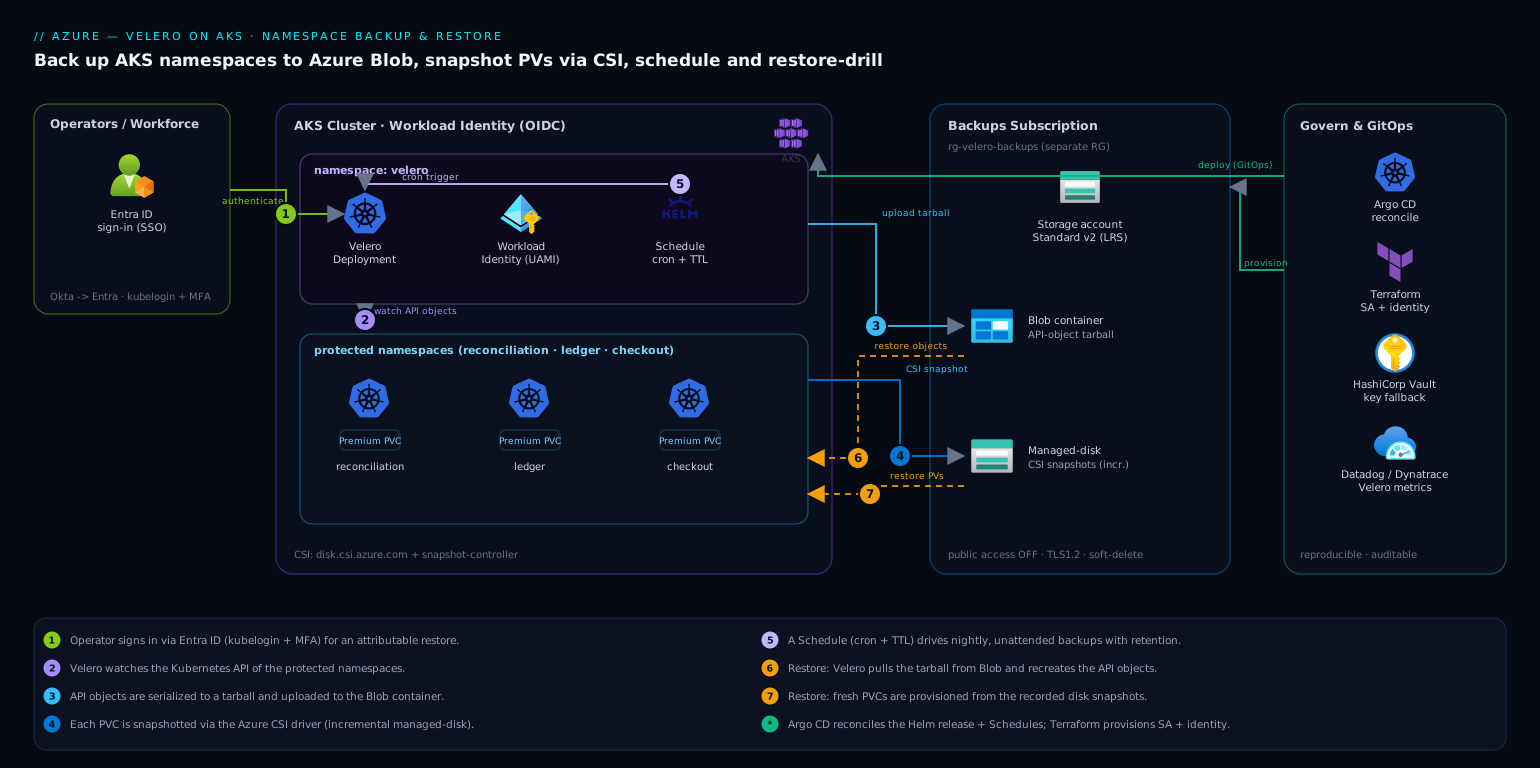
Velero runs as a single Deployment in its own velero namespace. It watches the Kubernetes API and, on a backup, does two things in parallel. First, it serializes the API objects of the targeted namespaces — Deployments, Services, ConfigMaps, Secrets, CRDs, the lot — into a tarball and uploads it to an Azure Blob container through the velero-plugin-for-microsoft-azure Object Store plugin. Second, for every PersistentVolume in scope it asks the Azure CSI driver to take a VolumeSnapshot; the snapshot lives as an incremental Azure managed-disk snapshot, and Velero records the handle in the backup metadata. A Schedule object turns this into a cron-driven, unattended job with a retention TTL. Restores reverse the flow: Velero pulls the object tarball from Blob, recreates the API objects, and provisions fresh PVCs from the recorded snapshots. The whole control loop stays inside the cluster; the only external surface is the one Blob container, reached over the storage account’s private data plane.
The blast radius is deliberately small and well-governed. HashiCorp Vault holds any residual credential the cluster cannot get from a managed identity (we use Workload Identity here, so ideally there is none — but Vault is where a fallback storage-account key would live, leased short and never written to a plain Secret). Wiz / Wiz Code continuously scans the storage account and the cluster for posture drift — a backup container drifting to public access is exactly the kind of finding it raises. CrowdStrike Falcon sensors on the node pool give runtime protection so a compromised pod cannot quietly tamper with backups. Dynatrace / Datadog scrape Velero’s Prometheus metrics so a silently failing nightly backup pages someone instead of being discovered during an incident. ServiceNow receives a change record when a restore is initiated, so a production restore is a tracked change, not a console cowboy move. And the install itself is GitOps-managed: the Velero Helm release and Schedule manifests live in Git and are reconciled by Argo CD, with the underlying storage account and identity provisioned by Terraform (or Ansible if that is your config-management standard) — so the backup system is itself reproducible and auditable.
1. Provision the Azure storage account and container
Velero needs a dedicated blob container for the object backups. Create a Standard v2 storage account (LRS is fine for backups within a region; use GRS if you want cross-region durability) and a single container. Keep this in its own resource group from the cluster so an accidental cluster-RG delete cannot take the backups with it.
# Variables — adjust to your environment
export AKS_RG=rg-aks-payments-prod
export AKS_NAME=aks-payments-prod
export LOCATION=centralindia
export BACKUP_RG=rg-velero-backups-prod          # separate RG on purpose
export STORAGE_ACCT=stveleropaymentsprod          # 3-24 chars, lowercase+digits
export BLOB_CONTAINER=velero

# Backups live in their own resource group
az group create --name "$BACKUP_RG" --location "$LOCATION"

az storage account create \
  --name "$STORAGE_ACCT" \
  --resource-group "$BACKUP_RG" \
  --sku Standard_LRS \
  --kind StorageV2 \
  --encryption-services blob \
  --min-tls-version TLS1_2 \
  --allow-blob-public-access false

# Container for Velero's object store
az storage container create \
  --name "$BLOB_CONTAINER" \
  --account-name "$STORAGE_ACCT" \
  --auth-mode login
--allow-blob-public-access false is non-negotiable: backups contain Secrets. This is precisely the setting Wiz will flag if it ever drifts.
2. Grant Velero access with Workload Identity (no keys)
The clean way to authenticate is Microsoft Entra Workload Identity — Velero’s pod gets an Entra token via a federated service-account credential, and we grant that identity Storage Blob Data Contributor on the storage account. No storage key sits in a Kubernetes Secret. (If your cluster predates Workload Identity, a storage-account key in a Velero Secret is the fallback — store the master copy in HashiCorp Vault and sync it, never commit it.)
# Ensure the OIDC issuer + Workload Identity are enabled on the cluster
az aks update -g "$AKS_RG" -n "$AKS_NAME" \
  --enable-oidc-issuer --enable-workload-identity

export OIDC_ISSUER=$(az aks show -g "$AKS_RG" -n "$AKS_NAME" \
  --query oidcIssuerProfile.issuerUrl -o tsv)

# A user-assigned managed identity for Velero
az identity create -g "$BACKUP_RG" -n id-velero-prod
export VELERO_CLIENT_ID=$(az identity show -g "$BACKUP_RG" -n id-velero-prod --query clientId -o tsv)
export VELERO_PRINCIPAL_ID=$(az identity show -g "$BACKUP_RG" -n id-velero-prod --query principalId -o tsv)
export STORAGE_ID=$(az storage account show -n "$STORAGE_ACCT" -g "$BACKUP_RG" --query id -o tsv)

# Velero needs to read/write blobs AND create disk snapshots
az role assignment create --assignee-object-id "$VELERO_PRINCIPAL_ID" \
  --assignee-principal-type ServicePrincipal \
  --role "Storage Blob Data Contributor" --scope "$STORAGE_ID"

# Snapshot rights on the resource group that holds the cluster's node/disk resources
export NODE_RG=$(az aks show -g "$AKS_RG" -n "$AKS_NAME" --query nodeResourceGroup -o tsv)
az role assignment create --assignee-object-id "$VELERO_PRINCIPAL_ID" \
  --assignee-principal-type ServicePrincipal \
  --role "Disk Snapshot Contributor" \
  --scope "/subscriptions/$(az account show --query id -o tsv)/resourceGroups/$NODE_RG"

# Federate the velero service account to this identity
az identity federated-credential create \
  --name fc-velero \
  --identity-name id-velero-prod \
  --resource-group "$BACKUP_RG" \
  --issuer "$OIDC_ISSUER" \
  --subject "system:serviceaccount:velero:velero" \
  --audience api://AzureADTokenExchange
3. Install the VolumeSnapshot CRDs and snapshot controller
CSI volume snapshots need the upstream VolumeSnapshot CRDs and a running snapshot-controller. AKS ships these on most channels, but verify — a missing CRD is the single most common reason PV snapshots silently no-op. Check first, install only if absent.
# Are the snapshot CRDs present?
kubectl get crd volumesnapshots.snapshot.storage.k8s.io 2>/dev/null \
  && echo "CRDs present" || echo "CRDs MISSING — install below"
If missing, apply the v8 CRDs and controller from the external-snapshotter project, then create a VolumeSnapshotClass that points at the Azure disk CSI driver and tells Velero to use it:
# velero-snapshotclass.yaml
apiVersion: snapshot.storage.k8s.io/v1
kind: VolumeSnapshotClass
metadata:
  name: velero-csi-azuredisk
  labels:
    velero.io/csi-volumesnapshot-class: "true"   # Velero auto-selects this class
driver: disk.csi.azure.com
deletionPolicy: Retain                            # keep the snapshot if the VS object is deleted
parameters:
  incremental: "true"                             # incremental managed-disk snapshots = cheaper
kubectl apply -f velero-snapshotclass.yaml
deletionPolicy: Retain matters: it decouples the lifecycle of the cloud snapshot from the Kubernetes object, so Velero’s own TTL retention drives expiry rather than a stray kubectl delete.
4. Install Velero with the Azure plugin and CSI support
Install via the Velero CLI, enabling the Azure object-store plugin and the CSI plugin, and turn on the EnableCSI feature flag. We pass useNodeAgent=false because we are using native CSI snapshots for block volumes, not filesystem-level file backups. Note --no-secret — we authenticate by Workload Identity, so there is no credentials Secret.
export SUBSCRIPTION_ID=$(az account show --query id -o tsv)

velero install \
  --provider azure \
  --plugins velero/velero-plugin-for-microsoft-azure:v1.10.0,velero/velero-plugin-for-csi:v0.7.0 \
  --bucket "$BLOB_CONTAINER" \
  --no-secret \
  --features=EnableCSI \
  --backup-location-config \
      resourceGroup=$BACKUP_RG,storageAccount=$STORAGE_ACCT,subscriptionId=$SUBSCRIPTION_ID,useAAD=true \
  --snapshot-location-config \
      apiTimeout=10m,resourceGroup=$NODE_RG,subscriptionId=$SUBSCRIPTION_ID \
  --use-volume-snapshots=true \
  --pod-labels azure.workload.identity/use=true \
  --service-account-annotations azure.workload.identity/client-id=$VELERO_CLIENT_ID
After install, label and annotate the service account so the Workload Identity webhook injects the token (the CLI flags above do this, but verify), then confirm the pod is healthy and the backup location is Available:
kubectl -n velero get deploy velero
velero backup-location get        # PHASE should read: Available
If velero backup-location get shows Unavailable, it is almost always the role assignment from Step 2 not yet propagated or useAAD=true missing — Velero cannot reach the container.
5. Take a first ad-hoc namespace backup
Before scheduling anything, prove a single namespace round-trips. Back up reconciliation — API objects plus its PVC snapshots — and watch it complete.
velero backup create reconciliation-manual-01 \
  --include-namespaces reconciliation \
  --snapshot-volumes \
  --wait

# Inspect what landed
velero backup describe reconciliation-manual-01 --details
velero backup logs reconciliation-manual-01 | tail -n 40
In the --details output, confirm two things: under Resource List you see the namespace’s Deployments/Secrets/ConfigMaps, and under CSI Volume Snapshots each PVC shows a snapshot with status Completed. Cross-check the snapshot exists in Azure:
az snapshot list -g "$NODE_RG" -o table --query "[].{Name:name, Size:diskSizeGb, State:provisioningState}"
6. Schedule per-namespace backups with retention
Now make it unattended. A Velero Schedule is cron plus a backup template plus a TTL. Run business-critical stateful namespaces nightly with a 30-day retention, and stateless namespaces less aggressively. Define schedules declaratively so they live in Git under Argo CD rather than as imperative CLI state.
# schedule-reconciliation.yaml
apiVersion: velero.io/v1
kind: Schedule
metadata:
  name: nightly-reconciliation
  namespace: velero
spec:
  schedule: "0 2 * * *"          # 02:00 every day (cluster timezone)
  template:
    includedNamespaces:
      - reconciliation
      - ledger
      - checkout
    snapshotVolumes: true
    storageLocation: default
    volumeSnapshotLocations:
      - default
    ttl: 720h0m0s                # 30-day retention; expired backups + snapshots auto-pruned
    includedResources:
      - "*"
    excludedResources:
      - events
      - events.events.k8s.io
kubectl apply -f schedule-reconciliation.yaml
velero schedule get
# Force one run immediately to verify the template, rather than waiting for 02:00
velero backup create --from-schedule nightly-reconciliation --wait
The ttl is what makes retention self-cleaning: Velero deletes the backup object and its associated Azure disk snapshots once the TTL elapses, so you are not hand-pruning snapshots (and not paying for years of them). Excluding events keeps backups lean and restores clean.
7. Validation — run a real restore drill
A backup you have never restored is a hypothesis, not a backup. Rehearse it. The honest drill is to delete a namespace and bring it back; do this on a non-production cluster or a dedicated drill namespace first, then schedule a quarterly drill in production with a ServiceNow change record attached.
# --- DRILL: simulate the original incident ---
kubectl delete namespace reconciliation        # the disaster, on purpose

# Restore the namespace + its PVs from the latest scheduled backup
LATEST=$(velero backup get -o name | grep nightly-reconciliation | sort | tail -n1 | cut -d/ -f2)
echo "Restoring from: $LATEST"

velero restore create reconciliation-drill-01 \
  --from-backup "$LATEST" \
  --include-namespaces reconciliation \
  --restore-volumes=true \
  --wait

# Verify the restore
velero restore describe reconciliation-drill-01 --details
kubectl -n reconciliation get pods,pvc,svc,configmap,secret
The acceptance test is concrete: every Deployment returns to its desired replica count, every PVC is Bound to a volume provisioned from the snapshot (check kubectl -n reconciliation get pvc shows the original capacity), and the application’s own health check passes. For a stateful service, exec in and confirm the data is the snapshot’s data — for a database PVC, that the last committed transaction before the backup is present:
# Example: confirm restored Postgres PVC actually carries data
POD=$(kubectl -n reconciliation get pod -l app=ledger-db -o name | head -n1)
kubectl -n reconciliation exec "$POD" -- \
  psql -U app -d ledger -c "select max(settled_at) from batch_runs;"
Record the RTO you actually measured (wall-clock from restore create to healthy) and the RPO (gap between the backup timestamp and the incident) in the drill ticket — those two numbers are what your DR plan promises, and an untested promise is the one that breaks.
8. Rollback / teardown
To remove a single bad schedule, delete the Schedule object — existing backups remain recoverable. To fully decommission Velero without orphaning cloud resources, delete in dependency order so you do not leave paid-for snapshots behind:
# Stop scheduled backups
kubectl -n velero delete schedule --all

# Optionally expire all backups (this also deletes their Azure snapshots, honoring deletionPolicy)
velero backup delete --all --confirm

# Remove Velero itself
velero uninstall              # removes the velero namespace, CRDs, and RBAC

# Tear down the cloud side (only after confirming no backups are needed)
az role assignment delete --assignee "$VELERO_PRINCIPAL_ID" --scope "$STORAGE_ID"
az identity delete -g "$BACKUP_RG" -n id-velero-prod
az storage container delete --name "$BLOB_CONTAINER" --account-name "$STORAGE_ACCT" --auth-mode login
# Leave the storage account if other backups share it; otherwise:
# az group delete --name "$BACKUP_RG" --yes
Order matters: velero backup delete --all before deleting the storage container, or the disk snapshots in $NODE_RG linger and keep billing. If you tear down the identity before expiring backups, Velero loses the rights to delete its own snapshots and you are left pruning them by hand in Azure.
Common pitfalls
- Snapshots silently skipped. The most frequent failure:
velero backup describe --detailsshows zero CSI snapshots. Cause is almost always the missing VolumeSnapshot CRDs (Step 3) or aVolumeSnapshotClassnot labeledvelero.io/csi-volumesnapshot-class: "true". Velero will happily back up the API objects and skip the data with only a log warning — always check the--detailssnapshot count, and alert on it in Dynatrace. - Backup location stuck
Unavailable. Either the role assignment from Step 2 has not propagated (give it a few minutes), oruseAAD=trueis missing from the backup-location config so Velero is reaching for a key that does not exist. - Restoring into an existing namespace. By default Velero skips resources that already exist; it will not overwrite a live, drifted object. For a true point-in-time rollback, delete the namespace first (as in the drill) or use
--existing-resource-policy=updatedeliberately and with eyes open. - Cross-region restore. Azure disk snapshots are regional. To restore into a different region you must copy snapshots across regions first, or use GRS storage and restore only the API objects while re-provisioning volumes empty. Plan this before the outage, not during.
- Cluster-version skew on restore. Restoring a backup taken on 1.27 into a 1.31 cluster can break on removed API versions (e.g. old
PodSecurityPolicy). Velero’s resource modifiers or a pre-restore manifest scrub handle it; test restores after every cluster upgrade. - Imperative drift. Schedules created with
velero schedule createon the CLI vanish from your Git source of truth. Define them as YAML under Argo CD so the backup policy itself is reviewed and reconciled.
Security notes
Backups are a copy of your most sensitive cluster state — every Secret in scope is in that tarball. Three controls keep them safe. Identity, not keys: Workload Identity (Step 2) means no storage key in a Kubernetes Secret; if a key-based fallback is ever required, its master copy lives in HashiCorp Vault with a short lease and is never committed. No public surface: allow-blob-public-access false plus a private endpoint on the storage account keeps the container off the internet, and Wiz / Wiz Code continuously verifies that posture and raises a finding the moment it drifts. Runtime integrity: CrowdStrike Falcon on the node pool protects the Velero pod from a compromised neighbor tampering with backup jobs. Operators authenticate restores through Entra ID (federated from Okta if that is your workforce IdP) with MFA, so every restore is attributable, and the backup container has soft-delete and a delete-lock so a compromised credential cannot wipe your recovery point. Restores that touch production raise a ServiceNow change record automatically, making recovery an auditable, approved action.
Cost notes
Velero itself is free and open source; the spend is Azure storage and snapshots. Three levers keep it small. Incremental snapshots (incremental: "true" in the VolumeSnapshotClass) mean each nightly snapshot stores only changed blocks, so a 256 GiB PVC with low daily churn costs a fraction of a full copy after the first one. TTL retention (Step 6) auto-prunes both backup objects and their disk snapshots at 30 days, so you never accumulate years of forgotten snapshots quietly billing — the most common backup cost surprise. And storage tier: the object tarballs are small and infrequently read, so Standard LRS is the right default; reserve GRS for namespaces whose DR plan genuinely requires cross-region durability rather than paying for geo-redundancy everywhere. Pipe Velero’s metrics to Datadog or Dynatrace to watch snapshot count and storage growth, so a runaway retention bug shows up as a cost line before it shows up on the invoice.