A pipeline that builds, tests, scans and publishes an artefact has done only half the job. The other half — the half that wakes you at 03:00 — is getting that artefact in front of real users without breaking them. That is the deployment strategy: the precise sequence by which new code replaces old, how traffic moves between the two, how you observe whether the new version is healthy, and how fast you can retreat if it is not.
Choosing a strategy is an exercise in trading three things against each other: blast radius (how many users a bad release can hurt), cost (how much spare capacity and tooling the strategy demands), and rollback speed (how quickly you can undo). A solo side-project can recreate-and-pray; a payments platform shifting £40m a day cannot. This lesson walks every mainstream strategy with a tradeoff table, then covers the idea that quietly changed the industry — decoupling deployment from release using feature flags — followed by rollback mechanics and the database migration patterns (expand/contract) that make any of it safe. By the end you will be able to look at a service, its SLOs, and its data model, and name the right strategy with reasons an interviewer will respect.
Learning objectives
By the end of this lesson you will be able to:
- Explain and contrast recreate, rolling, blue/green, canary, progressive delivery, shadow/traffic mirroring and A/B testing, and pick the right one for a given service.
- Reason about a deployment in terms of blast radius, cost, rollback speed and verification depth.
- Implement progressive (metric-driven) delivery with Argo Rollouts and Flagger, including automated analysis and abort.
- Use feature flags (LaunchDarkly, Unleash, OpenFeature, Flagsmith) to decouple deploy from release, enabling dark launches, ring rollouts and kill switches.
- Design rollback paths (instant traffic switch, redeploy, traffic shift back) and know which strategy gives which.
- Apply the expand/contract (parallel-change) pattern so database schema changes never block a rollback.
Prerequisites
You should be comfortable with the CI/CD pipeline end-to-end — stages, quality gates and artefact promotion — as covered in CI/CD Pipeline Design: Stages, Quality Gates, Artifacts & Security Scans. A working mental model of containers and Kubernetes Deployment objects helps for the progressive-delivery sections, and a passing familiarity with a load balancer or service mesh (how traffic is weighted between backends) will make the canary discussion concrete. No specific cloud is assumed; examples lean on Kubernetes because it makes the mechanics explicit, but every pattern maps onto VMs, App Service slots, Lambda aliases and serverless revisions. This lesson sits in the Deployment module of the DevOps Zero-to-Hero course, immediately after pipeline design and before troubleshooting.
Core concepts: deploy, release, and the four levers
Two words are used loosely in casual conversation and must be kept apart for the rest of this lesson:
- Deploy — to install a new version of the code onto infrastructure. The bits are present and running, but not necessarily serving user traffic.
- Release — to expose that version’s behaviour to (some or all) users. This is a traffic and flag decision, not a binary placement decision.
The single most important idea in modern delivery is that deploy and release are separable. Once you internalise that, half the strategies below stop being mutually exclusive and become composable.
Every strategy is then a position on four levers:
| Lever | Question it answers | Why it matters |
|---|---|---|
| Blast radius | If this release is bad, how many users/requests are harmed before we react? | Directly bounds incident severity and SLO error-budget burn. |
| Rollback speed | How long from “we see the problem” to “users are safe again”? | The dominant term in MTTR; a fast rollback turns an outage into a non-event. |
| Cost / capacity | How much extra compute, tooling and complexity does it demand? | Blue/green doubles capacity during cutover; progressive delivery needs a mesh + metrics. |
| Verification depth | What evidence of health do we gather before going wider? | “Pods are Ready” is weak; “p99 latency and error rate within SLO on real traffic” is strong. |
Keep this table in your head; the strategy comparison later is just these four columns scored per strategy.
A few supporting terms used throughout:
- Surge / unavailable — during a rolling update, how many extra pods you may add (
maxSurge) and how many existing pods may be down (maxUnavailable) at once. - Bake time — the deliberate wait at a traffic weight while you observe metrics before promoting further.
- Analysis / automated canary analysis (ACA) — a controller querying a metrics backend (Prometheus, Datadog, CloudWatch) against thresholds to decide promote-or-abort, removing the human from the loop.
- Ring — a named cohort you release to in order (internal → beta → 1% → 100%), a concept popularised by Microsoft.
Recreate (stop-the-world)
The simplest strategy: terminate every instance of the old version, then start the new one. There is a window — between the last old pod dying and the first new pod becoming Ready — during which the service is down.
In Kubernetes this is one line:
spec:
  strategy:
    type: Recreate
When it is correct: development environments; batch workers with no live traffic; applications that cannot run two versions concurrently (for example, a singleton holding an exclusive database lock, or an old and new schema that genuinely conflict). It is also the honest choice when your data layer forbids running both versions at once and you have a maintenance window.
The tradeoffs: zero extra capacity (you never run two versions), trivially simple, but guaranteed downtime and a slow rollback (you must recreate the old version the same way). Never use it for a user-facing service with an availability SLO.
Rolling update (the default)
Replace instances incrementally: bring up some new pods, wait for them to pass readiness, retire an equal number of old pods, repeat until the fleet is converted. This is the default for a Kubernetes Deployment and for most VM scale sets and App Service multi-instance plans.
spec:
  strategy:
    type: RollingUpdate
    rollingUpdate:
      maxSurge: 25%        # up to 25% extra pods during the roll
      maxUnavailable: 0    # never drop below desired capacity
Setting maxUnavailable: 0 with a positive maxSurge gives a zero-downtime roll: you always add capacity before removing any. Combine with a readinessProbe that genuinely reflects the app’s ability to serve, a preStop hook plus terminationGracePeriodSeconds for graceful connection draining, and a PodDisruptionBudget so cluster operations cannot evict too many at once.
The catch — and it is the whole reason canary exists: a readiness probe proves the process is up, not that it returns correct responses, not that p99 latency is within budget, not that a downstream call still resolves. A rolling update will therefore cheerfully roll a 200-on-/healthz-but-500-on-everything-else build to 100% as fast as probes allow. There is no metric feedback loop and rollback means rolling backwards (re-deploying the previous image), which takes as long as the roll did.
When it is correct: the workhorse for stateless services where backward/forward compatibility between adjacent versions holds (it must — both run simultaneously mid-roll), and where a readiness probe is a sufficient proxy for health. For anything where “healthy” needs evidence beyond “up”, graduate to canary.
Blue/green
Run two complete environments: blue (current, live) and green (new, idle). Deploy to green, smoke-test it out of band, then flip all traffic from blue to green in a single switch — a load-balancer target change, a DNS weight, a Kubernetes Service selector edit, an App Service slot swap, or a Lambda alias repoint. Keep blue warm; if green misbehaves, flip back instantly.
# Kubernetes "poor man's" blue/green: one Service, two Deployments by label.
# Cut over by editing the selector the Service points at.
kubectl patch service shop-web -p \
  '{"spec":{"selector":{"app":"shop-web","version":"green"}}}'

# Rollback is the same command with version: blue — sub-second, no rebuild.
kubectl patch service shop-web -p \
  '{"spec":{"selector":{"app":"shop-web","version":"blue"}}}'
On Azure App Service this is the slot swap (az webapp deployment slot swap), which additionally does a warm-up against the staging slot before the swap so the first real request does not hit a cold worker.
The defining property is rollback speed: because the old version is still running and fully provisioned, rollback is the switch in reverse — effectively instant, no rebuild, no re-roll. That single trait is why blue/green is beloved for high-stakes cutovers.
The tradeoffs: you pay for double the capacity during the cutover window (two full fleets). Stateful concerns are sharp: in-flight sessions on blue, database migrations that both versions must tolerate (see expand/contract), and message-queue consumers that might double-process. And the switch is all-or-nothing — 100% of users meet the new version simultaneously, so a defect that slipped smoke-testing hits everyone until you flip back. Blue/green bounds rollback time, not blast radius. Pair it with a brief canary if you need both.
Canary
Release the new version to a small slice of real traffic (say 5%), observe, and only then widen — 5% → 25% → 50% → 100% — with a bake time at each step. The name comes from the canary in a coal mine: the small exposed group warns you before the whole mine is affected.
Manual canary in Kubernetes can be approximated with two Deployments and replica ratios (9 stable : 1 canary ≈ 10% traffic), but that conflates replica count with traffic share and is coarse. Real canary shapes traffic weight at the mesh or ingress (Istio VirtualService, NGINX ingress canary annotations, Gateway API HTTPRoute weights, or a cloud LB’s weighted target groups), independent of pod counts.
The key difference from blue/green: blast radius is bounded by the percentage exposed, not by how fast pods schedule. A bad canary harms 5% of users for the few minutes before you notice, versus 100% with blue/green’s flip. The cost is operational: you must run two versions and have a way to weight traffic, and someone or something must watch the metrics during bake. If a human watches, you have a manual canary; automate that watcher and you have progressive delivery.
Progressive delivery (metric-driven canary)
Progressive delivery is canary with the human taken out of the promotion loop. A controller shifts a traffic weight, queries a metrics backend against thresholds (error rate, p99 latency, custom business KPIs), and promotes or aborts automatically. The unit of progress is a traffic weight; promotion is conditional on evidence; rollback is automatic on regression. Two CNCF tools dominate.
Argo Rollouts replaces the Deployment controller with a Rollout custom resource carrying canary (or blue/green) steps and inline AnalysisTemplate evaluation:
apiVersion: argoproj.io/v1alpha1
kind: Rollout
metadata:
  name: checkout
spec:
  replicas: 10
  strategy:
    canary:
      canaryService: checkout-canary
      stableService: checkout-stable
      trafficRouting:
        nginx:
          stableIngress: checkout
      steps:
        - setWeight: 5
        - pause: { duration: 5m }          # bake at 5%
        - analysis:                         # gate on metrics
            templates:
              - templateName: success-rate
        - setWeight: 25
        - pause: { duration: 10m }
        - setWeight: 50
        - pause: { duration: 10m }
        - setWeight: 100
  template:
    spec:
      containers:
        - name: checkout
          image: registry.example.com/checkout:v2
---
apiVersion: argoproj.io/v1alpha1
kind: AnalysisTemplate
metadata:
  name: success-rate
spec:
  metrics:
    - name: success-rate
      interval: 1m
      successCondition: result[0] >= 0.99   # ≥99% non-5xx
      failureLimit: 2                        # abort after 2 breaches
      provider:
        prometheus:
          address: http://prometheus.monitoring:9090
          query: |
            sum(rate(http_requests_total{service="checkout",code!~"5.."}[2m]))
            / sum(rate(http_requests_total{service="checkout"}[2m]))
When success-rate breaches failureLimit times, the Rollout aborts to the last stable ReplicaSet automatically — no human, no rebuild.
Flagger (Flux’s progressive-delivery operator) takes a different stance: you keep an ordinary Deployment, and a Canary resource drives the rollout, managing the canary/primary Deployments and the mesh/ingress objects for you. It supports Istio, Linkerd, App Mesh, NGINX, Gateway API and more, with built-in webhooks for load-testing and acceptance checks:
apiVersion: flagger.app/v1beta1
kind: Canary
metadata:
  name: checkout
spec:
  targetRef:
    apiVersion: apps/v1
    kind: Deployment
    name: checkout
  service:
    port: 8080
  analysis:
    interval: 1m
    threshold: 5            # max failed checks before rollback
    maxWeight: 50
    stepWeight: 10          # 10% → 20% → ... → 50%, then promote
    metrics:
      - name: request-success-rate
        thresholdRange: { min: 99 }
        interval: 1m
      - name: request-duration
        thresholdRange: { max: 500 }   # p99 ms
        interval: 1m
    webhooks:
      - name: load-test
        url: http://flagger-loadtester.test/
        metadata:
          cmd: "hey -z 1m -q 10 -c 2 http://checkout-canary.shop:8080/"
Argo Rollouts vs Flagger in one line: Argo Rollouts gives you a new workload object (Rollout) and pairs naturally with Argo CD; Flagger wraps your existing Deployment and pairs naturally with Flux. Both deliver automated, metric-gated canaries; pick by which GitOps ecosystem you already run.
Shadow (traffic mirroring)
Send a copy of live production traffic to the new version while the real responses still come from the old one. The new version processes mirrored requests; its responses are discarded (or compared offline). Users are never exposed to the shadow’s output, so the user-facing blast radius is zero even though the new code runs against real-world request patterns.
Istio expresses this with mirror on a VirtualService:
http:
  - route:
      - destination: { host: checkout, subset: stable }
        weight: 100
    mirror:
      host: checkout
      subset: canary
    mirrorPercentage:
      value: 100.0     # mirror all traffic; responses are dropped
When it shines: validating performance and correctness of a risky rewrite (a new search engine, a re-platformed pricing service) under genuine production load and edge-case inputs, before any user sees it. The big caveat: side effects. A mirrored request that writes to a database, charges a card, sends an email or enqueues a job will do real damage unless the shadow is pointed at isolated/sandboxed dependencies or made strictly read-only. Shadowing is a correctness/performance test in production, not a release mechanism — at the end you still need canary or blue/green to actually release.
A/B testing
Superficially similar to canary — two versions serve simultaneously — but the intent and routing key differ. Canary asks an operational question (“is v2 healthy?”) and routes by percentage. A/B testing asks a product question (“does variant B convert better than A?”) and routes by user attribute (cohort, geography, plan tier, a sticky hash of user-id) so a given user consistently sees one variant, with results measured over days against a business metric and judged for statistical significance.
A/B is usually implemented with feature flags (next section) rather than infrastructure traffic-splitting, precisely because you need attribute-based, sticky, per-user targeting — not a blunt traffic percentage. You can absolutely run an A/B experiment on top of a canary-deployed binary: deploy once, then use flags to assign cohorts. That composition is the bridge to the most important idea in this lesson.
Strategy comparison (the tradeoff table)
This is the table to know cold for an interview. Scores are relative.
| Strategy | Blast radius | Rollback speed | Extra capacity / cost | Verification depth | Downtime | Best for |
|---|---|---|---|---|---|---|
| Recreate | 100% (all at once) | Slow (recreate old) | None | None | Yes | Dev, batch, can’t run 2 versions |
| Rolling | Grows during roll | Slow (roll back) | Low (maxSurge) |
Weak (readiness only) | No (with surge) | Default stateless service |
| Blue/green | 100% at the flip | Instant (flip back) | High (2× fleet) | Pre-cutover smoke test | No | High-stakes cutovers, fast rollback |
| Canary (manual) | Small (e.g. 5%) | Fast (shift weight back) | Medium (2 versions + LB) | Human watches metrics | No | Risky change, you have eyes on it |
| Progressive (auto) | Small + bounded | Fast + automatic | Medium (mesh + metrics) | Strong (automated ACA) | No | Mature teams, frequent releases |
| Shadow | Zero (responses dropped) | N/A (no user exposure) | High (full mirror fleet) | Strong (real traffic, no risk) | No | Validating a rewrite under load |
| A/B | Per-cohort | Toggle off variant | Low (flag-driven) | Business metric over days | No | Product experiments, conversion |
Read it as four levers per row. Notice the standouts: blue/green wins rollback speed but loses blast radius; canary/progressive win blast radius; shadow wins verification with zero user risk but cannot release; A/B is a product tool, not an operational one. The mature default for a user-facing service is progressive delivery, often preceded by a shadow for a big rewrite and combined with feature flags for fine-grained control.
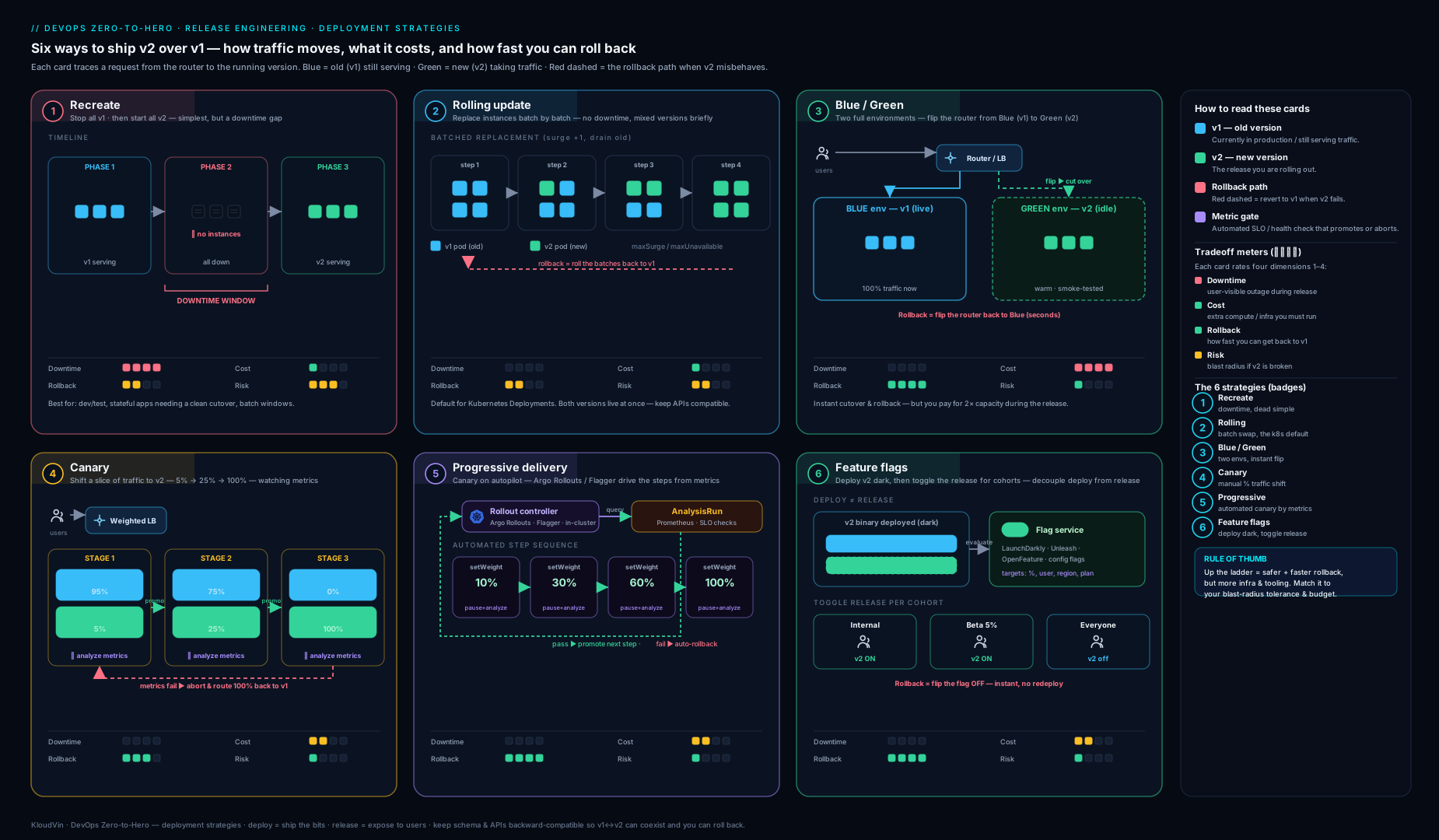
The diagram lays the strategies side by side — how traffic moves from old (blue) to new (green) version under each — so you can see at a glance why blast radius and rollback speed differ between them.
Feature flags: decoupling deploy from release
Every strategy above moves traffic at the infrastructure layer. Feature flags move the decision into the application layer, and in doing so deliver the separation we flagged in core concepts: deploy the binary continuously; release the behaviour on your own schedule.
A feature flag is a conditional that gates a code path at runtime:
if flags.is_enabled("new-checkout-flow", context={"user_id": user.id, "plan": user.plan}):
    return render_new_checkout()
return render_legacy_checkout()
Because the new code path is present but dark, the same binary can serve the old behaviour to everyone, then — with no deploy — be turned on for internal staff, then 1% of users, then a country, then everyone, and turned off instantly if something breaks. This unlocks a family of patterns:
| Pattern | What it is | Why flags enable it |
|---|---|---|
| Dark launch | Ship code to production switched off; enable later. | Deploy decoupled from release; merge to trunk safely. |
| Ring / percentage rollout | Enable for internal → beta → 1% → 100%. | Per-attribute and percentage targeting in the flag service. |
| Kill switch | Instantly disable a misbehaving feature. | Toggle off in seconds — faster than any redeploy. |
| Operational toggle | Shed load by disabling an expensive feature under stress. | Runtime control without a release. |
| Entitlement | Gate a feature to a plan/tenant. | Targeting rules by user attribute. |
| A/B experiment | Assign sticky cohorts to variants. | Deterministic per-user bucketing + analytics. |
Flags are also the enabler for trunk-based development: a half-finished feature can merge to main behind an off flag, keeping main always releasable without long-lived branches (see Migrating to Trunk-Based Development).
The tooling landscape
| Tool | Model | Notable strengths | Watch-outs |
|---|---|---|---|
| LaunchDarkly | Commercial SaaS | Mature targeting, experimentation, streaming SDK updates, governance | Cost at scale; vendor lock-in unless abstracted |
| Unleash | Open-source (+ hosted) | Self-hostable, activation strategies, gradual rollout, OSS control | You operate it (in OSS mode) |
| Flagsmith | Open-source (+ hosted) | Self-host or SaaS, remote config, segments | Smaller ecosystem than LaunchDarkly |
| OpenFeature | CNCF standard / SDK spec | Vendor-neutral API + provider model; swap backends with zero app code change | A spec, not a backend — needs a provider (flagd, LaunchDarkly, Unleash, …) |
OpenFeature deserves emphasis: it is not a flag service but a vendor-neutral SDK specification with a provider abstraction, so you code against one API and back it with flagd, LaunchDarkly, Unleash or others — and switch with no application change. That is the same anti-lock-in posture a senior architect applies everywhere; treat the flag vendor as replaceable infrastructure. See Building a Vendor-Neutral Feature Flag Platform with OpenFeature for a deeper build.
The discipline flags demand
Flags are debt with interest. Each one multiplies the code paths you must reason about and test (n boolean flags imply up to 2ⁿ combinations). The non-negotiable hygiene: name and own every flag, distinguish short-lived release flags (delete the moment the feature is at 100% and stable) from long-lived operational flags (kill switches, entitlements that live forever), set expiry/review dates, and run a periodic stale-flag audit so dead conditionals are removed. A flag that has been at 100% for six months is not a flag — it is a comment that lies.
Rollback: the mechanic that decides your MTTR
The strategy you pick is your rollback story; they are two views of the same machine. There are three rollback mechanics, and which you get is dictated by how you released:
| Mechanic | How it works | Speed | Comes from |
|---|---|---|---|
| Instant traffic switch | Repoint the LB/Service/DNS/alias/slot back to the old version still running. | Seconds | Blue/green, slot swap |
| Traffic shift back | Reduce the canary weight to 0; stable version already serving. | Seconds–minutes | Canary / progressive (auto-abort) |
| Redeploy previous | Re-roll or re-image the prior version; rebuild capacity. | Minutes–tens of minutes | Rolling, recreate |
| Flag off | Disable the feature at runtime; binary unchanged. | Seconds | Feature flags |
Two principles follow. First, the strategies with the smallest blast radius or a warm old version give the fastest rollback — which is exactly why progressive delivery and blue/green dominate for critical services, and why feature flags (a flag-off is faster than any redeploy) are the ultimate safety valve. Second, forward-fix versus rollback is a judgement call: rollback is the default reflex (restore service first, diagnose later), but if the previous version has its own known-critical bug, or — crucially — if a database migration cannot be reversed, you may be forced to roll forward with a fix. That constraint is almost always the database, which is why the next section is the one that actually makes rollback safe.
Database changes: expand/contract (and why rollback breaks without it)
Here is the trap that voids every clean rollback story above: you can roll code back in seconds, but you cannot roll a dropped column back at all. During any zero-downtime strategy, two versions of the application run against one database simultaneously — mid-roll, during a canary, on both sides of a blue/green flip. The schema must satisfy both versions at once. A migration that the new code needs but the old code cannot tolerate makes the old version un-runnable, which means you can no longer roll back.
The solution is the expand/contract pattern (also called parallel change): never make a breaking schema change in one step. Split every change into backward-compatible phases, each deployable and rollback-safe on its own.
Worked example — renaming full_name to display_name without downtime:
| Phase | Database action | Application action | Why it is safe |
|---|---|---|---|
| 1. Expand | Add new nullable column display_name; do not touch full_name. |
None yet (or dual-write begins). | Old code ignores the new column; nothing breaks. |
| 2. Migrate / dual-write | Backfill display_name from full_name; new code writes both columns, reads display_name (falling back to full_name). |
Deploy reader/writer code. | Both columns are populated and valid; either app version works. |
| 3. Verify | Confirm 100% backfilled and dual-write steady. | Bake. | Confidence before the irreversible step. |
| 4. Contract | Drop full_name (and the dual-write). |
Deploy code that uses only display_name. |
Only run after no version reads/writes the old column. |
Each phase is independently deployable and, individually, rollback-safe; you never have a moment where one running version needs a column another running version forbids. The rules generalise:
- Additive changes are safe (new nullable column, new table, new optional API field); destructive changes are not (drop/rename column, add
NOT NULLwithout a default, narrow a type) — defer destruction to the contract phase, long after the code that needed the old shape is gone. - Make columns nullable or give defaults so old code that does not set them still inserts successfully.
- Decouple schema migrations from code deploys — run expand migrations before the deploy that uses them, and contract migrations after the deploy that stops using the old shape, never in lockstep.
- Forward-only migrations are a deliberate alternative: rather than maintaining
downscripts (which are often untested and dangerous on production data), only ever roll forward with a new corrective migration. Many teams adopt forward-only precisely because reliable down-migrations are a fiction on real data; if you do, your code-rollback safety rests entirely on expand/contract keeping old code runnable. - Big tables need online schema-change tooling (
pt-online-schema-change,gh-ostfor MySQL; native concurrent operations / careful locking for PostgreSQL) so anALTERdoes not lock the table and cause its own outage.
Expand/contract is what converts “we have a fast rollback” from aspiration into fact. Skip it and your elegant blue/green flip becomes a one-way door the first time a release ships a schema change.
Choosing a strategy
Walk this decision sequence:
- Can two versions run at once (code and schema)? If no → recreate in a maintenance window (and plan to fix the coupling — usually via expand/contract — so you can do better next time).
- Is downtime acceptable? Dev/batch with no live traffic → recreate is fine. Otherwise continue.
- How critical is the service / how strict the SLO? Low-risk internal tool with a sound readiness probe → rolling is enough. High-stakes, user-facing, tight error budget → keep going.
- Do you need instant rollback above all, and can you afford 2× capacity? → blue/green (or slot swap).
- Do you need to bound blast radius and have a metrics backend + traffic-shaping? → canary, and if your team is mature enough to trust automated analysis → progressive delivery (Argo Rollouts / Flagger). This is the modern default for critical services.
- Is the change a risky rewrite you want to validate under real load with zero user risk first? → shadow it, then release via canary/blue/green.
- Is the question “which variant performs better” (product, not ops)? → A/B via feature flags.
- Across all of the above: put new behaviour behind a feature flag so deploy is decoupled from release and you always have a sub-second kill switch — and gate every schema change with expand/contract.
The strategies are not mutually exclusive. A strong production posture is frequently: progressive delivery of the binary, behaviour behind feature flags, schema evolved by expand/contract, with shadowing reserved for big rewrites — giving you bounded blast radius, automatic metric-gated rollback, runtime kill switches, and migrations that never trap you.
Hands-on lab
We will demonstrate canary, automatic abort and a feature-flag kill switch entirely free and locally using kind (Kubernetes in Docker) and Argo Rollouts. Allow ~30 minutes.
Prerequisites: Docker, kind, kubectl, and the Argo Rollouts kubectl plugin.
# 1) Create a throwaway cluster
kind create cluster --name deploy-lab

# 2) Install Argo Rollouts (pin a real version in production; latest is fine for a lab)
kubectl create namespace argo-rollouts
kubectl apply -n argo-rollouts \
  -f https://github.com/argoproj/argo-rollouts/releases/latest/download/install.yaml
kubectl rollout status deploy/argo-rollouts -n argo-rollouts

# 3) Install the kubectl plugin (macOS shown; Linux: download the release binary)
brew install argoproj/tap/kubectl-argo-rollouts
kubectl argo rollouts version
Create a Rollout with explicit canary steps:
cat <<'EOF' | kubectl apply -f -
apiVersion: argoproj.io/v1alpha1
kind: Rollout
metadata:
  name: demo
spec:
  replicas: 5
  selector:
    matchLabels: { app: demo }
  template:
    metadata:
      labels: { app: demo }
    spec:
      containers:
        - name: demo
          image: argoproj/rollouts-demo:blue
          ports: [{ containerPort: 8080 }]
          resources:
            requests: { cpu: 5m, memory: 32Mi }
  strategy:
    canary:
      steps:
        - setWeight: 20
        - pause: { duration: 30s }   # bake at 20%
        - setWeight: 60
        - pause: { duration: 30s }
        - setWeight: 100
EOF
Trigger a canary by changing the image, then watch the weighted promotion:
kubectl argo rollouts set image demo demo=argoproj/rollouts-demo:yellow
kubectl argo rollouts get rollout demo --watch
Expected output: the dashboard shows demo stepping 20% → 60% → 100% with a 30s pause at each step, the canary ReplicaSet scaling up as the stable one scales down. This is a live canary.
Now exercise the rollback path — abort mid-canary:
kubectl argo rollouts set image demo demo=argoproj/rollouts-demo:red
# while it is paused at 20%, simulate "bad metrics" by aborting:
kubectl argo rollouts abort demo
Expected output: the Rollout immediately returns all traffic to the previous stable version — no rebuild, no re-roll — demonstrating canary’s traffic-shift-back rollback. kubectl argo rollouts get rollout demo shows status Degraded/aborted with stable serving 100%. Promote for real with kubectl argo rollouts promote demo.
Validation checklist:
# Two ReplicaSets exist during a canary (stable + canary):
kubectl get rs -l app=demo
# After abort, the stable ReplicaSet carries all 5 replicas:
kubectl argo rollouts get rollout demo
Feature-flag mini-demo (no extra infra): the same rollouts-demo image colour is effectively a runtime toggle — flipping the image colour mirrors what a flag does at the application layer, except a real flag flips with no deploy at all. To see a true flag service, follow the OpenFeature/flagd lab linked in Next steps.
Cleanup:
kind delete cluster --name deploy-lab
Cost note: £0 — kind runs in local Docker and everything is torn down with the cluster. No cloud resources are created at any point.
Common mistakes & troubleshooting
| Symptom | Likely cause | Fix |
|---|---|---|
| Rolling update ships a broken build to 100% fast | Readiness probe only checks “process up”, not real health; no metric gate | Make the probe meaningful and move to canary/progressive with automated analysis |
| Blue/green flip causes errors despite green passing smoke tests | A schema change green needs is incompatible with blue, or in-flight sessions broke | Apply expand/contract; drain connections (preStop + grace period); use sticky sessions only where required |
| Cannot roll back after a release | A destructive migration ran in lockstep with the deploy; old code now un-runnable | Never drop/rename in the same step as code; expand/contract; forward-only with corrective migrations |
| Canary “looks fine” then breaks at 100% | Bake time too short, or analysis query not representative of real failure modes | Lengthen bake; query the metrics that actually correlate with user pain (error rate, p99, business KPI) |
| Mirrored (shadow) traffic charged cards / sent emails | Shadow pointed at production side-effecting dependencies | Point shadow at sandboxed/read-only deps; never let mirrored writes hit real systems |
| Manual canary “10%” doesn’t match observed traffic | Replica-ratio canary conflates pod count with traffic share | Shape traffic weight at mesh/ingress, independent of replica counts |
| Feature flags accumulate; behaviour becomes unpredictable | No flag lifecycle; stale flags never removed | Owner + expiry per flag; separate release vs operational flags; periodic stale-flag audit |
| Progressive rollout never promotes / always aborts | Threshold too strict, metrics backend unreachable, or no traffic to measure | Verify Prometheus/Datadog connectivity; loosen thresholds to realistic SLOs; ensure load (loadtester webhook) during bake |
Best practices
- Decouple deploy from release. Ship dark behind a flag; release on your schedule; keep a sub-second kill switch on everything risky.
- Make rollback the easy path. Prefer strategies (blue/green, progressive, flags) where rollback is a traffic/flag change, not a rebuild. Rehearse it — an untested rollback is a wish.
- Gate every schema change with expand/contract. Additive-then-destructive, with the destructive step deferred until no running version needs the old shape. Consider forward-only migrations.
- Verify on evidence, not optimism. Promote canaries on real SLO metrics (error rate, p99, business KPI), not on “pods are Ready”. Automate the analysis so promotion is consistent and fast.
- Right-size bake time and steps. Long enough to surface real regressions under representative load; short enough to keep deployment frequency high.
- Treat the flag vendor as replaceable. Code against OpenFeature so a backend swap is config, not a rewrite.
- Keep
mainreleasable. Trunk-based development plus flags beats long-lived branches for flow and lead time. - Drain gracefully.
preStophooks,terminationGracePeriodSeconds, and PodDisruptionBudgets so no strategy drops in-flight requests. - Instrument the deployment itself. Track deployment frequency, lead time, change-failure rate and MTTR (the DORA four) so you can prove the strategy is improving outcomes.
Security notes
- Flags are a control surface — and an attack surface. Authn/authz the flag-management plane, audit every toggle (who flipped what, when), and use environment-scoped keys so a leaked client SDK key cannot mutate production flags. A kill switch that anyone can flip is a denial-of-service waiting to happen.
- Never put secrets in feature flags or flag context. Flag payloads and evaluation context can be logged, cached client-side and shipped to SDKs; treat them as untrusted/visible.
- Shadow traffic carries real user data. Mirrored requests contain production PII; the shadow environment must meet the same data-protection, encryption and access controls as production, and must not exfiltrate to less-secure systems.
- Carry security gates into every strategy. Image-vulnerability and SBOM/signature checks (cosign/Sigstore) belong in the pipeline before any deployment, and admission policy (OPA/Gatekeeper, Kyverno) should refuse unsigned or non-compliant images regardless of the rollout mechanism.
- Migrations run with elevated DB privilege. Scope migration credentials tightly, run them through the pipeline (not from laptops), and review expand/contract changes for accidental data exposure (e.g. a backfill copying sensitive data into a less-protected column).
- Use OIDC/keyless deploy auth. Whatever shifts traffic (CI shifting weights, swapping slots, repointing aliases) should authenticate via short-lived OIDC federation, not long-lived static cloud keys.
Interview & exam questions
-
What is the difference between deploy and release, and why does it matter? Deploy installs the binary on infrastructure; release exposes its behaviour to users. Separating them (via feature flags) lets you ship continuously, control exposure independently, dark-launch, ring-roll, run A/B tests, and kill-switch instantly without redeploying — decoupling delivery risk from deployment.
-
Contrast blue/green and canary. When would you pick each? Blue/green flips 100% of traffic at once between two full environments — its strength is instant rollback (flip back to the still-running old version), its cost is 2× capacity and a full blast radius at cutover. Canary exposes a small slice first and widens gradually — its strength is bounded blast radius, its cost is needing traffic-shaping and metric observation. Pick blue/green when instant rollback dominates and you can afford double capacity; pick canary when limiting how many users a bad release touches matters most. Many teams combine: a brief canary, then widen.
-
What does a rolling update not protect you from, and what fixes it? It promotes on readiness (“process up”), which says nothing about error rate, latency, or correctness — so it can roll a 200-on-healthz/500-on-everything build to 100%. Fix: progressive delivery with automated canary analysis gating promotion on real SLO metrics, with automatic abort.
-
Explain the expand/contract pattern and the problem it solves. Because zero-downtime strategies run two app versions against one database, a breaking schema change can make a running version un-runnable and block rollback. Expand/contract splits a change into backward-compatible phases: expand (add nullable column/dual-write), migrate/verify, then contract (drop the old shape) only after no version uses it. Each phase is independently rollback-safe.
-
What is progressive delivery, and how do Argo Rollouts and Flagger differ? Metric-driven canary: a controller shifts traffic weight, queries a metrics backend against thresholds, and promotes or aborts automatically. Argo Rollouts introduces a
RolloutCRD (a Deployment replacement) and pairs with Argo CD; Flagger wraps an existingDeploymentvia aCanaryCRD and pairs with Flux. Both automate metric-gated canaries; choose by GitOps ecosystem. -
How does shadow/traffic mirroring work, and what is its single biggest risk? A copy of live traffic hits the new version while real responses still come from the old; the shadow’s responses are discarded, so user-facing blast radius is zero. Biggest risk: side effects — mirrored requests that write/charge/send do real damage unless the shadow uses isolated/read-only dependencies.
-
How is A/B testing different from canary even though both run two versions? Intent and routing. Canary is operational (“is v2 healthy?”) routed by percentage, judged in minutes on system metrics. A/B is a product experiment (“does B convert better?”) routed by user attribute (sticky per user), judged over days on a business metric for statistical significance — usually implemented with feature flags, not infra splitting.
-
Name three rollback mechanics and which strategy each comes from. Instant traffic switch (blue/green / slot swap) — seconds, old version still warm. Traffic shift back (canary/progressive) — reduce canary weight to 0. Redeploy previous (rolling/recreate) — slowest, must rebuild capacity. Plus flag-off (feature flags) — faster than any redeploy.
-
When is recreate the correct choice rather than a smell? When two versions genuinely cannot coexist — a singleton holding an exclusive lock, or schemas that truly conflict — and you have a maintenance window; or for dev/batch workloads with no live traffic. Elsewhere it means accepting downtime and a slow rollback.
-
Why are feature flags described as “debt”, and how do you manage it? Each flag multiplies code paths and test combinations (
2ⁿfornflags). Manage with: an owner and expiry per flag, separating short-lived release flags (delete at 100%/stable) from long-lived operational flags (kill switches, entitlements), and a periodic stale-flag audit. -
What is OpenFeature and why might an architect mandate it? A CNCF vendor-neutral SDK specification with a provider abstraction. You code against one API and back it with flagd, LaunchDarkly, Unleash, etc., swapping backends with no application change — avoiding vendor lock-in on the flag layer.
-
A release breaks at 100% but the previous version has a separate known-critical bug. Roll back or forward? You likely cannot safely roll back (old version is also broken), so roll forward with a fix — provided no irreversible migration is involved. This is exactly why expand/contract and a fast, well-rehearsed forward-fix path matter; the database constraint, not the code, usually forces the decision.
Quick check
- Which strategy gives the fastest rollback, and why?
- Which strategy gives the smallest blast radius for a bad release?
- In a zero-downtime deploy, how many application versions run against the database at once, and what pattern keeps that safe?
- What is the difference in routing key between canary and A/B testing?
- What is the one thing shadow traffic must never do?
Answers
- Blue/green (and slot swap) — the old version is still running and fully provisioned, so rollback is the cutover switch in reverse, effectively instant with no rebuild. (Feature-flag off is comparably fast for flagged behaviour.)
- Canary / progressive delivery — only a small percentage of users meets the new version before you observe and decide, bounding harm to that slice.
- Two (old and new run simultaneously mid-roll / across the flip / during canary). Expand/contract (parallel change) keeps the schema backward-compatible so both versions work and rollback stays possible.
- Canary routes by traffic percentage (operational: is it healthy?); A/B routes by user attribute with sticky per-user assignment (product: which converts better?).
- Cause real side effects — its responses must be discarded and its dependencies isolated/read-only; mirrored writes, charges or emails must never reach production systems.
Exercise
Take a service you know (or invent a realistic one: a checkout API with a Postgres database, a 99.9% availability SLO, ~500 req/s).
- Pick a strategy using the decision sequence, and write two sentences justifying it in terms of blast radius, rollback speed, cost and verification depth.
- Design the rollback path: which of the three mechanics applies, and what is the exact command/action and expected time-to-safe?
- Plan a breaking schema change (e.g. splitting
addressinto structured fields) as an expand/contract sequence — list each phase’s DB action, app action, and why it is rollback-safe. - Add one feature flag: name it, classify it (release vs operational), set an expiry/owner, and state what its kill-switch protects.
- Bonus: specify the automated canary analysis — which metric, threshold, bake time, and abort condition — and explain why that metric (not readiness) reflects user pain.
Write it up as a one-page deployment runbook; that artefact is exactly what a hiring panel or a change-advisory board wants to see.
Certification mapping
- AWS Certified DevOps Engineer – Professional (DOP-C02): deployment strategies in CodeDeploy (in-place vs blue/green; canary/linear/all-at-once traffic shifting for Lambda & ECS), automated rollback on CloudWatch alarms — directly maps to canary, blue/green and metric-gated rollback here.
- Microsoft Azure DevOps Engineer Expert (AZ-400): designing a release strategy — deployment slots (blue/green), App Configuration feature flags/feature management, ring-based deployments and progressive exposure, approvals/gates — maps to the feature-flag and blue/green sections.
- Google Cloud Professional DevOps Engineer: progressive rollouts, canary analysis, traffic splitting (Cloud Run revisions, GKE/Anthos), and SLO-driven release decisions — maps to progressive delivery and choosing a strategy.
- CKA/CKAD (Kubernetes): Deployment update strategies (
RollingUpdate/Recreate),maxSurge/maxUnavailable, readiness/liveness probes, rollbacks (kubectl rollout undo) — the rolling/recreate foundations and the lab. - DevOps Institute – DevOps Foundation / Continuous Delivery: the principle of small, frequent, low-risk releases; decoupling deploy from release; DORA outcomes — the conceptual spine of this lesson.
Glossary
- Deploy vs release — installing the binary vs exposing its behaviour to users; the separation that feature flags enable.
- Blast radius — the share of users/requests a bad release can harm before you react.
- Recreate — terminate all old instances, then start new; incurs downtime.
- Rolling update — incrementally replace instances honouring
maxSurge/maxUnavailable; the Kubernetes default. - Blue/green — two full environments; flip all traffic at once; instant rollback, double capacity.
- Canary — release to a small traffic slice first, then widen with bake time; bounded blast radius.
- Progressive delivery — canary with automated, metric-driven promotion/abort (Argo Rollouts, Flagger).
- Shadow / traffic mirroring — send a copy of live traffic to the new version; responses discarded; zero user exposure.
- A/B testing — serve variants to attribute-based cohorts to compare a business metric; usually flag-driven.
- Bake time — the deliberate wait at a traffic weight to observe metrics before promoting.
- Automated canary analysis (ACA) — controller querying metrics against thresholds to decide promote/abort.
- Ring — an ordered release cohort (internal → beta → 1% → 100%).
- Feature flag / toggle — a runtime conditional gating a code path; release control without redeploy.
- Dark launch — ship code switched off, enable later.
- Kill switch — a flag that instantly disables a feature.
- OpenFeature — CNCF vendor-neutral feature-flag SDK specification with a provider abstraction.
- Expand/contract (parallel change) — split a schema change into backward-compatible expand → migrate → contract phases so two app versions coexist and rollback stays possible.
- Forward-only migration — never reversing schema; rolling forward with a corrective migration instead of a
downscript. maxSurge/maxUnavailable— how many extra / how many down pods are allowed during a rolling update.- DORA metrics — deployment frequency, lead time, change-failure rate, MTTR.
Next steps
- Next lesson: DevOps Troubleshooting: Pipelines, Builds, Deployments, Runners & Artifacts — when a rollout gets stuck or a runner dies mid-deploy.
- Go deeper on progressive delivery: Progressive Delivery on Kubernetes with Argo Rollouts and Argo Rollouts Blue-Green with Preview & Analysis Gates.
- Feature flags in depth: Building a Vendor-Neutral Feature Flag Platform with OpenFeature and Migrating to Trunk-Based Development.
- Blue/green on a cloud PaaS: Zero-Downtime Blue-Green Deployments on Azure: App Service Slots, Front Door & Pipeline Automation.
- Prove it is working: DORA Metrics: Deployment Frequency & Lead Time from your Pipeline.