Certifications prove you can pass an exam. A portfolio proves you can ship, and in DevOps that distinction is everything — because the entire discipline is about getting working software safely and repeatedly into production, and a portfolio is the only artefact that demonstrates you can actually do it. After twenty-two years of hiring cloud and platform engineers, I can tell you what separates the candidates who get the offer: not the badge count, but a GitHub profile full of working pipelines, real deployments, and green checks that a hiring manager reads in five minutes and thinks, this person could own our delivery pipeline tomorrow.
This lesson is the map to that profile: a deliberately ordered ladder of six DevOps projects, each rung harder than the last and each chosen because it demonstrates a cluster of skills hiring managers screen for — continuous integration, the full CI/CD pipeline with artifacts and gates, advanced deployment strategies, GitOps, DevSecOps and software-supply-chain security, and running an internal developer platform. For every project you get the brief (what you build and why it matters), the tools, a build outline, the GitHub deliverable that makes it legible to a recruiter, and a copy-paste, quantified résumé bullet. We close with a GitHub presentation standard — an undocumented pipeline repo is, for hiring, almost worthless — and a mapping from each project to the certifications and roles it supports.
Build these in order. By the top you will have a portfolio that tells a coherent story: I can wire continuous integration, build a gated pipeline that produces versioned artifacts, release with blue/green and canary and feature flags, run Kubernetes the GitOps way, secure the whole supply chain, and operate the platform other engineers ship through. That story is the job.
Learning objectives
By the end of this lesson you can:
- Explain why a DevOps portfolio beats a certification in a hiring conversation, and what a reviewer inspects when they open your pipeline files and Actions tab.
- Build the six ladder projects — a CI pipeline, a full CI/CD with an artifact repo and gates, a blue/green + canary release with feature flags, GitOps to Kubernetes with Argo CD, a DevSecOps pipeline, and an Internal Developer Platform.
- Produce, for each project, a GitHub deliverable that is self-explanatory: a README, a pipeline diagram, a green CI/CD badge, screenshots of the running result, and a cost note.
- Write quantified résumé bullets that survive a recruiter’s six-second scan and give an interviewer something concrete to probe (lead time, deployment frequency, MTTR, change-failure rate, build-time cut).
- Present a DevOps repo to a GitHub presentation standard so a stranger can understand, trust, and reproduce your pipeline in minutes.
- Map each project to the certifications and roles it supports, so your portfolio and exam plan reinforce each other.
Prerequisites & where this fits
You should have worked through the bulk of the Terraform & DevOps Zero-to-Hero track (or have equivalent hands-on time): you are comfortable with the DevOps lifecycle and the four DORA metrics, YAML for pipelines, CI/CD pipeline design (stages, gates, artifacts), deployment strategies (rolling, blue/green, canary, feature flags), and at least the basics of Kubernetes and GitOps. This is the portfolio capstone of the course’s career track, sitting just before the final DevOps certification prep kit, because the projects you build here become the raw material for your interview stories — and several of them double as exam practice.
You will need a free GitHub account (for GitHub Actions minutes and the Actions tab that recruiters skim), a small sample application to put through the pipeline (any language — Node, Python, Go, Java), a container registry (GitHub Container Registry is free), and from rung 4 a Kubernetes cluster — a local kind/k3d/minikube cluster is free and entirely sufficient for the portfolio. Every project notes free-tier-friendly choices and a teardown step. GitLab CI, Jenkins, or Azure Pipelines work just as well as GitHub Actions throughout; the patterns are identical and naming the alternatives in your README signals breadth.
Core concepts: what a DevOps portfolio actually proves
Before the projects, internalise three ideas — they determine whether your effort converts into offers.
The evidence is a running pipeline, not a snippet. Unlike a generic code portfolio where a reviewer skims source files, a DevOps reviewer opens your Actions/Pipelines tab and watches a real run: stages that pass, a build that produces a versioned artifact, a deploy that actually deploys, a security scan that gates. A green pipeline you can re-trigger live is worth more than a flawless YAML file that has never executed. So a modest app with a working, observable delivery pipeline beats an impressive app with a pipeline that only exists on paper.
Quantify everything you can — and DevOps gives you the best metrics in tech to do it with: the four DORA metrics (deployment frequency, lead time for changes, change-failure rate, mean time to recovery). With that settled, each rung adds a distinct, hireable skill cluster while reusing what came before:
| Rung | Project | New skill cluster it proves | Builds on |
|---|---|---|---|
| 1 | CI pipeline (build/test/lint) | Continuous integration, fast feedback, caching | — |
| 2 | Full CI/CD + artifact repo + gates | Quality gates, versioned artifacts, promotion | CI from rung 1 |
| 3 | Blue/green + canary + feature flags | Safe release, progressive delivery, rollback | CI/CD + artifacts |
| 4 | GitOps to Kubernetes with Argo CD | Declarative delivery, K8s, reconciliation | Artifacts + deploys |
| 5 | DevSecOps pipeline (scan + sign + policy) | Supply-chain security, gating, provenance | Pipeline + K8s |
| 6 | Internal Developer Platform | Self-service, golden paths, DORA at scale | Everything above |
Reuse across rungs. Rung 1’s CI becomes the front of rung 2’s full pipeline; rung 2’s versioned artifact is what rung 3 releases with blue/green and canary; rung 4 delivers that artifact to Kubernetes the GitOps way; rung 5 secures the whole supply chain that produced and shipped it; rung 6 wraps it all in a self-service platform with DORA dashboards. A connected portfolio — one delivery system growing in maturity around a single sample app — tells a far stronger story than six disconnected toys, and mirrors how real delivery platforms evolve.
Project 1 — A CI Pipeline for an Application
The brief. Wire continuous integration for a sample application: on every push and pull request, a pipeline checks out the code, installs dependencies (cached), runs the linter, runs the unit tests with a coverage report, and builds the app — failing fast and reporting status back on the PR. This is the foundational rung because CI is the single most-tested DevOps skill in interviews and the daily heartbeat of any engineering team. It forces you through pipeline-as-code, triggers, jobs and steps, dependency caching, test reporting, and the discipline of fast, reliable feedback on every change — the craft of making a pipeline that engineers trust.
Tools. GitHub Actions (or GitLab CI / Jenkins / Azure Pipelines) · a sample app in any language with a real test suite · a linter (ESLint/Ruff/golangci-lint/Checkstyle) · a unit-test runner with coverage (Jest/pytest/go test/JUnit) · the platform’s dependency cache action · a status badge.
Build outline.
- Pick a small but real app with an actual test suite (a REST API is ideal), and add a pipeline file (
.github/workflows/ci.yml) triggered onpushandpull_request. - Define ordered steps: checkout → setup runtime → restore cache → install deps → lint → test (with coverage) → build — each a distinct, named step so a reviewer reads the pipeline like a story.
- Add dependency caching keyed on the lockfile hash so repeat runs are fast, and upload the coverage report and build output as artifacts.
- Make the pipeline a required status check on the default branch so a red build blocks the merge — CI that doesn’t gate the merge isn’t really CI.
- Add a matrix (e.g. two runtime versions) to show parallelism, and a CI status badge to the README so quality is visible from the profile.
GitHub deliverable. One repo with the app, the ci.yml workflow, and a green Actions tab a reviewer can open and re-trigger. The README leads with a one-line description, the CI status badge at the very top, a pipeline diagram (the stages), how to run the tests locally, and a note on the caching/matrix strategy. State the build/test time and coverage percentage — concrete numbers a reviewer trusts.
Résumé bullet (copy-paste, then adapt the numbers).
Built a continuous-integration pipeline (GitHub Actions) running lint, unit tests with 85%+ coverage, and a cached build on every pull request as a required, merge-blocking status check — cutting feedback time to under 4 minutes via dependency caching and a parallel test matrix, so no untested change reaches the main branch.
Project 2 — A Full CI/CD Pipeline with an Artifact Repository and Gates
The brief. Extend rung 1’s CI into a full CI/CD pipeline: after build and test, package the app (a container image or a language package), scan it, publish a versioned artifact to a registry, and deploy it to an environment — all behind quality gates (coverage threshold, security scan, manual approval before the protected environment). This is the leap from “I can test code” to “I can take a commit all the way to a running deployment with versioned, promotable artifacts” — the most common gap in junior portfolios. It exercises the load-bearing pipeline skills: stage design, gating, artifact versioning and promotion, environments and approvals, and OIDC-based deployment.
Tools. GitHub Actions (or GitLab/Azure Pipelines) · a container build (Docker/BuildKit) or a language package · a registry — GitHub Container Registry / Packages, or Nexus / Artifactory / Azure Artifacts · GitHub Environments (protection rules + required reviewers) · OIDC for keyless cloud auth · the rung-1 CI as the pipeline’s front half.
Build outline.
- Add a package stage after test: build a container image (or publish a language package), tag it immutably with the Git SHA and a SemVer tag — never
latestfor what you deploy. - Publish the artifact to a registry (GHCR/Packages or Nexus/Artifactory/Azure Artifacts) so the deployed thing is a versioned, retrievable object — the README explains promotion: the same artifact moves dev → staging → prod, it is never rebuilt per environment.
- Add a deploy stage to a real target (a cloud app service, a container service, or the kind cluster from rung 4), authenticating with OIDC so there are no long-lived credentials in the pipeline.
- Put gates in front of the protected environment: a coverage threshold, an image vulnerability scan, and a GitHub Environment with required reviewers so a human approves the production deploy.
- Wire rollback: keep the previous artifact version and add a one-click/
workflow_dispatchpath to redeploy it — proof you thought past the happy path.
GitHub deliverable. A repo with the full pipeline (ci-cd.yml), the Dockerfile/packaging, and an environment configured with protection rules. README with a pipeline diagram (source → build → test → scan → package → publish → deploy → verify), an artifact-promotion explanation (the senior signal — one artifact promoted, not rebuilt), the list of gates, “deploy it yourself” steps, and a cost note (the running environment is the spend — give an hourly figure and a teardown command). Quantify the lead time from commit to deployed.
Résumé bullet.
Built an end-to-end CI/CD pipeline that builds, tests, scans, and publishes an immutable, SHA-tagged container image to a registry, then promotes that single artifact through dev/staging/prod behind coverage and vulnerability gates and a required-reviewer approval — reducing commit-to-production lead time to under 15 minutes with OIDC keyless deploys and one-click rollback.
Project 3 — A Blue/Green and Canary Release with Feature Flags
The brief. Take the artifact from rung 2 and release it the safe way: deploy with blue/green (stand up the new version alongside the old, switch traffic instantly, roll back by switching back) and a canary (shift a small percentage of traffic to the new version, watch metrics, then ramp), and decouple deploy from release with feature flags so code can ship dark and be turned on independently. This rung signals “I can release without downtime and limit blast radius” — exactly what a release-engineering interviewer probes. It exercises traffic shifting, progressive delivery, automated rollback on bad metrics, and the deploy-versus-release distinction that separates senior engineers from juniors.
Tools. A platform that supports traffic splitting — Argo Rollouts or Flagger on Kubernetes, or deployment slots + Traffic Manager / a weighted load balancer on a cloud · a feature-flag service — OpenFeature with Flagsmith/Unleash, or LaunchDarkly · a metrics source (Prometheus) for the canary’s analysis · the rung-2 artifact and pipeline.
Build outline.
- Implement blue/green: deploy the new version to an idle “green” environment beside the live “blue,” run smoke tests against green, then switch traffic in one step — and demonstrate an instant rollback by switching back.
- Implement a canary with Argo Rollouts (or Flagger / weighted LB): shift 10% → 25% → 50% → 100% of traffic in steps, with a pause between steps for observation.
- Add automated analysis: wire the canary to Prometheus metrics (error rate, latency) so the rollout auto-aborts and rolls back if the new version degrades — the maturity signal most portfolios lack.
- Add feature flags (OpenFeature + a provider): gate a new feature behind a flag so the deploy ships it dark, then flip the flag to release it to a cohort — making the deploy-versus-release decoupling concrete.
- Record the result: a short clip/GIF or screenshots of the canary stepping up, a metric breach triggering an automatic rollback, and a flag flip toggling the feature live.
GitHub deliverable. A repo with the rollout/slot configuration, the flag integration, and the analysis rules. README with a strategy diagram (blue/green switch + canary steps + flag flip), a rollback demonstration (the screenshots/GIF), a clear deploy-vs-release explanation, “run it yourself” steps against a local cluster, and a cost note. Quantify the canary steps, the rollback time (instant), and the change-failure-rate reduction the approach buys.
Résumé bullet.
Implemented progressive delivery for a containerised service — blue/green with instant traffic-switch rollback and an Argo Rollouts canary (10→25→50→100%) with automated Prometheus analysis that auto-aborts on error-rate breach — plus OpenFeature feature flags decoupling deploy from release, cutting deployment risk and bringing mean rollback time to seconds.
Project 4 — GitOps to Kubernetes with Argo CD
The brief. Deliver the application to Kubernetes the GitOps way: a Git repository is the single source of truth for the desired cluster state, and Argo CD continuously reconciles the live cluster to match it — every change is a Git commit/PR, every deploy is a merge, and drift is corrected automatically. This rung signals “I can run modern Kubernetes delivery,” because GitOps is how serious teams operate clusters in 2026. It exercises declarative manifests (Kustomize/Helm), the pull-based reconciliation model, multi-environment overlays, automated sync with self-heal, and the auditability that comes from Git being the deployment record.
Tools. Kubernetes (a free local kind/k3d/minikube cluster is perfect) · Argo CD (or Flux) · Kustomize or Helm for environment overlays · a GitOps repo holding the manifests · the rung-2 container image as the workload · optionally the rung-3 Argo Rollouts for progressive sync.
Build outline.
- Stand up a local kind/k3d cluster and install Argo CD; write Kubernetes manifests for the app (Deployment, Service, Ingress) and structure them with Kustomize overlays (or a Helm chart) for
devandprod. - Create a separate GitOps repository as the source of truth and define an Argo CD
Applicationpointing at it — so the cluster’s desired state lives in Git, not inkubectl applyhistory. - Enable automated sync with self-heal and prune: Argo CD reconciles any drift back to Git, so an out-of-band
kubectl editis reverted automatically — demonstrate this live. - Close the loop with rung 2: the CI/CD pipeline, on a successful build, bumps the image tag in the GitOps repo (a commit/PR), and Argo CD rolls it out — the pipeline never touches the cluster directly.
- Add the app-of-apps pattern (one root Application managing several) or a second environment to show this scales beyond one workload.
GitHub deliverable. Two repos (or a clearly separated mono-repo): the app/manifests and the GitOps source-of-truth repo, plus the Argo CD Application definitions. README with a GitOps flow diagram (commit → Git → Argo CD reconcile → cluster), an explicit “Git is the source of truth” explanation, a self-heal demonstration (screenshot of Argo reverting drift), “run it on kind yourself” steps, and a teardown. Quantify the number of environments/apps reconciled and the sync/self-heal behaviour.
Résumé bullet.
Implemented GitOps delivery to Kubernetes with Argo CD — a Git repo as the single source of truth, Kustomize overlays for dev/prod, and automated sync with self-heal that reverts drift within seconds — wired so the CI/CD pipeline promotes releases by committing an image-tag bump, giving fully auditable, pull-based deployments with Git as the deployment record.
Project 5 — A DevSecOps Pipeline
The brief. Bake security into the whole pipeline and supply chain: on every change, run SAST (static code analysis), SCA (dependency/vulnerability scanning), and DAST (dynamic scan of the running app); scan the container image with Trivy; sign the image with cosign and generate an SBOM and provenance; and enforce an OPA policy that only signed, scanned images may be deployed — blocking anything that fails. This is the DevSecOps rung, and it is gold in interviews because most engineers can build a pipeline but far fewer can secure the supply chain end to end. It proves you think in guardrails and provenance, not just green checks — the difference between a build engineer and a platform/security-minded engineer.
Tools. SAST (CodeQL / Semgrep) · SCA (Trivy / Grype / Dependabot / Snyk) · DAST (OWASP ZAP) · Trivy for image and filesystem scanning · cosign (Sigstore) for keyless image signing + SBOM (Syft) and provenance/attestations · OPA/Conftest (or Kyverno/Gatekeeper as an admission gate) to enforce signed-and-scanned-only · the rung-2 pipeline and rung-4 cluster.
Build outline.
- Add SAST (CodeQL or Semgrep) and SCA (Trivy/Dependabot) on every PR; fail the build on
HIGH/CRITICALfindings and surface results in the Security tab. - Add a DAST stage: spin the app up in CI and run OWASP ZAP against it for runtime issues the static scans miss.
- Scan and sign the image: run Trivy on the built image, generate an SBOM with Syft, and sign with cosign (keyless via OIDC/Sigstore) plus an attestation — so every deployable image carries provenance.
- Enforce policy at the gate: an OPA/Conftest check (or a Kyverno/Gatekeeper admission policy on the cluster) that rejects images that aren’t signed and scan-clean, so an unsigned or vulnerable image cannot deploy.
- Deliberately introduce a vulnerable dependency and an unsigned image on a branch and screenshot the pipeline/admission controller rejecting them, then the fix passing — proof the controls bite.
GitHub deliverable. A repo with the security stages wired in, a policy/ directory (Rego/Kyverno), and the cosign/SBOM steps. README with a controls table (control → tool → what it prevents → where it gates), a supply-chain diagram (scan → sign → SBOM → policy gate → deploy), the before/after screenshots of a blocked vulnerable/unsigned build vs a passing one, and the count of controls enforced. This repo is unusually high-signal — lead the README with the blocked-build screenshot.
Résumé bullet.
Built a DevSecOps pipeline with SAST (CodeQL), SCA (Trivy), and DAST (OWASP ZAP) gating every PR on HIGH/CRITICAL findings, plus container signing with cosign, an SBOM, and an OPA/Kyverno admission policy that rejects any image that isn’t signed and scan-clean — shifting security left and making a vulnerable or unsigned artifact unable to reach production.
Project 6 — An Internal Developer Platform
The brief. Tie the ladder together into a self-service Internal Developer Platform (IDP): a Backstage developer portal with a software catalogue and golden-path templates that scaffold a new service — repo, CI/CD pipeline, Kubernetes manifests, and Argo CD app — in one click, so any engineer can go from idea to a deployed, paved-road service without bothering the platform team; backed by the rung-5 security gates and a DORA metrics dashboard so the platform measures its own delivery performance. This is the summit: it proves you can not only build delivery but operate the system other engineers ship through — the staff/platform-lead remit.
Tools. Backstage (the open developer-portal framework) · its Software Templates (golden paths / scaffolder) and software catalogue · the rung-1→5 building blocks the templates emit (CI/CD workflow, container build, Kustomize/Helm + Argo CD app, security gates) · a DORA dashboard (the Backstage DORA plugin, or Grafana over your pipeline data) · OIDC/SSO for the portal.
Build outline.
- Stand up Backstage and register your rung-1→5 repos in its software catalogue (
catalog-info.yaml) so every service, its docs, and its owner are discoverable in one place. - Author a golden-path template (Backstage Software Template) that scaffolds a new service end to end: a repo from a skeleton, the CI/CD pipeline (rungs 1–2), Kubernetes manifests + an Argo CD
Application(rung 4), and the security gates (rung 5) — the paved road, one form submission. - Wire the template to create the repo, open the GitOps PR, and register the new component automatically, so “new service” is genuinely one click to a deployed, governed app.
- Add a DORA dashboard (Backstage DORA plugin or Grafana) surfacing deployment frequency, lead time, change-failure rate, and MTTR across the catalogued services — the platform observing its own performance.
- Add TechDocs (docs-as-code in the portal) and SSO so the portal is a real internal product, not a demo — and record a clip of scaffolding a new service from the template to a running deployment.
GitHub deliverable. A repo (or small set) with the Backstage app, the golden-path template(s), the catalogue entries, and the DORA dashboard configuration. README with an architecture diagram of the platform (portal → template → repo + pipeline + GitOps + security gates, with the DORA loop), an explicit “one click from idea to deployed service” statement, a screenshot/GIF of the scaffolder producing a working service, the DORA dashboard view, and a cost note. Quantify the scaffold time (idea → deployed), the number of golden paths/catalogued services, and the DORA metrics achieved.
Résumé bullet.
Built an Internal Developer Platform on Backstage with a software catalogue and golden-path templates that scaffold a new service — repo, CI/CD pipeline, Kubernetes manifests, Argo CD app, and DevSecOps gates — in a single click, fronted by a DORA dashboard (deployment frequency, lead time, change-failure rate, MTTR), reducing new-service bootstrap from days to under 10 minutes and giving teams governed self-service delivery.
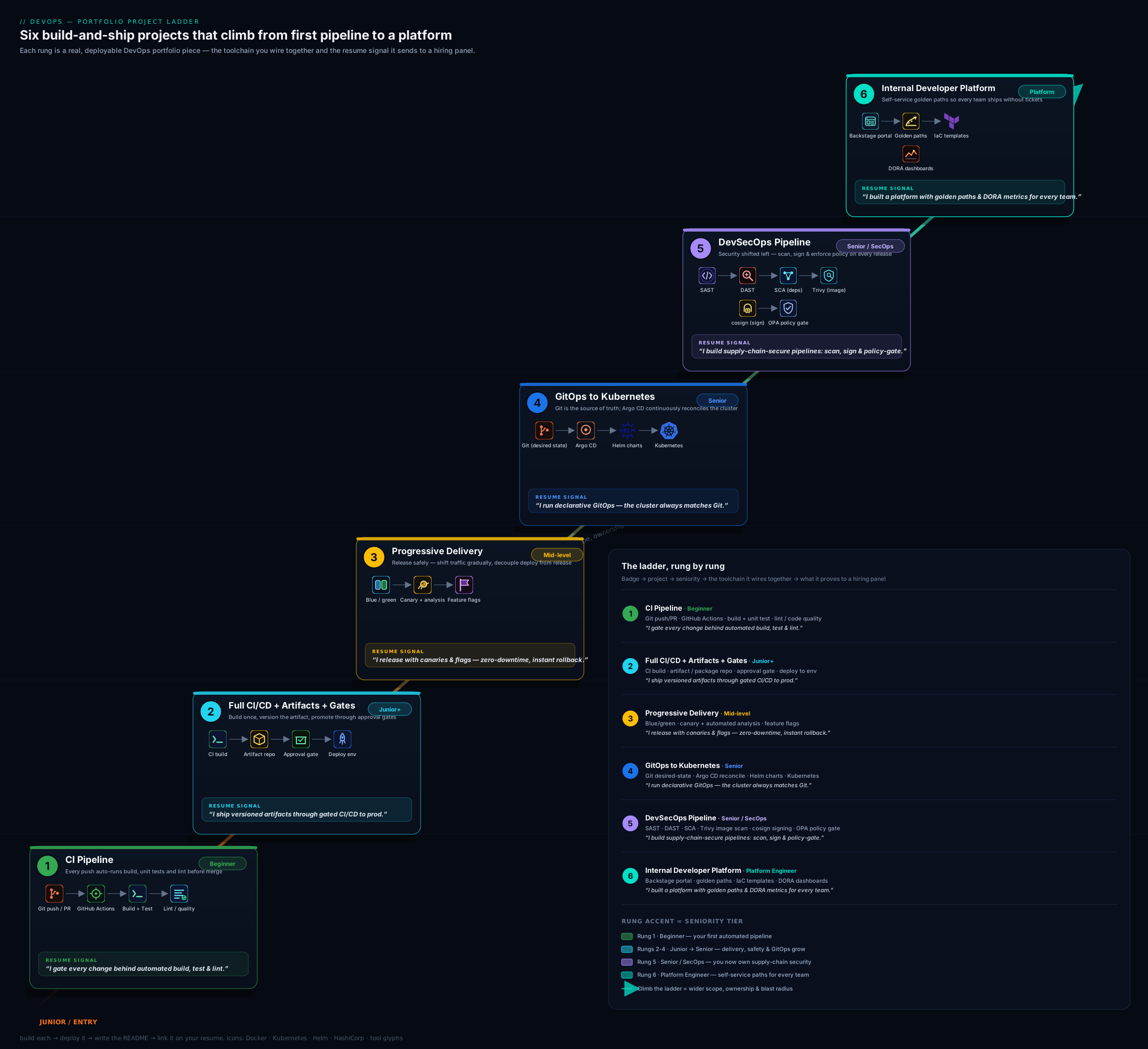
The diagram above shows the six projects as a rising ladder, with each rung’s headline tooling and the skill it proves — read it as the order to build in and the story your finished GitHub profile will tell, from a single CI pipeline at the bottom to a self-service developer platform at the top.
How to present each DevOps repo on GitHub: the presentation standard
A DevOps repo that is not legible to a stranger in five minutes is, for hiring purposes, half-finished. And because reviewers watch the pipeline run, the standard here is specific: the Actions/Pipelines tab must be green and re-runnable, and the README must make the delivery flow obvious without the reviewer reading every line of YAML.
The README is the product, and the running pipeline is the proof. A reviewer reads the README, looks at the diagram, then opens the Actions tab and watches a run. Lead with a one-sentence description of what the pipeline does, then the diagram, the badge, how to run it, screenshots of the running result, and a cost note — with the most impressive thing (a green CI/CD badge, a canary-rollback GIF, a one-click-scaffold clip) at the very top.
| README element | Why it matters | What “good” looks like |
|---|---|---|
| One-line summary | The six-second scan | “Full CI/CD to Kubernetes with canary releases and signed images.” |
| CI/CD status badge | Instant credibility | A green badge at the top, linking to a re-runnable Actions tab |
| Pipeline diagram | Shows you think in flow | A clean SVG/PNG of stages source→…→deploy→verify, embedded inline |
| Screenshots / GIF | Proves it actually runs | The pipeline passing, the canary stepping, the drift self-healing |
| “Run it yourself” | Shows reproducibility | Exact steps incl. a local kind/k3d path; assume a clean machine |
| Architecture diagram | Shows systems thinking | The deploy target, GitOps flow, or platform layout |
| Metrics / DORA note | Signals outcome-thinking (rare, valued) | Lead time, deployment frequency, build-time cut, MTTR — with numbers |
| Cost note + teardown | Signals cost-awareness | “≈₹X/month; run terraform destroy / kind delete cluster to stop the meter.” |
A few points deserve emphasis for DevOps specifically. Keep the Actions/Pipelines tab green and public — a red latest run, or a pipeline that has clearly never executed, is the first red flag a reviewer notices; re-trigger it before you share the repo. Make it reproducible on a free local cluster — a reviewer who can kind create cluster and watch your GitOps sync in five minutes is a reviewer who trusts you; never assume they have a paid cloud account. Pin your tool versions (action SHAs, image tags, Helm/chart versions) — unpinned pipelines break on a Friday and reviewers know it; pinning reads as “this person has been burned and learned.” Keep a .gitignore and never commit secrets — use the platform’s secret store and OIDC, because a credential in pipeline YAML or Git history is an instant rejection (these projects teach OIDC and secret managers precisely so there is nothing to leak). Finally, keep commits meaningful and pin your best repos to your profile.
Common mistakes & troubleshooting
| Symptom / mistake | Likely cause | Fix |
|---|---|---|
| Great YAML but no interview traction | No README, no diagram, no running result — illegible to a non-author | Apply the presentation standard; lead with summary, badge, diagram, screenshots |
| A secret committed to Git or pipeline YAML | No secret store; hard-coded token | Move to the platform’s secret store + OIDC, purge from history, rotate the secret |
| Latest pipeline run is red (or never ran) | Stale/broken workflow shared as-is | Re-trigger and fix to green before sharing; a red top-of-tab run kills credibility |
| Résumé bullet reads “set up CI/CD” and lands flat | No quantification | Add a DORA number: lead time, deployment frequency, change-failure rate, MTTR, build-time cut |
| Pipeline is green but doesn’t block bad merges | Job not a required status check | Mark the workflow required on the protected branch; gate the merge, not just report |
| Reviewer can’t reproduce it | Assumes a paid cloud / undocumented setup | Provide a local kind/k3d path and exact “run it yourself” steps |
“I deploy with kubectl apply from CI” |
Push-based, no source of truth, drift | Adopt GitOps (Argo CD/Flux): Git is the source of truth, the pipeline commits, the controller reconciles |
| Security scan exists but doesn’t gate | Scan runs but failures don’t fail the build | Fail on HIGH/CRITICAL; add a signed-and-scanned-only OPA/Kyverno gate; prove with a blocked build |
| Trying to build all six at once and finishing none | Scope overload | Build strictly in ladder order; ship and document rung n before starting n+1 |
Best practices
- Build in order, finish each rung. A finished, documented, running CI pipeline beats four half-built repos — and the ladder is designed so each rung reuses the last around one sample app.
- Automate and gate from project one. Every project’s pipeline is a required status check; from rung 5 it enforces security policy. A pipeline that doesn’t gate the merge teaches the syntax, not the job.
- Make it reproducible — and free — to run. Provide a local kind/k3d path and exact commands; a reviewer who reproduces your GitOps sync in five minutes is a reviewer who trusts you.
- Measure with DORA. Put deployment frequency, lead time, change-failure rate, and MTTR in the README and the résumé bullet — DevOps is judged on outcomes, and these are the outcomes.
- Pin relentlessly. Action SHAs, image tags, chart versions — unpinned pipelines break unpredictably, and reviewers read pinning as hard-won maturity.
- Adopt GitOps over push. From rung 4, Git is the source of truth and a controller reconciles; the pipeline commits rather than
kubectl apply-ing — auditable, drift-resistant, and the modern default. - Reuse across rungs. Rung 1’s CI fronts rung 2; rung 2’s artifact is released in rung 3; rung 4 delivers it via GitOps; rung 5 secures the supply chain; rung 6 makes it self-service. One growing delivery system beats six toys.
Security notes
These projects are also a chance to demonstrate secure-by-default delivery, which hiring managers weight heavily — and the pipeline is where insecure habits do the most damage because everything ships through it:
- Never commit secrets. Use the platform’s secret store and OIDC for cloud and registry auth — a token in pipeline YAML or Git history is a hard, permanent rejection unless you rewrite history and rotate. This is why rung 2 uses OIDC and rung 6 uses SSO.
- Prefer OIDC over stored credentials. From rung 2 the pipeline assumes a cloud/registry identity via short-lived federated tokens — no long-lived keys anywhere in the system.
- Secure the supply chain, not just the code. Rung 5 makes scan + sign (cosign) + SBOM + a signed-and-scanned-only policy gate the standard, so provenance is enforced, not assumed — protecting against tampered dependencies and images.
- Gate, don’t suggest. “No HIGH/CRITICAL vulnerabilities, only signed images” is a blocking CI/admission control, not a wiki page — rung 5 proves it by rejecting a vulnerable and an unsigned build.
- Apply least privilege. Scope pipeline identities and Argo CD/Kubernetes RBAC to exactly what each needs — the pipeline that can deploy one app should not be able to administer the cluster.
Cost & sizing
The whole ladder is buildable for almost nothing if you are disciplined — and being disciplined is itself the lesson a cost-aware hiring manager looks for. Most of DevOps is pipelines and code, which cost only free CI minutes; the only real spend is any cloud deploy target, and even that is avoidable because a local kind/k3d/minikube cluster runs rungs 3–6 for free. The highest-leverage habit is to put a teardown command in every README and actually run it between demos — kind delete cluster, terraform destroy, or stopping a cloud app service — because anything left running bills by the hour.
| Project | Main cost driver | Keep it cheap by |
|---|---|---|
| 1 — CI pipeline | Near zero (free CI minutes) | Free GitHub Actions tier; cache to cut minutes |
| 2 — Full CI/CD + artifacts | Deploy target (if cloud) | Smallest SKU, or deploy to local kind; free registry (GHCR); tear down between sessions |
| 3 — Blue/green + canary | Cluster / slots | Run on local kind/k3d for free; Prometheus runs in-cluster |
| 4 — GitOps with Argo CD | Kubernetes cluster | Local kind/k3d is perfect and free; kind delete cluster at rest |
| 5 — DevSecOps pipeline | Near zero (CI minutes + free scanners) | CodeQL/Trivy/ZAP/cosign are free; policy gates are plan-time |
| 6 — Internal Developer Platform | Backstage host + cluster | Run Backstage locally / a tiny VM; keep one golden path and a small cluster |
Interview & exam questions
- “Why should I hire you over someone with more certifications?” — Certifications show I learned the material; my portfolio shows I can ship it. I’ve built six rungs — a CI pipeline, a full gated CI/CD with versioned artifacts, blue/green and canary releases with feature flags, GitOps to Kubernetes with Argo CD, a DevSecOps pipeline with signed images, and a self-service Backstage platform — all with green, re-runnable pipelines you can open right now.
- “What’s the difference between CI, CD, and Continuous Deployment?” — CI is integrating and testing every change automatically on merge; Continuous Delivery keeps every change releasable and deploys to production with a manual approval; Continuous Deployment removes that gate so every passing change goes to production automatically. My rung-2 pipeline is delivery (a required-reviewer gate before prod).
- “How do you handle artifacts across environments?” — Build the artifact once, tag it immutably (Git SHA + SemVer), publish to a registry, and promote the same artifact dev → staging → prod — never rebuild per environment, because a rebuild can produce a different binary than the one you tested.
- “Blue/green vs canary — when each?” — Blue/green swaps all traffic between two full environments at once: instant cutover and rollback, but double the resources and a big blast radius if green is bad. Canary shifts a small percentage first and ramps with metric analysis: smaller blast radius and automated abort, at the cost of a slower, more complex rollout.
- “What does it mean to decouple deploy from release?” — Deploy is shipping code to production; release is exposing it to users. Feature flags let you deploy code dark and turn it on independently (per cohort, instantly off on trouble) — so deploys are frequent and low-risk while releases are a business decision.
- “What is GitOps and why use it?” — Git is the single source of truth for desired state, and a controller (Argo CD/Flux) continuously reconciles the cluster to match — pull-based, not push. You get auditability (every change is a commit), drift correction (self-heal), and easy rollback (revert the commit) — the pipeline commits rather than touching the cluster.
- “How does GitOps differ from running
kubectl applyin a pipeline?” — Push-basedkubectl applyhas no source of truth, no drift detection, and broad cluster credentials in CI. GitOps inverts it: the desired state is in Git, an in-cluster controller pulls and reconciles, out-of-band changes are reverted, and CI only needs to commit — more secure and more auditable. - “How do you secure the software supply chain?” — SAST/SCA/DAST gates in CI, scan the image (Trivy), sign it (cosign) with an SBOM and provenance, and enforce a signed-and-scanned-only admission/OPA policy so unsigned or vulnerable images can’t deploy — security as a blocking gate, not a checklist.
- “What are the four DORA metrics and why do they matter?” — Deployment frequency, lead time for changes, change-failure rate, and mean time to recovery (MTTR). They measure delivery throughput and stability together — the research-backed signal of a high-performing team, and the numbers I put on my portfolio and résumé.
- “How does your pipeline authenticate to the cloud without stored keys?” — OIDC federation: the pipeline exchanges a short-lived token for a cloud/registry role via a federated credential (GitHub→IAM role / Azure federated credential / GCP Workload Identity Federation), so there are no long-lived secrets to leak or rotate.
- “What is an Internal Developer Platform and what problem does it solve?” — A self-service layer (e.g. Backstage) with a catalogue and golden-path templates that scaffold a paved-road service — repo, pipeline, manifests, GitOps app, security gates — in one click. It removes the platform team as a bottleneck while keeping every service on governed, consistent rails. That’s my rung-6 summit.
- “How do you roll back a bad deployment?” — Depends on the strategy: blue/green switches traffic back instantly; canary auto-aborts on a metric breach; GitOps reverts the commit and the controller reconciles; and a feature flag turns the feature off without any redeploy. I keep the previous artifact and a one-click redeploy path as a backstop.
Quick check
- Why is a green, re-runnable Actions/Pipelines tab more valuable than a flawless YAML file in a DevOps portfolio?
- In the full-CI/CD project, what’s the recommended way to move a release across dev, staging, and prod?
- In the release project, what does decoupling deploy from release with feature flags let you do?
- What makes GitOps with Argo CD different from running
kubectl applyin a pipeline? - Name two of the four DORA metrics and say whether each measures throughput or stability.
Answers
- Because a DevOps reviewer opens the Actions tab and watches a real run — a green, re-triggerable pipeline proves the delivery flow actually works, whereas YAML that has never executed proves only that you can write YAML.
- Promote a single immutable artifact (built once, tagged with the Git SHA/SemVer) through the environments behind gates and an approval — never rebuild per environment, so prod runs the exact bits you tested.
- Deploy code dark and turn it on independently — ship to production frequently and safely while controlling exposure per cohort and flipping a feature off instantly without a redeploy (deploy ≠ release).
- GitOps makes Git the single source of truth and an in-cluster controller reconciles the live state to match (pull-based, self-healing, auditable), whereas
kubectl applyis push-based with no source of truth, no drift correction, and broad CI credentials. - Any two of: deployment frequency (throughput), lead time for changes (throughput), change-failure rate (stability), MTTR (stability).
Exercise
Build Project 2, the full CI/CD pipeline with an artifact repository and gates, end to end — and present it to the standard in this lesson. Follow the build outline: start from rung 1’s CI, add a package stage that builds an immutable SHA-tagged container image, publish it to GitHub Container Registry, and deploy it (to a local kind cluster is free and fine) — behind a coverage threshold, an image vulnerability scan, and a GitHub Environment with a required reviewer before the protected environment, authenticating with OIDC so no long-lived secrets exist. Then do the things that turn a working pipeline into a hiring asset: add a rollback path (workflow_dispatch to redeploy the previous tag), write the README to the presentation standard (one-line summary, green badge at the top, pipeline diagram, screenshots of a passing run, “run it on kind yourself” steps, cost note with teardown), and draft your quantified résumé bullet with a real commit-to-deployed lead-time number.
When you can hand a stranger that repo URL and they open the Actions tab, watch a run go from commit to a deployed, gated environment, and reproduce it on a local cluster in a few minutes — you have completed a pivotal rung, and a template for the rest.
Certification mapping
This portfolio is the practical complement to the cloud-DevOps and Kubernetes certification ladder; each project reinforces specific exams and roles.
| Project | Reinforces certification(s) | Target roles it supports |
|---|---|---|
| 1 — CI pipeline | DevOps Foundation, GitHub Actions cert | Junior DevOps / build engineer |
| 2 — Full CI/CD + artifacts | AWS DevOps (DOP-C02) / Azure DevOps (AZ-400) / GCP DevOps | DevOps / release engineer |
| 3 — Blue/green + canary + flags | cloud DevOps pro (DOP-C02 / AZ-400) | DevOps / SRE / release engineer |
| 4 — GitOps with Argo CD | CKA / CKAD, cloud DevOps pro | Platform / Kubernetes engineer |
| 5 — DevSecOps pipeline | DevSecOps practice, CKS, cloud DevOps pro | DevSecOps / platform engineer |
| 6 — Internal Developer Platform | AZ-400 / DOP-C02 / GCP DevOps, CKA | Staff / platform / SRE lead |
Taken together, the six projects give you concrete, demonstrable evidence for the cloud DevOps professional exams (AWS DevOps Engineer DOP-C02, Azure DevOps Engineer AZ-400, Google Cloud DevOps Engineer), the Kubernetes ladder (CKA/CKAD/CKS), the Terraform Associate, and the DevOps Institute credentials (DevOps Foundation, DevSecOps) — exactly the spread a versatile DevOps/platform engineer needs.
Glossary
- Continuous Integration (CI) — automatically building and testing every change on merge so integration problems surface immediately; the heartbeat of a team’s delivery.
- Continuous Delivery / Deployment (CD) — keeping every change releasable and deploying via an approval (delivery) or automatically (deployment).
- Quality gate — a pipeline checkpoint (coverage threshold, security scan, manual approval) that blocks progression if a standard isn’t met.
- Artifact / artifact repository — the immutable, versioned build output (a container image, a package) and the registry (GHCR, Nexus, Artifactory) that stores it for promotion across environments.
- Blue/green deployment — running two full environments and switching all traffic at once; instant cutover and rollback at the cost of double resources.
- Canary deployment — shifting a small percentage of traffic to a new version and ramping with metric analysis; small blast radius with automated abort.
- Feature flag — a runtime toggle that decouples deploy from release, letting code ship dark and be turned on independently per cohort.
- GitOps — Git as the single source of truth for desired state, with a controller (Argo CD/Flux) continuously reconciling the live system to match.
- Argo CD / Flux — pull-based GitOps controllers that reconcile a Kubernetes cluster to the manifests in Git, with self-heal and drift correction.
- DevSecOps — integrating security (SAST/SCA/DAST, image scanning, signing, policy gates) into the pipeline so security is a blocking, automated part of delivery.
- SAST / DAST / SCA — static code analysis, dynamic analysis of the running app, and software-composition (dependency) analysis, respectively.
- cosign / SBOM — Sigstore image signing for provenance, and a Software Bill of Materials listing everything in an artifact; together the basis of supply-chain trust.
- OPA / Kyverno — policy engines that enforce rules (e.g. signed-and-scanned-only images) as code, in CI or as a Kubernetes admission gate.
- DORA metrics — deployment frequency, lead time for changes, change-failure rate, and MTTR; the research-backed measures of delivery throughput and stability.
- Internal Developer Platform (IDP) / Backstage — a self-service layer (the Backstage portal, a catalogue, golden-path templates) that lets engineers scaffold and ship paved-road services without the platform team as a bottleneck.
- OIDC federation — authenticating a pipeline/platform to a cloud or registry with a short-lived federated token instead of a stored long-lived credential.
Next steps
You now have a build plan for a DevOps portfolio that tells a complete story — integrate, deliver, release safely, GitOps, secure, platform — and the standard to make every repo legible to a hiring manager. Build the six in order, keep every pipeline green and reproducible on a free local cluster, and pin them to your profile.
- Next lesson: DevOps Certification Prep Kit: AWS/Azure/GCP DevOps, Terraform Associate, CKA/CKAD & GitHub/GitLab — turn these projects into passing scores, with per-exam objective checklists and weightings, a practice-question bank with explained answers, and a study order.
Related reading to go deeper on individual rungs:
- The DevOps Architecting Ladder: From a Single Pipeline to an Internal Developer Platform — the architecture rationale that mirrors this portfolio’s rise to rung 6.
- Progressive Delivery with Argo Rollouts: Canary & Metric Analysis — the deep mechanics behind rung 3’s automated canary.
- OpenFeature Feature-Flag Platform & Progressive Rollout — the deploy-versus-release decoupling behind rung 3.
- Argo CD App-of-Apps & Multi-Cluster GitOps — the GitOps patterns behind rung 4.
- DevSecOps Pipeline: SAST, DAST, SCA & Policy Gates — the supply-chain security behind rung 5.
- Backstage Internal Developer Portal & Software Templates — the golden-path platform behind rung 6.
- DORA Metrics: Deployment Frequency & Lead Time — the metrics that quantify every rung.