A 40-person regional veterinary diagnostics lab — the kind that processes blood panels and tissue samples for a few hundred animal clinics across three states — runs its entire business on one cloud account: a patient-results portal, a LIMS (laboratory information management system) database that holds every test result, and a shared file store of scanned requisition forms. There is no dedicated infrastructure team. There is one platform engineer who also handles the help desk, and a managed-service provider on a part-time retainer. Last quarter a contractor ran a cleanup script with the wrong account context and deleted a production database; the team got lucky because a snapshot from the night before existed, but the restore took nine hours of frantic guesswork because nobody had ever actually done one. The lab’s medical director did the math: a full day of lost results means clinics can’t dose treatments, and the lab’s contracts carry penalties for missed turnaround times. The mandate that came down was blunt — “I don’t care about fancy failover, I care that if something gets deleted or encrypted, we get it back, we know how long it takes, and we’ve proven it works.”
That is the brief for backup-and-restore disaster recovery, the most foundational and cheapest DR strategy there is. It is not the glamorous active-active, multi-region, instant-failover architecture that gets conference talks. It is the one that small teams actually need first, can actually afford, and — critically — can actually operate without a 24/7 ops rotation. This article is the reference design for doing it properly: native cloud backup with immutable copies, a cross-region restore path, documented and honest recovery objectives, and a simple annual test that turns “we think we can recover” into “we recovered last month, here’s the runbook.”
Why backup-and-restore, and why not the shortcuts
DR strategies sit on a spectrum, and the spectrum is really a cost-versus-recovery-time curve. At the expensive end, active-active runs your full stack live in two regions and shrugs off a region loss in seconds — and costs you double your infrastructure plus the engineering to keep two environments in sync. Warm standby keeps a scaled-down copy running that you scale up on failover. Pilot light keeps only the core (usually the database) replicating, and builds the rest on demand. And at the foundational end sits backup-and-restore: you keep no running standby at all, just durable copies of your data and the infrastructure-as-code to rebuild, and you restore when disaster strikes.
| Strategy | Typical RTO | Typical RPO | Relative monthly cost | Right for |
|---|---|---|---|---|
| Backup & restore | Hours | Hours (last backup) | $ (storage only) | Small teams, internal apps, tight budgets |
| Pilot light | Tens of minutes | Minutes | $$ | Core DB must be current, rest can rebuild |
| Warm standby | Minutes | Seconds–minutes | $$$ | Revenue apps, moderate tolerance |
| Active-active | Near-zero | Near-zero | $$$$ | Mission-critical, regulated, global |
For the diagnostics lab, backup-and-restore is the correct answer, and it is worth being clear why the cheaper-looking shortcuts are traps. “We already have snapshots” is the most dangerous one: ad-hoc snapshots in the same account and same region survive a disk failure but not an account compromise, a region outage, or a malicious actor with console access who deletes the snapshots too. “The cloud is durable, so our data is safe” confuses durability with recoverability — S3’s eleven nines of durability protects against hardware loss, not against you deleting the object or ransomware encrypting it. And “we’ll just replicate everything to another region” turns a logical corruption — a bad DELETE, a ransomware run — into a replicated corruption that arrives in the DR region milliseconds later. Replication copies mistakes faithfully. Backups, with versioned history and immutability, are what let you go back to before the mistake.
Architecture overview
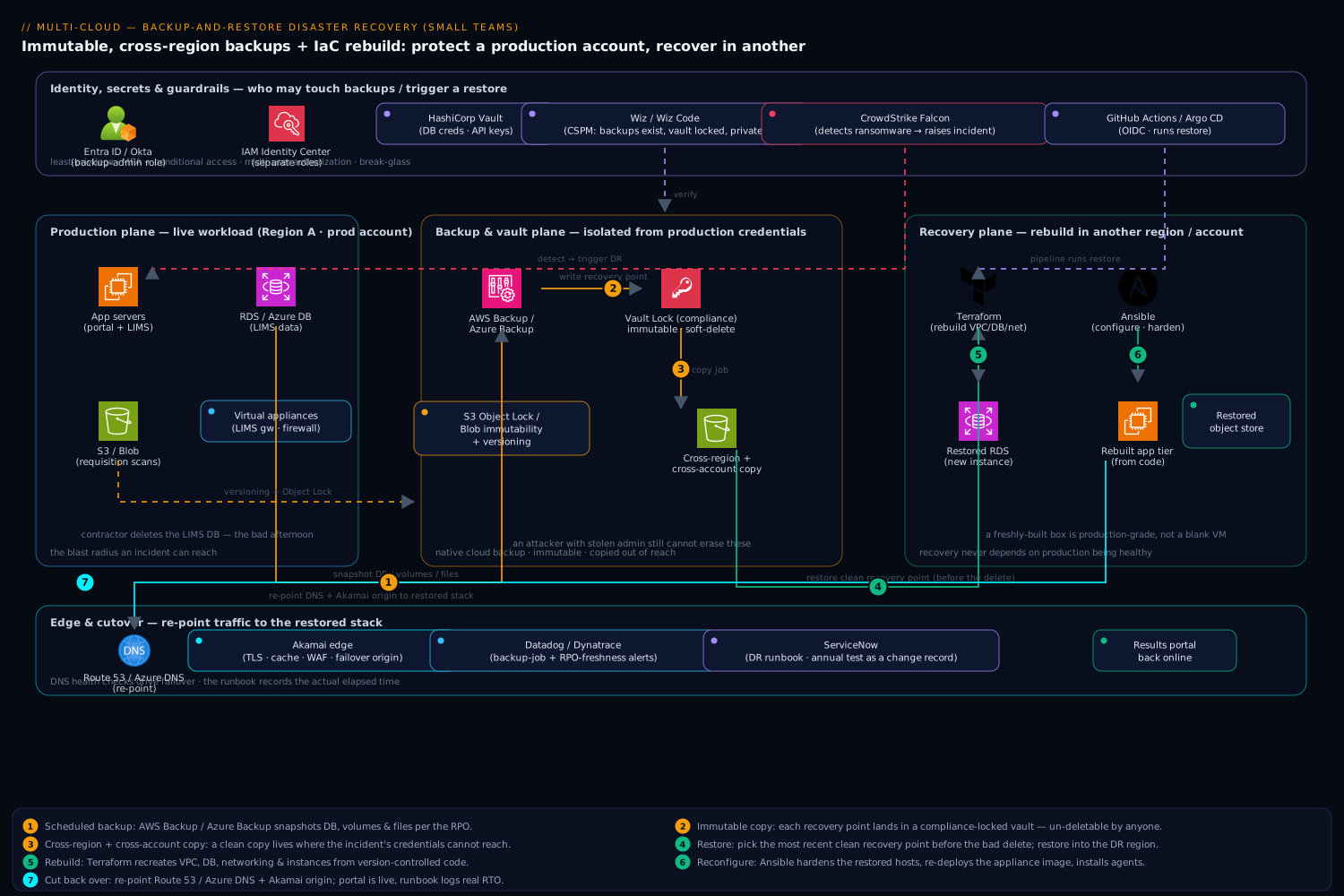
The design has three planes that are easy to keep straight: a production plane (the live workload), a backup-and-vault plane (where copies live, hardened against deletion), and a recovery plane (a separate region and account where you rebuild). The whole point of the architecture is that the backup-and-vault plane is isolated from the people and credentials that can touch production — so the same blast radius that takes out production cannot take out your ability to recover from it.
The production workload is deliberately ordinary: a handful of compute instances (the portal and LIMS app servers), a managed relational database (the LIMS data — Amazon RDS or Azure Database for PostgreSQL), and an object/file store (requisition scans in S3 or Azure Blob). Some of the fleet are virtual appliances — a vendor-supplied LIMS integration gateway and a network firewall appliance shipped as VM images — which matter for DR because you back up their data and config, not the appliance binary, and you re-deploy the vendor image from a known-good version on restore.
The control flow, following a single day of protection and one bad afternoon:
-
Scheduled backup. A native backup service — AWS Backup or Azure Backup — runs on a policy (a backup plan / backup vault in AWS, a Recovery Services vault + backup policy in Azure). It snapshots the RDS database, the instance volumes, and the file store on a schedule keyed to the RPO: hourly transaction-log backups for the database, nightly full snapshots for volumes, continuous versioning on the object store. No human runs these; the schedule is the contract.
-
Immutable, isolated copy. Each backup is written into a vault with a lock — AWS Backup Vault Lock in compliance mode or Azure Backup immutable vault + soft delete + multi-user authorization. Once locked, a recovery point cannot be deleted or shortened by anyone, including an account administrator or an attacker who has stolen admin credentials, until its retention expires. This single control is what defeats ransomware and rogue-insider deletion, and it is the difference between “we have backups” and “we have backups an attacker can’t erase.”
-
Cross-region (and ideally cross-account) copy. The backup plan copies each recovery point to a second region and, for the strongest posture, a separate backup account that production’s IAM/RBAC has no write path into. Now a full regional outage or a complete production-account compromise still leaves an untouched copy in a blast radius the incident never reached.
-
The bad afternoon — restore. A contractor deletes the LIMS database (the real incident from last quarter, but this time rehearsed). The on-call engineer opens the runbook, picks the most recent clean recovery point before the deletion, and restores: the database to a new RDS instance, volumes to new instances built from Terraform, the object store from its versioned/replicated copy. Ansible configures the restored instances (re-installs agents, re-points the LIMS gateway appliance, applies OS hardening) so a freshly-built box is production-grade, not a blank VM.
-
Cut back over. DNS (Route 53 / Azure DNS) and the CDN/edge — Akamai fronting the results portal for TLS, caching, and a WAF — are re-pointed to the restored stack. The portal is back. The runbook records the actual elapsed time, which feeds the next RTO review.
The deliberate design choice running through all of it: recovery does not depend on production being healthy. The IaC lives in Git, the backups live in a locked vault in another region/account, the runbook lives somewhere reachable when the main console is down, and the recovery account has its own break-glass access. Everything you need to rebuild is reachable after the thing you’re recovering from has already happened.
Component breakdown
| Component | Service / tool | Role in the DR design | Key configuration choices |
|---|---|---|---|
| Backup engine | AWS Backup / Azure Backup | Centrally schedules, runs, and tracks all backups | Policy-driven plan; tag-based resource selection; per-resource RPO schedule |
| Immutable store | Backup Vault Lock (compliance) / Immutable Recovery Services vault | Makes recovery points un-deletable for their retention | Lock in compliance mode; soft delete on; multi-user auth (MUA) on Azure |
| Cross-region copy | Backup copy jobs / vault replication | Survives a region or account loss | Copy to paired region + separate backup account |
| Object durability | S3 Versioning + Object Lock / Blob versioning + immutability | Point-in-time and ransomware protection for files | Versioning on; Object Lock (governance/compliance); lifecycle to cold tier |
| Rebuild infrastructure | Terraform | Recreates VPC, instances, DB, networking from code | State in remote backend; modules per environment; pinned provider versions |
| Configure instances | Ansible | Brings restored/rebuilt hosts to production state | Idempotent playbooks; re-deploy virtual appliances from known image |
| Identity | Microsoft Entra ID / Okta | Controls who can touch backups and trigger restores | Separate roles for backup-admin vs app-admin; MFA + conditional access |
| Secrets | HashiCorp Vault | Holds DB creds, API keys the restored app needs | Break-glass access path; secrets not baked into AMIs/images |
| Edge | Akamai | TLS, caching, WAF for the results portal; failover target | Origin re-point on cutover; health checks drive DNS |
| Posture / CSPM | Wiz / Wiz Code | Verifies backups exist, vaults are locked, no public exposure | Policy: “every prod DB has a recent backup”; IaC scan in Wiz Code |
| Endpoint/workload security | CrowdStrike Falcon | Detects the ransomware/intrusion that triggers DR | Sensor on all instances; detections raise the incident |
| Observability | Datadog / Dynatrace | Alerts on failed backup jobs and missed RPO | Monitor on backup job status; SLO on backup freshness |
| ITSM / runbook | ServiceNow | Declares the DR incident, drives the runbook, logs the test | DR runbook as a task template; annual test as a change record |
| CI / pipeline | GitHub Actions / Jenkins / Argo CD | Applies Terraform, runs restore automation | OIDC to cloud (no stored creds); pipeline can run the recovery |
A few of these choices carry the weight of the design and deserve the why.
Why native backup, not a script that calls the snapshot API. A cron job that runs aws rds create-db-snapshot looks cheaper than enabling AWS Backup. It is a false economy for a small team. Native backup gives you policy-based scheduling, cross-region and cross-account copy as a checkbox, vault immutability, lifecycle-to-cold-storage for cost, and — the part teams forget — a console that shows job success and failure that an alert can hang off. The home-grown script has none of that, fails silently the day an IAM permission changes, and is discovered to be broken only during the disaster. Let the cloud provider own the undifferentiated heavy lifting; your one engineer’s time is the scarce resource.
Why immutability is the load-bearing control. Ransomware operators in 2026 do not just encrypt your production data — they hunt for and delete your backups first, because they know that a victim with good backups doesn’t pay. A backup an administrator can delete is a backup an attacker with admin credentials can delete. AWS Backup Vault Lock in compliance mode and Azure immutable vaults with multi-user authorization remove that capability from everyone for the retention window — no override, no exception, not even the root account. That is precisely the property you want. The tradeoff is real and you must accept it eyes-open: in compliance mode you genuinely cannot delete those recovery points early even if you want to, so you size retention deliberately and test the lock in a sandbox first.
Why Terraform and Ansible are part of a backup story. Backups restore your data. They do not, by themselves, restore the environment the data lives in — the VPC, subnets, security groups, the database instance, the load balancer, the virtual appliances. If that environment exists only as click-ops in a console that may be unavailable in the region you lost, your RTO is “however long it takes to rebuild it from memory under pressure” — which is exactly the nine-hour scramble the lab already suffered. Terraform turns the environment into code you can apply into the recovery region in minutes; Ansible turns a bare restored instance into a configured, hardened, agent-installed production host. Together they make RTO a number you can shrink and trust, not a prayer.
Recovery objectives: making RTO and RPO honest
The two numbers that define any DR plan are RTO (Recovery Time Objective — how long until you’re back) and RPO (Recovery Point Objective — how much recent data you can afford to lose, i.e. how far back the last good backup is). The single most common small-team mistake is to write down aspirational numbers — “RTO 1 hour, RPO 5 minutes” — that the chosen strategy cannot physically deliver, and then discover the gap during a real outage.
Backup-and-restore is honest about its limits. Your RPO is bounded by your backup frequency: if you snapshot the database every hour, you can lose up to an hour of results, full stop. Your RTO is bounded by restore speed plus rebuild speed: how long to provision a new database from a snapshot (minutes to hours depending on size), plus how long Terraform takes to stand the environment up, plus configuration and cutover. For the lab, after measuring an actual test, the honest committed objectives were:
| Tier | Workload | RPO | RTO | How it’s met |
|---|---|---|---|---|
| 1 | LIMS database (test results) | 1 hour | 4 hours | Hourly log backup; restore to new RDS in DR region |
| 1 | Requisition file store | 15 min | 2 hours | Object versioning + cross-region replication |
| 2 | Results portal (app tier) | 24 hours | 4 hours | Nightly image; rebuilt via Terraform + Ansible |
| 3 | Internal reporting | 24 hours | 24 hours | Nightly backup; rebuilt only after Tier 1/2 |
Tiering is the trick that keeps cost down: not everything needs the tightest objective. The medical director cares about test results, so the LIMS database and the scans get the aggressive RPO; the internal reporting dashboard can wait a day. Spending Tier-1 money on Tier-3 data is the waste that makes DR look unaffordable. Write the objectives per workload, derive the backup schedule from them, and get the business — not just engineering — to sign the numbers, because RTO/RPO are business risk decisions wearing technical clothing.
Implementation guidance
Start with the backup plan, expressed as code. Define the AWS Backup plan (or Azure backup policy) in Terraform so the protection itself is version-controlled and reviewable. A minimal AWS shape communicates the intent — schedule, retention, immutability, and a cross-region copy:
resource "aws_backup_vault" "locked" {
  name = "vetlab-dr-vault"
}

# Compliance-mode lock: recovery points cannot be deleted early by ANYONE.
resource "aws_backup_vault_lock_configuration" "lock" {
  backup_vault_name   = aws_backup_vault.locked.name
  min_retention_days  = 35
  max_retention_days  = 365
  changeable_for_days = 3   # cooling-off window before the lock is permanent
}

resource "aws_backup_plan" "main" {
  name = "vetlab-dr-plan"

  rule {
    rule_name         = "hourly-db"
    target_vault_name = aws_backup_vault.locked.name
    schedule          = "cron(0 * * * ? *)"     # hourly -> 1h RPO for Tier 1
    lifecycle { delete_after = 35 }

    copy_action {                                # cross-region copy for region loss
      destination_vault_arn = aws_backup_vault.dr_region.arn
      lifecycle { delete_after = 35 }
    }
  }
}
Select resources by tag, not by ARN, so anything tagged backup=tier1 is automatically protected the moment it’s created — new resources inherit DR coverage instead of being forgotten. This closes the most common gap: the database somebody spun up “temporarily” that was never added to the backup job.
Harden the object store separately. Managed-DB backups cover the database; the file store needs its own protection. Turn on versioning and Object Lock (S3) or blob versioning + immutability policy (Azure) so a deleted or encrypted requisition scan can be rolled back to a prior version, and add cross-region replication so the files survive a region loss. Lifecycle rules then tier old versions to cheap cold storage (S3 Glacier / Azure Archive) so the history is affordable to keep.
Lock down who can touch backups. This is where identity does heavy lifting. In Microsoft Entra ID (or Okta federated in), create a backup-administrator role that is strictly separate from the application-administrator role, protect it with MFA and conditional access, and ensure the day-to-day app engineers and contractors do not hold delete rights on the vault. Azure’s multi-user authorization (MUA) adds a second-approver requirement for destructive vault operations. The credentials the restored application needs — database passwords, third-party API keys — live in HashiCorp Vault with a documented break-glass path, never baked into machine images, so a stolen AMI doesn’t hand over the keys and a restore can fetch fresh secrets.
Run the recovery from the pipeline, not by hand. Wire the Terraform apply and the restore automation into GitHub Actions (or Jenkins, or Argo CD if you lean GitOps), authenticating to the cloud via OIDC so there are no long-lived credentials to leak. The same pipeline that builds production can rebuild it in the DR region — which means the recovery path is exercised, in part, on every normal deploy, instead of being a special, untested code path that only runs on the worst day.
Enterprise considerations
Security: backups are an attack surface and a defense. Treat the backup system as a crown-jewel target. The defensive layer that triggers DR is your endpoint security — CrowdStrike Falcon sensors on every instance detect the ransomware run or intrusion and raise the incident that opens the runbook. The verification layer is Wiz: a continuous CSPM policy asserts that every production database has a recent recovery point, that every vault is locked and not publicly accessible, and that no backup snapshot has been shared out to an unknown account — and Wiz Code scans the Terraform in pull requests so a change that would disable immutability or drop a resource from the backup plan is caught before merge, not discovered during an outage. The principle: it is not enough to have backups; you need an independent control continuously proving the backups exist, are immutable, and are private.
Cost: this is the cheap DR strategy, so keep it cheap. The whole appeal of backup-and-restore is that you pay for storage, not for a running standby. Protect that economics:
| Lever | Mechanism | Effect |
|---|---|---|
| Lifecycle to cold | Move recovery points to Glacier/Archive after N days | 70–80% cheaper on long-tail retention |
| Tier the schedule | Aggressive backup only for Tier-1 data | Stops over-paying to protect throwaway data |
| Incremental backups | Native services back up only changed blocks | Storage grows with change rate, not full size |
| Right-size retention | Match retention to the actual compliance need | Avoids hoarding years of daily fulls |
| Delete on a schedule | Lifecycle expiry inside the lock window | Bounded, predictable storage bill |
The watch-out: immutable + cold storage means early-deletion fees and retrieval costs/latency. Compliance-mode locks plus Glacier Deep Archive can mean a recovery point you cannot delete for months and that takes hours to retrieve. That is fine for the deep archive tier and wrong for the Tier-1 restore path — so keep recent recovery points in the warm/standard tier where restore is fast, and let only the older long-tail age into cold. Match the storage class to the recovery objective, not the other way around.
Failure modes — name them before they page you.
- The backup job has been silently failing. An IAM permission changed three weeks ago and nightly backups have errored since; nobody noticed because nobody was watching job status. Mitigation: a Datadog (or Dynatrace) monitor on backup-job success and an SLO on backup freshness — alert if the newest recovery point for any Tier-1 resource is older than its RPO. A missed backup must page before it’s needed.
- The restore has never been tested. The snapshot exists but the restore procedure is undocumented, the team is improvising, and RTO balloons — the lab’s original nine-hour scramble. Mitigation: the annual recovery test (next section).
- Replicated corruption. A bad delete or ransomware encryption replicates instantly to the DR region; the “copy” is corrupt too. Mitigation: immutability + versioned history is the real recovery, not replication. You restore to before the event, not to the mirrored after.
- Backups deleted in the attack. The intruder has admin and wipes the vault before encrypting. Mitigation: compliance-mode lock and cross-account copy — the recovery copy lives where the compromised credentials have no reach.
- Secrets missing on restore. The environment rebuilds but the app can’t start because credentials were only ever in the dead account. Mitigation: secrets in Vault with break-glass access, fetched fresh at recovery time.
Observability and ITSM. Backups are worthless if you can’t see them and useless if recovery is ad-hoc. Wire backup-job status and RPO-freshness into Datadog/Dynatrace dashboards and alerts. Model the DR procedure as a ServiceNow runbook task template, so declaring a DR incident spins up an ordered checklist with owners and timestamps — and so the annual test is logged as a change record with its measured RTO/RPO attached. When the test reveals the real restore took five hours against a four-hour target, that’s a tracked finding with an action item, not a forgotten Slack message.
The recovery test — the part everyone skips
A backup you have never restored is a hypothesis, not a safety net. The single highest-value, lowest-cost thing a small team can do is schedule a recovery test at least annually and treat it as a real exercise:
- Pick a scenario — “the LIMS database was deleted at 2pm” — and a clean recovery point from before it.
- Restore into an isolated recovery environment (the DR region/account) using only the runbook and the IaC, with no help from the engineer who built production — to surface every undocumented step.
- Time it. Record actual RTO (restore + rebuild + cutover) and actual RPO (gap to the chosen recovery point).
- Validate the data. Confirm the restored database is queryable and consistent, the file store is complete, the app starts and serves a real result.
- Fix the runbook with everything that went wrong, and re-baseline the committed RTO/RPO to the truth.
This is what converts “we think we’re covered” into “we recovered last month, here’s the timing, here’s the runbook the medical director signed.” For a team of one platform engineer and a part-time MSP, the annual test is the highest-leverage hour on the calendar.
Explicit tradeoffs
Accept these or pick a different strategy. Backup-and-restore deliberately trades recovery speed for cost and simplicity. You will have a real RTO measured in hours, not seconds — there is no warm stack waiting, so you rebuild on demand. You will have an RPO bounded by backup frequency, so some recent data loss is on the table by design. Immutability, the control that makes this safe against ransomware, removes your own ability to delete recovery points early — that is the point, but it means you size retention carefully and live with the storage bill and any early-deletion fees. And the strategy assumes your environment is reproducible from code; if half your infrastructure is undocumented click-ops, your real RTO is far worse than the snapshot-restore time suggests, and the first deliverable is actually getting Terraform to describe what you have.
When to graduate. Backup-and-restore is the right floor, not the ceiling. When an hours-long RTO starts costing real money — when the lab wins a contract whose SLA penalizes any downtime over thirty minutes — move the most critical tier up to pilot light (keep the LIMS database continuously replicating to the DR region so only the app tier rebuilds) or warm standby (a scaled-down stack always running). Those cost more precisely because they keep something live. The beauty of starting here is that the investments are not wasted: the Terraform, the Ansible playbooks, the immutable vaults, the Entra-gated access, the tested runbook, and the Wiz/Datadog guardrails are the same foundations every higher tier is built on. You are not throwing away backup-and-restore when you graduate — you are keeping it as the bottom layer and adding a faster path on top for the workloads that have earned it.
The shape of the win
For the diagnostics lab, the payoff is not an architecture diagram — it is a sentence the medical director can say to a clinic on the phone: “Yes, a database was deleted this afternoon; results are restored and current as of 1pm, and we’ll be fully caught up within the hour.” That sentence exists because, before the bad day ever came, the team had nightly and hourly immutable backups in a locked vault an attacker couldn’t reach, a copy in a second region a regional outage couldn’t touch, Terraform and Ansible to rebuild the environment from code, identity controls so a contractor’s mistake couldn’t also wipe the backups, and a runbook they had personally executed in a test two months earlier. None of it is exotic. All of it is affordable for a 40-person company. And it is the exact difference between a nine-hour panic and a one-hour recovery — which, for a small team, is the entire game.