Knowing the names of the Azure analytics services is one thing; being able to assemble them into a working pipeline that ingests yesterday’s orders, cleanses them overnight, joins a live clickstream, and lights up a dashboard by 8 a.m. is another entirely. This lesson is the second of those skills. It is a senior data engineer’s build walkthrough of an end-to-end Azure data platform — the kind of thing you design in an interview on a whiteboard and then implement for real on Monday.
We will follow data through the five stages every platform shares — ingest, store, transform, serve — with streaming running alongside as a first-class path, and orchestration, CI/CD, security and governance wrapped around the whole thing. At each stage we do not merely name the service: we choose between the realistic options (Data Factory vs Synapse pipelines, dedicated vs serverless SQL, Stream Analytics vs Spark Structured Streaming, Synapse vs Microsoft Fabric vs Databricks), say why, and show the az/JSON shape of how it is wired. This is the build-skills companion to the platform overview, and it maps directly to the DP-203: Data Engineering on Microsoft Azure objectives — ingestion and transformation, securing and monitoring data storage and processing, and (increasingly) the Microsoft Fabric-era successor skills.
A note on the 2026 landscape. Microsoft has frozen new investment in standalone Synapse Analytics and made Microsoft Fabric its strategic data platform; the DP-203 exam is being retired in favour of Fabric-centric certifications (DP-700, DP-600). We teach the DP-203 build because the concepts are identical — pipelines, medallion, Delta, Spark, streaming, serving — and the huge installed base of Synapse/ADF estates is exactly what you will operate and migrate. Every pattern here translates one-to-one to Fabric, and we flag the Fabric equivalent as we go.
Learning objectives
By the end of this lesson you can:
- Design and build an ingestion layer with Azure Data Factory / Synapse pipelines — choosing the right integration runtime, and implementing both full and incremental/CDC loads.
- Lay out an ADLS Gen2 lake using the medallion (bronze/silver/gold) architecture in Delta/Parquet, and partition it so it performs.
- Transform data in batch with Synapse Spark and SQL pools (and know when Databricks is the better engine), applying cleansing, conforming and aggregation.
- Build a streaming path with Event Hubs feeding Stream Analytics or Spark Structured Streaming, and reason about windowing, watermarks and exactly-once.
- Serve the curated data through a dedicated SQL pool / Fabric Warehouse and Power BI (including DirectLake), and choose the serving engine deliberately.
- Operationalise the platform — orchestration (triggers, dependencies), CI/CD (Git integration, ARM/Bicep, deployment), security (managed identity, private endpoints) and governance (Microsoft Purview).
- Answer the DP-203-style design questions an interviewer will ask about each of the above.
Prerequisites
You should be comfortable with the Azure fundamentals — the tenant → subscription → resource group → resource hierarchy, storage accounts (ADLS Gen2 is a storage-account feature), and Entra identity and RBAC, because a data platform is identity plus storage plus compute. Reading SQL and a little Python/PySpark helps but is not required — we explain every snippet. If you want the conceptual map first (what each service is and the Synapse-vs-Fabric-vs-Databricks decision in depth), read the companion Data Factory, Synapse & Microsoft Fabric deep dive — this lesson assumes that map and concentrates on building the pipeline. It sits in the Data Engineering module of the Azure Zero-to-Hero course and is an Advanced lesson; the natural predecessor in the certification ladder is AI-102: Building Production AI.
Core concepts: the shape of an end-to-end pipeline
Before any service, fix the mental model. A data platform is a conveyor belt with five stations. Data is pushed onto the belt by ingestion, parked in the lake, refined by transformation, and handed off to consumers by the serving layer — with a fast lane (streaming) running in parallel for events that cannot wait for the nightly batch.
| Stage | Job | Primary Azure services (Synapse era → Fabric era) |
|---|---|---|
| Ingest | Pull/push data from sources into the lake | Data Factory / Synapse pipelines → Fabric Data Factory, Dataflows Gen2; Event Hubs/IoT (streaming) |
| Store | Hold raw and refined data cheaply, durably, in open formats | ADLS Gen2 (Delta/Parquet) → OneLake |
| Transform | Cleanse, conform, aggregate — raw → trustworthy | Synapse Spark & SQL pools, Databricks → Fabric notebooks / SQL / Dataflows |
| Serve | Expose curated, modelled data with good performance | Dedicated/serverless SQL → Fabric Warehouse/Lakehouse, Power BI (DirectLake) |
| Stream | Process events continuously, low latency | Event Hubs → Stream Analytics / Spark Structured Streaming → Fabric Eventstream / Eventhouse (KQL) |
Four cross-cutting ideas underpin everything and recur in every interview:
- Separation of storage and compute. The lake (cheap object storage) holds the data permanently; transient, independently-scaled compute (Spark or SQL) attaches only when work is needed and scales to zero after. This is why a 50 TB lake can cost a few hundred rupees a day at rest while a large cluster runs for an hour and bills only for that hour.
- ELT over ETL. Because storage is cheap and the engines are elastic, the modern pattern lands raw data first (Extract-Load) and transforms inside the platform (Transform) using its own compute — rather than transforming on a separate box before loading (classic ETL). The medallion architecture is ELT made concrete.
- Batch and streaming are two speeds of the same belt. Batch processes bounded data on a schedule (nightly orders); streaming processes unbounded data continuously (clickstream events). A mature platform runs both and reconciles them in the serving layer — the Lambda/Kappa debate is exactly this.
- Idempotency and incremental loading. Re-running a pipeline must not double-count. We achieve this with watermarks (load only rows newer than last time), Delta
MERGE(upsert, not append) and deterministic partitioning. An engineer who cannot make a load idempotent cannot be trusted with production data.
A few terms you will use constantly: OLTP (transactional source systems — your apps, many small writes) vs OLAP (the analytics store — large aggregating reads); CDC (Change Data Capture — capturing only inserts/updates/deletes since last run instead of re-reading the whole table); watermark (the high-water value, e.g. a LastModified timestamp, that marks where the last load stopped); and schema-on-read (the lake imposes structure when you read, not when you write).
Ingest: Data Factory, Synapse pipelines & integration runtimes
Azure Data Factory (ADF) is Azure’s serverless data-integration (ELT orchestration) service — a managed conductor that moves and orchestrates data without storing it. The same engine is embedded in Synapse as Synapse pipelines and in Microsoft Fabric as Fabric Data Factory / Dataflows Gen2; the authoring concepts are near-identical, so learn one and you know all three. Use standalone ADF when integration is the whole job; use Synapse pipelines when ingestion lives next to your Spark/SQL analytics in one workspace; use Fabric for new, BI-led platforms.
The building blocks:
| Concept | What it is |
|---|---|
| Pipeline | A workflow — an ordered, branching graph of activities |
| Activity | One step (Copy, Data Flow, notebook, stored proc, Lookup, ForEach, If, Until, Web) |
| Dataset | A named, typed view of data in a store (a table, a folder of CSVs) |
| Linked service | A connection string / credential to a store or compute (the “data source”) |
| Trigger | What starts a pipeline — schedule, tumbling window, storage event, or manual |
| Integration runtime (IR) | The compute that actually executes an activity |
The integration runtime is the single most-tested ingestion concept because it decides where the work runs and what it can reach:
| Integration runtime | Where it runs | Use it for | Gotcha |
|---|---|---|---|
| Azure IR | Microsoft-managed, in Azure | Cloud-to-cloud copy, public endpoints, Data Flow execution (Spark under the hood) | Auto-resolves region; pick region for data residency/latency |
| Self-hosted IR (SHIR) | A VM/host you install inside your network | On-prem or private sources (SQL Server, file shares, private endpoints) | Dials outbound to ADF (firewall-friendly — no inbound ports); install ≥2 nodes for HA |
| Azure-SSIS IR | Managed cluster of SSIS nodes in Azure | Lift-and-shift existing SSIS packages unchanged | Always-on cluster — pause/stop when idle or it bills 24×7 |
Interview classic — “How do you copy data from an on-prem SQL Server into the lake?” Install a Self-hosted Integration Runtime inside the on-prem network; it makes an outbound HTTPS connection to ADF, so no inbound firewall ports are opened. Use it as the IR on the source linked service.
Full vs incremental & CDC
Re-copying an entire table every night does not scale. The two patterns:
- Watermark-based incremental load. Store the last successfully-loaded high-water value (e.g.
MAX(LastModified)) in a small control table or pipeline variable. Each run: Lookup the old watermark → Lookup the new max → Copy only rows whereLastModified > old AND <= new→ write the new watermark. This is the canonical ADF pattern and the one to draw in an interview. - Native Change Data Capture (CDC). When the source supports it (Azure SQL/SQL Server CDC, Postgres logical replication, Cosmos DB change feed), capture inserts/updates/deletes directly from the transaction log — far cheaper and it preserves deletes. ADF/Synapse offer a CDC resource and the Copy/Mapping Data Flow “enable change data capture” toggle that automate this.
On the lake side, both patterns land into Delta and use MERGE (upsert) so a re-run is idempotent — late or duplicate rows update in place rather than appending.
// Copy activity source — incremental query using pipeline parameters
"source": {
  "type": "AzureSqlSource",
  "sqlReaderQuery": "SELECT * FROM dbo.Orders WHERE LastModified > '@{pipeline().parameters.oldWatermark}' AND LastModified <= '@{pipeline().parameters.newWatermark}'"
}
Store: ADLS Gen2, the medallion & Delta/Parquet
The lake is Azure Data Lake Storage Gen2 (ADLS Gen2) — a storage account with the hierarchical namespace (HNS) enabled, which gives real folders and POSIX-style ACLs instead of a flat blob namespace. HNS must be enabled at creation and cannot be toggled on later — a favourite exam gotcha. Organise the lake with the medallion architecture: three layers (containers) of rising data quality.
| Layer | Also called | Contents | Format | Who writes it |
|---|---|---|---|---|
| Bronze | Raw / landing | Data exactly as ingested, immutable, append-only, partitioned by load date | Parquet/Delta (or raw CSV/JSON) | Ingestion pipelines |
| Silver | Cleansed / conformed | De-duplicated, typed, validated, conformed keys; one row per business entity | Delta | Transform jobs |
| Gold | Curated / serving | Business-level aggregates, star-schema facts & dimensions, ready for reporting | Delta | Transform jobs |
File format is a deliberate choice:
| Format | What it is | When |
|---|---|---|
| CSV/JSON | Row-based text | Only at the very edge (raw bronze ingest); never for analytics — slow, untyped, huge |
| Parquet | Columnar, compressed, typed | Good general analytics format; great scan/compression |
| Delta Lake | Parquet + a transaction log | The default for silver/gold — adds ACID transactions, time-travel, schema enforcement/evolution and efficient MERGE/upserts; the open format Synapse, Fabric and Databricks all share |
Partitioning is how you make the lake fast: physically split data into folders by a frequently-filtered column — usually date (/year=2026/month=06/day=15/) — so engines prune (skip) irrelevant partitions instead of scanning everything. Partition on columns you filter on, keep partition counts sane (avoid thousands of tiny partitions), and watch the small-file problem — many tiny files crush performance, so compact them (Delta OPTIMIZE) into ~128 MB–1 GB files.
# Land bronze → write Delta silver, partitioned, with an idempotent upsert
from delta.tables import DeltaTable
df = spark.read.format("delta").load("abfss://bronze@lake.dfs.core.windows.net/orders")
silver_path = "abfss://silver@lake.dfs.core.windows.net/orders"
(DeltaTable.forPath(spark, silver_path).alias("t")
  .merge(df.alias("s"), "t.order_id = s.order_id")
  .whenMatchedUpdateAll().whenNotMatchedInsertAll().execute())   # idempotent
Transform (batch): Synapse Spark, SQL pools & Databricks
Transformation turns bronze into trustworthy silver and curated gold. You have three engines; choosing well is a core DP-203 skill.
| Engine | Language | Best for | Billing model | Pick it when |
|---|---|---|---|---|
| Synapse Spark pool | PySpark/Scala/Spark SQL | Big, complex, semi-structured transforms; ML feature prep | Per vCore-hour while the pool is active (auto-pause when idle) | Heavy/flexible engineering inside Synapse |
| Synapse SQL — serverless | T-SQL over lake files | Ad-hoc exploration, light transforms, CREATE EXTERNAL TABLE/CETAS |
Per TB scanned, no infra | Intermittent SQL over the lake; cheapest for occasional queries |
| Synapse SQL — dedicated pool | T-SQL, MPP warehouse | Steady, heavy warehouse loads and serving | Provisioned DWU, billed 24×7 (pause when idle) | Predictable high-volume warehouse workloads |
| Azure Databricks | PySpark/Scala/SQL, Photon | Premier Spark/ML/AI lakehouse; multi-cloud; large-scale engineering | Per DBU + VM | Serious data engineering/data science, multi-cloud, or where Synapse Spark falls short |
The realistic 2026 pattern: Spark (Synapse or Databricks) for the bronze→silver→gold transforms, serverless SQL for cheap ad-hoc exploration, and a dedicated pool or Fabric Warehouse only when a high-concurrency relational serving layer is required. Synapse Spark and Mapping Data Flows (ADF’s visual, code-free Spark) cover most cleansing; drop to notebooks for complex logic.
Typical silver→gold transform steps: deduplicate, enforce/cast types, conform keys (map source codes to canonical dimension keys), handle slowly-changing dimensions (SCD), then aggregate into gold facts. Spark SQL or T-SQL both express this; the lake’s Delta format gives you MERGE for SCD Type-2 history.
Interview classic — “Dedicated vs serverless SQL pool?” Dedicated is a provisioned, always-on MPP warehouse sized in DWUs — fast and predictable for steady heavy loads, but you pay 24×7 so pause it when idle. Serverless queries lake files on demand and bills per TB scanned with no infrastructure — ideal for ad-hoc and intermittent work.
Stream: Event Hubs + Stream Analytics / Spark Structured Streaming
Some data cannot wait for the nightly batch — fraud signals, IoT telemetry, clickstream. The streaming fast lane has three parts: an ingestion buffer, a stream processor, and a sink (usually the lake and/or a hot store).
Azure Event Hubs is the ingestion buffer — a massively-scalable, Kafka-protocol-compatible event broker that absorbs millions of events/sec into partitions and retains them for a window so consumers can read at their own pace. (IoT Hub sits in front for device fleets; Event Hubs Capture can auto-archive raw events straight to the lake as bronze.) Then you pick a processor:
| Azure Stream Analytics (ASA) | Spark Structured Streaming (Synapse/Databricks) | |
|---|---|---|
| Language | SQL-like query | PySpark/Scala |
| Ops model | Fully managed, serverless (Streaming Units) | You run a Spark cluster/job |
| Best for | Quick, declarative windowed aggregations, routing, alerting | Complex logic, ML scoring, joining streams to large lake tables, unified batch+stream code |
| Windowing | Tumbling, hopping, sliding, session, snapshot | Tumbling/sliding + custom; watermarks for late data |
| Sinks | Power BI (live), SQL, ADLS, Cosmos, Event Hubs, Functions | Anything Spark writes — Delta lake, DB, etc. |
Windowing is the heart of stream processing — you cannot aggregate an infinite stream without bounding it in time:
| Window | Behaviour | Example |
|---|---|---|
| Tumbling | Fixed, non-overlapping buckets | Count orders per 5-minute block |
| Hopping | Fixed size, overlapping by a hop | 10-min totals emitted every 5 min |
| Sliding | Emits when events enter/leave the window | Alert if >100 events in any 1-min window |
| Session | Groups bursts separated by a gap of inactivity | A user’s browsing session |
Two more must-knows: a watermark tells the engine how long to wait for late-arriving events before closing a window (trade latency vs completeness), and exactly-once processing (checkpointing + idempotent sinks, e.g. Delta) prevents double-counting on failure/replay. In Fabric, this whole path becomes Eventstream → Eventhouse (KQL).
-- Azure Stream Analytics: orders per product per 5-minute tumbling window
SELECT productId, System.Timestamp() AS windowEnd, COUNT(*) AS orders
INTO   [powerbi-output]
FROM   [eventhub-input] TIMESTAMP BY eventTime
GROUP  BY productId, TumblingWindow(minute, 5)
Serve: dedicated SQL, Microsoft Fabric & Power BI
The serving layer exposes gold data to humans and tools with good performance and security. Options:
| Serving surface | What it is | When |
|---|---|---|
| Synapse serverless SQL | Pay-per-TB T-SQL over gold Delta/Parquet (views, external tables) | Cheap, intermittent BI/ad-hoc on the lake |
| Synapse dedicated SQL pool | Provisioned MPP warehouse; load gold into relational tables | High-concurrency, low-latency enterprise reporting |
| Microsoft Fabric Warehouse / Lakehouse SQL endpoint | SaaS warehouse over OneLake | The 2026 default for new platforms |
| Power BI | The BI/visualisation layer on top of any of the above | Always — the dashboard the business actually sees |
Power BI storage modes are the serving decision most often probed: Import (data copied into Power BI — fastest, but stale until refresh), DirectQuery (queries the source live — fresh, but slower and load-heavy), and DirectLake (a Fabric-only mode that reads Delta tables directly from OneLake in memory — Import-grade speed with live data, no import refresh or DirectQuery round-trip). DirectLake resolves the classic Import-vs-DirectQuery trade-off and is a key reason new platforms target Fabric.
Interview classic — “A report must show live lake data at near-Import speed. What do you choose?” DirectLake mode on Microsoft Fabric — it reads Delta straight from OneLake, giving Import-speed performance on live data.
Orchestrate, CI/CD, secure & govern
A pipeline that only runs when you click “Debug” is a prototype. Production needs the wrapper.
Orchestration. Pipelines are driven by triggers: schedule (wall-clock), tumbling window (fixed, dependency-aware, back-fillable slices — the right choice for incremental loads), storage-event (a new blob arrives), and manual. Inside a pipeline you express dependencies (activity success/failure/completion/skip), loops (ForEach, Until), branching (If/Switch) and parameters; chain pipelines with Execute Pipeline. A master pipeline typically: ingest → transform → load serving → refresh Power BI dataset, each step gated on the previous succeeding.
CI/CD. Never author straight into the Live (published) mode in production. The flow:
- Connect the ADF/Synapse workspace to a Git repo (Azure Repos or GitHub) — work happens on feature branches in collaboration mode.
- Merge to the collaboration branch; publish generates ARM templates (the
adf_publish/workspace_publish branch) describing every pipeline, dataset and linked service. - A release pipeline (Azure DevOps/GitHub Actions) deploys those ARM templates to dev → test → prod, overriding environment-specific values (connection strings, IRs) via parameters/override files. Infra (storage, Synapse, Key Vault, networking) is itself defined in Bicep/Terraform.
# Provision the lake (HNS on) and a Synapse workspace — infra-as-code outline
az storage account create -n kvlakedp203 -g rg-data \
  --sku Standard_LRS --kind StorageV2 --hns true            # HNS = ADLS Gen2
az synapse workspace create -n kv-syn-dp203 -g rg-data \
  --storage-account kvlakedp203 --file-system lake \
  --sql-admin-login-user sqladmin --sql-admin-login-password '<pwd>' \
  --location southindia
Security. Apply Zero-Trust to data: authenticate every hop with managed identity / Microsoft Entra (never account keys or passwords in pipelines — secrets live in Key Vault and are referenced by linked services); enforce least privilege with RBAC + ADLS ACLs; keep traffic off the public internet with private endpoints (and a managed VNet with managed private endpoints for Synapse/ADF) or a Self-hosted IR for on-prem; encrypt at rest (platform or customer-managed keys) and in transit. Lock storage account public network access down and reach it via Private Link.
Governance. Microsoft Purview provides the catalogue and control plane: automatically scan sources to build a discoverable data map, classify and sensitivity-label PII, trace end-to-end lineage (source → transform → report), and centralise access policies and insights — the cure for an ungoverned “data swamp”. Lineage in particular is what lets you answer “where did this number in the board report come from?”.
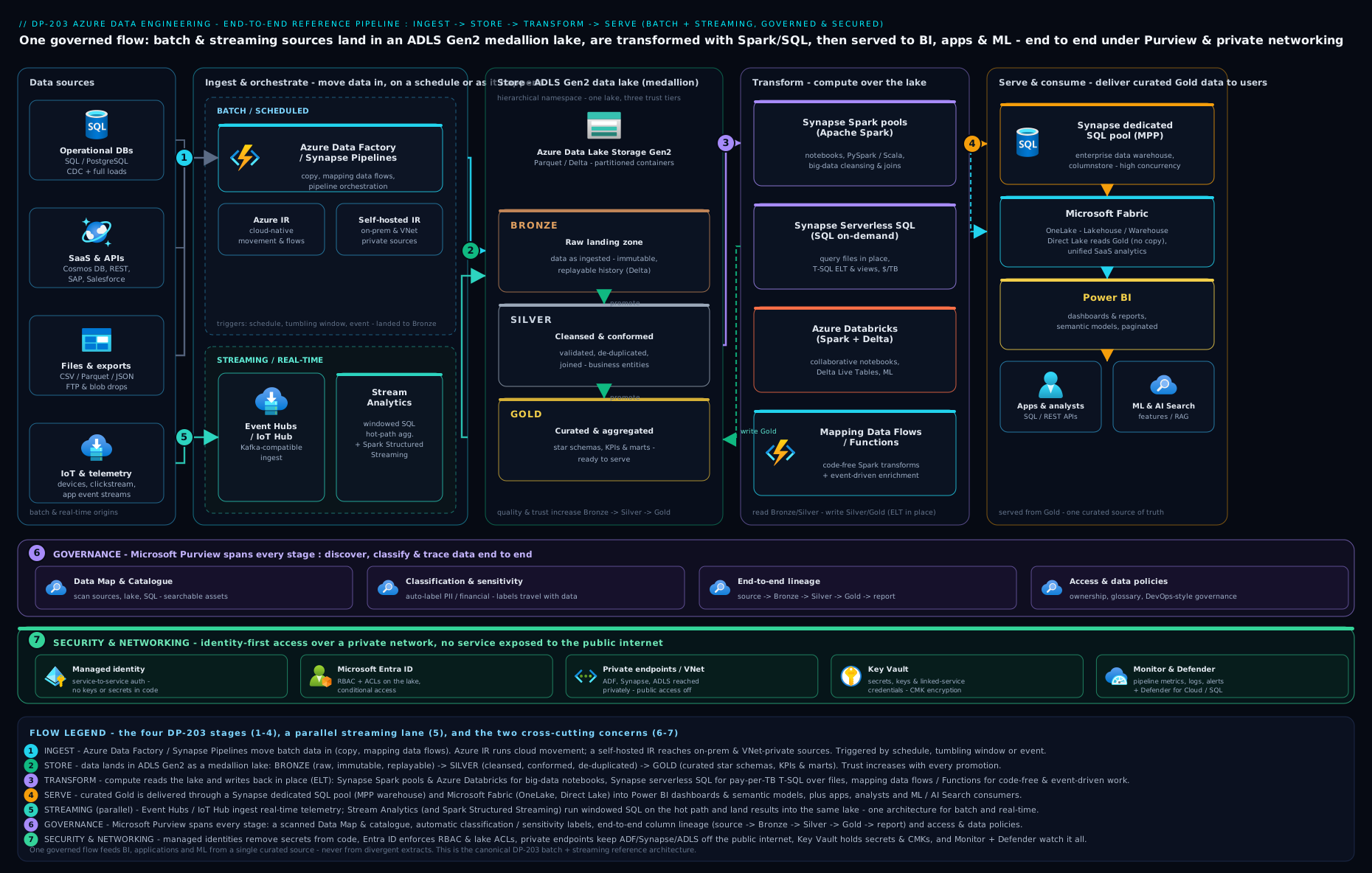
The diagram traces a single record’s journey: an on-prem source crosses a Self-hosted IR into bronze, batch and streaming paths converge through silver into gold Delta tables, and the dedicated SQL pool / Fabric Warehouse serves Power BI — all wrapped by orchestration, managed identity, private endpoints and Purview.
Hands-on lab
We will build a mini end-to-end pipeline entirely from the az CLI and free/low-cost tiers: create an ADLS Gen2 lake with medallion containers, stand up a serverless SQL endpoint over the lake, run an incremental Copy, and query the result — then clean up. (Spark and dedicated pools cost real money per hour, so the lab uses serverless SQL and tiny data to stay near-free.)
Prerequisites: an Azure subscription and the az CLI logged in (az login).
1. Resource group + ADLS Gen2 lake with medallion containers.
az group create -n rg-dp203-lab -l southindia

az storage account create -n kvdp203lab$RANDOM -g rg-dp203-lab \
  --sku Standard_LRS --kind StorageV2 --hns true            # HNS => ADLS Gen2
# capture the exact name it created:
SA=$(az storage account list -g rg-dp203-lab --query "[0].name" -o tsv)

for layer in bronze silver gold; do
  az storage fs create -n $layer --account-name $SA --auth-mode login
done
az storage fs list --account-name $SA --auth-mode login -o table   # expect 3 rows
Expected: a storage account with isHnsEnabled: true and three filesystems (bronze/silver/gold).
2. Land a tiny bronze dataset (stand-in for an ingested file).
printf 'order_id,product,amount,LastModified\n1,pen,40,2026-06-15T09:00:00Z\n2,book,250,2026-06-15T09:05:00Z\n' > orders.csv
az storage fs file upload -f bronze -s orders.csv \
  -p year=2026/month=06/day=15/orders.csv --account-name $SA --auth-mode login
Expected: the file lands under a date-partitioned path in bronze.
3. Query the lake with serverless SQL (the cheapest transform/serve surface). Create a Synapse workspace (its serverless SQL endpoint is always-on and billed only per TB scanned):
az synapse workspace create -n kvsyndp203$RANDOM -g rg-dp203-lab \
  --storage-account $SA --file-system bronze \
  --sql-admin-login-user sqladmin --sql-admin-login-password 'P@ssw0rd-Change-Me!' \
  -l southindia
az synapse workspace firewall-rule create --workspace-name <wsName> -g rg-dp203-lab \
  -n allowAll --start-ip-address 0.0.0.0 --end-ip-address 255.255.255.255   # lab only!
Then in the Synapse serverless SQL endpoint (Synapse Studio or sqlcmd), run an OPENROWSET over the lake — this is a real “serve straight from the lake” query, no data loaded:
SELECT product, SUM(amount) AS total
FROM OPENROWSET(
  BULK 'https://<SA>.dfs.core.windows.net/bronze/year=2026/month=06/day=15/orders.csv',
  FORMAT='CSV', PARSER_VERSION='2.0', HEADER_ROW=TRUE) AS rows
GROUP BY product;
Expected: two rows — book 250, pen 40.
Validation: you ingested to bronze, partitioned by date, and served an aggregate from the lake with zero provisioned compute — the medallion + serverless pattern in miniature.
Cleanup (important — do this to stop charges):
az group delete -n rg-dp203-lab --yes --no-wait
Cost note (INR). Run end to end and tidied up within the hour this stays in the few-rupees range: ADLS Gen2 LRS storage on this data is effectively nil; serverless SQL bills per TB scanned and this query scans kilobytes (~₹0); the Synapse workspace itself is free (you pay for the pools, which we never started). The expensive things — dedicated SQL pools (DWU, ~₹thousands/day), Spark pools and Stream Analytics SUs — are all avoided here. The one rule that saves real money: pause dedicated pools and auto-pause Spark pools the instant they are idle, and never leave an Azure-SSIS IR running.
Common mistakes & troubleshooting
| Symptom | Likely cause | Fix |
|---|---|---|
| “Cannot enable hierarchical namespace” on an existing account | HNS is a create-time-only setting | Create a new ADLS Gen2 account with --hns true and migrate data |
| On-prem Copy fails / times out | No Self-hosted IR, or it cannot reach ADF | Install SHIR inside the network (outbound 443); register it on the source linked service; add a 2nd node for HA |
| Re-running a load double-counts rows | Append instead of upsert; no watermark | Use Delta MERGE keyed on the business key + a watermark to load only new rows |
| Spark/SQL queries are mysteriously slow | Small-file problem / no partition pruning | OPTIMIZE (compact) Delta tables; partition on the filtered column; avoid one-file-per-record writes |
| Dedicated SQL pool bill is huge | Pool left running 24×7 | Pause the dedicated pool when idle; consider serverless for intermittent loads |
| Stream Analytics job lags / drops events | Under-provisioned Streaming Units or skewed Event Hub partitions | Scale up SUs; align query partitioning with Event Hub partition key; tune watermark/late-arrival |
| Pipeline runs in dev but the prod deploy points at dev sources | Environment values not parameterised in CI/CD | Override linked-service/IR values per environment via ARM template parameters |
| “Login failed” / key leaked in a linked service | Using account keys/passwords instead of identity | Switch to managed identity; store any unavoidable secret in Key Vault and reference it |
Best practices
- Land raw, transform in-platform (ELT). Keep an immutable bronze copy so you can always reprocess; never throw away the source of truth.
- Make every load idempotent. Watermarks + Delta
MERGE. A re-run must converge to the same result, not duplicate data. - Delta for silver/gold, partition deliberately, and
OPTIMIZE. Open format, ACID, time-travel, and good file sizes — fight the small-file problem proactively. - Right-size and pause compute. Serverless/auto-pause for intermittent work; reserve dedicated pools for steady high-volume serving and pause them when idle.
- Parameterise everything for CI/CD. Git-backed authoring, ARM/Bicep deploys, environment overrides — no manual changes in production.
- One master orchestration with explicit dependencies. Ingest → transform → serve → refresh, each gated on success, with alerting on failure.
- Reconcile batch and streaming in the serving layer, and prefer a single Spark codebase (Structured Streaming) when you need both speeds to share logic.
Security notes
- Identity, not keys. Use managed identity / Microsoft Entra for every service-to-service hop; disable storage account keys where possible and put any unavoidable secret in Key Vault, referenced by the linked service.
- Least privilege. Combine Azure RBAC (control plane) with ADLS ACLs (data plane, folder-level) so each pipeline identity touches only its own containers.
- Private networking. Use private endpoints + a managed VNet with managed private endpoints (Synapse/ADF) so data never traverses the public internet; use a Self-hosted IR for on-prem. Set storage public network access to disabled.
- Encryption. Platform-managed keys by default; customer-managed keys (CMK) in Key Vault / Managed HSM where compliance demands; TLS in transit everywhere.
- Govern and audit. Purview for classification, sensitivity labels and lineage; enable diagnostic logs on ADF/Synapse/storage to a Log Analytics workspace; apply Azure Policy to enforce private-endpoint-only and CMK across the estate.
Interview & exam questions
- “Walk me through an end-to-end Azure data pipeline.” Ingest with ADF/Synapse pipelines (right IR, incremental/CDC) → land bronze in ADLS Gen2 → transform to silver/gold Delta with Spark/SQL → serve via dedicated/serverless SQL or Fabric + Power BI; a parallel Event Hubs → Stream Analytics/Spark streaming path; all wrapped in orchestration, CI/CD, managed-identity security and Purview governance.
- “Which integration runtime for on-prem data, and why is it firewall-friendly?” Self-hosted IR — installed inside the network, it dials outbound to ADF, so no inbound ports are opened.
- “How do you implement an incremental load?” Store a watermark (e.g.
MAX(LastModified)); each run loads only rows newer than the stored value, then advances the watermark; upsert with DeltaMERGEfor idempotency. Use native CDC when the source supports it (captures deletes too). - “Describe the medallion architecture.” Bronze (raw/immutable as-ingested) → silver (cleansed/conformed/typed) → gold (curated business aggregates/star schema). Each layer is produced from the previous; keeps raw history and centralises cleansing.
- “Why Delta over plain Parquet?” Delta adds a transaction log → ACID transactions, time-travel, schema enforcement/evolution and efficient
MERGE; it is the shared open format across Synapse, Fabric and Databricks. - “Dedicated vs serverless SQL pool — when each?” Dedicated = provisioned MPP, fast/predictable for steady heavy loads, billed 24×7 (pause when idle). Serverless = pay-per-TB-scanned over lake files, ideal for ad-hoc/intermittent.
- “Stream Analytics vs Spark Structured Streaming?” ASA = serverless, SQL-like, fast to build for windowed aggregations/routing/alerting. Structured Streaming = full code, complex logic/ML/stream-to-lake joins, and one codebase for batch + stream.
- “Explain the windowing types.” Tumbling (fixed, non-overlapping), hopping (fixed, overlapping by a hop), sliding (emits as events enter/leave), session (groups bursts separated by an inactivity gap).
- “What is a watermark in streaming, and what trade-off does it represent?” The threshold for how long to wait for late events before closing a window — longer = more complete but higher latency; shorter = lower latency but may drop stragglers.
- “How do you do CI/CD for Data Factory/Synapse?” Git-integrated authoring on feature branches → publish generates ARM templates → a release pipeline (DevOps/GitHub Actions) deploys to dev/test/prod with per-environment parameter overrides; infra in Bicep/Terraform.
- “How do you secure the platform?” Managed-identity/Entra auth (no keys), RBAC + ADLS ACLs, private endpoints/managed VNet/SHIR, encryption (CMK where needed), and Purview classification + diagnostic logging.
- “Synapse, Fabric, or Databricks for a new platform — and what about the existing Synapse estate?” Fabric is the strategic default for new, Microsoft-centric, BI-led platforms; Databricks for heavy engineering/ML or multi-cloud; operate the existing Synapse estate but plan its migration to Fabric — start nothing new on Synapse.
Quick check
- Why must hierarchical namespace be decided at storage-account creation, and what do you do if an existing account lacks it?
- You need only the rows changed since last night, including deletes, from an Azure SQL source. Which technique, and what lands in the lake to keep re-runs idempotent?
- Name the three medallion layers in order and the file format you would use for silver/gold.
- A clickstream must drive a live Power BI tile updated every few seconds with a 5-minute rolling count. Which streaming services and which window type?
- For a brand-new, Microsoft-centric, BI-led platform in 2026, which serving/platform choice is the strategic default, and which Power BI storage mode gives live data at Import speed?
Answers
- HNS is a create-time-only setting — it cannot be toggled on later; you create a new ADLS Gen2 account with HNS enabled and migrate the data.
- Native Change Data Capture (CDC) (it captures inserts/updates/deletes); land into Delta and apply with
MERGE(upsert), keyed on the business key, so re-runs converge instead of duplicating. - Bronze → silver → gold; use Delta for silver and gold (Parquet + transaction log).
- Event Hubs → Stream Analytics (or Spark Structured Streaming) → Power BI live output, using a hopping window (5-minute size, short hop) — or a sliding/tumbling window depending on exact semantics.
- Microsoft Fabric (Warehouse/Lakehouse on OneLake) is the strategic default; DirectLake gives live data at Import-grade speed.
Exercise
Design (on paper, then sketch the az/JSON outline) an end-to-end platform for a mid-size retailer with three sources: an on-prem SQL Server of orders, a SaaS CRM exposing a REST API, and a website clickstream of events. Requirements: a single trustworthy analytics store; a sales dashboard refreshed by 8 a.m. daily; a live “orders in the last 5 minutes” tile; and customer PII that must be discoverable and protected.
Produce: (a) the ingest design — which integration runtime per source, and full vs incremental/CDC for each; (b) the lake design — medallion containers, formats, and the partitioning scheme; © the batch transform engine choice with a one-line justification, including how you make the load idempotent; (d) the streaming path — Event Hubs + processor + window type for the live tile; (e) the serving layer and the Power BI storage mode with reasons; (f) the orchestration (trigger types + dependency chain) and CI/CD approach; and (g) three security/governance controls (identity, networking, Purview). Bonus: name one place the small-file problem could bite and how you would prevent it.
Certification mapping
DP-203 (Data Engineering on Microsoft Azure):
- Design and implement data storage — ADLS Gen2, the medallion layering, partitioning, file/Delta formats, and serving structures (dedicated/serverless SQL).
- Develop data processing — batch ingestion and transformation with Data Factory/Synapse pipelines and Spark/SQL pools, incremental loads and CDC, and streaming with Event Hubs + Stream Analytics / Spark Structured Streaming (windowing, watermarks).
- Secure, monitor and optimise data storage and processing — managed identity, private endpoints, RBAC/ACLs, encryption (CMK), diagnostic logging, pipeline/query monitoring, and the small-file/partition-pruning optimisations.
Fabric-era successors (the live exams):
- DP-700 (Fabric Data Engineer Associate) — the same medallion/Delta/pipeline/streaming skills on OneLake, Eventstream/Eventhouse and Fabric notebooks.
- DP-600 (Fabric Analytics Engineer) — modelling and serving (Warehouse, DirectLake, Power BI).
(These build skills also underpin AZ-305 “design data storage solutions” scenarios.)
Glossary
- Azure Data Factory (ADF) / Synapse pipelines — serverless data-integration/ELT orchestration; moves and orchestrates data, doesn’t store it (the same engine appears in Fabric Data Factory).
- Integration runtime (IR) — the compute that runs an activity: Azure (cloud), Self-hosted (on-prem/private, outbound-only), Azure-SSIS (lift-and-shift SSIS).
- Change Data Capture (CDC) — capturing only inserts/updates/deletes since the last run (preserves deletes), vs re-reading the whole table.
- Watermark — the high-water value (e.g. a
LastModifiedtimestamp) marking where the last incremental load stopped. - ADLS Gen2 / hierarchical namespace (HNS) — a storage account with real folders + POSIX ACLs (the lake); HNS is set at creation only.
- Medallion (bronze/silver/gold) — lake layering by data quality: raw → cleansed/conformed → curated/aggregated.
- Delta Lake — Parquet + a transaction log adding ACID, time-travel, schema enforcement and
MERGE; the open table format shared by Synapse, Fabric and Databricks. - Partitioning / small-file problem — splitting data into folders for pruning; too many tiny files degrade performance (fix by
OPTIMIZE/compaction). MERGE/ upsert / idempotency — update-or-insert by key so a re-run converges instead of duplicating.- Synapse Spark pool / SQL pool (dedicated vs serverless) — Spark compute; provisioned MPP warehouse (DWU, pause when idle) vs pay-per-TB-scanned SQL over lake files.
- Azure Databricks — first-party, multi-cloud, best-in-class Spark/ML lakehouse (Delta, Unity Catalog, MLflow, Photon).
- Event Hubs — massively scalable, Kafka-compatible event-ingestion buffer (partitions, Capture).
- Azure Stream Analytics (ASA) — serverless, SQL-like stream processor (Streaming Units).
- Spark Structured Streaming — Spark’s streaming API; one codebase for batch + stream, watermarks, exactly-once.
- Windowing (tumbling/hopping/sliding/session) — ways to bound an unbounded stream in time for aggregation.
- Watermark (streaming) — how long to wait for late events before closing a window (latency vs completeness).
- Microsoft Fabric / OneLake / DirectLake — Microsoft’s SaaS analytics platform; its single tenant-wide lake; the Power BI mode reading Delta directly from OneLake at Import speed.
- Microsoft Purview — unified data governance: catalogue/data map, classification & sensitivity labels, end-to-end lineage, access policies.
- Managed identity / private endpoint — keyless Entra identity for service-to-service auth; private IP access to PaaS over the Microsoft backbone (no public internet).
Next steps
- Continue the certification ladder with SC-100: Cybersecurity Architect — Zero-Trust Strategy & Reference Designs — the data platform you just built holds an organisation’s most sensitive information, so designing security at strategy level is the natural next step.
- Go deeper on the platform’s conceptual map and the Synapse vs Fabric vs Databricks decision in the Data Factory, Synapse & Microsoft Fabric deep dive.
- See how streaming sources feed the platform in Event Hubs, Kafka & capture — the real-time complement to batch ingestion.