Almost every system you will ever build in Azure exists to do one of two things with data: record what happened (a customer placed an order, a sensor took a reading, a payment cleared) or make sense of what happened (which products sell best, which machines are about to fail, which customers are about to leave). Those two jobs pull a design in opposite directions, and almost every data decision you make for the rest of your career — which database, which storage, which file format, which Azure service — flows from understanding the difference.
This is the opening lesson of the DP-900: Azure Data Fundamentals track, and the foundation every later data lesson builds on. It assumes you have never written a line of SQL or designed a database in your life. By the end you will be able to look at any workload and say, with confidence, “that is structured, transactional, relational data — it belongs in a relational database” or “that is unstructured, analytical data — it belongs in a data lake”, and you will know who in a data team is responsible for each piece. Get these mental models right and the rest of DP-900 is largely vocabulary; get them wrong and nothing downstream will make sense.
Learning objectives
After this lesson you will be able to:
- Classify any dataset as structured, semi-structured or unstructured, and explain what each means for storage and querying.
- Distinguish relational from non-relational data and transactional (OLTP) from analytical (OLAP) workloads, and say why one database rarely serves both well.
- Describe the data lifecycle and the difference between batch and stream processing, with realistic Azure examples of each.
- Explain the modern data warehouse pattern and the medallion (bronze/silver/gold) architecture at a concept level.
- Identify the four core data roles — database administrator, data engineer, data analyst and data scientist — and who owns what.
- Recognise common data formats (CSV, JSON, XML, Parquet, Avro, ORC) and choose the right one for transactional versus analytical use.
Prerequisites
None beyond curiosity. It helps to have read Cloud Computing Fundamentals: IaaS, PaaS, SaaS & the Shared-Responsibility Model so that terms like PaaS and managed service are familiar, but this lesson defines everything it needs. This is Module 1, Lesson 1 of the DP-900 Data Fundamentals course in the KloudVin Azure Zero-to-Hero program.
How we classify data: structured, semi-structured, unstructured
The very first question to ask about any data is how regular is its shape? Data falls on a spectrum from rigidly tabular to completely freeform, and where it sits decides how you store it, how you query it and how much it costs to work with.
Structured data has a fixed, predefined schema — rows and columns, where every row has the same fields and every field has a declared type (an integer, a date, a 50-character string). A spreadsheet of employees is the everyday example; a relational database table is the production one. Because the shape is known in advance, structured data is easy to query precisely with a language like SQL and easy for the database to index and optimise.
Semi-structured data carries its own structure with it but does not force every record to look the same. A JSON document describing a product might have a discount field that some products simply omit; another might nest a list of reviews inside it. The structure is there — keys, values, nesting, arrays — but it is flexible and self-describing rather than fixed up front. This flexibility is exactly why semi-structured formats dominate web APIs and document databases.
Unstructured data has no inherent field-and-value model at all: photos, video, audio, PDFs, free-text emails, scanned documents. The bytes mean something to a human or to an AI model, but there is no schema a database can index on directly. You typically store the file as a blob and store metadata about it (name, size, tags, who uploaded it) separately. This is the fastest-growing category by far — most of the world’s data is now unstructured.
| Type | Schema | Examples | Where it lives in Azure | How you query it |
|---|---|---|---|---|
| Structured | Fixed, defined up front | Orders table, ledger, IoT readings in columns | Azure SQL Database, PostgreSQL/MySQL | SQL |
| Semi-structured | Self-describing, flexible | JSON/XML API payloads, product catalogues | Azure Cosmos DB, Azure Table storage | SQL-like / document queries |
| Unstructured | None (raw bytes + metadata) | Images, video, audio, PDFs, free text | Azure Blob Storage, Data Lake Storage Gen2 | Search, AI/ML, full-text |
A useful instinct: if you can draw it as a clean table, it is structured; if it is a document or message with optional, nested fields, it is semi-structured; if it is a file whose meaning lives in the bytes, it is unstructured.
Relational versus non-relational
Closely related to “shape” is the question of how records connect to each other.
A relational database stores data in tables and models relationships between them using keys. A Customers table and an Orders table are linked because each order carries a CustomerID that points back to a customer. The schema is enforced strictly: define a column as a date and the database refuses to store the word “Tuesday”. Relational databases excel when data is well-structured, relationships matter and you need strong consistency and complex joins — think finance, inventory, bookings. On Azure these are Azure SQL Database, Azure SQL Managed Instance, and Azure Database for PostgreSQL and MySQL.
A non-relational (often called NoSQL) database relaxes the fixed-schema rule and stores data in whatever shape suits the access pattern: documents (JSON), key-value pairs, wide columns or graphs. It trades rich cross-table joins and rigid schema for flexibility, massive horizontal scale and very fast reads/writes on known keys. It shines for catalogues, user profiles, IoT telemetry, gaming leaderboards and anything that must scale globally. On Azure the flagship is Azure Cosmos DB, alongside Azure Storage’s Table and Blob services.
Neither is “better” — they answer different questions. The exam loves a scenario that pushes you to pick: strong relationships and transactions → relational; flexible schema and global scale → non-relational.
Transactional versus analytical: OLTP vs OLAP
This is the single most important distinction in the whole lesson, and a guaranteed exam topic.
OLTP — Online Transaction Processing — is the world of recording what happens, right now. Each operation is small and touches a few rows: insert one order, update one balance, read one customer’s profile. There are many such operations per second, they must be fast, and they must be atomic and consistent — money must never disappear between two accounts. OLTP systems are optimised for lots of short read/write transactions and are usually relational, normalised (data stored once, without duplication) to keep writes clean and correct. Your e-commerce checkout, your banking app and your booking system are OLTP.
OLAP — Online Analytical Processing — is the world of understanding what happened, over time. A query here is large and read-only: “total revenue by product category by month for the last three years.” It scans millions or billions of rows but runs rarely compared with OLTP. OLAP systems are optimised for big aggregations and are usually denormalised (data deliberately duplicated and pre-joined into wide tables) and often column-oriented so that summing one column over a billion rows is cheap. Reporting, dashboards and business intelligence are OLAP.
The reason you cannot serve both well from one database is that their optimal designs are opposites: OLTP wants normalised tables and row storage for fast small writes; OLAP wants denormalised, columnar storage for fast huge reads. So in practice data is born in an OLTP system and copied into an OLAP system for analysis — which is exactly what the data lifecycle and the modern data warehouse describe.
| Aspect | OLTP (transactional) | OLAP (analytical) |
|---|---|---|
| Purpose | Run the business (record events) | Understand the business (analyse) |
| Typical operation | Small insert/update/read of a few rows | Large read-only aggregation over millions of rows |
| Frequency | Very high (many per second) | Lower (reports, dashboards) |
| Schema design | Normalised, row-oriented | Denormalised, often column-oriented |
| Consistency need | Strong (ACID transactions) | Read consistency; freshness can lag |
| Azure examples | Azure SQL Database, Cosmos DB, PostgreSQL | Azure Synapse Analytics, Microsoft Fabric, Databricks |
A quick memory hook: OLTP = Production/everyday transactions; OLAP = Analysis.
ACID: the promise that makes transactions safe
When people say a transactional database is “reliable”, they usually mean it guarantees ACID properties for every transaction:
- Atomicity — all the steps in a transaction happen, or none do. Debiting one account and crediting another either both succeed or both roll back; money never vanishes mid-transfer.
- Consistency — a transaction moves the database from one valid state to another, never leaving it half-broken or violating its rules.
- Isolation — concurrent transactions do not tread on each other; the result is as if they ran one after another.
- Durability — once a transaction is committed, it survives even a power cut or crash.
ACID is the hallmark of OLTP relational systems. Many non-relational systems relax some of these guarantees (for example offering eventual consistency) in exchange for scale and availability — a trade-off you choose deliberately based on the workload.
The data lifecycle
Data is not static; it moves through stages from creation to consumption. Understanding this flow is what ties every Azure data service together.
- Generate / capture — data is created by an application, device or user (an order is placed, a sensor emits a reading).
- Ingest — it is brought into a data platform, either in bulk on a schedule or continuously as events arrive.
- Store — it lands in an appropriate store: a relational database for transactions, a data lake for raw analytical data, a warehouse for curated data.
- Process / transform — it is cleaned, joined, reshaped and enriched into a form fit for analysis (this is where ETL/ELT lives — covered in the analytics lesson).
- Serve / analyse — it is queried by analysts, fed to dashboards or used to train machine-learning models.
- Visualise / act — insights reach humans (a Power BI dashboard) or drive automated decisions.
- Archive / retire — old data is moved to cheap cold storage or deleted per retention policy.
The two ingestion styles in step 2 — bulk-on-a-schedule versus continuous — are important enough to have their own names: batch and streaming.
Batch versus stream processing
Batch processing collects data over a period and processes it together in scheduled runs. You might load yesterday’s sales every night at 02:00, or reprocess a month of logs in one large job. Batches handle huge volumes efficiently and tolerate latency — nobody minds that last night’s sales report is a few hours old. The trade-off is freshness: results are only as current as the last run.
Stream processing handles data continuously, as each event arrives, with latency measured in seconds or milliseconds. A fraud-detection system scoring each card swipe, a live operations dashboard, or alerting on a sudden temperature spike are streaming workloads. Streaming gives you near-real-time insight but is more complex to build and operate, and typically processes smaller pieces of data at a time.
| Dimension | Batch | Streaming |
|---|---|---|
| When it runs | Scheduled / on demand, in chunks | Continuously, event by event |
| Latency | Minutes to hours | Seconds to milliseconds |
| Data size per run | Large (the whole batch) | Small (one event / micro-batch) |
| Complexity & cost | Lower, simpler | Higher, always-on |
| Azure services | Azure Data Factory, Synapse/Fabric pipelines, Databricks | Azure Stream Analytics, Event Hubs, Functions |
| Example | Nightly sales load, monthly billing | Live fraud scoring, IoT telemetry alerts |
Many real platforms use both: streaming for the live view and batch for the deep, historical reprocessing — an idea sometimes called a lambda architecture. For DP-900, the key is simply being able to tell a batch scenario from a streaming one by its latency requirement.
The modern data warehouse and the medallion idea
When organisations need to analyse data from many sources together, they build a modern data warehouse. The pattern is consistent regardless of the tool:
Ingest data from operational systems (databases, apps, files, streams) → store the raw data cheaply in a data lake (Azure Data Lake Storage Gen2) → transform it into clean, modelled tables → serve it from an analytical engine (Azure Synapse Analytics or Microsoft Fabric) → visualise it in Power BI. A data lake is simply massive, cheap storage that holds data of any shape — structured, semi-structured and unstructured — in its raw form, so you keep everything and decide how to use it later. A data warehouse is the curated, query-optimised store of clean, structured data ready for reporting.
A popular way to organise the lake is the medallion architecture, which refines data through three quality layers:
- Bronze — raw, untouched data exactly as ingested (your immutable source of truth).
- Silver — cleaned, validated, de-duplicated and conformed data.
- Gold — business-level, aggregated tables shaped for specific reports and dashboards.
Data flows bronze → silver → gold, getting more refined and more valuable at each step. You do not need the implementation detail for DP-900 — just the concept that raw data is progressively cleaned and curated, and that the lake holds everything while the warehouse holds the polished result.
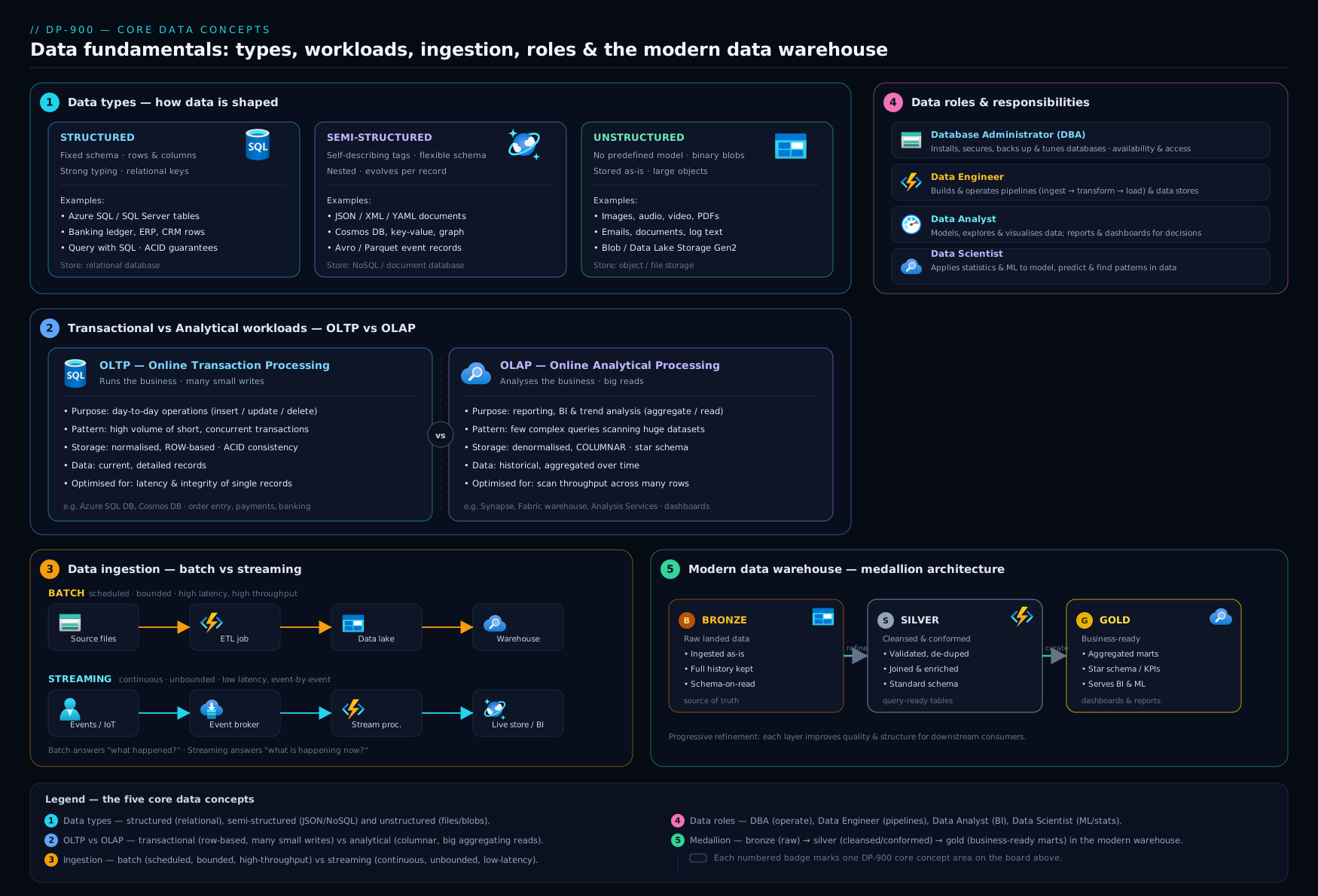
The diagram above ties it together: the same event is captured by an OLTP system, lands raw in the data lake, is refined through the medallion layers, and is finally served for OLAP analysis and visualisation — with each of the four data roles working at a different stage of that journey.
The four data roles: who does what
Data work in any serious organisation is divided among four roles. DP-900 expects you to match a responsibility to the right one.
Database administrator (DBA). Owns the health of operational databases. Provisions and configures them, manages security and access, plans backups and disaster recovery, tunes performance, applies patches and keeps the lights on. The DBA’s world is mostly the OLTP side — keeping production databases fast, secure and available. Azure tools: Azure SQL Database, SQL Managed Instance, backups, security tooling.
Data engineer. Builds the pipelines that move and transform data. They ingest data from many sources, design the data lake and warehouse, write the ETL/ELT that turns raw data into clean, usable datasets, and make sure analysts and scientists have trustworthy data to work with. The data engineer is the plumber of the data world. Azure tools: Azure Data Factory, Synapse/Fabric pipelines, Data Lake Storage Gen2, Databricks.
Data analyst. Turns curated data into insight for business decisions. They explore data, build reports and dashboards, define metrics and tell the story of what the numbers mean — usually for non-technical stakeholders. Azure tools: Power BI, Synapse/Fabric SQL queries.
Data scientist. Applies statistics and machine learning to find patterns and make predictions — forecasting demand, detecting fraud, predicting churn, building models. They work with both raw and curated data and need experimentation tooling. Azure tools: Azure Machine Learning, Databricks, notebooks.
| Role | Core question they answer | Typical tasks | Azure tools |
|---|---|---|---|
| Database administrator | “Is the database healthy, secure and fast?” | Provision, secure, back up, tune, patch | Azure SQL, Managed Instance, backups |
| Data engineer | “How do I move and shape this data reliably?” | Build pipelines, ETL/ELT, lake/warehouse | Data Factory, Synapse/Fabric, Data Lake, Databricks |
| Data analyst | “What is the data telling the business?” | Reports, dashboards, metrics, exploration | Power BI, Synapse/Fabric SQL |
| Data scientist | “What can we predict from this data?” | ML models, statistics, experimentation | Azure ML, Databricks, notebooks |
The roles overlap in practice — in a small team one person may wear several hats — but the exam treats them as distinct, so anchor each to its core question.
Common data formats
How data is stored on disk or in a file matters enormously for cost and performance, especially in analytics. DP-900 expects familiarity with these.
CSV (Comma-Separated Values). Plain text, one row per line, fields separated by commas. Simple, universal and human-readable; great for small exports and exchange. But it has no types (everything is text), no compression and must be read whole — poor for big analytics. Row-oriented.
JSON (JavaScript Object Notation). The standard for semi-structured data and web APIs. Self-describing, supports nesting and arrays, very flexible. More verbose than CSV and still text-based, so not ideal for huge analytical scans, but perfect for documents and message payloads. This is what document databases like Cosmos DB store.
XML (eXtensible Markup Language). An older, tag-based, self-describing format (<order><id>1</id></order>). Still common in enterprise integration and legacy systems, but heavier and more verbose than JSON, which has largely replaced it for new work.
Parquet. A columnar, compressed, binary format built for analytics. Because it stores data by column, a query that needs only two of fifty columns reads only those two — dramatically faster and cheaper for big aggregations. It also carries a schema and compresses extremely well. This is the workhorse of the data lake and the format you reach for when building analytical tables.
Avro. A row-based, compact, binary format with the schema stored alongside the data. It is strong for streaming and message-passing (it handles schema evolution gracefully) and for write-heavy ingestion where you read whole records. Often paired with Event Hubs / Kafka-style pipelines.
ORC (Optimised Row Columnar). Another columnar, compressed analytical format, common in the Hadoop/Hive ecosystem; conceptually similar to Parquet in its benefits.
| Format | Layout | Human-readable | Compressed | Schema | Best for |
|---|---|---|---|---|---|
| CSV | Row | Yes | No | No | Small exports, simple exchange |
| JSON | Row (document) | Yes | No | Self-describing | APIs, semi-structured documents |
| XML | Row (document) | Yes | No | Self-describing | Legacy/enterprise integration |
| Parquet | Column | No (binary) | Yes | Yes | Analytics, data lakes, big scans |
| Avro | Row | No (binary) | Yes | Yes (with data) | Streaming, write-heavy ingestion |
| ORC | Column | No (binary) | Yes | Yes | Analytics (Hadoop/Hive ecosystem) |
The exam-ready instinct: row formats (CSV, JSON, Avro) for transactional / write-heavy / whole-record reads; columnar formats (Parquet, ORC) for analytical / read-heavy / aggregate-a-few-columns workloads.
Hands-on lab: see structured, semi-structured and the OLTP→OLAP split for yourself
This lab needs nothing but a free Azure account and the Cloud Shell, and it uses the always-free Azure Storage tier within a normal subscription. The goal is to feel the three data shapes and the lifecycle, not to build a warehouse.
Open the Azure Cloud Shell (the >_ icon in the portal) and choose Bash. Then create a resource group and a storage account that will act as a tiny data lake:
# Variables
RG="rg-dp900-lab"
LOC="centralindia"
SA="dp900lab$RANDOM"   # storage account names must be globally unique, lowercase

# 1. Resource group
az group create --name $RG --location $LOC

# 2. Storage account with hierarchical namespace = Data Lake Storage Gen2
az storage account create \
  --name $SA --resource-group $RG --location $LOC \
  --sku Standard_LRS --kind StorageV2 --hierarchical-namespace true

# 3. A container to act as our "bronze" raw layer
az storage container create --account-name $SA --name bronze --auth-mode login
Now create one file of each shape locally and upload them, mimicking the ingest → store stages of the lifecycle:
# Structured (CSV) — a tiny orders table
printf "order_id,customer,amount\n1,Asha,1200\n2,Ben,450\n" > orders.csv

# Semi-structured (JSON) — a product document with optional/nested fields
printf '{"id":"p1","name":"Keyboard","price":1999,"tags":["input","usb"]}\n' > product.json

# Upload both to the bronze layer
az storage blob upload --account-name $SA -c bronze -f orders.csv  -n raw/orders.csv  --auth-mode login
az storage blob upload --account-name $SA -c bronze -f product.json -n raw/product.json --auth-mode login

# List what landed in the lake
az storage blob list --account-name $SA -c bronze --query "[].name" -o table --auth-mode login
Expected output: the final command lists raw/orders.csv and raw/product.json. You have just ingested structured and semi-structured data into a data lake — the bronze layer of a medallion design. (An unstructured file would simply be a blob too: try uploading any image with the same command and it lands right beside them — the lake does not care about shape.)
Validation: in the portal, open the storage account → Storage browser → Blob containers → bronze → raw, and confirm both files are present. Notice that the CSV is a neat grid (structured) while the JSON carries its own keys and a nested array (semi-structured).
Cleanup (important — avoid charges):
az group delete --name $RG --yes --no-wait
Cost note: kept to a single LRS storage account holding a few kilobytes, this lab costs effectively nothing — well under ₹1 — and the resource group is deleted immediately afterwards. Storage in India regions is billed per GB-month, so a few kilobytes for a few minutes rounds to zero; the discipline of always running the cleanup command is what keeps a learning subscription cheap.
Common mistakes & troubleshooting
| Symptom / mistake | Cause | Fix |
|---|---|---|
| Calling JSON “unstructured” | Confusing flexible with no structure | JSON is semi-structured — it is self-describing with keys and nesting |
| Running heavy reports against the production OLTP database | Treating one database as both transactional and analytical | Copy data to an OLAP store (Synapse/Fabric); keep OLTP for transactions |
| Choosing CSV for a large analytics dataset | Picking a familiar format over an efficient one | Use Parquet — columnar and compressed, far cheaper to scan |
| Storage account name rejected in the lab | Names must be globally unique, 3–24 chars, lowercase letters/numbers only | Append $RANDOM or pick another suffix |
| Expecting near-real-time results from a nightly batch | Mismatching latency need with processing style | Use stream processing (Stream Analytics/Event Hubs) for real-time |
| Mixing up data engineer and data analyst | Both “work with data” | Engineer moves and shapes data (pipelines); analyst interprets it (reports) |
Forgetting --auth-mode login on storage commands |
Defaults to key-based auth which may be disabled | Add --auth-mode login to use your Entra identity |
Best practices
- Match the store to the workload. Transactional and relational → relational database; flexible and globally scaled → non-relational; raw and analytical → data lake. Do not force one store to do every job.
- Separate OLTP from OLAP. Never let reporting queries compete with live transactions; move analytical data into a dedicated analytical store.
- Prefer columnar formats for analytics. Parquet/ORC cut scan cost and time dramatically over CSV/JSON.
- Keep raw data (bronze) immutable. Refine forward into silver and gold; never overwrite your source of truth.
- Choose batch or streaming by latency, not habit. Real-time need → streaming; tolerant of delay → batch (cheaper and simpler).
- Label data by sensitivity early. Knowing which datasets hold personal or financial data shapes every later security and governance decision.
Security notes
Even at fundamentals level, three security ideas underpin everything in DP-900. First, encryption: Azure data services encrypt data at rest by default and support encryption in transit (TLS), so data is protected both on disk and on the wire. Second, identity-based access: prefer Microsoft Entra ID identities and role-based access control (RBAC) over shared keys or passwords — in the lab we used --auth-mode login precisely so the storage operations ran as you, not as an account key that could leak. Third, classification and least privilege: identify which data is sensitive (personal, financial, health) and grant each role only the access it needs — a data analyst rarely needs write access to raw operational tables. These principles recur in every later data lesson, so internalise them now.
Interview & exam questions
-
What is the difference between structured, semi-structured and unstructured data? Give an example of each. Structured has a fixed schema (a SQL table); semi-structured is self-describing but flexible (JSON); unstructured has no inherent field model (an image or PDF).
-
Explain OLTP versus OLAP. OLTP handles many small, fast read/write transactions to run the business (and is normalised, row-oriented, ACID); OLAP handles large read-only aggregations to analyse the business (and is denormalised, often columnar). Data is born in OLTP and copied to OLAP.
-
Why can’t one database serve both transactional and analytical workloads well? Their optimal designs are opposites — OLTP wants normalised rows for fast small writes; OLAP wants denormalised columnar storage for fast huge reads. Mixing them degrades both.
-
What do the letters in ACID stand for, and which workload depends on them? Atomicity, Consistency, Isolation, Durability — the guarantees that make OLTP transactional databases reliable.
-
What is the difference between relational and non-relational data? Relational stores data in tables linked by keys with a strict schema and rich joins; non-relational (NoSQL) relaxes the schema for flexibility and horizontal scale (documents, key-value, columns, graphs).
-
Batch versus stream processing — when would you use each? Batch processes large volumes on a schedule with higher latency (nightly sales load); streaming processes events continuously with sub-second latency (live fraud detection). Choose by the latency requirement.
-
Describe the four data roles. Database administrator (health, security and performance of operational databases); data engineer (builds pipelines that move and transform data); data analyst (turns curated data into reports and insight); data scientist (builds ML models and predictions).
-
A team needs to analyse three years of sales by region in Power BI without slowing the checkout system. Outline an approach. Leave checkout on its OLTP database; use a data engineer’s pipeline to ingest the sales data into a data lake, refine it (bronze→silver→gold), serve it from Synapse/Fabric, and connect Power BI to that analytical store.
-
Why is Parquet preferred over CSV for large analytical datasets? Parquet is columnar and compressed, so a query reads only the columns it needs and far fewer bytes — dramatically faster and cheaper than scanning a whole row-based, uncompressed CSV.
-
What is a data lake, and how does it differ from a data warehouse? A data lake is massive, cheap storage holding raw data of any shape; a data warehouse holds curated, structured, query-optimised data ready for reporting. Data flows from lake to warehouse as it is refined.
-
What does the medallion architecture describe? Three progressive quality layers in a data lake — bronze (raw), silver (cleaned/conformed) and gold (business-ready aggregates) — through which data is refined.
-
Which file format would you choose for a streaming ingestion pipeline that reads whole records, and why? Avro — a compact, row-based binary format that stores its schema with the data and handles schema evolution well, suiting write-heavy, whole-record streaming.
Quick check
- JSON is an example of which data category?
- Which workload type is optimised for many small, fast transactions: OLTP or OLAP?
- True or false: streaming processing has higher latency than batch.
- Which role builds the pipelines that move and transform data?
- Which file format is columnar and best suited to large analytical scans?
Answers
- Semi-structured — it is self-describing and flexible but not freeform.
- OLTP (Online Transaction Processing).
- False — streaming has lower latency (seconds/ms); batch has higher latency.
- The data engineer.
- Parquet (ORC is the other columnar analytical format).
Exercise
Pick three systems you use or know — for example a banking app, a video-streaming service and a hospital’s patient-records system. For each, write a short note answering: (a) what kind of data does it mainly hold — structured, semi-structured or unstructured? (b) is its primary workload transactional (OLTP) or analytical (OLAP)? © would its reporting needs be better served by batch or streaming? (d) which two data roles would be most involved in running it? There is no single right answer — the value is in justifying each choice with the concepts from this lesson. As a stretch, sketch how data would flow through the lifecycle (generate → ingest → store → transform → serve) for one of them.
Certification mapping
This lesson maps directly to the DP-900: Microsoft Azure Data Fundamentals exam, principally the “Describe core data concepts” domain (the largest scored area), which covers ways to represent data (structured/semi-structured/unstructured and file formats), data workload options (batch vs streaming, transactional vs analytical) and common data roles and the tasks performed by each. The OLTP/OLAP, relational/non-relational and modern-data-warehouse concepts here also underpin the relational and non-relational/analytics domains covered in the following lessons. Everything in this lesson is foundational knowledge expected before any other DP-900 topic.
Glossary
- Structured data — data with a fixed, predefined schema of rows and typed columns (e.g. a SQL table).
- Semi-structured data — self-describing data with flexible structure (e.g. JSON), where records need not be identical.
- Unstructured data — data with no inherent field model (images, video, audio, free text), stored as files with separate metadata.
- Relational — data modelled as tables linked by keys, with a strict, enforced schema.
- Non-relational / NoSQL — databases that relax the fixed schema for flexibility and scale (document, key-value, column, graph).
- OLTP — Online Transaction Processing; many small, fast, ACID read/write transactions that run the business.
- OLAP — Online Analytical Processing; large read-only aggregations that analyse the business.
- ACID — Atomicity, Consistency, Isolation, Durability; the guarantees that make transactions reliable.
- Normalisation — organising data so each fact is stored once, without duplication (favoured by OLTP).
- Denormalisation — deliberately duplicating/pre-joining data into wide tables for fast reads (favoured by OLAP).
- Batch processing — processing data in scheduled chunks; higher latency, large volumes.
- Stream processing — processing events continuously as they arrive; very low latency.
- Data lake — massive, cheap storage holding raw data of any shape (Azure Data Lake Storage Gen2).
- Data warehouse — curated, query-optimised store of clean, structured data for analytics.
- Medallion architecture — bronze (raw) → silver (cleaned) → gold (business-ready) refinement layers in a lake.
- ETL / ELT — Extract-Transform-Load (or Extract-Load-Transform); the process of moving and reshaping data.
- Database administrator (DBA) — owns the health, security and performance of operational databases.
- Data engineer — builds the pipelines that ingest, move and transform data.
- Data analyst — turns curated data into reports, dashboards and business insight.
- Data scientist — applies statistics and machine learning to make predictions from data.
- Parquet / ORC — columnar, compressed binary formats optimised for analytical scans.
- Avro — a compact, row-based binary format with embedded schema, suited to streaming.
Next steps
You now have the vocabulary and the mental models the rest of the track depends on. Next, go hands-on with the most common workload of all in DP-900: Relational Data on Azure — tables, keys, normalisation, basic SQL and the Azure relational family (Azure SQL Database, Managed Instance, PostgreSQL and MySQL). From there the track moves to non-relational data and analytics, where the data lake, Cosmos DB, Synapse, Microsoft Fabric and Power BI ideas introduced here are explored in full.