In the previous lesson we put data into neat, predictable tables and queried it with SQL. That model is superb when your data is regular and your relationships are well known — but a great deal of the world’s data is neither. A product catalogue where every item has different attributes, a stream of clickstream events arriving a million an hour, a social graph of who-follows-whom, a folder of PDFs and videos — none of these fit comfortably into rows and columns. This is the territory of non-relational (often called NoSQL) data stores, and Azure has a rich family of them.
There is also a second, separate question this lesson answers: once an organisation has data scattered across dozens of relational databases, NoSQL stores, files and SaaS apps, how does it bring everything together to make decisions? That is the job of an analytics pipeline — ingest the data, land it cheaply in a data lake, transform it into something clean and joined-up, serve it in a query-friendly shape, and finally visualise it in a report a human can act on. These two themes — non-relational storage and the analytics pipeline — are exactly the two halves of this lesson, and together they round out the storage-and-analytics portion of the DP-900: Azure Data Fundamentals certification.
We assume you have read the core data concepts lesson (structured vs semi-structured vs unstructured, OLTP vs OLAP, batch vs streaming) and the relational data on Azure lesson. Everything here is taught from first principles, but those two give you the vocabulary the rest of this builds on.
Learning objectives
By the end of this lesson you can:
- Explain when a non-relational store beats a relational one, and name the four common NoSQL data models (key-value, document, column-family, graph).
- Describe Azure Cosmos DB at a fundamentals level — its five APIs (NoSQL, MongoDB, Cassandra, Gremlin, Table), global distribution, multi-region writes, consistency levels and request units (RUs) as a throughput/cost currency.
- Describe the four Azure Storage services — Blob, Table, File and Queue — and say what each is for.
- Lay out the modern analytics pipeline — ingest → store in a data lake → transform → serve → visualise — and name the Azure service that owns each stage.
- Tell ETL from ELT and explain why the cloud pushed everyone towards ELT.
- Pick the right analytics tool for a job — Data Factory, Data Lake Storage Gen2, Synapse Analytics, Microsoft Fabric, Azure Databricks, Power BI — using a clear comparison table.
Prerequisites & where this fits
You need only basic IT literacy and the two earlier Data Fundamentals lessons noted above; no Azure account is required to follow the concepts, though the optional lab uses a free Cosmos DB tier and a few rupees of Blob storage. This is the third Data Fundamentals lesson in the Azure Zero-to-Hero course. It deliberately stays at fundamentals depth — broad coverage, every term defined — and then hands off to the advanced Data Factory, Synapse & Fabric deep-dive and the Cosmos DB partition-key & RU optimisation deep-dive for engineers who need to build, not just understand.
Part 1 — Non-relational data
When NoSQL beats relational
A relational database earns its keep when data is structured and relationships are stable: every row has the same columns, foreign keys join tables reliably, and you need ACID transactions (the guarantee that a multi-step change either fully happens or not at all). For an order-entry system or a bank ledger, that is exactly right.
Non-relational stores trade some of those guarantees for flexibility and scale. They shine when one or more of the following is true:
| Signal in your workload | Why relational struggles | Why NoSQL fits |
|---|---|---|
| Variable / evolving schema | Adding columns and migrating is painful; sparse rows waste space. | Each item carries its own fields; no migration to add one. |
| Massive horizontal scale | A single SQL server has a ceiling; sharding is hard to bolt on. | Built to partition (shard) data across many nodes from day one. |
| Very high write throughput / low latency | Locking and joins add overhead. | Simple lookups by key are extremely fast and predictable. |
| Global users needing local latency | Geo-replication is add-on and usually single-write-region. | Some stores replicate multi-region with multi-write natively. |
| Naturally hierarchical or connected data | Deep joins to model trees/graphs get ugly. | Document and graph models store the shape directly. |
The trade-off is real: many NoSQL stores favour availability and partition tolerance over strict consistency (the famous CAP theorem — you cannot have perfect consistency, availability and partition tolerance all at once), and they generally do not do rich cross-entity JOINs or multi-table transactions the way SQL does. The senior-architect’s rule of thumb: use relational by default for transactional business data; reach for NoSQL when schema flexibility, horizontal scale, global low latency, or a graph/document shape is the dominant requirement.
The four NoSQL data models
“NoSQL” is an umbrella over four quite different shapes. Knowing them is a guaranteed DP-900 question:
| Model | Stores data as… | Good for | Azure service |
|---|---|---|---|
| Key-value | A dictionary: a unique key → an opaque value. | Caching, session state, simple lookups by id. | Azure Cosmos DB for Table, Azure Table storage |
| Document | Self-describing documents (usually JSON), each with its own fields. | Catalogues, user profiles, content, event payloads. | Azure Cosmos DB for NoSQL / for MongoDB |
| Column-family (wide-column) | Rows that can each have different, very many columns, grouped into families. | Time-series, IoT, huge sparse tables. | Azure Cosmos DB for Apache Cassandra |
| Graph | Nodes (entities) joined by edges (relationships), both with properties. | Social networks, recommendations, fraud, knowledge graphs. | Azure Cosmos DB for Apache Gremlin |
Notice that Azure Cosmos DB appears in every row. That is the headline: Cosmos DB is a single, fully managed, multi-model database service that can present any of these models through a choice of API.
Azure Cosmos DB
Azure Cosmos DB is Azure’s flagship globally distributed, multi-model NoSQL (and now also relational-via-PostgreSQL) database. As a managed PaaS service you never patch a server or manage a cluster; you pick an API, set your throughput, choose your regions, and Azure runs the rest with guaranteed single-digit-millisecond latency and SLAs covering availability, latency, throughput and consistency.
The five APIs
You choose an API when you create the account, and it is effectively permanent for that account. The API decides the data model, the wire protocol, and the query language your application speaks — which matters enormously, because it lets you lift an existing app onto Cosmos DB with little or no code change.
| API | Data model | Speaks the protocol of… | Pick it when… |
|---|---|---|---|
| API for NoSQL (formerly SQL/Core) | Document (JSON) | Cosmos DB’s native SQL-like query over JSON | It is a new project — gets every new feature first; the default and recommended choice. |
| API for MongoDB | Document (BSON) | MongoDB | You are migrating a MongoDB app or your team knows MongoDB tooling/drivers. |
| API for Apache Cassandra | Column-family | Cassandra (CQL) | You are moving a Cassandra workload and want a managed, elastic backend. |
| API for Apache Gremlin | Graph | Apache TinkerPop / Gremlin | You have graph data — relationships are the point (social, recommendations, fraud). |
| API for Table | Key-value | Azure Table storage | You want a premium, globally distributed, low-latency upgrade for an Azure Table storage app. |
The exam framing to remember: the API is chosen at account creation, lets you reuse existing drivers/skills, and you cannot mix models in one account. For greenfield work the answer is almost always API for NoSQL.
Global distribution and multi-region writes
The defining Cosmos DB capability is turnkey global distribution. With a tick-box on a world map you replicate your data to any number of Azure regions, and Cosmos transparently routes each client to the nearest one for low latency. Two modes matter:
- Single-region write, multi-region read — one region accepts writes; the rest are read replicas. Simpler and cheaper.
- Multi-region writes (multi-master) — every region accepts writes locally, giving the lowest write latency and surviving a regional outage with no failover. The cost is that write conflicts can occur, which Cosmos resolves with policies (last-writer-wins by default, or custom).
This is what people mean when they call Cosmos DB “globally distributed”: data and write capability follow your users around the planet, with a 99.999% availability SLA when configured multi-region with multi-write.
Consistency levels
Distributed systems must trade consistency (always seeing the latest write) against latency and availability. Cosmos DB is unusual in offering five well-defined consistency levels as a simple setting, from strongest to weakest:
| Level | Guarantee (plain English) | Trade-off |
|---|---|---|
| Strong | Every read sees the most recent committed write, everywhere. | Highest latency; limits multi-region writes. |
| Bounded staleness | Reads lag the latest write by at most K versions or T seconds — a bounded “behind”. | Tunable freshness vs performance. |
| Session (default) | Within a single client session you always read your own writes, in order. | Best balance for most apps — the sensible default. |
| Consistent prefix | You never see writes out of order, but may see an older snapshot. | Cheaper, lower latency. |
| Eventual | Replicas converge “eventually”; reads may be stale and unordered. | Lowest latency and cost; weakest guarantee. |
You rarely need Strong globally; Session is the workhorse default and the one to quote in an interview.
Request Units (RUs) — the throughput and cost currency
This is the single most important Cosmos DB concept for DP-900. Cosmos DB does not bill you per CPU or per query type. Instead, every operation — a read, a write, a query — costs some number of Request Units (RUs), a normalised currency that blends CPU, memory and IOPS into one number. Reading a 1 KB item costs 1 RU; writes and complex queries cost more.
You provision throughput as RUs per second (RU/s) on a container (or database), and that is what you pay for. There are three capacity modes:
| Mode | How you pay | Best for |
|---|---|---|
| Provisioned throughput | You reserve a fixed RU/s (e.g. 400 RU/s), billed whether used or not. | Steady, predictable traffic. |
| Autoscale | You set a maximum; Cosmos scales between 10% and 100% of it automatically. | Spiky or unpredictable traffic — no manual tuning. |
| Serverless | You pay per RU consumed, nothing when idle. | Dev/test, intermittent or low-traffic workloads. |
If you exceed your provisioned RU/s, requests are throttled (HTTP 429 “request rate too large”) and must back off and retry — so RU planning and good partition-key design (so load spreads evenly) are the heart of running Cosmos DB well. That depth is the subject of the dedicated Cosmos DB partition-key & RU optimisation lesson; for DP-900 you simply need to know RUs are the currency, you provision RU/s, and over-running them causes throttling.
Azure Storage
Before Cosmos DB existed, and still for an enormous range of jobs, the workhorse non-relational store on Azure is the humble storage account. A single storage account is a namespace that bundles four distinct data services, each a different shape of unstructured or semi-structured storage:
| Service | What it stores | Typical use | Access pattern |
|---|---|---|---|
| Blob storage | Binary Large OBjects — any file: images, video, backups, logs, Parquet. | The default place for unstructured data and the data lake (see Part 2). | REST/HTTPS, SDKs; URL per blob. |
| Table storage | A simple key-value / wide-column NoSQL store (partition key + row key). | Cheap, massive, schemaless lookup tables; metadata. | Key lookups; no joins. |
| File storage (Azure Files) | Fully managed SMB/NFS file shares in the cloud. | Lift-and-shift file shares; shared config; mount as a drive. | Mounted like a network drive. |
| Queue storage | A simple message queue for asynchronous work. | Decoupling app tiers; buffering work items. | Put/get messages, ~64 KB each. |
A few fundamentals to know for the exam:
- Blob access tiers let you match cost to how often data is read: Hot (frequent access, higher storage cost, low access cost), Cool (infrequently accessed, ~30+ days), Cold (rarely accessed, ~90+ days), and Archive (offline, cheapest storage but must be rehydrated over hours before reading). Moving older data down the tiers is a classic cost lever.
- Blob types: block blobs (files), append blobs (logging), page blobs (random-access, used for VM disks).
- Redundancy decides how many copies Azure keeps and where: LRS (3 copies in one datacentre), ZRS (across availability zones), GRS/GZRS (replicated to a paired region for regional-disaster protection). This is your durability/availability dial.
Azure Storage is covered exhaustively in the storage accounts deep-dive; here, the fundamentals point is simply one account, four services — Blob, Table, File, Queue — and Blob is where your data lake lives.
Part 2 — Analytics on Azure
We now switch from storing operational data to making sense of it all together. This is analytics: turning raw, scattered data into insight a human or a model can act on.
The modern analytics pipeline
Every analytics platform on Azure — whatever the branding — implements the same five-stage pipeline. Fix this mental model and the services fall into place:
| Stage | What happens | Azure services that own it |
|---|---|---|
| 1. Ingest | Pull/copy data from many sources (databases, APIs, files, streams) into the platform. | Azure Data Factory, Synapse pipelines, Microsoft Fabric Data Factory; Event Hubs / Stream Analytics for streaming. |
| 2. Store | Land it cheaply and at scale in a data lake — raw, before any cleaning. | Azure Data Lake Storage Gen2 (Blob + hierarchical namespace); Fabric OneLake. |
| 3. Transform | Clean, join, deduplicate, aggregate — turn raw into trustworthy. | Synapse Spark/SQL pools, Azure Databricks, Data Factory data flows, Fabric. |
| 4. Serve | Present the cleaned data in a query-friendly shape (a warehouse / model). | Synapse dedicated SQL pool / Fabric Warehouse / a relational warehouse. |
| 5. Visualise | Build reports and dashboards humans read and act on. | Power BI (reports, dashboards). |
Read it as a sentence: ingest the data, store it in a lake, transform it into something clean, serve it in a warehouse, and visualise it in Power BI. Almost every interview question about “the Azure data platform” is really asking you to recite and place services onto this pipeline.
The data lake (stage 2 in depth)
A data lake is a single, massively scalable store that holds data of any structure — structured tables, JSON, images, Parquet — in its raw form, cheaply, before you decide what to do with it. On Azure the lake is Azure Data Lake Storage Gen2 (ADLS Gen2), which is simply a Blob storage account with a “hierarchical namespace” turned on (giving it real directories and file-level security, which big-data engines need).
The lake is usually organised into the medallion architecture — three quality layers data flows through:
- Bronze — raw, as-ingested, untouched (your immutable landing zone).
- Silver — cleaned, de-duplicated, conformed (trustworthy and joined-up).
- Gold — business-level aggregates, ready to serve to reports and models.
Contrast the lake with a data warehouse: a lake stores raw, any-shape data cheaply and applies structure on read (“schema-on-read”); a warehouse stores cleaned, structured data with structure defined on write (“schema-on-write”) for fast SQL analytics. Modern platforms use both — lake for cheap raw storage and flexibility, warehouse to serve curated data fast — and the blend is increasingly called a lakehouse.
ETL vs ELT
The transform stage comes in two flavours, and the difference is a perennial exam favourite. Both move data from sources into a destination and clean it; they differ in when the transform happens relative to the load.
| ETL (Extract → Transform → Load) | ELT (Extract → Load → Transform) | |
|---|---|---|
| Order | Transform data before loading it into the destination. | Load raw data first, then transform inside the destination. |
| Where transform runs | A separate processing engine en route. | The powerful destination (data lake / warehouse) itself. |
| Raw data kept? | Often not — only the transformed result lands. | Yes — raw lands first (great for re-processing and audit). |
| Best when | Sensitive data must be cleansed/masked before it lands; smaller, on-prem-style volumes. | Big data and the cloud — scale the cheap lake, transform with elastic compute. |
| Classic on Azure | Data Factory mapping data flows / SSIS. | Land in ADLS Gen2, transform with Spark/Synapse/Databricks. |
Why the cloud pushed everyone to ELT: cloud storage is cheap and effectively limitless, and cloud compute is elastic, so it is now cheaper and more flexible to dump everything raw into the lake first and transform later with on-demand power — keeping the raw copy so you can always re-derive results when requirements change. ETL still wins when governance or compliance demands that data be masked or cleansed before it ever lands in the platform. The one-line answer: ETL transforms before load (clean-then-store); ELT loads then transforms (store-then-clean); the cloud favours ELT because cheap, scalable storage and elastic compute make load-first the natural pattern.
The Azure analytics services
Here are the services you must recognise at DP-900 level, each placed on the pipeline:
- Azure Data Factory (ADF) — the cloud ingest-and-orchestrate service. Visual, low-code pipelines of activities copy data from 90+ connectors and schedule/trigger the whole flow. It is the “mover and conductor”.
- Azure Data Lake Storage Gen2 — the store stage: the scalable, cheap lake (Blob + hierarchical namespace) where raw and curated data live.
- Azure Synapse Analytics — an integrated analytics platform that combines pipelines (ingest), Spark pools and SQL pools (transform), a dedicated SQL pool data warehouse (serve), and a studio to tie them together. The previous-generation unified analytics service.
- Microsoft Fabric — Microsoft’s newest, all-in-one SaaS analytics platform. It unifies Data Factory, data engineering (Spark), a warehouse, real-time analytics and Power BI over a single shared lake called OneLake, billed as one capacity. It is the strategic direction for new analytics work.
- Azure Databricks — a first-party Apache Spark platform optimised for large-scale data engineering, data science and machine learning (the lakehouse pioneers). Reach for it for heavy Spark/ML workloads and notebook-driven teams.
- Power BI — the visualise stage: build interactive reports and pin visuals to dashboards that business users explore. The “last mile” that turns curated data into decisions, and itself part of Fabric.
Which tool for which job?
This table is the payoff — the one to internalise for both the exam and real architecture conversations:
| You need to… | Use | Why |
|---|---|---|
| Copy / move / orchestrate data from many sources on a schedule | Azure Data Factory | Purpose-built, low-code ingest and pipeline orchestration with 90+ connectors. |
| Store raw data of any shape, cheaply, at scale | Azure Data Lake Storage Gen2 | The lake — cheap, limitless, big-data-engine friendly. |
| Run a unified analytics platform on the previous generation | Azure Synapse Analytics | Pipelines + Spark + SQL warehouse in one studio. |
| Start a new analytics project with everything unified as SaaS | Microsoft Fabric | All-in-one over OneLake; Microsoft’s strategic direction. |
| Do heavy Spark data engineering / data science / ML | Azure Databricks | Best-in-class managed Spark + collaborative notebooks. |
| Build reports and dashboards for business users | Power BI | The visualisation and self-service BI layer. |
| Process real-time streams | Azure Stream Analytics / Event Hubs / Fabric Real-Time | Continuous query over data in motion (the streaming counterpart). |
The architect’s summary: Data Factory ingests, Data Lake Gen2 stores, Synapse/Fabric/Databricks transform and serve, and Power BI visualises — with Fabric the unified, SaaS, go-forward choice for greenfield. The full depth lives in the Data Factory, Synapse & Fabric deep-dive.
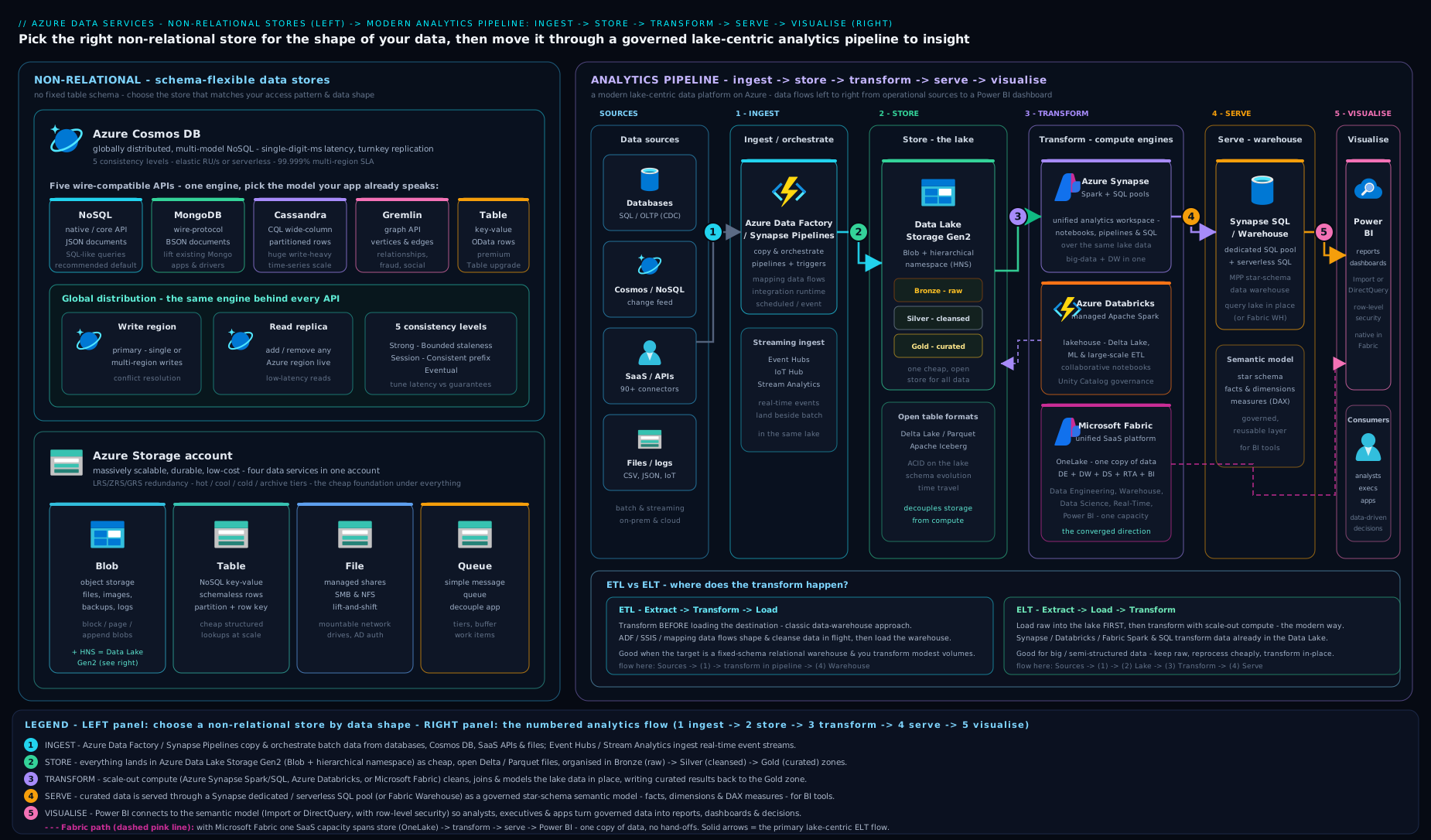
The diagram above stitches both halves together: the non-relational stores on the left (Cosmos DB’s five APIs and the four Azure Storage services) feeding the five-stage analytics pipeline on the right — ingest, lake, transform, serve, and finally Power BI.
Hands-on lab
A tiny, free hands-on to make both halves concrete: create a free-tier Cosmos DB account and a Blob container (your “data lake” landing zone), and confirm both work. We use the Azure CLI so the steps are copy-pasteable; everything here stays inside free limits or costs a few rupees.
1. Create a resource group
az group create \
  --name rg-dp900-nosql \
  --location centralindia
2. Create a free-tier Cosmos DB account (API for NoSQL)
The --enable-free-tier true flag gives you the first 1000 RU/s and 25 GB free on one account per subscription — perfect for learning.
az cosmosdb create \
  --name kvcosmos$RANDOM \
  --resource-group rg-dp900-nosql \
  --locations regionName=centralindia \
  --enable-free-tier true \
  --default-consistency-level Session
Note the account name printed in the output. Expected output: a JSON object with "provisioningState": "Succeeded" and "enableFreeTier": true.
3. Create a database and a container with autoscale throughput
# Replace <account> with the name from step 2
az cosmosdb sql database create \
  --account-name <account> \
  --resource-group rg-dp900-nosql \
  --name RetailDB

az cosmosdb sql container create \
  --account-name <account> \
  --resource-group rg-dp900-nosql \
  --database-name RetailDB \
  --name Products \
  --partition-key-path "/category" \
  --max-throughput 1000
Here --partition-key-path "/category" chooses category as the partition key (how data is spread for scale), and --max-throughput 1000 sets autoscale up to 1000 RU/s — inside the free allowance.
4. Create a Blob storage “data lake” landing container
az storage account create \
  --name kvlake$RANDOM \
  --resource-group rg-dp900-nosql \
  --location centralindia \
  --sku Standard_LRS \
  --kind StorageV2

# Use the storage-account name printed above
az storage container create \
  --account-name <storage-account> \
  --name bronze \
  --auth-mode login
Validation
# Confirm the Cosmos container and its throughput
az cosmosdb sql container show \
  --account-name <account> --resource-group rg-dp900-nosql \
  --database-name RetailDB --name Products \
  --query "{name:name, pk:resource.partitionKey.paths}" -o table

# Confirm the Blob container exists
az storage container show \
  --account-name <storage-account> --name bronze \
  --auth-mode login --query name -o tsv
You should see the Products container with partition key /category, and bronze returned for the Blob container. You have just built, in miniature, a non-relational store and the landing layer of a data lake.
Cleanup — delete the whole resource group so nothing keeps billing:
az group delete --name rg-dp900-nosql --yes --no-wait
Cost note (INR): the Cosmos DB account is on the free tier (₹0 for the first 1000 RU/s and 25 GB). The Standard LRS storage account costs roughly ₹1.6–₹2 per GB per month for Hot blobs, and you stored nothing, so the lab total is effectively ₹0 if you clean up the same day. Always run the cleanup step — an idle provisioned-throughput Cosmos container (outside free tier) is the classic surprise on a learner’s bill.
Common mistakes & troubleshooting
| Symptom | Likely cause | Fix |
|---|---|---|
| HTTP 429 “request rate too large” from Cosmos DB | You exceeded provisioned RU/s (often a hot partition). | Raise RU/s or switch to autoscale; choose a better-distributed partition key; implement retry-with-backoff. |
| Want to change a Cosmos account from MongoDB to NoSQL API | The API is fixed at account creation. | Create a new account with the desired API and migrate the data. |
| Blob “Archive” data won’t read | Archive tier is offline; blobs must be rehydrated first. | Rehydrate to Hot/Cool (hours) before reading, or keep frequently read data in Hot/Cool. |
| Big-data engine can’t do directory operations on your lake | You used a plain Blob account, not ADLS Gen2 (no hierarchical namespace). | Recreate with hierarchical namespace enabled (it cannot be toggled on later). |
| Data warehouse load is slow and expensive | You forced ETL on huge volumes through a small engine. | Switch to ELT: land raw in the lake, transform with elastic Spark/SQL compute. |
| Power BI report is stale | Dataset refresh not scheduled, or source not refreshed. | Configure scheduled refresh; for big models consider DirectQuery / DirectLake. |
| Surprise Cosmos bill on an idle dev database | Provisioned RU/s bills whether used or not. | Use serverless or autoscale for dev/test; delete idle resources. |
| Choosing Synapse for a brand-new project | Defaulting to the previous generation. | For greenfield, evaluate Microsoft Fabric (the strategic direction) first. |
Best practices
- Pick the right store for the shape of the data. Document → Cosmos DB for NoSQL; graph → Gremlin; cheap files/lake → Blob/ADLS Gen2; simple key-value at scale → Table storage. Don’t force everything into one model.
- Design the partition key first. In Cosmos DB (and Table storage) an even-spreading partition key is the single biggest factor in performance and cost; a “hot” partition wastes RUs.
- Use autoscale or serverless for variable/dev workloads and reserve fixed provisioned throughput only for steady, predictable traffic.
- Default to Session consistency in Cosmos DB; only strengthen it where a specific requirement demands.
- Land raw, then transform (ELT) and keep the bronze layer immutable so you can always re-derive curated data when business rules change.
- Tier your blobs (Hot/Cool/Cold/Archive) with lifecycle-management rules so cold data costs less automatically.
- For new analytics, evaluate Microsoft Fabric first; keep Synapse/Databricks where existing estates or heavy custom Spark justify them.
Security notes
- Prefer Microsoft Entra ID (identity) over keys. Both Cosmos DB and Storage support Entra ID with RBAC; use it (and managed identities for apps) instead of account keys or connection strings wherever possible, and rotate any keys you must use.
- Encryption is on by default. Data is encrypted at rest automatically; you can supply customer-managed keys (CMK) in Key Vault for extra control, and everything is encrypted in transit over HTTPS/TLS.
- Restrict the network. Lock storage accounts and Cosmos DB to private endpoints or selected VNets/firewall rules rather than leaving them open to the public internet; disable public blob access unless a container must be public.
- Govern the lake. As data from many sources lands in one place, classify and govern it (e.g. with Microsoft Purview) and apply least-privilege access at the container/folder level (ADLS Gen2 ACLs).
- Mind data residency. Global distribution replicates data to the regions you choose — pick regions deliberately to honour sovereignty and compliance requirements (for India, keep data in
centralindia/southindiawhere required).
Interview & exam questions
- When would you choose a non-relational store over a relational one? When the schema is variable/evolving, you need massive horizontal scale or very low-latency key lookups, you need global multi-write low latency, or the data is naturally a document/graph — and you don’t need rich cross-table JOINs or multi-table ACID transactions.
- Name the four NoSQL data models and an Azure service for each. Key-value (Table storage / Cosmos Table), document (Cosmos DB for NoSQL/MongoDB), column-family (Cosmos DB for Cassandra), graph (Cosmos DB for Gremlin).
- What are the five Cosmos DB APIs and when is each chosen? NoSQL (new projects, default), MongoDB (migrate Mongo apps), Cassandra (migrate Cassandra), Gremlin (graph data), Table (upgrade Azure Table apps). The API is fixed at account creation.
- What is a Request Unit (RU)? A normalised currency blending CPU, memory and IOPS; every operation costs RUs (a 1 KB read = 1 RU). You provision RU/s; exceeding it causes 429 throttling.
- Explain Cosmos DB consistency levels. Strong, Bounded staleness, Session (default), Consistent prefix, Eventual — a spectrum trading freshness for latency/availability. Session is the usual default.
- What is global distribution / multi-region writes? Replicating data to multiple regions for local latency; multi-region writes let every region accept writes (multi-master), surviving regional outages at the cost of conflict resolution.
- What are the four Azure Storage services? Blob (objects/files), Table (key-value NoSQL), File (SMB/NFS shares), Queue (messages).
- What are Blob access tiers and why do they matter? Hot, Cool, Cold, Archive — they match storage/access cost to access frequency; Archive is offline and must be rehydrated. They are a major cost lever.
- Describe the five stages of an analytics pipeline and name a service per stage. Ingest (Data Factory), store (Data Lake Gen2), transform (Synapse/Databricks/Fabric), serve (warehouse), visualise (Power BI).
- ETL vs ELT — what’s the difference and why did the cloud favour ELT? ETL transforms before loading; ELT loads raw then transforms in the destination. The cloud favours ELT because cheap, limitless storage plus elastic compute make “load-first” cheaper and more flexible, while keeping the raw copy.
- What is a data lake, and how does it differ from a data warehouse? A lake stores raw, any-shape data cheaply with schema-on-read; a warehouse stores cleaned, structured data with schema-on-write for fast SQL. ADLS Gen2 is the Azure lake; combining both is a lakehouse.
- Synapse, Fabric, or Databricks — which for a new project? For greenfield, evaluate Microsoft Fabric first (the unified SaaS, go-forward direction over OneLake); use Databricks for heavy custom Spark/ML; keep Synapse for existing estates.
Quick check
- Which Cosmos DB API would you choose for a brand-new application, and why?
- True or false: you can change a Cosmos DB account’s API after it is created.
- What does a Request Unit measure, and what happens if you exceed your provisioned RU/s?
- Put these in pipeline order: serve, ingest, visualise, transform, store.
- In ELT, does the transform happen before or after the data is loaded into the destination?
Answers
- API for NoSQL — it is the native, default API and receives every new feature first.
- False — the API is fixed at account creation; migrate to a new account to change it.
- An RU is a normalised throughput currency (CPU + memory + IOPS); exceeding provisioned RU/s causes HTTP 429 throttling, requiring back-off and retry.
- Ingest → store → transform → serve → visualise.
- After — ELT loads raw data first, then transforms it inside the destination (lake/warehouse).
Exercise
Imagine a retail company with: (a) a fast-growing product catalogue where items have wildly different attributes; (b) a clickstream of millions of website events per hour; © a folder of product images and PDFs; and (d) a need for executives to see daily sales dashboards.
For each of (a)–(d), write down which Azure service you would use and one sentence of justification. Then sketch — in five boxes — the end-to-end analytics pipeline that would carry the clickstream from the website all the way to an executive dashboard, labelling each stage. (Suggested answer: (a) Cosmos DB for NoSQL — flexible document schema; (b) ingest via Event Hubs/Data Factory into ADLS Gen2 — scale and cheap raw storage; © Blob storage — unstructured files; (d) Power BI — interactive dashboards. Pipeline: ingest → data lake (bronze) → transform (Spark/Synapse to silver/gold) → serve (warehouse) → visualise (Power BI).)
Certification mapping
This lesson maps to the DP-900: Microsoft Azure Data Fundamentals certification, principally the exam areas “Describe considerations for working with non-relational data on Azure” (Cosmos DB, its APIs, and Azure Storage — Blob, Table, File, Queue) and “Describe an analytics workload on Azure” (the ingest → store → transform → serve → visualise pipeline, ETL vs ELT, data lakes, Data Factory, Synapse, Fabric, Databricks and Power BI). It is also a useful on-ramp to DP-203 / DP-700 (data engineering) and PL-300 (Power BI data analyst).
Glossary
- NoSQL / non-relational — data stores that do not use the relational table model; optimised for flexible schema, scale or specific shapes (document, key-value, column-family, graph).
- Cosmos DB — Azure’s globally distributed, multi-model, fully managed NoSQL database service.
- API (Cosmos DB) — the protocol/data-model a Cosmos account speaks (NoSQL, MongoDB, Cassandra, Gremlin, Table), fixed at creation.
- Request Unit (RU) — the normalised currency for Cosmos DB throughput; you provision RU/s.
- Consistency level — the freshness-vs-latency setting in Cosmos DB (Strong, Bounded staleness, Session, Consistent prefix, Eventual).
- Global distribution / multi-region writes — replicating Cosmos data to multiple regions, optionally with every region accepting writes (multi-master).
- Storage account — an Azure namespace bundling Blob, Table, File and Queue services.
- Blob — Binary Large Object; any file stored in Blob storage; tiered Hot/Cool/Cold/Archive.
- Data lake / ADLS Gen2 — a cheap, scalable store for raw data of any shape (Blob + hierarchical namespace).
- Medallion architecture — organising a lake into bronze (raw), silver (cleaned), gold (business-ready) layers.
- Data warehouse — a store of cleaned, structured data optimised for fast SQL analytics (schema-on-write).
- Lakehouse — an architecture combining a data lake and warehouse capabilities.
- ETL / ELT — Extract-Transform-Load (transform before load) vs Extract-Load-Transform (transform after load, in the destination).
- Azure Data Factory — cloud data-ingestion and pipeline-orchestration service.
- Synapse Analytics — integrated analytics platform (pipelines + Spark + SQL warehouse).
- Microsoft Fabric — Microsoft’s unified SaaS analytics platform over OneLake; the strategic direction.
- Azure Databricks — first-party managed Apache Spark platform for data engineering and ML.
- Power BI — Microsoft’s reporting and dashboard (data-visualisation) tool.
Next steps
You now understand non-relational data and the analytics pipeline at fundamentals depth — the last big pillar of DP-900’s storage-and-analytics content. To go deeper:
- Next lesson: Azure Data Integration & Analytics: Data Factory, Synapse & Microsoft Fabric — the advanced, build-it version of Part 2.
- Go deeper on Cosmos DB: Cosmos DB partition-key design & RU optimisation.
- Go deeper on storage: Azure Storage accounts deep-dive — every option.
- Revisit the foundations: Core data concepts, roles & workloads and Relational data on Azure.