Most of the data that runs the world — bank balances, orders, payroll, inventory, patient records — lives in relational databases. They have been the workhorse of business computing for forty years for one reason: they are extraordinarily good at storing structured facts and answering precise questions about them without losing or corrupting a single row. This lesson teaches relational data from absolute first principles — what a table actually is, how rows relate to one another, and just enough SQL to be dangerous — and then walks the entire Azure relational family so you know exactly which service to reach for and why.
This is a DP-900: Azure Data Fundamentals lesson, the second in the data track. The previous lesson, Core Data Concepts, Roles & Workloads, drew the big map (structured vs unstructured, OLTP vs OLAP, who does what). Here we zoom into the structured, transactional corner of that map and make it concrete on Azure. No prior database experience is assumed; every term is defined the first time it appears.
Learning objectives
By the end of this lesson you can:
- Explain what a relational database is and define table, row, column, primary key, foreign key, and relationship in plain English.
- Describe normalisation, indexes, and views, and say what problem each one solves.
- Read and write basic SQL, and classify a statement as DDL, DML, DCL, or TCL.
- Tell the difference between running a database as IaaS versus PaaS, and explain the shared-responsibility consequences.
- Name every member of the Azure relational family — Azure SQL Database (single, elastic pool, serverless), SQL Managed Instance, SQL Server on Azure VM, and Azure Database for PostgreSQL and MySQL — and what each is for.
- Choose the right relational service for a given scenario using a when-to-use comparison.
- Provision and connect to a managed Azure relational database from the command line.
Prerequisites & where this fits
You need only basic IT literacy and ideally the previous lesson, DP-900: Core Data Concepts, Roles & Workloads, which introduced structured data, OLTP versus OLAP, and the data professional roles. An Azure account with a subscription is useful for the lab, but the concepts stand alone and every term is defined as it appears. This is Lesson 2 of the Data Fundamentals module in the Azure Zero-to-Hero course; the next lesson covers non-relational data and analytics, the other half of the data world.
What “relational” actually means
A relational database organises data into tables — think of a single, very disciplined spreadsheet. Each table describes one kind of thing: a Customers table, an Orders table, a Products table. The power, and the name, come from the fact that tables relate to one another: an order knows which customer placed it, and which products it contains, by referencing rows in the other tables rather than copying their data.
The model rests on a small, precise vocabulary. Learn these six terms and the rest follows.
| Term | Plain-English meaning | Spreadsheet analogy |
|---|---|---|
| Table (relation) | A collection of rows describing one kind of entity. | A whole worksheet |
| Row (record, tuple) | One instance of that entity — one customer, one order. | A single line |
| Column (field, attribute) | One property all rows share, with a fixed data type. | A column header |
| Schema | The structure — the tables, their columns, and the types — defined before you insert data. | The blank template |
| Primary key (PK) | A column (or set of columns) whose value uniquely identifies each row. No duplicates, never null. | The “ID” column |
| Foreign key (FK) | A column that points to a primary key in another table, creating the relationship. | A “lookup” reference |
The defining trait of the relational model is the rigid schema: every row in a table has exactly the same columns, and every column has a declared data type (integer, decimal, text of a given length, date, boolean, and so on). The database enforces this — try to put the word “blue” into an integer column and it refuses. That strictness is the whole point: it guarantees the data stays clean and consistent, which is precisely what you want for money, inventory, and records.
Keys and relationships
Imagine a Customers table with a primary key CustomerID, and an Orders table. Rather than repeating the customer’s name and address on every order, each order row stores a CustomerID foreign key that references the matching customer. This gives three things at once: no duplicated data, no chance of the copies drifting apart, and a way to join the tables back together when you query.
Relationships come in three shapes:
- One-to-many (the common case): one customer has many orders; each order belongs to exactly one customer. The FK lives on the “many” side (
Orders.CustomerID). - One-to-one: one row matches exactly one row elsewhere — e.g. an employee and a single security badge.
- Many-to-many: an order contains many products and a product appears in many orders. Relational databases model this with a third junction table (e.g.
OrderItems) holding two foreign keys.
A core safety feature is referential integrity: the database refuses to let an Orders row reference a CustomerID that does not exist, and can stop you deleting a customer who still has orders. Broken pointers are simply impossible.
Normalisation — designing tables that don’t lie
Normalisation is the process of organising columns into tables so that each fact is stored exactly once. The motivating problem is redundancy: if a customer’s address sits on every one of their order rows and they move house, you must update every row, and if you miss one the data now contradicts itself (an update anomaly). The fix is to factor repeating information into its own table and reference it by key — exactly the Customers/Orders split above.
You do not need the formal “normal forms” for DP-900, only the intuition: a well-normalised schema avoids duplicated, contradictory data and so is easier to keep correct. The trade-off is that answering a question may require stitching several tables back together with a JOIN, which costs a little query effort — a price relational databases pay gladly in exchange for trustworthy data. (Analytical systems sometimes de-normalise deliberately for read speed; that is the next lesson’s territory.)
Indexes — making queries fast
An index is a separate, sorted structure the database maintains so it can find rows without scanning the whole table, exactly like the index at the back of a book lets you jump to a page instead of reading every one. Without an index, “find the customer with email asha@example.com” forces the engine to read every row (a table scan); with an index on the Email column it jumps almost straight to the answer.
Two ideas worth knowing:
- A clustered index physically orders the table’s rows by the key (a table has at most one). A non-clustered index is a separate lookup structure pointing back to the rows (you can have many).
- Indexes are not free — they consume storage and must be updated on every insert, update, and delete. So you index the columns you frequently search, join, or sort by, not every column.
Views — saved queries that look like tables
A view is a stored SELECT query that you can read from as if it were a table, but it stores no data of its own — it runs its underlying query each time. Views let you (a) hide complexity behind a simple name (a MonthlySales view that already joins three tables), (b) expose only certain columns to certain users (security), and © present a stable shape even as the underlying tables change. Other related objects you may meet are stored procedures (saved, reusable blocks of SQL logic) and triggers (SQL that runs automatically in response to a change).
SQL: the language of relational data
You talk to a relational database in SQL — Structured Query Language. Although every engine adds its own dialect (Microsoft’s is T-SQL, PostgreSQL has PL/pgSQL), the core is a shared ANSI standard, so what you learn here transfers everywhere. SQL statements fall into four families — a favourite exam distinction.
| Family | Full name | What it does | Key statements |
|---|---|---|---|
| DDL | Data Definition Language | Defines and changes the structure (schema). | CREATE, ALTER, DROP, TRUNCATE |
| DML | Data Manipulation Language | Reads and changes the data in tables. | SELECT, INSERT, UPDATE, DELETE |
| DCL | Data Control Language | Manages permissions — who may do what. | GRANT, REVOKE, DENY |
| TCL | Transaction Control Language | Groups changes into all-or-nothing transactions. | BEGIN, COMMIT, ROLLBACK |
A memory hook: DDL shapes the container, DML moves the contents, DCL guards the door, TCL makes a batch of changes succeed or fail together. (Some courses fold SELECT into its own “DQL” — Data Query Language — but DP-900 treats it as DML.)
DDL — defining structure
CREATE TABLE Customers (
    CustomerID   INT          PRIMARY KEY,
    FullName     NVARCHAR(100) NOT NULL,
    Email        NVARCHAR(255) NOT NULL,
    City         NVARCHAR(50),
    CreatedOn    DATE          DEFAULT (GETDATE())
);
This creates the Customers table: CustomerID is the primary key, FullName and Email may not be empty (NOT NULL), and new rows default CreatedOn to today. ALTER TABLE later changes the structure (add a column), DROP TABLE deletes the table and its data outright, and TRUNCATE TABLE empties it quickly while keeping the structure.
DML — the four operations you use daily
SELECT reads data; it is by far the most-used statement:
-- Read specific columns, filtered and sorted
SELECT FullName, City
FROM Customers
WHERE City = 'Bengaluru'
ORDER BY FullName;
INSERT adds rows:
INSERT INTO Customers (CustomerID, FullName, Email, City)
VALUES (1, 'Asha Rao', 'asha@example.com', 'Bengaluru');
UPDATE changes existing rows — always with a WHERE, or you change every row:
UPDATE Customers
SET City = 'Mumbai'
WHERE CustomerID = 1;
DELETE removes rows — again, the WHERE is what saves you:
DELETE FROM Customers
WHERE CustomerID = 1;
The single most valuable habit a beginner can build: never run an UPDATE or DELETE without a WHERE clause unless you genuinely mean “every row”. A missing WHERE is the classic production accident.
Joining tables
Because relationships are everything, the JOIN stitches related tables back together on their keys — this is what makes a normalised design usable:
SELECT  c.FullName, o.OrderDate, o.Total
FROM    Customers c
JOIN    Orders    o ON o.CustomerID = c.CustomerID
WHERE   o.Total > 1000
ORDER BY o.OrderDate DESC;
DCL and TCL — permissions and transactions
GRANT SELECT ON Customers TO analyst_role; -- DCL: allow reads
A transaction (TCL) bundles several changes so they all succeed or all fail — the textbook example is a bank transfer, where the debit and the credit must happen together:
BEGIN TRANSACTION;
    UPDATE Accounts SET Balance = Balance - 500 WHERE AccountID = 1;
    UPDATE Accounts SET Balance = Balance + 500 WHERE AccountID = 2;
COMMIT;   -- both stick; ROLLBACK would undo both
This all-or-nothing behaviour is part of the ACID guarantees (Atomicity, Consistency, Isolation, Durability) that make relational databases trustworthy for transactional workloads — the reason banks use them and spreadsheets don’t.
IaaS versus PaaS for databases
Before touring the Azure services, grasp the one distinction that organises the whole family: how much of the work Microsoft does for you. This is the shared-responsibility model applied to databases.
-
IaaS (Infrastructure as a Service) — you run SQL Server (or any engine) on an Azure Virtual Machine. Azure gives you the VM; you install and patch the OS and the database engine, configure high availability, take backups, and tune everything. Maximum control, maximum effort. You would choose this only when you need OS-level access or a feature the managed options don’t expose.
-
PaaS (Platform as a Service) — you ask Azure for a database, not a server. Microsoft owns the OS, the engine patching, automated backups, high availability, and the underlying hardware; you own your data, your schema, and access control. Far less to manage, so it is the default choice for new work. Azure SQL Database, SQL Managed Instance, and the PostgreSQL/MySQL Flexible Servers are all PaaS.
The table below makes the split concrete.
| Responsibility | SQL Server on a VM (IaaS) | Managed database (PaaS) |
|---|---|---|
| Physical hardware & datacentre | Microsoft | Microsoft |
| Operating system patching | You | Microsoft |
| Database engine patching/upgrades | You | Microsoft |
| High availability & failover | You configure | Built in |
| Backups | You schedule | Automated |
| Scaling | Resize the VM/disks yourself | Change a tier/slider |
| Data, schema, indexes, queries | You | You |
| Access control & firewall rules | You | You |
The senior-architect rule of thumb: start at PaaS and only step down to IaaS when a concrete requirement forces you to. Every blade you don’t have to manage is a blade that can’t page you at 2 a.m.
The Azure relational family
Azure offers a graduated ladder of relational options, from “Microsoft manages almost everything” to “you manage almost everything”, across both the SQL Server engine and the popular open-source engines.
Azure SQL Database (PaaS — the flagship)
Azure SQL Database is a fully managed PaaS database built on the latest SQL Server engine, with the OS and engine entirely hidden. You get automated backups, automatic patching, built-in high availability, and point-in-time restore out of the box. It is the default choice for new cloud applications that need a SQL Server-compatible relational database. It comes in three deployment options:
- Single database — one isolated database with its own dedicated resources. Simple and predictable; ideal for a single application. You can buy capacity in two purchasing models: DTU (Database Transaction Units — a simple blended bundle of compute, memory, and I/O, in Basic/Standard/Premium tiers, easiest for beginners) or vCore (you choose virtual cores and memory directly, more transparent and the modern default).
- Elastic pool — a shared pool of resources spread across many databases that have varying, unpredictable usage. Instead of paying for each database’s peak separately, the databases draw from a common budget — far cheaper for SaaS providers running hundreds of small, mostly-idle tenant databases.
- Serverless — compute that auto-scales with demand and pauses when idle, billing per second of use. Perfect for intermittent or unpredictable workloads (dev/test, a line-of-business app used only in office hours) because you stop paying for compute while it sleeps. (Storage is still billed while paused.)
The trade-off versus the heavier options: Azure SQL Database is a single database abstraction, so a handful of instance-level SQL Server features (cross-database queries, SQL Agent, CLR, Service Broker) are limited or absent. When you need those, you move up to Managed Instance.
Azure SQL Managed Instance (PaaS — near-100% SQL Server compatibility)
SQL Managed Instance is also PaaS, but it presents a near-complete SQL Server instance rather than a lone database — so the instance-level features missing from Azure SQL Database (cross-database queries, SQL Server Agent, CLR, Database Mail, linked servers) are available. It deploys into your virtual network for private connectivity. This makes it the easiest target for lifting an existing on-premises SQL Server into PaaS with minimal code change. The cost is that it is larger and pricier than a single database and takes longer to deploy.
SQL Server on Azure Virtual Machines (IaaS)
This is SQL Server installed on a VM you control — full IaaS. You get 100% feature parity with the on-premises product, OS-level access, and the ability to run versions or configurations the managed services don’t offer. In return you own OS and SQL patching, HA configuration, and backups (the SQL IaaS Agent extension automates some of this, but the responsibility is yours). Choose it when you need OS access, a specific/older SQL Server version, or third-party software co-located on the database server — a true lift-and-shift that preserves everything.
Azure Database for PostgreSQL and MySQL (PaaS — open source)
Azure runs the two most popular open-source relational engines as managed PaaS, for teams whose applications target them rather than SQL Server:
- Azure Database for PostgreSQL — managed PostgreSQL, a feature-rich, standards-compliant engine popular for modern and geospatial workloads (the PostGIS extension).
- Azure Database for MySQL — managed MySQL, the database behind a vast amount of the web, including most WordPress, Drupal, and LAMP-stack applications.
Both are offered as Flexible Server, the current recommended deployment model, which gives you fine-grained control over configuration, zone-redundant high availability, and stop/start to save cost, plus a burstable tier for cheap dev/test. (You may still see the older Single Server model in documentation, but it is retiring; choose Flexible Server for anything new.) MariaDB also previously had an Azure service, but it has been retired in favour of MySQL — worth knowing only so the name doesn’t surprise you. Choose these when your application is written for Postgres or MySQL and you want the managed-service benefits without rewriting it for SQL Server.
The whole family at a glance
| Service | Model | Engine | What it is | Management burden |
|---|---|---|---|---|
| Azure SQL Database | PaaS | SQL Server | A single managed database (single / elastic pool / serverless) | Lowest |
| SQL Managed Instance | PaaS | SQL Server | A near-full managed SQL Server instance in your VNet | Low |
| SQL Server on Azure VM | IaaS | SQL Server | Full SQL Server you install and run on a VM | Highest |
| Azure DB for PostgreSQL | PaaS | PostgreSQL | Managed open-source Postgres (Flexible Server) | Low |
| Azure DB for MySQL | PaaS | MySQL | Managed open-source MySQL (Flexible Server) | Low |
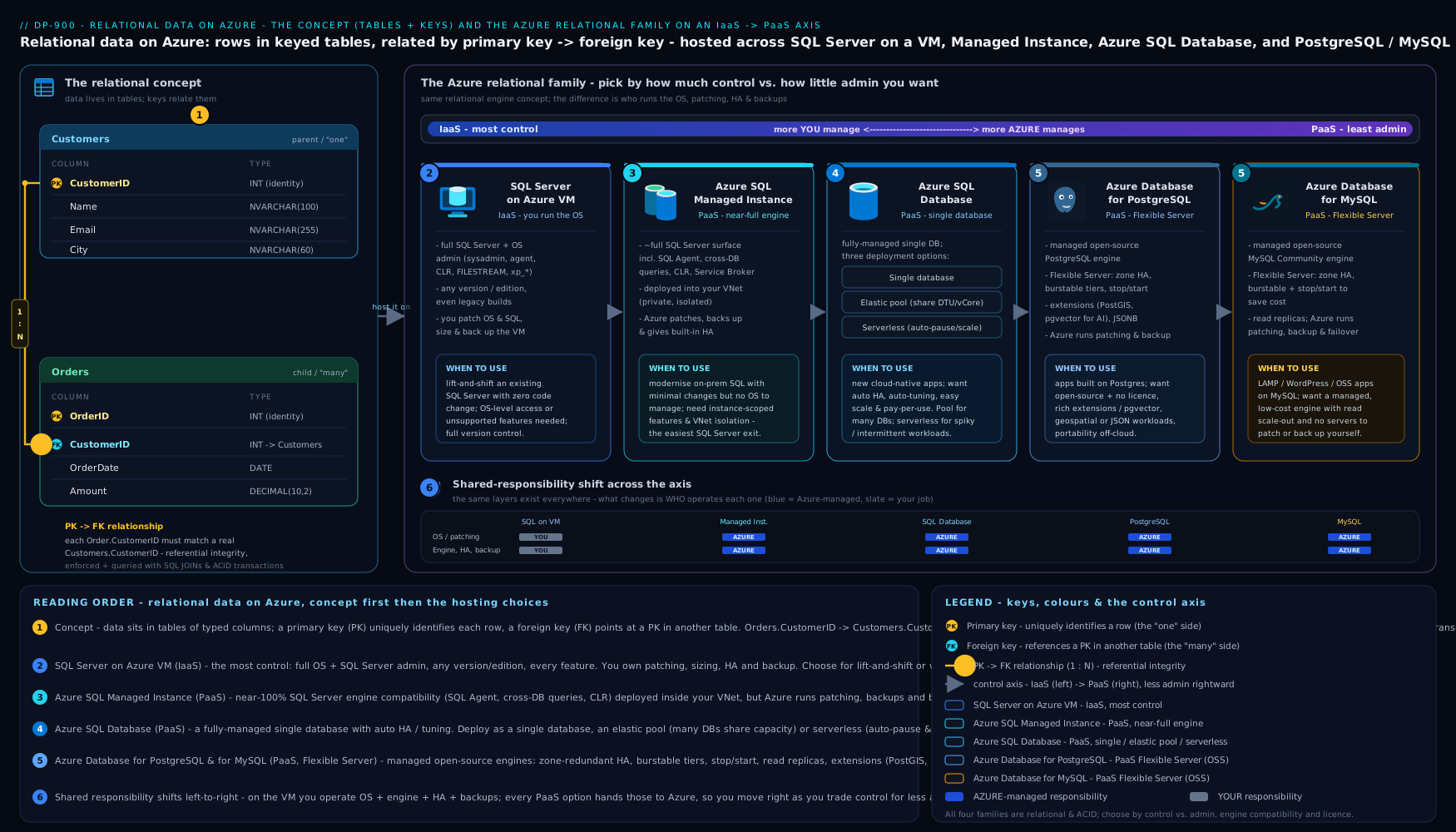
The diagram lays the family on the IaaS-to-PaaS spectrum, shows the three Azure SQL Database deployment options branching off the flagship, and maps each engine to the kind of workload it best serves — read it top to bottom as “how much does Microsoft manage for me?”.
When to use which — the decision
Cut through the options with a single question first — which engine does my application speak? — then choose the deployment style by how much you want to manage and how predictable the load is.
| If you need… | Choose | Why |
|---|---|---|
| A new cloud app on the SQL Server engine, least to manage | Azure SQL Database (single) | Fully managed, modern default for greenfield SQL |
| Many small SaaS-tenant databases with spiky, varied usage | Azure SQL Database (elastic pool) | Shared budget across databases is far cheaper |
| An app used intermittently / dev-test, pay only when active | Azure SQL Database (serverless) | Auto-pause stops compute billing when idle |
| To migrate an on-prem SQL Server to PaaS with minimal change | SQL Managed Instance | Near-full instance compatibility, VNet-native |
| OS access, a specific SQL version, or co-located software | SQL Server on Azure VM | Full control, 100% feature parity (IaaS) |
| A managed home for a PostgreSQL or MySQL app | Azure DB for PostgreSQL / MySQL (Flexible Server) | Managed open-source engine, no rewrite |
Two tie-breakers worth memorising for the exam and for life: single database for one app, elastic pool for many; Managed Instance when “Azure SQL Database” is missing an instance-level feature; and a VM only when you truly need the OS.
Hands-on lab: provision and connect to Azure SQL Database
This lab uses Azure Cloud Shell (the browser terminal at https://shell.azure.com — no local install) or any machine with az signed in via az login. You will create a logical SQL server and a small serverless database, open the firewall, run a query, and clean up.
Step 1 — Set variables and create a resource group. Pick a region near you:
LOCATION=centralindia
RG=rg-sql-lab
SERVER=sqlsrv-dp900-$RANDOM        # must be globally unique
ADMIN=sqladmin
PASSWORD='P@ssw0rd-Change-Me-123'  # use a strong, unique value
az group create --name $RG --location $LOCATION --output table
Step 2 — Create the logical SQL server (the management endpoint that databases live under):
az sql server create \
  --name $SERVER \
  --resource-group $RG \
  --location $LOCATION \
  --admin-user $ADMIN \
  --admin-password "$PASSWORD" \
  --output table
Step 3 — Create a small serverless database in the General Purpose tier (cheap; auto-pauses when idle):
az sql db create \
  --resource-group $RG \
  --server $SERVER \
  --name salesdb \
  --edition GeneralPurpose \
  --compute-model Serverless \
  --family Gen5 \
  --capacity 1 \
  --auto-pause-delay 60 \
  --backup-storage-redundancy Local \
  --output table
Step 4 — Open the firewall to your client. By default the server blocks everything; add a rule for your current IP (Cloud Shell shows it, or use whoami/the portal). For a quick lab you may allow Azure services:
MYIP=$(curl -s ifconfig.me)
az sql server firewall-rule create \
  --resource-group $RG --server $SERVER \
  --name allow-my-ip \
  --start-ip-address $MYIP --end-ip-address $MYIP \
  --output table
Step 5 — Connect and run SQL. Use sqlcmd (preinstalled in Cloud Shell) to create a table, insert a row, and read it back:
sqlcmd -S $SERVER.database.windows.net -d salesdb -U $ADMIN -P "$PASSWORD" -Q "
CREATE TABLE Customers (CustomerID INT PRIMARY KEY, FullName NVARCHAR(100), City NVARCHAR(50));
INSERT INTO Customers VALUES (1, 'Asha Rao', 'Bengaluru');
SELECT * FROM Customers;"
Expected output is a one-row result set showing 1 Asha Rao Bengaluru — proof you have a working managed relational database, queried with the same SQL you learned above.
Validation. Confirm the database exists and note its tier:
az sql db show --resource-group $RG --server $SERVER --name salesdb \
  --query "{Name:name, Edition:edition, Compute:currentServiceObjectiveName}" --output table
Cleanup. Delete the whole resource group so nothing keeps billing:
az group delete --name $RG --yes --no-wait
Cost note (INR). A single serverless General Purpose, 1 vCore database auto-pauses after the idle delay, so an idle lab costs only storage — a few rupees over an evening. Even left running, 1 vCore is on the order of ₹12–15 per hour of active compute plus storage; deleting the resource group immediately after the lab keeps the total to small change. Contrast that with a provisioned Business Critical database or a SQL Server VM, which bill continuously whether you use them or not — always clean up labs.
Common mistakes & troubleshooting
| Symptom | Likely cause | Fix |
|---|---|---|
Cannot connect / login timeout |
Server firewall blocks your IP | Add a firewall rule for your client IP (Step 4) |
Login failed for user |
Wrong admin name/password, or the login lacks rights | Re-check credentials; create a contained DB user for app access |
An UPDATE/DELETE changed far too many rows |
Missing WHERE clause |
Always scope DML; wrap risky changes in a transaction you can ROLLBACK |
| Query is slow on a large table | No index on the searched/joined column | Add a non-clustered index on that column |
| Picked Azure SQL Database, then a feature is missing (SQL Agent, cross-DB) | Single-database limitations | Move up to SQL Managed Instance |
| Surprise bill from a “small” database | Provisioned (not serverless) compute billing 24×7 | Use serverless with auto-pause for intermittent workloads; delete when done |
| Can’t choose the SQL Server version you need | Managed services control the engine version | Use SQL Server on a VM for full version control |
Best practices
- Default to PaaS. Reach for Azure SQL Database (or the PostgreSQL/MySQL Flexible Server) first; only choose a VM when a hard requirement forces IaaS.
- Match the deployment to the load: single database for one app, elastic pool for many spiky databases, serverless for intermittent ones.
- Normalise for transactional data to avoid duplicated, contradictory facts; index the columns you search, join, and sort by — and only those.
- Always scope
UPDATE/DELETEwithWHERE, and use transactions for multi-statement changes that must succeed or fail together. - Right-size, then scale on demand — start small; PaaS lets you change tiers later without rebuilding.
- Use views to hide complexity and limit which columns users see.
Security notes
- Lock the firewall down. A logical SQL server denies all traffic by default; add only the specific client IPs or VNet rules you need — never leave it open to the internet, and avoid the broad “allow Azure services” toggle in production.
- Prefer Microsoft Entra ID authentication over SQL logins where possible, so identities and MFA are centrally managed; keep the SQL admin password strong and out of source control.
- Encryption is on by default: Transparent Data Encryption protects data at rest, and connections are encrypted in transit (TLS). Use private endpoints to keep traffic off the public internet for sensitive systems.
- Grant least privilege with DCL (
GRANT/DENY) and roles — application accounts should never log in as the server admin. - Don’t disable automated backups; PaaS gives you point-in-time restore for free, which is a security and recovery control.
Interview & exam questions
- What is the difference between a primary key and a foreign key? A primary key uniquely identifies each row within its own table (unique, never null); a foreign key in one table references a primary key in another, creating the relationship and enforcing referential integrity.
- What is normalisation and why do it? Organising columns into tables so each fact is stored once, eliminating redundancy and the update anomalies that follow. The trade-off is more joins at query time.
- What does an index do, and why not index every column? It lets the engine find rows without a full table scan. Indexes cost storage and slow writes (they update on every insert/update/delete), so you index only frequently searched/joined/sorted columns.
- Classify these:
CREATE TABLE,SELECT,GRANT,COMMIT. DDL, DML, DCL, TCL respectively. - What is the practical difference between IaaS and PaaS for databases? With IaaS (SQL on a VM) you manage the OS, engine patching, HA, and backups; with PaaS (Azure SQL Database et al.) Microsoft manages all of that and you manage only data, schema, and access.
- When would you choose SQL Managed Instance over Azure SQL Database? When you need instance-level SQL Server features (cross-database queries, SQL Agent, CLR, linked servers) or are lifting an on-prem instance into PaaS with minimal change.
- What are the three deployment options of Azure SQL Database, and when is each used? Single database (one app), elastic pool (many spiky databases sharing a budget), and serverless (intermittent workloads, auto-pause to save compute cost).
- DTU versus vCore purchasing — what’s the difference? DTU bundles compute/memory/I/O into one simple unit across Basic/Standard/Premium; vCore lets you choose cores and memory directly for transparency and is the modern default.
- Which Azure service runs open-source relational engines, and in what model? Azure Database for PostgreSQL and MySQL, recommended as Flexible Server (configurable, zone-redundant HA, stop/start).
- When must you use SQL Server on a VM rather than a managed option? When you need OS-level access, a specific/older SQL Server version, or third-party software co-located on the database server.
- What does ACID guarantee, and why does it matter? Atomicity, Consistency, Isolation, Durability — the transactional guarantees that make a multi-step change (like a bank transfer) all-or-nothing and durable, which is why relational databases run financial systems.
- What is a view and why use one? A stored
SELECTthat behaves like a table but holds no data; it hides query complexity, restricts exposed columns for security, and presents a stable shape over changing tables.
Quick check
- In
Orders.CustomerIDreferencingCustomers.CustomerID, which is the foreign key? - To which SQL family does
DELETEbelong? - Which Azure SQL Database deployment option pauses compute when idle?
- True or false: SQL Server on an Azure VM is a PaaS offering.
- Which managed service gives you near-full SQL Server instance compatibility for a lift-and-shift?
Answers
Orders.CustomerID— the foreign key (it points to the primary key inCustomers).- DML (Data Manipulation Language).
- Serverless.
- False — it is IaaS (you manage the OS and engine).
- Azure SQL Managed Instance.
Exercise
Design a tiny normalised schema for a bookshop: tables for Authors, Books, and Orders, with appropriate primary and foreign keys and a junction table for the many-to-many relationship between orders and books. Then, in your lab database, write the CREATE TABLE statements (DDL), INSERT a couple of rows into each (DML), and finally write a SELECT with a JOIN that lists each order with the book titles it contains. Note which statements are DDL and which are DML. For bonus depth, decide which Azure relational service you would host it on if it were (a) a hobby project, (b) a multi-tenant SaaS with hundreds of shops, and © a migration of an existing on-prem SQL Server bookshop — and justify each in one sentence using the comparison table.
Certification mapping
This lesson maps to the DP-900: Microsoft Azure Data Fundamentals certification, specifically the “Describe how to work with relational data on Azure” domain: relational concepts and structures, common SQL statements, and identifying the relational Azure data services and when to use each. The IaaS-versus-PaaS reasoning also underpins AZ-900 and is foundational for the data-engineering path toward DP-300 (Azure Database Administrator).
Glossary
- Relational database — data stored in tables of rows and columns that relate to one another via keys.
- Primary key (PK) — a column (or columns) that uniquely identifies each row.
- Foreign key (FK) — a column referencing a primary key in another table, forming a relationship.
- Normalisation — organising tables so each fact is stored once, removing redundancy.
- Index — a sorted structure that speeds up finding rows without scanning the whole table.
- View — a stored query that behaves like a read-only table but holds no data.
- SQL — Structured Query Language; the language for relational databases.
- DDL / DML / DCL / TCL — the Definition, Manipulation, Control, and Transaction families of SQL.
- ACID — Atomicity, Consistency, Isolation, Durability: the transactional guarantees of relational engines.
- IaaS / PaaS — Infrastructure / Platform as a Service: how much of the stack the provider manages.
- Azure SQL Database — fully managed PaaS database on the SQL Server engine (single / elastic pool / serverless).
- Elastic pool — a shared resource budget across many Azure SQL databases.
- Serverless (Azure SQL) — auto-scaling compute that pauses when idle and bills per second.
- SQL Managed Instance — PaaS offering a near-complete SQL Server instance in your VNet.
- Flexible Server — the recommended deployment model for Azure Database for PostgreSQL and MySQL.
Next steps
You now understand relational data end to end and the full Azure relational family. The other half of the data world is non-relational stores and the analytics pipeline that turns raw data into insight. Continue with DP-900: Non-Relational Data & Analytics on Azure, which covers Azure Cosmos DB, Azure Storage, data lakes, and the modern analytics stack (Synapse, Microsoft Fabric, Power BI). Together these two lessons complete the data-services picture the DP-900 exam expects.