Almost every enterprise that runs Azure or Microsoft 365 started somewhere else: an on-premises Active Directory forest that has been the source of truth for users, groups, and computers for fifteen years, sitting behind the firewall, governing file shares, line-of-business apps, and the Windows logon itself. The cloud did not replace that directory — it created a second one, Microsoft Entra ID, with its own users, its own sign-in, and its own MFA. Hybrid identity is the discipline of making those two directories behave as one identity, one password, one set of access policies — so a user signs in once, with one credential, and is governed by a single, conditional, just-in-time access model whether they open a domain-joined laptop, a SaaS app, or the Azure portal. This article is a complete, reusable Azure reference architecture for hybrid identity and SSO, anchored on five pillars: Entra Connect / Cloud Sync for provisioning, a deliberate sign-in method (Password Hash Sync, Pass-through Authentication, or federation), Seamless SSO for silent corporate logon, Conditional Access as the policy perimeter, and Privileged Identity Management (PIM) for just-in-time admin.
The business scenario
The pattern below is deliberately scale-agnostic. The same topology serves a 120-person manufacturer with one AD domain and a 90,000-person bank with a multi-forest AD/AD-LDS estate; only the sync topology, the sign-in choice, and the operational rigor change.
Concretely, the recurring problem looks like this. An organization has an established on-premises Active Directory and is adopting cloud services — Microsoft 365, Azure, and a growing portfolio of SaaS apps that speak SAML or OIDC. The business needs people to be productive in the cloud without a second password and a second help desk, but identity, security, and audit teams have hard requirements that a naive “create cloud accounts by hand” or “stand up ADFS and forget it” approach cannot meet:
- One identity, one credential. A user must authenticate everywhere with the same username and password (ideally passwordless) they use to log into Windows. No duplicate accounts, no “cloud password” drift, no separate onboarding.
- The on-prem directory stays authoritative for lifecycle. Joiners, movers, and leavers are still driven by HR → AD. When an account is disabled on-prem, cloud access must die with it, fast — a terminated employee must not keep a live Microsoft 365 session.
- Identity is the perimeter, and it must be conditional. Sign-in must enforce MFA, evaluate device compliance and sign-in risk, block legacy protocols, and adapt by location — for cloud apps and, increasingly, for on-prem apps published through the cloud.
- No standing privileged access. Global Administrator and other high-blast-radius roles must be eligible, not active — claimed just-in-time, time-boxed, approval-gated, and fully audited. “A dozen permanent Global Admins” is a finding, not a baseline.
- Survive an on-prem outage. If the data centre, the domain controllers, or the WAN link is down, cloud sign-in must still work. An identity design that takes Microsoft 365 down whenever AD sneezes is unacceptable.
- It must be operable by a normal identity team — reproducible, observable, with a clean recovery story when the sync server or a directory object goes wrong.
The architecture that follows satisfies all of these with first-party Entra capabilities and no third-party identity brokers.
Architecture overview
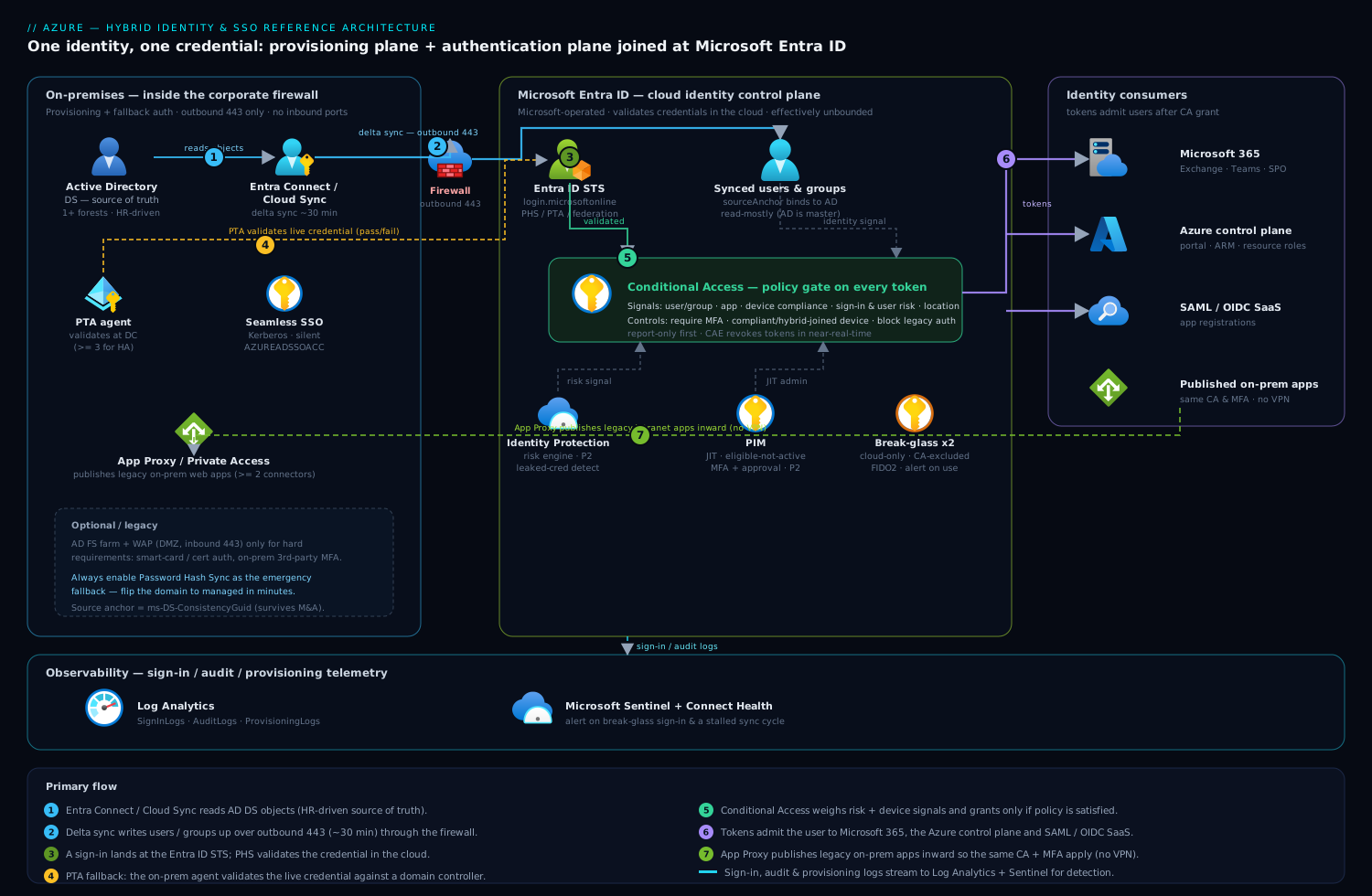
Hybrid identity has two distinct planes that people routinely conflate: a provisioning plane (how identities and their attributes get copied from AD into Entra ID) and an authentication plane (how a sign-in is validated and where the password is actually checked). Designing them independently is the key insight of this architecture.
The provisioning plane runs on a schedule, not on the request path. On a domain-joined server inside the corporate network, Microsoft Entra Connect Sync (or the lighter, agent-based Entra Cloud Sync) reads objects from one or more AD forests, applies attribute transformations and scoping filters, and writes the resulting users, groups, and contacts up to Entra ID over outbound HTTPS (443) every few minutes — by default a delta sync every 30 minutes. The cloud objects carry an immutable anchor (sourceAnchor / ms-DS-ConsistencyGuid) that permanently ties each Entra user back to its AD object, and userPrincipalName is mapped so the on-prem and cloud identity share the same logon name. Critically, Entra ID is read-mostly here: AD remains the source of truth, and (with the optional Entra Connect cloud-to-on-prem write-back features) only a controlled set of attributes — self-service password resets, device objects, group memberships — flow back down.
The authentication plane is where the sign-in choice lives, and it is the single most consequential decision in the whole design. When a user signs in to a cloud endpoint, the request lands at the Entra ID STS (login.microsoftonline.com), which must verify the credential one of three ways. With Password Hash Synchronization (PHS), Connect has already synced a hash-of-the-hash of the user’s AD password into Entra ID, so Entra validates the credential itself — the on-prem directory is not on the request path at all. With Pass-through Authentication (PTA), Entra hands the credential to a lightweight PTA agent running on-prem, which validates it against a domain controller and returns pass/fail — the password is never stored in the cloud, but a live agent must be reachable. With federation (AD FS or a third-party IdP), Entra redirects the browser to the on-prem federation service, which authenticates the user and returns a signed SAML/WS-Fed token. Layered on top of all three is Seamless Single Sign-On (Seamless SSO): for users on a domain-joined, corporate-network device, Entra silently obtains a Kerberos ticket (using a synthetic computer account AZUREADSSOACC) so the corporate logon flows straight into cloud apps with no password prompt at all.
Once the credential is validated, the request does not simply succeed — it passes through Conditional Access, the policy engine that sits in front of every token issuance. Conditional Access evaluates signals (user/group, application, device state from Intune/Entra-joined compliance, sign-in and user risk from Identity Protection, named locations, client app) and applies controls (require MFA, require compliant or hybrid-joined device, require token-protection, block, or grant). Only if the policy is satisfied does Entra ID issue the access and refresh tokens, and with Continuous Access Evaluation (CAE) those tokens can be revoked in near-real-time when risk spikes or the account is disabled.
For on-premises web apps that can’t be modernized, the Entra Private Access / Application Proxy connector publishes them through Entra ID so the same Conditional Access and MFA apply to a legacy intranet app as to a SaaS app — extending the identity perimeter inward without a VPN. And for administration, no one holds standing high-privilege roles: Privileged Identity Management makes Global Administrator, Privileged Role Administrator, and the Azure resource roles eligible, so an admin activates a role for a bounded window, satisfying MFA and (for the crown-jewel roles) an approval, with every activation logged and reviewed.
Picture the diagram as two halves joined at Entra ID. Left half (on-prem, inside the firewall): AD DS domain controllers; the Entra Connect / Cloud Sync server reading from them; a PTA agent and a Seamless SSO computer object; optionally an AD FS farm + WAP and an App Proxy connector. A single upward arrow labelled “outbound 443, delta sync every 30 min + auth agents” crosses the firewall. Center: Microsoft Entra ID — the STS, the synced users/groups, Conditional Access as a gate in front of token issuance, Identity Protection feeding risk signals into it, and PIM governing the admin roles. Right half (the things that consume identity): Microsoft 365, the Azure control plane, SAML/OIDC SaaS apps, and (looping back left through App Proxy) the published on-prem web apps. Sign-in logs and audit logs stream down to Log Analytics / Microsoft Sentinel along the bottom.
Component breakdown
| Component | Role in the architecture | Why it’s here | Key configuration choices |
|---|---|---|---|
| Entra Connect Sync | Server-based engine that synchronizes AD objects → Entra ID and hosts PHS/PTA | Provisioning plane for complex, multi-forest, or write-back estates | Staging-mode second server for HA/DR; ms-DS-ConsistencyGuid as source anchor; OU/attribute filtering; Group/Device/Password write-back as needed; ≤ Connect supported version |
| Entra Cloud Sync | Lightweight provisioning agents (no full sync server) managed from the cloud | Simpler, agent-resilient provisioning; multi-forest/M&A; gradual ADFS exit | Multiple agents for HA; cloud-managed scoping; use alongside Connect (group-by-group) during migration |
| Password Hash Sync (PHS) | Syncs a non-reversible hash-of-hash so Entra validates passwords itself | Default and recommended sign-in; cloud-resilient; enables leaked-credential detection | Enable even as a federation/PTA backup; pairs with Seamless SSO; near-instant for synced password changes |
| Pass-through Authentication (PTA) | On-prem agents validate the live credential against a DC | “Password must not live in the cloud” policy without federation complexity | ≥ 3 agents for HA; PHS enabled as fallback; agents need outbound 443 only |
| AD FS / federation (optional) | On-prem STS issues SAML/WS-Fed tokens; full control of the auth pipeline | Only for hard requirements (smart-card/cert auth, third-party MFA on-prem, custom claims) | Treat as legacy; WAP in DMZ; PHS enabled as emergency backup; plan migration to cloud auth |
| Seamless SSO | Silent Kerberos-based sign-in for domain-joined, on-network devices | Removes the password prompt entirely for corporate users | Synthetic AZUREADSSOACC computer object; roll over its Kerberos key periodically; browser/GPO config |
| Hybrid Azure AD Join | Registers domain-joined Windows devices into Entra ID | Produces the device identity Conditional Access needs as a signal | SCP via GPO or Connect; enables “require hybrid-joined device” controls and device-bound tokens |
| Conditional Access | Policy engine gating every token issuance on signals → controls | “Verify explicitly / least privilege / adaptive trust” — identity is the perimeter | Require MFA + compliant/hybrid-joined device; block legacy auth; sign-in/user-risk policies; named locations; report-only → on rollout |
| Identity Protection | Risk engine (leaked creds, impossible travel, anonymous IP, token replay) | Feeds risk signals into Conditional Access for adaptive policy | Requires Entra ID P2; risk-based CA (high risk → block, medium → MFA + password change) |
| Privileged Identity Management (PIM) | Just-in-time, time-boxed, approval-gated activation of privileged roles | “No standing privilege” — shrinks the high-value target surface | Roles Eligible not Active; activation MFA + approval for Global Admin; access reviews; activation alerts |
| Entra Application Proxy / Private Access | Reverse-proxy connectors that publish on-prem web apps through Entra | Extends Conditional Access + MFA to legacy apps without a VPN | ≥ 2 connectors per group for HA; pre-auth via Entra; KCD for Kerberos back-ends |
| Break-glass accounts | Two cloud-only emergency Global Admins, excluded from all CA | Recovery path if federation, PTA, sync, or a CA policy locks everyone out | *.onmicrosoft.com, not synced/federated; CA-excluded; FIDO2 + vaulted; high-severity sign-in alert |
| Log Analytics + Sentinel | Sign-in/audit/provisioning telemetry, detection, and reporting | “Continuously monitor” the whole identity plane | Stream Entra SignInLogs/AuditLogs; Connect Health for sync/agent health; alert on sync stalls and risky sign-ins |
A few configuration choices deserve emphasis because they are where most “hybrid identity” designs quietly go wrong:
- Enable Password Hash Sync even if you federate or use PTA. PHS is the backup authentication path. If AD FS or the PTA agents are down, an admin can flip the domain to managed (PHS) in minutes and keep cloud sign-in alive — but only if hashes are already syncing. There is no good reason not to have it on.
- Source anchor is forever — pick
ms-DS-ConsistencyGuid. The source anchor permanently binds a cloud user to its AD object. Using the mutableobjectGUIDbreaks identities during forest migrations and M&A; the consistency GUID survives them. Get this wrong and you face painful re-matching later. - Conditional Access goes live in report-only first. A bad CA policy at tenant scope is the fastest way to lock out the entire company. Every new policy ships in report-only, is validated against real sign-in logs, then is enforced — and break-glass accounts are excluded from all of it.
- Seamless SSO is not SSO-the-protocol; it’s the silent on-network experience. It rides on top of PHS or PTA via Kerberos. Remember to roll the
AZUREADSSOACCKerberos decryption key on a schedule — a stale key is a recurring, hard-to-diagnose outage cause.
Implementation guidance
Provisioning topology. Decide between Entra Connect Sync and Entra Cloud Sync (you can run both). Choose Connect when you need attribute write-back, exchange-hybrid, device write-back, or per-attribute transformation logic across a complex forest. Choose Cloud Sync when you want agent-based resilience, simpler ops, multi-forest/M&A onboarding, or a gradual exit from AD FS — its agents are stateless and you run several for HA. For Connect, always deploy a second server in staging mode: it stays fully synced but inactive, so failover is a single switch instead of a multi-hour rebuild during an incident.
Sign-in choice. Default to Password Hash Sync + Seamless SSO — it is Microsoft’s recommended method, it keeps cloud sign-in independent of on-prem availability, and PHS uniquely enables leaked-credential detection in Identity Protection. Use PTA + Seamless SSO only when a written policy forbids any password material (even a salted hash-of-hash) in the cloud — and still enable PHS as the emergency fallback. Reserve federation (AD FS) for genuine hard requirements (smart-card/certificate auth, an on-prem third-party MFA you cannot replace, or claims rules a cloud policy cannot express), treat it as legacy, and plan its retirement; Microsoft’s own guidance and tooling now push federated tenants toward cloud authentication.
IaC and configuration-as-code. The connectors (Connect/Cloud Sync agents) are agent installs on Windows, not Terraform resources — but everything downstream of them should be code:
- Terraform
azuread/azurermis a strong fit for the policy plane. Define Conditional Access policies (azuread_conditional_access_policy), named locations, groups used for CA targeting and PIM eligibility, app registrations for SaaS SSO, and role assignments. Keep policies in report-only state in code and promote via a variable so the same module governs rollout. - Bicep / ARM covers the supporting Azure resources — the Log Analytics workspace, diagnostic settings that route
SignInLogs/AuditLogs/ProvisioningLogsto it, and any Sentinel analytics rules — though the directory objects themselves live in Graph/azuread. - Microsoft Graph (PowerShell or Bicep
Microsoft.Graphresources) can declare Conditional Access, authentication methods policy, and PIM role-management policy settings, so even the identity-governance config is reviewable in source control rather than clicked through the portal.
Networking and firewall wiring. The sync server and the PTA/App-Proxy connectors need outbound HTTPS (443) only to a defined set of Microsoft endpoints — no inbound ports, which is why this works behind a corporate firewall without a DMZ (federation/AD FS is the exception: its WAP belongs in the DMZ with inbound 443). Allowlist the documented Entra Connect / connector FQDNs through the proxy/firewall, and prefer a dedicated outbound path so a proxy change doesn’t silently stall sync. There is no VNet or private endpoint on the request path for cloud auth — the whole point of PHS is that authentication happens in the cloud.
Identity wiring (the order that matters).
- Stand up Connect/Cloud Sync, set the source anchor to
ms-DS-ConsistencyGuid, scope by OU/attribute, and verify objects and UPNs match. - Enable Password Hash Sync and Seamless SSO; confirm a synced user can sign in to the cloud and that on-network domain-joined devices sign in silently.
- Turn on Hybrid Azure AD Join (SCP via Connect or GPO) so devices register and Conditional Access has a device signal.
- Create the two break-glass accounts, exclude them from all Conditional Access, and wire a high-severity sign-in alert.
- Author Conditional Access in report-only: a baseline requiring MFA for all users, a policy requiring compliant/hybrid-joined devices for sensitive apps, a block-legacy-authentication policy, and risk-based policies (high sign-in risk → block, user risk → secure password change). Validate against sign-in logs, then enforce.
- Onboard PIM: make Global Administrator and the other Tier-0 roles eligible, require MFA + approval to activate Global Admin, set short activation windows, and schedule quarterly access reviews.
- (Optional) Deploy App Proxy / Private Access connectors and publish legacy web apps with Entra pre-authentication so the same CA applies.
Operational guardrails. Install Entra Connect Health to monitor sync latency, PTA/AD FS agent health, and the AD FS performance counters; alert when a delta sync hasn’t completed or an agent goes unhealthy. Schedule the AZUREADSSOACC Kerberos key rollover. Keep Connect within the supported-version window — Microsoft retires old builds on a hard cadence.
Enterprise considerations
Security & Zero Trust. This architecture implements the Zero-Trust signals on the identity plane: verify explicitly (Conditional Access on every token, MFA, device and risk signals, CAE for continuous re-evaluation), least privilege (PIM just-in-time admin, group-based access, access reviews), and assume breach (Identity Protection leaked-credential and impossible-travel detection feeding adaptive policy; block-legacy-auth to kill the protocols that bypass MFA). The single most valuable property: a terminated employee’s access dies on the next sync cycle (account disabled in AD → propagated to Entra → CAE can revoke live sessions in near-real-time), and a leaked AD password is detected by Identity Protection precisely because PHS is enabled. Block-legacy-authentication alone closes the most-exploited MFA-bypass on the planet (IMAP/POP/SMTP/older Office clients).
Cost optimization. The provisioning and sign-in plumbing — Entra Connect, Cloud Sync, PHS, PTA, Seamless SSO, Hybrid Join — is included with all Entra ID tiers, including the free tier bundled with Microsoft 365. The cost is licensing for the advanced policy: Conditional Access requires Entra ID P1, and Identity Protection (risk-based CA) and PIM require P2. Tactics: license P2 for the privileged population and the higher-risk user segments, and P1 across the broader workforce (commonly delivered via the Microsoft Entra Suite, EMS E5, or Microsoft 365 E5/E3+add-ons). Avoid the classic waste of running AD FS purely out of inertia — a federation farm is servers, certificates, WAP nodes, and patching you pay for in people-time; moving to PHS retires all of it. There is no per-sync or per-token Azure meter here, so the bill is predictable and license-driven.
Scalability. Entra Connect handles very large directories (hundreds of thousands of objects) on a single appropriately-sized server, with the staging server as warm standby; Cloud Sync scales horizontally by adding agents. PTA and App Proxy scale by adding connectors to a connector group. The authentication plane (Entra STS) is Microsoft-operated and effectively unbounded — your sign-in throughput is not your problem. Onboarding a new forest (M&A) is an additive operation: point a new Cloud Sync agent or Connect connector at it, map the source anchor, and scope.
Reliability & DR (RTO/RPO). The headline reliability win of PHS is that cloud sign-in does not depend on on-prem availability at all — if the data centre is dark, Microsoft 365 and Azure sign-in keep working. The components to make redundant are the provisioning and fallback paths: run two Connect servers (active + staging) or multiple Cloud Sync / PTA / App Proxy agents so no single box is a single point of failure. A practical posture: provisioning RPO ≈ one sync cycle (≤ 30 min) of attribute changes, and provisioning RTO ≈ minutes (promote the staging server). For authentication, with PHS the effective auth RTO during an on-prem outage is zero because the cloud already validates credentials; with PTA/federation, the documented break-glass is to convert the domain to managed (PHS) — which is exactly why PHS must always be pre-enabled. DR for the directory itself is Microsoft’s responsibility within Entra ID; your DR plan is “keep a healthy second sync path and a tested break-glass.”
Observability. Stream Entra ID sign-in logs, audit logs, and provisioning logs to Log Analytics, and correlate in Microsoft Sentinel: blocked legacy-auth attempts, Conditional Access failures and grants, risky sign-ins, PIM activations, and break-glass usage. Use Entra Connect Health for sync latency, agent health, and AD FS counters, and alert on a stalled sync, an unhealthy PTA agent, or a Kerberos-key staleness window approaching. The two highest-value alerts: any break-glass account sign-in, and a sync cycle that hasn’t completed (because a stalled sync silently freezes joiner/leaver propagation).
Governance. Govern the privileged plane with PIM (eligible-not-active, approval-gated, time-boxed) and quarterly access reviews of privileged roles and of guest access. Govern which identities exist via the on-prem HR → AD lifecycle plus Entra entitlement management for any cloud-born and guest accounts. Enforce posture with Conditional Access coverage monitoring (catch users or apps with no policy) and policy-as-code review in Terraform/Graph so every CA change is peer-reviewed. Maintain a written break-glass runbook and test it.
Reference enterprise example
Meridian Components, a mid-sized industrial manufacturer (~6,800 employees across India, the UK, and Germany; two AD forests after a 2024 acquisition), runs Microsoft 365 and a growing Azure estate. It is exiting a tired AD FS deployment: the farm had a near-miss certificate-expiry incident that briefly threatened Microsoft 365 sign-in for the whole company, and the security team wants risk-based access and just-in-time admin that AD FS does not provide. The brief: one credential everywhere, kill AD FS, enforce conditional and just-in-time access, and never let an on-prem outage take down cloud sign-in.
Decisions.
- Password Hash Sync + Seamless SSO as the target sign-in method (retiring AD FS), with PHS deliberately enabled first as the AD FS fallback during the migration so a federation failure can no longer black out Microsoft 365.
- Entra Cloud Sync for the second (acquired) forest and Entra Connect (active + staging) for the legacy primary forest — running both, migrating users group-by-group, with
ms-DS-ConsistencyGuidas the source anchor on both so the M&A re-match is clean. - Hybrid Azure AD Join for the ~5,500 Windows endpoints so Conditional Access can require a compliant/hybrid-joined device.
- Conditional Access rolled out report-only → enforced: MFA for everyone, compliant/hybrid-joined device for finance and engineering-IP apps, block legacy auth tenant-wide, and risk-based policies (high sign-in risk → block, user risk → secure password change) via Identity Protection.
- PIM for the 14 Global-Admin-eligible staff and the Azure resource roles: Global Admin activation requires MFA and approval, capped at a 4-hour window, with quarterly access reviews.
- Entra Application Proxy to publish three legacy on-prem intranet apps so they inherit the same MFA and Conditional Access — letting the team finally turn off the corporate VPN for those apps.
- Two cloud-only break-glass accounts, FIDO2-secured, excluded from all CA, with split-vaulted credentials and a Sentinel high-severity sign-in alert.
Realistic numbers. Provisioning runs a delta sync every 30 minutes across ~7,200 synced objects; staging-server failover was rehearsed at under 5 minutes. Licensing landed at Entra ID P2 for ~900 users (all privileged staff plus finance/engineering and other higher-risk segments) and P1 for the remaining ~5,900 workforce, delivered through the organization’s Microsoft 365 E5/E3+EMS mix. In the first month after enforcing block-legacy-auth, Sentinel showed ~31,000 legacy-protocol sign-in attempts blocked — every one a pre-MFA bypass that previously could have succeeded. Identity Protection flagged 17 leaked-credential users (detectable only because PHS was now on) and auto-forced secure password changes. The AD FS farm — four servers and two WAP nodes — was decommissioned, removing the certificate-expiry blast radius entirely.
Outcome. Six weeks after cutover, a planned data-centre power test took the primary forest’s domain controllers and the WAN link fully offline for three hours — and Microsoft 365 and Azure sign-in were completely unaffected, because PHS validates credentials in the cloud. The only impact was that new HR changes paused until the sync server came back, which the team had accepted as the design’s RPO. Admin behavior shifted from 14 standing Global Admins to zero standing privilege: every privileged action is now a logged, approved, time-boxed PIM activation, which the auditor cited approvingly. The VPN requirement for the three published intranet apps was dropped. The identity team operates the whole estate — two forests, two sync paths, CA, PIM — with a 3-person crew, leaning on Connect Health and Sentinel alerts rather than manual checks.
When to use it
Use this architecture when you have an established on-premises Active Directory, you are adopting (or have adopted) Microsoft 365 and/or Azure, and you need users to have one credential and a single, conditional, just-in-time access model across on-prem and cloud. It scales from a single-domain SMB to a multi-forest global enterprise, and it is the de-facto baseline for every Microsoft hybrid shop.
Trade-offs. It introduces sync infrastructure to own and patch (mitigated by Cloud Sync’s agent model or a Connect staging server), and it makes Entra ID a hard dependency for cloud access — which is the point, but means Conditional Access and break-glass discipline are non-negotiable. The advanced value (risk-based CA, PIM) sits behind P2 licensing, so the security model has a real cost. Federation (if you keep it) is the heaviest variant operationally and the one Microsoft is steering customers away from.
Anti-patterns to avoid.
- Running federation/PTA with PHS disabled — you have thrown away your emergency authentication fallback and your leaked-credential detection.
- Using
objectGUIDas the source anchor — it breaks identities across forest migrations and M&A; usems-DS-ConsistencyGuid. - Enforcing a new Conditional Access policy without report-only first, or without excluding break-glass accounts — the classic way to lock out the whole company.
- Leaving legacy authentication enabled — it bypasses MFA and is the single most-exploited sign-in path.
- Standing Global Admins instead of PIM-eligible — a permanent fleet of high-blast-radius accounts is a finding, not a baseline.
- A single Connect server with no staging/standby, or a stale
AZUREADSSOACCKerberos key — both are avoidable outages.
Alternatives. If you have no on-prem directory at all (a true cloud-native or startup posture), skip the hybrid bridge entirely: make Entra ID the sole source of truth, use cloud-only accounts, and apply the same Conditional Access + PIM model — there is nothing to sync. If you are running a non-Microsoft IdP (Okta, Ping) as the primary, you can still federate Entra ID to it, but you lose the tight native integration with Conditional Access, Identity Protection, and managed-device signals that makes this design cohesive — a common interim state during consolidation rather than a target. If your goal is to provision SaaS app accounts (not validate sign-in), that is SCIM-based app provisioning, a complementary capability layered on top of this architecture, not a replacement for it. And if you are mid-journey on a federation server today, the right move is rarely “rebuild ADFS” — it is to enable PHS, point Cloud Sync at your forests, and migrate to cloud authentication, arriving exactly at the architecture above.