A datacenter exit is one of the few cloud programs where the deadline is set by something you do not control: a lease that expires, a colo contract that renews at a punishing rate, hardware that is out of warranty, or an acquirer who wants the facility gone from the books. That external clock changes the architecture. You are not chasing an elegant target state for every workload — you are emptying a building by a date, with a few hundred to a few thousand servers that nobody has fully documented, while keeping the business running. This article describes a reusable reference architecture for that program: the Azure Migrate discovery and replication plane, the landing zone the workloads land in, the rehost-versus-replatform decision that governs how each workload moves, and the wave machinery that turns “move 1,400 servers” into a predictable production line with a tested rollback at every cutover. It is deliberately the solution architecture — the moving parts and how they wire together — not a restatement of any framework’s methodology.
The business scenario
The shape repeats across company sizes. A mid-market manufacturer runs two on-premises datacenters; the secondary site’s lease ends in 14 months and renewing means a 40% rate increase plus a hardware refresh the CFO will not approve. A regional bank is exiting a managed colo because the provider is sunsetting the facility. A 30,000-employee enterprise is consolidating eight datacenters down to two after a merger and wants the rest gone. In every case the brief is the same: vacate the physical estate by a hard date, do not break the business, and land somewhere we can actually operate afterward.
What makes this hard is rarely the headline applications. The CRM and the ERP are documented, owned, and have a budget. The risk lives in the long tail: the 1,200 commodity VMs running line-of-business apps, file servers, print servers, a SQL Server 2014 instance three departments quietly depend on, a licence server with a hard-coded IP, an appliance whose vendor went out of business. Nobody has a complete inventory. Dependencies are tribal knowledge. And the people who knew are gone.
The architecture has to absorb four constraints simultaneously:
- A fixed deadline that is non-negotiable and externally imposed, which makes “rearchitect everything” a fantasy. Most workloads will move as-is and be improved later.
- An incomplete inventory and unknown dependencies, so discovery and dependency mapping are first-class architectural components, not a planning afterthought.
- Continuous business operation — finance closes the books, the factory ships, the bank settles — so every cutover needs near-zero downtime where the business demands it and a tested way back when it goes wrong.
- An operable end state, meaning the workloads cannot just land on a flat network of orphan VMs. They land in a governed landing zone with identity, networking, security, and cost controls already in place, or you have simply moved your technical debt to a more expensive address.
This reference architecture solves all four: a discovery-and-replication control plane, a disposition framework that keeps most of the estate on the fast path, a pre-built landing zone as the target, and wave-based execution with rollback.
Architecture overview
Think of the architecture as three planes that operate at once during the program and then collapse to one when the source datacenter is empty: a control plane (discovery, assessment, orchestration), a data plane (replication of disks and databases from source to target), and the target plane (the Azure landing zone the workloads run in). The end-to-end flow follows the lifecycle of a single server as it travels from the source datacenter into a production Azure subscription, repeated wave after wave.
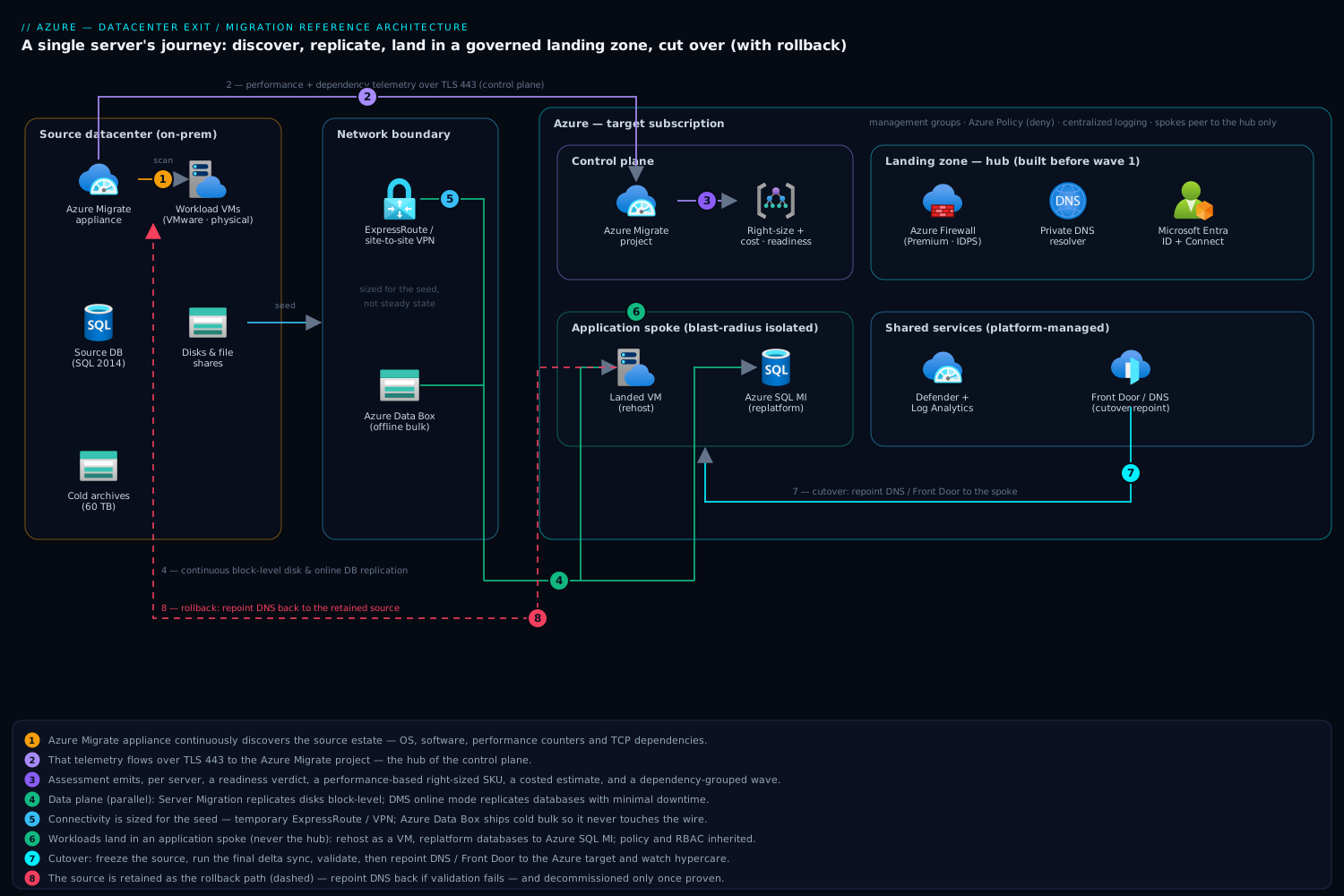
The journey of a workload reads left to right. In the source datacenter, an Azure Migrate appliance — a lightweight VM for VMware or Hyper-V, or an agent for physical and other-cloud servers — sits on the network and continuously discovers the estate: VMs, OS versions, installed software, SQL instances, web apps, and, critically, performance counters over time and TCP dependency data (what talks to what). That telemetry flows over TLS 443 to the Azure Migrate project, the hub of the control plane. The project produces, per server, a readiness verdict, a right-sized target SKU based on real utilization rather than provisioned size, a monthly cost estimate with a confidence rating, and a dependency map that becomes the raw input to wave grouping.
The data plane runs in parallel and independently. For lift-and-shift VMs, Azure Migrate: Server Migration replicates disks continuously from the source through a replication path into managed disks staged in a cache/storage account in the target subscription; the initial seed runs in the background over days while production keeps serving from on-prem, then only deltas flow. For databases, the replication path is purpose-built per engine — the Azure Database Migration Service (DMS) in online mode for SQL Server with minimal downtime, native log shipping, or managed-instance link for SQL. Connectivity for both planes runs over either a temporary high-bandwidth ExpressRoute circuit or a site-to-site VPN, sized to the seed volume; for petabyte-scale cold data, Azure Data Box appliances physically ship the bulk and replication carries only the changes.
The target plane is the landing zone, and it exists before the first workload moves. A platform team has already deployed the management-group hierarchy, the hub-and-spoke (or Virtual WAN) network with Azure Firewall and DNS, Microsoft Entra ID with hybrid identity, Azure Policy guardrails, Microsoft Defender for Cloud, and centralized logging. Migrated servers land in application landing zone spokes — never the hub — with their networking, RBAC, and policy inherited automatically. A workload becomes a real VM (or App Service, or Azure SQL) in a spoke, is validated against real replicated data in a test migration (an isolated clone in a sandbox network, with production still untouched), and only then is scheduled for cutover.
Cutover is the controlled handoff. At the planned window the team freezes change on the source, runs the final delta sync, validates integrity, repoints DNS and load balancers / Azure Front Door to the Azure target, and watches a stabilization (hypercare) window. The source is retained as the rollback path until the workload is proven, then decommissioned in the final step — which is the only step that actually shrinks the datacenter. The program repeats this loop wave by wave; the planes wind down as the source empties, leaving only the landing zone.
A reader picturing the diagram should see: source datacenter on the left (appliance + the workloads), two arrows crossing a network boundary (a thin telemetry arrow to the Migrate project up top = control plane; a thick disk/DB replication arrow across the middle = data plane), Azure on the right with the landing zone hub in the center and application spokes around it, and a dotted “rollback” arrow pointing from the spoke back to the still-alive source until decommission.
Component breakdown
Each component earns its place by removing a specific category of risk from a deadline-bound move. The table summarizes the roles; the prose explains the configuration choices that actually matter.
| Component | Plane | What it does | Why it’s here | Key configuration choice |
|---|---|---|---|---|
| Azure Migrate appliance | Control | Continuous discovery, performance + dependency telemetry | You cannot move what you cannot see; right-sizing needs real utilization | One appliance per ~scale unit; agentless dependency analysis first pass |
| Azure Migrate project | Control | Assessment, right-sizing, cost confidence, readiness | Turns inventory into a costed, sequenced backlog | Performance-based sizing with a comfort/buffer factor |
| Azure Migrate: Server Migration | Data | Continuous block-level disk replication, test migration, cutover | Near-zero-downtime rehost without touching the guest at cutover | Online replication; mandatory test migration before every cutover |
| Database Migration Service / engine-native | Data | Online DB replication (SQL, MySQL, PostgreSQL, Oracle paths) | Databases need transactional consistency, not disk copy | DMS online mode; managed-instance link for SQL where it fits |
| ExpressRoute / VPN / Data Box | Data | Bulk-seed and delta transport, or offline bulk for cold data | The seed, not steady state, sizes the pipe; cold data ships physically | Temporary ExpressRoute for the program; Data Box for >tens of TB cold |
| Landing zone (hub) | Target | Shared network, firewall, DNS, identity, policy, logging | Workloads must land governed, not on a flat orphan network | Hub-spoke or Virtual WAN; deployed before wave 1 |
| Application landing zone (spoke) | Target | Where migrated workloads actually run | Blast-radius isolation; policy/RBAC inherited per app | One spoke per app or per environment tier |
| Microsoft Entra ID + Entra Connect | Target | Identity for migrated servers and admins | Servers reauthenticate against cloud identity; admins need least privilege | Hybrid join / Entra Domain Services; PIM for elevation |
| Microsoft Defender for Cloud | Target | Posture, vulnerability, and threat protection for landed VMs | Migrated VMs arrive unhardened and must be brought to baseline | Auto-provisioning; enable plans before workloads land |
| Azure Monitor + Log Analytics | Target | Health of replication and migrated workloads; cutover validation | You need evidence to call a cutover good and a baseline to compare | Workspace per landing zone; VM Insights on landed servers |
Azure Migrate appliance and project — the control plane. The single highest-leverage configuration decision is performance-based right-sizing, not as-is sizing. The on-prem 16-vCPU box that idles at 8% does not become a 16-vCPU Azure VM; it becomes a far smaller, cheaper SKU, and getting this wrong is how datacenter exits blow their cloud budget on day one. Run agentless dependency analysis for the estate-wide first pass (no guest install, broad coverage), then reserve agent-based analysis for the handful of complex, undocumented workloads where you need process-level certainty. The dependency map is the architectural input that makes wave grouping safe: it distinguishes direct dependencies (low-latency, must move in the same wave), indirect dependencies (tolerate temporary hybrid operation), and business dependencies (reporting that should follow its source). Tools miss informal integrations every time, so you validate the map with workload-owner interviews.
Azure Migrate: Server Migration — the rehost data plane. This does continuous block-level replication so the long seed happens in the background and only a small delta is left at cutover, which is what makes near-zero downtime possible. The non-negotiable configuration is the test migration: before any real cutover, you boot a clone of the replicated server into an isolated sandbox network and validate that it actually comes up, services start, and the app responds — with production completely untouched. Skipping the test migration is the most common cause of a failed cutover weekend.
Database Migration Service and engine-native paths — the database data plane. Databases are where disk replication is the wrong tool; you need transactional consistency. Use DMS online mode for minimal-downtime SQL Server, MySQL, and PostgreSQL moves, the managed-instance link when the target is Azure SQL Managed Instance, and engine-native log shipping or replication for cases DMS does not cover. The disposition matters here: a SQL Server VM rehosted as-is keeps you on the licensing-and-patching treadmill, whereas replatforming to Azure SQL Managed Instance removes the OS and much of the DBA toil — a decision made per database during assessment, not at cutover.
Connectivity and bulk transport. Size the network for the seed, not steady state — the initial full replication of hundreds of servers is the bandwidth event; once seeded, only deltas flow. A temporary ExpressRoute circuit for the program duration is usually right; a sized site-to-site VPN suffices for smaller estates. For genuinely cold bulk — archives, large file shares, media — Azure Data Box ships the bulk physically and replication carries only what changes after the box is sealed, which both saves the pipe and shortens the timeline.
The landing zone — the target plane. This is the component teams under-resource and regret. Migrated servers land in application landing zone spokes, never the hub, so a compromised or misbehaving migrated VM has a contained blast radius. Networking, DNS resolution, RBAC, and Azure Policy are inherited from the platform automatically, which means workload teams do not reinvent — or forget — the controls. The landing zone is deployed and tested before wave one; you do not build the runway while the plane is landing.
Implementation guidance
The implementation splits cleanly into two IaC streams with different change rates. The platform (landing zone) is built once, changes slowly, and is owned by a platform team. The migration estate (the per-workload targets) is generated repeatedly, churns wave by wave, and is owned by migration pods. Keeping these in separate state and separate repositories is the single most important structural decision, because you do not want a wave-7 VM apply to share state with the firewall.
Landing zone as code. For greenfield Azure governance, the Azure Landing Zones (ALZ) Terraform module (or the equivalent Bicep accelerator) stamps the management-group hierarchy, policy assignments, hub network, firewall, DNS, and logging. A skeleton of the platform stream:
# platform/ — built once, changes slowly, owned by the platform team
module "alz" {
  source  = "Azure/avm-ptn-alz/azurerm"   # ALZ pattern module
  # management groups, default policy assignments (deny-public-IP,
  # require-tags, allowed-regions), and the hub plumbing
}

module "hub" {
  source              = "Azure/avm-ptn-hubnetworking/azurerm"
  resource_group_name = "rg-connectivity-hub"
  hub_virtual_networks = {
    primary = {
      address_space        = ["10.0.0.0/22"]
      firewall = { sku_tier = "Premium" }   # IDPS + TLS inspection
      # ExpressRoute or VPN gateway for the migration transport
    }
  }
}
Migration targets as code, generated not hand-written. The Azure Migrate assessment already produces the right-sized SKU per server; the anti-pattern is to retype those SKUs into HCL by hand for 1,400 machines. Export the assessment, treat it as the source of truth, and drive a parameterized module from it so every wave’s targets are generated from data:
# estate/waves/wave-03/ — generated from the exported assessment, churns per wave
locals {
  servers = jsondecode(file("${path.module}/assessment-wave03.json"))
}

module "migrated_vm" {
  source   = "../../modules/landed-vm"   # one tested module, many instances
  for_each = { for s in local.servers : s.name => s }

  name                = each.value.name
  size                = each.value.recommended_sku    # from Azure Migrate, not guessed
  subnet_id           = each.value.spoke_subnet_id    # lands in an app spoke
  os_disk_type        = "Premium_LRS"
  availability        = each.value.tier == "critical" ? "zone" : "none"
  tags = {
    wave        = "03"
    disposition = each.value.disposition   # rehost | replatform
    app_owner   = each.value.owner
    source_host = each.value.source_fqdn    # provenance for rollback
  }
}
A few implementation rules that separate a smooth program from a painful one:
- Replication and cutover are orchestrated, not coded. The actual disk replication, test migration, and cutover are driven through Azure Migrate (portal, PowerShell
Az.Migrate, or REST) — Terraform/Bicep stand up the target landing spots and the landing zone, while the data movement is an operational workflow. Do not try to force live replication state into IaC state. - Networking wiring. Each application spoke peers to the hub; spokes do not peer to each other (forced tunneling through the firewall preserves inspection and segmentation). Resolve names through Azure DNS Private Resolver or DNS forwarders so on-prem and Azure see one namespace during the hybrid period — critical because half-migrated apps span both sides. Plan IP space generously up front; renumbering spokes mid-program is miserable.
- Identity wiring. Migrated servers must reauthenticate against cloud identity. Keep Microsoft Entra Connect running so hybrid identities sync during the transition; provide AD authentication in Azure via Microsoft Entra Domain Services or replicated domain controllers in the hub. Human access to landed VMs goes through Azure Bastion (no public RDP/SSH, ever) with elevation gated by Privileged Identity Management (PIM) so admin rights are just-in-time, not standing.
- Secrets and configuration. Apps that carried hard-coded connection strings and credentials are the silent cutover-breakers. Route configuration through Azure Key Vault with managed identities as part of replatforming, and discover hard-coded endpoints during assessment so DNS-based indirection can absorb the address change at cutover.
Enterprise considerations
Security and Zero Trust. Migrated VMs arrive unhardened — they were built for a trusted internal network and now sit in a cloud you are still securing. Three controls are mandatory before wave one, not after: Microsoft Defender for Cloud with auto-provisioning enabled so every landed VM is immediately assessed for posture, vulnerabilities, and threats; Azure Policy in deny mode for the controls you cannot allow to drift (no public IPs on migrated VMs, mandatory tags, allowed regions and SKUs, encryption at rest); and network segmentation by default — spokes isolated, east-west traffic forced through Azure Firewall Premium with IDPS. Zero Trust here means the migrated workload is not trusted because it used to live inside the perimeter: it authenticates against Entra ID, its admin access is just-in-time through PIM and Bastion, and its network position grants it nothing.
Cost optimization. A datacenter exit can either cut cost or quietly inflate it, and the difference is almost entirely architectural decisions made at assessment time. Performance-based right-sizing is the first lever — moving the idle 16-vCPU box to a correctly sized SKU. Azure Hybrid Benefit is the second and is frequently left on the table: applying existing Windows Server and SQL Server licences to Azure VMs can cut compute cost by up to ~40-55%, and for a rehosted Windows-heavy estate this is the largest single saving. Reserved Instances or Savings Plans are the third — once a workload is stable in Azure it is, by definition, a steady predictable load, the ideal RI/Savings-Plan candidate, often a further ~30-65% off pay-as-you-go. The fourth lever is disposition discipline: every database replatformed to a PaaS tier removes an OS you no longer license, patch, or pay to run. And do not forget to actually decommission the source — programs that leave old hardware powered “just in case” pay for two datacenters indefinitely.
Scalability of the program. Scale here is about throughput of moves, not request rate. The architecture scales by parallelizing: multiple migration pods, each owning waves, each driving the same tested landed-vm module and the same assess→replicate→test→cutover loop. The landing zone scales by adding spokes (each app gets its own), and the management-group hierarchy means a new spoke inherits all governance for free. The constraint that bites is rarely Azure capacity — it is change windows and people: how many cutovers the business will absorb per weekend and how many runbooks your team can execute well. Architect for a steady cadence (e.g., one wave per fortnight) rather than a heroic big bang.
Reliability and DR (RTO/RPO). Two reliability stories run in parallel. During migration, continuous replication gives you a tight RPO on the replicated copy, and the retained source is your rollback: if a cutover fails validation, you repoint DNS back to the still-running source — this is why the source is decommissioned only after the workload is proven, and why a tested rollback path is a hard gate on every wave. After migration, the workload needs a real DR posture it may never have had on-prem: critical-tier VMs land in availability zones, replatformed databases get zone-redundant or geo-redundant tiers, and Azure Site Recovery provides region-to-region failover with documented RTO/RPO targets. A datacenter exit is the rare moment to raise resilience, because you are rebuilding the deployment anyway — bake in zones and DR rather than faithfully reproducing the single-site fragility you are leaving.
Observability. You need evidence at two moments. At cutover, you need to declare success against data, not vibes: Azure Monitor and Log Analytics capture the post-cutover health of the workload, and you compare it against the on-prem performance baseline Azure Migrate recorded during discovery — same throughput, same error rate, same latency. Across the program, a single dashboard tracks servers discovered, assessed, replicating, tested, cut over, and decommissioned, so leadership can see the datacenter actually emptying against the lease clock. VM Insights on landed servers and replication-health alerts catch a stalled seed before it derails a wave.
Governance. The landing zone’s management-group hierarchy and Azure Policy are the governance — they apply to migrated workloads automatically the moment they land in a spoke, which is the entire point of building the target plane first. Tag every migrated resource with its wave, disposition, app owner, and source host so cost shows up against the right cost center, rollback knows its origin, and you have an audit trail of what moved when. Cost governance via Microsoft Cost Management budgets and anomaly alerts per landing zone keeps the right-sizing honest after cutover, when teams are tempted to over-provision “to be safe.”
Reference enterprise example
Northwind Components AG is a fictional EUR 600M precision-parts manufacturer with ~3,200 employees across Europe. They run two datacenters: a primary in Stuttgart and a secondary in a Frankfurt colo whose lease ends in 13 months with a renewal quote 42% higher. The CFO declines the renewal and the refresh behind it. The mandate to the platform team: vacate Frankfurt — 940 servers — and land it in Azure within 11 months, with two months of buffer.
Discovery (weeks 1-5). They deploy two Azure Migrate appliances against the Frankfurt VMware estate and run agentless dependency analysis. The project discovers 940 servers: 610 Windows, 250 Linux, 80 physical. Performance-based assessment finds the estate is, predictably, over-provisioned — average CPU utilization is 11% — so right-sizing alone projects a 34% smaller compute footprint than a like-for-like move. Dependency mapping surfaces the landmines: a SQL Server 2014 instance that 14 apps depend on, a licence server with a hard-coded IP referenced in six application configs, and a “reporting” VM that turns out to be business-critical month-end close. Owner interviews catch three nightly ODBC integrations the tooling did not see.
Disposition (weeks 4-8). Applying a disposition framework to the 940 servers:
| Disposition | Count | Rationale |
|---|---|---|
| Rehost (lift-and-shift VM) | 690 | Commodity LOB apps; move now, optimize later — the deadline path |
| Replatform | 120 | 38 databases → Azure SQL Managed Instance; web tiers → App Service; removes OS/patching toil |
| Retire | 95 | Decommissioned apps still powered “just in case”; no real owner found |
| Retain (hybrid for now) | 35 | Tied to on-prem appliances or licensing; stay in Stuttgart, revisit later |
Retiring 95 dead servers before touching Azure is free capacity that never has to move — the single fastest win, and only discovery makes it findable.
Landing zone (weeks 1-8, parallel). The platform team deploys the landing zone with the ALZ Terraform module: management groups, a hub-spoke network in West Europe with Azure Firewall Premium, Entra ID with Entra Connect synced from on-prem AD, Defender for Cloud plans enabled, Azure Policy in deny mode for public IPs and mandatory tagging, and a central Log Analytics workspace. A temporary 2 Gbps ExpressRoute circuit is provisioned for the seed; two Azure Data Box units ship 60 TB of cold engineering archives so they never touch the wire.
Waves (months 3-11). Execution runs as 8 waves grouped by the dependency map — each wave is an application boundary so direct dependencies move together. The SQL Server 2014 instance and its 14 dependent apps move as one wave, replatformed to Azure SQL Managed Instance via the managed-instance link, with the hard-coded licence-server IP fixed by DNS indirection ahead of cutover. Every wave runs the same loop: replicate in the background, test migration into a sandbox spoke, validate against the on-prem baseline, then a Saturday cutover with the Frankfurt source held live as rollback for 72 hours before decommission. Wave 5’s reporting VM fails its test migration (a missing scheduled-task dependency) — caught in the sandbox, fixed, re-tested, and cut over the following week with zero business impact. The rollback path is exercised exactly once, on a mid-tier app whose post-cutover latency regressed; DNS is repointed to Frankfurt in under 15 minutes, the issue (a missing private endpoint) is fixed, and it succeeds on retry.
Outcome. Frankfurt is fully decommissioned in month 10, one month ahead of the lease and three months inside the original mandate. Final numbers: 845 servers landed in Azure (690 rehosted, 120 replatformed, 35 retained on-prem), 95 retired. Right-sizing plus Azure Hybrid Benefit on the Windows and SQL estate plus three-year Savings Plans on the now-stable workloads land the steady-state Azure run-rate at roughly 38% below the projected cost of renewing Frankfurt and refreshing its hardware. The 38 databases on Managed Instance retire an entire class of OS patching and licensing. And because critical-tier VMs landed in availability zones with Azure Site Recovery configured, Northwind comes out of the exit with better resilience than the single-site colo ever provided — the deadline forced the move, but the architecture made it an upgrade rather than a relocation of debt.
When to use it
Use this architecture when the move is driven by a hard external deadline on the physical estate — a lease, a colo sunset, a hardware end-of-life, a divestiture — and the dominant disposition is rehost with selective replatform. It is the right pattern when you have hundreds to thousands of servers, an incomplete inventory, and a business that cannot stop. The core bet is sound: move most things as-is into a governed landing zone to make the deadline, replatform the high-value subset opportunistically, and modernize after you are out of the building, not before.
It is the wrong architecture in a few situations. If you have no deadline pressure and your goal is true cloud-native transformation, a rehost-first exit just relocates monoliths you will pay to rearchitect later — lead with refactor/rebuild instead and let the datacenter age out. If the estate is small (a few dozen servers), the full landing-zone-plus-wave machinery is heavier than the problem; a lighter targeted migration is more proportionate. And if workloads are tied to specialized hardware — mainframe, HSMs, FPGA appliances, hard-licensed gear — those need their own path (emulation, SaaS replacement, or genuine retain) and should be quarantined out of the wave plan early rather than allowed to stall it.
The anti-patterns are consistent and expensive. Skipping discovery and dependency mapping — moving servers in inventory order instead of dependency order — guarantees a broken app the moment its chatty database lands in a different wave. As-is sizing instead of performance-based right-sizing inflates the cloud bill on day one and is the classic way an exit overshoots budget. Skipping the test migration turns every cutover into a live experiment. Migrating into a flat network without a landing zone moves your technical debt to a more expensive address and leaves you with orphan VMs and no governance. Forgetting to decommission the source means you pay for two datacenters indefinitely — the only step that empties the building is the one teams defer. And rearchitecting under deadline pressure is how programs miss the lease date: the discipline that makes a datacenter exit succeed is moving fast and as-is now, and improving deliberately later, with the landing zone making “later” safe.
Sound alternatives exist and sometimes win. A replatform-led program suits estates dominated by databases and stateless web tiers where PaaS targets are obvious and the toil savings justify the extra cutover engineering. A rearchitect/rebuild-led program is right when no external clock is forcing your hand and the goal is genuine modernization. Azure VMware Solution (AVS) is the pragmatic answer when the deadline is brutal and the estate is deeply VMware-coupled — relocate the vSphere environment wholesale into Azure to hit the date, then migrate to native services from inside Azure on a calmer timeline. The reference architecture here is the middle, highest-utility path that most enterprises facing a real datacenter-exit deadline actually need: fast enough to make the date, governed enough to operate afterward, and structured so the modernization you deferred is a deliberate next chapter rather than a missed obligation.