Most “secure” web applications on Azure are still built on an implicit-trust model: the app is reachable on a public hostname, the database has a firewall rule that says “allow Azure services,” and the security story is a single TLS certificate and a hope that nobody guesses the admin password. Zero Trust inverts that. It assumes the network is already hostile, that credentials will leak, and that every request — from a browser, a daemon, or a developer’s laptop — must be authenticated, authorized, and inspected on its own merits. This article is a complete, reusable Azure reference architecture for a Zero-Trust web application, anchored on four pillars: Application Gateway with WAF at the edge, Microsoft Entra ID + Conditional Access for identity, Private Endpoints to collapse the data-plane attack surface, and managed identities to eliminate stored secrets.
The business scenario
The pattern below is deliberately scale-agnostic. The same topology serves a 40-person fintech startup and a 40,000-person regulated insurer; only the SKUs, the number of spokes, and the operational rigor change.
Concretely, the recurring problem looks like this. An organization runs a customer- or employee-facing web application — a claims portal, an internal HR system, a B2B partner dashboard, a SaaS product. The business needs it on the internet (or at least reachable by remote staff), but the security, risk, and compliance teams have hard requirements that a naive “App Service with a public endpoint” design cannot meet:
- No standing trust in the network. A compromised VM in the same VNet, or a leaked connection string in a Git history (a real incident this very organization has lived through), must not translate into database access.
- Identity is the perimeter. Authentication must be centralized in Entra ID, enforce MFA and device compliance, block legacy protocols, and adapt to risk (impossible travel, anonymous IP, leaked credentials) — not be a bespoke username/password table.
- The data plane must not be public. SQL, storage, Key Vault, and the app’s own back-end tier must have no public IP and no public DNS resolution to a routable address. Auditors increasingly fail designs where the database is “protected” only by a firewall allowlist.
- The edge must inspect, not just forward. OWASP-class attacks (SQLi, XSS, path traversal), bot traffic, and volumetric L7 floods must be filtered before they reach application code.
- Secrets must not exist at rest in the app. No connection strings with passwords, no SAS tokens baked into config. Workloads authenticate to data and to each other using their own Entra identity.
- It must be affordable and operable by a normal platform team — reproducible in IaC, observable, and not requiring a 24/7 SOC just to keep the lights on.
The architecture that follows satisfies all of these with first-party Azure services and no third-party security appliances.
Architecture overview
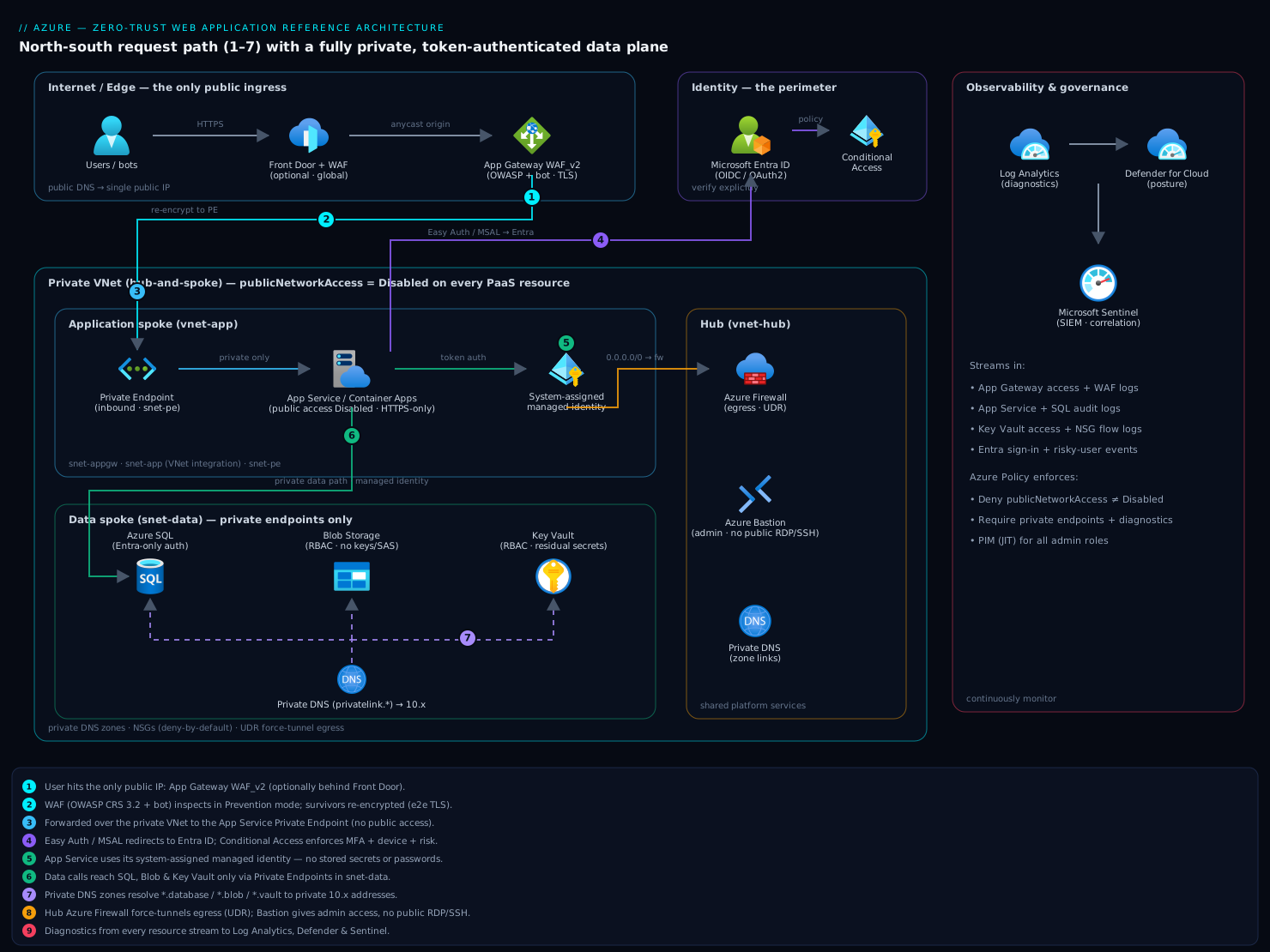
The end-to-end request path flows north-to-south through progressively higher-trust zones, and the data path never touches the public internet at all.
A user opens https://portal.contoso.com. Public DNS resolves that name to the public IP of an Azure Application Gateway v2 (WAF_v2 SKU) — the only public ingress in the entire system. Optionally Azure Front Door sits in front of App Gateway for global anycast, CDN, and edge WAF; in a single-region design App Gateway alone is the edge. The Application Gateway terminates TLS, evaluates the WAF policy (OWASP Core Rule Set 3.2 + bot protection) against the request, and — only if the request survives inspection — forwards it over the private network to the application tier.
The application tier is an App Service (or Container Apps) on a regional VNet, injected into a dedicated subnet via VNet integration for outbound traffic, and fronted by a Private Endpoint for inbound. The App Service’s public access is disabled; it is reachable only from the App Gateway’s subnet through that private endpoint. The first thing the app does is authentication: either App Service Easy Auth or MSAL in code redirects the user to Microsoft Entra ID. Entra evaluates Conditional Access — is MFA satisfied, is the device compliant/managed, is the sign-in risk low, is the location allowed — and only then issues tokens. The user is now authenticated and the session is governed by policy.
When the application needs data, it calls Azure SQL Database, Blob Storage, and Key Vault, each exposed exclusively through its own Private Endpoint in a dedicated snet-data subnet. There are no firewall allowlists to maintain and public network access is set to Disabled on every PaaS resource. DNS for *.database.windows.net, *.blob.core.windows.net, and *.vault.azure.net is overridden by Azure Private DNS zones linked to the VNet, so those hostnames resolve to private 10.x addresses. Authentication to SQL and Storage uses the App Service’s system-assigned managed identity and Entra-issued tokens — there are no passwords or connection strings with secrets anywhere. Key Vault holds only the residual material that genuinely must be a secret (a third-party API key, a signing cert), and even that is fetched at runtime via managed identity, never stored in app config.
Outbound and east-west traffic is governed by a hub-and-spoke topology: an Azure Firewall (or the WAF subnet’s NSGs plus a firewall in the hub) sits in the hub, all spoke egress is force-tunneled through it via UDR, and NSGs on every subnet enforce least-privilege L4 segmentation. The result is a system where the network grants no trust, identity is continuously evaluated, the edge inspects every request, the data plane is unroutable from the internet, and no secret sits at rest in the application.
Picture the diagram as four stacked bands. Band 1 (Internet/Edge): users and bots hit Front Door → App Gateway WAF_v2 (the single public IP). Band 2 (Identity, off to the side, touching every layer): Entra ID + Conditional Access issuing tokens. Band 3 (Application spoke): snet-appgw → private endpoint → App Service with VNet integration, plus the managed identity badge. Band 4 (Data spoke): snet-data holding private endpoints for SQL, Storage, and Key Vault, each wired to a Private DNS zone, with a dashed line back to the App Service showing the private, token-authenticated data path. The hub (Firewall + Bastion + Private DNS) underlays bands 3 and 4, and Log Analytics/Defender sit to the right collecting from all of them.
Component breakdown
| Component | Role in the architecture | Why it’s here (Zero-Trust principle) | Key configuration choices |
|---|---|---|---|
| Application Gateway WAF_v2 | Public L7 ingress; TLS termination; OWASP + bot inspection; path-based routing | “Assume breach / inspect every request” — nothing reaches the app un-inspected | WAF policy in Prevention mode, OWASP CRS 3.2 + bot manager ruleset; autoscaling (min 2 instances) zone-redundant; end-to-end TLS to the backend; custom health probe on /healthz |
| Azure Front Door (optional) | Global anycast entry, CDN, edge WAF, fast failover across regions | Edge offload + DDoS posture for multi-region | Premium SKU for Private Link origin to App Gateway; WAF policy mirrored at the edge; caching for static assets only |
| Microsoft Entra ID | Identity provider; token issuance (OIDC/OAuth2) | “Verify explicitly” — identity is the perimeter | App registration with redirect URIs; group/app-role claims; token lifetime and Continuous Access Evaluation (CAE) enabled |
| Conditional Access | Policy engine that gates token issuance | “Least privilege + adaptive trust” | Require MFA; require compliant or Entra-joined device; block legacy auth; sign-in-risk and user-risk policies (require password change / block); named locations |
| App Service / Container Apps | The web application runtime | Workload tier with no public exposure and no stored secrets | Public access Disabled; VNet integration (outbound) + Private Endpoint (inbound); system-assigned managed identity; HTTPS-only; minTlsVersion 1.2; Easy Auth or MSAL |
| Private Endpoints | Private NICs that map PaaS services into the VNet | “Never trust the network” — removes public data-plane | One PE per resource (SQL, Blob, Key Vault, App Service, Front Door origin) in snet-data/snet-pe; public network access Disabled on each PaaS resource |
| Azure Private DNS zones | Override public hostnames to resolve privately | Makes private endpoints transparent to the app | privatelink.database.windows.net, privatelink.blob.core.windows.net, privatelink.vaultcore.azure.net, privatelink.azurewebsites.net, linked to the VNet with auto-registration off |
| Azure SQL Database | Relational data store | Data tier, Entra-auth, no SQL logins | Entra-only authentication; managed-identity DB user; TDE; Public network access = Disabled; private endpoint only |
| Azure Storage (Blob) | Object/blob storage | Data tier | Managed-identity RBAC (no account keys, no SAS); Public network access = Disabled; private endpoint; shared key auth disabled |
| Azure Key Vault | Secret/cert/key store for residual secrets | Centralize the few secrets that remain; managed-identity access | RBAC authorization (not access policies); private endpoint; purge protection + soft delete; managed identity granted Key Vault Secrets User |
| Azure Firewall (hub) | Egress control + east-west L4/L7 filtering | “Assume breach” for outbound; exfiltration control | Forced tunneling via UDR from spokes; FQDN/application rules allowlisting only required egress; DNS proxy for FQDN rules |
| NSGs | Per-subnet L4 microsegmentation | Least-privilege network paths | App Gateway subnet: allow 65200-65535 mgmt + 443 inbound; snet-data: allow only from app subnet on 1433/443; deny-all defaults |
| Azure Bastion | Browser-based admin access to jump hosts | Removes public RDP/SSH; admin plane Zero Trust | Standard SKU; no public IPs on VMs; native client + just-in-time where used |
| Log Analytics + Defender for Cloud + Sentinel | Observability, posture, and threat detection | “Continuously monitor” | Diagnostic settings from every resource; Defender plans for App Service/SQL/Storage/Key Vault; WAF and sign-in logs streamed to Sentinel |
A few configuration choices deserve emphasis because they are where most “Zero-Trust” designs quietly cheat:
Public network access = Disabledis non-negotiable on every PaaS resource. A private endpoint that coexists with an open public endpoint is not Zero Trust — it’s a second door. The private endpoint only matters when the public one is bolted shut.- End-to-end TLS, not TLS offload-and-forget. App Gateway re-encrypts to the backend so the App-Gateway-to-App-Service hop on the private network is also encrypted; the backend trusts the App Gateway’s certificate chain.
- Entra-only auth on SQL. Leaving SQL authentication enabled (even unused) keeps a password-based path alive. Set the database to Entra authentication only so a leaked connection string is inert.
- RBAC, not access policies, on Key Vault, and shared-key/SAS disabled on Storage — both push every access decision onto Entra identity and Azure RBAC, where Conditional Access and PIM can govern it.
Implementation guidance
Resource topology. Provision a hub-and-spoke layout: a hub VNet (vnet-hub, e.g. 10.0.0.0/22) containing AzureFirewallSubnet, AzureBastionSubnet, and the Private DNS zone links; and an application spoke (vnet-app, e.g. 10.1.0.0/22) with snet-appgw (App Gateway, /24), snet-app (App Service VNet-integration delegation, /24), and snet-data (private endpoints, /24). Peer the spoke to the hub and apply a UDR on snet-app and snet-data with a 0.0.0.0/0 next hop of the Azure Firewall private IP to force-tunnel egress.
IaC. Treat the whole thing as code; this architecture has too many interdependent private-DNS and RBAC wirings to click through reliably.
- Terraform is a strong fit. The data-plane pattern repeats per resource, so build a small reusable module that takes a resource ID and creates the
azurerm_private_endpoint, the matchingazurerm_private_dns_a_record, and theazurerm_private_dns_zone_virtual_network_link. Useazurerm_role_assignmentfor managed-identity grants (Storage Blob Data Contributor,Key Vault Secrets User, and the SQLdb_datareader/writermapping done via a T-SQLCREATE USER ... FROM EXTERNAL PROVIDER). Keep secrets out of state by sourcing residual values from Key Vault data sources rather than variables. - Bicep suits Azure-only shops: use the
Microsoft.Network/privateEndpoints+privateDnsZoneGroupschild resource to bind the PE to its zone in one declaration, and amodules/private-endpoint.bicepyoufor-loop over a list of{ name, serviceId, groupId, zone }. Use deployment stacks so deleting the stack cleans up the private endpoints and DNS records together.
Identity wiring. Register the app in Entra ID; configure the redirect URI to the App Gateway hostname (not the App Service default hostname). Turn on Easy Auth with the Entra provider (requireAuthentication: true, unauthenticatedClientAction: RedirectToLoginPage) so unauthenticated requests never reach app code, or implement MSAL in-app if you need fine-grained control. Author Conditional Access as code through Microsoft Graph / Terraform azuread: a policy targeting the app’s enterprise application that requires MFA + compliant device, plus tenant-wide policies blocking legacy auth and acting on sign-in risk. Enable Continuous Access Evaluation so token revocation (user disabled, risk detected) propagates in near-real-time instead of waiting for token expiry.
Managed-identity data access. Enable the system-assigned managed identity on the App Service. Grant it:
- On Storage:
Storage Blob Data Contributor(RBAC) — and disable account-key/SAS auth so this is the only path. - On Key Vault:
Key Vault Secrets User(RBAC mode). - On SQL: connect once as the Entra admin and run
CREATE USER [app-msi-name] FROM EXTERNAL PROVIDER;thenALTER ROLE db_datareader/db_datawriter ADD MEMBER [app-msi-name];.
In code, use DefaultAzureCredential (Azure SDK) so the same code path uses the managed identity in Azure and the developer’s az login locally — no connection strings, no secrets in appsettings.
App Gateway + WAF. Deploy WAF_v2 with a separate Microsoft.Network/applicationGatewayWebApplicationFirewallPolicies resource in Prevention mode, OWASP CRS 3.2 plus the Bot Manager ruleset. Configure the HTTP settings for end-to-end TLS (backend protocol HTTPS), a health probe, and cookieBasedAffinity only if the app is not stateless. Reference the App Service via its private endpoint FQDN as the backend pool target (the App Gateway resolves it through the linked Private DNS zone).
Enterprise considerations
Security & Zero Trust. This architecture implements all five Zero-Trust signals: verify explicitly (Entra + Conditional Access on every sign-in, CAE for continuous re-evaluation), least privilege (RBAC + PIM for admins, managed-identity-scoped data grants), assume breach (WAF inspection, Azure Firewall egress control, deny-by-default NSGs), no implicit network trust (private endpoints + Public access Disabled everywhere), and no standing secrets (managed identities; Key Vault only for irreducible secrets, fetched at runtime). The single most valuable property: a leaked SQL connection string — the exact incident class this org has suffered before — is now useless, because SQL is Entra-only and unreachable from the public internet.
Cost optimization. The dominant line items are App Gateway WAF_v2 (fixed instance + capacity-unit charges), private endpoints (a per-endpoint hourly charge plus data processing), and Azure Firewall (the most expensive single component). Tactics: in smaller estates, drop Azure Firewall and rely on NSGs + a NAT Gateway for egress, or use Azure Firewall Basic; share private endpoints and DNS zones across multiple apps in the same platform landing zone rather than per-app; right-size App Gateway autoscale floor to 2 in prod and 0–1 in non-prod; and use Front Door only when you genuinely need multi-region or global edge — a single-region app does not. For non-prod, collapse the data tier to public-access-disabled + service endpoints to save private-endpoint cost while keeping the data plane off the internet.
Scalability. App Gateway WAF_v2 autoscales on capacity units; the App Service/Container Apps tier scales horizontally (and Container Apps scales to zero for spiky workloads). SQL scales via vCore tiers or Hyperscale; storage is effectively unbounded. Because the data plane is private-endpoint-based, scaling out the app tier needs no firewall-rule changes — new instances inherit VNet integration and the same managed-identity grants.
Reliability & DR (RTO/RPO). Make App Gateway, App Service, and SQL zone-redundant within the region for an in-region RTO of near-zero and RPO of zero for zonal failures. For regional DR: deploy the spoke into a secondary region, use SQL active geo-replication or a failover group (RPO seconds, RTO minutes), GZRS/RA-GRS storage, and Front Door to health-probe and fail traffic over. A typical posture: RPO ≤ 5 s (failover group) and RTO ≤ 15 min (automated Front Door failover + warm secondary). Private endpoints and Private DNS must be pre-provisioned in the secondary region, since they are the slowest things to stand up during an incident.
Observability. Stream diagnostic settings from every component to Log Analytics: App Gateway access + WAF logs (blocked rule IDs, matched OWASP rules), App Service logs, SQL auditing, Key Vault access, and NSG flow logs. Defender for Cloud scores posture and flags drift (e.g., if someone re-enables public access). Sentinel correlates WAF blocks with Entra risky sign-ins to detect coordinated attacks. Alert on: WAF block-rate spikes, Conditional Access failures, managed-identity token failures, and any change to publicNetworkAccess.
Governance. Enforce the architecture with Azure Policy: deny resources where publicNetworkAccess != Disabled, deny Storage accounts with shared-key auth enabled, require private endpoints on SQL/Storage/Key Vault, require diagnostic settings, and audit Conditional Access coverage. Manage admin access with PIM (just-in-time, approval-gated, time-boxed roles). Wrap the whole thing in a landing zone so every new app inherits the policy set, the shared DNS zones, and the hub by default.
Reference enterprise example
NorthBridge Mutual, a mid-sized regional insurer (~3,200 employees, ~1.1M policyholders), is moving its legacy on-prem claims portal to Azure. The portal lets policyholders file and track claims and lets ~600 internal adjusters work cases. Drivers: a state regulator now requires that “customer PII data stores have no public network exposure,” and the security team is still smarting from a prior incident where a connection string leaked in a contractor’s Git push — exactly the scenario the new design must neutralize.
Decisions.
- Single primary region (Central India) with a warm secondary (South India), because policyholders and adjusters are all in-country and a global edge isn’t needed — so no Front Door initially; App Gateway WAF_v2 is the edge.
- Container Apps for the portal (it’s containerized and bursts hard at month-end and after storm events, so scale-to-zero in non-prod and aggressive autoscale in prod save money).
- Azure SQL Hyperscale, Entra-only auth, in a failover group to the secondary region.
- Private endpoints for SQL, Blob (claim documents/photos), and Key Vault;
Public network access = Disabledon all three; shared-key auth disabled on Storage. - Conditional Access: policyholders authenticate via an Entra External ID (CIAM) tenant with MFA; the 600 adjusters use the corporate tenant with MFA + compliant-device required, and PIM gates the 12 platform admins.
- Azure Firewall Basic in the hub (not Standard) to control egress within budget, shared across this app and two others in the same landing zone.
Realistic numbers. Steady state runs ~6 Container Apps replicas, bursting to ~40 after a major weather event. SQL Hyperscale at 8 vCores. The platform team measured a representative monthly bill of roughly ₹1.95–2.4 lakh for the production estate (App Gateway WAF_v2 ~₹38k, Container Apps ~₹55k, SQL Hyperscale ~₹70k, private endpoints + DNS ~₹9k, Firewall Basic share ~₹18k, Storage + egress + Defender/Sentinel ~₹25k), with non-prod at roughly a third of that thanks to scale-to-zero and service-endpoint data tiers. DR posture validated at RPO ~5 s / RTO ~12 min in a game-day failover test.
Outcome. The regulator’s auditor accepted the design on the first pass: every PII store returned Public network access: Disabled, and the auditor’s own attempt to resolve nbm-claims-sql.database.windows.net from outside the VNet returned a private 10.1.x address that didn’t route. Three months later, a penetration-test vendor was given a valid-looking SQL connection string (seeded to simulate the old leak) and could do nothing with it — SQL was Entra-only and unreachable. The WAF blocked ~14,000 OWASP/bot hits in its first month with zero false-positive escalations after a two-week tuning window. The platform team operates the whole thing with a 4-person crew and no dedicated 24/7 SOC, relying on Defender + Sentinel analytics rules and on-call alerting.
When to use it
Use this architecture when you have a web application handling sensitive or regulated data, an organization that has standardized (or wants to standardize) on Entra ID, a compliance mandate to remove public data-plane exposure, and a platform team capable of operating IaC and a VNet. It scales down to a single app and up to a landing-zone-wide standard.
Trade-offs. It is more expensive and more operationally involved than a public App Service + SQL firewall rule. Private endpoints add per-endpoint cost and DNS complexity — the number-one operational footgun is a missing or mis-linked Private DNS zone, which produces baffling “works from the portal, fails from the app” connectivity bugs. Local development requires az login + DefaultAzureCredential discipline (or a dev VNet) because the data plane isn’t reachable from a laptop.
Anti-patterns to avoid.
- Deploying private endpoints but leaving
Public network accessenabled “just for now” — that defeats the entire model. - Keeping SQL authentication enabled alongside Entra auth, leaving a password path alive.
- Putting connection strings or SAS tokens in app settings “temporarily” instead of using managed identity.
- Running the WAF in Detection mode in production and never promoting to Prevention.
- A per-app private DNS zone sprawl instead of shared, centrally-managed zones in the hub.
Alternatives. For a low-sensitivity public marketing site, this is over-engineered — a public Static Web App or App Service with Front Door WAF is fine. If you need the app itself fully air-gapped from the internet for internal users only, replace the public App Gateway with an internal (private) App Gateway reachable over ExpressRoute/VPN — the rest of the data-plane pattern is identical. If you’re multi-cloud or want the WAF and identity decoupled from Azure, an external IdP + a third-party WAF can substitute, at the cost of losing the tight Entra/Conditional Access/managed-identity integration that makes this design cohesive. And if your scale is genuinely tiny and budget is the hard constraint, the EasyAuth-on-SWA pattern (Static Web Apps with built-in Entra auth, no App Gateway, service-endpoint data tier) is a lighter on-ramp that you can graduate from into this full topology later.