The fastest way to a Google Cloud mess is the friendliest path: someone signs in with a corporate Google account, clicks Create project, and ships. Six months later there are forty projects with no parent, three of them billing to a personal card, production and a hackathon sharing a default VPC that someone widened to 0.0.0.0/0 “for the demo,” and a bigquery.dataViewer grant on the analytics dataset that quietly lets anyone with a stolen token bq extract the whole customer table to a bucket in a project you have never heard of. The secure foundation — Google’s name for a landing zone — is the antidote: a pre-built, governed organization where every project is born inside the hierarchy, inherits non-negotiable guardrails it cannot turn off, attaches to a network it does not own, and sits inside a data-exfiltration perimeter that the IAM model alone cannot give you. This article builds that foundation end to end with the resource hierarchy, Shared VPC, the Organization Policy Service, VPC Service Controls, and Security Command Center.
This is the deployable reference architecture, not a tour of the Cloud Adoption Framework. It follows the shape of the major architecture centers: the scenario, the end-to-end governance and data path, a component-by-component breakdown, concrete Terraform and wiring, the enterprise concerns, a named worked example with real numbers, and an honest section on when the full build is overkill. Where it overlaps the official Enterprise foundations blueprint, I say so and explain the why, because the blueprint gives you the modules but rarely the reasoning.
The business scenario
The forcing functions are identical from a Series-B startup to a 30,000-person bank; only the dial settings change. Picture three companies that all need the same shape:
- Series-B SaaS (≈70 engineers). One Google Cloud project holds staging and production. A service-account key was committed to a public repo last month, and because that SA had
Editoron the project, the blast radius was everything. They have a SOC 2 Type II audit in five months and no story for “who can read the production database” or “prove no one can copy it out.” - Mid-market healthtech (≈800 staff). Eleven squads, each with self-serve projects created against a shared billing account. No naming standard, no central logs, PHI sitting in BigQuery in the same project as a marketing data mart, and an auditor who wants to see HIPAA-scoped data provably isolated — not isolated by an IAM grant someone could change on a Friday afternoon.
- Global enterprise (30,000+ staff, 50+ business units). Federated identity from Entra ID, three data-residency regimes (EU, US, India), an on-prem data center that must reach Google Cloud over redundant private circuits, and a board mandate that no project — ever — can expose a VM with a public IP, disable audit logging, or move regulated data outside an approved set of services.
All three share five root problems. Weak isolation (one project is one blast radius, and Editor/Owner is a skeleton key). Inconsistent guardrails (security is whatever the person who built the project remembered to do). A network free-for-all (default VPCs, default firewall rules, every team re-IP’ing and re-peering). No data-exfiltration boundary — and this is the GCP-specific gap most teams miss: IAM answers “can this identity call this API?” but it does not answer “can data leave this trust boundary?” A correctly-granted reader can still gsutil cp a bucket to a personal project or run a BigQuery query that exports across a project line. And finally no single security pane to see misconfigurations, vulnerabilities, and active threats across the estate.
The design goal is precise: every new project is governed from the first second — it lands inside the hierarchy already carrying the org’s policies, already attached to a network it consumes but cannot reconfigure, already inside a VPC Service Controls perimeter so regulated data is physically prevented from leaving, and already streaming findings into one Security Command Center pane. The safe path must be the fast path: a team should request a project and receive it fully baselined the same day, then deploy without filing a ticket for every firewall rule or policy.
Architecture overview
The foundation is organized on two axes: a governance axis — the resource hierarchy of organization → folders → projects, down which IAM and Organization Policy inherit — crossed with a connectivity axis — a small set of platform host projects that own the network and the security perimeters, consumed by a growing set of workload service projects. Decisions flow down the hierarchy; packets flow through the host projects; and a thin perimeter (VPC Service Controls) wraps the projects that touch regulated data so that even correctly-authorized calls cannot move that data out. Get those right and the rest is parameters.
The governance path, top to bottom. At the apex is the organization resource, provisioned 1:1 with your Cloud Identity / Workspace account and your verified DNS domain (kloudvin.com). It is the root of all policy: an IAM binding or an Organization Policy constraint set here flows to every folder and project beneath and cannot be loosened lower down — a child may add restriction, never remove a parent’s. Directly under the org node sit bootstrap and common folders for the foundation’s own plumbing (the seed project that holds Terraform state and the foundation service account; the logging, monitoring, and Security Command Center projects), and then the estate branches into environment folders — production, non-production, development — each of which contains the workload projects for that tier, plus a sandbox folder with loose policy and hard budgets and a bootstrap/common split for shared services. Folders are policy scopes: a constraint assigned to production applies to every current and future project under it. The leaves are projects, the unit of billing, quota, and isolation — and crucially, the unit the network and the perimeter attach to.
The connectivity path, through the host projects. Workloads do not own networks. In each environment folder there is a Shared VPC host project (one for production, one for non-production, one for development) owned by the network team; it holds the VPC, subnets, routes, hierarchical firewall policies, Cloud Router, the Cloud Interconnect / HA VPN attachments to on-prem, and Cloud NAT for egress. Workload service projects are attached to their environment’s host project and simply consume subnets via the compute.networkUser role — a VM in a service project draws its IP from a subnet that lives in the host project. North-south internet egress is forced through Cloud NAT (no external IPs on VMs, enforced by Organization Policy), and access to Google APIs goes over Private Google Access / Private Service Connect so it never touches the public internet. On-prem reaches Google Cloud once, over the Interconnect/VPN that terminates in the host project, and every attached service project can reach it through the shared network. Because there is one VPC and one firewall control plane per environment, there is no east-west peering mesh and no N² problem.
The perimeter path — the piece IAM cannot do. Around the projects that handle regulated or sensitive data, you draw a VPC Service Controls service perimeter. The perimeter is a boundary at the API layer: it tells Google “calls to these services (BigQuery, Cloud Storage, etc.) for resources inside this perimeter are only honored when the caller is also inside the perimeter (or matches an explicit ingress/egress rule).” Now a stolen token with valid bigquery.dataViewer cannot exfiltrate a table to a project outside the perimeter, because the API itself refuses the cross-boundary read. Access Context Manager supplies the access levels (caller IP ranges, device posture, identity) that the perimeter’s ingress rules consult. This is the control that turns “the data is hard to read” into “the data cannot leave.”
The observation plane, over everything. Audit logs from every project stream to a central logging project (an aggregated log sink at the org node routes Admin Activity, Data Access, and platform logs to a BigQuery dataset and a locked log bucket). And Security Command Center (Premium/Enterprise) is enabled at the org node so its built-in services — Security Health Analytics (misconfiguration scanning), Event Threat Detection (log-based threat detection), Web Security Scanner, and VM/Container Threat Detection — produce a single, org-wide stream of findings, with Sensitive Data Protection (formerly DLP) discovering where the regulated data actually lives.
If you sketch this, it is two overlaid pictures. The governance picture is an org chart: org node → {bootstrap, common} and {production, non-production, development, sandbox}, with little “policy” tags hanging off each folder and arrows pointing down. The connectivity picture is, per environment, a hub of one Shared VPC host project with workload service projects clipped onto it, an Interconnect line to on-prem, and a Cloud NAT for egress — all wrapped, for the regulated projects, in a dashed VPC-SC perimeter ring at the API layer.
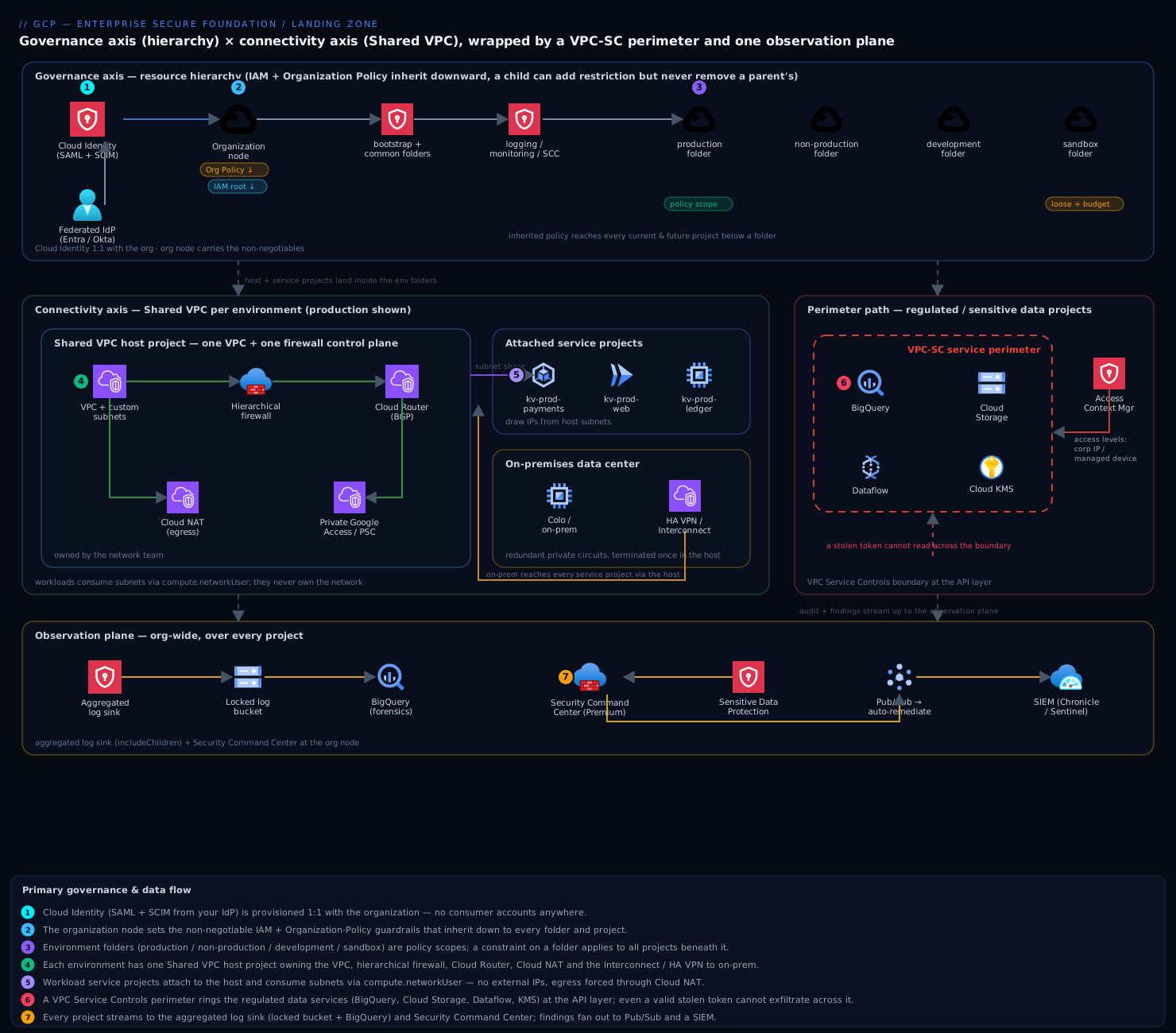
The governance flows down the tree, traffic flows through the host project, and the perimeter is a ring at the API boundary that no IAM grant can punch through. The rest of the article unpacks each piece.
Component breakdown
| Component | What it does | Why it’s there | Key configuration choices |
|---|---|---|---|
| Organization resource | Single root of the hierarchy; top of the IAM and Organization-Policy inheritance chain; the scope SCC, the asset inventory, and the log sink bind to | Turns personal projects into a governed estate that survives employees leaving; the one place to set non-negotiable, estate-wide guardrails | Provision Cloud Identity first and federate to your IdP; treat Super Admin as break-glass (hardware MFA, 2+ recovery accounts); grant roles/resourcemanager.organizationAdmin to a group and keep org-node IAM tiny |
| Folders (environment-oriented) | Group projects for policy and RBAC inheritance | A constraint or role on production applies to every current and future project beneath it, so governance is set once, not per project |
Group by environment and function, not by team; keep the tree shallow (≤ 3–4 levels); a sandbox folder with loose policy and a hard budget; bootstrap/common for the foundation’s own projects |
| Projects | Unit of billing, quota, IAM blast radius, and network/perimeter attachment | The real isolation boundary — a leaked key is capped to one project, not the company | Naming + label standard (env, business-unit, cost-center, data-class); no human gets Owner/Editor on a prod project; vended from IaC, never hand-clicked |
| Shared VPC (host + service projects) | Host project owns one VPC and shares its subnets; service projects consume IPs without owning the network | One network and one firewall control plane per environment; no peering mesh, no east-west bottleneck, network owned by the network team | A Shared VPC per environment (prod/non-prod/dev host projects) so there is a hard boundary with no peering between tiers; grant compute.networkUser per-subnet, not project-wide; centralize Cloud NAT, Interconnect, and Cloud DNS in the host |
| Hierarchical firewall policies | Allow/deny rules attached at the org or folder level, evaluated before per-VPC rules | Estate-wide network guardrails (e.g., deny RDP/SSH from the internet) that a project team cannot override | Attach a baseline deny-all-ingress-from-internet + allow-iap-ranges at a top folder; let teams add VPC rules only below the inherited deny |
| Organization Policy Service | Sets constraints (boolean and list) that cap what can be configured, inherited down the hierarchy | Make non-negotiables impossible regardless of IAM — IAM says who can act, Org Policy says what is permissible at all | Enforce compute.vmExternalIpAccess (deny external IPs), compute.requireOsLogin, iam.disableServiceAccountKeyCreation, gcp.resourceLocations (residency), sql.restrictPublicIp, iam.allowedPolicyMemberDomains (block external identities); set at org/folder, exempt narrowly with tags |
| VPC Service Controls + Access Context Manager | API-layer perimeter around projects; calls to protected services succeed only from inside the perimeter or via explicit ingress/egress rules | The control IAM lacks — stops data exfiltration even by a correctly-authorized but stolen/abused identity | Start in dry-run to learn the blast radius from violation logs; protect the regulated services (bigquery, storage, dataflow, KMS, logging); use ingress/egress rules + access levels (corp IP / managed device) for legitimate cross-boundary flows; perimeter bridges for controlled multi-perimeter sharing |
| Cloud NAT + Private Google Access / PSC | Outbound internet for VMs without external IPs; private path to Google APIs | Keeps the egress identity known and the data path off the public internet, complementing VPC-SC | Cloud NAT per region in the host project; enable Private Google Access on subnets; Private Service Connect endpoints for Google/partner APIs so even API traffic stays internal |
| Cloud Interconnect / HA VPN + Cloud Router | Private, redundant connectivity to on-prem; dynamic (BGP) route exchange | One predictable, audited hybrid path instead of a mesh of one-off tunnels | Terminate once in the host project; HA VPN (two tunnels, two interfaces) or Dedicated/Partner Interconnect with a redundant pair; advertise only required ranges |
| Centralized logging (aggregated sink) | Org-level log sink routes Admin Activity, Data Access, and platform logs to a locked log bucket + BigQuery | One tamper-resistant, queryable audit record across every project, isolated from the projects that generate it | Aggregated sink at the org node with includeChildren; locked bucket with retention + bucket lock; restrict who can read Data Access logs; export to BigQuery for SQL forensics |
| Security Command Center (Premium/Enterprise) | Org-wide security pane: misconfig scanning, threat detection, vulnerability + posture management, attack-path simulation | Single place to see and triage what is wrong and what is being attacked across the whole estate | Enable at the org node; turn on Security Health Analytics, Event Threat Detection, VM/Container Threat Detection; Sensitive Data Protection to discover where regulated data lives; export findings to a SIEM (Chronicle/Sentinel) and to Pub/Sub for automation |
Two components are routinely under-appreciated. VPC Service Controls is the one most teams skip and most regret — they assume IAM least-privilege is the whole exfiltration story, then an incident (or an auditor) reveals that a single over-broad token could have copied the warehouse out, and IAM would never have stopped it. And the aggregated log sink to a locked bucket is your evidence locker: if a panicked engineer or an attacker can delete audit logs, you have lost both forensics and compliance, so it must live in a project they have no write path into.
Implementation guidance
Bootstrapping order. Provision Cloud Identity and federate your IdP → claim the organization node and lock down Super Admin → create the seed/bootstrap project that holds remote Terraform state (a GCS bucket) and the foundation service account with org-level roles → lay down the folder hierarchy and the org-node Organization Policies and aggregated log sink → enable Security Command Center at the org → stand up the per-environment Shared VPC host projects, hybrid connectivity, and hierarchical firewall policies → define the VPC-SC perimeters in dry-run → vend the first workload service projects via the project factory. Do not retrofit this onto a sprawling existing org until you have mapped every loose project to a target folder; importing a messy project applies the inherited policy and will surface violations.
Infrastructure as Code. The reference is Google’s Cloud Foundation Fabric modules or the Terraform Example Foundation (the deployable form of the Enterprise foundations blueprint). Both are Terraform; Deployment Manager is deprecated and Config Connector/KCC is for workload reconciliation, not the foundation bootstrap. Structure the foundation as staged Terraform: 0-bootstrap (seed project, state bucket, CI/CD identity), 1-org (folders, org policies, log sink, SCC), 2-environments (per-env folders + Shared VPC host projects), 3-networks (subnets, firewall, Interconnect, NAT, DNS), 4-projects (the project factory). A folder + an org policy denying external IPs looks like:
# 1-org: an environment folder under the org, with a guardrail attached
resource "google_folder" "production" {
  display_name = "production"
  parent       = "organizations/${var.org_id}"
}

# Deny external IPs on every VM in production (and all future projects under it)
resource "google_org_policy_policy" "no_external_ip" {
  name   = "${google_folder.production.name}/policies/compute.vmExternalIpAccess"
  parent = google_folder.production.name

  spec {
    rules {
      enforce = "TRUE"   # boolean constraint: the behaviour is denied outright
    }
  }
}

# Data residency: restrict resource locations to EU + India multi-regions
resource "google_org_policy_policy" "resource_locations" {
  name   = "${google_folder.production.name}/policies/gcp.resourceLocations"
  parent = google_folder.production.name

  spec {
    rules {
      values {
        allowed_values = ["in:eu-locations", "in:asia-south1-locations"]
      }
    }
  }
}
A project from the factory is a pull request, not a console click — it creates the project in the right folder, links billing, enables APIs, applies labels, and attaches it as a Shared VPC service project:
module "app_a_prod" {
  source          = "terraform-google-modules/project-factory/google"
  name            = "kv-prod-app-a"
  folder_id       = google_folder.production.name
  billing_account = var.billing_account
  labels = {
    env = "prod", business_unit = "payments", cost_center = "cc-4407", data_class = "pci"
  }
  activate_apis = ["compute.googleapis.com", "run.googleapis.com", "logging.googleapis.com"]

  # Attach to the production Shared VPC host and grant subnet access
  shared_vpc         = module.prod_host.project_id
  shared_vpc_subnets = ["projects/${module.prod_host.project_id}/regions/asia-south1/subnetworks/prod-app"]
}
Networking wiring. In each environment’s host project, create the VPC with custom-mode subnets (never auto-mode — auto-mode hands you a subnet in every region with predictable ranges you do not control). Disable the default network by Org Policy (compute.skipDefaultNetworkCreation) so no project is born with an open default VPC. Enable Shared VPC on the host, then attach service projects and grant compute.networkUser per subnet (not project-wide) so a service project can only place IPs in the subnets it is meant to. Centralize Cloud NAT per region for egress and turn on Private Google Access on every subnet; for API traffic that must stay fully internal, add Private Service Connect endpoints. Terminate hybrid connectivity once — HA VPN (four-nines, two tunnels across two interfaces) for most, Dedicated/Partner Interconnect with a redundant pair for high-bandwidth/low-latency — on a Cloud Router that advertises only the ranges on-prem actually needs. Layer hierarchical firewall policies at a top folder: a baseline that denies all internet ingress and allows only the Identity-Aware Proxy ranges (35.235.240.0/20) for SSH/RDP, so admin access is brokered through IAP, not public IPs.
Identity wiring. Federate Cloud Identity to your IdP (Entra ID / Okta / Ping) with SAML for sign-in and SCIM for automatic user/group provisioning, so joiners and leavers sync without manual steps and there are no @gmail.com consumer accounts anywhere. Drive all access through Google Groups, never per-user bindings: a group like gcp-payments-prod-developers@ is granted a predefined or custom role on the kv-prod-app-a project — and even then, no human gets roles/owner or roles/editor on production; use granular roles and IAM Conditions to scope by resource and time. Enforce iam.allowedPolicyMemberDomains at the org so a policy can never grant access to an identity outside your domain (the classic accidental allUsers/external-domain leak), and iam.disableServiceAccountKeyCreation so workloads use Workload Identity Federation / attached service accounts and keyless auth instead of downloadable JSON keys. Reserve a tightly-watched break-glass path: two Super Admin accounts on hardware keys, offline, with an alert on any sign-in.
Perimeter wiring (VPC Service Controls). Create an access policy at the org, then a service perimeter listing the projects that hold regulated data and the protected restricted_services (bigquery.googleapis.com, storage.googleapis.com, dataflow.googleapis.com, cloudkms.googleapis.com, logging.googleapis.com). Always start in dry-run (use_explicit_dry_run_spec) — the perimeter logs what it would block without breaking anything, and those violation logs are how you discover the legitimate cross-boundary flows you must allow. Then write ingress/egress rules for those flows (e.g., the CI pipeline’s service account may read a specific bucket from outside) and attach access levels from Access Context Manager (corp IP ranges, managed devices) so even console access to protected data is conditional. Only after dry-run is clean do you enforce. Use a perimeter bridge if two perimeters must share specific projects in a controlled way.
resource "google_access_context_manager_service_perimeter" "regulated" {
  parent = "accessPolicies/${var.access_policy_id}"
  name   = "accessPolicies/${var.access_policy_id}/servicePerimeters/regulated_data"
  title  = "regulated_data"

  # Start in dry-run: log violations, enforce nothing yet.
  use_explicit_dry_run_spec = true
  spec {
    resources           = [for p in var.regulated_project_numbers : "projects/${p}"]
    restricted_services = ["bigquery.googleapis.com", "storage.googleapis.com",
                           "dataflow.googleapis.com", "cloudkms.googleapis.com"]
    access_levels       = [google_access_context_manager_access_level.corp_devices.name]
  }
}
Detective layer. Enable Security Command Center at the org node and turn on its built-in services; route findings to Pub/Sub for automated remediation and to your SIEM (Google SecOps/Chronicle or Microsoft Sentinel) for correlation. Run Sensitive Data Protection discovery across BigQuery and Cloud Storage so you actually know where PHI/PCI/PII lives before you draw perimeters around it. Keep the aggregated log sink exporting to a locked bucket and BigQuery for forensics, and enable Data Access audit logs on the regulated services (they are off by default and are exactly what an auditor wants).
Enterprise considerations
Security & Zero Trust. Trust is layered, and each layer assumes the one above can fail. The project is the IAM blast-radius boundary — a leaked key is capped to one project because projects share no IAM. Organization Policy enforces non-negotiables (no external IPs, OS Login, no SA keys, approved locations) that survive even a compromised project owner, because Org Policy caps what is configurable, above what IAM can grant. Hierarchical firewall + IAP mean no admin port is exposed to the internet and every SSH/RDP session is brokered and logged. And VPC Service Controls closes the gap IAM cannot: it assumes a credential will eventually leak and ensures that even a valid token cannot move regulated data across the perimeter. That layering — identity-perimeter (BeyondCorp/IAP) for humans, network-perimeter (firewall/NAT) for traffic, and API-perimeter (VPC-SC) for data — is what “Zero Trust on GCP” actually means in practice.
Cost optimization. All projects roll up to one or a few billing accounts, so committed-use discounts and sustained-use discounts apply where they are needed, and the BigQuery billing export plus mandatory labels (cost_center, business_unit, env) make spend attributable per team. Set budgets and alerts per project (hard caps and aggressive alerts on the sandbox folder). Centralizing Cloud NAT and egress in the host project avoids a NAT per workload — a real five-figure annual saving at scale. The honest trade-off: Security Command Center Premium/Enterprise and VPC Service Controls operational overhead are not free, and SCC Premium is priced on spend, so budget for it as a line item rather than a surprise.
Scalability. The model scales by adding projects, which sidesteps the per-project quotas (firewall rules, subnets, IAM bindings) that strangle a single-project design. The project factory vends a fully-baselined, network-attached project the same day; folders and policies inherit automatically so governance scales at zero marginal cost per project; and a Shared VPC comfortably carries many service projects without the N² peering problem a hub-of-VPCs would create.
Reliability & DR (RTO/RPO). The foundation itself is resilient — the hierarchy, Org Policies, and the log sink are global control-plane constructs, and Google’s regional/zonal redundancy underpins the network. Because the entire foundation is Terraform, your DR plan for the platform is “re-apply the code.” For workloads, the project-per-environment pattern makes a clean DR region straightforward: replicate data (BigQuery cross-region datasets, GCS dual/multi-region buckets, Cloud SQL cross-region replicas) and pre-create the DR subnets in the host project. Typical targets: mission-critical (payments/ledger) RTO ≤ 1 h / RPO ≤ 5 min via active-passive multi-region with continuous replication; standard tier RTO ≤ 4 h / RPO ≤ 1 h via warm standby; dev/test RTO 24 h from IaC redeploy. Keep the log bucket in a multi-region so audit survives a regional event.
Observability. Three planes. Audit — the aggregated sink gives one immutable record of every API call across every project, queryable in BigQuery. Security posture — Security Command Center aggregates misconfigurations, vulnerabilities, attack paths, and active threats into one org-wide view with attack-path simulation that scores which exposures actually reach high-value assets. Operations — Cloud Monitoring with metrics scopes that span projects gives SREs a single pane, and VPC Flow Logs + Firewall Insights feed network forensics. Wire SCC and Event Threat Detection findings into your SIEM so security and ops correlate in one place.
Governance. Guardrails come in two flavors: preventive — Organization Policy constraints and hierarchical firewall that block the action — and detective — Security Health Analytics and Event Threat Detection that flag drift and threats, routed to Pub/Sub for auto-remediation. The whole org definition lives in Git: folders, policies, perimeters, network, and project requests are reviewed by pull request, giving change history and four-eyes approval on the things that matter. Use resource labels + tags as the taxonomy that powers cost, policy exemptions, and findings triage.
Reference enterprise example
MeridianPay is a fictional payments company: ~500 employees, processing card transactions across the EU and India, subject to PCI-DSS and India’s data-residency expectations, growing 55% year over year. They start on three overloaded Google Cloud projects and migrate to a secure foundation over one quarter, deploying the Terraform Example Foundation with their own modules on top.
Target structure. Cloud Identity is federated from Entra ID via SAML + SCIM. The org node carries the non-negotiables. A bootstrap folder holds the seed project (Terraform state, foundation SA); a common folder holds the logging project (aggregated sink → locked multi-region bucket + BigQuery), the monitoring project, and the Security Command Center project. Environment folders production, non-production, and development each own a Shared VPC host project — prod’s VPC lives in asia-south1 (Mumbai) and europe-west1, with HA VPN to their Frankfurt and Mumbai colos and Cloud NAT for egress. production holds service projects kv-prod-payments, kv-prod-ledger, kv-prod-web; non-production holds the matching *-staging. A sandbox folder gives each of their 9 squads a personal project with loose policy but a hard ₹25,000/month budget and nightly cleanup of idle resources.
Guardrails they set. Org-node Organization Policies deny external IPs (compute.vmExternalIpAccess), require OS Login, disable service-account key creation, restrict iam.allowedPolicyMemberDomains to meridianpay.com, skip default-network creation, and set gcp.resourceLocations to EU + India multi-regions. The production folder adds sql.restrictPublicIp and a stricter location set. A hierarchical firewall policy at the org denies all internet ingress and allows only the IAP range for admin access — so there is no public SSH anywhere.
The perimeter. They draw a VPC Service Controls perimeter around {kv-prod-payments, kv-prod-ledger, logging}, protecting BigQuery, Cloud Storage, Dataflow, and KMS. They run it in dry-run for three weeks, watch the violation logs, and discover (and then explicitly allow via egress rules) exactly two legitimate cross-boundary flows: the reconciliation pipeline reading a partner bucket, and the SIEM export. An access level requires a corp IP and a managed device for any console access to cardholder data. Then they enforce. Now even a leaked bigquery.dataViewer token cannot bq extract the cardholder table to an outside project — the API refuses it.
Identity. gcp-payments-prod-developers@ (an Entra group synced by SCIM) gets granular roles on kv-prod-payments — no Owner, no Editor. Workloads use Workload Identity Federation; there are zero downloadable SA keys. When an engineer leaves, Entra removes them and SCIM revokes access within minutes.
Outcomes after one quarter.
| Metric | Before (3 shared projects) | After (secure foundation) |
|---|---|---|
| Time to provision a governed project | ~3 days, manual, inconsistent | < 1 day via the project factory, fully baselined and network-attached |
| Blast radius of a leaked key | The whole company (Editor everywhere) | One project, scoped roles |
| Data exfiltration of the cardholder table | Possible with any valid read token | Blocked at the API by VPC-SC, even for valid tokens |
| External IPs / public SSH | Common, ad-hoc | Impossible by Org Policy + hierarchical firewall (IAP only) |
| Audit trail | Deletable by project owners | Aggregated, locked bucket, queryable in BigQuery |
| Security visibility | None, per-project guesswork | One Security Command Center pane, findings → SIEM |
| Cost attribution | One opaque bill | Per squad / per environment via labels |
| Data residency | Unenforced | gcp.resourceLocations to EU + India |
The CISO’s summary: “We stopped hoping nobody could copy the card table out and made it impossible at the API, and our PCI assessor now reviews two isolated projects inside a perimeter instead of everything we own.”
When to use it
Use a secure foundation when you have (or will soon have) multiple teams, more than one environment, any compliance obligation (PCI, HIPAA, SOC 2, data residency), or any need to attribute cost and contain blast radius. Past roughly three or four projects, or the first audit, this is the GCP default — the direct counterpart to an AWS multi-account Landing Zone and an Azure Enterprise-Scale Landing Zone. The org/folder/project tree maps to AWS OUs/accounts and Azure management groups/subscriptions; Shared VPC maps to a centrally-owned hub network; Organization Policy maps to SCPs / Azure Policy; and VPC Service Controls is the GCP-specific control with no clean AWS/Azure equivalent — the API-layer data-exfiltration perimeter is the single biggest reason to take GCP’s foundation seriously on its own terms.
Trade-offs and costs. A foundation adds real overhead: a platform/cloud-foundations team to own it, a learning curve around Org Policy and (especially) VPC-SC perimeters, and baseline spend — the hierarchy and Org Policy are free, but Security Command Center Premium/Enterprise, Interconnect, and cross-region replication are not, so budget a few thousand dollars a month before workloads. VPC Service Controls in particular has a genuine operational tax: every new legitimate cross-boundary integration needs an ingress/egress rule, and a perimeter misconfigured straight to enforce will break things — which is exactly why dry-run first is non-negotiable.
Anti-patterns to avoid. Running workloads in the seed/bootstrap or org-admin projects (keep them tiny and locked down). Treating Organization Policy as if it grants — it only caps; IAM still grants. Auto-mode VPCs and default networks (you lose control of your IP plan; disable them by policy). Granting compute.networkUser project-wide instead of per-subnet. Per-user IAM bindings and Owner/Editor on production (use groups + granular roles). Downloadable service-account keys (use Workload Identity Federation). Drawing a VPC-SC perimeter without dry-run and without first running Sensitive Data Protection to know where the data is. A folder tree organized by team instead of by environment/function (you end up duplicating policy everywhere). And the big one: assuming IAM least-privilege alone solves exfiltration — it does not, which is the entire reason VPC-SC exists.
Alternatives. For a genuinely small shop that will never exceed a couple of teams, plain organization + a handful of hand-built projects + a single Shared VPC + the core Org Policies may be enough — you get isolation, central networking, and one bill without the full perimeter and SCC machinery, at the price of doing the baseline yourself and revisiting it when the first audit lands. If you want the opinionated, supported build, deploy the Enterprise foundations blueprint (Terraform Example Foundation) or Cloud Foundation Fabric and customize, rather than hand-rolling everything. For multi-cloud governance, the equivalents are AWS Landing Zones (Control Tower) and Azure Enterprise-Scale — the tree, policy-as-guardrail, hub network, and federated SSO map almost one-to-one, with VPC Service Controls as the GCP capability the other two cannot quite replicate.
The secure foundation is not a product you buy once; it is a foundation you operate. Done well it becomes invisible: teams ship into a network that already works, with guardrails they never think about, a data perimeter that quietly refuses the one query that would have made the news, and a security team that sleeps better because the dangerous things are simply not possible.