A regional logistics company — think parcel sorting and last-mile delivery across a few states — has a small platform team and one looming problem: their driver-tracking API runs on a single hand-built EC2 instance that someone SSHes into to deploy. When that instance’s disk filled up during the holiday peak, deliveries went dark for ninety minutes, and the post-incident review had exactly one finding worth acting on: stop deploying by logging into a server. The team has three engineers, no Kubernetes experience, and a directive from their head of engineering: get this service onto something that redeploys cleanly, scales with the morning dispatch surge, and survives a single machine dying — without hiring a platform specialist they cannot afford. This article is the reference architecture for exactly that move: a containerized service on AWS ECS Fargate, the on-ramp to production containers that does not require you to learn Kubernetes first.
The pressures here are the ordinary ones, not exotic ones, which is the whole point. Reliability means a single failed instance can no longer take down driver tracking. Scale means the 6–9 AM dispatch window has ten times the traffic of midnight, and the service should follow that curve instead of being sized for the peak all day. Operability means a junior engineer can ship a fix on their second week without a runbook full of SSH commands. And cost means a small company paying in real money cannot run a fleet of always-on servers at 5% utilization. Containers on Fargate satisfy all four: you package the app once as an image, AWS runs it as managed tasks with no servers for you to patch, and a load balancer plus an auto-scaling policy handle the dispatch surge automatically.
Why Fargate, and why not the obvious alternatives
It is worth naming the roads not taken, because someone on the team will propose each one.
Keep deploying to EC2 by hand is the status quo that caused the outage: snowflake servers, drift between “what’s running” and “what’s in git,” and a deploy process that lives in one person’s head. Run your own Kubernetes (EKS) is the over-correction — EKS is powerful and is where this company might land in three years, but it asks a three-person team to own a control plane, node groups, networking add-ons, and upgrades, which is a second full-time job they do not have. ECS on EC2 keeps Amazon’s simpler orchestrator but still hands you the servers to patch, scale, and secure. Fargate is the sweet spot for a first container deployment: you bring a container image and a task definition, and AWS runs the container with no host to manage, no SSH, no OS patching, billed per vCPU-second and GB-second the task actually uses.
| Option | Who manages servers | Learning curve | Best fit |
|---|---|---|---|
| Hand-built EC2 | You (and it shows) | Low to start, high to operate | The thing we are escaping |
| ECS on EC2 | You (patch, scale hosts) | Moderate | Steady, dense workloads where you want host control |
| ECS Fargate | AWS (serverless tasks) | Low | First containers, spiky traffic, small teams |
| EKS (Kubernetes) | You (control plane + nodes) | High | Large platforms, multi-team, portability needs |
Fargate’s tradeoff is real and stated up front: you give up host-level control and pay a small premium per unit of compute versus a fully-packed EC2 fleet, in exchange for never touching a server. For this team, that trade is obviously worth it.
Architecture overview
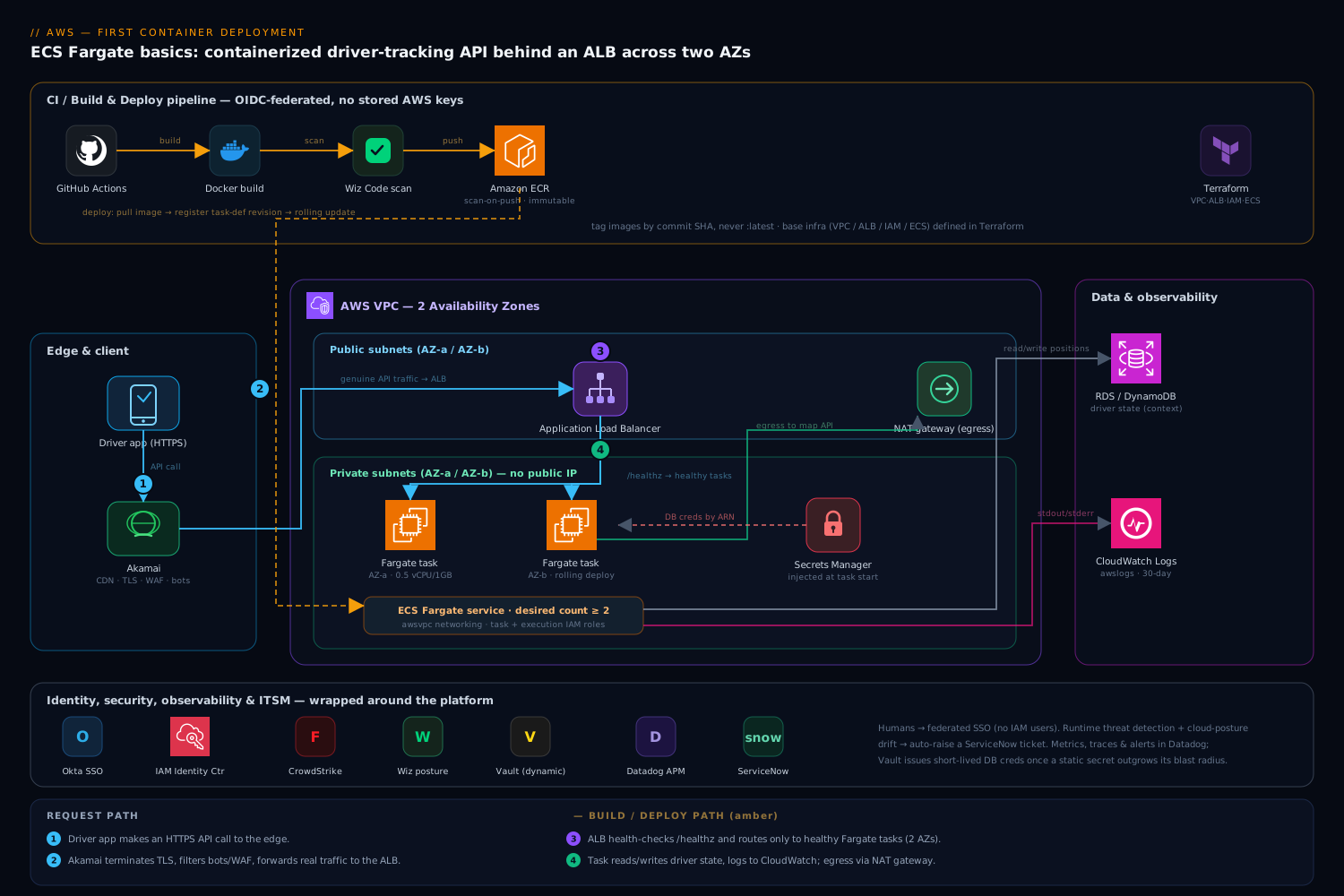
The whole system is a short, legible path from a developer’s commit to a running container serving a driver’s phone. Read it as two flows that meet at the registry: a build/deploy flow that turns code into a running task, and a request flow that turns a driver’s API call into a response.
The defining property of the design is that nothing runs on a server you manage and nothing is deployed by hand. The image is built by CI, stored in a registry, and run by ECS as immutable tasks across two Availability Zones behind a load balancer. If a task dies, ECS replaces it; if a whole AZ has a bad day, the other one keeps serving.
Request path, following the traffic:
- A driver’s app makes an HTTPS call. Akamai sits at the edge as CDN and WAF — it terminates TLS close to the user, caches static map tiles and the driver app’s assets, and filters bot and injection traffic before any request reaches AWS. Only genuine API calls are forwarded to the origin.
- The request lands on an Application Load Balancer (ALB) in public subnets, spanning two Availability Zones. The ALB terminates TLS again with an ACM certificate, runs health checks against each task’s
/healthzendpoint, and only routes to tasks that report healthy. - The ALB forwards to one of several ECS Fargate tasks running the driver-tracking container in private subnets. The tasks have no public IP; the only way in is through the load balancer, and their only way out is a NAT gateway for things like calling the mapping provider.
- The task handles the request, reading and writing driver positions from the database (an RDS instance or DynamoDB table, outside this article’s scope but shown for context), and returns the response back up through the ALB and Akamai to the driver.
Build/deploy path, triggered by a git push:
- An engineer merges to
main. GitHub Actions (the team’s CI) checks out the code, builds the Docker image, and runs tests. It authenticates to AWS using OIDC — a short-lived federated token, no long-lived AWS keys stored in GitHub, which is the single most important security choice in the whole pipeline. - The pipeline pushes the tagged image to Amazon ECR (Elastic Container Registry), the private image registry. Wiz Code (and an ECR-native scan) inspect the image for vulnerable OS packages and known-bad dependencies; a critical finding fails the build before the image is ever deployable.
- The pipeline registers a new ECS task definition revision pointing at the new image tag and updates the ECS service, which performs a rolling deployment — start new tasks, wait for them to pass ALB health checks, then drain and stop the old ones. A bad image never fully replaces a healthy one because the new tasks never go healthy.
- The base infrastructure — VPC, subnets, ALB, ECR repo, ECS cluster, IAM roles — is defined in Terraform and applied by the same OIDC-federated pipeline, so the environment itself is in version control, not clicked together in the console.
Component breakdown
Every piece here earns its place. The table is the map; the paragraphs after it explain the choices juniors most often get wrong.
| Component | Service / tool | Role here | Key configuration |
|---|---|---|---|
| Edge | Akamai | CDN, TLS, WAF, bot filtering at the perimeter | Cache app assets; WAF rules; origin = ALB DNS |
| Load balancing | Application Load Balancer | TLS termination, health checks, routing to tasks | Target group on container port; /healthz check; 2 AZs |
| Compute | ECS Fargate | Runs the container as serverless tasks | awsvpc networking; 0.5 vCPU / 1 GB; desired count + autoscaling |
| Image registry | Amazon ECR | Private store for built images | Immutable tags; scan-on-push; lifecycle policy |
| App packaging | Docker | Reproducible image of the service | Multi-stage build; non-root user; small base image |
| Secrets | AWS Secrets Manager | DB credentials, API keys injected at task start | Referenced by ARN in task def secrets block |
| Logs | CloudWatch Logs | Container stdout/stderr, retention, queries | awslogs driver; log group per service; 30-day retention |
| Identity (humans) | Okta + AWS IAM Identity Center | Engineer SSO into the AWS console/CLI | SAML/OIDC federation; permission sets, no IAM users |
| Secrets (advanced) | HashiCorp Vault | Dynamic DB creds for apps that outgrow static secrets | Optional; AWS auth method; short-lived leases |
| Image security | Wiz / Wiz Code | Scan images and cloud posture for risk | Fail build on critical CVE; alert on public-exposure drift |
| Runtime security | CrowdStrike Falcon | Threat detection on running containers | Fargate sensor; detections to the SOC |
| Observability | Datadog | Metrics, traces, dashboards, alerting | ECS integration; APM tracing; alert on p95 + error rate |
| ITSM | ServiceNow | Change records and incident tickets | Deploy change record; auto-ticket on alert |
| CI / IaC | GitHub Actions + Terraform | Build, scan, deploy; infra as code | OIDC to AWS; rolling ECS deploy; no stored keys |
A few of these deserve the why, because they are the decisions a first-time team fumbles.
Why the task definition is the heart of it. The task definition is a JSON document that tells ECS everything about how to run your container: which image, how much CPU and memory, which port, which IAM role, which secrets to inject, and where logs go. Each change creates a new immutable revision — you never edit a running task, you register a new revision and roll forward. That immutability is what makes deploys boring and rollbacks trivial (point the service back at the previous revision). A minimal shape makes the model concrete:
{
  "family": "driver-tracking",
  "networkMode": "awsvpc",
  "requiresCompatibilities": ["FARGATE"],
  "cpu": "512",
  "memory": "1024",
  "executionRoleArn": "arn:aws:iam::123456789012:role/driver-tracking-exec",
  "taskRoleArn": "arn:aws:iam::123456789012:role/driver-tracking-task",
  "containerDefinitions": [{
    "name": "app",
    "image": "123456789012.dkr.ecr.ap-south-1.amazonaws.com/driver-tracking:sha-9f3a21",
    "portMappings": [{ "containerPort": 8080 }],
    "secrets": [{
      "name": "DB_PASSWORD",
      "valueFrom": "arn:aws:secretsmanager:ap-south-1:123456789012:secret:driver-db-AbCdEf"
    }],
    "logConfiguration": {
      "logDriver": "awslogs",
      "options": {
        "awslogs-group": "/ecs/driver-tracking",
        "awslogs-region": "ap-south-1",
        "awslogs-stream-prefix": "app"
      }
    }
  }]
}
Why there are two IAM roles, not one. This is the single most common point of confusion, so be precise about it. The execution role is used by the Fargate agent — the AWS-managed machinery that starts your task. It needs permission to pull the image from ECR, fetch the secret from Secrets Manager, and write to CloudWatch Logs. The task role is assumed by your application code at runtime, and it should grant only what the app itself calls — read a specific DynamoDB table, put an object in one S3 bucket, publish to one SQS queue. Keeping them separate is least privilege in action: the platform’s right to start a container is not the same as the app’s right to touch your data, and you should be able to widen one without widening the other. Pin the task role tightly and resist the urge to attach a broad managed policy “to make it work.”
Why secrets are injected, never baked in. A junior’s instinct is to put the database password in an environment variable in the task definition, or worse, in the Docker image. Both are wrong — the task definition is readable by anyone with ecs:DescribeTaskDefinition, and an image layer can be pulled and inspected. Instead, store the secret in AWS Secrets Manager and reference it by ARN in the task definition’s secrets block; Fargate resolves it at task start and injects it as an environment variable the app reads, while the value itself never appears in the task definition or the image. As the platform matures and apps need credentials that rotate frequently, HashiCorp Vault with its AWS auth method can issue dynamic, short-lived database credentials per task — a step up from static Secrets Manager values, and worth it once a static secret’s blast radius starts to worry you. Start with Secrets Manager; reach for Vault when you outgrow it.
Building and shipping the image
The container itself should be small, reproducible, and not running as root. A multi-stage Dockerfile keeps build tooling out of the final image, which shrinks attack surface and pull time both:
# build stage
FROM node:20-slim AS build
WORKDIR /src
COPY package*.json ./
RUN npm ci
COPY . .
RUN npm run build

# runtime stage — small, no build tools, non-root
FROM node:20-slim
RUN useradd --create-home appuser
WORKDIR /home/appuser/app
COPY --from=build /src/dist ./dist
COPY --from=build /src/node_modules ./node_modules
USER appuser
EXPOSE 8080
HEALTHCHECK CMD node dist/healthcheck.js || exit 1
CMD ["node", "dist/server.js"]
The CI flow that ships it is deliberately short. GitHub Actions authenticates to AWS via OIDC (no stored AWS_SECRET_ACCESS_KEY anywhere — the workflow exchanges its GitHub identity token for short-lived AWS credentials), then builds, scans, pushes, and deploys:
permissions:
  id-token: write        # required for OIDC
  contents: read
jobs:
  deploy:
    runs-on: ubuntu-latest
    steps:
      - uses: actions/checkout@v4
      - uses: aws-actions/configure-aws-credentials@v4
        with:
          role-to-assume: arn:aws:iam::123456789012:role/gha-deploy
          aws-region: ap-south-1
      - uses: aws-actions/amazon-ecr-login@v2
      - run: |
          IMAGE=123456789012.dkr.ecr.ap-south-1.amazonaws.com/driver-tracking:sha-${GITHUB_SHA::8}
          docker build -t "$IMAGE" .
          docker push "$IMAGE"
      # Wiz Code scans the pushed image; a critical CVE fails the job here
      - run: aws ecs update-service --cluster prod --service driver-tracking --force-new-deployment
Two non-negotiables hide in that file. Tag images by commit SHA, not latest — latest is a moving target that makes “what is actually running in prod” unanswerable and rollbacks impossible. And scan before deploy: Wiz Code inspects the image (and the IaC) in the pipeline for vulnerable packages and misconfigurations, and a critical finding fails the build so a known-CVE image never reaches ECR. ECR’s own scan-on-push is a useful second layer. Pair this with an ECR lifecycle policy that expires untagged and old images so the registry does not grow without bound.
Enterprise considerations
Security and least privilege. The posture is straightforward to reason about because the surface is small. Tasks run in private subnets with no public IP — the ALB is the only ingress, and a per-task security group allows inbound only from the ALB’s security group on the container port, nothing else. Egress goes through a NAT gateway so you can lock down where tasks may call out. Human access to AWS is federated through Okta into AWS IAM Identity Center: engineers log in with their corporate Okta identity and conditional-access policies, receive a permission set scoped to what their role needs, and there are no long-lived IAM users or access keys to leak — the same lesson, applied to people, that OIDC applies to the pipeline. On the running containers, CrowdStrike Falcon’s Fargate sensor provides runtime threat detection, feeding suspicious behavior to the company’s SOC, while Wiz runs continuous cloud-posture scanning and raises an alert the moment something drifts toward public exposure or an over-broad IAM policy. When Wiz or Falcon flags something material, it auto-raises a ServiceNow incident so security works a ticket, not a buried log line.
Cost. Fargate bills per vCPU-second and GB-second a task runs, which rewards right-sizing and punishes over-provisioning — so the levers are about running the right amount of compute, not buying servers.
| Lever | Mechanism | Typical effect |
|---|---|---|
| Right-size the task | Set CPU/memory to observed p95, not a guess | Stops paying for idle headroom every second |
| Autoscale to traffic | Scale task count up at dispatch peak, down at night | Follows the curve instead of sizing for peak all day |
| Fargate Spot | Run non-critical / batch tasks on Spot capacity | Up to ~70% off for interruption-tolerant work |
| Compute Savings Plan | Commit to a baseline of steady Fargate usage | Discount on the always-on floor |
| ECR lifecycle + log retention | Expire old images; cap CloudWatch retention | Trims storage drag that quietly accrues |
Watch the NAT gateway too — its per-GB data-processing charge surprises teams whose tasks chat constantly with external APIs; a VPC endpoint for ECR and Secrets Manager keeps that AWS-bound traffic off the NAT entirely. Pipe the cost and utilization metrics into Datadog so right-sizing is driven by data, not vibes.
Scaling. This is where Fargate earns the migration. Attach an Application Auto Scaling target-tracking policy to the ECS service — for example, hold average CPU at 60%, or scale on ALB requests-per-target so task count tracks actual load rather than a lagging CPU signal. The dispatch surge then provisions tasks automatically at 6 AM and releases them by mid-morning. Because Fargate has no hosts, there is no node pool to grow first — new tasks just start, typically in under a minute. Spread tasks across two or more Availability Zones (the ALB and subnets already span them) so capacity and resilience scale together.
resource "aws_appautoscaling_policy" "cpu" {
  name               = "driver-tracking-cpu60"
  service_namespace  = "ecs"
  resource_id        = "service/prod/driver-tracking"
  scalable_dimension = "ecs:service:DesiredCount"
  policy_type        = "TargetTrackingScaling"
  target_tracking_scaling_policy_configuration {
    target_value       = 60
    predefined_metric_specification {
      predefined_metric_type = "ECSServiceAverageCPUUtilization"
    }
  }
}
Failure modes, named before they page you. The value of a small architecture is that the failure list is short and each item has an obvious mitigation.
- A bad image deploys — the new container crashes or fails its health check. ECS keeps the old tasks serving because the new ones never pass the ALB health check; you roll back by pointing the service at the previous task-definition revision. Mitigation: a real
/healthzendpoint and a minimum-healthy-percent that forbids dropping below full capacity mid-deploy. - A task or an AZ dies — ECS notices the task is unhealthy and launches a replacement; if an entire AZ is impaired, the tasks in the other AZ keep serving. Mitigation: desired count ≥ 2, spread across ≥ 2 AZs — the default you should never skip.
- The app silently fills up or hangs — the original outage, reborn. Mitigation: health checks catch a hung task and ECS recycles it; CloudWatch and Datadog alarms on error rate and p95 latency catch the slow burn before users do.
- Secrets Manager or ECR is unreachable at task start — the task fails to launch because the execution role cannot fetch what it needs. Mitigation: correct execution-role permissions and VPC endpoints so the dependency path does not traverse the public internet.
- A throttled or throttling dependency — the database or mapping API rejects calls under surge. Mitigation: autoscale the right tier, add timeouts and retries with backoff in the app, and alert on dependency error rates.
Observability. Containers are opaque until you make them legible, so wire this on day one. The awslogs driver ships every container’s stdout/stderr to CloudWatch Logs, one log group per service with a sane retention (30 days here, not infinite). Layer Datadog over the top via its ECS integration for metrics (CPU, memory, task count), APM traces through the request, and dashboards the team actually watches; alert on p95 latency, 5xx error rate, task count vs. desired, and deployment failures, routing pages to on-call and auto-opening a ServiceNow incident for anything customer-impacting. The goal a junior should internalize: you should be able to answer “is it healthy, is it fast, and what changed” from a dashboard, never from SSH — because there is no SSH.
Reliability and DR. For a first deployment, “reliability” mostly means the two-AZ, desired-count-≥-2, health-checked baseline above, which already removes the single-machine failure that started this. If the business later needs to survive a whole-region event, the same task definition and Terraform redeploy into a second region behind Akamai (or Route 53) health-checked failover, with the database’s cross-region replication as the real recovery guarantee — but resist building multi-region until a clear requirement, and the budget, demand it. State your numbers honestly: a small service like this can target RTO of minutes within a region (ECS self-heals) and accept a longer RTO for the rare cross-region event, with RPO set by the database’s replication, not by Fargate.
Explicit tradeoffs
Accept these or pick a different tool. Fargate trades host control for simplicity: you cannot SSH into the host, install a custom kernel module, or pack many small containers onto one big machine for maximum density — and per unit of raw compute you pay a premium over a fully-utilized EC2 fleet. Cold-ish start matters too: a new task takes tens of seconds to a minute to pull, start, and pass health checks, so scaling is fast but not instant; size autoscaling thresholds with that lag in mind. And the model assumes a stateless app — driver state lives in the database, never on the task’s ephemeral disk — because a task can be replaced at any moment. For this stateless, spiky, small-team service, every one of those trades is the right call.
When something else wins. If you are running steady, dense, cost-sensitive workloads and have the appetite to manage hosts, ECS on EC2 reclaims the density and per-compute savings Fargate gives up. If you genuinely need Kubernetes — multiple teams, a rich ecosystem of operators, portability across clouds, or you are standardizing on Argo CD GitOps and Helm across a large platform — EKS is the destination, and a team that starts on Fargate buys itself the time to learn Kubernetes deliberately instead of in a panic. If the service is tiny and event-driven rather than a long-running API, AWS Lambda may beat a container outright. And Terraform here is interchangeable with CloudFormation or CDK; the principle that matters is not which tool, but that the VPC, ECR, ALB, IAM roles, and ECS service are code in version control, applied by an OIDC-federated pipeline, never clicked together by hand.
The shape of the win
For the logistics company, the payoff is not “we use containers now.” It is that an engineer fixes a driver-tracking bug, opens a pull request, and on merge the change is built, scanned by Wiz Code, pushed to ECR, and rolled out across two AZs by GitHub Actions — with the old version still serving until the new one is provably healthy, no one logging into a server, and the whole thing redeployable from Terraform if the account were lost tomorrow. When the 6 AM dispatch surge hits, task count climbs on its own and settles back by ten; when a task dies, ECS replaces it before anyone notices; and the next outage review has nothing to say about disk space on a snowflake server, because there is no snowflake server. That is the real upgrade — from a machine someone babysits to a service the platform runs for you. Start here, keep it boring, and graduate to EKS the day you have a reason to, not a day before.