Before you launch a single virtual machine on Google Cloud, three ideas decide whether your time on the platform is calm or chaotic: where your resources physically live, how they are organised so that security and billing flow predictably, and what you actually pay for. Get these wrong and you spend your first month confused about why a teammate can see a database they should not, or why a small test left a bill you did not expect. Get them right and the rest of Google Cloud — Compute Engine, BigQuery, GKE — becomes safe to explore.
This lesson is the on-ramp. It assumes nothing. By the end you will understand Google’s global infrastructure (regions, zones, multi-regions and the edge), the resource hierarchy that is the single most important design decision on the platform, the shared-responsibility model that tells you who secures what, and the pricing model with its discounts and the all-important Free Tier and $300 credit. It maps directly to the Cloud Digital Leader (CDL) and Associate Cloud Engineer (ACE) exams, and it gives a working architect the mental model everything else hangs from.
Learning objectives
By the end of this lesson you can:
- Explain what Google Cloud is and place the IaaS / PaaS / SaaS service models against real GCP products.
- Describe the global infrastructure — regions, zones, multi-regions, edge points of presence — and choose a region for a workload deliberately.
- Lay out the resource hierarchy (Organization → Folders → Projects → Resources) and explain why the project is the boundary for isolation and billing, and how policy inherits down the tree.
- Describe Cloud Identity, APIs and service enablement, and the shared-responsibility model.
- Reason about pricing: pay-as-you-go, sustained-use and committed-use discounts, the Free Tier and $300 credit, budgets, and what actually drives cost.
- Recognise the core GCP services and what each is for.
Prerequisites
You need a Google account and a browser — nothing more. No prior cloud experience is assumed; every term is defined as it appears. A credit card is required to activate the Free Trial (Google uses it only to verify you are human and will not auto-charge you when the trial ends), but you will not be charged to complete the lab. This is the first lesson in the Google Cloud Zero-to-Hero course and everything downstream — IAM, networking, compute, data — builds on the foundations here.
Core concept: what Google Cloud actually is
Google Cloud (GCP) is Google’s public cloud: a global pool of compute, storage, networking, data and AI services that you rent on demand and pay for by usage, all reachable through a web console, a command-line tool (gcloud), client libraries and REST APIs. Instead of buying servers, racking them in a data centre, and waiting weeks, you provision a virtual machine in seconds and delete it just as fast. That shift — from owning capital equipment to renting a service — is the whole point of cloud computing, and it brings elasticity (scale up and down with demand), a global reach you could never build yourself, and a pay-for-what-you-use cost model.
Cloud services are usually grouped into three models, distinguished by how much the provider manages for you:
| Model | What you get | What you manage | What Google manages | GCP examples |
|---|---|---|---|---|
| IaaS (Infrastructure as a Service) | Raw compute, storage, network | OS, runtime, app, data, scaling | Hardware, virtualisation, data centre | Compute Engine, Persistent Disk, VPC |
| PaaS (Platform as a Service) | A managed platform to run code or data | Your app, your data, config | OS, runtime, patching, scaling | Cloud Run, App Engine, Cloud SQL, BigQuery |
| SaaS (Software as a Service) | Finished software you just use | Only your data and users | Everything else | Google Workspace, Looker |
The practical rule: move up the stack whenever you can. The higher the model, the less undifferentiated heavy lifting you do. A junior engineer instinctively reaches for a VM (IaaS) because it is familiar; an architect asks, “could this be Cloud Run or BigQuery instead?” because managed services remove patching, scaling and a whole class of operational toil. You will still use IaaS where you need full control, but it should be a deliberate choice, not a default.
Core concept: Google’s global infrastructure
Google’s network is one of the largest on Earth, connected by private subsea and terrestrial fibre. Understanding its physical shape matters because latency, availability, data residency and cost all depend on where your resources sit.
Regions and zones
A region is an independent geographic area — europe-west2 (London), asia-south1 (Mumbai), us-central1 (Iowa) — containing multiple zones. A zone is a deployment area within a region (us-central1-a, us-central1-b, …), roughly one or more data centres with independent power, cooling and networking. The relationship is the foundation of resilience on GCP:
| Concept | What it is | Failure isolation | Naming example |
|---|---|---|---|
| Region | An independent geographic area | Survives a regional disaster only if you replicate to another region | asia-south1 |
| Zone | An isolated location inside a region | Survives a single-zone failure if you spread across zones | asia-south1-a |
| Multi-region | Data replicated across a continent | Highest durability/availability for storage | EU, US, ASIA |
The rule of thumb for availability: for high availability, spread across zones; for disaster recovery, spread across regions. A single VM lives in one zone, so a zonal outage takes it down — running instances in two or more zones behind a load balancer keeps you up.
Global, regional and zonal services
Every GCP service has a scope, and this trips up beginners constantly:
| Scope | Meaning | Examples |
|---|---|---|
| Zonal | Lives in one zone; fails with that zone | Compute Engine VM, zonal Persistent Disk |
| Regional | Replicated across zones in a region | Regional Persistent Disk, regional MIG, Cloud SQL HA |
| Global | One instance serving the whole world | VPC network, global HTTP(S) Load Balancer, Cloud DNS, IAM |
That the VPC network is global is a genuine GCP differentiator (in some other clouds the virtual network is regional). One VPC can hold subnets in every region, which dramatically simplifies global architectures. By contrast, subnets themselves are regional, and VMs are zonal.
Multi-regions and the edge
For storage that must be extremely durable and available, multi-regions (US, EU, ASIA) replicate data across a large geographic area. Cloud Storage buckets and BigQuery datasets can be multi-regional.
Separately, Google operates a global edge network of Points of Presence (PoPs) — hundreds of locations far more numerous than the regions. The edge terminates user connections close to them, runs Cloud CDN caching, and pulls traffic onto Google’s private backbone as early as possible (this is cold-potato routing — Google carries your traffic on its own network rather than the public internet for as long as possible), which is why GCP can feel fast globally even when the workload runs in one region.
Choosing a region
Pick a region by weighing four factors, usually in this order:
- Latency — closest to your users (Mumbai for India, London for the UK).
- Data residency / compliance — regulation may require data to stay in-country or in-continent.
- Service & feature availability — not every product or machine type exists in every region; newer GPUs and services land in large regions first.
- Price — per-unit cost varies by region;
us-central1is often among the cheapest, some regions carry a premium.
Sustainability is a useful tiebreaker: Google publishes a carbon-free energy percentage per region, so when latency and price are equal, the greener region is the better citizen.
Core concept: the resource hierarchy
This is the most important design decision you will make on Google Cloud, so read it twice. Every resource you create lives in a tree, and IAM permissions and Organisation Policies flow down that tree by inheritance. Get the topology right and governance is a handful of policies set high up; get it wrong and you spend years stapling exceptions onto individual projects.
The hierarchy, top to bottom:
| Level | What it is | One per | Why it exists |
|---|---|---|---|
| Organisation | The root node, tied to your Cloud Identity / Workspace domain | One per company | Apply company-wide policy and ownership; survives individual employees leaving |
| Folder | A grouping node (nestable up to 10 deep) | Many | Map departments / teams / environments; the unit of delegated autonomy and distinct guardrails |
| Project | The core container for resources | Many | The trust, isolation and billing boundary |
| Resource | The actual service instances (VMs, buckets, datasets) | Many | The things that do work |
The project is the boundary that matters
A project is the fundamental unit of Google Cloud. Almost every resource belongs to exactly one project, and the project is simultaneously:
- The billing boundary — costs roll up per project, so cost attribution is only as good as your project layout.
- The isolation / trust boundary — by default, resources in different projects cannot reach each other; IAM is scoped here.
- The API enablement boundary — you enable services (APIs) per project.
- The quota boundary — many quotas and limits are per project.
A project has three identifiers, and confusing them is a classic beginner error:
| Identifier | Example | Mutable? | Used for |
|---|---|---|---|
| Project ID | kloudvin-prod-7f3a |
No — permanent, globally unique | gcloud commands, APIs, the thing you actually reference |
| Project number | 849302118245 |
No — auto-assigned | Some internal references, service agents |
| Project name | KloudVin Production |
Yes — display only | Human readability in the console |
The golden rule of project design: one workload + one environment = one project (so app-prod and app-dev are separate projects). This gives you clean cost attribution, a tight blast radius if something is misconfigured, and per-environment IAM. The opposite — one giant project holding everything — destroys cost visibility and means a single bad IAM grant exposes your whole estate.
Folders and policy inheritance
Folders group projects (and other folders, nested up to ten deep). They are where you grant a team autonomy and apply distinct guardrails — a payments folder can have different allowed regions or stricter rules than a data folder.
The mechanism that makes the hierarchy powerful is inheritance. Two things flow down the tree:
- IAM allow policies — a role granted at the Organisation or folder level is inherited by everything beneath it. This is additive and a union: a child cannot take away access granted by a parent. Grant
roles/viewerat a folder and every project in it inherits read access. (This additive, can’t-be-reduced model is a notable contrast with how some other clouds let a child boundary deny inherited access — on GCP you reach for explicit deny policies for that, which the next lesson covers.) - Organisation Policies — constraints (guardrails) such as “only allow resources in EU regions” or “disable service-account key creation” set high in the tree apply to everything below, unless explicitly overridden where allowed.
A minimal, sensible topology for a mid-size company looks like this:
Organisation (kloudvin.com)
├── fldr-bootstrap            # Terraform state, CI/CD service accounts
├── fldr-common               # shared logging, DNS, networking hub
├── fldr-platform
│   ├── prj-platform-prod
│   └── prj-platform-nonprod
└── fldr-business-units
    ├── fldr-payments
    │   ├── prj-payments-prod
    │   └── prj-payments-dev
    └── fldr-data
        ├── prj-data-prod
        └── prj-data-dev
Design the tree on paper before you open the console, driven by two questions: where do policy boundaries fall (that decides folders), and where does cost attribution fall (that decides projects).
Core concept: Cloud Identity, APIs and shared responsibility
Cloud Identity
The Organisation node does not appear by magic — it is created when you have a Cloud Identity or Google Workspace account for your domain. Cloud Identity is Google’s free, standalone Identity-as-a-Service product: it manages your users and groups (the who) at kloudvin.com, independent of email. When a Cloud Identity (or Workspace) account exists, Google provisions the Organisation resource for that domain, and your company — not any individual’s personal Gmail — owns the cloud estate. This matters: resources owned by a personal account vanish with that person, whereas an Organisation persists. Authentication (proving who you are) is Cloud Identity’s job; authorisation (what you may do) is IAM’s, the subject of the next lesson.
APIs and service enablement
Every Google Cloud service is exposed as an API, and on a fresh project almost all of them are disabled by default. Before you can use Compute Engine you must enable compute.googleapis.com; before BigQuery, bigquery.googleapis.com. This is a security feature — your attack surface is only the APIs you have switched on — and a cost-safety feature. You enable services per project, in the console or with one command:
gcloud services enable compute.googleapis.com
gcloud services list --enabled        # see what is on
The shared-responsibility model
Security in the cloud is shared. Google secures the cloud; you secure what you put in it. The line moves depending on the service model — the more managed the service, the more Google handles:
| Responsibility | IaaS (Compute Engine) | PaaS (Cloud Run) | SaaS (Workspace) |
|---|---|---|---|
| Physical data centre, hardware | |||
| Network infrastructure, hypervisor | |||
| Operating system & patching | You | ||
| Runtime / platform | You | ||
| Application code | You | You | |
| Your data & access (IAM) | You | You | You |
| Identity & user configuration | You | You | You |
Notice the constant across every column: your data, your IAM and your configuration are always yours to secure. Google will never misconfigure a permission for you — the most common cloud breaches are customer misconfigurations (a world-readable bucket, an over-broad role), not provider failures. Google calls its side security of the cloud; yours is security in the cloud.
Core concept: how Google Cloud pricing works
Cloud cost surprises almost always come from not understanding the model, so let us make it concrete.
Pay-as-you-go and the units that bill
The baseline is pay-as-you-go (on-demand): no upfront commitment, billed per second or per unit for what you consume, charged monthly. Different resources meter differently — and knowing the unit is how you predict the bill:
| Resource | Billed by | Cost driver |
|---|---|---|
| Compute Engine VM | vCPU + memory per second (min 1 min) | Machine type, region, running time |
| Persistent Disk | Provisioned GB-month | Size and type (you pay even when the VM is off) |
| Cloud Storage | GB-month stored + operations + egress | Volume, storage class, retrieval |
| BigQuery | Bytes scanned (on-demand) or slots | Query design and data volume |
| Cloud Run | vCPU + memory while serving requests | Request volume and concurrency; scales to zero |
| Network egress | GB leaving Google’s network | Cross-region and internet egress |
Two facts to internalise early. First, a stopped VM still costs money because its Persistent Disk and any reserved static IP keep billing — to stop paying for compute you must delete the disk too, and to stop paying entirely you delete the resources. Second, ingress (data in) is generally free, but egress (data out) is charged, and cross-region or internet egress is a frequent source of surprise bills.
Discounts: paying less for the same thing
Google rewards steady and committed usage with automatic and opt-in discounts:
| Discount | How it works | When it applies | Commitment |
|---|---|---|---|
| Sustained-Use Discounts (SUD) | Automatic discount the more of a month a VM runs | Compute Engine (predefined N-family) | None — applied automatically |
| Committed-Use Discounts (CUD) | Commit to 1- or 3-year spend or resources for up to ~57% off | Compute, and many other services (spend-based) | 1 or 3 years |
| Spot VMs | Spare capacity up to ~60–91% cheaper | Fault-tolerant, interruptible workloads | None, but can be pre-empted any time |
| Per-second billing | Pay only for seconds used (min 1 min) | Compute Engine, GKE | None |
The architect’s mental model: use Spot for anything interruptible (batch, CI, stateless workers), let Sustained-Use reward your always-on baseline automatically, and buy Committed-Use for the predictable floor of your steady-state spend after a few months of data.
Free Tier and the $300 credit
Google offers two distinct things people often conflate:
- The $300 free trial credit — new customers get US $300 in credit valid for 90 days to spend on almost anything. When it expires (or is spent), nothing auto-charges; you stay on a sandbox until you actively upgrade to a paid account.
- The Always Free tier — a set of usage limits on ~20+ products that are free forever, even after the trial, for accounts in good standing. Examples: one small
e2-microVM per month in select US regions, 5 GB of Cloud Storage, generous BigQuery query/storage allowances, and Cloud Run’s monthly free requests and compute.
This lesson’s lab fits comfortably inside the Always Free tier.
Budgets and keeping cost under control
You cannot set a hard cap that stops spending in real time, but you can be warned early. A Cloud Billing budget watches a billing account or project and fires alerts at thresholds (e.g. 50/90/100% of a monthly amount) to email or, via Pub/Sub, to automation. Combined with labels (key-value tags on resources) for cost attribution and the Cloud Billing reports dashboard, budgets are how teams avoid nasty end-of-month surprises. Set a budget on day one — it is free.
Core services overview
You will meet these throughout the course; this is the one-line map so the names are not strangers:
| Service | Category | What it is |
|---|---|---|
| Compute Engine | Compute (IaaS) | Virtual machines you fully control |
| Cloud Run | Compute (serverless) | Run containers that scale to zero; no servers to manage |
| Google Kubernetes Engine (GKE) | Containers | Managed Kubernetes for orchestrating containers |
| Cloud Storage | Storage | Durable object storage (buckets) for files and blobs |
| Cloud SQL | Database | Managed MySQL, PostgreSQL and SQL Server |
| BigQuery | Analytics | Serverless data warehouse; SQL over petabytes |
| VPC | Networking | Your global private network — subnets, firewalls, routing |
| IAM | Security | Who can do what, where — the access-control plane |
| Pub/Sub | Messaging | Global, scalable asynchronous messaging and event ingestion |
A useful first decision tree for compute: need full OS control or a legacy app → Compute Engine; a stateless container/API that should scale to zero → Cloud Run; complex, multi-service orchestration with portability → GKE.
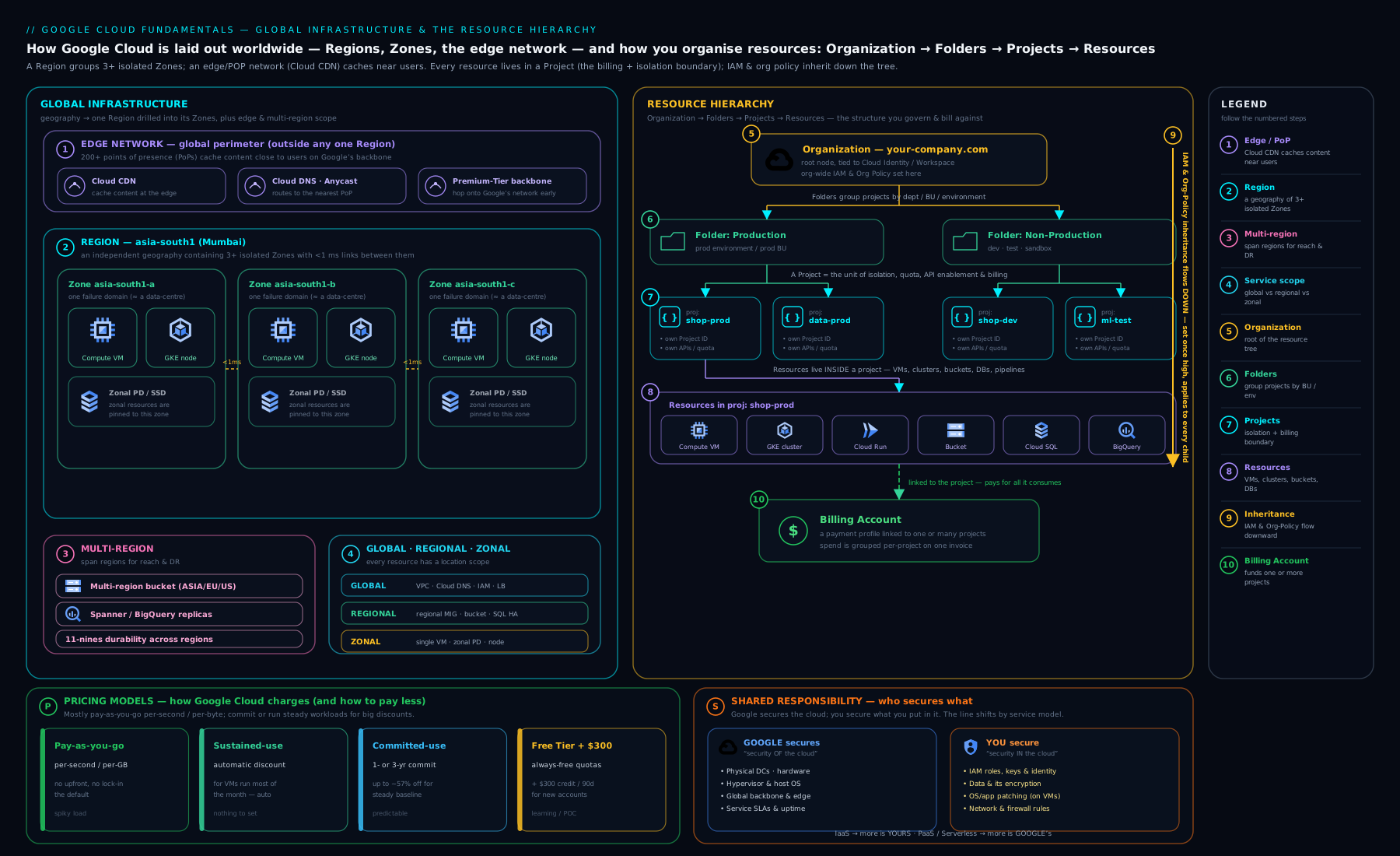
The diagram shows the two foundations side by side: on the left, the physical world of regions, zones and the global edge that determines where your resources live; on the right, the logical Organisation → Folders → Projects → Resources tree down which IAM and Org Policy inherit — the two views you must hold in your head whenever you design on Google Cloud.
Hands-on lab: create a project, enable an API, set a budget, and explore the hierarchy
In this lab you will use Cloud Shell (a free, browser-based terminal with gcloud pre-installed) to create a project, see where it sits in the hierarchy, enable a service, and set a budget guardrail — then clean up. Everything here is within the Free Tier / $300 trial.
Step 1 — Open Cloud Shell
In the Google Cloud Console, click the Activate Cloud Shell icon (a terminal >_) in the top bar. After a moment you have a shell with gcloud ready. Confirm who you are:
gcloud auth list
gcloud config list
Step 2 — Create a new project
Project IDs are globally unique, so add a random suffix:
PROJECT_ID="kv-fundamentals-$RANDOM"
gcloud projects create "$PROJECT_ID" --name="KV Fundamentals Lab"
gcloud config set project "$PROJECT_ID"
Expected output: Operation "operations/..." finished successfully. and Updated property [core/project].
Note: to create resources that cost money you must link a billing account (
gcloud billing accounts listthengcloud billing projects link "$PROJECT_ID" --billing-account=BILLING_ID). For this lab the read-only inspection steps work without it.
Step 3 — See the project in the hierarchy
gcloud projects describe "$PROJECT_ID"
Look at the output: projectId, projectNumber, name, lifecycleState: ACTIVE, and — if you have an Organisation — a parent field showing the folder or org it sits under. This is the resource hierarchy made concrete. If you have org access, list it:
gcloud organizations list           # the root node (if any)
gcloud resource-manager folders list --organization=ORG_ID   # folders under it
Step 4 — Enable an API
gcloud services enable compute.googleapis.com
gcloud services list --enabled --filter="config.name:compute"
Expected output: the enable operation finishes, and the second command lists compute.googleapis.com. You have just opened exactly one door in your project’s attack surface — deliberately.
Step 5 — Set a budget (guardrail)
In the console, go to Billing → Budgets & alerts → Create budget, scope it to your new project, set a small amount (e.g. ₹100 / $2) and alert thresholds at 50% / 90% / 100%. This costs nothing and is the single best habit for avoiding surprises.
Step 6 — Validation
Confirm the three things you set up:
gcloud config get-value project          # your lab project
gcloud services list --enabled | grep compute   # API on
gcloud projects describe "$PROJECT_ID" --format="value(lifecycleState)"  # ACTIVE
Step 7 — Cleanup
Deleting the project removes everything in it and stops all billing — the cleanest possible teardown:
gcloud projects delete "$PROJECT_ID"
You will be asked to confirm. The project enters a 30-day “pending deletion” state (recoverable) and then is permanently removed.
Cost note: every step above is free. Creating a project, enabling an API, inspecting the hierarchy and setting a budget incur no charge; deleting the project guarantees nothing is left billing. The only way this lab could cost money is if you went on to create chargeable resources — which we did not.
Common mistakes & troubleshooting
| Symptom | Likely cause | Fix |
|---|---|---|
API [compute.googleapis.com] not enabled when creating a VM |
Service disabled on the project (default state) | gcloud services enable compute.googleapis.com and retry |
| “The caller does not have permission” creating a project | No resourcemanager.projects.create at org/folder, or no Organisation |
Ask an org admin for roles/resourcemanager.projectCreator, or create under no-org with appropriate rights |
| Bill keeps growing after you “stopped” the VM | Persistent Disk and static IP still provisioned | Delete the disk and release the static IP; or delete the whole project |
| Unexpectedly large egress charges | Cross-region or internet data transfer | Keep traffic in-region; review the egress pricing for your flows |
| Can’t pick the region/feature you want | Service or machine type not offered there | Choose a larger region; check product availability per region |
| Resources you create are owned by your personal account | No Cloud Identity / Organisation set up | Set up Cloud Identity so the company Organisation owns resources |
| Project ID already taken | IDs are globally unique across all customers | Add a random suffix or pick a more specific ID |
Best practices
- Design the hierarchy before you build. Decide folders by policy boundary and projects by workload+environment, on paper, first.
- One workload + one environment = one project. Never the “one giant project” anti-pattern — it destroys cost attribution and blast-radius isolation.
- Set policies and IAM as high as is safe. Inheritance means one folder-level grant beats fifty per-project grants; manage it as code.
- Enable only the APIs you need, per project — minimise attack surface and accidental cost.
- Set a budget on day one, label resources for cost attribution, and review the billing dashboard weekly.
- Choose regions deliberately for latency, residency, availability and price — and prefer greener regions on a tie.
- Use a Cloud Identity / Organisation so the company, not a person, owns the estate.
Security notes
- Security is shared: Google secures the infrastructure; your data, IAM and configuration are always yours. Most incidents are customer misconfigurations.
- The project is the trust boundary — resources in different projects are isolated by default. Use that isolation; do not collapse environments into one project.
- Least privilege starts at the hierarchy: grant the narrowest role at the lowest scope that works (detailed in the IAM lesson).
- Organisation Policies are preventative guardrails (e.g. restrict regions, disable SA-key creation) that inherit down the tree — set them high.
- APIs are off by default for a reason; enable consciously and disable what you no longer use.
- Cloud Audit Logs record who did what; ensure they are retained for investigation.
Interview & exam questions
-
What is the difference between a region and a zone? A region is an independent geographic area (e.g.
asia-south1); a zone is an isolated deployment area within a region (e.g.asia-south1-a). For high availability you spread across zones; for disaster recovery you spread across regions. -
Why is the project the most important boundary on GCP? It is simultaneously the billing, isolation/trust, API-enablement and quota boundary. Almost every resource belongs to exactly one project, so cost attribution and blast radius follow your project layout.
-
Explain IAM/policy inheritance in the resource hierarchy. IAM allow policies and Organisation Policies set at Organisation or folder level are inherited by everything beneath them. IAM is additive and a union — a child cannot remove access granted by a parent (you use explicit deny policies for that).
-
Which GCP resources are global, regional and zonal? Give an example of each. Global: VPC network, global HTTP(S) Load Balancer, IAM. Regional: subnet, regional MIG, Cloud SQL HA. Zonal: a Compute Engine VM, a zonal Persistent Disk.
-
A stopped VM — are you still paying for it? Yes. The VM’s vCPU/memory stop billing, but its Persistent Disk and any reserved static IP keep charging. To stop paying entirely, delete the disk/IP or the whole project.
-
Differentiate the three pricing discounts. Sustained-Use Discounts apply automatically the longer a VM runs in a month (no commitment). Committed-Use Discounts give a larger discount for a 1- or 3-year commitment. Spot VMs are deeply discounted spare capacity that can be pre-empted at any time.
-
What is the difference between the $300 credit and the Always Free tier? The $300 credit is a 90-day trial balance for new customers. The Always Free tier is a set of per-product usage limits that remain free indefinitely, even after the trial.
-
Explain the shared-responsibility model with an IaaS vs PaaS example. On IaaS (Compute Engine) you patch the OS, runtime and app; on PaaS (Cloud Run) Google handles the OS and runtime and you bring only your container and config. In both, your data, IAM and configuration are your responsibility.
-
How do you choose a region for a new workload? Weigh latency to users, data-residency/compliance, service/feature availability, and price (carbon-free energy as a tiebreaker).
-
What does “enabling an API” mean and why does it matter? Each service is a per-project API, off by default. Enabling it (
gcloud services enable …) switches the service on for that project; leaving others off minimises attack surface and accidental cost. -
What is Cloud Identity and why does it matter for ownership? Cloud Identity is Google’s free IDaaS managing users/groups for your domain; having it provisions the Organisation node so the company owns resources, which persist even after individuals leave.
-
Can you set a hard spending cap on GCP? Not a real-time hard stop. You set Cloud Billing budgets that alert at thresholds (and can trigger Pub/Sub automation), and you use labels and reports for attribution.
Quick check
- True or false: a single Compute Engine VM survives a zone failure.
- Which one resource type is global on GCP — a subnet, a VM, or a VPC network?
- Your
devandprodof the same app should live in ___ project(s). - Which costs money: data into GCP (ingress) or data out (egress)?
- How long is the new-customer free trial credit valid, and for how much?
Answers: 1. False — a VM is zonal; a zonal outage takes it down, so spread across zones for HA. 2. The VPC network (subnets are regional, VMs are zonal). 3. Two — one workload + one environment = one project. 4. Egress (data out) is charged; ingress is generally free. 5. US $300, valid for 90 days.
Exercise
Design (on paper or in a text file, no resources needed) a resource hierarchy for a fictional company “AcmePay” that has a payments platform and a data-analytics team, each with production and development environments, plus a shared logging/networking function and a Terraform bootstrap area. Then:
- Draw the Organisation → Folders → Projects tree.
- For two folders, state one Organisation Policy you would set there and why (e.g. restrict payments to EU regions for residency).
- Pick a region for the payments production project and justify it against the four region-selection factors.
- List which APIs each project would need enabled.
Compare your design against the “one workload + one environment = one project” and “folders by policy boundary” rules.
Certification mapping
- Cloud Digital Leader (CDL): Digital transformation with Google Cloud and Infrastructure & application modernisation — global infrastructure, the service models, the value of managed services, and the basics of cost (Free Tier, discounts, budgets) are directly examinable.
- Associate Cloud Engineer (ACE): Setting up a cloud solution environment — creating and managing projects, the resource hierarchy, enabling APIs, linking billing and setting budgets, and choosing regions/zones are core, hands-on ACE skills.
- The pricing, discount and shared-responsibility concepts recur across every Professional exam as the assumed foundation.
Glossary
- Region — an independent geographic area containing multiple zones (e.g.
europe-west2). - Zone — an isolated deployment area within a region (e.g.
europe-west2-a). - Multi-region — data replicated across a continent-scale area (
US,EU,ASIA) for maximum durability. - Point of Presence (PoP) / edge — a global network location that terminates user traffic and serves CDN content close to users.
- Organisation — the root node of the resource hierarchy, tied to a Cloud Identity/Workspace domain.
- Folder — a grouping node (nestable to 10 deep) for organising projects and applying inherited policy.
- Project — the core resource container and the billing, isolation, API and quota boundary.
- IAM (Identity and Access Management) — the system controlling who can do what, where.
- Cloud Identity — Google’s free identity-as-a-service for managing users and groups.
- API / service enablement — switching a per-project service API on before use.
- Shared-responsibility model — the division of security duties between Google (the cloud) and you (in the cloud).
- Sustained-Use Discount (SUD) — automatic discount for VMs that run much of a month.
- Committed-Use Discount (CUD) — larger discount in exchange for a 1- or 3-year commitment.
- Spot VM — deeply discounted, pre-emptible spare capacity.
- Free Tier — Always Free per-product usage limits plus the $300 / 90-day trial credit.
- Budget — a Cloud Billing alert on spend against a threshold.
- Egress — data leaving Google’s network, which is charged.
Next steps
You now have the foundations: where resources live, how they are organised, who secures what, and what you pay. The next lesson goes deep on the who can do what half of the platform — principals, roles, the allow policy and inheritance, service accounts and keyless authentication — in Google Cloud IAM Fundamentals: Roles, Service Accounts, Policy & Inheritance (gcp-iam-fundamentals-roles-service-accounts-policy). With the hierarchy from this lesson and IAM from the next, you will be ready to build safely.