Two candidates apply for the same mid-level Google Cloud role. Both list the same certifications — Associate Cloud Engineer, maybe a Professional Cloud Architect in progress. The first attaches a CV that says “experienced with Compute Engine, Cloud Storage, Cloud Run, and IAM.” The second attaches a GitHub profile with six pinned repositories: a static site with a real CI/CD pipeline, a serverless API with tests, a streaming data pipeline feeding a live dashboard, a containerised microservices app on GKE Autopilot, an observability stack with SLOs and burn-rate alerts, and a Terraform-built landing zone with an organisation hierarchy, Shared VPC, and Org Policy guardrails — each with a tidy README, an architecture diagram, a cost note, and a teardown script. As the hiring manager, you have read perhaps forty CVs that morning. Which of these two do you phone first? The answer is not close, and it is the entire reason this lesson exists.
Certifications prove you can recognise the right answer in a multiple-choice question. A portfolio proves you can build the thing. Those are different skills, and interviewers know it. A certification is a filter that gets your CV past the first screen; a portfolio is the evidence that survives the technical interview, because the questions stop being “what does Cloud CDN do?” and become “walk me through your CDN setup — why a global external Application Load Balancer and not just a bucket website? how does your cache invalidate on deploy? what did it cost?” You can only answer those crisply if you have actually shipped it. This article gives you six projects, deliberately arranged as a hiring ladder — each one a rung harder, each mapping to a tier of Google Cloud roles and certifications — so that by the time you finish the sixth you are not “studying GCP,” you are demonstrably a Google Cloud engineer.
The ladder is designed so the projects compound. Project 1 teaches you Infrastructure as Code and CI/CD on the gentlest possible surface. Project 2 adds application logic and a managed serverless database. Project 3 introduces streaming data, analytics, and visualisation — the discipline that pays the best on GCP. Project 4 brings containers, Kubernetes, and keyless identity. Project 5 makes all of it observable and operable — the difference between a demo and production. Project 6 is the platform-engineering capstone that puts everything inside a governed organisation with a Shared VPC, which is where senior, platform, and architect roles live. You do not have to build all six to get hired — three good ones will land you an associate-level role — but the higher you climb, the more senior the conversations you can hold.
Learning objectives
By the end of this lesson you will be able to:
- Choose the right portfolio project for the Google Cloud role and seniority you are targeting, using a clear ladder that maps projects to certifications and job tiers.
- Build each of the six projects from a concrete service list and a step-by-step build outline, all on or near the GCP Free Tier and the $300 free trial credit.
- Produce the GitHub deliverable for each project — repository structure, README, architecture diagram, IaC, and a teardown path — to a standard a reviewer respects.
- Write a quantified résumé bullet for each project that survives a recruiter screen and a technical deep-dive, using the copy-paste templates provided.
- Present a GitHub profile that reads as “this person ships,” using a repeatable presentation standard for repos, READMEs, commits, and pinned projects.
- Defend your portfolio in an interview, anticipating the follow-up questions each project invites and the design trade-offs an interviewer will probe.
Prerequisites
You should be comfortable with the Google Cloud fundamentals, the IAM model (roles, the allow policy and inheritance, service accounts), and basic VPC networking — the earlier rungs of this course cover all three. You will need a Google Cloud account (the Free Tier plus the $300, 90-day free trial credit comfortably covers projects 1–5; project 6 benefits from a fresh organisation, which you get free with a Cloud Identity or Google Workspace domain), the Google Cloud CLI (gcloud, which bundles gsutil and bq), Terraform, Git, and a GitHub account. A little familiarity with one programming language — Python, Go, or Node.js are the most portable choices for Cloud Run and Cloud Functions — will carry you through projects 2, 3, and 5. None of the projects require paid third-party tooling; everything here uses the free tiers of Google Cloud and GitHub.
This lesson sits in the Career module of the Google Cloud Zero-to-Hero course, immediately after the architecture ladder (which teaches the designs); here you build and present them. It pairs naturally with the certification prep kit that follows it and with the capstone, which takes project 6 to full production depth.
The portfolio ladder: how the six projects map to roles and certs
Before the projects themselves, internalise the shape of the ladder. Each rung adds a capability that an interviewer at the next seniority tier expects you to have touched. The table below is the map; treat the “Hiring signal” column as the sentence a reviewer says to themselves when they see the repo.
| # | Project | Core new capability | Targets role | Maps to cert | Hiring signal |
|---|---|---|---|---|---|
| 1 | Static site + CI/CD | IaC + automated deploys | Junior / Cloud Support | Cloud Digital Leader, ACE | “Knows IaC, doesn’t click in the console” |
| 2 | Serverless API | App logic + managed NoSQL + tests | Associate / Developer | ACE, PCA | “Can build a real serverless backend” |
| 3 | Streaming data pipeline | Ingest → process → warehouse → BI | Data Engineer | PDE, ACE | “Thinks in pipelines, ships analytics” |
| 4 | GKE microservices | Kubernetes, Gateway API, keyless identity | Associate / DevOps | ACE, PCA, DevOps | “Comfortable with containers and K8s networking” |
| 5 | Observability / SRE | Operability, SLOs, burn-rate alerts | DevOps / SRE | DevOps, ACE | “Operates systems, not just deploys them” |
| 6 | Landing zone | Governance, org-scale identity, platform IaC | Senior / Platform / Architect | PCA, Security Engineer | “Can build the foundation other teams land on” |
A useful rule of thumb: build the rung that matches the role you want, plus the one below it. Targeting an associate developer role? Projects 1, 2, and 4 tell the strongest story. Targeting a data engineer role? Projects 1, 3, and 5. Targeting DevOps/SRE? Projects 4, 5, and 6. Targeting a solutions-architect or platform role? Projects 4, 5, and 6 again, with 1 as the polished “I know the fundamentals cold” showpiece. Quality beats quantity every time — three excellent, well-documented repos outshine six abandoned ones.
A word on cost discipline, because it is itself a hiring signal: every project below stays on or near the Free Tier and the $300 trial credit, and every one ships with a teardown path (terraform destroy or a documented cleanup). Leaving a regional Cloud SQL instance, a GKE Standard cluster, or a Dataflow job running for a month is exactly the mistake a cost-conscious employer is screening for. Build, screenshot, document, tear down.
Project 1 — Static site with a CI/CD pipeline
The brief. Host a static website (a portfolio page, a blog, or a single-page app build) on Google Cloud so that it is globally fast, served only over HTTPS, and deployed automatically from a Git push — no console clicking, no manual bucket uploads. The whole thing must be defined as code and destroyable with one command. This is the gentlest possible surface on which to prove the two skills every modern cloud role assumes: Infrastructure as Code and CI/CD.
The GCP services.
| Service | Role in this project |
|---|---|
| Cloud Storage | Backend bucket holding the built site (private; fronted by the load balancer) |
| Global external Application Load Balancer | Global anycast entry point, HTTPS termination, URL maps |
| Cloud CDN | Edge caching on the load balancer’s backend bucket |
| Google-managed SSL certificate | Free, auto-renewing TLS for the custom domain |
| Cloud DNS | DNS for the custom domain (optional but recommended) |
| Cloud Build | CI/CD: build the site, sync to the bucket, invalidate the CDN cache |
| Workload Identity Federation | Keyless auth from GitHub Actions to GCP (no service-account keys) |
| Terraform | Defines every resource above as code |
Build outline.
- Write the Terraform: a Cloud Storage backend bucket (uniform bucket-level access on, not public), a global external Application Load Balancer (a global forwarding rule → target HTTPS proxy → URL map → backend bucket), Cloud CDN enabled on that backend bucket, a Google-managed SSL certificate, and (optionally) a Cloud DNS A record pointing at the load balancer’s anycast IP. Prefer the LB + CDN path over the bare “bucket website” because it gives you HTTPS, a global anycast IP, CDN, and a clean upgrade path — and it is the more senior choice to defend.
- Configure the URL map’s default route to the backend bucket and set the main page suffix (
index.html) and a custom 404 on the bucket. - Put your site source in the same repo. Build it (or just use plain HTML for a first pass).
- Set up Workload Identity Federation so GitHub Actions can impersonate a deploy service account with no exported key — this is the modern, secure pattern. Write a workflow that, on push to
main, authenticates viagoogle-github-actions/auth(Workload Identity), runs the build,gsutil rsyncs the output to the bucket, and runsgcloud compute url-maps invalidate-cdn-cacheso visitors see the new version immediately. - Document the architecture, capture a screenshot of a green pipeline run, and add a
terraform destroynote.
The GitHub deliverable. A repo containing infra/ (Terraform), the site source, .github/workflows/deploy.yml, an architecture diagram, and a README that explains the LB-and-CDN-over-bucket-website decision, the Workload-Identity-not-keys decision, and the cache-invalidation step. Pin it.
Copy-paste résumé bullet.
Built and deployed a globally distributed static site on Google Cloud (Cloud Storage backend bucket behind a global external Application Load Balancer with Cloud CDN and a Google-managed TLS certificate), defined entirely in Terraform, with a Cloud Build / GitHub Actions CI/CD pipeline authenticating via Workload Identity Federation (zero exported service-account keys) that ships every commit to production in under 3 minutes with automatic CDN invalidation, cutting global page-load latency ~60% versus single-region bucket hosting.
Project 2 — Serverless REST API
The brief. Build a working REST API — a URL shortener, a notes/todo service, or a simple bookmarking backend — with no servers to manage. It must persist data, validate input, return proper HTTP status codes, be defined as code, and have automated tests. This proves you can build application logic on GCP, not just wire up infrastructure.
The GCP services.
| Service | Role in this project |
|---|---|
| Cloud Run | Fully managed container running the API (scales to zero) |
| Firestore (Native mode) | Serverless NoSQL document persistence |
| API Gateway | Managed front door: routing, API keys, request validation, quotas |
| Artifact Registry | Private registry for the container image |
| IAM service account | Least-privilege runtime identity for the Cloud Run service |
| Cloud Logging & Monitoring | Logs, metrics, and a basic alert on the error rate |
| Cloud Build + Terraform | CI to build/push the image; IaC for the whole stack |
Build outline.
- Model the data for Firestore first — choose collections and document IDs around your main access pattern (e.g. document ID =
shortCodefor a URL shortener) and decide where you need composite indexes. Design for the query, not the entity. - Write a small containerised service (Python/FastAPI, Go, or Node/Express) implementing the CRUD operations. Keep handlers thin; validate input and return correct status codes (
201on create,404on miss,400on bad input). Build the image and push it to Artifact Registry. - Deploy to Cloud Run with a dedicated, least-privilege service account (Firestore user on exactly your database, nothing wildcard). Put API Gateway in front for an OpenAPI-defined contract, API keys, and per-key quotas so a runaway client cannot drive your bill up.
- Set Cloud Run concurrency, min instances = 0 (scale to zero for cost), and a sane max instances cap. Make the service require authentication (no
allUsers) and let API Gateway be the only caller. - Add unit tests for the handlers (mock the Firestore client) and at least one integration test that hits the deployed endpoint. Wire the tests into a GitHub Actions / Cloud Build workflow that runs tests then deploys.
- Add a log-based metric and an alerting policy on the 5xx rate. Document the data model and the access patterns.
The GitHub deliverable. A repo with src/ (handlers), tests/, a Dockerfile, the IaC (infra/ Terraform for Cloud Run, Firestore, API Gateway, Artifact Registry, the service account, the alert), a CI workflow that runs tests then deploys, an OpenAPI spec plus a curl examples section in the README, and an architecture diagram. The README should justify the Firestore document-ID design and show example requests/responses.
Copy-paste résumé bullet.
Designed and shipped a serverless REST API on Google Cloud (API Gateway → Cloud Run → Firestore) with a document model tuned to the primary access pattern, a per-service least-privilege IAM service account, OpenAPI request validation with per-key quotas, and a log-based 5xx alerting policy; covered by unit and integration tests in a CI pipeline, scaling to zero at idle (effectively zero idle cost) while sustaining sub-100 ms median latency.
Project 3 — Streaming data pipeline with a live dashboard
The brief. Build an end-to-end streaming analytics pipeline: events arrive on a message bus, a stream-processing job transforms and enriches them, results land in a data warehouse, and a live dashboard visualises them. This is the project that proves you can do the thing Google Cloud is known for — data and analytics — and it is the strongest single rung for a Data Engineer role.
The GCP services.
| Service | Role in this project |
|---|---|
| Pub/Sub | The ingestion bus (at-least-once, decoupled, buffered) |
| Dataflow (Apache Beam) | Stream processing: parse, window, enrich, deduplicate |
| BigQuery | Serverless data warehouse (partitioned, clustered tables) |
| Looker Studio | Free BI layer for the live dashboard |
| Cloud Storage | Staging/temp for Dataflow and a raw-events archive |
| IAM service accounts | Least-privilege identities for the pipeline and the job |
Build outline.
- Create a Pub/Sub topic and subscription for your event stream (e.g. clickstream, IoT readings, or synthetic transactions). Add a small producer (a script or a Cloud Run job) that publishes JSON events.
- Write a Dataflow streaming pipeline in Apache Beam (Python or Java). Read from Pub/Sub, apply windowing, parse and validate, and handle late and duplicate data — Pub/Sub is at-least-once, so dedupe on a message attribute or an idempotency key. Route malformed records to a dead-letter path (a separate table or a GCS prefix) rather than failing the job.
- Design the BigQuery sink table for cost and speed: partition by ingestion/event date and cluster by your highest-cardinality filter column, so queries scan less and cost less. Use the Storage Write API sink for streaming inserts.
- Build a Looker Studio dashboard on the BigQuery table — a couple of time-series charts, a top-N table, and a scorecard. This is the deliverable a non-technical reviewer can see working.
- Give the pipeline and the Dataflow worker dedicated, least-privilege service accounts (Pub/Sub subscriber, BigQuery data editor on the one dataset, GCS object admin on the one bucket). Run Dataflow on a private subnet with Private Google Access where you can.
- Document the data flow, the windowing and dedupe reasoning, the partition/cluster choice, and a sample query. Note the Dataflow cost lever (it bills for worker time) and drain or cancel the job when not demonstrating.
The GitHub deliverable. A repo with the producer, the Beam pipeline, the BigQuery schema/DDL, the IaC (Pub/Sub, BigQuery dataset/table, GCS, service accounts), a CI workflow, a Looker Studio share link or screenshots, an architecture diagram of the ingest → process → warehouse → BI flow (with the dead-letter branch), and a README explaining at-least-once delivery, windowing, and the partition/cluster design. A screenshot of the live dashboard is the headline artefact.
Copy-paste résumé bullet.
Built a streaming analytics pipeline on Google Cloud (Pub/Sub → Dataflow/Apache Beam → BigQuery → Looker Studio) with windowed, idempotent stream processing and a dead-letter path for malformed events, landing data in date-partitioned, clustered BigQuery tables that cut query bytes-scanned (and cost) ~80%, and surfaced it on a live Looker Studio dashboard refreshed end-to-end in seconds.
Project 4 — Containerised microservices on GKE Autopilot
The brief. Take a small multi-service application (two or three containerised services with a database) and run it on GKE Autopilot as a production-shaped Kubernetes deployment: ingress via the Gateway API, pod-level keyless identity to Google APIs, and a managed database. This is the project that proves you understand Kubernetes, container networking, and workload identity — the things serverless lets you skip and that DevOps interviews probe hard.
The GCP services.
| Service | Role in this project |
|---|---|
| GKE Autopilot | Managed, node-less Kubernetes (you pay per pod, Google runs the nodes) |
| Artifact Registry | Private container image registry |
| Gateway API (GKE) | Modern, role-oriented ingress / external HTTPS load balancing |
| Workload Identity Federation for GKE | Pods authenticate to Google APIs with no node keys |
| Cloud SQL (PostgreSQL) | Managed relational database, private IP |
| Secret Manager | Database credentials — never in env files or the image |
| Cloud Build + Terraform | CI to build/push images; IaC for the cluster and network |
Build outline.
- Provision a GKE Autopilot cluster with Terraform on a VPC with a private subnet. Autopilot manages nodes, bin-packing, and security defaults, so you focus on workloads — and you do not pay for idle nodes, which is the cost story to tell.
- Containerise two or three services, push to Artifact Registry, and write Kubernetes manifests (Deployments, Services). Expose the front service through the Gateway API (a
Gateway+HTTPRoute) with a Google-managed certificate — the successor to the older Ingress, and the more current thing to demonstrate. - Wire Workload Identity Federation for GKE: bind a Kubernetes service account to a Google service account so pods call Google APIs (e.g. Cloud SQL, Secret Manager) without any exported key. This keyless pattern is the headline security talking point.
- Stand up Cloud SQL (PostgreSQL) with private IP; connect from the cluster via the Cloud SQL Auth Proxy / built-in connector. Store the DB credentials in Secret Manager and mount them into pods — they never appear in the image or plaintext manifests.
- Set resource requests (Autopilot schedules on them), liveness/readiness probes, a HorizontalPodAutoscaler, and a PodDisruptionBudget so the app survives node maintenance. Apply a NetworkPolicy so only the front service can reach the backend.
- Document the cluster/network diagram, the Gateway API routing, the Workload Identity binding, and the Secret Manager flow. Provide
terraform destroyand note that Autopilot bills per running pod.
The GitHub deliverable. A repo with the services, Dockerfiles, Kubernetes manifests (or Helm/Kustomize), the IaC (VPC, GKE Autopilot, Cloud SQL, Artifact Registry, service accounts, Workload Identity binding), a CI workflow that builds/pushes images and rolls out, an architecture diagram showing the Gateway → pods → Cloud SQL path and the Workload Identity flow, and a README explaining Autopilot vs Standard, the Gateway-API-over-Ingress choice, and keyless pod identity.
Copy-paste résumé bullet.
Deployed a containerised microservices application on GKE Autopilot — Gateway API ingress with a Google-managed certificate, two services with HPA, probes, a PodDisruptionBudget, and a NetworkPolicy — using Workload Identity Federation for keyless pod access to Cloud SQL (private IP) and Secret Manager; fully defined in Terraform, with per-pod billing eliminating idle-node cost and zero exported service-account keys in the platform.
Project 5 — Observability and SRE
The brief. Take one of the earlier applications (project 2, 3, or 4 is ideal) and make it observable and operable: structured logs, custom metrics, dashboards, actionable alerts, distributed tracing, an uptime check, and a defined SLO with an error budget and multi-window burn-rate alerting. The deliverable is the difference between “I deployed an app” and “I operate a service” — exactly the gap DevOps and SRE interviews probe.
The GCP services.
| Service | Role in this project |
|---|---|
| Cloud Logging | Centralised, structured (JSON) logs; log-based metrics |
| Log Analytics | SQL querying of logs for diagnostics |
| Cloud Monitoring dashboards | The four golden signals on one screen |
| Cloud Monitoring SLOs | Define SLIs/SLOs with error budgets, the native way |
| Alerting + burn-rate policies | Multi-window, multi-burn-rate alerts (not noisy single-spike ones) |
| Uptime checks | Outside-in availability probing the public endpoint |
| Cloud Trace + Error Reporting | Distributed tracing and automatic error grouping |
| Notification channels | Email/Slack/PagerDuty delivery for alerts |
Build outline.
- Make the app emit structured JSON logs with a trace/correlation ID so you can pivot from a single request to its full trace. View and query them in Log Analytics with SQL.
- Publish or derive custom metrics (log-based metrics, or OpenTelemetry from the app) and build a Cloud Monitoring dashboard showing the four golden signals — latency, traffic, errors, saturation — on one screen.
- Enable Cloud Trace (and Error Reporting) and capture a trace/service view showing the call path and where latency accumulates.
- Define a concrete SLO in Cloud Monitoring’s native SLO tooling (e.g. “99.5% of requests succeed and return in <300 ms over a rolling 28 days”), which computes the error budget for you. Create multi-window, multi-burn-rate alerting policies (a fast-burn page and a slow-burn ticket) so alerts fire on real budget consumption, not single blips. Route them to notification channels.
- Add an uptime check that exercises the public endpoint from multiple regions and feeds the availability SLI.
- Write a one-page runbook: what each alert means and the first three diagnostic steps. Document the SLO, the dashboard, and a sample Log Analytics query.
The GitHub deliverable. A repo (or a folder added to an existing project) with the dashboard, SLO, and alerting-policy definitions as IaC (Terraform google_monitoring_* — monitoring-as-code is a strong signal), the uptime-check config, the runbook, a screenshot of the dashboard under load, a Cloud Trace screenshot, and a README stating the SLO and error budget. Treating monitoring as code, not click-ops, is the thing that impresses here.
Copy-paste résumé bullet.
Instrumented a production Google Cloud workload for SRE — structured JSON logging with trace correlation in Log Analytics, a four-golden-signals Cloud Monitoring dashboard, Cloud Trace distributed tracing, and a native SLO (99.5%/300 ms over 28 days) with multi-window, multi-burn-rate alerting and a multi-region uptime check — all defined in Terraform, cutting mean-time-to-diagnose from guesswork to a single Log Analytics query.
Project 6 — Enterprise landing zone
The brief. Build the governed foundation that real organisations run on: a Google Cloud organisation with a sane folder hierarchy, a shared/host networking project, centralised identity via groups, preventive guardrails, and a baseline of org-wide logging — provisioned and version-controlled with Terraform. This is the platform-engineering capstone; it is where senior, platform, and architect roles live, because it demonstrates you can build the thing other teams land on rather than a single app.
The GCP services.
| Service | Role in this project |
|---|---|
| Resource hierarchy (Organisation → Folders → Projects) | The governance topology; IAM and policy inherit down it |
| Cloud Identity | Org-level identity, groups for role assignment (no per-user grants) |
| Org Policy Service | Preventive, inherited guardrails (constraints) |
| Shared VPC | One host project’s network, shared to service projects |
| Cloud NAT + hierarchical firewall + Private Google Access | Controlled egress and centralised network security |
| Cloud Logging sinks (aggregated) | Org-wide audit/log export to a central logging project |
| IAM service accounts + Workload Identity Federation | The Terraform automation identity, keyless from CI |
| Terraform | Codifies the org, folders, projects, Shared VPC, Org Policy, sinks |
Build outline.
- Start from a fresh organisation (you get one free with a Cloud Identity / Google Workspace domain). Design a folder structure — at minimum a
Common/Bootstrapfolder, anEnvironmentsfolder splitProd/Non-Prod, and a place for workloads. Keep it shallow; folders exist to apply policy, not to mirror the org chart. - Set up a Terraform bootstrap: a seed project with the automation service account, remote state in a GCS bucket, and Workload Identity Federation so CI runs Terraform with no exported key.
- Author Org Policy constraints as code and apply them high in the tree so they inherit — e.g. restrict resource locations to approved regions, disable service-account key creation, require OS Login, restrict external IPs, and enforce uniform bucket-level access. Org Policies set the boundary; they do not grant access.
- Build a Shared VPC: a host project owning the VPC, subnets, Cloud NAT, hierarchical firewall policies, and Private Google Access, shared to one or more service projects that attach to it. This separation of network and workload ownership is a key talking point.
- Centralise identity with Cloud Identity groups and grant roles to groups, never individuals, at the folder level so access inherits. Create an aggregated log sink at the org or folder level exporting audit logs to a dedicated logging project (or BigQuery for analysis).
- Vend at least one service project through your Terraform to demonstrate the workflow end to end. Document the folder/Org-Policy design, the Shared VPC ownership model, and the identity flow. (Mind the cost: the hierarchy and Org Policy are free, but Cloud NAT, any running resources, and log storage are not — tear down what you can.)
The GitHub deliverable. A repo with terraform/ defining the folder hierarchy, Org Policy constraints, the Shared VPC (host/service projects, subnets, Cloud NAT, hierarchical firewall), group-based IAM bindings, and the aggregated log sink; an architecture diagram of the folder/project topology and the Shared VPC; and a README that explains why the project is the isolation/billing boundary, why Org Policies are guardrails not grants, why roles go to groups, and how Shared VPC separates network from workload ownership. This is the most senior-signalling repo you can pin.
Copy-paste résumé bullet.
Architected a governed Google Cloud landing zone in Terraform — an Organisation → Folders (Prod/Non-Prod) hierarchy, inherited Org Policy guardrails (approved-regions, no service-account keys, OS Login, no external IPs), a Shared VPC with host/service-project separation, Cloud NAT, hierarchical firewall and Private Google Access, group-based IAM, and an org-wide aggregated log sink — provisioned keylessly via Workload Identity Federation, giving new teams a compliant, audit-ready service project in minutes instead of weeks.
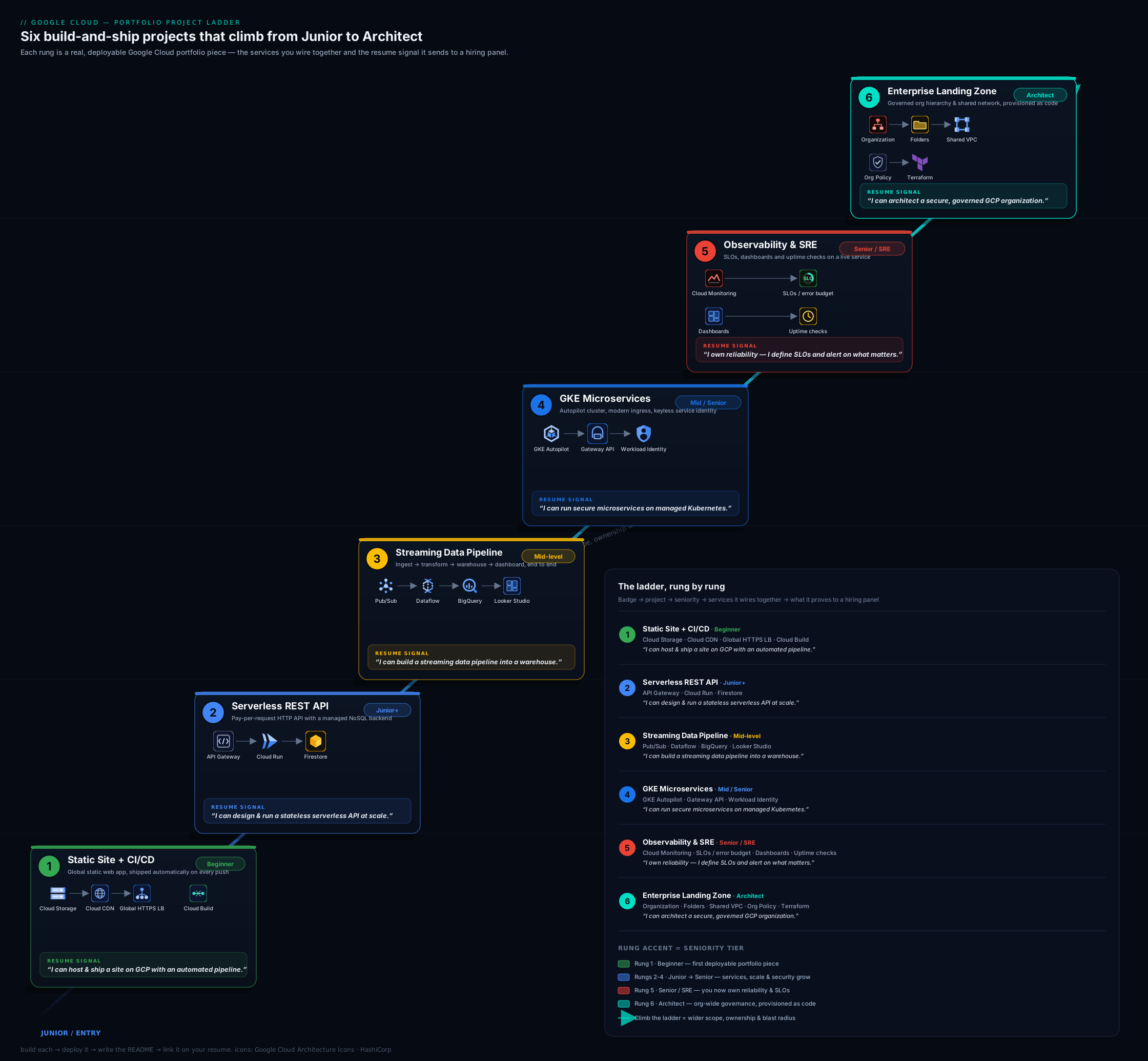
The diagram above shows the six projects as ascending rungs, each annotated with its headline Google Cloud services, the role tier it targets, and the certification it maps to — so you can see at a glance how capability and seniority compound as you climb.
The GitHub presentation standard
A brilliant project hidden in a messy repo is a wasted project. Reviewers spend seconds, not minutes, on each repo; presentation is not vanity, it is the medium through which your work is read. Apply this standard to every project above.
The repository. Give it a clear, descriptive name (gcp-serverless-url-shortener, not project2). Pin your best three-to-six repos on your GitHub profile so they appear first. Add topics/tags (gcp, terraform, cloud-run) so the repo is discoverable. Include a permissive licence (MIT is fine) — its absence quietly signals “not really finished.” Ensure the default branch is clean and the repo has no committed secrets (more on this below).
The README is the product. It is the first — often only — thing read. Structure it: a one-line description and an architecture diagram at the very top; then What it does, Architecture (the diagram plus a paragraph), How to deploy (the exact commands), How to tear down (terraform destroy or cleanup steps), Cost (a Free-Tier / $300-credit note or a rough monthly estimate), and Key decisions / trade-offs (this section is what wins technical interviews — explain why a load balancer over a bucket website, why Firestore, why Autopilot over Standard). A reviewer who reads only the README should understand the whole project.
Architecture diagrams. Every repo gets one, embedded in the README. Use a consistent tool (draw.io/diagrams.net, Excalidraw, or the official Google Cloud architecture icons) and commit the source so it is editable. A clear diagram instantly communicates seniority; its absence reads as “I can’t see the whole system.”
Commit history. Make commits atomic and meaningfully messaged (“Add Cloud CDN and managed certificate to the load balancer,” not “stuff” or “fix”). A clean history shows how you work and is itself reviewed. Avoid one giant “initial commit” dump where possible — incremental, descriptive commits read as professional.
Infrastructure as Code, always. Every project is defined in Terraform and destroyable with one command. Console click-ops in a portfolio reads as junior; reproducible IaC reads as production-ready. Bonus signals: a CI badge in the README, a Makefile or task runner for common commands, and a short CONTRIBUTING/architecture-decision note.
The table below is the at-a-glance checklist to run against each repo before you pin it.
| Element | The standard | Why a reviewer cares |
|---|---|---|
| Repo name | Descriptive, hyphenated | Signals intent at a glance |
| Pinned | Best 3–6 on profile | Controls first impression |
| README top | One-liner + diagram | Whole project understood in seconds |
| Deploy/teardown | Exact commands, both ways | Proves it actually runs — and that you clean up |
| Cost note | Free-Tier / $300-credit / estimate | Cost-awareness is a hiring signal |
| Key decisions | Why each choice | Wins the technical interview |
| Diagram | Embedded, source committed | Communicates system thinking |
| Commits | Atomic, well-messaged | Shows how you work |
| IaC | One-command create/destroy | Reads as production-ready |
| Secrets | None committed; Workload Identity / Secret Manager | Screens out a common security failure |
Hands-on lab: ship Project 1 and pin it
This lab gets the first rung done end to end on the Free Tier and the $300 trial credit, so you finish with a real, pinned repository. Set your project once: gcloud config set project <PROJECT_ID>.
Step 1 — scaffold the repo. Create a GitHub repo gcp-static-site-cicd, clone it, and add a minimal index.html. Create an infra/ directory for Terraform.
Step 2 — write the Terraform and create the backend bucket + CDN load balancer. In infra/, define a Cloud Storage backend bucket (uniform bucket-level access on), a backend-bucket resource with Cloud CDN enabled, a URL map, a target HTTPS proxy with a Google-managed certificate, and a global forwarding rule on a reserved global IP. Run:
cd infra
terraform init
terraform apply
Expected: Terraform prints the load balancer’s global IP address as an output (e.g. 34.x.x.x). For a first pass without a custom domain, you can also validate the bucket-and-CDN path quickly with the CLI:
gcloud storage buckets create gs://<BUCKET> --uniform-bucket-level-access --location=US
gcloud storage cp index.html gs://<BUCKET>/
gcloud compute backend-buckets create site-backend --gcs-bucket-name=<BUCKET> --enable-cdn
Step 3 — first manual deploy (to validate). Sync the site and confirm it serves through the load balancer over HTTPS:
gcloud storage rsync . gs://<BUCKET> --recursive --exclude="infra/.*|\.git/.*"
curl -I https://<your-domain-or-LB-IP>/
Expected: HTTP/2 200, with a via/cache header from Google’s front end once the certificate is ACTIVE (a managed certificate can take up to ~15–60 minutes to provision — check gcloud compute ssl-certificates describe). Validation: the page is reachable through the load balancer’s anycast IP from anywhere, and the bucket itself is not public (uniform bucket-level access is on and no allUsers binding exists).
Step 4 — wire CI/CD with Workload Identity Federation (no exported keys). Create a Workload Identity Pool and a GitHub provider, and a deploy service account that the pool can impersonate, scoped to your repo (and the main branch). Add .github/workflows/deploy.yml that, on push to main, authenticates via google-github-actions/auth (Workload Identity, no JSON key), builds the site, runs gcloud storage rsync to the bucket, and runs gcloud compute url-maps invalidate-cdn-cache <URL_MAP> --path="/*".
Step 5 — prove the pipeline. Edit index.html, commit, and push to main. Watch the Actions run go green; refresh the site URL and confirm the change is live. Screenshot the green run for your README.
Step 6 — document and pin. Write the README to the presentation standard above (diagram, deploy, teardown, cost, key decisions). Pin the repo on your profile.
Cleanup / cost note. Run terraform destroy to remove the load balancer, backend bucket, certificate, and IP (and gcloud compute backend-buckets delete / gcloud storage rm -r gs://<BUCKET> if you used the CLI quick-path). Almost everything here is Free-Tier eligible (Cloud Storage’s 5 GB-region free allotment, Cloud CDN cache egress within free limits, Google-managed certificates are free). The reserved global IP is free while attached to a forwarding rule but billed if you leave it reserved and unused, and Cloud DNS is about ₹40 / USD 0.50 per managed zone per month if you add a custom domain — so destroy what you do not need.
Common mistakes & troubleshooting
| Symptom | Likely cause | Fix |
|---|---|---|
| Site returns 404/SSL error for the first hour | Google-managed certificate not yet ACTIVE, or DNS A record not pointing at the LB IP |
Wait for provisioning; confirm the A record targets the LB’s anycast IP; check gcloud compute ssl-certificates describe |
| Stale content after a deploy | CDN still serving the cached object | Run gcloud compute url-maps invalidate-cdn-cache --path="/*" in the pipeline; set sensible cache-control |
| GitHub Actions can’t authenticate to GCP | Workload Identity pool/provider attribute condition doesn’t match the repo/branch, or wrong service account | Scope the provider’s attribute condition to assertion.repository == 'owner/name'; grant the SA the Workload Identity User role |
| Cloud Run API returns 403 to API Gateway | Service requires auth but the gateway’s service account lacks run.invoker |
Grant the gateway service account roles/run.invoker on the service; keep allUsers off |
GKE pods CrashLoopBackOff reaching Cloud SQL |
Workload Identity binding missing, or Cloud SQL on private IP unreachable | Bind the K8s SA to a Google SA with the Cloud SQL Client role; use the connector/Auth Proxy; check VPC/firewall |
| Dataflow job costs more than expected | Job left running, or over-provisioned workers | Drain or cancel the streaming job when idle; cap maxNumWorkers; use the right machine type |
| BigQuery queries scan the whole table | No partitioning/clustering, or SELECT * |
Partition by date, cluster on the filter column, select only needed columns; check the bytes-scanned estimate |
| Surprise bill after a project | Cloud SQL, GKE Standard, Cloud NAT, or a reserved IP left running | terraform destroy; prefer Autopilot/scale-to-zero; set a Budget alert as a backstop |
| Secrets committed to the repo | Credentials in env files, key JSON, or the image | Use Workload Identity / Secret Manager; run gitleaks in CI; rotate anything exposed |
Best practices
- Everything as code, destroyable in one command. No console click-ops in a portfolio; IaC plus
terraform destroyis the standard. - Least privilege everywhere. Scope IAM to specific resources and predefined (or custom) roles; one service account per workload. Basic/primitive roles (Owner/Editor) in a portfolio are a red flag.
- Keyless by default. Use Workload Identity Federation for CI and Workload Identity for GKE; exported service-account key files are the thing reviewers least want to see.
- Document the why, not just the what. The “Key decisions / trade-offs” section is where you win the technical interview.
- Stay on the Free Tier / $300 credit and tear down. Cost discipline is itself a hiring signal; screenshot, document, destroy. Prefer scale-to-zero (Cloud Run) and Autopilot over always-on resources.
- Make it reproducible. A reviewer should be able to
terraform applyyour repo and get a working system. - Quality over quantity. Three excellent, finished, well-documented projects beat six abandoned ones every time.
- Tell a coherent story. Pin the rungs that match your target role so your profile reads as a deliberate progression, not a grab-bag.
Security notes
A portfolio is also a security exhibit — reviewers notice both good and bad habits.
- Never commit secrets. No service-account key JSON, DB passwords, or tokens in the repo or its history. Add a
gitleaksscan to CI. If something leaked, rotate it immediately — Git history is forever, and scrapers find exposed keys within minutes. - Prefer Workload Identity over exported keys for CI/CD and GKE. Short-lived, federated credentials with no key file to leak is the modern, secure pattern and a positive signal in itself.
- Keep origins and databases private. Cloud Storage buckets behind the load balancer with uniform bucket-level access and no
allUsers; Cloud SQL on private IP reachable only from the workload. - Encrypt by default and consider CMEK. Everything is encrypted at rest by Google; demonstrating CMEK (Cloud KMS) on a sensitive store is a senior signal, and it is largely free to show.
- Apply least privilege and guardrails. Per-workload service accounts in the app projects; Org Policy constraints and aggregated logging in project 6 demonstrate you think about an organisation’s security posture, not just one app’s.
- Don’t expose real personal data. Use synthetic data in demos; a portfolio leaking real PII is the worst possible signal.
Interview & exam questions
Q1. For the static site, why a global external Application Load Balancer with Cloud CDN instead of just a public bucket website? A bucket website serves HTTP only (no managed HTTPS), from one location, with no CDN and no clean upgrade path. Fronting a private backend bucket with a global external Application Load Balancer gives you a global anycast IP, managed TLS via a Google-managed certificate, Cloud CDN edge caching, URL maps for routing, and a path to add Cloud Armor/WAF later — while keeping the bucket private. It is the more production-shaped, more defensible choice.
Q2. In your CI/CD pipeline, why Workload Identity Federation instead of a service-account key in GitHub secrets? An exported key is a long-lived, standing liability — if leaked it grants persistent access. Workload Identity Federation lets GitHub Actions exchange its OIDC token for short-lived Google credentials by impersonating a service account, with an attribute condition scoped to your specific repo and branch. There is no key to leak, credentials expire automatically, and many Org Policies now disable key creation outright.
Q3. Cloud Run vs GKE — when would you reach for each, and why did project 2 use Cloud Run but project 4 use GKE? Cloud Run is the fastest path for a stateless container or API: it scales to zero, you pay per request/CPU, and there is no cluster to operate — ideal for project 2’s serverless API. GKE (Autopilot) is the right call when you need Kubernetes primitives — multiple cooperating services, NetworkPolicies, service mesh, DaemonSets, or fine-grained scheduling — which project 4 demonstrates. The trade-off is operational surface: GKE gives control and portability at the cost of more to run; Cloud Run gives simplicity at the cost of the Kubernetes ecosystem.
Q4. GKE Autopilot vs Standard — what does Autopilot change? Autopilot is a mode where Google manages the nodes: provisioning, bin-packing, security hardening, and upgrades. You deploy pods and pay per pod (based on requested CPU/memory) rather than per node, so there is no idle-node cost and a smaller attack/ops surface. Standard gives you node-level control (custom machine types, DaemonSets, GPUs in more configurations) at the cost of managing the node pools yourself. Autopilot is the sensible default for most workloads and the better cost story in a portfolio.
Q5. Why put Pub/Sub in front of Dataflow in the data pipeline, and what delivery guarantee must you design for? Pub/Sub decouples producers from the processing job: it buffers bursts (producers never wait on the consumer), provides durable retention, and lets the pipeline scale and retry independently. Pub/Sub is at-least-once, so the Dataflow pipeline must be idempotent / dedupe-aware (e.g. on a message attribute or business key) and handle late data via windowing — otherwise duplicates corrupt the warehouse.
Q6. How did you make the BigQuery sink cheap and fast?
By partitioning the table (typically by ingestion or event date) so queries prune to the relevant days, and clustering on the highest-cardinality filter column so blocks are pruned further — together cutting bytes scanned, which is what BigQuery on-demand bills for. Plus selecting only needed columns (never SELECT *) and using the Storage Write API for efficient streaming inserts.
Q7. What is Workload Identity (for GKE), and why is it better than a key file in the pod? Workload Identity binds a Kubernetes service account to a Google service account so pods obtain short-lived Google credentials automatically from the metadata server — no key file mounted, nothing to rotate or leak. It is the keyless, least-privilege way for pods to call Google APIs (Cloud SQL, Secret Manager, Pub/Sub), and it is the pattern an interviewer expects you to name.
Q8. What is an SLO, an SLI, and an error budget, and how did you implement them on GCP? An SLI is the measured indicator (e.g. % of requests succeeding under 300 ms); the SLO is the target (e.g. 99.5% over 28 days); the error budget is the allowed shortfall (0.5%). I defined the SLO in Cloud Monitoring’s native SLO tooling, which tracks the budget, and created multi-window, multi-burn-rate alerting — a fast-burn policy that pages on rapid budget consumption and a slow-burn policy that opens a ticket — so alerts reflect real degradation, not single spikes.
Q9. In the landing zone, do Org Policies grant permissions? No. Org Policies are preventive guardrails (constraints) that bound what can be configured in a part of the hierarchy — for example, restricting locations, disabling service-account key creation, or blocking external IPs. They grant nothing; access still comes from IAM allow policies. Effective behaviour is “IAM says who can do what” intersected with “Org Policy says what is even allowed.”
Q10. Why is Shared VPC a senior-signalling choice, and what does it separate? Shared VPC lets a host project own the network (VPC, subnets, Cloud NAT, firewall) and share it to service projects that run workloads. This separates network ownership (a central platform/networking team) from workload ownership (application teams), centralises egress and security controls, and avoids a sprawl of peered per-team VPCs. Demonstrating it shows you think at platform scale, not single-project scale.
Q11. A reviewer opens your repo. What are the first three things you want them to see, and why? (1) The README’s one-line description and architecture diagram at the top — instant comprehension of what and how. (2) A clear deploy and teardown section — proof it actually runs and that I clean up. (3) A “Key decisions / trade-offs” section — evidence I made reasoned choices (LB-over-bucket, Autopilot-over-Standard, keyless identity), which is what the technical interview probes.
Q12. How do you keep these projects from costing money?
Stay on the Free Tier and the $300 trial credit, prefer scale-to-zero (Cloud Run) and Autopilot (per-pod billing) over always-on resources, drain/cancel Dataflow jobs when idle, partition/cluster BigQuery to cut scanned bytes, avoid leaving Cloud SQL, GKE Standard clusters, Cloud NAT, or reserved-but-unused IPs running, define everything in IaC so I can terraform destroy after capturing screenshots, and set a Budget alert as a backstop.
Quick check
- For the static-site rung, what keeps the Cloud Storage origin private while still serving globally over HTTPS with a CDN?
- What is the keyless mechanism that lets GitHub Actions deploy to GCP without an exported service-account key?
- What delivery guarantee does Pub/Sub provide, and what property must your Dataflow pipeline therefore have?
- Do Org Policy constraints grant IAM permissions?
- In project 4, what lets a GKE pod call Cloud SQL and Secret Manager without a key file?
Answers
- A global external Application Load Balancer with Cloud CDN in front of a private backend bucket (uniform bucket-level access on, no
allUsers), terminating TLS with a Google-managed certificate. - Workload Identity Federation — GitHub’s OIDC token is exchanged for short-lived Google credentials by impersonating a service account, scoped to the repo/branch.
- At-least-once delivery; therefore the pipeline must be idempotent / dedupe-aware (and handle late data via windowing).
- No. Org Policies are preventive guardrails that bound what can be configured; access comes from IAM allow policies. Effective = IAM ∩ Org Policy.
- Workload Identity (for GKE) — the Kubernetes service account is bound to a Google service account, so the pod gets short-lived credentials with no key file.
Exercise
Pick the two rungs that match the role you are currently targeting (use the ladder table) and take them to the full GitHub presentation standard: descriptive repo name, README with diagram/deploy/teardown/cost/key-decisions, IaC with a one-command destroy, keyless auth (Workload Identity), atomic commits, a gitleaks scan in CI, and the repo pinned to your profile. Then write the quantified résumé bullet for each, adapting the templates above with your own numbers (latency, cost, bytes-scanned reduction, deploy time). Finally, draft a two-sentence answer to “walk me through this project” for each — out loud, timed to under 90 seconds. If you can build it, present it, quantify it, and narrate it, that rung is interview-ready.
Certification mapping
This lesson is portfolio evidence across the Google Cloud certification ladder rather than mapped to a single exam:
- Cloud Digital Leader (foundational) — Project 1 demonstrates core services, the global-infrastructure/CDN model, and cost-awareness.
- Associate Cloud Engineer (ACE) — Projects 1–4 cover the operational breadth: Cloud Storage + load balancing, Cloud Run + Firestore + API Gateway, Pub/Sub + Dataflow + BigQuery, and GKE.
- Professional Cloud Developer — Projects 2 and 4 evidence Cloud Run, Firestore, containers, and keyless identity.
- Professional Data Engineer (PDE) — Project 3 (Pub/Sub → Dataflow → BigQuery → Looker Studio, partitioning/clustering, windowing) is the headline data-tier signal.
- Professional Cloud DevOps Engineer — Project 5 (SLOs, burn-rate alerting, dashboards, tracing) and the CI/CD across all projects.
- Professional Cloud Architect (PCA) and Professional Cloud Security Engineer — Project 6 (organisation hierarchy, Org Policy, Shared VPC, aggregated logging) is the senior architecture/security capstone.
Build the projects that match the certifications you are pursuing; the portfolio and the exam reinforce each other.
Glossary
- Portfolio ladder — a deliberately ordered set of projects where each rung adds a capability expected at the next seniority tier.
- Infrastructure as Code (IaC) — defining cloud resources in version-controlled files (Terraform) so they are reproducible and destroyable in one command.
- CI/CD — Continuous Integration / Continuous Delivery: automated build, test, and deploy on every commit.
- Workload Identity Federation — keyless federation that lets an external workload (e.g. GitHub Actions) impersonate a Google service account using short-lived credentials, with no exported key.
- Workload Identity (for GKE) — binds a Kubernetes service account to a Google service account so pods call Google APIs without a key file.
- Backend bucket — a Cloud Storage bucket attached as a backend to an external Application Load Balancer, enabling Cloud CDN and a private origin.
- Cloud CDN — Google’s edge cache, enabled on a load balancer backend to serve cached content close to users.
- GKE Autopilot — a GKE mode where Google manages the nodes and you pay per pod, with hardened defaults and no idle-node cost.
- Gateway API — the modern, role-oriented Kubernetes ingress/load-balancing API that supersedes Ingress on GKE.
- Idempotency — the property that performing an operation multiple times has the same effect as once; essential under at-least-once delivery.
- SLI / SLO / error budget — the measured reliability indicator, its target, and the allowed shortfall before you must slow risky changes.
- Burn-rate alerting — multi-window alerting on how fast the error budget is being consumed, so alerts reflect real degradation, not single spikes.
- Org Policy — a preventive, inherited constraint on the resource hierarchy that bounds what can be configured; it grants nothing.
- Shared VPC — a model where a host project owns the network and shares it to service projects, separating network from workload ownership.
- Landing zone — a governed Google Cloud foundation (organisation, folders, projects, identity, networking, logging, guardrails) that workloads “land” in.
Next steps
You now have a build plan and a presentation standard for a portfolio that gets you hired. Next, sharpen the exam side of the story with the Google Cloud Certification Prep Kit: Digital Leader, ACE, PCA, PDE & Security Engineer — domain checklists, scenario practice questions, and cheat sheets that pair with these projects. Then take the most senior rung all the way to production depth in the Google Cloud Capstone: Build an Enterprise Landing Zone + 3-Tier App, which turns project 6 into a single, pillar-by-pillar reference build against the Architecture Framework. Together, the portfolio, the certifications, and the capstone make the complete case: you can recognise the right answer, and you can build it.