A mid-sized further-education college — the kind that runs Moodle for 18,000 students across three campuses — has a problem every August. Enrollment opens, every applicant and returning student logs in within the same fortnight, and the single virtual machine that has hosted the learning portal for six years falls over under the load. Last year the registrar’s office took 2,000 phone calls in a week because students could not submit coursework before a deadline, and the IT team spent three nights restarting a server by hand. The principal’s brief to the new platform engineer is blunt and unglamorous: “make the portal stay up in August, stop keeping the database password in a config file, and do it without hiring a team I cannot afford.” This is not a machine-learning moonshot. It is the most common architecture in the world — a three-tier web application — and getting the foundational version right on Google Cloud is what turns three sleepless nights into a non-event. This article is that reference build.
The three tiers are a separation of concerns that has survived four decades because it keeps working. The presentation/web tier takes HTTP requests and renders responses. The application/logic tier runs the business rules — in a small Moodle-style app these two often live in the same process, and we will treat the web+app tier as one horizontally scalable layer. The data tier is the database of record, where the durable truth lives. The whole point of separating them is that each tier fails, scales, and gets secured on its own terms: you add web servers when traffic spikes without touching the database, and you harden the database behind a private network without slowing down the web servers.
Why not just a bigger single server
The college’s instinct — and the honest starting point for most teams — is “the VM is too small, buy a bigger VM.” Naming why that fails matters, because someone will propose it in every planning meeting.
A single large VM is a single point of failure: when it reboots for a kernel patch, or its zone has an incident, the entire portal is down, and August is exactly when you cannot afford that. It scales only vertically — you can buy a bigger machine right up until you hit the largest machine, and you are still paying for that peak capacity in February when nobody is enrolling. It couples the tiers: a runaway web process can starve the database of CPU on the same box. And it tends to keep secrets on disk — the database password ends up in a config.php, which is the exact thing the principal asked to stop, and the exact thing that leaks when a backup or a repo goes somewhere it should not.
The three-tier pattern on GCP fixes all four: a load balancer spreads traffic across many small, identical, replaceable web instances in multiple zones; the web tier scales horizontally up in August and back down in February so you pay for what you use; the data tier is a separate managed service with its own failover; and the database credential lives in Secret Manager, never on a web server’s disk.
Architecture overview
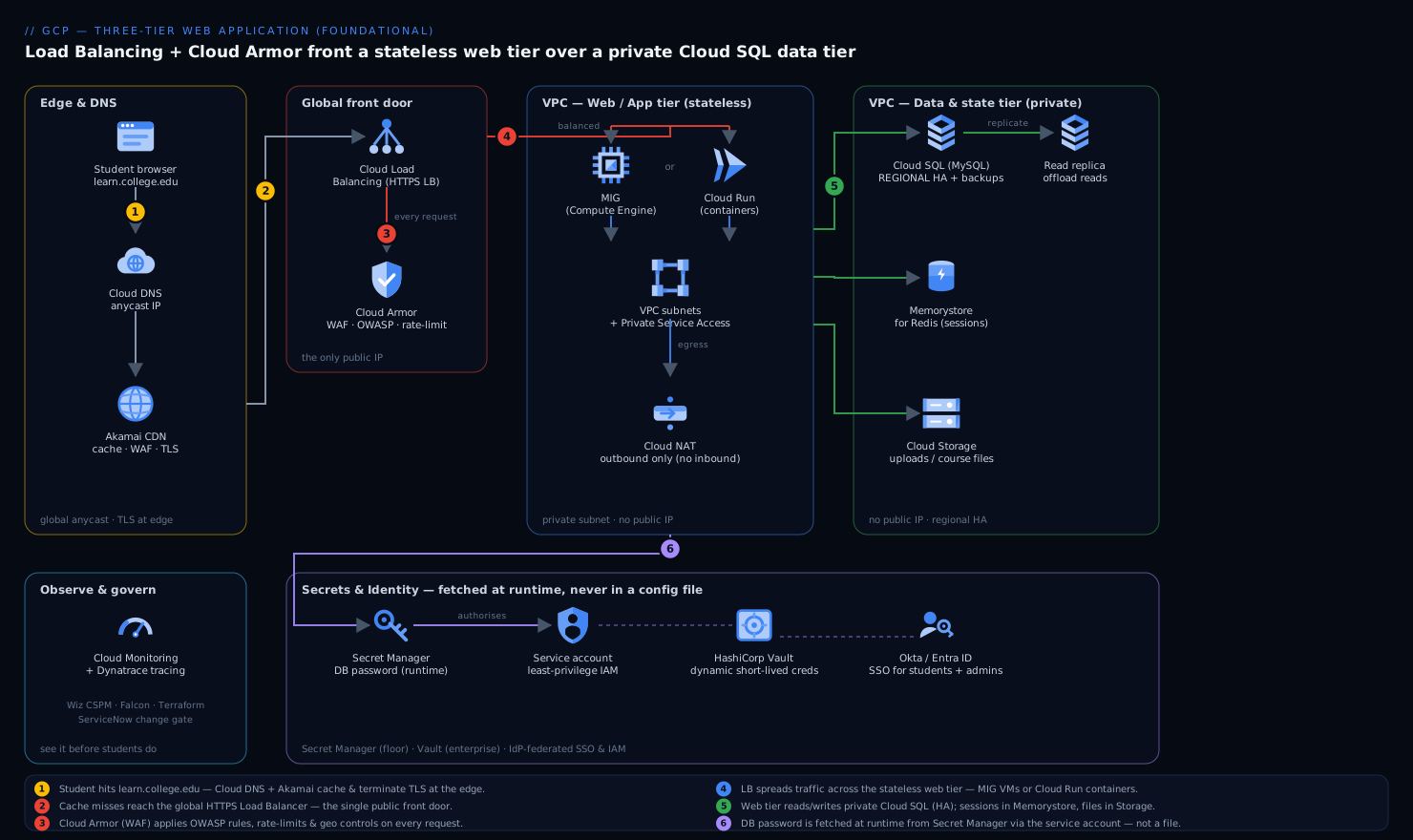
The request follows one clean path from a student’s browser down to the database and back. Trace it once and the whole architecture makes sense.
-
Edge & DNS. A student opens
learn.college.edu. Cloud DNS resolves it to a single global anycast IP that fronts the application. For this college, Akamai sits in front as the CDN and edge: it caches the static course assets (PDFs, lecture videos, CSS/JS) close to students so those bytes never travel to GCP at all, terminates TLS at the edge, and absorbs a first layer of volumetric and bot traffic — which keeps the August spike of cacheable requests off the origin entirely. -
Global HTTPS Load Balancer + WAF. Requests that are not served from cache reach Cloud Load Balancing (the global external Application Load Balancer). It terminates HTTPS with a Google-managed certificate, and every request first passes through Cloud Armor, GCP’s WAF and DDoS shield, attached as a security policy on the backend. Cloud Armor runs preconfigured OWASP rules (SQL injection, XSS), per-IP rate limiting to stop a single client hammering the login endpoint, and geo or IP allow/deny lists. This is the single front door — one place to enforce edge security for every request that reaches the app.
-
Web/App tier. The load balancer distributes traffic across the web tier, which is where the two valid foundational choices diverge (covered in the next section): either a managed instance group (MIG) of identical Compute Engine VMs running Moodle behind the LB, or Cloud Run running Moodle as a container that scales to zero. Either way, the web tier is stateless — it holds no durable data — so any instance can serve any request and instances are freely added or destroyed.
-
Data tier. The web tier reads and writes to Cloud SQL (MySQL for Moodle), running as a regional, highly-available instance with a standby in a second zone and automated backups. Critically, Cloud SQL has no public IP: the web tier reaches it over Private Service Access on the VPC’s private subnet, so the database is never exposed to the internet.
-
Secrets, not config files. Before the web tier can connect to Cloud SQL, it needs the DB password. It does not read a file. It fetches the credential at runtime from Secret Manager, authorized by the instance’s or service’s service account — no password is baked into an image, a container, or a repo. For the college’s heavier compliance and rotation needs (and to manage non-GCP secrets like the Akamai API token), HashiCorp Vault can sit alongside as the central secrets broker with dynamic, short-lived database credentials and a full audit trail; Secret Manager is the GCP-native floor, Vault is the enterprise ceiling.
-
State that is not the database. User sessions and Moodle’s cache go to Memorystore for Redis so that a student’s logged-in session survives any single web instance being replaced — the web tier stays genuinely stateless. Uploaded assignments and course files go to a Cloud Storage bucket, not a VM disk, so files persist independently of any instance and can be served via Akamai.
The defining property to internalize: the only thing exposed to the internet is the load balancer’s IP behind Cloud Armor. The web instances have no public IPs, the database has no public IP, and everything talks over a private VPC. That single fact is what makes this defensible rather than just available.
The one real decision: MIG VMs vs. Cloud Run
For a foundational three-tier app on GCP the web tier has two legitimate answers, and a Junior engineer should be able to argue both. They are not equally good for every case; the table is the honest comparison.
| Dimension | Managed Instance Group (Compute Engine) | Cloud Run (containers) |
|---|---|---|
| Mental model | “Many identical VMs behind the LB” | “Run my container, you handle the machines” |
| Scaling | Autoscaler adds/removes VMs on CPU/LB load (seconds–minutes) | Scales per-request, to zero when idle (sub-second cold start tax) |
| Idle cost | You pay for the minimum running VMs 24/7 | ~Zero when no traffic — ideal for nights/off-season |
| Fit for Moodle | Strong: Moodle is a long-running PHP app, easy to lift onto a VM image | Strong if you containerize Moodle and keep it stateless |
| Ops burden | You own the OS: patching, the base image, OS-level agents | No OS to manage; Google patches the platform |
| Spiky August load | Pre-warm + autoscale; predictable | Effortless burst, but watch DB connection storms on scale-up |
| When it wins | Steady baseline traffic, OS-level control, existing VM images | Bursty/seasonal traffic, small team, “no servers to babysit” |
For this college the honest recommendation is Cloud Run if they are willing to containerize Moodle: the workload is intensely seasonal, scale-to-zero saves real money in the quiet months, and “no OS to patch” is exactly what a one-person platform team needs. If they want to lift the existing VM image with minimal change and value OS-level control, the MIG is a perfectly correct foundational choice. Both sit behind the same Load Balancer + Cloud Armor + Cloud SQL + Secret Manager skeleton — that skeleton is the architecture; the web-tier engine is swappable.
One trap with either choice: when the web tier scales out fast, every new instance opens database connections, and Cloud SQL has a connection ceiling. Put a connection pooler (the Cloud SQL Auth Proxy with pooling, or ProxySQL) in the path so an autoscaling event does not become a database connection storm — the failure that turns a traffic spike into an outage.
Networking and the VPC, concretely
The network is where Junior builds most often go wrong, so be deliberate. A single VPC with purpose-built subnets is enough:
- A subnet for the web tier (the MIG VMs, or the Serverless VPC connector that lets Cloud Run reach private resources).
- A range reserved for Private Service Access, which is how Cloud SQL gets a private IP inside your VPC.
- Cloud NAT so that web instances with no external IP can still reach the internet outbound (OS updates, calling the Akamai or Okta APIs) without being reachable inbound.
Firewall rules express the tiering as policy, not hope: allow the Load Balancer’s health-check and proxy ranges into the web tier on 443/8080; allow the web tier to reach Cloud SQL’s private IP on 3306; deny everything else, and especially never open 3306 or 22 to 0.0.0.0/0. A minimal Terraform sketch of the data tier shows the intent — private IP only, HA, backups, deletion protection:
resource "google_sql_database_instance" "moodle" {
  name             = "moodle-prod"
  database_version = "MYSQL_8_0"
  region           = "europe-west2"

  settings {
    tier              = "db-custom-4-15360"
    availability_type = "REGIONAL"          # HA standby in a second zone
    disk_autoresize   = true
    backup_configuration {
      enabled                        = true
      binary_log_enabled             = true # enables point-in-time recovery
      transaction_log_retention_days = 7
    }
    ip_configuration {
      ipv4_enabled    = false               # NO public IP
      private_network = google_compute_network.vpc.id
    }
  }
  deletion_protection = true                # don't let a typo drop prod
}
And the credential the app uses to connect is created in Secret Manager, never written to an image:
echo -n "$DB_PASSWORD" | gcloud secrets create moodle-db-pass --data-file=-
# the web tier's service account is granted read access, and nothing else:
gcloud secrets add-iam-policy-binding moodle-db-pass \
  --member="serviceAccount:moodle-web@PROJECT.iam.gserviceaccount.com" \
  --role="roles/secretmanager.secretAccessor"
Identity: students, and the people who run it
There are two distinct identity problems and it is worth separating them.
Students authenticate to Moodle itself, typically against the college’s existing directory. If the college standardizes workforce and student SSO on Okta (or Microsoft Entra ID), Moodle federates to it over SAML/OIDC so a student has one login across the portal and other campus systems, with MFA enforced centrally — and crucially, account de-provisioning is one action in the IdP when a student leaves.
The engineers and admins who operate the GCP project authenticate to Google Cloud, and their human identities should come from the same IdP: federate Okta/Entra → Google Cloud so that access to the project is granted to IdP groups, governed by least-privilege IAM roles, and revoked centrally. No standing personal gcloud keys; no shared admin password. The web tier and Cloud Run service each run as a dedicated service account with the narrowest roles that work — read this secret, connect to this Cloud SQL instance, write to this bucket — and nothing more.
Security posture
For a foundational app the security story is layered and mostly built from defaults done correctly:
- Edge: Cloud Armor (OWASP rules, rate limiting, geo controls) in front of the LB; Akamai adds an outer CDN/WAF and TLS-at-edge layer.
- Network: no public IPs on web or data tiers, private VPC, deny-by-default firewalls, Cloud NAT for controlled egress.
- Identity: IdP-federated SSO for humans (Okta/Entra), per-tier service accounts, least-privilege IAM.
- Secrets: Secret Manager as the floor, HashiCorp Vault for dynamic short-lived DB creds and audit when the college’s compliance grows.
- Posture & runtime (the enterprise layer): Wiz runs agentless cloud-security-posture scanning across the GCP project — it flags the moment a bucket turns public, a firewall rule widens, or the Cloud SQL instance drifts toward a public IP, and Wiz Code scans the Terraform in the repo so a misconfiguration is caught before it is applied, not after. CrowdStrike Falcon sensors on the MIG VMs give runtime threat detection and feed the college’s security alerts (on Cloud Run, where there is no OS to instrument, you lean on platform controls and Wiz instead). When Wiz or Falcon raises a finding, it auto-opens a ServiceNow incident so there is a tracked ticket and an owner, not just a log line.
The principal’s specific ask — “stop keeping the database password in a config file” — is satisfied the moment the credential moves to Secret Manager and the web tier reads it via its service account. That is the single highest-value security change in the whole project.
Cost
A three-tier app’s bill is dominated by what runs 24/7, so the architecture choice is also a cost choice.
| Lever | Mechanism | Typical effect |
|---|---|---|
| Scale to zero | Cloud Run for the web tier idles to ~0 in the off-season | Largest saving for seasonal traffic like enrollment |
| Right-size + autoscale | MIG min instances low; scale out only in August | Avoid paying February capacity all year |
| Cache at the edge | Akamai/CDN serves static course assets | Cuts origin egress and compute on cacheable load |
| Committed-use discounts | 1-year CUD on the steady Cloud SQL + baseline web | ~Up to ~55% off the always-on tier |
| Storage tiering | Old course archives to Nearline/Coldline buckets | Cheap long-term retention of past terms |
For the college the big lever is obvious: traffic is near zero for months, so scale-to-zero compute plus edge caching is the difference between a bill sized for August and a bill sized for the actual usage curve. The one cost you should not trim is the regional HA Cloud SQL — paying for a standby is cheap insurance against the exact outage that started this project.
Scaling, failure modes, and reliability
Scaling is per-tier by design. The web tier scales horizontally — the autoscaler (MIG) or per-request scaling (Cloud Run) adds capacity on load and removes it after — and because the tier is stateless, this is safe. The data tier scales differently and more slowly: read replicas offload read-heavy traffic (Moodle dashboards, course listings) from the primary, and you scale the primary up (a bigger tier) rather than out. Recognizing that the database does not scale like the web tier — and protecting it with a connection pooler and read replicas — is the single most important scaling lesson in this pattern.
Failure modes to name before they page you at 2 a.m.:
- A zone incident. Mitigated by spreading the web tier across multiple zones and running Cloud SQL as REGIONAL (automatic failover to the standby in seconds). This is why HA is non-negotiable.
- A database connection storm on scale-up. Many new web instances open connections at once and exhaust Cloud SQL’s limit. Mitigated by the connection pooler.
- A traffic or attack spike. Mitigated at the edge by Cloud Armor rate limiting and Akamai absorption before requests reach the LB.
- A bad deploy. Mitigated by rolling updates (MIG) or gradual traffic splitting / instant rollback (Cloud Run), so a broken release reaches a fraction of students and is reverted in one command.
- Accidental data loss. Mitigated by automated backups with point-in-time recovery and
deletion_protectionon the instance.
Reliability targets (RTO/RPO). For this college a pragmatic, affordable goal is RTO ~5 minutes, RPO ~minutes: regional Cloud SQL fails over automatically within the region, point-in-time recovery bounds data loss to minutes, and the stateless web tier is recreated from its image/container in moments. True multi-region (a cross-region read replica promotable on a regional outage) is the next maturity step — worth naming, not worth buying for a single college on day one.
Observability
You cannot keep the portal up in August if you cannot see it. Cloud Monitoring and Cloud Logging are the native floor: LB latency and 5xx rates, web-tier CPU and instance count, Cloud SQL connection count and replication lag, and Cloud Armor blocked-request counts — with alerting policies that page before students do. For a richer operating picture the college can run Dynatrace (or Datadog) across the stack for distributed tracing of a request from edge to database, automatic dependency mapping, and anomaly detection that flags a latency or error regression on its own. The metrics that actually matter here are p95 page latency, login success rate, Cloud SQL connection saturation, and cache hit-rate at Akamai — the four numbers that predict an August outage.
Build and deploy
Treat the whole thing as code so it is reproducible and reviewable. Terraform provisions the VPC, subnets, firewall rules, Load Balancer, Cloud Armor policy, MIG or Cloud Run service, Cloud SQL, Memorystore, the bucket, and the IAM bindings — the network and security are deliverables, not afterthoughts, and Wiz Code scans those Terraform plans in the pull request. Ansible can handle OS-level configuration on the MIG image (installing the PHP runtime, the Moodle app, OS agents) if you go the VM route. The application pipeline runs in GitHub Actions or Jenkins: build the Moodle container or VM image, run tests, and deploy — authenticating to GCP via Workload Identity Federation so there is no stored service-account key to leak. For teams that want declarative, auditable rollouts, Argo CD can drive deployments from Git as the source of truth. Whatever the tool, the principle is the same: no human clicks in the console for a production change, and every change is a reviewable, revertible commit. New environment changes pass a ServiceNow change approval before they go live, giving the college a documented gate.
Explicit tradeoffs
Accept these, or build the single VM and own its risks. The three-tier pattern adds more moving parts than one server — a load balancer, a separate managed database, a VPC with private networking, a secrets store, a cache — and each is one more thing to understand and provision. The private networking that makes it secure (no public IPs, Cloud NAT for egress, Private Service Access for Cloud SQL) is exactly where Junior builds get stuck, and a missing firewall rule or NAT looks like a silent hang, not a clear error. Splitting state out to Memorystore and Cloud Storage to keep the web tier stateless is discipline you must hold — the moment someone writes a session to a local disk, scale-to-zero and rolling updates start losing user data.
When the simpler thing is genuinely right: for a 50-student internal tool with no traffic spikes and no compliance pressure, a single well-backed-up VM (or a managed App Engine / Cloud Run service with a small Cloud SQL and nothing else) is the correct, cheaper answer — do not build a global load balancer for it. And at the other end, when the college grows to multi-region resilience, microservices, or GKE-based container orchestration, this foundational pattern is the base camp you grow from, not a dead end. The three tiers, the WAF at the edge, the private data tier, and the secret-not-in-a-file rule all carry forward unchanged.
The shape of the win
Next August, enrollment opens and the portal does not fall over. Cloud Load Balancing spreads the surge across web instances that autoscale on their own; Akamai serves the cacheable course assets so most of the spike never reaches GCP; Cloud Armor turns away the bots and rate-limits the login floods; Cloud SQL’s standby is ready if a zone hiccups; and the database password the principal worried about lives in Secret Manager, read by a service account, present in no config file and no repo. The IT team spends August watching a Dynatrace dashboard instead of restarting a server at 3 a.m. None of this is exotic — it is the foundational three-tier pattern, built honestly on GCP. That is precisely why it is worth getting right: it is the architecture you will reach for again and again, and the day you stop losing sleep over August is the day it has paid for itself.