Single-service troubleshooting — the kind in the previous lesson, where a VM won’t boot or a firewall rule blocks a port — is the easy half of the job. The hard half is the 02:00 page that says checkout latency is up 400% and the error rate is climbing, where nothing is obviously broken and the cause turns out to be a quota you didn’t know you were near, a zone Google is draining for maintenance, or an Org Policy a platform team applied at the folder level six hours ago. Complex incidents are systemic: a small change or a partial failure in one service propagates through dependencies and shows up as a symptom three layers away from the cause. You cannot grep your way out of these. You need a repeatable incident-response lifecycle, the discipline to correlate signals across Cloud Monitoring, Cloud Logging, Cloud Trace and Error Reporting, and — afterwards — a blameless postmortem that turns the pain into permanent prevention.
This lesson is the senior on-call’s playbook. It builds the incident lifecycle, shows you how to correlate across the four pillars of Google Cloud observability plus Personalised Service Health, then works five genuinely complex multi-service scenarios as symptom → hypotheses → cross-service diagnosis → fix. It closes with how to write a blameless postmortem and drive corrective and preventive actions (CAPA) so the same incident never recurs. The goal is that you can walk into a war room, take the role of Incident Commander, and run it calmly.
Learning objectives
By the end of this lesson you will be able to:
- Run a Google Cloud incident through a structured lifecycle — detect → triage → communicate → mitigate → RCA → prevent — with clear roles and a bias toward fast mitigation over root-cause-first.
- Correlate signals across Cloud Monitoring metrics, Logs Explorer / Log Analytics, Cloud Trace, Error Reporting, Personalised Service Health and Active Assist to localise a fault that spans services.
- Diagnose and mitigate five classes of complex incident: cascading failure from quota exhaustion, a zonal/regional outage, an Org Policy or VPC Service Controls blast radius, an IAM change that locks out a workload, and a Cloud DNS / load-balancer / certificate failure.
- Reason about quotas, limits and rate limits as first-class reliability risks and instrument them before they bite.
- Write a blameless postmortem with a clear timeline, contributing factors (not a single “root cause”), and a tracked CAPA list with owners and dates.
Prerequisites
You should be comfortable with everything in the previous lesson, Google Cloud Troubleshooting Playbooks: IAM, VPC, Compute, Cloud SQL & GKE — the reproduce → isolate-the-layer → inspect-logs method, and the per-service diagnostic steps. You should know the resource hierarchy (Organization → Folders → Projects), IAM allow/deny policies, VPC and load-balancing basics, and how to read Cloud Logging. This is the Advanced rung of the Troubleshooting module in the Google Cloud Zero-to-Hero course: where the previous lesson localises a fault within a service, this one localises a fault across services and wraps it in incident management. A $300 free-trial or any project with Owner/Editor and the Monitoring and Logging APIs enabled is enough for the lab.
Core concepts: the incident-response lifecycle
An incident is an unplanned disruption or degradation that needs an urgent, coordinated response — distinct from a routine bug. The single most important mindset shift from single-service debugging is this: in an incident, mitigation comes before root cause. Stop the bleeding for users first; understand exactly why later. A junior engineer wants to find the bug; the Incident Commander wants the error rate back to baseline, by rollback or failover or feature-flag, even if the why is still unknown.
The lifecycle has six phases. They overlap in practice — you communicate continuously, and you start gathering RCA evidence the moment you detect — but naming them keeps a chaotic war room organised.
| Phase | Goal | Key activities | Google Cloud tooling |
|---|---|---|---|
| Detect | Know something is wrong, fast | Alerting policies on SLO burn rate, uptime checks, anomaly detection, user reports | Cloud Monitoring alerting, uptime checks, SLO burn-rate alerts |
| Triage | Assess severity & scope; assign roles | Declare incident, set severity (SEV), name an Incident Commander (IC), scribe, comms lead | Incident doc/template; severity matrix |
| Communicate | Keep stakeholders informed | Status updates on a cadence; single source of truth; internal + customer comms | Status page, chat channel, incident doc |
| Mitigate | Restore service (not necessarily fix the cause) | Rollback, failover, scale up, raise quota, disable a feature flag, drain a zone | Cloud Deploy rollback, traffic splitting, MIG/Cloud Run revisions |
| RCA | Understand why it happened | Correlate signals, build a timeline, identify contributing factors | Logs Explorer, Cloud Trace, Error Reporting, Cloud Monitoring, Audit Logs |
| Prevent | Stop recurrence | Blameless postmortem, CAPA with owners/dates, alerting & guardrail improvements | Postmortem doc, issue tracker, SLOs, Org Policy |
Severity (SEV) levels drive how loudly you respond. A workable default:
| Severity | Meaning | Example | Response |
|---|---|---|---|
| SEV1 | Critical, business-wide, customer-facing outage | Checkout down globally; data-loss risk | All-hands war room, IC + comms, exec notified, customer status page |
| SEV2 | Major degradation, significant subset of users | One region down; checkout slow but working | War room, IC, status updates every 30 min |
| SEV3 | Minor / partial, workaround exists | One non-critical feature failing | On-call handles; no war room; tracked |
| SEV4 | Negligible user impact | Elevated error rate within SLO budget | Ticket; fix in business hours |
Roles matter more than people. The Incident Commander owns the response (not the fix — they coordinate, decide, and delegate); the Operations/Subject lead drives the technical investigation; the Communications lead owns stakeholder and customer updates; the Scribe keeps a timestamped log. In a small team one person may wear several hats, but the IC role should always be explicitly held by someone, and that someone should not also be heads-down in a terminal.
The IC’s job is to be slightly bored. If the Incident Commander is frantically typing
gcloudcommands, nobody is steering. The IC asks “what’s our current hypothesis, what’s our mitigation, and who owns it?” — and keeps the room from chasing five theories at once.
A few load-bearing principles:
- One source of truth. A single incident doc (or chat thread) with the timeline. Side-channel DMs fragment the picture.
- Time-box hypotheses. “We’ll try the rollback for 10 minutes; if error rate doesn’t drop, we move to failover.” Avoid sunk-cost debugging.
- Mitigate with the biggest, safest hammer. Rolling back a recent deploy is usually safer and faster than hot-fixing forward under pressure.
- Capture evidence as you go. Screenshot the dashboard, copy the log query, note the exact timestamps — you will need them for the postmortem and the graphs will have rolled off by morning.
Correlating signals across services
The skill that separates senior on-call from junior is correlation: taking a symptom in one service and walking the dependency graph through telemetry to the cause in another. Google Cloud gives you four primary observability pillars plus two incident-specific tools. Know what each is for — using the wrong one wastes precious minutes.
| Tool | Answers the question | Use it when | Notes |
|---|---|---|---|
| Cloud Monitoring (metrics, dashboards, alerting, SLOs) | What is wrong and how bad — the shape of the problem over time | Always start here: latency, error rate, saturation, traffic (the four golden signals) | MQL/PromQL; build a war-room dashboard ahead of time |
| Logs Explorer / Log Analytics | Why a specific request or component failed; who did what | After metrics localise the layer; for exact error strings and Audit Logs | Log Analytics runs SQL (BigQuery) over logs for ad-hoc joins |
| Cloud Trace | Where latency is spent across a distributed request | Latency incidents; “the API is slow but which hop?” | Distributed tracing; shows the span that blew the budget |
| Error Reporting | Which error is new or spiking, grouped & deduplicated | A flood of exceptions; “is this error new since the deploy?” | Auto-groups stack traces; links to first/last seen |
| Personalised Service Health (PSH) | Is Google having an incident affecting my projects? | Before you blame your own code — rule out the platform | Project-scoped; relevance-filtered; has an API & alerts |
| Active Assist / Recommender | Are there pre-incident risks (quota, reliability, security)? | Proactively, and in RCA to spot the warning you missed | Quota recommendations, unattended-project, IAM insights |
The correlation workflow in practice:
- Anchor on the timeline. Note the exact start time from the alert or the first metric inflection. Almost every incident correlates to something that changed — a deploy, a config push, a traffic spike, or a Google maintenance event. Hold that timestamp in your head; everything you look at, you line up against it.
- Start with the golden signals in Cloud Monitoring: latency, traffic, errors, saturation. The pattern tells you the class of problem. Errors up + latency up + traffic flat ⇒ a dependency is failing. Latency up + saturation up + traffic up ⇒ you’re overloaded. Errors up + traffic down ⇒ something upstream (DNS, LB, cert) is stopping requests reaching you.
- Rule out Google first with Personalised Service Health. If GCP is having a regional incident, your mitigation is failover, not debug.
- Localise the layer, then switch tools: Trace for where the latency is, Error Reporting for which exception, Logs Explorer for the exact failing request and the Audit Logs of who changed what.
- Find the change. Query Admin Activity audit logs around the start time — a config change, IAM binding, Org Policy edit, or quota change is the cause more often than a code bug.
A correlation query you will use constantly — what changed in the minutes before the incident — joins the timeline to the Admin Activity audit log:
# Who changed what in this project in the incident window?
gcloud logging read '
  logName="projects/PROJECT_ID/logs/cloudaudit.googleapis.com%2Factivity"
  AND timestamp>="2026-06-15T01:50:00Z"
  AND timestamp<="2026-06-15T02:10:00Z"
' --project=PROJECT_ID --order=asc \
  --format='table(timestamp, protoPayload.authenticationInfo.principalEmail, protoPayload.methodName, resource.type)'
In Log Analytics the same idea becomes a SQL query you can join, aggregate and pivot — invaluable when you need to count errors by service or correlate two log sources:
SELECT
  timestamp,
  proto_payload.audit_log.authentication_info.principal_email AS who,
  proto_payload.audit_log.method_name AS action,
  resource.type AS resource
FROM `PROJECT_ID.global._Default._AllLogs`
WHERE log_id = "cloudaudit.googleapis.com/activity"
  AND timestamp BETWEEN "2026-06-15 01:50:00 UTC" AND "2026-06-15 02:10:00 UTC"
ORDER BY timestamp;
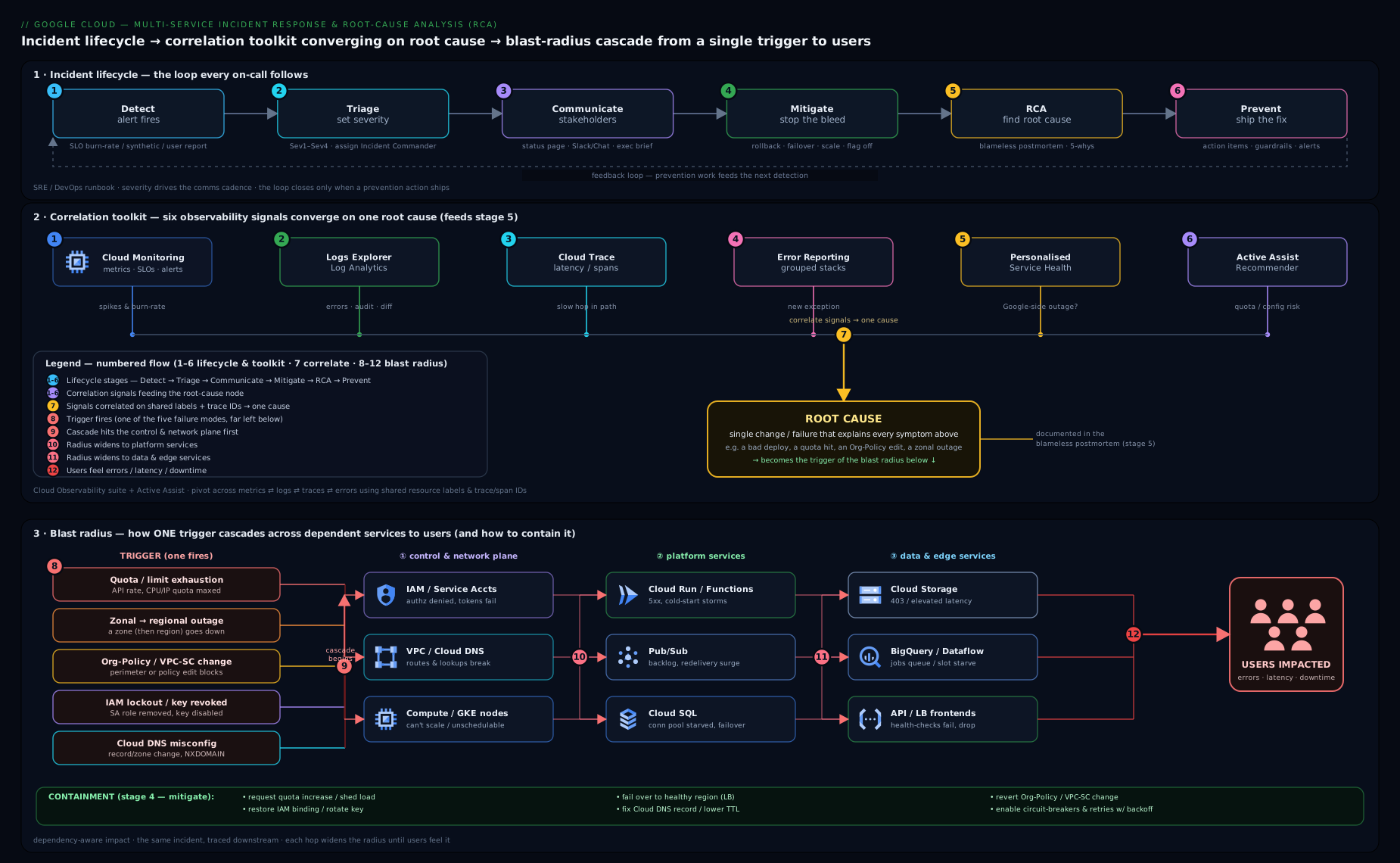
The diagram above maps the incident lifecycle across the top and, beneath it, shows how a symptom at the load balancer is traced back through Monitoring, Trace, Error Reporting and Audit Logs to a contributing change — the mental model for every scenario that follows.
Scenario A — Cascading failure from quota exhaustion
Symptom. At 02:00 the checkout SLO burn-rate alert fires. Cloud Monitoring shows backend 5xx climbing from 0.1% to 18% over ten minutes; p99 latency has tripled. Traffic is slightly elevated (a marketing email went out) but not extreme. The frontend Cloud Run service is throwing 503s and the GKE payment service shows pods crash-looping. Nothing was deployed.
Hypotheses.
- A downstream dependency (Cloud SQL, an external payment API) is failing and back-pressure is cascading upward.
- A quota or limit has been hit — Cloud Run max instances, Cloud SQL connections, a Compute Engine CPU quota blocking autoscale, or an API rate limit (429s).
- A noisy-neighbour or memory leak is OOM-killing pods, and retries are amplifying load (a retry storm).
- Google is having an incident (rule out with PSH).
Cross-service diagnosis. PSH is green, so it’s us. The shape — errors and latency up, traffic only mildly up — says we hit a ceiling, not we got flooded. The cascade pattern (frontend 503 + payment pods crashing simultaneously) points to a shared resource. Walk the dependency graph downward:
- Cloud SQL connections. Check the metric
cloudsql.googleapis.com/database/network/connectionsagainstmax_connections. It’s pinned at the limit. The payment pods logFATAL: remaining connection slots are reserved/too many connections. That is the floor of the cascade. - Why now? The traffic bump nudged concurrency up; each Cloud Run instance and each GKE pod opens its own pool; instance count rose and the pools multiplied past
max_connections. Classic connection exhaustion. Confirm by counting connections per source:
# Connection saturation over the incident window
gcloud monitoring time-series list \
  --project=PROJECT_ID \
  --filter='metric.type="cloudsql.googleapis.com/database/network/connections"
            AND resource.labels.database_id="PROJECT_ID:checkout-db"' \
  --interval-start-time=2026-06-15T01:50:00Z \
  --interval-end-time=2026-06-15T02:15:00Z
- The amplifier. Cloud Trace shows checkout spans timing out on the DB call, then the client retrying three times — so each user request becomes 3–4 DB attempts, accelerating exhaustion. Error Reporting shows one dominant new group: the Postgres connection error, first seen at 02:01.
Fix (mitigate first, then prevent).
- Mitigate now: raise the Cloud Run max-instances down is wrong — counter-intuitively you cap the fan-out. The fastest safe mitigation is to reduce the pressure on the shared resource: lower Cloud Run max instances / GKE replicas to throttle concurrency and introduce or enable a connection pooler. Deploy a PgBouncer sidecar / use Cloud SQL Auth Proxy with pooling, or set conservative pool sizes. In parallel, raise
max_connectionson Cloud SQL if headroom allows (it costs memory — a tier bump may be needed). - Break the retry storm: add jittered exponential backoff and a circuit breaker so a failing DB doesn’t get hammered.
# Throttle the fan-out so pools stop multiplying past the DB limit
gcloud run services update checkout-frontend \
  --region=europe-west1 --max-instances=20 --concurrency=80

# Give the DB more slots if the tier has the RAM for it
gcloud sql instances patch checkout-db \
  --database-flags=max_connections=400
- Prevent: put an alert on connection-pool saturation (e.g. >80% of
max_connections) so you’re paged before exhaustion; right-size pools asinstances × pool_size ≤ max_connections − headroom; adopt a pooler permanently; load-test to the marketing-spike traffic level. This is the canonical cascade: a soft limit, an amplifier (retries), and a trigger (traffic). Fix all three.
Scenario B — Zonal/regional outage and failover
Symptom. The uptime check for app.example.com flaps, then goes hard red for one region. p99 latency in europe-west1 spikes; a third of GKE nodes show NotReady; some Compute Engine VMs are unreachable. Your other region, europe-west4, looks healthy. No deploys, no config changes.
Hypotheses.
- A zonal failure within the region (one zone’s hardware/power/network) — a subset of nodes and VMs in
europe-west1-b. - A regional Google Cloud incident.
- A self-inflicted regional problem (a bad config that happens to be regional, a regional quota).
Cross-service diagnosis. This is the one scenario where you check Personalised Service Health first and fast — because if it’s Google, no amount of debugging your code helps, and the correct action is failover.
# Is Google having an incident affecting MY project right now?
gcloud beta service-health events list \
  --project=PROJECT_ID \
  --filter='state="ACTIVE"' \
  --format='table(title, category, state, relevance, updateTime)'
- PSH shows an ACTIVE zonal event in
europe-west1-b(or, if regional, a regional event). That confirms the layer instantly. - Localise zonal vs regional. Break the failing metrics down by zone. If only
-bis affected and-a/-care healthy, it’s zonal — a regional MIG or regional GKE cluster should be self-healing by rescheduling onto healthy zones. If all zones degrade together, it’s regional. - Check whether your architecture is actually multi-zone. If the VMs were in a single zone (a zonal MIG, or pets pinned to
-b), a “zonal” failure is a total failure for that workload — the architecture, not Google, is the contributing factor.
Fix.
- Zonal outage, regional architecture: mostly let it self-heal. A regional MIG recreates instances in healthy zones; a regional GKE cluster reschedules pods; the global/regional load balancer drops the failed backends from rotation automatically via health checks. Verify the LB is shedding the bad zone:
gcloud compute backend-services get-health checkout-backend --global \
  --format='table(status.healthStatus[].instance, status.healthStatus[].healthState)'
- Zonal outage, zonal architecture (the real incident): mitigate by failing over — scale the surviving region, shift traffic, and recreate the lost capacity in another zone. With a global external Application Load Balancer this is often automatic once unhealthy backends drain; otherwise shift DNS/traffic weights to
europe-west4. - Regional outage: invoke DR. Promote the cross-region Cloud SQL replica, route traffic to the standby region, and confirm RTO/RPO. If you only had one region, that is the postmortem’s headline finding.
# Failover: send all traffic to the healthy region's backend
gcloud compute backend-services update-backend checkout-backend --global \
  --instance-group=ig-europe-west4 --instance-group-zone=europe-west4-a \
  --capacity-scaler=1.0
gcloud compute backend-services update-backend checkout-backend --global \
  --instance-group=ig-europe-west1 --instance-group-zone=europe-west1-b \
  --capacity-scaler=0.0
- Prevent: ensure every tier is regional or multi-region by default (regional MIGs, regional GKE, Cloud SQL HA with a cross-region replica, multi-region buckets); subscribe to PSH alerts so the platform tells you before your users do; rehearse failover as a game-day so the runbook is muscle memory.
Scenario C — Org Policy / VPC Service Controls blast radius
Symptom. Across several projects at once, new deployments fail and some running workloads start throwing permission or connectivity errors. A data pipeline can no longer write to Cloud Storage; a Cloud Function deploy fails with a policy error; a VM creation is rejected. The errors are diverse but they all started at roughly the same minute, and they span project boundaries — which no single app bug ever does.
Hypotheses.
- An Org Policy constraint was changed at the organization or folder level (e.g.
constraints/gcp.resourceLocations,iam.disableServiceAccountKeyCreation,compute.vmExternalIpAccess) and the constraint inherits down to all child projects. - A VPC Service Controls perimeter change — a project added to a perimeter, a restricted service added, or an ingress/egress rule tightened — is now blocking managed-API calls that used to work.
- A broad IAM change at a high level removed a role (covered more in Scenario D, but it can co-occur).
Cross-service diagnosis. The tell is breadth across projects + simultaneity. That can only come from something above the project: the resource hierarchy. Go straight to the Organization/folder Audit Logs, not the project’s app logs.
- Find the policy change. Query Admin Activity at the org and folder level for
SetOrgPolicyand VPC-SC perimeter methods in the incident window:
# Org-level: who changed an Org Policy or a VPC-SC perimeter?
gcloud logging read '
  (protoPayload.methodName="google.cloud.orgpolicy.v2.OrgPolicy.UpdatePolicy"
   OR protoPayload.methodName:"accesscontextmanager")
  AND timestamp>="2026-06-15T08:00:00Z"
' --organization=ORG_ID --order=asc \
  --format='table(timestamp, protoPayload.authenticationInfo.principalEmail,
                  protoPayload.methodName, resource.type)'
- Distinguish the two. Read the error strings precisely:
- Org Policy violations read like
Constraint constraints/… violated/FAILED_PRECONDITIONon a create/modify call. - VPC-SC violations read like
Request is prohibited by organization's policywith avpcServiceControlsUniqueIdentifierand asecurityPolicyInfoblock. VPC-SC denials are also logged specifically — query them:
- Org Policy violations read like
gcloud logging read '
  protoPayload.status.details.violations.type="VPC_SERVICE_CONTROLS"
  AND timestamp>="2026-06-15T08:00:00Z"
' --project=PROJECT_ID --order=asc \
  --format='table(timestamp, protoPayload.methodName,
                  protoPayload.metadata.vpcServiceControlsUniqueIdentifier)'
- Confirm the blast radius. A policy set at a folder hits every project under it; a perimeter change hits every project in the perimeter. The audit log entry shows the exact resource the policy was set on — that is your blast-radius boundary.
Fix.
- Mitigate: the fastest, safest move is almost always to revert the change — restore the previous Org Policy (set it back to inherit or to the prior value) or roll back the perimeter edit. For VPC-SC, if the change must stay, add a scoped ingress/egress rule or access level to re-permit the broken flow rather than removing the protection wholesale.
# Revert an Org Policy back to inheriting the parent (un-break children)
gcloud org-policies reset constraints/gcp.resourceLocations \
  --folder=FOLDER_ID

# Or restore from a saved policy file you exported before changes
gcloud org-policies set-policy /path/to/previous-policy.yaml
- Prevent: this is the argument for dry-run mode. Roll out VPC-SC perimeters and many Org Policies in dry-run /
enforcementMode: DRY_RUNfirst, watch the violation logs to see exactly what would break, and only enforce once the logs are clean. Require policy changes to go through Terraform with code review and aplandiff so nobody hand-edits org-level policy at 09:00 on a Monday. Alert onSetOrgPolicyand perimeter changes so a human-initiated org change is visible immediately. This scenario is nearly always self-inflicted by a well-meaning platform change — process, not heroics, prevents it.
Scenario D — An IAM change that locks out a workload
Symptom. A batch service that has run for months suddenly fails. Cloud Run / GKE logs show PERMISSION_DENIED: caller does not have permission calling Cloud Storage or Pub/Sub. The code didn’t change; the service account didn’t change. It worked yesterday; it fails today.
Hypotheses.
- A role binding was removed from the service account (someone “cleaned up” IAM, or an over-broad binding was tightened at the project/folder level and the SA lost an inherited role).
- A deny policy or IAM Condition now matches and blocks the call (a deny overrides any allow; a time- or resource-bound condition stopped matching).
- A service account key was disabled/deleted or expired, or the SA itself was disabled.
- A higher-level (org/folder) policy change removed the role via inheritance (overlaps with Scenario C).
- Workload Identity Federation / Workload Identity mapping broke (wrong
iam.serviceAccounts.actAs/roles/iam.workloadIdentityUserbinding).
Cross-service diagnosis. The symptom is PERMISSION_DENIED from a previously-working identity, so the cause is an identity or policy change, not code. Two tools do the work: the Policy Troubleshooter (does this principal have this permission on this resource right now, and why/why not) and the Audit Logs (what changed).
- Ask the Troubleshooter the exact question:
gcloud policy-troubleshoot iam \
  //storage.googleapis.com/projects/_/buckets/batch-output \
  --principal-email=batch-runner@PROJECT_ID.iam.gserviceaccount.com \
  --permission=storage.objects.create
It returns GRANTED/NOT_GRANTED and the bindings it evaluated, including which deny rule or missing role is responsible — it walks inheritance for you.
- Find the change in Admin Activity audit logs —
SetIamPolicy,CreatePolicy/UpdatePolicy(deny),DisableServiceAccount,DisableServiceAccountKey:
gcloud logging read '
  (protoPayload.methodName="SetIamPolicy"
   OR protoPayload.methodName:"DenyPolicy"
   OR protoPayload.methodName:"DisableServiceAccount")
  AND (protoPayload.request.policy.bindings.members:"batch-runner@PROJECT_ID.iam.gserviceaccount.com"
       OR protoPayload.resourceName:"batch-runner")
  AND timestamp>="2026-06-14T00:00:00Z"
' --project=PROJECT_ID --order=asc \
  --format='table(timestamp, protoPayload.authenticationInfo.principalEmail,
                  protoPayload.methodName, protoPayload.resourceName)'
- Check for a deny policy and conditions explicitly — a deny is invisible in the standard allow-policy view:
gcloud iam policies list --attachment-point=cloudresourcemanager.googleapis.com/projects/PROJECT_ID \
  --kind=denypolicies
- Check the SA itself isn’t disabled, and that any key is enabled:
gcloud iam service-accounts describe batch-runner@PROJECT_ID.iam.gserviceaccount.com \
  --format='value(disabled)'
Fix.
- Mitigate: restore the missing binding (least privilege — grant the specific predefined role the Troubleshooter says is missing, not Editor), or remove/adjust the offending deny policy or condition, or re-enable the SA/key.
# Re-grant the exact role the Troubleshooter flagged as missing
gcloud projects add-iam-policy-binding PROJECT_ID \
  --member="serviceAccount:batch-runner@PROJECT_ID.iam.gserviceaccount.com" \
  --role="roles/storage.objectAdmin" --condition=None
- Prevent: manage IAM as code (Terraform) so removals are reviewed and reversible; avoid hand-editing bindings in the console; prefer groups over per-SA bindings so cleanups are predictable; use deny policies and conditions sparingly and test them; replace long-lived keys with Workload Identity Federation so there are no keys to disable or expire. Add an alert on
SetIamPolicyfor sensitive resources. The lesson learned is usually “an IAM cleanup had unintended blast radius” — version control and review are the fix.
Scenario E — A Cloud DNS / load-balancer / certificate failure
Symptom. Users report app.example.com is down or showing a browser TLS warning (NET::ERR_CERT_… / SSL_ERROR). Crucially, your backend metrics look healthy — low error rate, normal latency, normal but reduced traffic. The uptime check from outside is red; internal health checks are green. Requests aren’t reaching the backends.
Hypotheses.
- DNS: the record for
app.example.comis wrong, missing, points at the old/changed LB IP, or a DNSSEC/delegation problem; or a Cloud DNS response policy is intercepting it. - Load balancer: the forwarding rule / target proxy / URL map is misconfigured, the LB IP changed, or all backends are marked unhealthy by the health check (so the LB has nothing to send to — returns 502/503).
- Certificate: the Google-managed SSL cert is
FAILED_NOT_VISIBLE/ not yetACTIVE(domain-validation DNS not in place), or a self-managed cert expired, or the cert doesn’t cover the SNI hostname.
Cross-service diagnosis. The signature — users can’t connect but backends are healthy and traffic is down — means the failure is in the front door, above your code. Work the request path from the outside in: DNS → LB front end → certificate → backends.
- DNS first. Resolve the name and compare to the LB’s actual IP:
dig +short app.example.com            # what users get
gcloud compute forwarding-rules list --global \
  --format='table(name, IPAddress, target)'   # what the LB actually is
gcloud dns record-sets list --zone=example-zone --name=app.example.com.
If they differ, DNS is the cause (a record was edited, or the LB IP wasn’t reserved as static and changed on recreate).
- Certificate next. Check the managed cert status —
ACTIVEvsPROVISIONING/FAILED_NOT_VISIBLE, and the domains it covers and its expiry:
gcloud compute ssl-certificates describe app-cert --global \
  --format='value(managed.status, managed.domainStatus, expireTime)'
FAILED_NOT_VISIBLE almost always means the DNS A/AAAA record for the domain isn’t pointing at this LB yet, so Google can’t complete domain validation — which ties DNS and cert together. A self-managed cert past expireTime is the other classic.
- Load balancer last. If DNS and cert are fine, check backend health (a health-check misconfig can mark every backend unhealthy, so the LB returns 502/503 even though the app is fine):
gcloud compute backend-services get-health app-backend --global
gcloud compute url-maps describe app-urlmap   # path/host rules correct?
A misconfigured health-check path (checking / when the app only answers /healthz) marks all backends down — the single most common “LB returns 502 but the app is healthy” cause.
Fix.
- DNS: correct the record to the LB’s static IP; ensure the LB IP is a reserved static address so it never changes; lower TTL during the fix so the correction propagates fast; check DNSSEC and delegation if resolution fails entirely.
- Certificate: for managed certs, fix the validating DNS record and wait for
ACTIVE(provisioning can take up to ~60 minutes); for expired self-managed certs, rotate immediately and put expiry on an alert. Ensure the cert’s domains include the exact SNI hostname. - Load balancer: fix the health-check path/port so backends report healthy; correct the URL map host/path rules; verify the forwarding rule → target proxy → cert chain.
# Reserve the LB IP so it never changes again, then point DNS at it
gcloud compute addresses create app-lb-ip --global
gcloud dns record-sets update app.example.com. --zone=example-zone \
  --type=A --ttl=300 --rrdatas="$(gcloud compute addresses describe app-lb-ip --global --format='value(address)')"

# Fix the health check that was marking everything unhealthy
gcloud compute health-checks update http app-hc --request-path=/healthz --port=8080
- Prevent: alert on certificate expiry (and on managed-cert non-
ACTIVEstatus); use static reserved IPs for all LB front ends; uptime-check the real user hostname over HTTPS from multiple regions (which catches DNS and cert and LB in one signal); manage DNS and LB config as code so changes are reviewed.
Hands-on lab: build the war-room signals and find a planted change
You’ll stand up the observability you need before an incident, then practise the correlation move — using Audit Logs to find a change you plant yourself. Free-tier friendly; Cloud Monitoring and Logging have generous free allotments.
1. Set up.
export PROJECT_ID="$(gcloud config get-value project)"
gcloud services enable monitoring.googleapis.com logging.googleapis.com \
  cloudtrace.googleapis.com clouderrorreporting.googleapis.com \
  --project="$PROJECT_ID"
2. Create a uptime check + alerting policy (the detect phase). Create an uptime check on any public endpoint you own, then an alert policy that pages on failure. Via CLI you can create the alert from a JSON/YAML policy; the console wizard is fine too. Expected: the policy shows in gcloud alpha monitoring policies list.
gcloud alpha monitoring policies list --format='table(displayName, enabled, conditions[].displayName)'
3. Build a log-based metric for errors (a war-room signal). Count severity≥ERROR log entries so you can alert on an error spike:
gcloud logging metrics create app_error_count \
  --description="App errors (severity>=ERROR)" \
  --log-filter='severity>=ERROR'
gcloud logging metrics describe app_error_count   # validation
4. Plant a change and find it (the correlation drill). Make a deliberate, harmless IAM change, note the time, then hunt it in the Audit Logs exactly as you would in an incident:
# The "change" — grant then immediately remove a trivial role to a test SA
TS_BEFORE="$(date -u +%Y-%m-%dT%H:%M:%SZ)"
gcloud projects add-iam-policy-binding "$PROJECT_ID" \
  --member="serviceAccount:$(gcloud iam service-accounts list --format='value(email)' --limit=1)" \
  --role="roles/browser" --condition=None >/dev/null

# Now find it — who did what, since TS_BEFORE
gcloud logging read "
  protoPayload.methodName=\"SetIamPolicy\"
  AND timestamp>=\"$TS_BEFORE\"
" --project="$PROJECT_ID" --order=asc \
  --format='table(timestamp, protoPayload.authenticationInfo.principalEmail, protoPayload.methodName)'
Expected output: a row showing your principal email and SetIamPolicy at the time you ran it. That is the exact muscle you use in Scenarios C and D to find the contributing change.
5. Explore the four pillars. Open Logs Explorer (run severity>=ERROR over the last hour), Cloud Trace (if you have a traced service), Error Reporting (it auto-populates from logged exceptions), and Personalised Service Health (Console → Service Health) to see whether any Google incident is active for the project.
Cleanup
# Remove the planted binding and the lab artefacts
gcloud projects remove-iam-policy-binding "$PROJECT_ID" \
  --member="serviceAccount:$(gcloud iam service-accounts list --format='value(email)' --limit=1)" \
  --role="roles/browser" --condition=None
gcloud logging metrics delete app_error_count --quiet
# Delete the uptime check + alert policy from the Console (Monitoring → Uptime / Alerting)
Cost note
Cloud Logging includes the first 50 GiB of ingestion per project per month free; Cloud Monitoring metrics and the first uptime checks are free within generous limits; Cloud Trace and Error Reporting have free monthly allotments. This lab stays comfortably inside the free tier — the only thing that ever surprises people is log ingestion volume at scale, so set a logs exclusion filter for chatty, low-value logs and a budget alert in real projects.
Common mistakes & troubleshooting
| Symptom | Cause | Fix |
|---|---|---|
| Chasing the root cause while users stay down | Treating an incident like a debugging session | Mitigate first (rollback/failover/scale), RCA after; the IC enforces this |
| Five people, five theories, no progress | No Incident Commander; no single source of truth | Name an IC who coordinates (doesn’t type); one incident doc with the timeline |
| Spending an hour on your code, then finding it was Google | Didn’t check Personalised Service Health early | Rule out the platform first for any broad/regional symptom |
| “Nothing changed” but everything broke at once | A config/Org Policy/IAM change you didn’t make | Query Admin Activity Audit Logs in the incident window — find the change |
| Errors that span multiple projects blamed on one app | App bugs don’t cross project boundaries | Breadth + simultaneity ⇒ look above the project (org/folder policy, VPC-SC) |
| LB returns 502/503 but the app is healthy | Health-check path/port wrong ⇒ all backends marked unhealthy | Fix the health-check probe to hit a real healthy endpoint |
| A retry made the outage worse | Retry storm amplifying load on a failing dependency | Add jittered backoff + circuit breakers; cap concurrency |
| Postmortem names one person as “the cause” | Blameful culture; stops at human error | Blameless framing: ask why the system let the mistake cause an outage |
Best practices
- Pre-build the war-room dashboard and runbooks. During a SEV1 is the wrong time to write a query. Have the golden-signals dashboard, the “what changed” Audit Log query, and per-scenario runbooks ready.
- Alert on SLO burn rate, not raw thresholds. Multi-window burn-rate alerts page you for user-impacting problems and stay quiet for noise — far better than “CPU > 80%”.
- Make mitigation reversible and fast. Keep deploys rollback-able (Cloud Deploy/Cloud Run revisions), keep traffic splitting ready, keep failover rehearsed.
- Design for the failure modes above by default: regional resources, connection pooling, static LB IPs, dry-run policy rollouts, IAM-as-code. Most incidents in this lesson are preventable architecture/process gaps.
- Run game days. Rehearse a regional failover and a quota-exhaustion drill so the runbook is muscle memory and the gaps surface in daylight.
- Track CAPA to closure. A postmortem with un-actioned items is theatre. Owners, dates, and a review.
Security notes
- Audit Logs are your incident black box — protect them. Ensure Admin Activity (always on) and Data Access audit logs are enabled where you need “who read/changed what”, and export logs to a sink (a separate logging project / BigQuery / Cloud Storage) so an attacker who gains project access can’t erase the evidence. Lock the sink destination down.
- Incidents and breaches overlap. A “permission denied” storm can be a misconfiguration or an attacker tripping VPC-SC/deny policies. Treat unexplained IAM/policy changes as potential security events and loop in security early.
- Least privilege in the fix, too. Under pressure it’s tempting to grant Owner to “just make it work”. Grant the specific role the Policy Troubleshooter identifies; over-grants made in incidents become tomorrow’s audit findings.
- Don’t paste secrets into the incident doc. Connection strings, tokens and keys gathered while debugging do not belong in a shared timeline; reference Secret Manager, don’t copy values.
- VPC-SC and Org Policy are security controls. When you revert one to mitigate, you may be reducing protection — note it explicitly and restore the control (scoped, in dry-run first) as a CAPA item.
Interview & exam questions
Q1. In an incident, what do you do first — find the root cause or mitigate? Mitigate. Restore service for users (rollback, failover, scale, raise quota, feature-flag) before fully understanding the cause. Root-cause analysis happens after the bleeding stops. Leading with RCA prolongs the outage.
Q2. What does the Incident Commander actually do? Coordinates the response — decides, delegates, time-boxes hypotheses, maintains the single source of truth, and runs comms cadence. The IC does not do the hands-on fixing; they keep the room organised and the team focused on one mitigation at a time.
Q3. Errors and latency are up but traffic is roughly flat. What class of problem is that, versus errors up with traffic up? Flat traffic + rising errors/latency ⇒ you hit a ceiling (quota/connection/limit) or a dependency is failing. Rising traffic + rising errors/latency/saturation ⇒ overload. The traffic shape distinguishes “we broke” from “we got flooded”.
Q4. Which Google Cloud tool tells you whether Google itself is having an incident affecting your project, and why check it early? Personalised Service Health (PSH) — project-scoped, relevance-filtered, with an API and alerts. Check it early for any broad/regional symptom because if it’s a Google outage, the correct response is failover, not debugging your code.
Q5. Several projects start failing at the same minute with different errors. Where do you look and why?
Above the project — the Organization/folder Audit Logs for Org Policy (SetOrgPolicy) and VPC Service Controls perimeter changes. Breadth across projects plus simultaneity can’t come from one app bug; it comes from an inherited policy/perimeter change.
Q6. How do you tell an Org Policy denial from a VPC Service Controls denial in the logs?
Org Policy reads as Constraint constraints/… violated / FAILED_PRECONDITION on create/modify calls. VPC-SC reads as Request is prohibited by organization's policy with a vpcServiceControlsUniqueIdentifier and a violation of type VPC_SERVICE_CONTROLS. VPC-SC denials are separately queryable by that violation type.
Q7. A service account that worked yesterday now gets PERMISSION_DENIED. Walk through the diagnosis.
The cause is an identity/policy change, not code. Use the Policy Troubleshooter to see whether the permission is granted now and which binding/deny is responsible, then query Audit Logs for SetIamPolicy, deny-policy changes, or DisableServiceAccount(Key) in the window. Check for a deny policy and IAM Conditions explicitly, and confirm the SA/key isn’t disabled. Fix with the specific missing role.
Q8. Why roll out VPC Service Controls and Org Policies in dry-run mode first? Dry-run logs what would be blocked without actually blocking it, so you see the full blast radius in the violation logs and fix legitimate flows (ingress/egress rules, access levels) before enforcing. It’s the single best defence against the Scenario-C blast radius.
Q9. Users get a TLS error but your backends are healthy and traffic is down. Where is the fault and how do you confirm?
In the front door, above the app: DNS, the load-balancer front end, or the certificate. Confirm by working outside-in — dig the hostname vs the LB’s actual (static) IP, check the managed SSL cert status (ACTIVE vs FAILED_NOT_VISIBLE/expired), then backend health and the URL map. FAILED_NOT_VISIBLE usually means DNS isn’t pointing at the LB so validation can’t complete.
Q10. What is a retry storm and how do you stop one amplifying an incident? When a dependency slows or fails, naive clients retry, multiplying load on the already-struggling dependency and accelerating collapse. Stop it with jittered exponential backoff, retry budgets, and circuit breakers; during the incident, cap concurrency/instances to reduce the fan-out.
Q11. What makes a postmortem “blameless”, and why does it matter? It focuses on why the system allowed a mistake to cause an outage, not who made it — assuming people acted reasonably with the information they had. It matters because blame drives engineers to hide information, which destroys the learning; psychological safety produces honest timelines and real fixes.
Q12. What’s the difference between a contributing factor and a single root cause, and why prefer the former? Complex incidents rarely have one cause; they’re a chain (a latent limit + an amplifier + a trigger, e.g. Scenario A). Listing contributing factors yields multiple independent fixes (alert on saturation and add pooling and add backoff), which is more resilient than fixing one “root cause” and calling it done.
Quick check
- True/False: during a SEV1 the Incident Commander should be the one running the most
gcloudcommands. - You see rising errors and latency with flat traffic. Ceiling/limit problem, or overload?
- Which single tool tells you if a Google regional incident is affecting your project?
- Errors across five projects starting at the same minute — project app logs, or org/folder Audit Logs?
- A managed SSL certificate is stuck at
FAILED_NOT_VISIBLE. What’s the most likely cause?
Answers
- False. The IC coordinates and decides; they delegate the hands-on work so they can steer.
- A ceiling/limit problem (quota, connections, rate limit) or a failing dependency — not overload (which would show rising traffic/saturation).
- Personalised Service Health (PSH).
- Org/folder Audit Logs — breadth + simultaneity points above the project (Org Policy / VPC-SC).
- The domain’s DNS A/AAAA record isn’t pointing at this load balancer, so Google can’t complete domain validation.
Exercise
Take one of your own (or a lab) workloads and write a one-page incident runbook for a single scenario from this lesson — say, regional outage or quota exhaustion. It must contain: (1) the detection signal and the exact alert that should fire; (2) the first three diagnostic commands/queries (including the PSH check and the “what changed” Audit Log query); (3) the mitigation step and how to verify it worked; (4) the rollback/abort criterion (“if X doesn’t improve in N minutes, do Y”). Then run a 30-minute game day: have a colleague inject the failure (drain a zone, lower a quota, point DNS wrong) without telling you the details, and execute your runbook. Afterwards, write a short blameless postmortem — timeline, contributing factors, and three CAPA items with owners and dates. You now have both a tested runbook and a postmortem template.
Certification mapping
This lesson maps primarily to the Professional Cloud DevOps Engineer (PCDE) exam — incident response, SLO/SLI and error budgets, blameless postmortems, monitoring/logging/tracing, and reducing toil are core domains — and to the Professional Cloud Architect (PCA) exam’s reliability, observability and operational-excellence themes (the case studies frequently probe failover, DR and capacity/quota planning). The audit-log forensics and VPC-SC/Org Policy/IAM diagnosis also reinforce material on the Professional Cloud Security Engineer (PCSE) exam.
Glossary
- Incident Commander (IC): the person who owns and coordinates the incident response (decisions, delegation, comms) without doing the hands-on fixing.
- SEV (severity): the classification of an incident’s business impact (SEV1–SEV4) that drives the response intensity.
- Golden signals: latency, traffic, errors, saturation — the four metrics whose pattern characterises most problems.
- SLO burn rate: how fast you’re consuming your error budget; the basis for high-signal, user-impact alerting.
- Personalised Service Health (PSH): Google Cloud’s project-scoped view of Google-side incidents affecting your resources, with an API and alerting.
- Cloud Trace: distributed tracing that shows where time is spent across the spans of a request.
- Error Reporting: automatic grouping and deduplication of application errors, with first/last-seen tracking.
- Log Analytics: SQL (BigQuery-backed) querying over Cloud Logging data for ad-hoc joins and aggregation.
- Audit Logs: Admin Activity / Data Access / System Event logs that record who did what on your resources — your incident black box.
- VPC Service Controls (VPC-SC): a service perimeter around managed APIs that can deny otherwise-authorised requests based on origin/destination.
- Blast radius: the scope of resources affected by a change or failure.
- Retry storm: self-amplifying load created when clients retry against a failing/slow dependency.
- Blameless postmortem: a retrospective that examines why the system allowed an outage, assuming people acted reasonably — to maximise learning.
- CAPA: Corrective And Preventive Actions — the tracked follow-ups from a postmortem, with owners and due dates.
- Dry-run mode: evaluating a policy/perimeter and logging what would be blocked without enforcing it.
Next steps
You can now run a complex Google Cloud incident end to end and turn it into prevention. Next, step up from operating systems to designing them: The Google Cloud Architecting Ladder: From a Static Site to Multi-Region Global (gcp-architecting-ladder-static-site-to-multi-region) — which teaches the resilient, regional-by-default architectures that make most of the incidents in this lesson impossible in the first place. To go deeper on the security controls that featured here, revisit VPC Service Controls (gcp-vpc-service-controls-perimeters-exfiltration-prevention) and IAM deny policies, conditions & impersonation chains (gcp-iam-deny-policies-conditions-impersonation-chains).