This is the capstone of the Google Cloud Zero-to-Hero course. Everything you have built up to now — the resource hierarchy, IAM, networking, compute, data, security, and observability — converges here into one project: design and build, with Terraform, an enterprise landing zone and deploy a production 3-tier application into it. A landing zone is the pre-governed environment that workloads “land” in. The hierarchy, identity, guardrails, network, security baseline, monitoring, and cost controls are wired up first, so that when an application team arrives they inherit security and consistency on day one instead of re-inventing it — and getting it wrong — on every project.
We work the way a real platform team does: start from a business brief, make explicit design decisions, then build in staged phases, validating each before the next. Every phase reuses a deeper lesson from the course so you always know where to go for detail, and the whole thing is held against the Google Cloud Architecture Framework pillars — operational excellence, security, reliability, cost optimisation, and performance — exactly the way a Cloud Architect review board grades a design. You finish with a genuinely real (if small) landing zone in your own project, acceptance criteria to prove it works, and a self-assessment rubric to grade yourself.
Learning objectives
By the end of this capstone you can:
- Translate a business brief into a concrete GCP landing-zone design spanning the resource hierarchy, Cloud Identity and IAM, Org Policy, Shared VPC, the workload, security, observability, DR and cost.
- Justify the load-bearing decisions — why a folder hierarchy, why host/service projects, why a global HTTPS load balancer in front of a regional backend.
- Build the foundation with Terraform (and verify with
gcloud): folders, projects, IAM bindings, Org Policy constraints, a Shared VPC with Cloud NAT and hierarchical firewall, a 3-tier workload, KMS/CMEK, and logging sinks. - Apply preventive guardrails (Org Policy) and a security + observability + cost baseline so the platform stays compliant and observable on its own.
- Verify the result against explicit acceptance criteria and grade it against the Architecture Framework pillars with a rubric.
- Know exactly which course lesson to open for any single pillar when you build the full thing for real.
Prerequisites & where this fits
This is the final, Advanced lesson of the GCP Zero-to-Hero course and it assumes the whole course. You should be comfortable with the resource hierarchy (organisation → folders → projects → resources, and how IAM and Org Policy inherit down it), driving GCP from Cloud Shell with the gcloud CLI, the IAM model (roles, members, service accounts, impersonation), and the basics of VPC networking. If any of those feel shaky, work the earlier lessons first — this capstone links back to them at each phase rather than re-teaching them. You will also lean on the KloudVin deep-dive lessons (linked throughout) for production detail beyond what one lesson can hold. It picks up directly from the Google Cloud Certification Prep Kit.
The brief
Our fictional company is Meridian Logistics, a mid-size freight firm moving from a single hand-built project (one engineer clicked it together two years ago; nobody remembers what is in it) to a governed Google Cloud foundation. Leadership wants three things, in their words:
- “Stop the wild west.” Every resource must be owned, labelled, and monitored, sitting in the right project under the right folder. No more external buckets, no orphaned service-account keys, no mystery spend.
- “Let app teams move fast — safely.” A new project team should get a ready-to-use, isolated environment with guardrails already on, and a subnet in the shared network, without filing a networking ticket.
- “Show me the bill, by team, and keep us up.” Finance needs spend broken down per workload with budget alerts; the business needs the flagship app to survive a zonal failure.
Translated into platform language, Meridian needs: a folder/project hierarchy for inherited IAM and Org Policy; Cloud Identity with groups as the principal model; Org Policy guardrails that block risky configurations; a Shared VPC so connectivity and IP space are centralised; a hardened 3-tier workload (global HTTPS LB → autoscaling middle tier → highly-available database); a security baseline (Security Command Center, CMEK, Secret Manager, a VPC Service Controls perimeter); centralised observability (log sinks, dashboards, SLOs); and DR plus cost controls. That is exactly a Google Cloud landing zone — and it lines up one-to-one with the five Architecture Framework pillars.
Design decisions
A landing zone is mostly a set of decisions; implementation is the easy part once they are explicit and defensible. Here are the eight that matter, each mapped to the Architecture Framework pillar it most serves and the course lesson that owns it in depth.
1. Resource hierarchy
Decision: adopt a folder hierarchy rather than a flat organisation. Folders are the unit at which you grant a team autonomy and apply distinct guardrails; projects are the atomic boundary for billing, IAM, quota, and blast radius. The rule of thumb is one workload + one environment = one project.
Organization (meridian.com)
├── fldr-bootstrap                 # Terraform state bucket + seed SA (heavily audited)
├── fldr-common                    # shared platform services
│   ├── prj-net-host-prod          # Shared VPC HOST project (prod)
│   ├── prj-net-host-nonprod       # Shared VPC HOST project (non-prod)
│   ├── prj-logging                # log sinks + BigQuery/bucket destinations
│   └── prj-security               # KMS keys, SCC, org-level tooling
└── fldr-business-units
    └── fldr-logistics
        ├── prj-freight-prod       # SERVICE project — prod workload
        └── prj-freight-nonprod    # SERVICE project — non-prod workload
A constraint set at fldr-logistics (say, allowed regions) inherits to every project beneath it, including ones that do not exist yet. Detail: Designing a GCP Resource Hierarchy. Pillar: operational excellence.
2. Cloud Identity + IAM
Decision: Cloud Identity (or Google Workspace) is the identity source, and you grant IAM roles to groups, never individuals, scoped at the folder or project level rather than per-resource. Privileged access is granted just-in-time, and human users never download service-account keys — workloads use attached service accounts and CI/CD uses Workload Identity Federation (keyless).
| Group | Bound at | Role(s) | Purpose |
|---|---|---|---|
gcp-org-admins@ |
Organization | resourcemanager.organizationAdmin (eligible, audited) |
Bootstrap only |
gcp-platform@ |
fldr-common |
compute.networkAdmin, logging.admin |
Run the shared network + logging |
gcp-freight-devs@ |
prj-freight-nonprod |
editor (non-prod) |
Move fast in non-prod |
gcp-freight-sre@ |
fldr-logistics |
monitoring.editor, compute.viewer |
Operate prod, read-only infra |
gcp-billing@ |
Billing account | billing.viewer |
Read the bill by team |
Least privilege is the rule: app teams get broad rights in non-prod and tightly-scoped rights in prod; the Terraform pipeline identity is granted only what it needs at the folder it manages. Detail: GCP IAM: deny policies, conditions & impersonation and Workload Identity Federation. Pillar: security.
3. Org Policy guardrails
Decision: governance is preventive, not a quarterly audit. Apply Organization Policy constraints high in the hierarchy so they inherit. The ones Meridian needs first:
| Constraint | Effect | Why |
|---|---|---|
iam.disableServiceAccountKeyCreation |
Block SA-key download | Force impersonation / federation; kills the #1 credential leak |
compute.vmExternalIpAccess (deny all) |
No external IPs on VMs | Workloads stay private by construction |
gcp.resourceLocations |
Restrict to in:eu-locations (e.g.) |
Data-residency + cost predictability |
compute.requireOsLogin |
Enforce OS Login | SSH via IAM, no shared keys |
storage.publicAccessPrevention |
Block public buckets | No accidental data exposure |
iam.allowedPolicyMemberDomains |
Domain-restricted sharing | Stops sharing with arbitrary Google accounts |
Always test a new constraint on a non-prod folder first, read the effect, then roll it up. Detail: Resource hierarchy + Org Policy guardrails. Pillar: security + operational excellence.
4. Shared VPC
Decision: centralise the network in a host project that owns the VPC, subnets, Cloud NAT, and firewall, and attach service projects that deploy workloads into the host’s subnets. The platform team governs IP space and firewall policy; app teams consume subnets without ever creating a network.
- Subnets are regional; size them with room to grow and reserve secondary ranges if GKE pods/services will land here later.
- Cloud NAT on a Cloud Router gives private VMs outbound internet without external IPs (pairs with the deny-external-IP Org Policy).
- Hierarchical firewall policies at the folder level set org-wide allow/deny that VPC firewall rules cannot override.
- Private Google Access lets private instances reach Google APIs (Storage, Logging) without leaving Google’s network.
- Private Service Access / PSC is how the workload reaches managed services (Cloud SQL) over private IP.
The alternative — a flat VPC per project with mesh peering — is non-transitive and collapses at scale. Detail: Building a Shared VPC and Hierarchical firewall, Cloud NAT & egress control. Pillar: reliability + security.
5. The 3-tier workload
Decision: a classic, defensible 3-tier shape. The web/edge tier is a global external Application Load Balancer (anycast IP, Google-managed TLS cert, Cloud Armor WAF, Cloud CDN for static assets). The application tier is either a regional Managed Instance Group (MIG) of Compute Engine VMs with autohealing and autoscaling, or Cloud Run for a serverless container — pick per team maturity. The data tier is Cloud SQL with HA (regional, synchronous standby) on a private IP.
| Tier | Service | Resilience | Why this choice |
|---|---|---|---|
| Edge | Global external Application LB + Cloud Armor + CDN | Anycast, multi-region front door | One global IP, TLS offload, WAF, DDoS |
| App | Regional MIG (autoscale + autoheal) or Cloud Run | Spreads across zones in the region | Self-healing capacity; serverless option for low ops |
| Data | Cloud SQL HA (regional) + read replicas | Synchronous standby in a second zone | Automatic failover; private connectivity |
Detail: Global external Application Load Balancer, Regional MIGs: autohealing & canary, Cloud Run services & jobs, Cloud SQL HA & private connectivity. Pillar: reliability + performance.
6. Security baseline
Decision: defence in depth, on by default. Turn on Security Command Center (Premium/Enterprise where available) at the org for misconfiguration and threat findings. Encrypt with customer-managed keys (CMEK) from Cloud KMS on the database, disks, and buckets. Keep application secrets in Secret Manager (CMEK-encrypted, with rotation), never in code or metadata. Draw a VPC Service Controls perimeter around the data projects so even valid credentials cannot exfiltrate data to an outside project.
Detail: Cloud KMS & CMEK envelope encryption, Secret Manager rotation, VPC Service Controls perimeters. Pillar: security.
7. Observability
Decision: centralise logs with an aggregated log sink at the organisation/folder level routing to a dedicated prj-logging project (a Cloud Logging bucket for operations, plus BigQuery for long-term analysis). Build Cloud Monitoring dashboards and uptime checks, and define SLOs (e.g. 99.9% availability on the LB) with alerting policies and error-budget burn alerts so the team learns about problems before customers do.
Detail framing across the course’s observability lessons. Pillar: operational excellence + reliability.
8. DR + cost
Decision: for DR, the workload is already zone-resilient (regional MIG + Cloud SQL HA); add a cross-region read replica that can be promoted, and replicate critical buckets to a second region, sized to the business RTO/RPO. For cost, attach a Budget with alerts to each project, apply consistent labels (team, env, cost-center) so billing export to BigQuery slices cleanly, and lean on committed-use and sustained-use discounts for steady workloads.
Detail: Cloud SQL HA & read replicas and the enterprise DR design in Enterprise architecture: GCP DR & resilience. Pillar: cost optimisation + reliability.
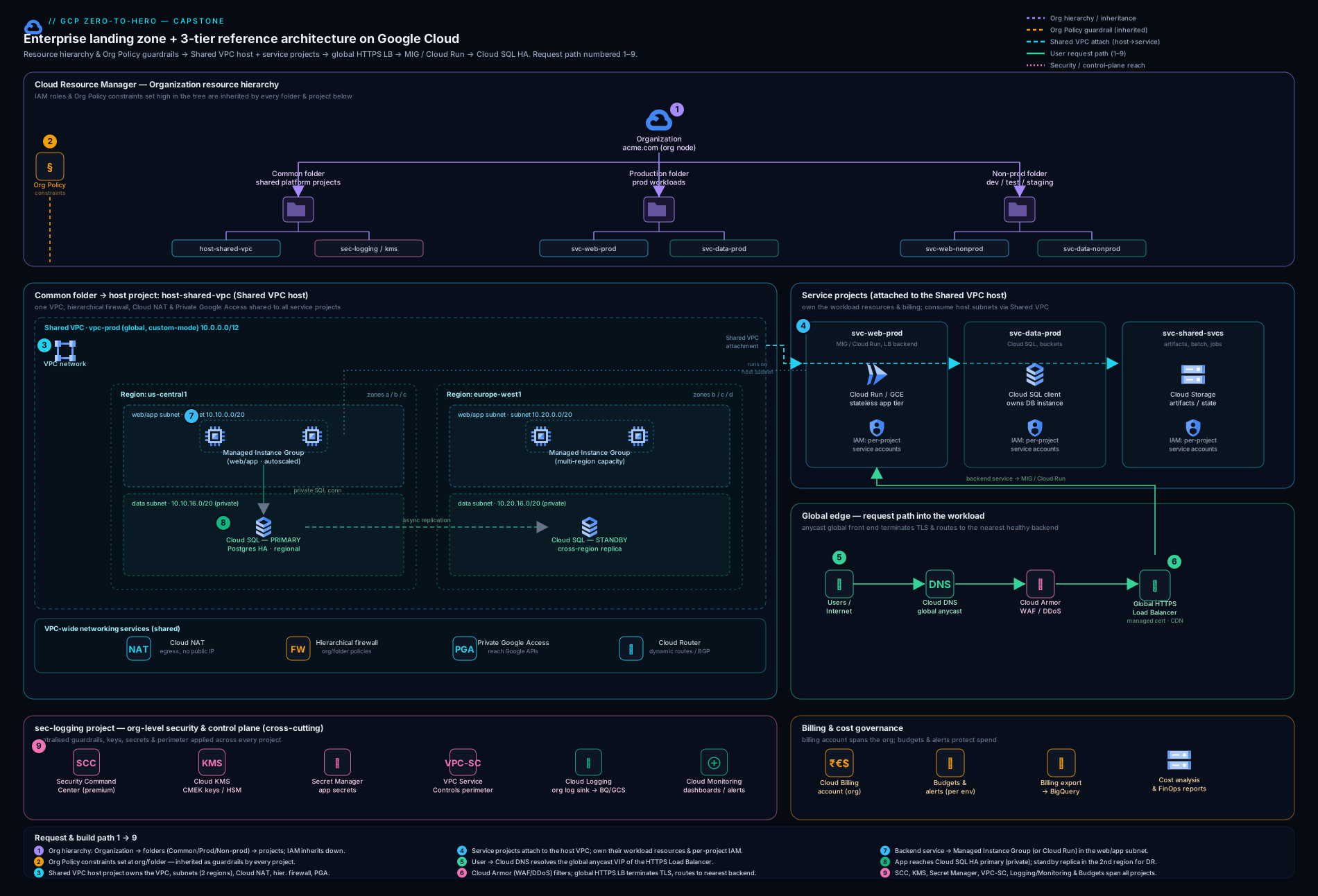
The diagram above is the target state we are building toward: the folder/project hierarchy inherits IAM and Org Policy down into the common and business-unit projects; the Shared VPC host project owns the network that the freight service projects deploy into; the 3-tier app flows from the global load balancer through the app tier to Cloud SQL; and everything reports to the central logging project. Keep it open as a map while you build — each phase below fills in one part of it.
Staged build plan
You do not build a landing zone in one giant terraform apply — you build it in phases, validating each before the next, ideally as separate Terraform root modules (or a single repo with ordered stacks) so that the slow-moving foundation and the fast-moving workload have independent state and blast radius. Each phase names the deeper lesson to open if you need more than the snippet. The hands-on lab that follows builds a free-tier slice of phases 1, 3, 4 and 7 end to end inside a single project.
| Phase | What you build | Pillar | Reuse lesson |
|---|---|---|---|
| 0. Bootstrap | Seed project, Terraform state bucket, pipeline identity (WIF) | Operational excellence | WIF keyless CI/CD |
| 1. Hierarchy | Folders + projects + billing + API enablement | Operational excellence | Resource hierarchy |
| 2. Identity | IAM bindings to groups; deny policies | Security | IAM deny/conditions/impersonation |
| 3. Org Policy | Inherited constraints (keys, IPs, locations) | Security | Org Policy guardrails |
| 4. Shared VPC | Host/service, subnets, Cloud NAT, hierarchical firewall, PGA | Reliability + security | Shared VPC |
| 5. Workload | Global LB → MIG/Cloud Run → Cloud SQL HA | Reliability + performance | Global LB, MIGs |
| 6. Security | SCC, KMS/CMEK, Secret Manager, VPC SC perimeter | Security | KMS/CMEK, VPC SC |
| 7. Observability | Log sinks + Monitoring + SLOs + alerts | Operational excellence | course observability lessons |
| 8. DR + cost | Cross-region replica, budgets, labels | Cost + reliability | Cloud SQL HA |
Representative Terraform for the core pieces
In real life you split these across stacks, but here are representative snippets for each phase so you can see the shape. Configure the Google provider once and pin a version:
terraform {
  required_providers {
    google = { source = "hashicorp/google", version = "~> 5.40" }
  }
  backend "gcs" {
    bucket = "meridian-tfstate"   # created once in the bootstrap project
    prefix = "landing-zone"
  }
}

provider "google" {
  region = "europe-west1"
}
Phase 1 — a folder and a project (hierarchy):
resource "google_folder" "logistics" {
  display_name = "logistics"
  parent       = "folders/${var.bu_folder_id}"
}

resource "google_project" "freight_prod" {
  name            = "freight-prod"
  project_id      = "meridian-freight-prod"
  folder_id       = google_folder.logistics.id
  billing_account = var.billing_account
  labels          = { team = "freight", env = "prod", cost-center = "log-ops" }
}

resource "google_project_service" "apis" {
  for_each = toset([
    "compute.googleapis.com", "sqladmin.googleapis.com",
    "secretmanager.googleapis.com", "cloudkms.googleapis.com",
  ])
  project = google_project.freight_prod.project_id
  service = each.value
}
Phase 3 — an inherited Org Policy constraint (boolean):
resource "google_org_policy_policy" "no_sa_keys" {
  name   = "folders/${google_folder.logistics.folder_id}/policies/iam.disableServiceAccountKeyCreation"
  parent = "folders/${google_folder.logistics.folder_id}"
  spec {
    rules { enforce = "TRUE" }
  }
}
Phase 4 — Shared VPC host, a subnet with Private Google Access, and service attachment:
# Make the network project a Shared VPC host
resource "google_compute_shared_vpc_host_project" "host" {
  project = var.host_project_id
}

resource "google_compute_network" "vpc" {
  project                 = var.host_project_id
  name                    = "vpc-shared"
  auto_create_subnetworks = false
}

resource "google_compute_subnetwork" "app" {
  project                  = var.host_project_id
  name                     = "snet-app-euw1"
  region                   = "europe-west1"
  network                  = google_compute_network.vpc.id
  ip_cidr_range            = "10.10.0.0/20"
  private_ip_google_access  = true        # Private Google Access
}

# Attach the workload (service) project to the host
resource "google_compute_shared_vpc_service_project" "freight" {
  host_project    = var.host_project_id
  service_project = google_project.freight_prod.project_id
}
Phase 4 — Cloud NAT for private egress:
resource "google_compute_router" "rtr" {
  project = var.host_project_id
  name    = "rtr-euw1"
  region  = "europe-west1"
  network = google_compute_network.vpc.id
}

resource "google_compute_router_nat" "nat" {
  project                            = var.host_project_id
  name                               = "nat-euw1"
  router                             = google_compute_router.rtr.name
  region                             = "europe-west1"
  nat_ip_allocate_option             = "AUTO_ONLY"
  source_subnetwork_ip_ranges_to_nat = "ALL_SUBNETWORKS_ALL_IP_RANGES"
}
Phase 5 — Cloud SQL HA on a private IP with CMEK:
resource "google_sql_database_instance" "db" {
  project          = google_project.freight_prod.project_id
  name             = "freight-pg"
  region           = "europe-west1"
  database_version = "POSTGRES_16"
  encryption_key_name = google_kms_crypto_key.sql.id   # CMEK
  settings {
    tier              = "db-custom-2-7680"
    availability_type = "REGIONAL"                       # HA: synchronous standby
    ip_configuration {
      ipv4_enabled    = false                            # private only
      private_network = google_compute_network.vpc.id
    }
    backup_configuration {
      enabled                        = true
      point_in_time_recovery_enabled = true
    }
  }
}
Phase 7 — an aggregated log sink to a logging project:
resource "google_logging_folder_sink" "central" {
  name             = "central-sink"
  folder           = google_folder.logistics.folder_id
  include_children = true
  destination      = "logging.googleapis.com/projects/${var.logging_project}/locations/global/buckets/_Default"
  filter           = "severity >= WARNING"
}
These are deliberately representative, not a full module — the point is that every pillar of the landing zone is expressible as a handful of well-understood Terraform resources, deployed in dependency order.
Hands-on lab — build a free-tier landing-zone slice
You will build a real, working slice using the gcloud CLI in Google Cloud Shell — no installs. To stay inside the GCP Free Tier / $300 credit and avoid needing org-admin or a real Shared VPC (which requires an organisation), we model the hierarchy and guardrails inside a single project and build the network + a private VM + Cloud NAT + a guardrail-style check + a logging sink. The commands are identical in shape to the real thing.
Note on scope: real folders, an org-level Shared VPC, and org-level Org Policy need a Cloud Identity organisation you may not have on a personal account. This lab therefore models them with project-level resources and project-level policy. Where an org is required, the snippet earlier in the lesson shows the real form.
1. Set context. Open Cloud Shell, then confirm and pin your project:
gcloud config set project "$(gcloud config get-value project)"
PROJECT_ID=$(gcloud config get-value project)
REGION=europe-west1
echo "Working in: $PROJECT_ID ($REGION)"
gcloud services enable compute.googleapis.com logging.googleapis.com
2. Build the network (phase 4 slice) — a custom VPC and a subnet with Private Google Access:
gcloud compute networks create vpc-lz --subnet-mode=custom

gcloud compute networks subnets create snet-app \
  --network=vpc-lz --region=$REGION \
  --range=10.10.0.0/20 \
  --enable-private-ip-google-access
3. Add Cloud NAT so private VMs get outbound internet with no external IP (the posture the deny-external-IP guardrail enforces):
gcloud compute routers create rtr-lz --network=vpc-lz --region=$REGION

gcloud compute routers nats create nat-lz \
  --router=rtr-lz --region=$REGION \
  --auto-allocate-nat-external-ips \
  --nat-all-subnet-ip-ranges
4. Apply a firewall guardrail — deny is implicit; allow only internal SSH via IAP (no 0.0.0.0/0:22):
gcloud compute firewall-rules create allow-iap-ssh \
  --network=vpc-lz --direction=INGRESS --action=ALLOW \
  --rules=tcp:22 --source-ranges=35.235.240.0/20   # IAP range
5. Launch a private app-tier VM (phase 5 slice) — no external IP, reachable only through IAP/the LB later:
gcloud compute instances create vm-app \
  --zone=${REGION}-b --machine-type=e2-small \
  --subnet=snet-app --no-address \
  --image-family=debian-12 --image-project=debian-cloud
6. Route logs centrally (phase 7 slice) — create a log sink to BigQuery (models the aggregated sink):
bq --location=$REGION mk -d lz_logs 2>/dev/null || true

gcloud logging sinks create lz-sink \
  bigquery.googleapis.com/projects/$PROJECT_ID/datasets/lz_logs \
  --log-filter='resource.type="gce_instance" AND severity>=WARNING'
7. Validate. Prove the slice exists and is wired correctly:
# Subnet has Private Google Access ON
gcloud compute networks subnets describe snet-app --region=$REGION \
  --format="value(privateIpGoogleAccess)"   # -> True

# Cloud NAT present
gcloud compute routers nats list --router=rtr-lz --region=$REGION \
  --format="value(name)"                      # -> nat-lz

# VM has NO external IP (private by construction)
gcloud compute instances describe vm-app --zone=${REGION}-b \
  --format="value(networkInterfaces[0].accessConfigs[0].natIP)"  # -> empty

# Log sink created and its writer identity returned
gcloud logging sinks describe lz-sink --format="value(name,writerIdentity)"
Expected: Private Google Access reads True, the NAT is listed, the VM’s external-IP field is empty, and the sink reports a writerIdentity service account (which you would then grant bigquery.dataEditor on the dataset). You now have, in miniature, the network, private-by-default compute, egress, a firewall guardrail, and central log routing — the spine of the landing zone.
8. Cleanup. Delete in reverse dependency order:
gcloud logging sinks delete lz-sink --quiet
bq rm -r -f -d ${PROJECT_ID}:lz_logs
gcloud compute instances delete vm-app --zone=${REGION}-b --quiet
gcloud compute routers delete rtr-lz --region=$REGION --quiet
gcloud compute firewall-rules delete allow-iap-ssh --quiet
gcloud compute networks subnets delete snet-app --region=$REGION --quiet
gcloud compute networks delete vpc-lz --quiet
Cost note: A custom VPC, a subnet, a firewall rule, and a log sink are free. Cloud NAT bills a small hourly + data rate, and one e2-small VM is a few pennies per hour; deleting everything the same day keeps this comfortably inside the Free Tier / $300 credit. (An e2-micro in a US free-tier region is always-free if you want zero compute cost.)
Common mistakes & troubleshooting
| Symptom | Likely cause | Fix |
|---|---|---|
| Service project can’t deploy into the host’s subnet | The service-project SA / app team lacks compute.networkUser on the subnet |
Grant roles/compute.networkUser on the specific subnet (subnet-scoped, not project-wide) |
| Private VM can’t reach Google APIs or the internet | Private Google Access off and/or no Cloud NAT | Enable PGA on the subnet for Google APIs; add Cloud NAT for general egress |
Org Policy terraform apply “permission denied” |
You need orgpolicy.policyAdmin at the org/folder, not project Owner |
Grant the policy-admin role at the right scope; apply from the pipeline identity |
| New constraint breaks the platform’s own bootstrap | A too-broad deny (e.g. resource locations) blocks a needed region/service | Test on a non-prod folder first; add a conditional allow value or scope the constraint lower |
| Cloud SQL won’t take a private IP | Private Service Access (VPC peering range) not allocated to the VPC | Reserve a /24+ range and create the servicenetworking peering before the instance |
| VPC Service Controls perimeter blocks a legitimate call | The calling project/identity isn’t in the perimeter or an ingress rule | Add the project to the perimeter or write a scoped ingress/egress rule; dry-run the perimeter first |
| Log sink writes nothing to the destination | The sink’s writerIdentity SA lacks write permission on the destination |
Grant the sink’s service account dataEditor/objectCreator on the BigQuery dataset or bucket |
| Global LB returns 502 with a healthy-looking backend | Health check failing, or firewall doesn’t allow the LB/health-check ranges | Allow 130.211.0.0/22 and 35.191.0.0/16; verify the health-check path returns 200 |
Best practices
- Decide before you deploy. Write the eight decisions down and review them against the Architecture Framework pillars with stakeholders. Terraform is cheap to change; an undocumented hierarchy is not.
- Inherit, don’t repeat. Bind IAM and apply Org Policy at the highest sensible level (folder) so new projects are governed automatically.
- Projects are cheap; use them as boundaries. One workload-per-environment beats one giant project — it preserves cost attribution and blast-radius isolation.
- Centralise the network, federate the workloads. A Shared VPC host owned by the platform team; subnets consumed by app teams with subnet-scoped
networkUser. - Keys, not nobody, but never humans. Disable SA-key creation org-wide; use attached service accounts and Workload Identity Federation for CI/CD.
- Everything is code, in ordered stacks. Bootstrap → foundation → workload as separate Terraform states so blast radius and apply speed are independent. Deploy through a pipeline, never the console, for anything reproducible.
- Label from day one.
team,env,cost-centerare what make cost, ownership, and cleanup possible.
Security notes
The landing zone is your security baseline. Grant IAM to groups, scoped high, least-privilege, and keep privileged roles just-in-time and audited. Make workloads private by Org Policy (deny external IPs; reach them through IAP, the load balancer, or Cloud NAT for egress, never a public NIC). Encrypt the database, disks, and buckets with CMEK from Cloud KMS so you control the key lifecycle, and keep secrets in Secret Manager (CMEK + rotation), never in metadata or code. Draw a VPC Service Controls perimeter around the data projects so even a stolen credential cannot exfiltrate to an outside project. Turn on Security Command Center and route its findings — plus all Cloud Audit Logs — to the central logging project so security can hunt across the estate. Enforce OS Login so SSH is governed by IAM rather than shared keys. And ship all of this through a pipeline whose identity is a federated one, not a downloaded key.
Interview & exam questions
Q: Walk me through how you would design a Google Cloud landing zone for a company moving off a single project. Start from the business drivers, then the Architecture Framework pillars. Build a folder hierarchy (bootstrap / common / business-units) for inherited IAM and Org Policy; one project per workload-environment as the billing/blast-radius boundary; Cloud Identity with IAM granted to groups; preventive Org Policy guardrails (no SA keys, no external IPs, restricted locations); a Shared VPC host with subnets, Cloud NAT, hierarchical firewall and Private Google Access that service projects consume; the workload as global LB → autoscaling app tier → Cloud SQL HA; a security baseline of SCC, CMEK, Secret Manager and a VPC SC perimeter; centralised log sinks plus Monitoring and SLOs; and DR (cross-region replica) with budgets and labels. Deliver it as ordered Terraform stacks through a federated pipeline.
Q: Why folders and projects rather than one project with everything in it? Inheritance and isolation. Folders let one IAM binding or Org Policy constraint flow to every current and future project beneath them; projects are the atomic boundary for billing, quota, IAM, and blast radius. One giant project destroys cost attribution and means any misconfiguration can touch everything.
Q: Explain Shared VPC — host vs service project — and the IAM that makes it work.
A host project owns the VPC, subnets, routes, and firewall; service projects are attached to it and their resources deploy into the host’s subnets, sharing one routing domain. The platform team holds compute.xpnAdmin at the org/folder to enable hosts and attach services; app teams need only compute.networkUser on the specific subnets they use. Network control stays central; workload ownership stays federated.
Q: How do Org Policy constraints differ from IAM, and why use them in a landing zone?
IAM controls who can do what; Org Policy controls what is allowed to exist or how, regardless of permissions — even an Owner cannot create an external IP if compute.vmExternalIpAccess denies it. They are preventive guardrails that inherit down the hierarchy, so they make the platform compliant by construction rather than by audit.
Q: How do you give a private VM outbound internet without an external IP? Cloud NAT on a Cloud Router for general egress, and Private Google Access on the subnet so it can reach Google APIs over Google’s network — both pairing with the deny-external-IP Org Policy so the VM stays private.
Q: Why a global external Application Load Balancer in front of a regional backend? It gives a single anycast IP served from Google’s edge, terminates TLS with a managed cert, integrates Cloud Armor (WAF/DDoS) and Cloud CDN, and lets you later add backends in more regions without changing the front door — so today’s single-region backend can become multi-region without a re-architecture.
Q: What makes Cloud SQL “HA,” and how is that different from a read replica?
HA (REGIONAL availability) keeps a synchronous standby in a second zone of the same region and fails over automatically — it is for availability within a region. A read replica is asynchronous, serves reads (or, cross-region, underpins DR by being promotable), and does not provide automatic failover by itself. You use both: HA for zonal resilience, a cross-region replica for regional DR.
Q: How does VPC Service Controls add to IAM and firewalls? It draws a perimeter around services/projects so that data cannot move across the boundary even with valid credentials — mitigating credential theft and exfiltration. IAM says who may call an API; firewalls control packets; VPC SC controls whether data can leave the perimeter at the API layer. Defence in depth.
Q: Where do you put logs in a landing zone, and how?
An aggregated log sink at the org or folder (with include_children) routes everything to a dedicated logging project — a Logging bucket for operational queries and BigQuery for long-term analysis — and you grant the sink’s writerIdentity write access on the destination. Centralising lets security and SRE query the whole estate.
Q: How does this design answer “show me the bill, by team”?
Projects are the billing boundary (one per workload/env), consistent labels (team, env, cost-center) flow into the BigQuery billing export, and a Budget with alerts per project warns owners before overspend. Finance slices spend by project and label.
Q: How would you review this design before sign-off? Against the five Architecture Framework pillars: operational excellence (IaC, hierarchy, observability), security (least-privilege IAM, Org Policy, CMEK, VPC SC, SCC), reliability (HA, autohealing, multi-zone, DR replica), cost optimisation (labels, budgets, CUDs/SUDs, right-sizing), and performance (global LB, CDN, autoscaling) — scoring each and closing gaps before it ships.
Quick check
- Why apply Org Policy and IAM at a folder rather than on each project?
- What is the difference between a Shared VPC host project and a service project, and which IAM role lets a service project use a subnet?
- How does a private VM reach Google APIs and the general internet with no external IP?
- What distinguishes Cloud SQL HA from a read replica?
- What does VPC Service Controls protect against that IAM and firewall rules do not?
Answers
- Because folders inherit — a single binding or constraint flows to every current and future project beneath them, so new teams are governed automatically instead of someone re-applying guardrails each time.
- The host project owns the VPC/subnets/firewall; service projects attach and deploy into the host’s subnets. A service project’s workloads need
roles/compute.networkUseron the specific subnet (the platform team holdscompute.xpnAdminto attach projects). - Private Google Access on the subnet lets it reach Google APIs over Google’s network; Cloud NAT on a Cloud Router gives outbound internet — neither requires an external IP, matching the deny-external-IP guardrail.
- HA keeps a synchronous standby in another zone with automatic failover (availability within a region); a read replica is asynchronous, serves reads or underpins cross-region DR by being promotable, and has no automatic failover on its own.
- Data exfiltration with valid credentials — VPC SC draws a perimeter so data cannot move to a project outside it even by an authorised identity, which IAM (who may call) and firewalls (packets) do not address.
Exercise
Extend the lab into the cost + observability pillars. First, label and budget: apply team, env, and cost-center labels to the project, then create a budget with an alert:
gcloud billing budgets create \
  --billing-account="$(gcloud billing projects describe $PROJECT_ID --format='value(billingAccountName)' | cut -d/ -f2)" \
  --display-name="freight-monthly" \
  --budget-amount=10USD \
  --threshold-rule=percent=0.8 --threshold-rule=percent=1.0
Then create a logs-based metric and an alerting policy (or describe one) that fires when gce_instance ERROR logs exceed a threshold. In three or four sentences, explain how labels + the BigQuery billing export + the budget together satisfy Meridian’s “show me the bill, by team” and how the logs-based metric contributes to an SLO. Clean up afterward.
Certification mapping
This capstone maps most directly to the Professional Cloud Architect (PCA) exam — the design-and-justify exam GCP is famous for — across its core areas:
- Designing and planning a cloud solution architecture — hierarchy, network topology, the 3-tier workload, and Architecture Framework trade-offs are the heart of PCA (and exactly how the Mountkirk / EHR / Helicopter case studies are reasoned about).
- Managing and provisioning infrastructure — Shared VPC, Cloud NAT, MIGs/Cloud Run, Cloud SQL, all as Terraform.
- Designing for security and compliance — IAM to groups, Org Policy, CMEK, Secret Manager, VPC Service Controls, SCC.
- Ensuring solution and operations reliability — HA, autohealing, multi-zone, DR replica, log sinks, SLOs and error budgets.
It also reinforces Associate Cloud Engineer skills (creating projects, networks, VMs, IAM and policy with gcloud), Professional Cloud Security Engineer (the guardrail and perimeter work), Professional Cloud Network Engineer (Shared VPC, NAT, firewall, LB), and Professional Cloud DevOps Engineer (IaC, SLOs, observability). It is the single artefact that ties the whole certification ladder together.
Glossary
- Landing zone — a pre-provisioned, governed Google Cloud environment (hierarchy, identity, network, guardrails, observability) that workloads “land” in.
- Folder — a container above projects (nestable) for applying IAM and Org Policy that inherit downward.
- Project — the atomic boundary for billing, IAM, quota, and blast radius; one workload-per-environment is the rule.
- Org Policy constraint — a preventive rule on what may exist or how (e.g. no external IPs), enforced regardless of IAM, inherited down the hierarchy.
- Shared VPC — a topology where a host project owns the network and service projects deploy into its subnets; central network control, federated workloads.
- Host / service project — the network owner vs the workload owner in a Shared VPC; the workload needs
compute.networkUseron a subnet. - Cloud NAT — managed NAT on a Cloud Router giving private instances outbound internet with no external IP.
- Private Google Access — a subnet setting letting private instances reach Google APIs over Google’s network.
- CMEK — customer-managed encryption key (in Cloud KMS) used to encrypt a resource so you control the key lifecycle.
- VPC Service Controls — a service perimeter that prevents data exfiltration across the boundary even with valid credentials.
- Aggregated log sink — an org/folder sink (with child inclusion) that routes logs from many projects to one central destination.
- SLO / error budget — a reliability target (e.g. 99.9% availability) and the allowable failure budget that drives alerting.
- Architecture Framework — Google Cloud’s well-architected guidance across five pillars: operational excellence, security, reliability, cost optimisation, performance.
Next steps
Congratulations — that is the Google Cloud Zero-to-Hero capstone, and the finale of the course. You have designed and (in slice form) built an enterprise landing zone and a 3-tier app, and reviewed it against every Architecture Framework pillar.
To take any single pillar from this capstone to full production depth, build on the KloudVin deep-dive lessons:
- Designing a GCP Resource Hierarchy & Org Policy guardrails — the hierarchy and preventive governance in depth.
- Building a Shared VPC and Hierarchical firewall, Cloud NAT & egress control — the network foundation.
- Global external Application Load Balancer, Regional MIGs: autohealing & canary, and Cloud SQL HA & private connectivity — the workload.
- Cloud KMS & CMEK, Secret Manager rotation, and VPC Service Controls — the security baseline.
- Workload Identity Federation — keyless CI/CD for the pipeline that deploys all of the above.
- Enterprise architecture: GCP DR & resilience and enterprise global web on GCP — multi-region depth beyond the capstone.