A mid-sized online learning company runs a Moodle platform that 90,000 university students log into for graded exams. One Tuesday during a final-exam window, an availability zone in their cloud region has a power event. Half the application servers vanish. The site stays up — slower, but up — because there was a second zone carrying the load. Nobody fails an exam. That is high availability doing its job.
Six weeks later, a botched storage migration corrupts the production database in a way that replicates everywhere in the region. The whole region is effectively gone for them. Now the question is not “is a second server still running” — it is “how fast can we stand the entire platform back up somewhere else, and how much student work did we lose?” That is disaster recovery, and it is a completely different problem.
New engineers blur these two together constantly, and it costs real money — either by over-building HA when they needed DR, or by assuming HA will save them from a disaster it was never designed for. This article untangles them. By the end you will be able to define RTO and RPO precisely, place any system on the DR strategy ladder, and make the cost-versus-resilience tradeoff deliberately instead of by accident.
The one-sentence difference
Hold onto this framing for the rest of the article:
- High availability (HA) keeps a system running through small, expected failures — a dead server, a failed disk, one bad availability zone — usually with no human involved and no data loss. It is about redundancy inside one region.
- Disaster recovery (DR) brings a system back after a large, rare failure — a whole region down, a ransomware event, a catastrophic human error — typically across a second region, and usually with some recovery time and possibly some data loss.
HA is “don’t fall over.” DR is “get back up after you’ve been knocked out.” You need both, because they defend against different things. HA will not save you from a region-wide outage; a DR plan that takes six hours will not save you from a single crashed node that HA could have masked in seconds.
| Dimension | High Availability | Disaster Recovery |
|---|---|---|
| Protects against | Component / AZ failure | Region failure, corruption, ransomware, human error |
| Scope | Within one region (multi-AZ) | Across regions (multi-region) |
| Human action | None — automatic | Often a deliberate failover decision |
| Data loss | Effectively zero | Zero to “since the last replication,” by design |
| Recovery speed | Seconds, transparent | Minutes to hours, depending on strategy |
| Typical cost | Moderate (2× the active tier) | Ranges from cheap (backups) to very expensive (active-active) |
Availability zones vs regions — the physical reality
These two words carry the whole distinction, so be precise about them.
A region is a geographic area (say, Mumbai or Frankfurt). An availability zone (AZ) is one or more physically separate data centers inside that region, with independent power, cooling, and networking, connected to the other zones by fast, low-latency links. A single region typically has three AZs.
HA = spreading copies across AZs in one region. Because the zones are close, replication between them can be synchronous (every write is confirmed in two zones before the user sees “saved”), so a zone failure loses nothing. The Moodle company survived its first incident because its web tier, app tier, and database replica were all spread across two zones.
DR = having a plan for a second region entirely. Regions are far apart, so cross-region replication is usually asynchronous (the second region is a few seconds behind), which is exactly why DR has to reckon with possible data loss. That trade — distance buys you independence from a regional disaster, but costs you the ability to confirm every write everywhere instantly — is the physics underneath everything that follows.
RTO and RPO: the two numbers that define a DR plan
You cannot design or buy DR without these two numbers. They are the whole vocabulary.
RTO — Recovery Time Objective. How long can we be down? It is the maximum acceptable time from “disaster strikes” to “service restored.” RTO is measured in time — 15 minutes, 4 hours, a day.
RPO — Recovery Point Objective. How much data can we afford to lose? It is the maximum acceptable gap between the last usable copy of your data and the moment of failure. RPO is measured in time, expressed as data — an RPO of 5 minutes means you may lose up to the last 5 minutes of writes.
A picture pins it down. Imagine a timeline with the disaster at the centre:
        <----- RPO -----> [DISASTER] <----- RTO ----->
   last good data copy        |          service back online
   (how much you lose)        |        (how long you're down)
RPO looks backwards from the disaster (how much work disappears). RTO looks forwards from the disaster (how long until you’re serving again). They are independent — you can have a tiny RPO and a huge RTO, or vice versa.
Two quick, concrete examples to make it stick:
- A bank’s payment ledger needs RPO ≈ 0 (losing even one confirmed transaction is unacceptable) and a low RTO (every minute down is lost revenue and angry customers).
- An internal HR reporting tool might happily accept RPO 24 hours (a nightly backup is fine) and RTO 8 hours (restore it tomorrow morning), because nobody is harmed by a day-old report being a day late.
The trap to avoid: smaller numbers cost more, often a lot more. Driving RPO from “5 minutes” to “zero” can multiply your bill, because zero data loss demands synchronous replication and the expensive infrastructure that goes with it. RTO and RPO are not aspirations you set to “as low as possible” — they are budget decisions you negotiate with the business, written down per system. Companies often capture these agreed targets formally as a tier in their ServiceNow service catalog, so “this app is Tier 1, RTO 15 min / RPO 5 min” is recorded, owned, and auditable rather than living in one engineer’s head.
The DR strategy ladder
There is no single “DR setup.” There is a ladder of four well-known strategies, each a different point on the cost-versus-recovery curve. The right rung is the cheapest one that still meets your agreed RTO and RPO. Climb only as high as you have to.
Rung 1 — Backup & Restore (cheapest, slowest)
Take regular backups (database snapshots, object-storage copies) and store them in a second region. When disaster strikes, you provision fresh infrastructure there and restore from backup.
- RTO: hours to a day (you are building from scratch under pressure).
- RPO: as old as your last backup — often hours.
- Cost: very low. You pay only for stored backups; no idle compute.
- Good for: non-critical and internal systems. The HR reporting tool lives here happily.
A backup is not a DR plan until it has been test-restored. An untested backup is a hope, not a recovery. Define it as code so the recovery environment is reproducible — a Terraform module that stands the whole stack up in the secondary region, and Ansible playbooks to configure the restored hosts. That way “rebuild in the other region” is terraform apply against a known-good plan, not a frantic afternoon of clicking.
Rung 2 — Pilot Light
Keep a minimal always-on core in the second region — typically your database, continuously replicated, plus the baseline networking. The application servers exist only as machine images, switched off. On disaster, you “turn up the wick”: boot the app tier from those images, scale it out, and point traffic over.
- RTO: tens of minutes (the data is already there and warm; you only spin up compute).
- RPO: minutes (continuous database replication).
- Cost: low–moderate. You pay for the small replicated database and storage, not a full idle fleet.
This is the first rung where RPO drops to minutes, because the database is live in the second region rather than restored from a file.
Rung 3 — Warm Standby
Run a full but scaled-down copy of the entire stack in the second region — every tier is actually running, just smaller. On disaster you fail traffic over and scale the standby up to full size.
- RTO: minutes (everything is already running; you just redirect and grow).
- RPO: seconds to minutes.
- Cost: moderate–high. You are paying for a running second environment, even if it is undersized.
Warm standby is the common landing spot for genuinely important systems that cannot justify the cost of running two full production environments at all times.
Rung 4 — Active-Active / Multi-Region (most resilient, most expensive)
Run full production in two (or more) regions simultaneously, both serving live traffic, with a global load balancer steering users. If one region dies, the survivors absorb the load — often with no failover step at all, because traffic was already flowing to both.
- RTO: near zero (the other region is already serving).
- RPO: near zero (with appropriate replication).
- Cost: highest. You run (at least) two full production stacks, plus you must solve hard problems: cross-region data consistency, conflict resolution, and “split-brain” avoidance.
This is where banks put their payment ledgers and where a global SaaS keeps its core API. It is overkill — and an irresponsible use of money — for the HR reporting tool.
| Strategy | RTO | RPO | Relative cost | Fits |
|---|---|---|---|---|
| Backup & Restore | Hours–day | Hours | $ | Internal / non-critical |
| Pilot Light | ~30 min | Minutes | $$ | Important, cost-sensitive |
| Warm Standby | Minutes | Secs–mins | $$$ | Business-critical |
| Active-Active | ~Zero | ~Zero | $$$$ | Mission-critical, can’t go down |
Architecture overview
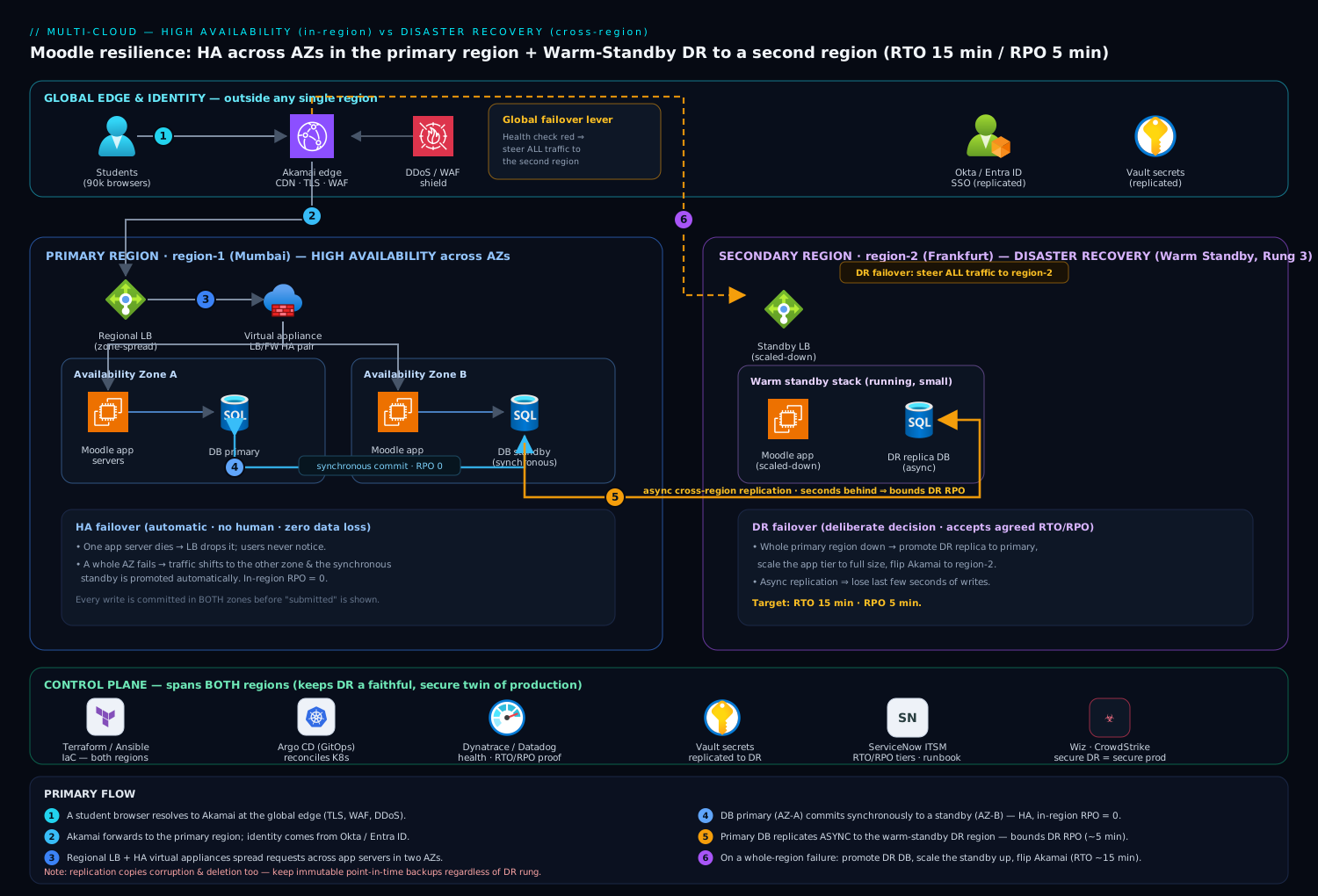
Here is how HA and DR fit together for the learning company’s Moodle platform once they take resilience seriously. Read it as two layers stacked on one another: HA inside the primary region, and DR spanning to a second region.
Inside the primary region (the HA layer), following a normal student request:
- A student’s browser resolves to Akamai at the edge, which provides global anycast, TLS termination, and a WAF/DDoS shield, then forwards the request to the primary region. Akamai is also the lever that later performs DR failover: a health check that goes red lets it steer all traffic to the second region.
- Traffic hits a regional load balancer that spreads requests across application servers living in two availability zones. Lose a zone and the load balancer simply stops sending traffic to the dead instances — the HA survival you saw in the opening story.
- The Moodle app servers (and the file store for course content) run as redundant copies across both AZs, fronted by virtual appliances — load-balancer and firewall VMs deployed in an HA pair across zones so the network path itself has no single point of failure.
- The database runs as a primary in AZ-A with a synchronous standby in AZ-B. Every write is committed to both zones before the student sees “submitted,” so an AZ failure causes an automatic database failover with zero data loss — RPO of zero within the region. This is HA, not DR: it protects against a zone dying, not the whole region.
Spanning to the second region (the DR layer):
- The primary database asynchronously replicates to a standby database in a second region, a few seconds behind. The company chose Warm Standby (Rung 3): a scaled-down but running Moodle stack sits in region two, fed by that replica.
- If the entire primary region fails, the team makes a deliberate failover decision: promote the second-region database to primary, scale the standby app tier up to full size, and flip Akamai to send all students to region two. Because replication is asynchronous, they may lose the last few seconds of writes — their agreed RPO of 5 minutes — and the scale-up-and-redirect takes a few minutes — their agreed RTO of 15 minutes.
The control plane around both layers is what makes this operable rather than heroic:
- Terraform defines every resource in both regions, so the DR region is provably identical to production and can be rebuilt from code; Ansible configures the hosts.
- Jenkins or GitHub Actions runs the deployment pipeline to both regions so they never drift apart, and Argo CD continuously reconciles the Kubernetes workloads in each region against Git — meaning the DR region self-heals toward the same declared state as production instead of quietly rotting.
- Dynatrace (or Datadog) provides the health signals — latency, error rate, replication lag — that tell humans when a region is genuinely failing versus merely wobbling, and feeds the dashboards that prove RTO/RPO are being met.
- ServiceNow holds the runbook and opens the major-incident record the moment a regional failover begins, giving the business a single source of truth during the worst hour.
Component-by-component: what each piece does
| Layer | Component | Role in HA / DR |
|---|---|---|
| Edge | Akamai | TLS, WAF, DDoS at the perimeter; flips traffic to region two on failover |
| Identity | Okta / Entra ID | Workforce/student SSO; replicated identity so login still works after failover |
| Network | Virtual appliances (LB/firewall VMs) | HA pair across AZs; removes single points of failure on the network path |
| Compute | Moodle app servers (multi-AZ) | Redundant across zones for HA; scaled-down copy in region two for DR |
| Data | Primary + synchronous standby (in-region) | Zero-RPO HA failover when an AZ dies |
| Data (DR) | Asynchronous cross-region replica | The few-seconds-behind copy that bounds DR’s RPO |
| Secrets | HashiCorp Vault | Stores DB credentials and keys; replicated so the DR region can authenticate |
| Posture | Wiz / Wiz Code | Verifies the DR region is built securely, not as a soft target |
| Runtime security | CrowdStrike Falcon | Endpoint/workload protection on both regions’ compute |
| Delivery | Jenkins / GitHub Actions + Argo CD | Deploys to both regions; keeps DR from drifting away from prod |
| IaC | Terraform / Ansible | Makes the second region reproducible from code |
| Observability | Dynatrace / Datadog | Detects real regional failure; proves RTO/RPO compliance |
| ITSM | ServiceNow | Records RTO/RPO tiers; runs the failover runbook and incident |
A few of these deserve a word on why they matter specifically for resilience, because beginners often forget them until a real failover exposes the gap.
Identity has to survive the disaster too. A perfectly replicated database is useless if students cannot log in because the Okta / Entra ID identity service was only reachable through the dead region. Treat your IdP as a Tier 1 dependency with its own HA/DR posture — its outage is your outage.
Secrets have to survive the disaster too. When the DR region boots, the app needs database passwords, API keys, and TLS certificates. If those live in HashiCorp Vault only in the primary region, your failover stalls at the worst moment. Replicate Vault (or its equivalent) to the DR region so the recovered stack can actually authenticate.
The DR region must be as secure as production. A standby that is rarely looked at is a tempting soft target. Wiz (and Wiz Code scanning the infrastructure-as-code before it deploys) continuously checks that the second region has the same locked-down posture as the first — no accidentally public storage bucket, no over-broad firewall rule — while CrowdStrike Falcon provides runtime threat detection on the workloads in both regions. A breached DR region is not a recovery plan; it is a second front.
Failure modes — and which layer is supposed to catch each
Naming the failure tells you which mechanism is responsible. The classic beginner mistake is expecting the wrong layer to save you.
- One application server crashes → the load balancer drops it; users never notice. HA catches this.
- An entire availability zone fails → multi-AZ redundancy and synchronous DB standby take over automatically, zero data loss. HA catches this. (This is the opening story.)
- The whole region fails → HA cannot help; this is precisely what DR exists for. Fail over to region two, accept the agreed RTO/RPO. DR catches this.
- Data corruption or ransomware that replicates everywhere → both HA and synchronous replication will faithfully copy the bad data. Only point-in-time backups (Rung 1, kept immutable and offline) save you here — which is why even an active-active shop still keeps backups. Backups catch this; live replication does not.
- Accidental deletion by an engineer → same lesson. Replication copies the deletion instantly. Backups and soft-delete / versioning are the safety net.
That fourth point is the one that surprises people most: replication is not backup. Replication copies everything, including your mistakes, in seconds. Backups give you a clean point in the past to roll back to. A serious resilience posture needs both, and the second incident in our opening — region-wide corruption — is exactly the case where only a backup would have saved them.
Scaling, cost, and the central tradeoff
The whole subject reduces to one honest sentence: more resilience costs more money, and the right amount is the least you can get away with for each system.
Scaling. HA scales by adding redundancy within a region — more instances across more AZs, bigger standby databases. DR scales by how much of a second region you keep warm: nothing (backups), a little (pilot light), a scaled-down copy (warm standby), or a full twin (active-active). Each rung up the ladder is a step up in steady-state spend.
Cost, made concrete. Suppose one full production environment costs a notional ₹10 lakh/month to run. Rough relative steady-state costs of protecting it:
| Approach | Extra monthly cost vs. single region | What you’re buying |
|---|---|---|
| Backup & Restore | ~5–10% (storage only) | Survival of a disaster, but slow and lossy recovery |
| Pilot Light | ~15–25% | Warm data, fast-ish recovery, minimal idle compute |
| Warm Standby | ~50–70% | A running (small) second stack; minutes-RTO |
| Active-Active | ~100%+ | Two full stacks; near-zero RTO/RPO |
The discipline is to map each system to a tier and resist gold-plating. The HR tool does not need active-active; spending Tier 1 money on it is waste. The exam platform during finals week genuinely cannot lose a student’s submitted answers and cannot be down for hours — warm standby (or higher) is justified there. Different systems in the same company correctly sit on different rungs, and writing that down — again, often as RTO/RPO tiers in ServiceNow, validated by what Dynatrace or Datadog actually measure — is how you keep the spend honest.
The thing teams forget: test the failover
The single most common way DR fails is that the plan was never tested, so it didn’t actually work when it was needed. Backups that won’t restore. Replicas that lagged hours behind unnoticed. Secrets missing in the DR region. An identity provider only reachable through the dead region. None of these show up until you try — under real pressure, at the worst possible time.
So make failover a routine, scheduled drill, not a theoretical document:
- Game-day exercises: deliberately fail over to the DR region on a schedule, time it, and confirm you actually hit your RTO and RPO. Use the Dynatrace / Datadog numbers as the scorecard.
- Continuously verify replication lag so your real RPO matches the one you promised — a replica silently four hours behind means your true RPO is four hours, not five minutes.
- Keep the DR region honest with GitOps: because Argo CD reconciles it against Git and Terraform defines it as code, the standby stays a faithful twin of production instead of drifting until a failover lands on a broken environment.
- Run the failover from the runbook in ServiceNow, so the steps are written down and anyone on call can execute them at 3 a.m., not just the architect who designed it.
An untested DR plan and no DR plan are dangerously close to the same thing. The only DR you can trust is the one you have actually exercised.
Wrap-up: how to choose
Walk the decision in order, and the design falls out:
- Start with HA always. Spread every tier across multiple AZs in your primary region. This is table stakes — it is cheap relative to what it prevents and it handles the common failures (a dead node, a bad zone) automatically and losslessly. The learning company’s first incident was a non-event purely because of this.
- Then ask the business the two questions: How long can this system be down (RTO)? and How much data can it afford to lose (RPO)? Get real numbers, per system, and record them.
- Pick the lowest rung of the DR ladder that still meets those numbers. Backups for the unimportant; pilot light or warm standby for the important; active-active only for the truly cannot-go-down. Climbing higher than required is just burning money.
- Keep backups regardless of rung, because replication faithfully copies corruption and deletion, and only a clean point in the past saves you from those.
- Test the failover on a schedule, or assume it does not work.
HA keeps you standing through the everyday stumbles. DR — sized honestly with RTO and RPO, built from code into a second region, secured as carefully as production, and actually rehearsed — is what brings you back after the rare day the whole region goes dark. Get both right, at the right cost for each system, and the difference between a quiet Tuesday and a catastrophe is just your architecture doing exactly what you designed it to do.