A mid-sized hospital network — twelve sites, around 6,000 clinical and back-office staff — hands its new platform engineer a single, deceptively simple ticket: “a nurse who joins on Monday should be able to log in to everything she needs by her first shift, and a nurse who leaves on Friday should lose access to all of it before she walks out the door.” Today neither happens. The roster system, the AWS console where the analytics team lives, the Moodle site that hosts mandatory compliance training, the ServiceNow help desk, and a dozen SaaS apps each have their own username and password. Onboarding takes nine separate account requests and three days. Offboarding is worse: when a contractor left last quarter, her AWS credentials stayed live for six weeks because nobody told the cloud team, and an auditor found them. In a hospital, a stale login that can reach patient data is not an inconvenience — it is a reportable breach.
This is the problem identity federation and single sign-on (SSO) exist to solve. If you are new to cloud, identity feels like plumbing — invisible until it leaks. This article is the gentle-but-real introduction: what the pieces are called, how a login actually flows across systems, and how a hospital (or any regulated organization) wires one identity provider into many cloud accounts so that joining and leaving happen once, everywhere, automatically. We will keep the vocabulary honest and the diagrams concrete, because these few concepts underpin almost everything else you will build.
First, two words people constantly mix up
Before any of the acronyms, settle the most common confusion in all of identity, because every design decision downstream depends on it.
Authentication (AuthN) is “who are you?” It is the act of proving identity — the nurse types her credential and a second factor, and the system becomes confident she is who she claims. Authorization (AuthZ) is “what are you allowed to do?” It is the decision about access — given that we know she is a ward nurse, can she open the radiology system? Can she touch the AWS billing console? (No, on both counts.)
They are different questions answered by different machinery, often at different moments. Authentication usually happens once, up front, at a central identity provider. Authorization happens many times, continuously, at each resource, based on attributes the authentication carried along — her role, her department, her group memberships. A useful mental model: authentication issues a passport; authorization is the border guard at each country deciding what that passport lets you do here. Keep them separate in your head and the rest of this falls into place.
The cast of characters: IdP and SP
Federation has exactly two leading roles, and the whole field is built on the relationship between them.
The Identity Provider (IdP) is the system that holds identities and performs authentication. It is the single source of truth for “who works here.” In our hospital we will use Okta as the workforce IdP — it stores every employee and contractor, enforces the password and MFA policies, and is the one place a credential is ever checked. (The cloud-native equivalent many shops use is Microsoft Entra ID, formerly Azure AD; the concepts are identical and the two even federate to each other, which we will return to.)
The Service Provider (SP) is any application that trusts the IdP to do the authenticating and just wants to know “is this a valid, logged-in user, and what are their attributes?” The AWS console is an SP. ServiceNow is an SP. Moodle is an SP. The SP does not store the nurse’s password and never sees it — it has outsourced the entire question of identity to the IdP.
Federation is simply a trust relationship established between an IdP and an SP, so that an identity proven at the IdP is accepted at the SP. You configure it once per app: you tell the SP “trust assertions signed by this IdP,” and you tell the IdP “here is an app you may issue assertions for.” After that handshake, the nurse authenticates at Okta and AWS believes her — without AWS ever having an account for her in the traditional sense.
Single sign-on (SSO) is the user-facing payoff of federation: because all those SPs trust one IdP, the nurse signs in once and moves between apps without signing in again. SSO is the experience; federation is the mechanism underneath that makes it possible. People use the terms loosely; the precise version is “federation is how, SSO is what the user feels.”
Architecture overview
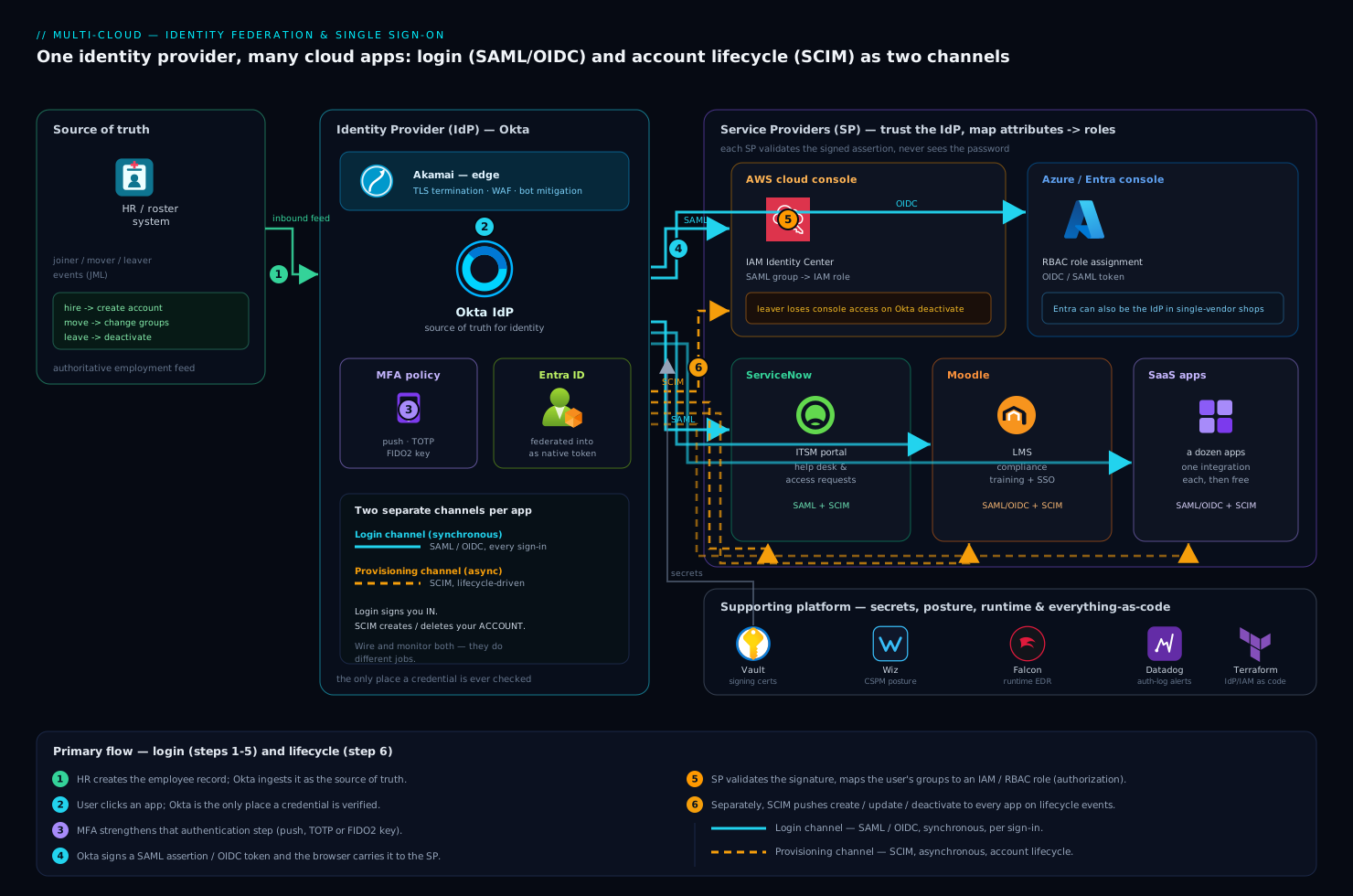
Here is the whole system at a glance, then we will walk every arrow. At the center sits Okta as the IdP — the only system that ever checks a credential. Around it sit the service providers: the AWS and Entra ID / Azure cloud consoles, the ServiceNow ITSM portal, the Moodle learning platform, and a fleet of SaaS apps. Feeding into Okta is the HR system (the roster), which is the authoritative source for who is an active employee. Reaching out of Okta are two kinds of connection that beginners must not confuse: the runtime login flow (SAML or OIDC, happening live every time someone logs in) and the provisioning flow (SCIM, happening in the background to create and delete accounts). Wrapped around the edge is MFA (the second factor) and Akamai at the network perimeter handling TLS and bot/WAF protection before any login traffic reaches the apps.
The single most important idea in the picture: two completely separate channels run between the IdP and each app, and they do different jobs. One channel logs you in (SAML/OIDC, synchronous, per-login). The other channel creates and removes your account (SCIM, asynchronous, lifecycle-driven). Almost every “but I thought SSO already did that” confusion comes from blurring these two. We will take them one at a time.
The login channel, step by step: SAML and OIDC
When the nurse clicks “AWS console” in her Okta dashboard, this is the dance — known as the SP-initiated or, here, IdP-initiated flow. Follow the control flow:
- The browser is sent to Okta with a request that says, in effect, “this user wants to access AWS.”
- Okta checks whether she already has a live session. If not, it authenticates her: password plus a second factor (her phone push). This is the only point a credential is verified. Crucially, AWS never sees the password — that is the entire security win of federation.
- Okta builds a signed assertion (SAML) or token (OIDC) that states “this is Priya Nair, employee, groups:
ward-nurses,site-north, authenticated with MFA at 08:58.” It signs this with a private key only Okta holds. - The browser carries that signed assertion to AWS.
- AWS (the SP) validates the signature against Okta’s public key — proving the assertion really came from the IdP it trusts and was not tampered with — reads the attributes, maps her group to an IAM role, and grants a session scoped to exactly that role’s permissions.
That fifth step is authorization, done by the SP using attributes the IdP supplied. Notice the clean division of labor: Okta said who; AWS decided what.
The signed message in step 3 comes in two competing standards, and knowing when to reach for each is genuinely useful:
| SAML 2.0 | OIDC (OpenID Connect) | |
|---|---|---|
| Era / style | 2005, XML-based | 2014, JSON + built on OAuth 2.0 |
| Message format | XML assertion, signed | JWT (compact, base64 JSON) |
| Best fit today | Enterprise web SSO, legacy SaaS, the AWS/SAP/ServiceNow world | Modern web, mobile, and single-page apps; native cloud |
| Transport | Browser POST of an XML blob | Redirects with tokens; works cleanly for APIs and mobile |
| You will meet it when | Wiring an older enterprise SP to Okta | Building a new app or using cloud-native sign-in |
Both achieve the same outcome — a signed claim of identity the SP can trust — so the choice is usually dictated by what the application supports, not by preference. SAML still rules enterprise web SSO because so many business apps were built around it; OIDC is the default for anything new, especially APIs, mobile, and single-page apps, because a JWT is far easier to pass around than an XML document. A mature IdP like Okta or Entra ID speaks both, so you mix them per-app: SAML to the legacy HR portal, OIDC to the new patient-portal microservice.
A tiny OIDC ID token, decoded, makes the abstraction concrete — it is just signed JSON stating who, where from, and when:
{
  "iss": "https://hospital.okta.com",
  "sub": "00u1priyanair",
  "aud": "aws-console-app",
  "email": "priya.nair@hospital.example",
  "groups": ["ward-nurses", "site-north"],
  "amr": ["pwd", "mfa"],
  "iat": 1749542280,
  "exp": 1749545880
}
iss is the issuer (our IdP), aud the intended audience (the app), groups the attributes that drive authorization at the SP, and amr records that MFA was actually used. The SP reads this, verifies the signature, and proceeds. That is OIDC’s whole magic, minus the cryptography.
The provisioning channel: SCIM, the part SSO does not do
Here is the trap that snares every beginner, and the reason our contractor’s AWS access lingered for six weeks. SSO logs people in; it does not create or delete their accounts. When the nurse first SAMLs into ServiceNow, ServiceNow may not even have a user record for her yet — and when she leaves, disabling her Okta login stops new logins but does nothing about accounts already sitting inside each app. The login channel and the account-lifecycle channel are separate, and you must wire both.
The lifecycle channel is SCIM — System for Cross-domain Identity Management. It is a simple REST/JSON protocol that lets Okta push account changes into each SP automatically:
- A nurse is hired → HR creates her record → Okta sees it → Okta SCIM-POSTs a “create user” to ServiceNow, Moodle, and the SaaS apps, so her accounts exist before her first login.
- She moves from the north site to cardiology → her group changes in Okta → Okta SCIM-PATCHes the affected apps so her access follows her role.
- She resigns → HR marks her terminated → Okta SCIM-DELETEs (or deactivates) her across every connected app within minutes — this is what would have killed the contractor’s credentials on day one instead of week six.
The flow of truth runs one way: HR system → Okta → every app. HR owns “is this person employed”; Okta owns “what apps and groups”; the apps simply obey. That single directional pipeline is the heart of joiner/mover/leaver (JML) automation, and it is what turns the hospital’s nine-request, three-day onboarding into one HR action that fans out automatically.
A SCIM deprovision is unglamorous and exactly as boring as you want a security control to be:
PATCH /scim/v2/Users/00u1priyanair
{ "schemas": ["urn:ietf:params:scim:api:messages:2.0:PatchOp"],
  "Operations": [ { "op": "replace", "value": { "active": false } } ] }
One call, every app, the moment HR flips the switch. Cloud accounts are the highest-stakes target: federating the AWS and Entra/Azure consoles to Okta means a leaver loses console access the instant their Okta account deactivates, with no separate IAM cleanup to forget.
Where MFA fits, and why it is non-negotiable
Multi-factor authentication (MFA) strengthens the authentication step — and only that step. The classic phrasing: something you know (password), something you have (a phone, a hardware key), something you are (a fingerprint). MFA requires two or more, so a stolen password alone is useless.
The right place to enforce MFA is at the IdP, once, for everyone — not bolted onto each app separately. Because every login funnels through Okta, an MFA policy there covers all federated SPs at a stroke. And because Okta sees context, it can apply adaptive (risk-based) MFA: prompt for the second factor only when something looks off — a new device, an unfamiliar country, an attempt at 3 a.m. — and stay frictionless otherwise. For high-blast-radius targets like the AWS root-adjacent admin roles, you tighten the policy to require phishing-resistant factors (a FIDO2/WebAuthn hardware key) rather than an SMS code, which can be SIM-swapped. The general rule: the more an account can damage, the stronger the factor it must present.
| Factor type | Examples | Strength | Where the hospital uses it |
|---|---|---|---|
| Knowledge | Password, PIN | Weak alone | Baseline, never by itself |
| Possession | Phone push, TOTP app, FIDO2 key | Strong | All staff for SaaS; FIDO2 for cloud admins |
| Inherence | Fingerprint, face | Strong, device-bound | Unlocks the phone that approves the push |
Component breakdown
A quick reference for who does what in this architecture, including the operational tools that keep it honest:
| Component | Tool here | Role | Channel |
|---|---|---|---|
| Identity Provider | Okta (or Entra ID) | Source of truth for identity; performs authentication; issues assertions/tokens | Both |
| Cloud SP | AWS console, Entra/Azure | Trusts the IdP; maps groups → IAM/RBAC roles for authorization | SAML/OIDC + SCIM |
| ITSM SP | ServiceNow | Help-desk and access-request portal; receives SCIM accounts | SAML + SCIM |
| Learning SP | Moodle | Mandatory compliance-training platform; SSO + auto-enrolment | SAML/OIDC + SCIM |
| Source of truth | HR / roster system | Authoritative “is this person employed”; drives JML into Okta | Inbound feed |
| Second factor | Okta MFA / FIDO2 keys | Strengthens authentication; adaptive and phishing-resistant tiers | AuthN only |
| Edge | Akamai | TLS termination, WAF, bot mitigation in front of login and apps | Network |
| Secrets | HashiCorp Vault | Stores the SAML signing certs, OIDC client secrets, SCIM API tokens out of config | Supporting |
| Posture / CSPM | Wiz (+ Wiz Code) | Flags risky IAM, over-broad federation, public exposure; Wiz Code scans IaC pre-merge | Supporting |
| Runtime security | CrowdStrike Falcon | Endpoint/identity threat detection; catches credential abuse on hosts | Supporting |
| Observability | Datadog (or Dynatrace) | Ingests Okta/AWS auth logs; alerts on failed-login spikes and anomalies | Supporting |
| CI / IaC | GitHub Actions / Jenkins + Terraform / Ansible | Provisions IdP config, IAM roles, app integrations as code; Argo CD syncs cluster apps | Supporting |
Three of these deserve the why, because they are where beginners under-invest.
Why store the federation secrets in Vault. Every federation relationship is held together by secret material — a SAML signing certificate, an OIDC client secret, a SCIM bearer token per app. Scatter these into config files or environment variables and one leaked repo compromises your whole identity fabric. HashiCorp Vault keeps them in one audited, access-controlled place, hands them out short-lived, and lets you rotate a signing cert without redeploying every app. In identity, the secrets are the trust; treat them accordingly.
Why posture-scan the identity layer. SSO makes access easy, which means a misconfiguration makes over-access easy too — an IAM role mapped to too broad an Okta group, a federation left enabled for a decommissioned app, a public S3 bucket a federated role can read. Wiz continuously scans the cloud accounts for exactly these, surfacing over-privileged roles and risky trust relationships, while Wiz Code checks the Terraform before it merges so an over-broad role never ships in the first place. Federation centralizes access; posture scanning is how you make sure that centralized access stays least-privilege.
Why everything is code. The IdP app integrations, the AWS IAM roles, the group-to-role mappings, and the SCIM connections are all defined in Terraform (and host-level config in Ansible), then applied through GitHub Actions or Jenkins — with Argo CD continuously reconciling any in-cluster identity services to their declared Git state. Click-ops on identity is how drift and forgotten grants accumulate; codifying it means every change is reviewed, versioned, and instantly revertable, and a new hospital site can be stood up by copying a module.
Failure modes, and what each looks like
Name them before they page you — identity failures are uniquely scary because they either lock everyone out or let the wrong person in.
- IdP outage = nobody logs in anywhere. Centralizing authentication centralizes the blast radius: if Okta is down, every federated app is unreachable. Mitigation: choose an IdP with a strong SLA, keep a tightly controlled break-glass local admin per cloud account (MFA-protected, monitored, alerted on every use), and never let break-glass become the daily path.
- Clock skew breaks SAML/OIDC. Assertions carry
iat/exptimestamps; if the SP’s clock drifts more than the allowed window, valid logins are rejected as expired. Mitigation: NTP everywhere — a boring fix for a baffling “it works for me but not the new server” symptom. - Misconfigured group-to-role mapping = silent over-access. A typo mapping
ward-nursesto an admin IAM role grants power nobody intended, and nothing errors. Mitigation: least-privilege role design, Wiz flagging the over-grant, and peer review on the Terraform. - SCIM drift = the leaver who never left. If a SCIM connector silently fails, deactivations stop propagating and stale accounts pile up — the original sin of this whole project. Mitigation: alert on SCIM sync failures in Datadog, and periodically reconcile each app’s user list against Okta as the authority.
- Token/assertion replay or theft. A stolen token is a valid session until it expires. Mitigation: short token lifetimes, signature validation enforced on every request, MFA to raise the bar on initial auth, and CrowdStrike Falcon watching endpoints for the credential theft that precedes replay.
Security, scaling, and cost
Security posture. Done right, this architecture is a large net security gain, not a new risk. One enforcement point for MFA and password policy beats a dozen inconsistent ones. Federation means passwords are checked in exactly one hardened place and never stored in each app. Deprovisioning becomes instant and complete. But the trade is concentration of risk: the IdP becomes the keys to the kingdom, so it gets the strongest protections you have — phishing-resistant MFA for its own admins, Vault-held secrets, Wiz watching the resulting cloud grants, Falcon on the endpoints, and Datadog alerting on auth anomalies. Akamai at the edge absorbs credential-stuffing and bot traffic before it ever reaches the login page, so brute-force attempts break against the perimeter rather than the IdP.
Scaling. The pattern scales almost embarrassingly well, which is its quiet superpower. Adding the thirteenth hospital site adds zero new login systems — the new staff are just more identities in the same Okta, inheriting every policy automatically. Adding a new SaaS app is one federation integration (SAML or OIDC) plus one SCIM connector, after which onboarding and offboarding for that app are free forever. The IdP itself is a managed, horizontally scaled service; 6,000 users or 60,000 is the vendor’s problem, not yours.
Cost. Federation is typically licensed per user per month at the IdP, which feels like a new line item — but weigh it against what it removes: the help-desk hours lost to password resets (consistently a top-three ticket category), the audit findings from stale accounts, and the breach risk a single missed deprovision represents. For a hospital under HIPAA-style obligations, the compliance value alone usually justifies it. Keep the bill sane by licensing the right tier (not every user needs the most advanced adaptive-MFA SKU) and by retiring legacy per-app credential systems once SSO covers them, so you are not paying twice.
Explicit tradeoffs
Accept these or do not centralize. You are concentrating risk: the IdP is now a single point of both failure and attack, so it demands disproportionate protection and a real break-glass plan. You are taking a dependency on a vendor’s uptime for all access. You are adding moving parts — two channels (login and provisioning) to wire and monitor per app, signing certs and tokens to rotate, mappings to review. And SAML/OIDC/SCIM each carry sharp edges (clock skew, attribute mismatches, connector failures) that produce confusing symptoms until you have seen them once.
The alternatives, and when they win. For a five-person startup with three apps, central federation is overkill — a shared password manager and each app’s native MFA is genuinely fine until you grow. If you are entirely inside one cloud and one vendor’s ecosystem, you may not need a separate IdP at all: Entra ID alone can be both your IdP and your cloud directory, no Okta-to-Entra federation hop required. That federation hop — running Okta as the workforce IdP and federating it into Entra so Azure sees a native token — is worth it precisely when you are multi-cloud or multi-SaaS and want one front door across AWS, Azure, ServiceNow, and Moodle alike, which is exactly our hospital. Choose the simplest thing that covers your actual app sprawl; graduate to full federation when the sprawl, the headcount, or the auditor demands it.
The shape of the win
Back to the ticket that started it. After this is wired, a nurse hired on Monday is created once in the HR roster; Okta sees the new record and SCIM-provisions her accounts into AWS-adjacent tools, ServiceNow, Moodle, and the SaaS apps before her shift; she logs in once with a password and a phone push and reaches everything she needs through SSO; and when she leaves on Friday, one HR action deactivates her in Okta and SCIM tears down every account within minutes — the AWS console access included, no six-week tail, no auditor’s finding. The nurse experiences “one login, everything works.” The security team experiences “one place to enforce MFA, one switch to revoke access, one dashboard of who can reach what.” That is the whole promise of identity federation: not a feature anyone sees, but the quiet foundation that makes who you are and what you can do finally line up — on the day you join, and the day you leave.