A regional logistics and freight company — think a few hundred trucks, a dozen warehouses, and a software team of nine — just lost a full day of order intake because someone clicked through the Azure portal at 11 p.m. to “quickly” resize a virtual machine, fat-fingered the network security group, and locked the warehouse scanners out of the routing API. There was no record of what changed, no way to roll it back, and the on-call engineer spent the outage reverse-engineering the live environment by clicking around the same portal that caused the problem. The CTO’s takeaway was blunt: we cannot keep running production by hand. This is the moment almost every team meets Infrastructure as Code, and this article is your first hands-on Terraform deployment on Azure — building a resource group, a virtual network, and a virtual machine the way a real platform team would, so that the next change is a reviewed pull request instead of a midnight click.
We will stay deliberately foundational — this is a 101 — but everything here is the genuine starting shape of how serious organizations run their cloud. By the end you will understand what a Terraform provider, resource, and state file actually are, why remote state in an Azure Storage account is the single most important upgrade a beginner can make, how the plan/apply loop turns a change into something you can review before it touches anything real, and where a security scanner like Wiz Code fits so that a mistake is caught in the pull request rather than in production at 11 p.m.
What problem does Infrastructure as Code actually solve
Clicking through a cloud portal feels fast for exactly one resource and falls apart at scale. Three problems compound. Drift: the environment slowly diverges from anyone’s mental model, because every manual tweak is invisible. No history: when something breaks, there is no diff, no author, no “what changed since yesterday.” No repeatability: building an identical staging environment means a human re-clicking forty screens and getting some of them subtly wrong.
Infrastructure as Code fixes all three by describing your infrastructure as text files you keep in Git. The files are the source of truth. A change is a commit with an author and a timestamp; a review is a pull request; a rollback is git revert; and “build me an identical environment” is running the same code with a different variable. Terraform, the open-source tool from HashiCorp, is the most widely used way to do this across clouds — you declare the desired end state (“I want one VNet and one VM”), and Terraform figures out the API calls to make reality match. You do not write “create this, then create that”; you describe the destination and let the tool plan the route.
The three concepts you must understand first
Before any code, internalize three words. Almost every beginner confusion traces back to fuzzy understanding of one of them.
| Concept | What it is | Why it matters on day one |
|---|---|---|
| Provider | A plugin that teaches Terraform how to talk to one platform’s API (here, azurerm for Azure) |
You configure it once; it authenticates and translates your resources into Azure REST calls |
| Resource | A single managed object — a resource group, a VNet, a VM — declared in a resource block |
This is the unit you create, change, and destroy; each has a type and a local name |
| State | A JSON file mapping your code to the real objects Terraform created in Azure | It is how Terraform knows what already exists, so the next plan is a diff, not a re-create |
The one that trips people up is state. Terraform does not “read your whole cloud” to decide what to do. It reads its state file, compares it to your code, and computes the difference. That is why state is sacred: lose it and Terraform forgets it ever created your VM (and may try to make a duplicate); let two people use different copies of it and they will overwrite each other’s work. We will solve both problems with remote state shortly — but first, the moving parts as a whole.
Architecture overview
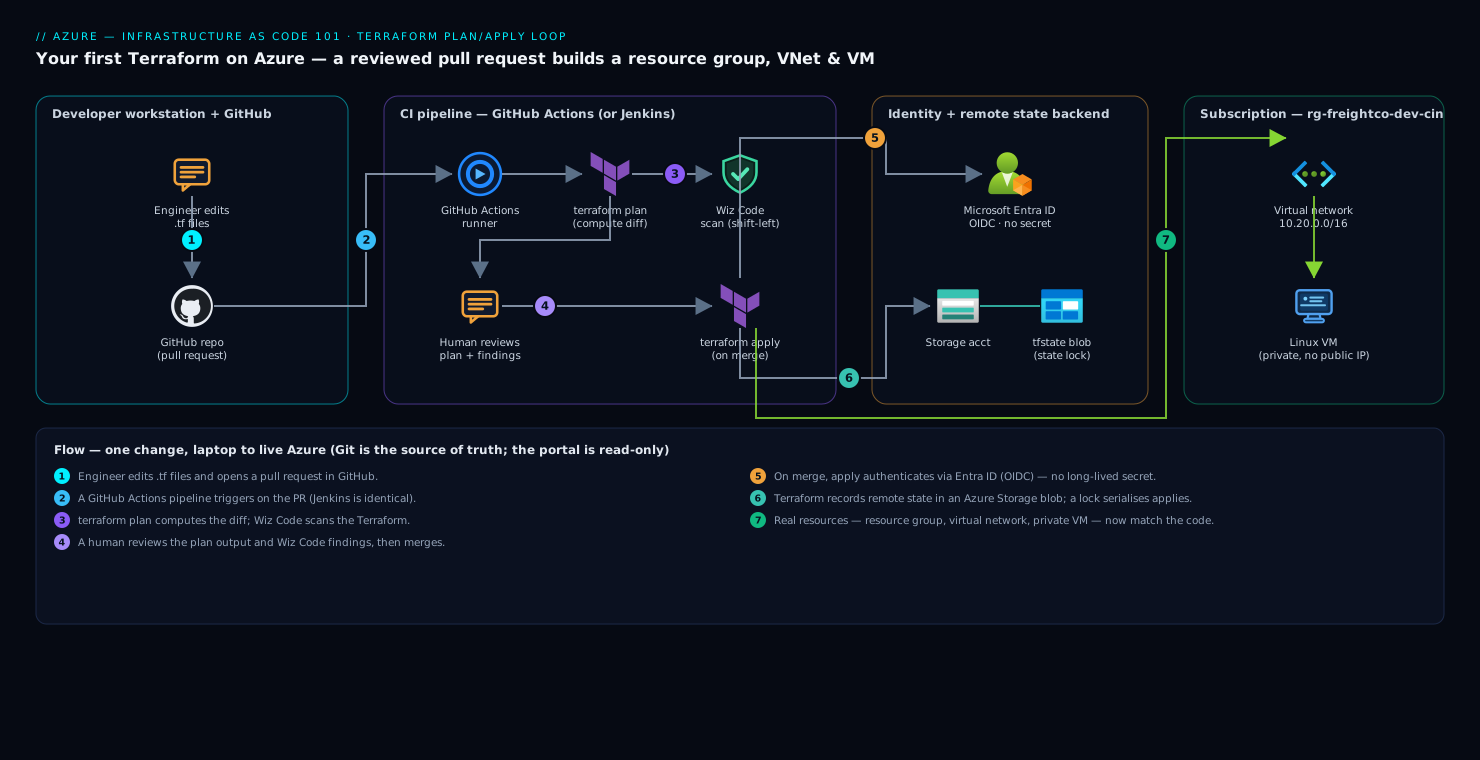
Even a “first” Terraform setup has a real control flow worth drawing, because the workflow — not the syntax — is the thing that makes IaC valuable. Here is the loop, following a single change from a developer’s laptop to live Azure resources.
- An engineer writes or edits
.tffiles on their machine and opens a pull request in GitHub. The infrastructure code lives in the same kind of repo as application code, reviewed the same way. - A GitHub Actions pipeline runs on the PR. It executes
terraform planto compute exactly what would change, and runs Wiz Code to scan the Terraform for insecure configurations — a VM with a public IP open to the world, a storage account without encryption, an over-broad network rule — before anything is applied. (A team standardized on a self-hosted CI server would run the identical steps in Jenkins; the workflow is the same, only the runner differs.) - A human reviews the plan output and the Wiz Code findings in the PR, the same way they would review a code diff. The plan is the safety rail: you see “+ 1 virtual machine, ~ 1 network rule, - 0 to destroy” before you commit.
- On merge, the pipeline runs
terraform apply. Terraform authenticates to Azure through Microsoft Entra ID (Azure’s identity service) using an OIDC federated identity from GitHub — so there is no long-lived secret stored anywhere — and makes the API calls to create or change resources. - Terraform records the result in its remote state file, which lives in an Azure Storage account (a blob container), not on the laptop. A state lock prevents two applies from running at once.
- The real Azure resources — a resource group containing a virtual network and a virtual machine — now match the code exactly.
The defining property of this whole picture, even at 101 level, is that the Git repository is the source of truth and the portal is read-only by convention. Nobody clicks “create VM” anymore. They change code, the plan shows the impact, a scanner checks it, a human approves it, and Terraform makes it so. That single discipline is what would have prevented the logistics company’s outage.
Your first resources, block by block
Let’s build the actual deployment. A Terraform project is just a folder of .tf files; Terraform reads all of them together, so the split below is purely for human readability.
Configure the provider. The provider block tells Terraform which platform you mean and pins versions so a colleague gets identical behavior:
terraform {
  required_version = ">= 1.7"
  required_providers {
    azurerm = {
      source  = "hashicorp/azurerm"
      version = "~> 4.0"   # pin the major version; never float silently
    }
  }
}

provider "azurerm" {
  features {}   # required, even when empty
}
Pinning versions is not pedantry. An unpinned provider can upgrade itself between your run and your teammate’s, and suddenly a plan shows changes nobody made — the infrastructure equivalent of “works on my machine.”
Declare the resource group, VNet, and a subnet. Each resource block has a type (azurerm_resource_group) and a local name (main) you use to reference it elsewhere in the code:
resource "azurerm_resource_group" "main" {
  name     = "rg-freightco-dev-cin"
  location = "Central India"   # data residency: keep it in-country
}

resource "azurerm_virtual_network" "main" {
  name                = "vnet-freightco-dev"
  address_space       = ["10.20.0.0/16"]
  location            = azurerm_resource_group.main.location
  resource_group_name = azurerm_resource_group.main.name
}

resource "azurerm_subnet" "app" {
  name                 = "snet-app"
  resource_group_name  = azurerm_resource_group.main.name
  virtual_network_name = azurerm_virtual_network.main.name
  address_prefixes     = ["10.20.1.0/24"]
}
Notice azurerm_resource_group.main.name referenced inside the VNet. This is an implicit dependency: Terraform reads it and knows the resource group must exist before the VNet, so it builds them in the right order automatically. You never write the ordering by hand — you wire resources together by reference, and the dependency graph falls out of that. This is the heart of declarative IaC.
Add the virtual machine and its network plumbing. A VM needs a network interface, which needs the subnet, which needs the VNet. Watch how the references chain:
resource "azurerm_network_interface" "vm" {
  name                = "nic-app-01"
  location            = azurerm_resource_group.main.location
  resource_group_name = azurerm_resource_group.main.name

  ip_configuration {
    name                          = "internal"
    subnet_id                     = azurerm_subnet.app.id
    private_ip_address_allocation = "Dynamic"
    # deliberately NO public_ip_address_id — this VM stays private
  }
}

resource "azurerm_linux_virtual_machine" "app" {
  name                  = "vm-app-01"
  location              = azurerm_resource_group.main.location
  resource_group_name   = azurerm_resource_group.main.name
  size                  = "Standard_B2s"   # small/cheap for dev
  admin_username        = "azureuser"
  network_interface_ids = [azurerm_network_interface.vm.id]

  admin_ssh_key {
    username   = "azureuser"
    public_key = file("~/.ssh/id_rsa.pub")   # key-based auth, never a password
  }

  os_disk {
    caching              = "ReadWrite"
    storage_account_type = "Standard_LRS"
  }

  source_image_reference {
    publisher = "Canonical"
    offer     = "0001-com-ubuntu-server-jammy"
    sku       = "22_04-lts-gen2"
    version   = "latest"
  }
}
Two beginner decisions here are actually security decisions, and naming them matters because they are the ones reviewers will check. No public IP means this VM is reachable only from inside the VNet — to administer it you would go through a bastion, not expose SSH to the internet. And SSH key authentication, not a password, removes the single most brute-forced door in the cloud. A 101 deployment that gets these two right is already ahead of a lot of hand-clicked production.
The plan/apply workflow, the part that makes IaC safe
You now have code. The workflow that turns it into infrastructure has four commands, and the order is the lesson.
terraform init      # download the azurerm provider, set up the backend
terraform plan      # compute the diff: what WILL change, with nothing applied
terraform apply     # make it real, after showing the plan once more
terraform destroy   # tear it all down (great for dev/test cost control)
terraform plan is the command that makes the whole approach trustworthy. It produces a human-readable diff with three symbols you will read every day: + to create, ~ to change in place, and - to destroy. Watching for - is a survival reflex — it tells you Terraform intends to delete and recreate something, which on a VM means data loss or downtime. A plan you read carefully is the difference between “I shipped a small change” and “I accidentally rebuilt the database.”
| Command | What it does | When you run it |
|---|---|---|
init |
Downloads providers, configures the state backend | Once per project, and after changing providers or backend |
plan |
Shows the exact diff without touching anything | On every change, and in CI on every pull request |
apply |
Executes the plan against the real cloud | After the plan is reviewed and approved |
destroy |
Removes everything Terraform manages in this state | To tear down ephemeral dev/test environments and stop their spend |
In the logistics company’s new world, plan runs automatically on the pull request and its output is pasted into the PR for a colleague to read. The midnight VM resize that caused the outage would have shown, in black and white, a network rule changing — and a second pair of eyes would have caught it before merge. That is the entire value proposition of IaC in one sentence.
Remote state: the upgrade that makes Terraform a team sport
By default, Terraform writes its state to a local file, terraform.tfstate, in your project folder. For any team, this is a trap, and outgrowing it is the single most important step a beginner takes. Local state means the file lives on one laptop: a teammate cannot run apply without it, two people running Terraform will clobber each other’s work, and the file — which can contain secrets like generated passwords in plain text — risks being committed to Git, which is exactly the kind of credential leak that haunts teams for years.
The fix is remote state in an Azure Storage account. The state lives in a blob container everyone can reach (with permission), and Azure Blob storage provides automatic state locking so two simultaneous applies cannot corrupt it — the second one waits. You bootstrap the storage account once (by hand or a tiny separate Terraform), then point your project at it with a backend block:
terraform {
  backend "azurerm" {
    resource_group_name  = "rg-tfstate-cin"
    storage_account_name = "stfreightcotfstate"
    container_name       = "tfstate"
    key                  = "freightco-dev.terraform.tfstate"
  }
}
Now the state is shared, locked, versioned (enable blob versioning so you can recover a prior state), and access-controlled through Entra ID rather than living on one engineer’s disk. This one change is what takes you from “Terraform as a personal scripting tool” to “Terraform as the way the whole team operates.” If you remember one upgrade from this article, remember this: get the state off the laptop and into a locked, shared backend before a second person touches the project.
Where security scanning fits — catch it in the pull request
Infrastructure code can be insecure in ways that are invisible until something is breached. A VM accidentally given a public IP with SSH open to 0.0.0.0/0; a storage account without encryption or with public blob access; a network security group that allows all inbound traffic. The whole point of having infrastructure as code is that these mistakes are now readable text in a pull request — which means a scanner can catch them automatically, before apply.
Wiz Code is the scanner in this workflow. It runs in the CI pipeline on every pull request, parses the Terraform, and flags insecure configurations as a comment on the PR itself — the same place a human reviewer leaves comments. So if a junior engineer adds a public_ip_address_id to that VM and opens SSH to the world, Wiz Code blocks the merge and explains why, in the review, days before that VM would ever exist. This is “shift left”: move the security check from a post-incident audit (expensive, embarrassing) to the moment of authorship (cheap, private). It pairs naturally with Wiz’s runtime cloud-posture scanning of the deployed environment — Wiz Code guards what you are about to deploy, Wiz watches what is already running — so a misconfiguration that somehow slips past code review is still caught against the live cloud.
For larger estates this is also where related tooling slots into the same pipeline as you grow: Ansible for configuring the software inside the VM after Terraform creates it (Terraform builds the box; Ansible installs and configures what runs on it), Argo CD if those VMs later give way to Kubernetes and you adopt GitOps for app deployment, and an ITSM tool like ServiceNow to require a change-approval ticket before apply runs against production. None of that is needed for your first VM — but it is the same pull-request-driven spine, which is why starting with the discipline now pays off later.
Failure modes a beginner will actually hit
Naming these before they bite you is half the battle.
- Lost or corrupted local state. Terraform forgets it created your VM and tries to make a second one, or refuses to proceed. Mitigation: use remote state in Azure Storage with blob versioning from the start, so you can restore a prior state and locking prevents corruption.
- Editing in the portal behind Terraform’s back (“drift”). Someone clicks-changes a resource Terraform manages; the next
planshows surprising changes as Terraform tries to revert it to the code. Mitigation: make the portal read-only by team agreement; all changes go through code. Runplanregularly to detect drift early. - The accidental
-in a plan. A small edit (like renaming a resource) makes Terraform plan to destroy and recreate, causing downtime or data loss. Mitigation: read every plan for-lines; for stateful resources add alifecycle { prevent_destroy = true }guard. - Secrets in state or in Git. Generated passwords land in plain-text state, or
terraform.tfstategets committed. Mitigation: never commit state (.gitignoreit), use a remote backend, and keep real secrets in a dedicated store such as HashiCorp Vault that Terraform reads at apply time rather than hardcoding. - Unpinned provider versions. A provider auto-upgrades and the plan changes with no code change. Mitigation: pin
versionand commit the.terraform.lock.hcllock file so everyone resolves identical versions.
Cost, scaling, and the road past your first VM
Cost. IaC is itself a cost control. The terraform destroy command lets you tear down an entire dev or test environment overnight and recreate it in minutes the next morning — you stop paying for idle VMs without losing the ability to rebuild perfectly. Tag every resource through Terraform (an owner and a cost-center tag) so finance can attribute spend, and choose right-sized SKUs in code (a Standard_B2s burstable VM for dev, not a production size) where the choice is reviewable rather than buried in a portal.
Scaling the practice, not just the VM. Your first project is one folder, one state file, one environment. The honest next steps, in order, are: variables (variable blocks and a .tfvars file) so the same code builds dev, staging, and prod with different inputs; modules to package the VNet+VM pattern so you stop copy-pasting it; and separate state per environment so a mistake in dev cannot possibly touch prod. Resist reaching for these on day one — a beginner who adds modules and workspaces before they are comfortable with plan/apply usually ends up more confused, not less. Walk first.
| Maturity stage | What it looks like | When to adopt |
|---|---|---|
| First steps (this article) | One folder, local-then-remote state, manual apply |
Learning the plan/apply loop and the three core concepts |
| Team workflow | Remote state, PR + plan-in-CI + Wiz Code, OIDC auth | The moment a second person touches the code |
| Reusable & multi-env | Variables, modules, separate state per environment | When you copy-paste a pattern, or need real dev/staging/prod parity |
Explicit tradeoffs
Accept these or do not adopt IaC. There is real upfront cost: you must learn the tool, learn the plan/apply discipline, and stand up a state backend before you create your first “useful” resource — slower than clicking a VM into existence for exactly one VM. The portal will tempt people forever, and drift is the standing failure of every IaC shop where someone clicked “just this once.” State is a genuine operational responsibility — it can be corrupted, leaked, or lost — which is overhead a single-resource hobby project does not need. And Terraform’s declarative model has a learning curve: error messages can be cryptic, and understanding why a plan wants to recreate something instead of updating it takes time.
When the portal is actually fine. For a one-off experiment you will delete in an hour, a true throwaway proof-of-concept, or learning what a service even does, clicking in the portal is faster and there is no shame in it. IaC earns its overhead the moment infrastructure is shared, long-lived, or reproduced — more than one person depends on it, it must survive past this week, or you need a second identical copy. The freight company crossed every one of those lines years before the outage; they just had not noticed.
The shape of the win
For the logistics team, the payoff is not “we use Terraform now.” It is that the next time someone needs to resize a VM, they change one line in a .tf file, open a pull request, and a colleague sees in the plan output exactly what will change — including any network rule it touches — while Wiz Code independently confirms nothing insecure slipped in, all before a single API call hits Azure. The 11 p.m. outage becomes structurally impossible, because there is no more 11 p.m. clicking: there is a reviewed change, an approved plan, and an apply that does precisely and only what everyone already agreed to. Your first resource group, VNet, and VM are not the destination — they are the smallest honest version of that discipline. Build them this way, get the state off your laptop, put the scanner in the pull request, and you have already adopted the operating model that the rest of your cloud career will run on.