A 600-bed regional hospital group runs a patient-portal and telehealth platform across two cloud regions, and the platform team is four engineers. Last quarter, two unrelated incidents landed in the same retrospective. First: an on-call engineer fixed a Friday-night outage by widening a database firewall rule by hand in the console — and forgot to tell anyone, so the next automated deployment quietly reverted it and paged the whole team at 2 a.m. Second: two engineers ran the same deployment script ten minutes apart, both believing it had failed the first time, and ended up with two load balancers billing in parallel for a week before finance noticed. Neither failure was exotic. Both are exactly what Infrastructure as Code — and three specific concepts inside it: state, idempotency, and drift — exist to prevent. This article walks a junior engineer through those concepts using Terraform as the running example, the way they actually show up on a real platform that happens to be under HIPAA.
The stakes here are ordinary and high at once. Regulation (HIPAA) means every change to infrastructure that touches patient data needs an audit trail — who changed what, when, and why. Reliability means the telehealth service cannot be down during clinic hours. A tiny team means nobody can afford to hand-build environments or remember which console toggle they flipped six months ago. Infrastructure as Code answers all three: you describe the infrastructure you want in version-controlled files, a tool makes reality match that description, and the files become the audit trail, the documentation, and the recovery plan all at once.
Declarative vs imperative: describe the destination, not the route
The first fork in the road is how you tell the computer what to do, and it is the concept everything else rests on.
An imperative approach is a list of steps: “create a VM, then attach a disk, then open port 443, then install the agent.” It is a recipe. The problem is that a recipe assumes a known starting state. Run it twice and you get two VMs — exactly the duplicate-load-balancer incident above. Run it against a half-built environment and step three fails because step two never finished, and now you are debugging a recipe that is half-applied.
A declarative approach describes the end state you want — “there should be one VM of this size, with this disk, with port 443 open” — and lets the tool figure out the steps to get there from wherever reality currently is. Terraform is declarative. So is Ansible in its resource-module form (Ansible can also run imperative shell steps, which is why teams reach for it to configure inside a machine, while Terraform provisions the machine and the cloud around it). The hospital team uses Terraform to stand up networks, databases, and clusters, and Ansible to harden the OS image and install the telehealth agent once the box exists — a common and healthy division of labor.
The declarative mindset is the thing to internalize first. You never write “create” or “delete” in Terraform. You write what should exist, and Terraform computes the difference between that and what does exist. Which raises the obvious question: how does Terraform know what already exists? That is what state is for.
State: Terraform’s memory of the world
When Terraform creates a load balancer, the cloud hands back an ID — something like lb-0a3f91. Terraform has to remember that this specific load balancer is the one your aws_lb.portal block refers to, or next time it runs it will have no idea whether to create a new one, leave yours alone, or change it. That memory is the state file (terraform.tfstate): a JSON map from the resources you declared in code to the real resource IDs in the cloud, plus their last-known attributes.
State is the most important and most dangerous concept in Terraform, and it is where most junior-engineer pain comes from. Three rules matter.
Rule 1: State is the source of truth for the mapping, not your code. Your code says “I want a load balancer.” State says “and that one, lb-0a3f91, is it.” If state is lost, Terraform forgets it owns lb-0a3f91 and, on the next apply, tries to create a brand new load balancer — the duplicate problem again, this time self-inflicted. Losing state is the single worst thing that can happen to a Terraform project.
Rule 2: State must live in remote, shared, locked storage — never on a laptop. With four engineers, if each keeps state on their own machine, they each have a different idea of reality and overwrite each other’s infrastructure. The fix is remote state: the state file lives in a shared backend that everyone reads and writes. On AWS that is an S3 bucket (often with a DynamoDB table for locking); on Azure, a Storage Account blob with native blob leasing; on GCP, a GCS bucket. The hospital runs primarily on AWS, so:
terraform {
  backend "s3" {
    bucket         = "hospital-tfstate-prod"
    key            = "patient-portal/terraform.tfstate"
    region         = "ap-south-1"
    dynamodb_table = "hospital-tf-locks"   # state locking
    encrypt        = true                  # SSE at rest; PHI-adjacent metadata
  }
}
Rule 3: State must be locked during writes. This is what would have prevented the duplicate-load-balancer incident directly. When one engineer runs apply, Terraform takes a lock (a row in the DynamoDB table) so that a second apply waits instead of racing. The moment the team turned on locking, “we both ran it at once” stopped being possible — the second run simply blocks with Error acquiring the state lock until the first finishes. Locking is not optional on a team; it is the difference between a shared tool and a footgun.
State also contains a subtle hazard worth flagging early to any junior: state can hold secrets. A database resource’s state includes its connection details; an initial password set through Terraform lands in the state file in plaintext. That is the entire reason the state backend above is encrypted and access-controlled, and a major reason the team keeps real secrets out of Terraform and in Vault — covered below.
The plan/apply lifecycle: see the change before you make it
Here is the loop a Terraform engineer lives in, and it is the safest habit in all of IaC.
| Command | What it does | When the hospital team runs it |
|---|---|---|
terraform plan |
Compares desired state (code) to actual state (state file + live cloud) and prints the diff — what it would add, change, or destroy — without touching anything | On every pull request, automatically, as a required review |
terraform apply |
Executes that diff to make reality match the code, then updates state | Only after a human approves the plan, via the CI pipeline |
terraform destroy |
Removes everything in state (used for ephemeral environments) | Tearing down a short-lived test environment nightly |
The discipline is: never apply without reading the plan. A plan that says 1 to add, 0 to change, 0 to destroy is reassuring. A plan that says 0 to add, 1 to change, 2 to destroy when you only meant to tweak a tag is Terraform telling you that you are about to delete two things you forgot about — before you do it. For a HIPAA platform, “the database will be destroyed” appearing in a plan is the guardrail that keeps a careless one-line edit from taking down patient records. The -/+ symbol in a plan (destroy then create) is the one to fear most: it means a resource will be replaced, which for a database means downtime and possibly data loss unless you have a snapshot.
This is why the team gates every apply behind code review of the plan. Which brings us to where this lifecycle actually runs.
Architecture overview
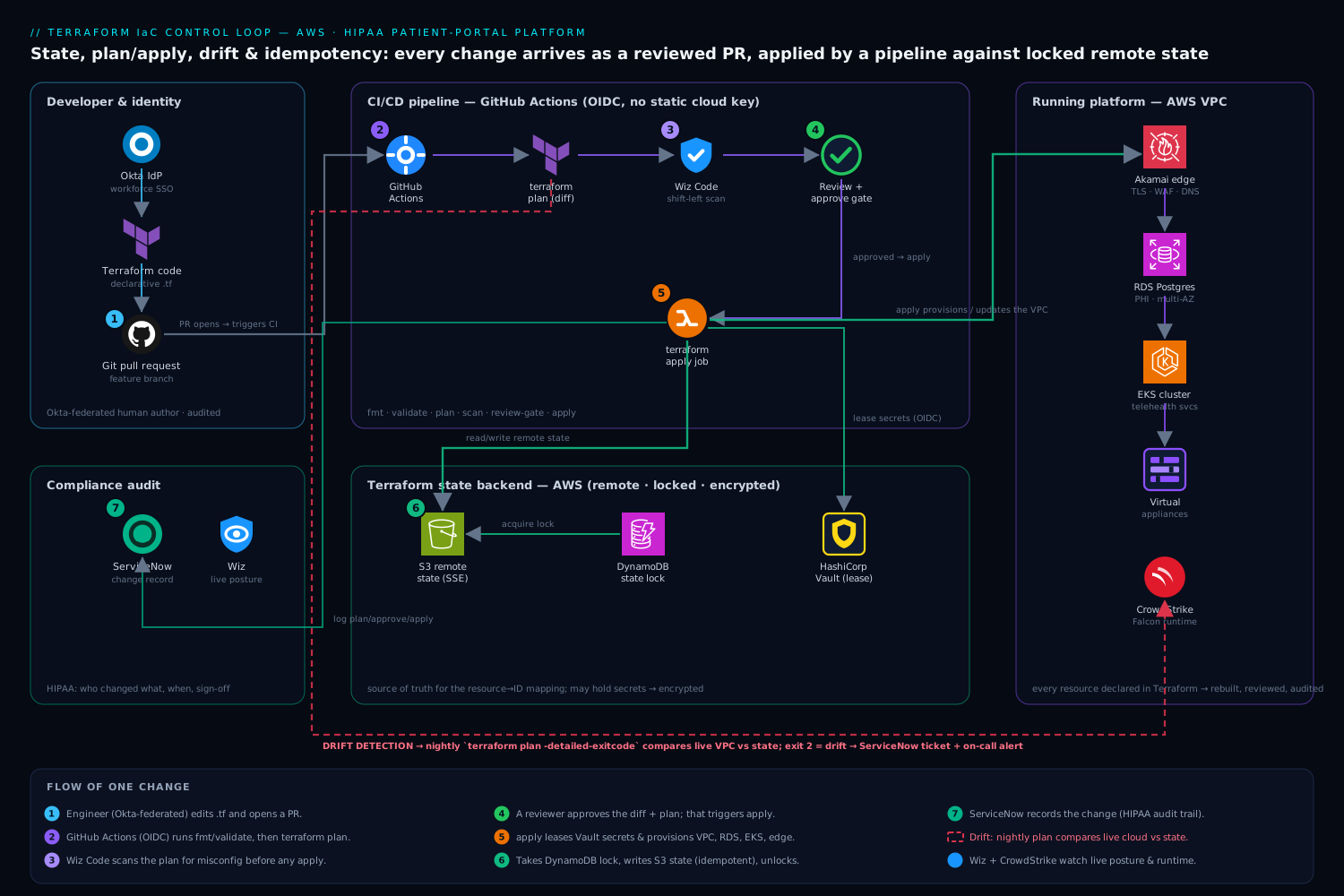
The platform team never runs apply from a laptop against production. Everything flows through a pipeline so that the plan is reviewed, the apply is logged, and the credentials are short-lived. Following the control flow of a single change:
- An engineer edits the Terraform code in a feature branch and opens a pull request. Their identity is Okta federated into the cloud (Okta is the workforce IdP, brokered so cloud IAM sees a first-class role) and into the Git platform — so the author of every infrastructure change is an audited human, not a shared account.
- The pull request triggers GitHub Actions (the team’s CI), which runs
terraform fmt -check,terraform validate, and thenterraform plan. Critically, the runner authenticates to AWS via OIDC — a short-lived token minted for that job — so there is no long-lived cloud key stored in CI to leak. The plan output is posted back as a comment on the PR. - Wiz Code scans the Terraform in the PR for misconfigurations before anything is applied — a database resource declared with public access, an S3 bucket without encryption, an over-broad security group. Catching “this rule exposes the patient database to the internet” at plan time, as a failing check, is infinitely cheaper than catching it in production. This is “shift-left” security in its most literal form: the IaC is the place a misconfiguration is born, so it is the place to kill it.
- A second engineer reviews both the code diff and the plan, then approves. Approval triggers the apply job. The apply runner pulls any real secrets it needs — third-party API tokens, the database’s bootstrap password — from HashiCorp Vault using a short-lived, OIDC-authenticated lease, so secrets are injected at apply time and never written into the repo or the state-backend by hand.
- The apply job acquires the state lock (DynamoDB), runs
terraform applyagainst the remote state in S3, updates state, and releases the lock. The change is now live and the state file reflects it. - Every plan, approval, and apply is recorded as a ServiceNow change record (the apply pipeline opens or updates a change ticket automatically), giving compliance the HIPAA audit trail of who changed which infrastructure, when, and with whose sign-off — without an engineer hand-filling a form.
Around this control loop sits the running platform that the code describes — the VPC, the load balancers (Akamai sits at the edge for TLS, global DNS, WAF and bot protection in front of the portal), the managed database holding patient records, the Kubernetes cluster running the telehealth services, the Moodle instance the hospital uses for staff clinical training, and assorted virtual appliances (a third-party firewall appliance, a fax gateway that still matters in healthcare) — every one of them declared in Terraform so it can be rebuilt, reviewed, and audited the same way.
Idempotency: run it again, get the same answer
Idempotency is the property that running the same operation many times produces the same result as running it once. It is the concept that directly cures the “we both ran it and got two load balancers” failure, and it is a direct consequence of being declarative plus having state.
Because Terraform declares an end state and remembers (in state) what it already built, a second apply with no code changes does nothing — it computes the diff, sees the world already matches, and reports No changes. Your infrastructure matches the configuration. Compare that to the imperative shell script, which would blindly create a second load balancer because it has no memory of the first. Idempotency is what makes Terraform safe to re-run, and “safe to re-run” is what makes it safe to put in a pipeline that might retry, in two engineers’ hands at once, or in a disaster-recovery rebuild.
A short illustration. This Terraform block is idempotent — apply it ten times, end up with exactly one bucket:
resource "aws_db_instance" "patient_records" {
  identifier        = "patient-records-prod"
  engine            = "postgres"
  instance_class    = "db.r6g.large"
  allocated_storage = 200
  storage_encrypted = true            # required for PHI at rest
  multi_az          = true            # HA for clinic hours
}
The imperative equivalent — aws rds create-db-instance ... in a bash script — is not idempotent: the second run errors with “DB instance already exists,” and a naive script that ignores the error or retries can do real damage. The lesson for a junior engineer: prefer the declarative resource over the imperative CLI call precisely because the declarative one is idempotent for free. (Ansible earns its keep the same way — its well-written modules are idempotent, checking “is this package already installed?” before acting, which is why an Ansible playbook is safe to re-run across the fleet while a raw shell script is not.)
Drift: when reality stops matching the code
Drift is what happened in the hospital’s first incident — the on-call engineer who widened a firewall rule by hand. Drift is any divergence between what the code (and state) say should exist and what actually exists in the cloud, caused by a change made outside of Terraform: a console click, a CLI command, another tool, or even the cloud provider auto-modifying something.
Drift is dangerous for two opposite reasons. If Terraform doesn’t know about the manual change, the next apply will revert it — which is what re-broke the firewall rule and paged everyone, because Terraform faithfully restored the world to match the code. But the manual change might have been an important emergency fix, so silently reverting it is its own incident. Conversely, drift can hide a security regression: someone widens a security group in the console, Terraform doesn’t notice until the next run, and for days the patient database is more exposed than the reviewed code says it should be.
The cure is drift detection: regularly comparing real infrastructure against state and flagging the differences. The simplest form is terraform plan run on a schedule against unchanged code — any diff it reports is drift, because the code didn’t change but reality apparently did.
# Nightly drift check in GitHub Actions; non-empty plan == drift == alert
terraform plan -detailed-exitcode -lock-timeout=5m
# exit 0 = no drift, 2 = drift detected, 1 = error
The hospital team runs exactly this nightly. Exit code 2 (drift detected) opens a ServiceNow ticket and posts to the on-call channel, so the firewall-rule scenario now surfaces the next morning as “production has drifted from code — reconcile it” rather than as a 2 a.m. surprise during the next unrelated deploy. The remediation is a human decision: either codify the manual change (update Terraform to match the emergency fix and keep it) or revert it (let the next apply restore the intended state) — but now it is a deliberate choice, not an accident. Defense-in-depth layers two more detectors on top: Wiz continuously monitors the live cloud posture and alerts on dangerous drift like a newly public resource regardless of Terraform’s schedule, and CrowdStrike Falcon runtime sensors on the cluster nodes and virtual appliances catch threats inside the running workloads that no IaC tool would ever see — because drift detection secures the shape of the infrastructure, not what an attacker does once they are on a box.
| Concept | The failure it prevents | The mechanism |
|---|---|---|
| Declarative | Half-applied recipes, “create vs. update?” guesswork | Describe end state; tool computes steps |
| State (remote + encrypted) | Forgetting what you own → duplicate or orphaned resources; leaked secrets | Shared, locked, encrypted source-of-truth mapping |
| Locking | Two engineers racing → duplicates / corrupted state | One writer at a time (DynamoDB / blob lease) |
| Plan/apply | Surprise deletions of production resources | Review the diff before executing it |
| Idempotency | Re-running creates duplicates | Declarative + state → second run is a no-op |
| Drift detection | Silent reverts; hidden security regressions | Scheduled compare of reality vs. state |
Modules: write it once, stamp it everywhere
The hospital has two regions (primary and DR) and three environments (dev, staging, prod). They are not going to copy-paste the same 400 lines of VPC, database, and cluster code six times — that way, the copies drift apart and a fix applied to one is forgotten in the others. The answer is modules: a parameterized, reusable bundle of Terraform that you call with different inputs.
module "telehealth_env" {
  source      = "git::https://github.com/hospital/tf-modules.git//telehealth?ref=v2.4.0"
  environment = "prod"
  region      = "ap-south-1"
  db_size     = "db.r6g.large"   # prod gets bigger; dev passes db.t3.medium
  multi_az    = true             # off in dev to save money
}
Two junior-relevant points. First, pin the module version (ref=v2.4.0, never a floating branch) so that prod’s infrastructure doesn’t silently change because someone merged to the module’s main branch — the same “don’t let it drift on its own” discipline as pinning anything else. Second, modules are how you guarantee dev, staging, and prod are structurally identical (differing only by the inputs you chose to vary, like size and HA), which is what makes “it worked in staging” actually mean something. Modules turn the team’s hard-won correct architecture into a stamp they can press repeatedly and audit once.
Secrets: the one thing that must never be in the code
This is the rule a junior engineer must learn before they ever touch a real repo, and the hospital learned it the hard way once already: never put a secret in your Terraform code or commit it to Git. A database password hardcoded in a .tf file — or worse, in terraform.tfvars checked into the repo — is now in the Git history forever, readable by anyone who ever clones it, and rotating it means rotating it everywhere it leaked. Git history is unforgiving; a secret committed once is a secret compromised.
The pattern the team uses: real secrets live in HashiCorp Vault, and Terraform reads them at apply time via the Vault provider, so the secret flows through memory but is never written into code. Even then, be aware that a secret read into Terraform can land in the state file — which is the final reason the S3 state backend is encrypted, access-controlled, and treated as sensitive as the database itself.
data "vault_kv_secret_v2" "db" {
  mount = "secret"
  name  = "patient-portal/db"
}

# Used to set the initial password; rotated by Vault thereafter, never in Git
resource "aws_db_instance" "patient_records" {
  # ...as above...
  password = data.vault_kv_secret_v2.db.data["bootstrap_password"]
}
The CI runner gets its own short-lived Vault token via OIDC, scoped to exactly the secrets that apply needs — so even the pipeline never holds a long-lived credential. This is the same shift the platform team made everywhere: no static keys, federate or lease everything, and keep the blast radius of any one leak as small as possible.
Operating it day to day
A few habits separate a Terraform setup that survives contact with a real on-call rotation from one that becomes a liability.
Observability of the infrastructure, not just the apply. The code describes the desired shape; you still need to watch the running result. The hospital sends platform and application telemetry to Dynatrace (with Datadog used by one team for its database dashboards), so when an apply changes a load balancer or scales the cluster, the team can see the effect on latency and error rates immediately — and can correlate a metrics regression back to the exact Terraform change and ServiceNow record that caused it. IaC gives you the change record; the monitoring tells you whether the change was good.
Scaling the team, not just the infra. With remote state, locking, modules, and a plan-reviewed pipeline, the four-person team can let a fifth engineer contribute on day one: they open a PR, CI runs the plan, Wiz Code scans it, a teammate reviews the diff, and the pipeline applies it — the system enforces the safety rules so no single person has to remember them. That is the real payoff of these concepts: they are not Terraform trivia, they are how a tiny team operates a regulated platform without heroics.
Explicit tradeoffs
IaC is not free, and a junior should know the costs going in. There is a real learning curve — state, locking, providers, and modules are genuinely more to learn than clicking in a console, and the first few weeks are slower, not faster. The state file is a new thing that can break in new ways (a corrupted or lost state is a worse afternoon than any console mistake), which is the price of the memory that makes idempotency possible. And IaC only protects you if it is the only way changes are made — the moment someone “just quickly” fixes something in the console, drift begins, and the discipline of routing every change through the pipeline is a cultural cost, not a technical one.
The alternatives, and when they win. For a genuine one-time, throwaway experiment, clicking in the console is faster and fine — IaC pays off when an environment must be repeated, reviewed, or recovered, which is almost always but not literally always. Imperative scripting still wins for orchestrating actions inside a machine or for one-shot data migrations, which is why Ansible and shell live alongside Terraform rather than being replaced by it. And managed “click-ops with export” features that generate IaC from existing resources are a reasonable on-ramp for a team adopting Terraform against infrastructure they built by hand — but they generate code that needs cleanup, and they do not retroactively give you the review discipline that is the actual point.
The shape of the win
For the hospital’s four-person platform team, the payoff is not “we use Terraform now.” It is that the two incidents that opened this article cannot happen the same way again: state locking means two engineers can never race into duplicate load balancers, and nightly drift detection means a hand-edited firewall rule surfaces as a reviewed ticket the next morning instead of a 2 a.m. page during an unrelated deploy. Underneath that, every infrastructure change to a HIPAA platform now arrives as a reviewed pull request, with a plan a human approved, secrets pulled from Vault instead of hardcoded, a Wiz Code scan that rejects an exposed database before it exists, and a ServiceNow record an auditor can read. The concepts — declarative, state, plan/apply, idempotency, drift, modules, secrets — are not academic. Each one is a specific 2 a.m. page that a junior engineer will never have to take, because the system was built to make the dangerous thing impossible rather than merely discouraged.