You already know the one-line version of Kubernetes: you declare what you want, and the cluster makes reality match. That mental model is enough to use Kubernetes. It is nowhere near enough to operate it, to debug it at 3 a.m., or to pass the architecture questions in a CKA or KCNA interview. The moment a pod is stuck Pending, or the API feels slow, or a node goes NotReady, “it reconciles for you” stops being an answer — you need to know which component reconciles, where the state lives, and how a request actually travels from your terminal to a running container.
This lesson opens the box. We will name every component of the control plane and every agent on a worker node, explain what each one is responsible for and what breaks when it dies, and then trace a single kubectl apply of a Deployment all the way through the system — admission, persistence in etcd, scheduling, and the kubelet pulling and starting containers via the CRI. Along the way we will cover etcd quorum (why control planes come in odd numbers), the watch/list mechanism that makes the whole thing efficient, and the four pluggable interfaces — CRI, CNI, CSI, and the cloud-controller — that let Kubernetes stay vendor-neutral. By the end you will be able to draw the architecture from memory and reason about failures like an operator, not a tourist.
Learning objectives
By the end of this lesson you will be able to:
- Name every control-plane component (kube-apiserver, etcd, kube-scheduler, kube-controller-manager, cloud-controller-manager) and state precisely what each does and what fails when it is down.
- Name every node component (kubelet, kube-proxy, container runtime via the CRI) and explain its job.
- Explain the declarative reconciliation loop — desired vs actual state, controllers, and the watch/list pattern — in your own words.
- Trace end-to-end what happens when you
kubectl applya Deployment: authentication, authorisation, admission, persistence, scheduling, kubelet, CRI, and CNI. - Explain etcd’s role, why it needs a quorum, and why control planes are deployed in odd numbers (1, 3, 5).
- Describe the CRI, CNI, CSI, and cloud-controller (CCO) interfaces and why Kubernetes pushes these out to pluggable implementations.
Prerequisites
You need comfort with a Linux/shell prompt and the idea of a container (an isolated, packaged process). It helps to have read the introductory architecture lesson — this one assumes you have already met the words “control plane,” “node,” and “reconciliation,” and goes several layers deeper. No prior cluster-administration experience is assumed; every term is defined on first use. For the hands-on lab you will want Docker (or Podman) plus one free local-cluster tool — kind, minikube, or k3d — which we install together. Everything here targets Kubernetes v1.30+ and current CNCF projects.
The big picture: one database, many controllers
Before the component-by-component tour, hold this one idea in your head, because everything else hangs off it:
Kubernetes is a database with a REST API, surrounded by a swarm of small programs that watch that database and try to make the real world match what it says.
The database is etcd. The REST API in front of it is the kube-apiserver — the only component that talks to etcd directly; everything else goes through the API. The “small programs that watch the database” are controllers (in the controller-manager), the scheduler, and the per-node kubelet. None of them talk to each other directly. They communicate only by reading and writing objects through the apiserver. This is the hub-and-spoke design, and it is why the apiserver is the single most important process in the cluster.
That indirection is not an accident — it is the source of Kubernetes’ resilience. Because components share state through a durable database rather than direct RPC, any of them can crash and restart, re-read the current state, and carry on. There is no in-memory coordination to lose.
| Idea | What it means in practice |
|---|---|
| Single source of truth | All cluster state lives in etcd, reached only via the apiserver |
| Hub-and-spoke | Components never call each other; they read/write objects through the apiserver |
| Level-triggered | Controllers act on the current state, not on a stream of events they must not miss |
| Eventually consistent | The system converges toward desired state; it is not instantaneous or transactional across objects |
The control plane, component by component
The control plane is the brain of the cluster. In production it runs on dedicated machines — usually three, for high availability (we will see why the number matters when we reach etcd). On a managed service such as AKS, EKS, or GKE the cloud provider runs and hides the control plane for you; on a self-managed cluster you run these processes yourself. Either way, the components are the same.
kube-apiserver — the front door
The kube-apiserver exposes the Kubernetes API over HTTPS. It is the front door to the cluster and the hub of the hub-and-spoke design: kubectl, controllers, the scheduler, and every kubelet all talk to it, and it is the only component that reads from and writes to etcd.
Every request that reaches it passes through a fixed pipeline, and knowing this pipeline is what separates a deep answer from a shallow one:
- Authentication — who are you? The apiserver verifies your identity from a client certificate, a bearer token, an OIDC token, or (on cloud) a provider plugin. Kubernetes has no built-in user database; identity is always external.
- Authorisation — are you allowed? Almost always RBAC (Role-Based Access Control): does this identity have permission to perform this verb (get, list, create, update, delete) on this resource in this namespace?
- Admission control — should this specific object be allowed, and should we change it first? Mutating admission webhooks can modify the object (inject a sidecar, set defaults); validating webhooks can reject it (enforce a policy). Built-in admission plugins live here too.
- Validation & persistence — the object is validated against its schema and written to etcd.
The apiserver is stateless and horizontally scalable: you can run several replicas behind a load balancer because they all share the same backing etcd. It is also the component whose health you feel most directly — if the apiserver is down, kubectl stops working and no new changes can be made, but existing workloads keep running, because the kubelets on each node already know what they are supposed to run.
etcd — the cluster’s memory
etcd is a distributed, strongly consistent key-value store, and it is the only stateful component in the control plane. Every object you ever create — Pods, Deployments, Services, Secrets, ConfigMaps, RBAC rules — is serialised and stored here as a key/value pair. If etcd is healthy, you can rebuild every other component from scratch and lose nothing. If etcd is lost without a backup, the cluster’s entire desired state is gone. This is why etcd backups (etcdctl snapshot save) are the single most important operational task for a self-managed cluster.
etcd uses the Raft consensus algorithm to stay consistent across replicas, and this is where quorum comes in. A write is only committed once a majority of etcd members agree on it. “Majority” is why control planes come in odd numbers:
| etcd members | Quorum (majority needed) | Failures tolerated |
|---|---|---|
| 1 | 1 | 0 (no HA) |
| 3 | 2 | 1 |
| 5 | 3 | 2 |
| 7 | 4 | 3 |
The pattern: a cluster of N members needs (N/2)+1 to agree and tolerates the loss of (N-1)/2. Note that 3 and 4 members both tolerate only one failure — adding the fourth buys you nothing but more machines that must agree, which is exactly why even counts are pointless and odd counts are the rule. If a majority is not available (e.g. two of three control-plane nodes are down), etcd goes read-only: it refuses writes to avoid split-brain, so the cluster freezes for changes until quorum returns. Five members is the practical ceiling for most clusters; beyond that, the cost of every write needing more agreement outweighs the extra fault tolerance. etcd is also latency-sensitive — it wants fast disks (low fsync latency), which is why control-plane nodes favour SSDs.
A subtle but exam-worthy point: etcd holds the desired state and the recorded status, but it does not make decisions. It is memory, not intelligence. The intelligence lives in the controllers and the scheduler, which read from it (via the apiserver) and write back.
kube-scheduler — the placement engine
The kube-scheduler has exactly one job: decide which node each new Pod should run on. It does not start the Pod; it only chooses the node and records that choice. When a Pod is created with no node assigned (an empty spec.nodeName), the scheduler notices it and runs a two-phase decision:
- Filtering (predicates) — eliminate nodes that cannot run the Pod: not enough free CPU/memory, taints the Pod does not tolerate, node selectors or affinity rules that do not match, required volume topology not available.
- Scoring (priorities) — rank the surviving nodes and pick the best: spread Pods across nodes, prefer nodes that already have the image, honour affinity preferences, balance resource use.
The scheduler then performs a binding — it writes the chosen node name back onto the Pod object via the apiserver. That write is the scheduler’s entire output. Everything after that is the kubelet’s responsibility. If the scheduler is down, existing Pods keep running but new Pods stay Pending, because nothing is assigning them to nodes — a classic interview scenario and a classic real-world symptom.
kube-controller-manager — the swarm of control loops
The kube-controller-manager is a single binary that runs many controllers, each a control loop responsible for one kind of reconciliation. Bundling them into one process is purely operational convenience; conceptually each is independent. Examples you meet daily:
| Controller | What it reconciles |
|---|---|
| Deployment controller | Creates/updates ReplicaSets to match a Deployment’s spec (rollouts, rollbacks) |
| ReplicaSet controller | Creates/deletes Pods so the running count matches the desired replica count |
| Node controller | Watches node health; marks nodes NotReady and evicts Pods after a grace period |
| Job / CronJob controllers | Run Pods to completion, or on a schedule |
| Endpoints / EndpointSlice controller | Keeps the list of healthy Pod IPs behind each Service up to date |
| Namespace controller | Cleans up all objects when a namespace is deleted |
| ServiceAccount & token controllers | Provision default service accounts and their tokens |
Each controller runs the same loop forever: observe the desired state and the actual state, diff them, and act to close the gap — then repeat. Crucially this is level-triggered, not edge-triggered: a controller reacts to the current state of the world, not to a one-off event it might miss. If a controller crashes and restarts, it simply re-reads the world and reconciles again — there is no lost event to recover. This is the heart of Kubernetes’ self-healing.
cloud-controller-manager — the bridge to your cloud
The cloud-controller-manager (CCM) holds the controllers that talk to a specific cloud provider’s API, split out so the core of Kubernetes stays vendor-neutral. It is what turns a Service of type LoadBalancer into an actual cloud load balancer, registers and de-registers nodes against the provider’s instance API, and configures cloud routes. On a managed service the provider runs this for you; on a bare-metal or on-prem cluster you may have no CCM at all (and instead use something like MetalLB for load balancers). The split between the cloud-controller-manager and the generic kube-controller-manager is precisely so that the cloud-specific code can evolve independently — and is the conceptual ancestor of the pluggable interfaces we cover below.
The node components
A worker node is any machine — physical or virtual — that runs your application Pods. Every node, including control-plane nodes (which also run Pods, just system ones), runs a small set of agents.
kubelet — the node’s agent
The kubelet is the primary node agent and the only component that actually makes Pods run. It watches the apiserver for Pods bound to its node (remember, the scheduler already set nodeName), and then drives the container runtime to make those Pods real: pull images, create containers, set up the Pod’s resources. It continuously reports node and Pod status back to the apiserver, and it runs the Pods’ liveness, readiness, and startup probes, restarting containers that fail. The kubelet does not manage Pods that were never scheduled to it, and — importantly — it does not need the rest of the control plane to keep running Pods it already knows about. That is why a node keeps serving traffic even when the apiserver is briefly unreachable.
kube-proxy — the Service plumbing
kube-proxy runs on each node and implements the Service abstraction at the network layer. When you create a ClusterIP Service, kube-proxy programs the node’s data path (using iptables or, more commonly now, IPVS) so that traffic sent to the Service’s virtual IP is load-balanced across the healthy Pod IPs behind it. It watches Services and EndpointSlices via the apiserver and updates those rules as Pods come and go. (Some modern CNI plugins, notably Cilium in its kube-proxy-replacement mode using eBPF, take over this job entirely — but the role is the same.)
Container runtime (via the CRI)
The kubelet does not know how to start a container itself — it delegates to a container runtime through the Container Runtime Interface (CRI), a stable gRPC API. The runtime pulls images and manages the container lifecycle. The common runtimes today are containerd and CRI-O; both use runc under the hood to create the actual Linux namespaces and cgroups. (Docker is no longer used directly by the kubelet — the old “dockershim” was removed in v1.24 — though images you built with Docker run perfectly well, because they are standard OCI images.)
| Node component | Job | If it stops |
|---|---|---|
| kubelet | Run/monitor Pods bound to this node, report status, run probes | Node goes NotReady; existing containers keep running but are unmanaged |
| kube-proxy | Program Service load-balancing rules on the node | New/changed Service routing breaks on this node |
| Container runtime (containerd/CRI-O) | Pull images, start/stop containers via CRI | kubelet cannot start or manage any container on the node |
The declarative reconciliation loop, precisely
Now we can state the central pattern exactly. You submit a spec — your desired state — to the apiserver, which persists it in etcd. A controller responsible for that object type observes the spec and the object’s status (its actual state), computes the difference, and takes action through the apiserver to reduce that difference. It writes the observed reality back into the object’s status. Then it does it again, forever.
Two design choices make this both efficient and robust:
- Watch, don’t poll. Controllers do not hammer the apiserver asking “anything changed?” Instead they do an initial list to learn current state, then open a watch — a long-lived connection over which the apiserver pushes changes as they happen. This is how thousands of objects can be reconciled with minimal load, and it is what makes the cluster feel responsive.
- Level-triggered, not edge-triggered. A controller acts on the full current state, so a missed or duplicated notification cannot corrupt it — on restart it re-lists and reconciles from scratch. This is why Kubernetes survives controller crashes gracefully.
The chain of ownership for a typical app shows several loops stacked on top of each other: you create a Deployment; the Deployment controller creates a ReplicaSet to match it; the ReplicaSet controller creates Pods to match the replica count; the scheduler binds each Pod to a node; the kubelet on that node makes the Pod real. Each layer reconciles independently, and that layering is exactly what lets a rolling update (a new ReplicaSet scaling up while the old one scales down) be safe and resumable.
End to end: what happens when you kubectl apply a Deployment
This is the question that proves you understand the architecture. Here is the full journey of a single kubectl apply -f deployment.yaml, step by step.
- kubectl → apiserver.
kubectlreads your YAML, resolves the cluster endpoint and credentials from your kubeconfig, and sends an HTTPS request to the kube-apiserver to create (or update) the Deployment object. - Authentication. The apiserver verifies who you are from your kubeconfig credentials (client cert, token, or OIDC). Unknown identity →
401. - Authorisation (RBAC). The apiserver checks whether your identity may
createDeployments in this namespace. Not allowed →403 Forbidden. - Admission control. Mutating webhooks may modify the object (e.g. a service mesh injecting a sidecar, or defaults being applied); validating webhooks and built-in plugins may reject it if it violates policy. This is where Pod Security and tools like Kyverno or OPA Gatekeeper enforce rules.
- Persist to etcd. The validated Deployment object is written to etcd via the apiserver. At this instant your desired state is durable — but nothing is running yet.
- Deployment controller acts. The Deployment controller, watching the apiserver, sees the new Deployment and creates a ReplicaSet that captures the desired Pod template and replica count. (It writes that ReplicaSet through the apiserver, into etcd.)
- ReplicaSet controller acts. Watching for ReplicaSets whose actual Pod count is below desired, it creates the required number of Pod objects — each initially with no node assigned (
nodeNameempty, statusPending). - Scheduler binds. The kube-scheduler, watching for unscheduled Pods, runs filtering then scoring, picks the best node for each Pod, and writes the chosen
nodeNameback onto the Pod (the binding). The Pod is now assigned but still not running. - kubelet realises the Pod. The kubelet on the chosen node, watching the apiserver for Pods bound to it, sees the assignment and goes to work.
- CRI: pull and start containers. The kubelet calls the container runtime over the CRI to pull the image and create the containers. The runtime (containerd/CRI-O) uses runc to set up namespaces and cgroups.
- CNI: wire up networking. Before the app containers start, the runtime invokes the CNI plugin to give the Pod its own IP address and connect it to the cluster network.
- CSI: attach storage (if any). If the Pod requests a persistent volume, the relevant CSI driver attaches and mounts it before the containers start.
- Status flows back. The kubelet runs the Pod’s startup/readiness/liveness probes and reports status to the apiserver, which records it in etcd. Once the Pod is
Ready, the EndpointSlice controller adds its IP behind any matching Service, and kube-proxy updates each node’s rules so traffic can reach it.
Notice the shape of it: everything routes through the apiserver, every component finds its work by watching the apiserver, and the work flows downhill — Deployment → ReplicaSet → Pod → node binding → kubelet → CRI/CNI/CSI. No component ever calls another directly. That single sentence is the architecture.
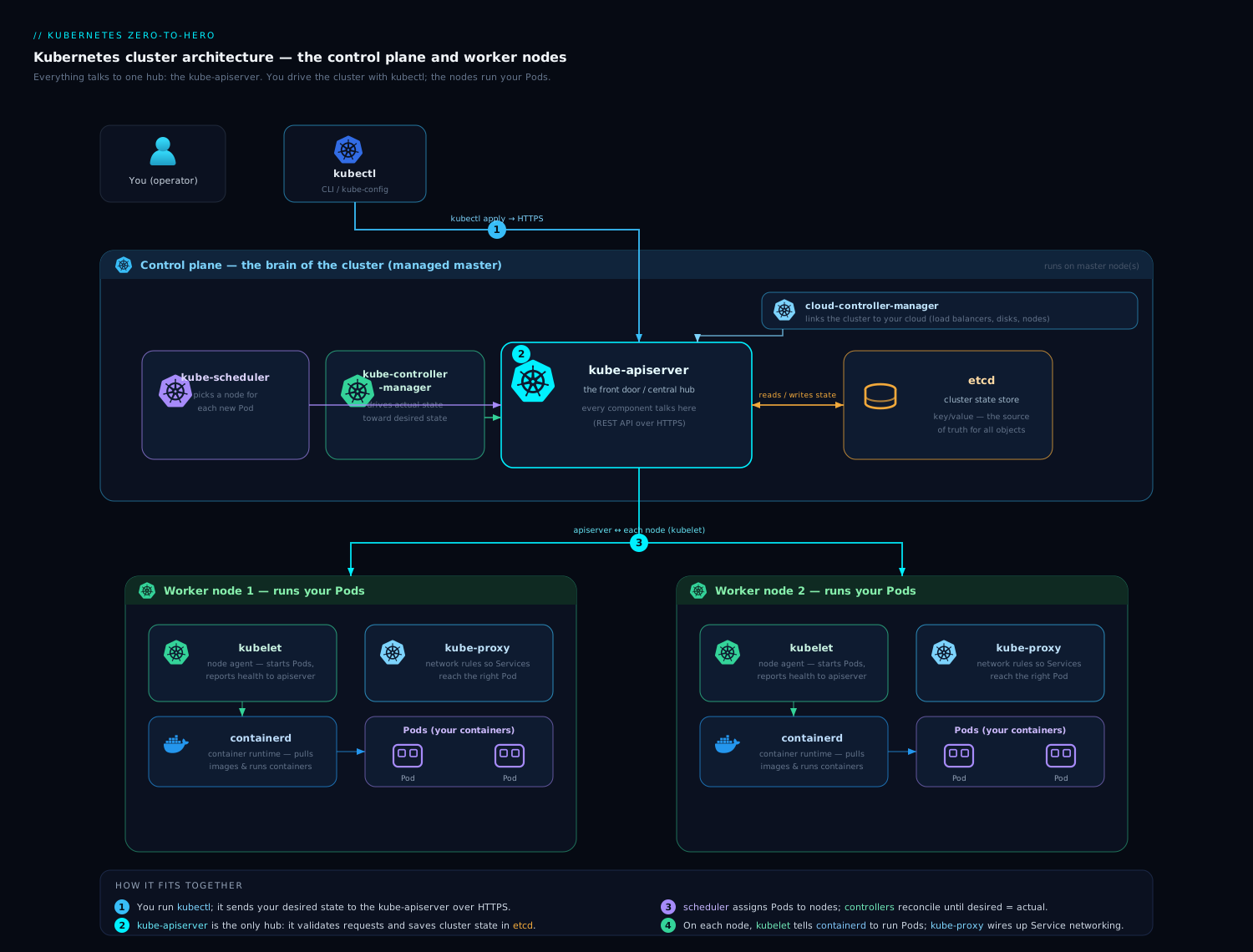
The diagram traces exactly this path: a request entering through the apiserver, persisted in etcd, picked up by the controllers and scheduler, and finally realised by the kubelet through the CRI/CNI/CSI on a worker node — with every arrow passing through the apiserver hub.
The pluggable interfaces: CRI, CNI, CSI & CCO
A large part of why Kubernetes won is that it does not hard-code how containers run, how the network works, how storage is provisioned, or which cloud it runs on. It defines stable interfaces and lets vendors plug in implementations. Knowing these four by name — and what each one abstracts — is core KCNA/CKA material.
| Interface | Full name | What it abstracts | Common implementations |
|---|---|---|---|
| CRI | Container Runtime Interface | How the kubelet starts/stops containers | containerd, CRI-O (both via runc) |
| CNI | Container Network Interface | How Pods get IPs and connect to the cluster network | Cilium, Calico, Flannel, AWS VPC CNI |
| CSI | Container Storage Interface | How persistent volumes are provisioned/attached/mounted | EBS/Azure Disk/GCE PD drivers, Ceph, Portworx |
| CCO / CCM | Cloud Controller (Cloud Provider interface) | How the cluster talks to a cloud (load balancers, nodes, routes) | AWS, Azure, GCP cloud-controller-managers |
The pattern is the same in every case: Kubernetes core stays vendor-neutral and stable; the messy, provider-specific or technology-specific code lives outside the core, behind a contract. This is also why you can swap a CNI plugin or a storage backend without changing your application manifests at all — your Pod just asks for “a network” and “a 10Gi volume,” and the plugged-in implementation provides them.
Hands-on lab
Let’s see the architecture with our own eyes. We will spin up a real (single-node) cluster locally, for free, and inspect the control-plane and node components inside it. Pick one of the three tools below — any of them works.
Create a cluster (choose one):
# Option A — kind (Kubernetes in Docker)
kind create cluster --name arch-lab

# Option B — minikube
minikube start -p arch-lab

# Option C — k3d (k3s in Docker)
k3d cluster create arch-lab
1. Confirm the node is up.
kubectl get nodes -o wide
Expected: one node in status Ready, with its Kubernetes version (v1.30+), internal IP, OS image, and — tellingly — the container runtime it is using (e.g. containerd://1.7.x). That last column is the CRI runtime we discussed.
2. Look at the control-plane components running as Pods. On kind/minikube, the control plane runs as static Pods in the kube-system namespace:
kubectl get pods -n kube-system
Expected (on a kubeadm-style cluster such as kind): you will see etcd-..., kube-apiserver-..., kube-scheduler-..., kube-controller-manager-..., plus kube-proxy-... and a CNI Pod (e.g. kindnet-... or calico-...) and coredns-.... There they all are — the components from this lesson, as real Pods. (On k3d the control plane is bundled into a single k3s process, so you will see fewer individual Pods; that is k3s’s lightweight design, not a different architecture.)
3. Watch the reconciliation loop happen. Open a watch in one terminal:
kubectl get pods -w
In a second terminal, create a Deployment and watch the first terminal:
kubectl create deployment web --image=nginx --replicas=3
Expected: in the watch terminal you see Pods appear and march through Pending → ContainerCreating → Running. You have just watched steps 6–13 above play out: the Deployment controller made a ReplicaSet, the ReplicaSet controller made three Pods, the scheduler bound them, and the kubelet started them via the CRI.
4. See the scheduler’s decision recorded on a Pod.
kubectl get pods -o wide
Expected: each web-... Pod now shows a NODE and a Pod IP. The node column is the scheduler’s binding (step 8); the IP is the CNI’s work (step 11).
5. Prove the controller is reconciling — delete a Pod and watch it return.
kubectl delete pod -l app=web --field-selector status.phase=Running | head -n 1
kubectl get pods -l app=web
Expected: the deleted Pod’s slot is refilled almost immediately. Desired state said “3”; actual dropped to 2; the ReplicaSet controller reconciled back to 3. That is the loop, live.
Validation: you saw (a) the runtime in get nodes -o wide, (b) the real control-plane Pods in kube-system, © Pods created and scheduled by the controllers + scheduler, and (d) self-healing after a delete.
Cleanup:
kubectl delete deployment web
kind delete cluster --name arch-lab     # or: minikube delete -p arch-lab  /  k3d cluster delete arch-lab
Cost note: £0 / ₹0. Everything runs in local containers on your own machine; nothing is created in any cloud, so there is no bill to watch.
Common mistakes & troubleshooting
| Symptom | Likely cause | Diagnostic / fix |
|---|---|---|
kubectl hangs or returns connection errors, but apps stay up |
apiserver unreachable (down, or wrong kubeconfig context) | kubectl config current-context; check the apiserver Pod/process and its load balancer. Running apps are unaffected — the kubelets carry on. |
Pods stuck Pending forever |
Scheduler can’t place them (insufficient resources, taints, affinity) — or the scheduler is down | kubectl describe pod and read the Events; check kube-scheduler is running. |
| Cluster refuses all writes; reads may work | etcd quorum lost (majority of members down) | Restore quorum (bring members back) or restore from an etcdctl snapshot. Never run an even number of members. |
Node shows NotReady |
kubelet down or the node lost contact with the apiserver | systemctl status kubelet on the node; check the kubelet logs and the container runtime. |
New Pods stick at ContainerCreating |
CNI not installed/healthy, or the runtime can’t pull the image | kubectl describe pod events; check the CNI Pods and image-pull errors. |
| A Service has no effect / traffic doesn’t reach Pods | kube-proxy not programming rules, or no healthy endpoints | kubectl get endpointslices; check kube-proxy Pods and the Service selector. |
| “Why is everything slow?” | etcd on slow disk (high fsync latency) | etcd wants low-latency SSDs; check etcd metrics and disk latency on control-plane nodes. |
Best practices
- Treat etcd as sacred. Back it up regularly (
etcdctl snapshot save), put it on fast disks, and test your restores. A cluster with no etcd backup is one disk failure away from total loss of desired state. - Run control planes in odd numbers (3 for most clusters, 5 for very large ones). Never deploy an even number of etcd members — it adds machines without adding fault tolerance.
- Keep the apiserver highly available behind a load balancer with several replicas; it is the hub everything depends on.
- Think in terms of the loop. When something is wrong, ask: what is the desired state, what is the actual state, and which controller closes that gap? Then
describethe object and read its Events, which are the controllers narrating their reconciliation. - Prefer managed control planes (AKS/EKS/GKE) unless you have a strong reason to self-manage. The provider runs etcd, the apiserver, and upgrades for you — the hardest parts of the job.
- Respect the version-skew policy. kubelets may lag the apiserver by a bounded number of minor versions, never lead it — upgrade the control plane before the nodes.
Security notes
- The apiserver is the security perimeter. Authentication and RBAC authorisation run there on every request — lock down RBAC to least privilege, because anyone who can reach the apiserver and is authorised can change the cluster.
- etcd contains everything, including Secrets. By default Secrets are only base64-encoded in etcd, not encrypted — enable encryption at rest for etcd and restrict access to it tightly. Anyone who can read etcd can read every Secret in the cluster.
- Protect the etcd peer and client ports. etcd should only be reachable by the apiserver (and its own members) over mTLS — never expose it to the wider network.
- Use admission control as a guardrail. Validating webhooks (Pod Security Admission, Kyverno, OPA Gatekeeper) are your enforcement point in the request pipeline — that is the right place to block unsafe workloads before they ever reach etcd.
- Mind the kubelet API. The kubelet exposes an API that can be abused if left unauthenticated; ensure kubelet authN/authZ is enabled (it is, on managed clusters and modern kubeadm defaults).
Interview & exam questions
1. What is the only component that talks to etcd, and why does that matter? The kube-apiserver. Funnelling all etcd access through one component gives a single place for authentication, authorisation, admission, validation, and caching, and keeps the hub-and-spoke design coherent — every other component shares state only through the apiserver.
2. Walk me through what happens when I kubectl apply a Deployment.
kubectl → apiserver; authN → authZ (RBAC) → admission (mutating then validating) → persist to etcd; the Deployment controller creates a ReplicaSet; the ReplicaSet controller creates Pods (unscheduled); the scheduler filters/scores and binds each Pod to a node; the kubelet on that node uses the CRI to pull and start containers, the CNI to give the Pod an IP, and CSI for any volumes; status flows back to the apiserver/etcd, and once Ready the Pod is added to its Service’s EndpointSlice.
3. The scheduler is down. What breaks and what doesn’t?
Existing Pods keep running; new Pods stay Pending because nothing assigns them to nodes. No running workload is affected — only placement of new Pods stops.
4. Why do control-plane / etcd clusters come in odd numbers like 3 or 5?
etcd commits a write only with a majority (quorum). N members need (N/2)+1 to agree and tolerate (N-1)/2 failures. 3 and 4 both tolerate only one failure, so the even count adds cost without resilience — odd numbers are optimal.
5. What happens to the cluster if etcd loses quorum? etcd goes read-only and refuses writes to prevent split-brain. The cluster freezes for changes (no new objects, no edits) until quorum is restored; running workloads continue.
6. What is the difference between the kube-controller-manager and the cloud-controller-manager? Both run reconciliation loops, but the cloud-controller-manager holds the controllers that call a specific cloud provider’s API (load balancers, node lifecycle, routes), split out so Kubernetes core stays vendor-neutral. The kube-controller-manager holds the cloud-agnostic controllers (Deployment, ReplicaSet, Node, Job, etc.).
7. Explain “level-triggered” reconciliation and why it makes Kubernetes resilient. Controllers act on the current full state, not on a stream of one-off events. So a missed, duplicated, or out-of-order notification cannot corrupt them — on restart a controller simply re-lists the world and reconciles again. There is no lost event to recover, which is the basis of self-healing.
8. What are the CRI, CNI, and CSI, and why does Kubernetes use them? Pluggable interfaces: CRI abstracts the container runtime (containerd/CRI-O), CNI abstracts Pod networking (Cilium/Calico/…), CSI abstracts persistent storage (cloud disk drivers, Ceph…). They keep Kubernetes core vendor-neutral and let you swap implementations without changing application manifests.
9. If the apiserver is down, why do my running applications keep serving traffic?
Because each kubelet already knows which Pods it is responsible for and keeps them running independently, and kube-proxy has already programmed the node’s Service rules. You lose the ability to make changes (and lose kubectl), but the data plane keeps working.
10. Where does RBAC enforcement happen in the request path? In the apiserver, at the authorisation stage — after authentication and before admission control. RBAC decides whether the authenticated identity may perform the requested verb on the resource.
11. Why is Docker “removed” from Kubernetes if my Docker-built images still run? The kubelet no longer talks to Docker via the old dockershim (removed in v1.24); it talks to a CRI runtime (containerd/CRI-O) directly. Your images are standard OCI images, so they run unchanged regardless of how they were built.
12. What single piece of state, if lost, loses the whole cluster’s desired configuration — and how do you protect it?
etcd. Protect it with regular etcdctl snapshot save backups (and tested restores), fast low-latency disks, encryption at rest for Secrets, mTLS, and an odd-numbered HA member set.
Quick check
- Which component is the only one that reads from and writes to etcd?
- What are the two phases the scheduler uses to choose a node?
- In a 5-member etcd cluster, how many member failures can it tolerate?
- Which node agent actually starts containers, and through which interface?
- Name the four pluggable interfaces and what each abstracts.
Answers
- The kube-apiserver — every other component reaches etcd only through it.
- Filtering (eliminate nodes that can’t run the Pod) then scoring (rank the survivors and pick the best).
- Two — a 5-member cluster needs a quorum of 3, so it tolerates the loss of 2.
- The kubelet, via the CRI (Container Runtime Interface) to a runtime such as containerd or CRI-O.
- CRI (container runtime), CNI (Pod networking), CSI (persistent storage), and the cloud-controller / cloud provider interface (cloud load balancers, nodes, routes).
Exercise
On your local lab cluster, prove the architecture to yourself in writing:
- Run
kubectl get pods -n kube-systemand list which control-plane components you can see as Pods. (On k3d, note that they are bundled — explain in one sentence why.) - Create a Deployment with 2 replicas, then
kubectl describeone of its Pods and copy out the Events section. Annotate each event line with which component produced it (scheduler binding, kubelet pulling image, etc.). - Delete the cluster’s CoreDNS Deployment’s Pods (not the Deployment) with
kubectl delete pod -n kube-system -l k8s-app=kube-dnsand watch them come back. In one paragraph, explain which controller restored them and why this is “level-triggered” reconciliation in action. - Write the 13-step
kubectl applyrequest flow from memory, then check it against this lesson. Note every step you missed — those are your weak spots before an interview.
Certification mapping
- KCNA (Kubernetes and Cloud Native Associate): directly covers Kubernetes architecture, the control-plane and node components, the API, and the CRI/CNI/CSI interfaces — this lesson maps to the “Kubernetes Fundamentals” and “Container Orchestration” domains.
- CKA (Certified Kubernetes Administrator): the Cluster Architecture, Installation & Configuration domain assumes exactly this model — how the components fit, etcd’s role and backups, and the request flow. You will manage and troubleshoot these components directly in the exam.
- This lesson is foundational for the troubleshooting domains of CKA/CKS too: every incident playbook starts from “which component owns this, and what is its desired vs actual state?”
Glossary
- Control plane — the set of components that store cluster state and make decisions (apiserver, etcd, scheduler, controller-manager, cloud-controller-manager).
- kube-apiserver — the REST API front door and hub; the only component that talks to etcd.
- etcd — the distributed, strongly consistent key-value store holding all cluster state.
- Quorum — the majority of etcd members that must agree before a write commits;
(N/2)+1. - Raft — the consensus algorithm etcd uses to keep members consistent.
- kube-scheduler — assigns (binds) unscheduled Pods to nodes via filtering then scoring.
- kube-controller-manager — runs the cloud-agnostic control loops (Deployment, ReplicaSet, Node, Job, …).
- cloud-controller-manager (CCM) — runs the cloud-provider-specific control loops (load balancers, nodes, routes).
- kubelet — the node agent that runs and monitors Pods bound to its node.
- kube-proxy — programs each node’s Service load-balancing rules (iptables/IPVS).
- Reconciliation loop — observe desired vs actual state, diff, act, repeat; the core control pattern.
- Level-triggered — acting on current full state rather than on individual events.
- Watch/list — controllers list current state once, then watch for pushed changes (instead of polling).
- CRI — Container Runtime Interface; how the kubelet drives the container runtime.
- CNI — Container Network Interface; how Pods get IPs and network connectivity.
- CSI — Container Storage Interface; how persistent volumes are provisioned/attached.
- Binding — the scheduler writing a chosen
nodeNameonto a Pod. - Admission control — the apiserver stage that can mutate or reject objects after authZ and before persistence.
Next steps
Now that you can see the machinery, the next lesson puts you back at the controls with a deep understanding behind every command: Pods, ReplicaSets, Deployments & Services: the core objects. You will create the very objects whose journey through the control plane you just traced — and you will know exactly what each one triggers under the hood.