Most engineers can write a Horizontal Pod Autoscaler manifest. Far fewer can explain why it chose seven replicas instead of six, why it scaled up in fifteen seconds but refused to scale down for five minutes, or what the <unknown> in the TARGETS column actually means. This lesson is about that machinery: the exact arithmetic the HPA runs on every loop, the four metric types and how each is computed, the metrics pipeline that feeds those numbers in, the behavior block that governs how fast scaling happens, and the Vertical Pod Autoscaler — its three components, four modes, and the one rule that stops it fighting the HPA.
This is the fundamentals-and-algorithm companion to two adjacent lessons. The HPA, KEDA & node autoscaling guide wires up the full practical stack — custom-metric adapters, event-driven KEDA scalers, Cluster Autoscaler vs Karpenter. The VPA right-sizing guide is about reading recommendations and improving bin-packing. This lesson deliberately stays underneath both of those: how the controllers compute their decisions in the first place. If you want to build an event-driven pipeline, start there; if you want to understand and debug what an autoscaler is doing, start here.
Learning objectives
By the end of this lesson you will be able to:
- Reproduce the HPA scaling formula by hand and predict the replica count a given metric reading will produce.
- Distinguish the four
autoscaling/v2metric types — Resource, Pods, Object, External — and know exactly when each applies. - Trace the metrics pipeline end to end:
metrics-serverfor resource metrics, the custom and external metrics APIs for everything else. - Tune the
behaviorblock —scaleUp/scaleDownpolicies,stabilizationWindowSeconds,selectPolicy— and explain how tolerance and stabilisation prevent flapping. - Describe the VPA’s recommender / updater / admission-controller architecture and its four update modes.
- State the HPA + VPA conflict rule precisely and design a combination that does not create a feedback loop.
- Choose correctly between HPA, VPA and the Cluster Autoscaler for a given problem.
Prerequisites & where this fits
You should be comfortable with Deployments and ReplicaSets, and with container requests and limits (the VPA right-sizing lesson covers requests/limits, QoS classes and the two failure modes in full — this lesson assumes them). You will need a cluster with metrics-server installed; kind or minikube is perfect for the lab. Everything here targets Kubernetes v1.30+ and the stable autoscaling/v2 API. In the Zero-to-Hero programme this sits in the Workloads module, after Deployments and before scheduling and security hardening.
Core concepts: two axes of scaling, one shared input
There are two independent ways to give a workload more capacity, and they operate on perpendicular axes:
- Horizontal — add more Pod replicas. The Horizontal Pod Autoscaler (HPA) owns this axis. More copies, same size each.
- Vertical — make each Pod bigger by raising its CPU/memory requests. The Vertical Pod Autoscaler (VPA) owns this axis. Same number of copies, more resource each.
A third controller, the Cluster Autoscaler (or Karpenter), operates a level below both: it adds nodes when Pods cannot be scheduled. It is not pod autoscaling at all — it reacts to Pending pods — but it is the third corner of the decision triangle, so we compare against it at the end.
| HPA | VPA | Cluster Autoscaler | |
|---|---|---|---|
| Changes | replica count | per-pod requests | node count |
| Reacts to | live metric vs target | historical usage | unschedulable (Pending) pods |
| Disruptive? | no (adds/removes pods) | yes (evicts to resize)* | yes (drains nodes) |
| Built in? | yes (autoscaling/v2) |
no (separate install) | no (separate install / managed) |
*In-place pod resize is graduating, which will eventually let the VPA resize without eviction; today the standard updater evicts.
The single most important shared fact: all utilisation-based autoscaling keys off the Pod’s resource request, not its limit and not the node capacity. Get requests wrong and every percentage the HPA computes is wrong. That is why the VPA (which finds the right request) and the HPA (which scales on a percentage of it) are so entangled — and why their conflict, covered later, is the classic interview trap.
The HPA control loop
The HPA is a closed control loop run by the kube-controller-manager. On a fixed interval — the --horizontal-pod-autoscaler-sync-period, 15 seconds by default — it does the following for every HPA object:
- Fetch the current metric value(s) from the appropriate metrics API.
- Compute a desired replica count for each metric using the scaling formula.
- Take the maximum desired count across all metrics (scale to satisfy the most demanding one).
- Apply
behaviorconstraints (policies, stabilisation) to that proposal. - Clamp the result to
[minReplicas, maxReplicas]. - If the final number differs from the current replica count, patch the target’s
/scalesubresource.
Two consequences fall straight out of this. First, the HPA never talks to your Pods directly — it patches the Deployment’s replica count and lets the normal ReplicaSet controller create the Pods. That is why the HPA can target anything with a /scale subresource: Deployments, ReplicaSets, StatefulSets, and many CRDs. Second, because step 3 takes the maximum, adding a metric can only ever make the HPA scale up more, never less — each metric independently argues for a floor on the replica count.
The scaling algorithm and formula
Here is the heart of the whole topic. For a single metric the HPA computes:
desiredReplicas = ceil( currentReplicas × ( currentMetricValue / desiredMetricValue ) )
The ratio currentMetricValue / desiredMetricValue is the usage ratio. If you are at twice your target, the ratio is 2.0 and the HPA wants twice the replicas. The ceil() (round up) means the HPA always errs toward more capacity — it never rounds away a fractional pod you might need.
A worked example. You run 4 replicas, the HPA targets 50% CPU utilisation, and the current average utilisation is 90%:
desiredReplicas = ceil( 4 × (90 / 50) ) = ceil( 4 × 1.8 ) = ceil(7.2) = 8
The HPA scales to 8. Now utilisation should fall: the same total CPU work spread over 8 pods instead of 4 lands near 45%, just under target, and the loop stabilises. Work the reverse: at 4 replicas and 20% utilisation against a 50% target, ceil(4 × 0.4) = ceil(1.6) = 2, so it scales down to 2.
Three refinements make this production-accurate rather than textbook:
Tolerance. The HPA does not act on every tiny deviation. If the usage ratio is within a tolerance of 1.0 — default 0.1, i.e. ±10% — it does nothing. So a ratio between 0.9 and 1.1 is treated as “on target”. This is the first line of defence against flapping: minor metric noise never moves the replica count. (Since v1.33 this tolerance is configurable per-HPA under spec.behavior.scaleUp/scaleDown.tolerance; before that it was a single cluster-wide flag, --horizontal-pod-autoscaler-tolerance.)
Not-ready and missing pods. When computing an average, the HPA is careful about which pods to count. Pods that are not yet Ready, or are still in their CPU initialisation period, are excluded from the usage calculation but assumed to consume 0% when the metric would otherwise drive a scale-up, and 100% when it would drive a scale-down. This deliberate pessimism stops a burst of brand-new, not-yet-warm pods from being misread as idle (which would cancel the scale-up that just created them) or a terminating pod from blocking a needed scale-down.
Multiple metrics. With several metrics listed, the formula runs once per metric and the largest desiredReplicas wins, as noted in the loop. A CPU metric might say 6 and a requests-per-second metric might say 9 — the HPA picks 9.
The exam-favourite gotcha: a
Utilizationtarget is a percentage of the request. If a pod requests250mCPU and uses200m, that is 80% — even though the node has spare cores. People who reason about node capacity instead of the request get every HPA calculation wrong.
Metric types in autoscaling/v2
The autoscaling/v2 API accepts a list of metric sources, each with a type. There are four, and choosing the right one is most of writing a correct HPA.
type |
Reads | Target kinds | Served by | Typical use |
|---|---|---|---|---|
Resource |
CPU/memory of the target’s pods | Utilization, AverageValue |
metrics-server |
CPU%, memory bytes |
Pods |
a custom per-pod metric, averaged | AverageValue only |
custom metrics API (adapter) | requests/sec per pod |
Object |
a metric describing one other object | Value, AverageValue |
custom metrics API (adapter) | Ingress RPS, queue length as one number |
ContainerResource |
CPU/memory of one named container | Utilization, AverageValue |
metrics-server |
scale on the app container, ignoring a noisy sidecar |
External |
a metric not tied to any K8s object | Value, AverageValue |
external metrics API (adapter/KEDA) | cloud queue depth, third-party SLO |
The target type inside each metric matters as much as the metric type:
Utilization— a percentage of the resource request, averaged across pods. The HPA divides the summed usage by the summed requests. Only valid for resource metrics. This is the only one expressed as a percent.AverageValue— an absolute value per pod. The HPA divides the total observed value by the current replica count before comparing to the target. Use this for memory (a percentage of a memory request is rarely meaningful) and for any per-pod custom metric.Value— an absolute value taken as-is, not divided by replicas. Used withObjectandExternalwhen the number describes a single shared thing (a queue’s total length), and you want the raw number compared to the target.
The Value vs AverageValue distinction on Object/External metrics is the subtle one and a frequent source of wildly wrong scaling. With AverageValue the HPA computes desired = ceil(totalValue / targetPerReplica) directly — “give me one replica per N units of work”. With Value it computes the usage ratio against the current replica count like the resource formula. For a queue you almost always want AverageValue: “I want roughly 30 messages of backlog per worker”.
A ContainerResource example — scale on the application container only, so an Istio sidecar’s CPU does not skew the average:
apiVersion: autoscaling/v2
kind: HorizontalPodAutoscaler
metadata:
  name: api
  namespace: shop
spec:
  scaleTargetRef:
    apiVersion: apps/v1
    kind: Deployment
    name: api
  minReplicas: 3
  maxReplicas: 30
  metrics:
    - type: ContainerResource
      containerResource:
        name: cpu
        container: api            # ignore the proxy sidecar entirely
        target:
          type: Utilization
          averageUtilization: 70
An Object metric — scale on requests-per-second reported against an Ingress, taken as a single value divided across pods:
  metrics:
    - type: Object
      object:
        describedObject:
          apiVersion: networking.k8s.io/v1
          kind: Ingress
          name: shop
        metric:
          name: requests_per_second
        target:
          type: AverageValue       # total RPS / replicas
          averageValue: "200"
The metrics pipeline
A metric type is only useful if something serves it. Kubernetes does not collect application metrics itself; the HPA reads from three aggregated API groups, each backed by a different component. Understanding this pipeline is how you debug a <unknown> target.
                 ┌─────────────────────────────┐
   HPA  ───────► │ metrics.k8s.io              │ ◄── metrics-server  (CPU/memory)
 (controller)    ├─────────────────────────────┤
        ───────► │ custom.metrics.k8s.io       │ ◄── adapter (Prometheus Adapter, …)
        ───────► │ external.metrics.k8s.io     │ ◄── adapter / KEDA metrics adapter
                 └─────────────────────────────┘
                   (API aggregation layer)
Resource metrics → metrics.k8s.io → metrics-server. metrics-server is a lightweight cluster add-on that scrapes the kubelet’s /metrics/resource endpoint on every node (which in turn reads cAdvisor) and keeps the latest CPU and memory reading per pod in memory. It is not a monitoring system — it stores no history, only the most recent value, which is all the HPA needs. It registers itself as an API service for the metrics.k8s.io group via the aggregation layer. The litmus test that it is healthy:
kubectl top nodes      # returns CPU/memory numbers, not an error
kubectl top pods -A    # per-pod usage
If kubectl top errors, no CPU/memory HPA can work — fix metrics-server first. On managed platforms (AKS, GKE, EKS) it usually ships pre-installed; on kind/minikube you install it yourself (see the lab). Two metrics-server gotchas: on kind you must add --kubelet-insecure-tls because the kubelet’s serving cert is self-signed, and the HPA only sees pods whose containers actually declare CPU/memory requests — a pod with no requests reports <unknown> for utilisation forever.
Custom & external metrics → adapters. For Pods, Object and External metrics, Kubernetes ships no default provider. You install an adapter that registers as the API service for custom.metrics.k8s.io (for Pods/Object) or external.metrics.k8s.io (for External). The common choice is the Prometheus Adapter, which translates PromQL queries into Kubernetes metrics; KEDA also registers an external-metrics adapter to drive the HPAs it manages. The wiring and adapter rules are covered in depth in the HPA, KEDA & node autoscaling lesson — what matters here is the topology: the HPA asks the aggregated API, the API routes to the adapter, the adapter queries the real source.
Inspect every layer directly — this is the single most useful debugging skill for autoscaling:
kubectl get apiservices | grep metrics            # which metrics APIs are registered & Available
kubectl get --raw /apis/metrics.k8s.io/v1beta1/pods | head          # resource metrics
kubectl get --raw /apis/custom.metrics.k8s.io/v1beta1 | jq .        # what custom metrics exist
kubectl get --raw /apis/external.metrics.k8s.io/v1beta1 | jq .      # external metrics
A <unknown> in kubectl get hpa always traces to this pipeline: the relevant API service is missing/Unavailable, the adapter is down, the metric name is misspelled, or (for resource metrics) the pod has no requests. The HPA is flying blind until that column shows real numbers, so never tune thresholds before fixing it.
Scaling behaviour: stabilisation, policies and flapping
The raw formula tells the HPA where it wants to be; the spec.behavior block governs how fast it is allowed to get there. This is where you stop oscillation and control blast radius. There are two symmetric sub-blocks, scaleUp and scaleDown, each with a stabilisation window, a list of rate policies, and a policy-selection rule.
The default behaviour is asymmetric on purpose — scale up fast, scale down slowly:
Default scaleUp |
Default scaleDown |
|
|---|---|---|
stabilizationWindowSeconds |
0 (act immediately) |
300 (consider last 5 min) |
| Rate policies | +100% or +4 pods per 15s, whichever is more | -100% per 15s (i.e. can remove all surplus) |
selectPolicy |
Max |
Max |
The rationale: briefly over-provisioning is cheap and protects users; thrashing replicas down and back up is expensive and risky. Removing capacity is the dangerous direction, so it is deliberately damped.
stabilizationWindowSeconds is the anti-flapping mechanism, and it works differently per direction. The HPA records its computed recommendations over the window and then, instead of using the latest, it picks the most conservative one for the direction of change:
- On the way down, it uses the highest recommendation from the window. So a single momentary dip in load will not shrink the fleet — the HPA waits to be sure demand has fallen, looking back over (by default) five minutes and refusing to go below the largest replica count it recently wanted.
- On the way up, with the default window of
0, it uses the latest recommendation immediately. If you set a non-zero up-window, it uses the lowest recommendation in that window, damping spiky scale-ups.
This “take the safest recommendation over a window” behaviour, not the per-period rate limits, is what actually kills flapping. If pods still oscillate, widen scaleDown.stabilizationWindowSeconds before you touch anything else.
Rate policies cap how much can change per time period, independent of stabilisation. Each policy is a type: Percent or type: Pods with a value and a periodSeconds. selectPolicy decides how to combine multiple policies: Max (take the most permissive — the default, lets either policy authorise the change), Min (the most restrictive), or Disabled (forbid scaling in that direction entirely — e.g. scaleDown.selectPolicy: Disabled to make a workload scale up but never down automatically).
A complete, production-shaped block — react instantly upward but cap the rate, and shed capacity gently:
spec:
  behavior:
    scaleUp:
      stabilizationWindowSeconds: 0      # no delay going up
      selectPolicy: Max
      policies:
        - type: Percent
          value: 100                     # at most double…
          periodSeconds: 30
        - type: Pods
          value: 8                       # …or +8 pods, whichever is larger
          periodSeconds: 30
    scaleDown:
      stabilizationWindowSeconds: 300    # only shrink after 5 min of sustained low load
      selectPolicy: Max
      policies:
        - type: Percent
          value: 20                      # remove at most 20% of pods per minute
          periodSeconds: 60
There is no separate “cooldown” field in autoscaling/v2 — the old fixed --downscale-stabilization cooldown was replaced by exactly this per-HPA scaleDown.stabilizationWindowSeconds, which is strictly more expressive.
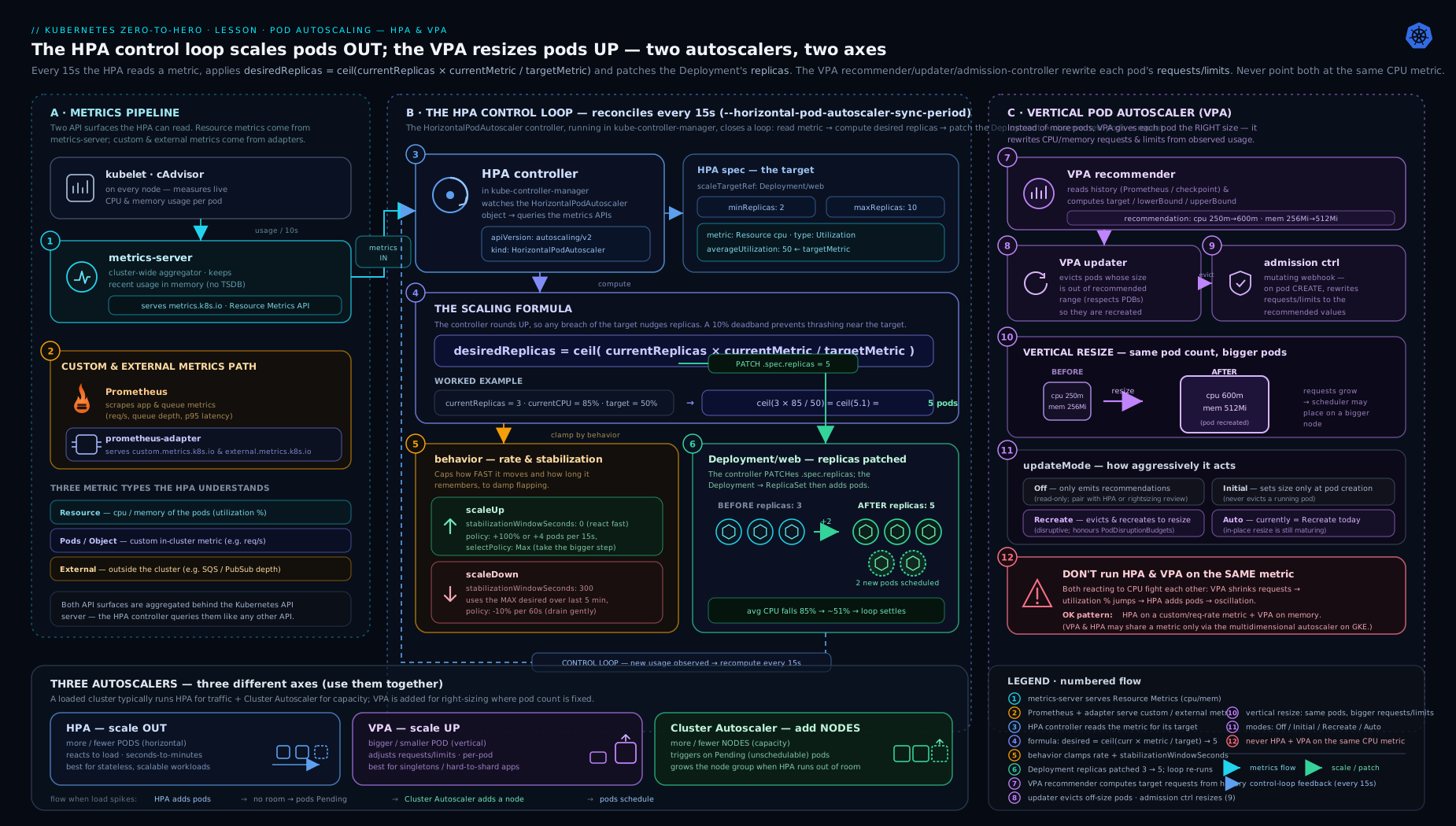
The diagram traces both axes: the HPA loop on the left (metrics APIs → formula → behaviour gate → /scale patch → more replicas) and the VPA loop on the right (recommender → recommendation → updater eviction → admission-controller rewrite → bigger pods), meeting at the shared “request” input that makes their conflict unavoidable.
The Vertical Pod Autoscaler: components
The VPA scales the other axis — it right-sizes a pod’s CPU/memory requests instead of changing the replica count. It is not built into Kubernetes; you install it from the autoscaler repository, and it ships as three independent components plus a CRD. (The right-sizing lesson covers how to read the recommendation numbers; here we focus on the mechanism that produces and applies them.)
| Component | Role | Safe to run alone? |
|---|---|---|
| Recommender | Watches live usage (metrics API) + history; writes target/lowerBound/upperBound into the VPA object’s status. |
Yes — pure observation. |
| Updater | In Auto/Recreate mode, evicts pods whose requests are out of bounds so they reschedule. |
No — it disrupts pods. |
| Admission controller | A mutating webhook that rewrites a new pod’s requests to the recommendation at creation time. | Paired with the updater. |
The interplay is the key insight: the recommender only suggests; the updater can only evict (it does not patch a running pod in place — the standard updater works by deletion, relying on the controller to recreate); and the admission controller is what makes a recreated pod come back with the new requests rather than the old ones. Remove the admission controller and an evicted pod would simply restart at its original size — the updater and admission controller are a pair. The recommender by contrast is genuinely standalone, which is exactly why the recommended first step is to run only recommendations.
Install and verify:
git clone https://github.com/kubernetes/autoscaler.git
cd autoscaler/vertical-pod-autoscaler
./hack/vpa-up.sh                          # generates webhook certs; deploys all three
kubectl -n kube-system get pods | grep vpa
# vpa-recommender-...           1/1 Running
# vpa-updater-...               1/1 Running
# vpa-admission-controller-...  1/1 Running
VPA update modes
The VPA’s updatePolicy.updateMode decides how aggressively recommendations are applied. There are four:
| Mode | Behaviour | Disruption |
|---|---|---|
Off |
Recommend only — writes status, never touches pods. |
None. |
Initial |
Applies the recommendation only when a pod is first created; never evicts running pods. | Only on natural rollout/restart. |
Recreate |
Evicts and recreates pods whenever their requests drift outside [lowerBound, upperBound]. |
Mid-life evictions. |
Auto |
Currently equivalent to Recreate; intended to adopt in-place resize as that feature matures. |
Mid-life evictions (today). |
The discipline that prevents self-inflicted outages: start in Off to gather a full traffic cycle of recommendations with zero risk, then graduate to Initial for most production workloads — new pods get correct requests on every deploy, but you never suffer a surprise eviction during a traffic spike. Reserve Recreate/Auto for workloads that tolerate eviction and where you actively want continuous resizing.
apiVersion: autoscaling.k8s.io/v1
kind: VerticalPodAutoscaler
metadata:
  name: api
  namespace: shop
spec:
  targetRef:
    apiVersion: apps/v1
    kind: Deployment
    name: api
  updatePolicy:
    updateMode: "Off"               # observe first — always
  resourcePolicy:
    containerPolicies:
      - containerName: api
        minAllowed: { cpu: 100m, memory: 256Mi }
        maxAllowed: { cpu: "2",  memory: 2Gi }
        controlledResources: ["cpu", "memory"]
      - containerName: istio-proxy
        mode: "Off"                 # never resize the sidecar
The resourcePolicy bounds the recommender so it cannot propose something absurd: minAllowed is essential for JVMs and other runtimes with a fixed memory floor, maxAllowed is your guard-rail against a runaway recommendation, and per-container mode: "Off" excludes sidecars. controlledResources is the field that becomes load-bearing in the conflict section below — it scopes which resources the VPA is allowed to touch.
The HPA + VPA conflict — and how to combine them
This is the single most important rule in pod autoscaling, and a near-guaranteed interview question.
Never run the VPA (in
Auto/Recreate) and an HPA on the same resource metric for the same workload.
The mechanism is a feedback loop. Suppose the HPA scales on CPU utilisation and the VPA also controls CPU. Under load, the VPA raises the CPU request. But utilisation is usage ÷ request — so raising the request lowers the measured utilisation percentage, even though real usage is unchanged. The HPA sees utilisation fall below target and scales the replica count down. Fewer replicas means more load per pod, the VPA raises the request again, and the two controllers oscillate against each other. The official guidance is explicit: do not use the VPA with the HPA on CPU or memory.
They combine perfectly, however, as long as they never share a controlled dimension. Two clean designs:
Design A — orthogonal signals (preferred). The HPA scales replicas on a custom or external metric (requests-per-second, queue depth, p95 latency); the VPA owns CPU and memory requests. No shared dimension, no loop. The HPA decides how many pods; the VPA decides how big each one is.
# HPA: replicas driven by RPS only — NO cpu/memory resource metric here
apiVersion: autoscaling/v2
kind: HorizontalPodAutoscaler
metadata: { name: api, namespace: shop }
spec:
  scaleTargetRef: { apiVersion: apps/v1, kind: Deployment, name: api }
  minReplicas: 3
  maxReplicas: 40
  metrics:
    - type: Pods
      pods:
        metric: { name: http_requests_per_second }
        target: { type: AverageValue, averageValue: "50" }
---
# VPA: owns CPU + memory requests, Initial mode
apiVersion: autoscaling.k8s.io/v1
kind: VerticalPodAutoscaler
metadata: { name: api, namespace: shop }
spec:
  targetRef: { apiVersion: apps/v1, kind: Deployment, name: api }
  updatePolicy: { updateMode: "Initial" }
  resourcePolicy:
    containerPolicies:
      - containerName: api
        controlledResources: ["cpu", "memory"]   # HPA touches neither
Design B — split the resources. If you must keep the HPA on CPU (say RPS metrics are not available), confine the VPA to memory only with controlledResources: ["memory"]. The HPA owns CPU; the VPA owns memory; they never touch the same number.
  # VPA scoped so it cannot interfere with a CPU-based HPA
  resourcePolicy:
    containerPolicies:
      - containerName: api
        controlledResources: ["memory"]   # HPA keeps CPU
Memorise the rule and one valid combination — examiners love to ask you to spot the broken config (HPA on CPU + VPA in Auto controlling CPU) and then fix it.
When HPA vs VPA vs Cluster Autoscaler
These solve genuinely different problems; the right answer is often “more than one, layered”.
| Use… | When the bottleneck is… | It changes… | Watch out for |
|---|---|---|---|
| HPA | Load is horizontally scalable (stateless web/API, queue workers) and varies over time. | replica count | needs a good per-replica metric; can’t scale stateful singletons |
| VPA | A pod is mis-sized (OOMKilled, or hugely over-provisioned) and you don’t know the right request. | per-pod requests | evicts to resize; conflicts with CPU/mem HPA; not for sharp spikes |
| Cluster Autoscaler / Karpenter | Pods are Pending because the cluster has no room. |
node count | only reacts after pods are unschedulable; adds node-provisioning latency |
The mental model: HPA and VPA decide how much pod you need; the Cluster Autoscaler decides whether there is a node to put it on. They stack. A typical production setup runs an HPA on an application metric, a VPA in Initial mode on memory to keep requests honest, and a node autoscaler underneath to supply capacity when the HPA’s new replicas have nowhere to land. Crucially the latencies are additive: metric crosses target → HPA loop (~15s) → new pod Pending → node autoscaler reacts → node Ready → pod scheduled. The end-to-end scale-up time is the sum of all three loops, which is the operational point the HPA/KEDA/node lesson measures in its load test. Use the VPA’s recommendations as the source of truth for the requests your HPA percentages and your node bin-packing both depend on.
Hands-on lab
We will stand up metrics-server, watch the HPA formula produce a specific replica count under real CPU load, tune the behavior block, then deploy a VPA in Off mode and read its recommendation. A two-CPU kind or minikube node is enough.
1. Cluster and metrics-server
# kind:
kind create cluster --name hpa-lab
# Install metrics-server (the components.yaml release)
kubectl apply -f https://github.com/kubernetes-sigs/metrics-server/releases/latest/download/components.yaml

# kind's kubelet uses a self-signed serving cert — let metrics-server accept it:
kubectl -n kube-system patch deployment metrics-server --type=json \
  -p='[{"op":"add","path":"/spec/template/spec/containers/0/args/-","value":"--kubelet-insecure-tls"}]'

# Wait until it is serving:
kubectl -n kube-system rollout status deploy/metrics-server
kubectl top nodes      # must return numbers, not an error
minikube users can instead run minikube addons enable metrics-server and skip the TLS patch.
2. A CPU-burnable workload with requests
The HPA can only compute utilisation if the container declares a CPU request:
kubectl create deployment php --image=registry.k8s.io/hpa-example
kubectl set resources deployment php --requests=cpu=200m --limits=cpu=500m
kubectl expose deployment php --port=80
kubectl rollout status deploy/php
3. Create the HPA and read the algorithm inputs
kubectl autoscale deployment php --cpu-percent=50 --min=1 --max=10
# Equivalent to a metrics: [{type: Resource, resource: {name: cpu,
#   target: {type: Utilization, averageUtilization: 50}}}] HPA.

kubectl get hpa php
# NAME  REFERENCE        TARGETS       MINPODS  MAXPODS  REPLICAS
# php   Deployment/php   cpu: 0%/50%   1        10       1
cpu: 0%/50% is current/target. If you ever see <unknown>/50%, metrics-server is unhealthy or the deployment has no CPU request — stop and fix that.
4. Generate load and watch the formula fire
In one terminal, drive sustained load:
kubectl run load --rm -it --image=busybox --restart=Never -- \
  /bin/sh -c "while true; do wget -q -O- http://php; done"
In another, watch the HPA decide:
kubectl get hpa php -w
# TARGETS climbs (e.g. cpu: 250%/50%) → REPLICAS rises.
# 250%/50% gives a usage ratio of 5.0; from 1 replica → ceil(1×5)=5 (then re-evaluated as pods spread load)
kubectl describe hpa php      # the "events" log every decision and the computed desired count
Watch kubectl describe hpa php — its events explicitly state “computed the desired num of replicas” and the metric reading behind each change. That is the formula, observable in production.
5. Validation — confirm the maths
kubectl get hpa php
# Expect REPLICAS to settle where current utilisation × replicas / target ≈ 50% per pod.
kubectl top pods -l app=php   # per-pod CPU should hover near the 100m that 50% of a 200m request implies
Stop the load generator (Ctrl-C in its terminal). With the default 300s down-stabilisation window, observe that replicas do not immediately fall — the HPA waits, demonstrating stabilisation directly. After ~5 minutes it scales back toward 1.
6. Tune behaviour and observe the change
kubectl patch hpa php --type=merge -p '{
  "spec":{"behavior":{"scaleDown":{"stabilizationWindowSeconds":30,
    "policies":[{"type":"Percent","value":50,"periodSeconds":30}]}}}}'
Re-run the load, stop it, and note that scale-down now begins after ~30s instead of 5 minutes — you have changed the algorithm’s down-gate live.
7. VPA recommendation (observation only)
git clone --depth 1 https://github.com/kubernetes/autoscaler.git
cd autoscaler/vertical-pod-autoscaler && ./hack/vpa-up.sh
kubectl -n kube-system get pods | grep vpa     # three components Running

cat <<'EOF' | kubectl apply -f -
apiVersion: autoscaling.k8s.io/v1
kind: VerticalPodAutoscaler
metadata: { name: php }
spec:
  targetRef: { apiVersion: apps/v1, kind: Deployment, name: php }
  updatePolicy: { updateMode: "Off" }     # recommend only — zero risk
EOF

# Give the recommender a few minutes of the load running, then:
kubectl describe vpa php | sed -n '/Recommendation/,/Events/p'
# target / lowerBound / upperBound for cpu and memory appear in status.
The VPA in Off mode never touched a pod — it only wrote a recommendation you can act on, exactly as the right-sizing lesson advises.
Cleanup
kubectl delete hpa php
kubectl delete vpa php
kubectl delete deploy php
kubectl delete svc php
# remove VPA components:
cd autoscaler/vertical-pod-autoscaler && ./hack/vpa-down.sh
# remove the whole cluster:
kind delete cluster --name hpa-lab        # or: minikube delete
Cost note
Everything here runs on a single local kind/minikube node — zero cloud cost. On a managed cluster, the only spend is the extra replicas the HPA briefly creates under load; the VPA in Off mode costs nothing because it changes nothing.
Common mistakes & troubleshooting
| Symptom | Cause | Fix |
|---|---|---|
TARGETS shows <unknown> |
Pod has no CPU/memory request, or metrics-server down |
Set requests; verify kubectl top pods works |
| HPA never scales despite high load | Reasoning about node capacity, but utilisation is % of request | Recompute against the request; lower the request or the target |
| Replicas flap up and down | Stabilisation window too short / metric noisy | Widen scaleDown.stabilizationWindowSeconds; rely on default tolerance |
Custom-metric HPA stuck at <unknown> |
Adapter not registered / metric name wrong | Check kubectl get apiservices | grep custom.metrics; query the raw API |
| HPA and VPA “fighting”, odd oscillation | Both control the same CPU/memory metric | Move HPA to a custom metric, or scope VPA to memory only |
| Scale-up far slower than expected | Latencies are additive (HPA + scheduler + node provisioning) | Profile each hop; pre-warm or raise minReplicas |
| VPA evicts pods during a spike | updateMode: Auto/Recreate on a user-facing app |
Use Initial (or Off) for anything latency-sensitive |
HPA scales to maxReplicas and stops |
Hit the ceiling; looks identical to “broken” | Alert on max reached; raise maxReplicas if capacity allows |
Best practices
- Set correct requests first. Every utilisation HPA and the VPA itself depend on the request. Use the VPA in
Offmode to discover honest values before trusting any percentage. - Scale on a signal users feel. CPU is a proxy; requests-per-second, queue depth or p95 latency via a custom/external metric usually tracks real demand far better.
- Keep the default asymmetry. Fast up, stabilised down is the right shape for almost everything; change it only with evidence.
- Lean on stabilisation, not thresholds, to stop flapping. Widen the down-window before you fiddle with targets.
- Run the VPA in
OffthenInitial. Never start inAuto;Initialgives you right-sized requests without surprise evictions. - One owner per resource dimension. A given resource metric is controlled by either an HPA or a VPA for a workload — never both.
- Use
ContainerResourceto scale on the app container when a noisy sidecar would otherwise distort the average. - Alert on
max replicas reachedand on sustainedPendingpods — those are the two silent failure modes.
Security notes
- Least privilege for adapters. The custom/external metrics adapter and KEDA hold credentials to external metric sources (cloud queues, Prometheus). Scope those credentials tightly and prefer workload identity over long-lived secrets.
- VPA admission webhook is in the pod-creation path. Because the admission controller mutates every pod it targets, an outage or misconfiguration can block pod scheduling cluster-wide. Run it HA, set a sane
failurePolicy, and scope its webhook with namespace/object selectors so a failure cannot wedge unrelated workloads. - RBAC on HPA/VPA objects. Anyone who can edit an HPA can set
maxReplicasarbitrarily high and turn a metric spike into a cost or capacity incident; treat autoscaler objects as privileged and restrict write access. - Don’t expose raw metrics APIs. The aggregated metrics APIs can leak per-pod resource data; rely on standard RBAC and avoid granting broad
getonmetrics.k8s.io/custom.metrics.k8s.ioto untrusted subjects.
Interview & exam questions
-
State the HPA scaling formula.
desiredReplicas = ceil(currentReplicas × currentMetricValue / desiredMetricValue). Theceil()rounds up so the HPA never under-provisions a fractional pod. -
At 6 replicas, 80% current CPU utilisation, 40% target — what does the HPA want?
ceil(6 × 80/40) = ceil(12) = 12replicas. -
What is a
Utilizationtarget a percentage of? The pod’s resource request — not its limit, not node capacity. Wrong requests give wrong HPA maths. -
Name the four
autoscaling/v2metric types and one use of each.Resource(CPU% of pods),Pods(per-pod custom metric like RPS),Object(a metric on one other object such as an Ingress),External(a metric outside the cluster like a cloud queue’s length). -
ValuevsAverageValueon anExternalmetric?AverageValuedivides the metric by the replica count (“N units per pod”);Valuecompares the raw number as-is. For a queue you almost always wantAverageValue. -
Which component serves resource metrics, and how do you check it?
metrics-server, registered formetrics.k8s.io. Healthy iffkubectl top nodes/podsreturns numbers. -
What does
<unknown>in the HPATARGETScolumn mean? The metrics pipeline is broken — missing request, deadmetrics-server, unregistered adapter, or wrong metric name. The HPA cannot scale until it shows a real value. -
How does
stabilizationWindowSecondsprevent flapping? The HPA picks the most conservative recommendation over the window — the highest when scaling down, the lowest when scaling up — so transient dips/spikes don’t move the replica count. Default is 0 up, 300 down. -
Why is the default behaviour asymmetric (fast up, slow down)? Brief over-provisioning is cheap and protects users; thrashing capacity down then back up is expensive and risky, so the down direction is damped.
-
List the VPA’s three components and their roles. Recommender (writes target/lowerBound/upperBound), updater (evicts out-of-bounds pods in Auto/Recreate), admission controller (rewrites requests on new pods). Recommender is safe to run alone.
-
State the HPA + VPA conflict rule and give one safe combination. Never let both control the same CPU/memory metric for a workload — raising the request lowers utilisation, which makes the HPA scale down, creating a loop. Safe: HPA on a custom metric (RPS) while VPA owns CPU/memory; or HPA on CPU while VPA is scoped to memory only.
-
HPA vs VPA vs Cluster Autoscaler — what does each change, and in response to what? HPA changes replica count in response to a live metric vs target; VPA changes per-pod requests in response to historical usage; Cluster Autoscaler changes node count in response to unschedulable (
Pending) pods.
Quick check
- Multiple metrics on one HPA: does it use the minimum, maximum, or average of the per-metric desired counts?
- True/false: an HPA can scale a Deployment down to zero replicas.
- Which metric target type is invalid for memory —
UtilizationorAverageValue— and why is it discouraged? - Which VPA update mode applies recommendations only at pod creation, never evicting running pods?
- You see
cpu: <unknown>/50%. Name two distinct causes.
Answers
- The maximum — the HPA scales to satisfy the most demanding metric, so each metric sets a floor.
- False. A plain HPA’s
minReplicasis at least 1 (without the alphaHPAScaleToZerofeature). Scale-to-zero is KEDA’s job. Utilizationis technically valid but discouraged for memory because a percentage of a memory request rarely reflects real pressure (memory doesn’t “burst” usefully like CPU); useAverageValue(absolute bytes) instead.Initial— it sets requests on new pods and never evicts running ones.- Any two of: the deployment’s containers declare no CPU request;
metrics-serveris not running/healthy; the metrics API service isUnavailable.
Exercise
On a kind/minikube cluster, deploy a workload with requests.cpu=100m. Create an HPA targeting 60% CPU utilisation, min=2 max=12. (a) Before generating load, compute by hand the replica count you’d expect if average utilisation hit 180%. (b) Generate load, confirm the HPA reaches your predicted number (within rounding), and capture the kubectl describe hpa event that states the computed desired replicas. © Add a behavior.scaleDown.stabilizationWindowSeconds: 20 and demonstrate, by stopping the load and watching kubectl get hpa -w, that scale-down now starts roughly 20s after load drops instead of the 5-minute default. (d) Add a VPA in Off mode and record its target CPU recommendation — then explain why you must not simultaneously run this CPU-based HPA and a VPA controlling CPU in Auto.
Certification mapping
- CKAD — “Define, build and modify container images / Pods” and the autoscaling objectives: writing an HPA (
kubectl autoscaleand theautoscaling/v2manifest), choosing metric and target types, and understanding requests as the basis for utilisation. The VPA modes and the HPA+VPA conflict are common discussion points. - CKA — cluster add-on operation: installing and verifying
metrics-server, diagnosing<unknown>targets via the aggregated metrics APIs, and reasoning about the HPA control loop and the metrics pipeline as a cluster-wide service.
Glossary
- HPA (Horizontal Pod Autoscaler) — controller that adjusts a workload’s replica count to meet a metric target, via the
autoscaling/v2API. - VPA (Vertical Pod Autoscaler) — add-on that adjusts a pod’s CPU/memory requests to fit observed usage.
- Usage ratio —
currentMetricValue / desiredMetricValue; the multiplier the HPA applies to the current replica count. - Utilisation — a metric value expressed as a percentage of the resource request (not the limit, not node capacity).
metrics-server— cluster add-on serving the latest CPU/memory per pod throughmetrics.k8s.io; the source for resource-based HPAs.- Custom / external metrics API — aggregated API groups (
custom.metrics.k8s.io,external.metrics.k8s.io) served by an adapter, supplying non-resource metrics. - Stabilisation window — the look-back period over which the HPA takes its most conservative recommendation, the primary anti-flapping mechanism.
- Tolerance — the dead-band (default ±10%) around the target within which the HPA makes no change.
selectPolicy— how the HPA combines multiple rate policies:Max,Min, orDisabled.- Recommender / updater / admission controller — the VPA’s three components: compute recommendations, evict out-of-bounds pods, rewrite requests on new pods.
controlledResources— VPA field limiting which resources (cpu/memory) it may manage — the key to combining it safely with an HPA.
Next steps
- Build the practical multi-layer stack — custom-metric adapters, KEDA event-driven and scale-to-zero scalers, and Cluster Autoscaler vs Karpenter — in Kubernetes Autoscaling in Depth: HPA, KEDA & Node Autoscaling.
- Go deeper on reading VPA recommendations and turning right-sized requests into real bin-packing savings in Right-Sizing Kubernetes Workloads with the VPA.
- Harden the workloads you’re now scaling in Kubernetes Security Contexts, In Depth: runAsNonRoot, Capabilities, seccomp & AppArmor.