A Kubernetes cluster is a fleet of moving parts — pods being scheduled and evicted, nodes filling up, Deployments rolling, autoscalers reacting — and you cannot operate what you cannot see. Monitoring is the sensory system of a cluster: it tells you whether the control plane is healthy, whether your workloads are getting the CPU and memory they asked for, whether users are actually being served, and — crucially — it is the source of truth that the Horizontal Pod Autoscaler reads to decide whether to add replicas. Get monitoring wrong and you are flying blind; get it right and the cluster becomes legible, debuggable and, increasingly, self-managing.
This lesson is a complete tour of the native Kubernetes monitoring stack, built bottom-up. We start with metrics-server — the small, in-cluster component that powers kubectl top and the HPA — and are careful to draw the line between it and a real monitoring system, because confusing the two is the single most common beginner mistake. We then build out Prometheus: its pull-based architecture, the four metric types (counter, gauge, histogram, summary), how scraping and service discovery work on Kubernetes, the PromQL query language, and the two exporters that turn a cluster into a rich metrics source — kube-state-metrics (object state) and node-exporter (machine metrics). We cover the Prometheus Operator and its ServiceMonitor/PodMonitor custom resources, which is how essentially everyone runs Prometheus on Kubernetes today. We add Grafana for dashboards and Alertmanager for turning firing rules into paged humans (with routing, grouping, inhibition and silences). Finally we step up a level to the methodology that separates noise from signal: the four golden signals, the USE and RED methods, and how to define SLIs and SLOs with error budgets so your alerts page you when users hurt — not when a graph wiggles.
By the end you will understand every component, every metric type, the query language, the Operator CRDs and the alerting pipeline well enough to stand up the stack, debug it, answer CKA-style questions about it and design alerts that a tired on-call engineer will thank you for.
Learning objectives
By the end of this lesson you will be able to:
- Explain the difference between the metrics pipelines in Kubernetes — the resource metrics pipeline (metrics-server → Metrics API →
kubectl top/HPA) versus a full monitoring pipeline (Prometheus), and pick the right one for a task. - Describe Prometheus’s pull model, scrape configuration and service discovery, and the four metric types (counter, gauge, histogram, summary) including when each is appropriate.
- Write PromQL queries: instant and range vectors, selectors and matchers,
rate()/irate()/increase(), aggregation operators,histogram_quantile(), and recording rules. - Deploy and reason about kube-state-metrics (cluster object state) and node-exporter (node-level OS metrics), and know which questions each answers.
- Use the Prometheus Operator and its
ServiceMonitor,PodMonitor,PrometheusRuleandAlertmanagercustom resources to manage monitoring declaratively. - Build Grafana dashboards backed by Prometheus, and configure Alertmanager routing, grouping, inhibition and silences.
- Apply the four golden signals, USE and RED methods, and define SLIs/SLOs with error budgets to drive symptom-based alerting.
Prerequisites & where this fits
You should be comfortable with core Kubernetes objects (Pods, Deployments, Services, Namespaces) and basic kubectl, and ideally have read the autoscaling lesson, since the HPA is the most important consumer of metrics-server. You will want a local cluster (kind or minikube) and Helm v3 for the hands-on lab. No prior Prometheus knowledge is assumed — we define every term.
This lesson sits in the Operations module of the Kubernetes Zero-to-Hero course, immediately after the networking-internals lesson (you need to understand Services and DNS to follow scrape discovery) and before the worker-node-internals lesson. Monitoring is the foundation that day-2 operations, autoscaling, SLOs and incident response all build on, so it is worth studying carefully.
Core concepts: observability, the two metrics pipelines, and the metrics triad
Observability is the property of a system that lets you ask arbitrary questions about its internal state from the outside, using its outputs. The three classic pillars of observability are metrics (numeric time series — cheap, aggregatable, ideal for alerting and dashboards), logs (timestamped text records of discrete events — rich, high-cardinality, good for forensics) and traces (the path of a single request across services — essential for distributed debugging). This lesson is about metrics; logs and traces are covered in the SigNoz/OpenTelemetry lesson linked at the end. A complete observability strategy needs all three, but metrics are where you start because they are cheap, they power alerting, and they drive autoscaling.
The single most important mental model in Kubernetes monitoring is that there are two separate metrics pipelines, and they exist for different reasons.
| Pipeline | Component | API it serves | Storage | Consumers | Purpose |
|---|---|---|---|---|---|
| Resource metrics | metrics-server | metrics.k8s.io (Metrics API) |
In-memory, ~last value only | kubectl top, HPA, VPA, scheduler hints |
Fast, lightweight CPU/RAM for autoscaling |
| Full / custom metrics | Prometheus (+ adapter) | custom.metrics.k8s.io, external.metrics.k8s.io, plus PromQL/HTTP |
On-disk TSDB, weeks of history | Dashboards, alerting, HPA-on-custom-metrics | Rich, historical, queryable monitoring |
The resource metrics pipeline is deliberately minimal: metrics-server scrapes only CPU and memory from each kubelet, keeps roughly the latest value in memory, and exposes it through the aggregated Metrics API (metrics.k8s.io). It has no history, no query language and no dashboards — it exists so that kubectl top is fast and so the HPA has a low-latency source. The full monitoring pipeline is Prometheus: it scrapes hundreds of metrics from many targets, stores them in a time-series database (TSDB) on disk for weeks, and exposes a powerful query language (PromQL). When people say “monitoring”, they almost always mean Prometheus; metrics-server is a tiny, single-purpose cousin. Confusing them — e.g. expecting kubectl top to show you yesterday’s memory, or expecting Prometheus to drive a basic CPU HPA without an adapter — is the classic beginner error.
A few more terms you will see throughout:
- Exporter — a small process that exposes metrics about something else in Prometheus’s text format on an HTTP
/metricsendpoint (e.g. node-exporter exposes Linux machine metrics; kube-state-metrics exposes Kubernetes object state). - Instrumentation — code inside your own application that exposes its own
/metrics(via a Prometheus client library). - Scrape / target — Prometheus pulls metrics by making an HTTP GET to a target’s
/metricsendpoint on a schedule. - Time series — a stream of timestamped values uniquely identified by a metric name plus a set of labels (key/value pairs).
http_requests_total{method="GET", status="200"}andhttp_requests_total{method="POST", status="500"}are two distinct series. - Cardinality — the number of distinct time series. High-cardinality labels (user IDs, request IDs, raw URLs) blow up memory and are the number-one Prometheus performance footgun.
metrics-server: the resource metrics pipeline in full
metrics-server is a cluster add-on that collects resource usage (CPU and memory) from every node’s kubelet and exposes it through the Metrics API (metrics.k8s.io), registered into the API server via the API Aggregation Layer. It is what makes kubectl top nodes and kubectl top pods return numbers, and it is the default source for the HorizontalPodAutoscaler and VerticalPodAutoscaler.
How it works, end to end:
- Each kubelet computes CPU and memory usage for the node and its pods (sourced from the container runtime via cAdvisor, exposed at the kubelet’s
/metrics/resourceendpoint). - metrics-server scrapes every kubelet on a short interval (default 15 seconds) over the kubelet’s secure port (10250).
- It keeps the latest readings in memory only (no database, no history) and serves them through the aggregated
metrics.k8s.ioAPI. kubectl top, the HPA controller and the VPA query that API.
Key facts and gotchas:
| Aspect | Detail |
|---|---|
| Metrics collected | CPU and memory only — nothing else (no disk, no network, no custom metrics) |
| History | None — roughly the latest scrape; you cannot ask “what was memory an hour ago” |
| Scrape interval | --metric-resolution, default 15s; must be ≥ kubelet housekeeping interval |
| Transport | Scrapes kubelet over TLS on port 10250 |
| HA | Run ≥2 replicas for availability; readings are reconciled, not aggregated |
| Not for | Monitoring, alerting, dashboards, capacity history — that is Prometheus’s job |
The most common failure is metrics-server failing to scrape kubelets because of TLS: on kind/minikube and many self-managed clusters the kubelet serving certificate is self-signed and not in metrics-server’s trust store, so scrapes fail with x509 errors and kubectl top returns error: Metrics API not available. The well-known (and lab-only) fix is the flag --kubelet-insecure-tls; in production you instead enable proper kubelet serving certificates signed by the cluster CA (serverTLSBootstrap: true and an approver for the kubernetes.io/kubelet-serving CSRs). Other causes of “Metrics API not available”: metrics-server not installed at all, the aggregation layer not reaching the pod (network policy/firewall on port 4443/10250), or the pod crash-looping.
Because metrics-server feeds the HPA, its health is your autoscaler’s health: if kubectl top pods is broken, a CPU/memory HPA shows <unknown> in its TARGETS column and will not scale. Always verify metrics-server before debugging an HPA.
Prometheus: architecture and the pull model
Prometheus is an open-source monitoring system and time-series database, and the de-facto standard for Kubernetes. Its defining architectural choice is the pull model: Prometheus scrapes (HTTP GETs) a /metrics endpoint on each target on a fixed interval, rather than having targets push metrics to it. This is the opposite of many older systems (and of the StatsD/push style), and the trade-offs are worth understanding because they come up in interviews.
| Pull (Prometheus default) | Push (e.g. via Pushgateway) | |
|---|---|---|
| Target discovery | Prometheus owns the target list (service discovery) | Targets must know the server address |
| Liveness signal | A failed scrape is itself a signal (up == 0) |
A silent target looks identical to a healthy one |
| Short-lived jobs | Awkward (job may exit before a scrape) — use Pushgateway | Natural fit |
| Firewalls / NAT | Prometheus must reach targets | Targets reach Prometheus |
| Control | Central control of scrape rate, easy to fan out | Decentralised |
The major components of the Prometheus ecosystem:
- Prometheus server — does service discovery, scraping, rule evaluation and storage, and answers PromQL queries. Stores data in a local TSDB on disk.
- Exporters — expose third-party system metrics in Prometheus format (node-exporter, kube-state-metrics, blackbox-exporter, database exporters, …).
- Client libraries — instrument your own app to expose
/metrics(Go, Java, Python, etc.). - Pushgateway — an intermediary that holds metrics from short-lived batch jobs so Prometheus can scrape them. Use sparingly; it breaks the liveness-via-scrape property.
- Alertmanager — receives alerts fired by Prometheus rules and handles routing, grouping, dedup, silencing and delivery (email, Slack, PagerDuty, …).
- Grafana — the visualisation layer (technically separate from Prometheus but near-universal alongside it).
Storage. Prometheus’s local TSDB writes incoming samples to a write-ahead log (WAL) and periodically compacts them into immutable two-hour blocks on disk, later merged into larger blocks. Retention is by time (--storage.tsdb.retention.time, default 15 days) and/or size. Local storage is not clustered or replicated — for long-term storage and global query you use remote write to a system like Thanos, Cortex, Mimir or VictoriaMetrics. For this lesson, single-server local storage is exactly right.
A scrape config tells Prometheus what to scrape and how. The classic static example:
global:
  scrape_interval: 15s        # how often to pull each target
  evaluation_interval: 15s    # how often to evaluate alerting/recording rules
scrape_configs:
  - job_name: "prometheus"    # the 'job' label applied to these targets
    static_configs:
      - targets: ["localhost:9090"]
  - job_name: "node"
    static_configs:
      - targets: ["10.0.0.1:9100", "10.0.0.2:9100"]
On Kubernetes you almost never use static_configs; you use kubernetes_sd_configs (service discovery), which queries the API server for node, pod, service, endpoints, endpointslice or ingress objects and turns them into targets. Relabeling (relabel_configs) then filters and rewrites those targets — keep only pods with a certain annotation, set the scrape port from a label, drop noisy targets, and so on. In modern setups the Prometheus Operator generates all of this for you from ServiceMonitor/PodMonitor objects (covered below), so you rarely hand-write kubernetes_sd_configs — but you should understand that it is what runs underneath.
The four metric types
Every Prometheus metric is one of four types. Picking the right type is fundamental — using a gauge where you need a counter (or vice versa) produces nonsense graphs.
| Type | What it represents | Can it decrease? | Typical query | Example |
|---|---|---|---|---|
| Counter | A cumulative total that only ever increases (resets to 0 on restart) | No (except reset) | rate(x[5m]) |
http_requests_total, container_cpu_usage_seconds_total |
| Gauge | A value that can go up or down | Yes | use directly, avg, max |
node_memory_MemAvailable_bytes, kube_pod_status_phase |
| Histogram | Observations bucketed into configurable ranges, plus _sum and _count |
(buckets are counters) | histogram_quantile() |
http_request_duration_seconds_bucket |
| Summary | Client-side computed quantiles, plus _sum and _count |
(counters) | read the quantile series directly | rpc_duration_seconds{quantile="0.99"} |
Counter. The workhorse. Counters only go up (a process restart resets to zero — Prometheus’s rate() detects and handles the reset). You almost never look at a counter’s raw value; you look at its rate of change. rate(http_requests_total[5m]) gives requests per second averaged over 5 minutes. By convention counters end in _total.
Gauge. A snapshot value that can rise and fall — current memory in use, current temperature, number of items in a queue, number of pods in Running. You graph gauges directly and aggregate them with avg/sum/max.
Histogram. The right tool for latency and response sizes. The application pre-defines buckets (e.g. ≤0.1s, ≤0.5s, ≤1s, …); each observation increments the counter for every bucket it falls into (buckets are cumulative — le = “less than or equal”). A histogram exposes three series families: <name>_bucket{le="..."}, <name>_sum and <name>_count. Crucially, quantiles are computed server-side at query time with histogram_quantile(), which means histograms are aggregatable across instances — you can compute a cluster-wide p99 by summing buckets across pods. The cost is choosing buckets up front, and bucket cardinality. (Newer native histograms remove the fixed-bucket limitation and are far more efficient, but classic bucketed histograms remain the common case.)
Summary. Also for latency/sizes, but quantiles are computed client-side over a sliding window and exposed directly as {quantile="0.5"}, {quantile="0.99"} series, alongside _sum and _count. The advantage is accurate per-instance quantiles with no bucket choice; the fatal limitation is that summary quantiles cannot be aggregated — you cannot average two pods’ p99s to get a meaningful cluster p99. For that reason, prefer histograms for anything you will aggregate across replicas (which on Kubernetes is almost everything). Use summaries only when you need an exact single-instance quantile and will never aggregate.
Interview-grade one-liner: Use a histogram when you need to aggregate latency percentiles across instances (the Kubernetes default); use a summary only for accurate single-instance quantiles you will never sum.
PromQL: querying the time series
PromQL (Prometheus Query Language) is how you slice the data. Master a handful of constructs and you can answer almost anything.
Selectors and matchers. The simplest query is a metric name, which returns an instant vector (one sample per matching series at the evaluation time):
http_requests_total
Filter with label matchers in braces — = equals, != not-equals, =~ regex-match, !~ regex-not-match:
http_requests_total{job="api", status=~"5.."} # all 5xx from the api job
Append a range in square brackets to get a range vector (a window of samples per series), which is what rate-style functions consume:
http_requests_total{job="api"}[5m]
Rate functions turn counters into per-second rates:
| Function | Use |
|---|---|
rate(c[5m]) |
Per-second average over the window; smooth; the default for alerting/dashboards |
irate(c[5m]) |
Instantaneous rate from the last two samples; spiky; for fast-moving graphs only |
increase(c[1h]) |
Total increase over the window (= rate * window); good for “how many in the last hour” |
Rule of thumb: use
rate()for almost everything. Reach forirate()only for high-resolution graphs, never for alerts. Make the range at least 4× the scrape interval so a window always contains several samples.
Aggregation operators collapse many series into fewer, with by (keep these labels) or without (drop these labels):
sum(rate(http_requests_total[5m])) by (status)       # total RPS grouped by status code
avg(node_memory_MemAvailable_bytes) by (instance)    # avg available memory per node
topk(5, sum(rate(container_cpu_usage_seconds_total[5m])) by (pod))   # 5 hottest pods
count(kube_pod_status_phase{phase="Running"} == 1)   # number of running pods
Common aggregators: sum, avg, min, max, count, count_values, stddev, topk, bottomk, quantile, group.
Percentiles from histograms — the canonical latency query:
histogram_quantile(
  0.99,
  sum(rate(http_request_duration_seconds_bucket[5m])) by (le)
)
Note the pattern: rate() the buckets, sum ... by (le) to aggregate across instances while preserving the bucket boundary label, then histogram_quantile(). This is the most important PromQL snippet to memorise.
Binary operators and vector matching. Arithmetic (+ - * /), comparison (> < ==), and logical (and or unless) operators work between vectors, matching on identical label sets (use on(...)/ignoring(...) and group_left/group_right for many-to-one joins). An error-ratio SLI:
sum(rate(http_requests_total{status=~"5.."}[5m]))
  /
sum(rate(http_requests_total[5m]))
Recording rules precompute expensive or frequently-used expressions on the evaluation_interval and save them as new series, so dashboards and alerts read a cheap pre-aggregated metric:
groups:
  - name: api-slo
    interval: 30s
    rules:
      - record: job:http_request_errors:ratio_rate5m
        expr: |
          sum(rate(http_requests_total{status=~"5.."}[5m]))
            / sum(rate(http_requests_total[5m]))
The naming convention level:metric:operation (e.g. job:http_request_errors:ratio_rate5m) signals the aggregation level. Alerting rules are similar but use alert:/expr:/for:/labels:/annotations: and feed Alertmanager (see below).
kube-state-metrics: the state of your cluster objects
By itself, Prometheus + node-exporter tells you about machines. To monitor Kubernetes objects — Deployments, Pods, DaemonSets, Jobs, PVCs, nodes-as-objects — you need kube-state-metrics (KSM). KSM is a service that listens to the Kubernetes API and exposes the current state of objects as Prometheus gauges, without modification, caching or opinion.
KSM answers “is the cluster in the state I declared?” questions:
kube_deployment_status_replicas_availablevskube_deployment_spec_replicas— are all desired replicas up?kube_pod_status_phase{phase="Pending|Running|Failed"}— pod phase distribution.kube_pod_container_status_restarts_total— crash-looping containers.kube_pod_container_status_waiting_reason{reason="CrashLoopBackOff|ImagePullBackOff"}— why a pod is stuck.kube_node_status_condition{condition="Ready", status="true"}— node readiness.kube_job_status_failed,kube_cronjob_next_schedule_time,kube_persistentvolumeclaim_status_phase,kube_resourcequota,kube_horizontalpodautoscaler_status_current_replicas, and hundreds more.
The critical distinction interviewers probe:
| metrics-server | kube-state-metrics | node-exporter | |
|---|---|---|---|
| Source | kubelet (cAdvisor) | Kubernetes API objects | the host OS (/proc, /sys) |
| Tells you | resource usage (CPU/RAM) | object state (desired vs actual, phases, counts) | machine health (CPU, mem, disk, net, FS) |
| Exposes | Metrics API for HPA | Prometheus gauges | Prometheus gauges |
| Example question | “how much CPU is this pod using?” | “are all my replicas available?” | “is the node’s disk full?” |
KSM does not report resource usage (that is metrics-server/cAdvisor) and it is not the same as metrics-server — it is a complement. A healthy Prometheus stack runs all three: node-exporter (machines), kube-state-metrics (objects), and metrics-server (HPA), with Prometheus also scraping cAdvisor-style container metrics from the kubelet directly.
node-exporter: machine-level metrics
node-exporter is the canonical Prometheus exporter for *nix machine metrics. It runs as a DaemonSet (one pod per node), reads the host’s /proc and /sys (mounted in), and exposes hardware/OS metrics on :9100/metrics. It is how you see what is happening underneath Kubernetes — the actual Linux box.
Key metric families:
- CPU —
node_cpu_seconds_total{mode="idle|user|system|iowait|..."}(a counter; rate it and subtract idle for utilisation). - Memory —
node_memory_MemAvailable_bytes,node_memory_MemTotal_bytes(gauges). - Disk space —
node_filesystem_avail_bytes,node_filesystem_size_bytes(the right metrics for “disk full” alerts — and for predicting the kubelet’s eviction). - Disk I/O —
node_disk_read_bytes_total,node_disk_io_time_seconds_total. - Network —
node_network_receive_bytes_total,node_network_transmit_bytes_total, errors and drops. - Load & uptime —
node_load1/5/15,node_boot_time_seconds.
Example: node CPU utilisation as a percentage:
100 * (1 - avg by (instance)(rate(node_cpu_seconds_total{mode="idle"}[5m])))
Because node-exporter exposes the host, it is the basis of the USE method (Utilisation, Saturation, Errors — see below) for nodes, and it is what tells you the cluster is about to start evicting pods because a node’s disk or memory is exhausted — something Kubernetes object metrics alone cannot reveal.
The Prometheus Operator: ServiceMonitor, PodMonitor and friends
Running Prometheus on Kubernetes by hand-editing prometheus.yml and reloading it does not scale — every new service means editing central config. The Prometheus Operator solves this with the operator pattern: it installs CustomResourceDefinitions and a controller that generates Prometheus’s configuration from Kubernetes objects, so monitoring becomes declarative and namespaced. This is how virtually everyone runs Prometheus on Kubernetes today, most commonly via the kube-prometheus-stack Helm chart (Operator + Prometheus + Alertmanager + Grafana + node-exporter + kube-state-metrics + a library of dashboards and alert rules, in one install).
The Operator’s custom resources:
| CRD | Purpose |
|---|---|
| Prometheus | Declares a Prometheus instance (replicas, retention, storage, resources, which monitors/rules it selects) |
| Alertmanager | Declares an Alertmanager cluster |
| ServiceMonitor | Declares how to scrape a set of Services (selects Services by label, names the port, sets path/interval) |
| PodMonitor | Declares how to scrape Pods directly (no Service needed) |
| Probe | Declares blackbox/synthetic probes of ingresses or static targets |
| PrometheusRule | Declares recording and alerting rules as a Kubernetes object |
| AlertmanagerConfig | Namespaced routing/receivers, so teams own their own alert routing |
| ScrapeConfig | An escape hatch for raw scrape configs (e.g. external targets) the CRDs don’t cover |
The key insight is the two-level selection: the Prometheus resource has a serviceMonitorSelector (a label selector) that picks which ServiceMonitors it honours; each ServiceMonitor in turn has a selector that picks which Services it scrapes. A ServiceMonitor that no Prometheus selects is silently ignored — the most common “my target isn’t showing up” cause.
A typical ServiceMonitor for an app whose Service exposes a metrics port:
apiVersion: monitoring.coreos.com/v1
kind: ServiceMonitor
metadata:
  name: payments
  namespace: shop
  labels:
    release: kube-prometheus-stack   # must match the Prometheus serviceMonitorSelector
spec:
  selector:
    matchLabels:
      app: payments                  # selects Services with this label
  namespaceSelector:
    matchNames: ["shop"]
  endpoints:
    - port: metrics                  # the *named* port on the Service
      path: /metrics
      interval: 30s
      scrapeTimeout: 10s
The two most common Operator mistakes: (1) the ServiceMonitor’s labels do not match the Prometheus instance’s
serviceMonitorSelector(so Prometheus ignores it), and (2) theportfield must be the Service port’s name, not a number. Use a PodMonitor when there is no Service (e.g. a headless workload or a DaemonSet). Check the Operator did its job in Prometheus’s UI under Status → Targets and Status → Configuration.
A PrometheusRule carries alerts and recording rules as a first-class object the Operator wires into Prometheus:
apiVersion: monitoring.coreos.com/v1
kind: PrometheusRule
metadata:
  name: payments-slo
  namespace: shop
  labels:
    release: kube-prometheus-stack
spec:
  groups:
    - name: payments.rules
      rules:
        - alert: PaymentsHighErrorRate
          expr: |
            sum(rate(http_requests_total{job="payments",status=~"5.."}[5m]))
              / sum(rate(http_requests_total{job="payments"}[5m])) > 0.02
          for: 10m
          labels: { severity: page }
          annotations:
            summary: "Payments 5xx error ratio above 2% for 10m"
Grafana: dashboards and visualisation
Grafana is the visualisation and dashboarding layer. It connects to one or more data sources (Prometheus being the canonical one, but also Loki for logs, Tempo for traces, and many databases), runs PromQL on your behalf, and renders panels (time series graphs, stat/gauge/bar panels, tables, heatmaps) on dashboards. It is technically independent of Prometheus, but the two are almost always deployed together (and kube-prometheus-stack bundles Grafana pre-wired with a large set of cluster dashboards).
What you should know:
- Data sources — add Prometheus by URL; in-cluster that is typically
http://kube-prometheus-stack-prometheus.monitoring:9090. - Panels and queries — each panel runs one or more PromQL queries; you can template the legend, set units (seconds, bytes, percent), thresholds and axis scales.
- Variables / templating — dashboard-level dropdowns (e.g.
$namespace,$pod) built from PromQLlabel_values(...)queries, so one dashboard works for any namespace. This is what makes a dashboard reusable. - Provisioning & dashboards-as-code — dashboards are JSON; in production you store them in Git and provision them (via ConfigMaps with the
grafana_dashboardlabel, the Grafana Operator, or files), not by clicking in the UI, so they are reviewable and reproducible. - Importing community dashboards — grafana.com hosts thousands (e.g. the well-known Kubernetes cluster/namespace/node dashboards); import by ID and point them at your Prometheus.
- Grafana alerting (optional) — Grafana has its own unified alerting engine that can alert on any data source; on Kubernetes most teams still alert via Prometheus rules → Alertmanager (covered next) and use Grafana purely for visualisation. Know that both options exist.
A dashboard is for exploration and situational awareness; it should not be your alerting mechanism — nobody is staring at a screen at 3am. Alerts come from Prometheus rules.
Alertmanager: routing, grouping, inhibition and silences
Prometheus fires alerts (a rule’s expr is true for its for duration), but Prometheus does not send notifications. It pushes firing alerts to Alertmanager, whose entire job is to turn a stream of alerts into the right notifications to the right people, without spamming them. The split is deliberate: Prometheus decides what is wrong; Alertmanager decides who to tell and how.
The alert lifecycle: a PrometheusRule’s expr becomes true → it is pending for the for duration (debounce) → it becomes firing and is pushed to Alertmanager → Alertmanager groups, dedups, routes, applies inhibition and silences, then notifies a receiver.
Alertmanager’s core features:
| Feature | What it does |
|---|---|
| Routing tree | A route with nested routes matches alerts by label (match/matchers) and sends them to a receiver; supports per-route timing |
| Grouping | group_by bundles related alerts into one notification (e.g. all alerts for a cluster, or all instances of one alert) so a node failure is one page, not 50 |
| Timing | group_wait (wait before first send, to batch), group_interval (wait before sending updates to a group), repeat_interval (how often to re-notify a still-firing alert) |
| Receivers | Integrations: email, Slack, PagerDuty, Opsgenie, webhook, etc. |
| Inhibition | One alert suppresses others (e.g. a ClusterDown alert inhibits all the per-service alerts it would obviously cause) |
| Silences | Time-bounded, label-matched mutes you create in the UI/API (e.g. during a planned maintenance window) — alerts still fire but are not notified |
| HA | Run Alertmanager as a gossiping cluster; it dedups so multiple Prometheis don’t double-page |
A representative configuration:
route:
  receiver: "slack-default"
  group_by: ["alertname", "namespace"]   # batch by alert + namespace
  group_wait: 30s
  group_interval: 5m
  repeat_interval: 4h
  routes:
    - matchers: ['severity="page"']       # page-severity goes to PagerDuty
      receiver: "pagerduty"
    - matchers: ['namespace="dev"']        # dev alerts go to a low-noise channel
      receiver: "slack-dev"

inhibit_rules:
  - source_matchers: ['severity="page"', 'alertname="ClusterDown"']
    target_matchers: ['severity=~"warning|page"']
    equal: ["cluster"]                     # cluster-down hides everything in that cluster

receivers:
  - name: "slack-default"
    slack_configs:
      - channel: "#alerts"
        api_url_file: /etc/alertmanager/secrets/slack-url   # never inline the webhook
  - name: "pagerduty"
    pagerduty_configs:
      - routing_key_file: /etc/alertmanager/secrets/pd-key
  - name: "slack-dev"
    slack_configs:
      - channel: "#alerts-dev"
Grouping is what keeps on-call humane: when a node dies and 40 pods go unready,
group_bycollapses that into a single notification. Inhibition is the next level — theNodeDownpage suppresses the 40 downstreamPodNotReadywarnings entirely. Both should be configured before you enable real paging.
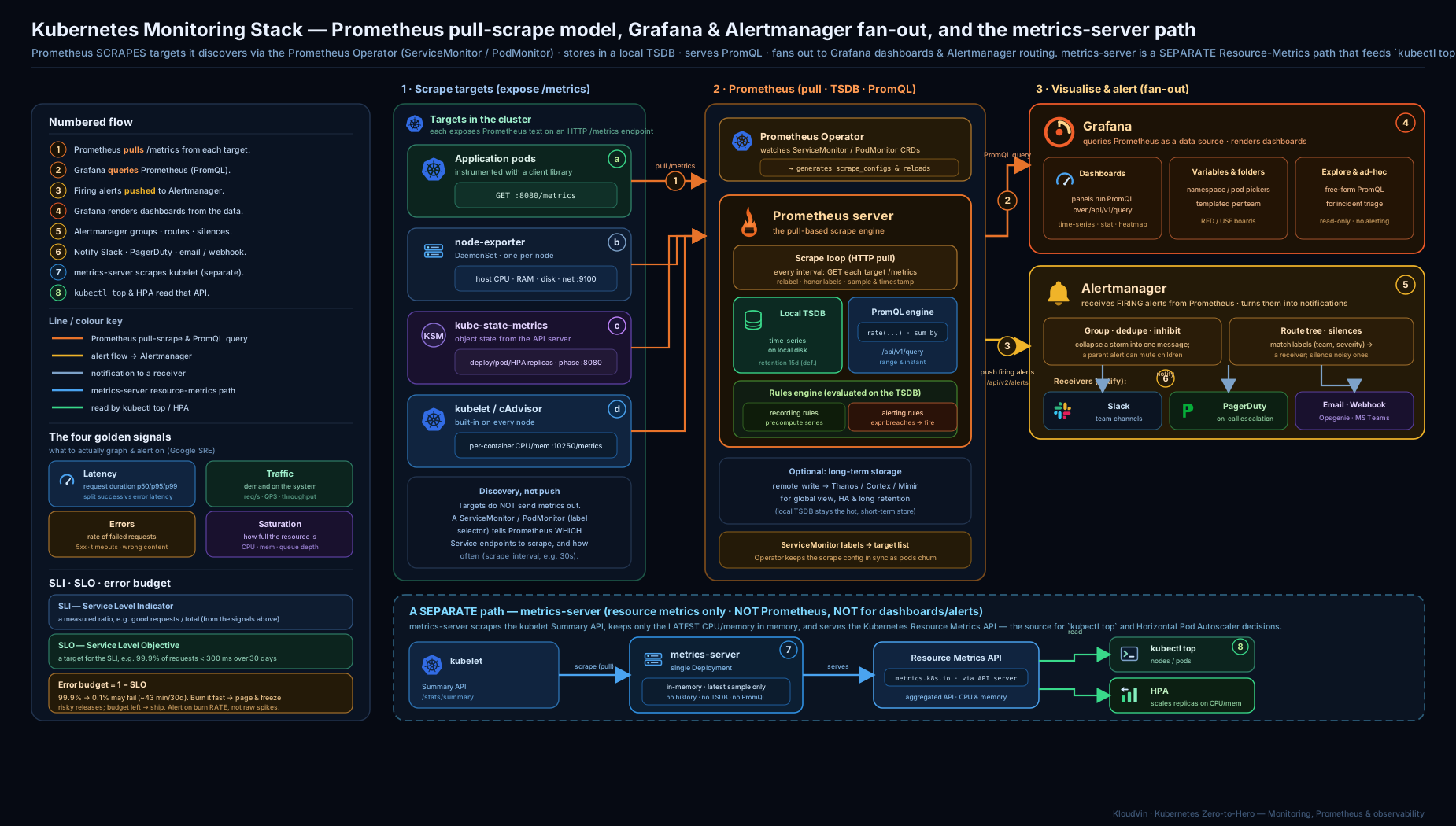
The diagram above shows the full pipeline: node-exporter (per-node DaemonSet) and kube-state-metrics (cluster object state) and your instrumented apps expose /metrics; the Prometheus Operator turns ServiceMonitor/PodMonitor objects into scrape config; Prometheus pulls those targets into its TSDB; Grafana queries Prometheus for dashboards; Prometheus evaluates PrometheusRule alerts and pushes them to Alertmanager, which routes, groups and silences before notifying Slack/PagerDuty — while the separate, lightweight metrics-server pipeline feeds kubectl top and the HPA.
The four golden signals, USE and RED
Tools collect metrics; methodology decides which metrics matter and when to page. Three frameworks dominate, and they are complementary.
The four golden signals (from Google’s SRE book) — the signals to monitor for any user-facing service:
| Signal | Question | Typical metric |
|---|---|---|
| Latency | How long do requests take? (split success vs error latency) | histogram_quantile(0.99, ...) on request duration |
| Traffic | How much demand? | sum(rate(http_requests_total[5m])) |
| Errors | What fraction is failing? | 5xx ratio, exception rate |
| Saturation | How “full” is the service? (the constrained resource) | queue depth, CPU/mem near limit, thread-pool usage |
The RED method (Tom Wilkie) — a request-centric specialisation for services, easy to remember:
- Rate — requests per second.
- Errors — failed requests per second.
- Duration — distribution (percentiles) of request latency.
RED is essentially the golden signals minus saturation; it is the right default dashboard for every microservice.
The USE method (Brendan Gregg) — resource-centric, for machines and components:
- Utilisation — % of time the resource is busy (CPU, disk, NIC).
- Saturation — the degree of queued extra work it cannot service yet (run-queue length, swap, I/O wait).
- Errors — error counts for the resource (disk errors, dropped packets).
The clean division: RED for services (request-driven, from app instrumentation), USE for resources (from node-exporter/cAdvisor). A complete cluster dashboard set has RED panels per service and USE panels per node. Saturation is the signal beginners most often omit and the one that gives you lead time — a service can be at 100% utilisation but only queuing (saturated) is the early warning of impending failure.
SLIs, SLOs and error budgets
The final and most important step is to stop alerting on causes (CPU is high) and start alerting on symptoms users feel, expressed as service-level objectives.
- SLI (Service Level Indicator) — a measured number that reflects user happiness, almost always a ratio of good events to total events: e.g. “fraction of HTTP requests served in < 300 ms with a non-5xx status”. As PromQL:
sum(rate(http_request_duration_seconds_bucket{le="0.3",status!~"5.."}[5m])) / sum(rate(http_request_duration_seconds_count[5m])) - SLO (Service Level Objective) — a target for an SLI over a window: “99.9% of requests succeed within 300 ms over 30 days”. The SLO is an internal goal you alert against.
- SLA (Service Level Agreement) — a contractual promise to a customer with consequences (refunds) if broken. SLAs are usually looser than your internal SLOs (you alert before you breach the contract).
- Error budget — the inverse of the SLO:
100% − SLO. A 99.9% SLO permits 0.1% failures = ~43 minutes/month of “bad”. The budget is a shared currency: when it is healthy, ship features fast; when it is being burned, freeze risky changes and fix reliability.
Burn-rate alerting is the modern best practice and the reason SLOs beat threshold alerts. Instead of paging on “errors > 2%”, you page on how fast you are consuming the error budget. A multi-window, multi-burn-rate alert combines a fast, high-rate signal (e.g. 14.4× burn over 1h means you’d exhaust a 30-day budget in ~2 days — page now) with a slower, lower-rate signal (e.g. 1× burn over 6h — ticket), each gated by a short and a long window so you alert quickly on big breakages but don’t flap on transient blips. The payoff: you page when users are actually being harmed at a rate that threatens the SLO, not every time a graph twitches — dramatically less alert fatigue, far fewer false pages. This is the destination the whole stack exists to reach.
Hands-on lab: stand up the full stack on kind
We will create a local cluster, install kube-prometheus-stack (Operator + Prometheus + Grafana + Alertmanager + node-exporter + kube-state-metrics), deploy a sample app, scrape it with a ServiceMonitor, query it in Prometheus and Grafana, and add a PrometheusRule. Everything runs locally and is free.
0. Prerequisites. Install kind, kubectl and helm (v3). Then create a cluster:
kind create cluster --name monitoring-lab
kubectl cluster-info --context kind-monitoring-lab
1. Install metrics-server (kind ships without it) and prove the resource pipeline.
helm repo add metrics-server https://kubernetes-sigs.github.io/metrics-server/
helm repo update
helm install metrics-server metrics-server/metrics-server -n kube-system \
  --set "args={--kubelet-insecure-tls}"          # lab-only: kind kubelet uses a self-signed cert

kubectl -n kube-system rollout status deploy/metrics-server
sleep 30
kubectl top nodes        # expect CPU/MEM columns with numbers, not an error
kubectl top pods -A      # per-pod usage
If kubectl top returns error: Metrics API not available, wait another 20–30s for the first scrape, then re-check; persistent failure means the --kubelet-insecure-tls flag did not apply.
2. Install the full Prometheus stack via Helm.
helm repo add prometheus-community https://prometheus-community.github.io/helm-charts
helm repo update
kubectl create namespace monitoring
helm install kps prometheus-community/kube-prometheus-stack -n monitoring \
  --set grafana.adminPassword='lab-password'

kubectl -n monitoring rollout status deploy/kps-grafana
kubectl -n monitoring get pods
# Expect: prometheus-kps-... , alertmanager-kps-... , kps-grafana-... ,
#         kps-kube-state-metrics-... , and a kps-prometheus-node-exporter-... per node.
kubectl -n monitoring get servicemonitors    # the bundled monitors (kubelet, apiserver, etc.)
3. Open the Prometheus UI and explore targets and types.
kubectl -n monitoring port-forward svc/kps-kube-prometheus-stack-prometheus 9090:9090
# (service name may be 'kps-prometheus' — check: kubectl -n monitoring get svc | grep prometheus)
Browse to http://localhost:9090. Under Status → Targets every target should be UP. In the expression bar try:
up                                                  # 1 per healthy target
kube_pod_status_phase{phase="Running"}              # kube-state-metrics: running pods (gauge)
rate(node_cpu_seconds_total{mode="idle"}[5m])       # node-exporter counter -> rate
sum(rate(container_cpu_usage_seconds_total[5m])) by (pod)   # per-pod CPU
4. Deploy a sample app and scrape it with a ServiceMonitor. We use an app that natively exposes Prometheus metrics on a metrics port.
kubectl create namespace demo
cat <<'EOF' | kubectl apply -f -
apiVersion: apps/v1
kind: Deployment
metadata: { name: hello, namespace: demo }
spec:
  replicas: 2
  selector: { matchLabels: { app: hello } }
  template:
    metadata: { labels: { app: hello } }
    spec:
      containers:
        - name: hello
          image: ghcr.io/prometheus/prometheus:v2.53.0   # exposes /metrics on 9090
          args: ["--config.file=/etc/prometheus/prometheus.yml"]
          ports: [{ name: metrics, containerPort: 9090 }]
---
apiVersion: v1
kind: Service
metadata: { name: hello, namespace: demo, labels: { app: hello } }
spec:
  selector: { app: hello }
  ports: [{ name: metrics, port: 9090, targetPort: metrics }]
---
apiVersion: monitoring.coreos.com/v1
kind: ServiceMonitor
metadata:
  name: hello
  namespace: demo
  labels: { release: kps }          # must match the Prometheus serviceMonitorSelector
spec:
  selector: { matchLabels: { app: hello } }
  endpoints:
    - port: metrics                  # the *named* Service port, not a number
      interval: 15s
EOF
Wait ~30s, then in the Prometheus UI under Status → Targets you should see a new serviceMonitor/demo/hello/0 job with both pods UP. If it does not appear, check the ServiceMonitor release label matches (kubectl -n monitoring get prometheus -o yaml | grep -A3 serviceMonitorSelector) and that the endpoint port name matches the Service.
5. Add a PrometheusRule (alerting rule).
cat <<'EOF' | kubectl apply -f -
apiVersion: monitoring.coreos.com/v1
kind: PrometheusRule
metadata:
  name: hello-rules
  namespace: demo
  labels: { release: kps }
spec:
  groups:
    - name: hello.rules
      rules:
        - alert: HelloTargetDown
          expr: up{job="hello"} == 0
          for: 1m
          labels: { severity: warning }
          annotations: { summary: "A hello replica has been down for 1m" }
EOF
In the Prometheus UI under Alerts you should see HelloTargetDown in the inactive state. Delete a pod (kubectl -n demo delete pod -l app=hello --field-selector ... or just scale to expose it) to watch it go pending then firing.
6. Open Grafana and view a dashboard.
kubectl -n monitoring port-forward svc/kps-grafana 3000:80
# login: admin / lab-password
Browse to http://localhost:3000, open Dashboards and explore the bundled “Kubernetes / Compute Resources / Namespace (Pods)” dashboard. Then create a panel with the query sum(rate(container_cpu_usage_seconds_total{namespace="demo"}[5m])) by (pod) to see your app’s CPU.
7. Validation checklist.
kubectl top nodes                                  # metrics-server pipeline works
kubectl -n monitoring get prometheus,alertmanager  # Operator-managed instances exist
kubectl get servicemonitor -A                      # your 'hello' monitor is listed
# In Prometheus UI: Status->Targets all UP; Alerts shows HelloTargetDown
# In Grafana: a cluster dashboard renders data
8. Cleanup.
kubectl delete namespace demo
helm uninstall kps -n monitoring
kubectl delete namespace monitoring
helm uninstall metrics-server -n kube-system
kind delete cluster --name monitoring-lab
Cost note. Everything here runs in a local kind cluster on your laptop — zero cloud cost. In a managed cluster, the levers that move the monitoring bill are Prometheus retention (disk), scrape interval and cardinality (RAM and storage scale with the number of time series — the dominant cost), Grafana/Alertmanager being negligible, and any remote-write to a long-term backend (Thanos/Mimir/managed Prometheus) which is usually the largest line item at scale.
Common mistakes & troubleshooting
| Symptom | Likely cause | Fix |
|---|---|---|
kubectl top → “Metrics API not available” |
metrics-server not installed, or kubelet TLS (x509) scrape failures |
Install metrics-server; on self-signed kubelets use --kubelet-insecure-tls (lab) or enable signed kubelet serving certs (prod) |
HPA TARGETS shows <unknown> |
metrics-server broken, or requests not set on pods | Fix metrics-server first; set CPU/memory requests (utilisation targets are % of request) |
| ServiceMonitor created but no target appears | Its labels don’t match the Prometheus serviceMonitorSelector, or wrong namespace selection |
Add the matching label (e.g. release: kps); check Status → Configuration/Targets in the UI |
| ServiceMonitor endpoint scrapes nothing | port set to a number instead of the Service port name |
Use the named port; ensure the Service actually exposes /metrics |
| Latency p99 graph looks wrong / impossible to aggregate | Using a summary and trying to average quantiles across pods | Switch to a histogram and use histogram_quantile(0.99, sum(rate(..._bucket[5m])) by (le)) |
| Counter graph shows huge negative spikes | Graphing a counter’s raw value across a restart (reset to 0) | Use rate()/increase(), which handle resets |
| Alertmanager floods on a node failure | No group_by/inhibition configured |
Group by alertname/node; add inhibition so NodeDown suppresses downstream alerts |
| Prometheus OOMs or disk fills | High cardinality (per-request/per-user labels) or long retention | Drop high-cardinality labels via relabeling; tune retention; pre-aggregate with recording rules |
| Alerts never fire despite the condition being true | Rule has a long for: and the condition flaps below it; or PrometheusRule label not selected by the Prometheus |
Lower/verify for:; ensure the rule’s labels match ruleSelector |
Best practices
- Run the full trio plus metrics-server. node-exporter (machines) + kube-state-metrics (objects) + cAdvisor/kubelet (containers) + metrics-server (HPA). Each answers questions the others can’t.
- Use the Operator and manage everything declaratively —
ServiceMonitor/PodMonitor/PrometheusRulein Git, reviewed like code. Don’t hand-editprometheus.yml. - Prefer histograms over summaries for any latency/size you aggregate across instances (which on Kubernetes is almost everything). Choose buckets to bracket your SLO threshold.
- Always rate your counters with
rate()/increase(), never graph raw counters; make windows ≥ 4× the scrape interval. - Guard cardinality ruthlessly. Never put unbounded values (user IDs, request IDs, raw paths, full URLs) in labels. Cardinality is the dominant cost and the top cause of Prometheus OOMs.
- Alert on symptoms, not causes. Build dashboards with USE (nodes) + RED (services); page on SLO burn rate, not raw thresholds. “CPU high” is rarely worth a page; “users are seeing errors fast enough to blow the budget” always is.
- Make alerts actionable. Every paging alert needs a clear
summary, a runbook link inannotations, and a severity. If an alert has no action, it should be a dashboard, not a page. - Configure grouping, inhibition and silences before going live. This is the difference between sustainable on-call and pager hell.
- Treat dashboards as code. Provision Grafana dashboards from Git/ConfigMaps; use template variables so one dashboard serves every namespace.
- Plan retention and long-term storage deliberately. Local TSDB for recent data; remote-write to Thanos/Mimir/managed Prometheus for long retention and global query — don’t over-retain locally.
Security notes
- Metrics endpoints leak information.
/metricscan expose internal hostnames, versions, queue names, build info and traffic patterns. Don’t expose them on public Ingress; keep scraping in-cluster and require auth/mTLS where possible (the Operator supportsbearerTokenSecret,tlsConfigand authorization on ServiceMonitor endpoints). - Lock down the kubelet scrape. metrics-server and Prometheus talk to the kubelet on 10250 over TLS; in production use signed kubelet serving certificates rather than
--kubelet-insecure-tls, which disables certificate verification. - Protect Grafana and the Prometheus/Alertmanager UIs. They are unauthenticated or weakly authenticated by default. Put them behind SSO/OAuth proxy or your ingress auth, set a strong Grafana admin password, and never expose them publicly. Grafana data-source credentials and dashboard query power are sensitive.
- Never inline secrets in Alertmanager config. Slack webhooks, PagerDuty keys and SMTP creds go in Kubernetes Secrets referenced via
*_file/api_url_file/routing_key_file, not plaintext in the config (or git). - Scope RBAC tightly. kube-state-metrics needs broad read across the API — review its ClusterRole. Prometheus’s service account should be read-only. Run all components as non-root with restricted Pod Security.
- Alerting is a security signal too. Wire alerts for suspicious states (cert expiry, sudden RBAC changes, repeated auth failures, control-plane component down) — monitoring is part of detection, not just performance.
Interview & exam questions
-
What is the difference between metrics-server and Prometheus? metrics-server is a tiny resource-metrics pipeline that scrapes only CPU/memory from kubelets, keeps the latest value in memory (no history), and serves the aggregated Metrics API for
kubectl topand the HPA. Prometheus is a full monitoring system: it scrapes many targets, stores time series on disk for weeks, and offers PromQL for dashboards and alerting. They are complementary; metrics-server is not a monitoring system. -
Why does Prometheus pull instead of push, and what are the trade-offs? Pull lets Prometheus own service discovery and gives a free liveness signal (a failed scrape sets
up == 0); it’s awkward for short-lived jobs (use Pushgateway) and requires network reachability to targets. Push fits ephemeral jobs and firewalled targets but loses the “silent target = down” signal. -
Explain the four metric types and when to use each. Counter — monotonically increasing total, always
rate()d (requests, bytes). Gauge — value up/down (memory, queue length). Histogram — bucketed observations, quantiles computed server-side withhistogram_quantile(), aggregatable across instances — the default for latency. Summary — quantiles computed client-side, accurate per-instance but not aggregatable. -
Histogram vs summary — which for cluster-wide p99 latency, and why? Histogram. Summary quantiles are pre-computed per instance and cannot be meaningfully averaged across pods. Histograms expose raw
lebuckets, so yousum(rate(..._bucket[5m])) by (le)across instances and thenhistogram_quantile(0.99, ...). -
Write a PromQL query for the p99 request latency across all replicas of a service.
histogram_quantile(0.99, sum(rate(http_request_duration_seconds_bucket{job="api"}[5m])) by (le)). -
rate()vsirate()vsincrease()?rate()= smooth per-second average over the window (use for alerts/dashboards).irate()= instantaneous rate from the last two samples (spiky high-res graphs only).increase()= total rise over the window (rate × window), good for “how many in the last hour”. All three correctly handle counter resets. -
What do kube-state-metrics and node-exporter each provide, and how do they differ from metrics-server? kube-state-metrics exposes the state of Kubernetes objects (replica counts, pod phases, restart counts, node conditions) from the API. node-exporter exposes host OS metrics (CPU, memory, disk, network) per node via a DaemonSet. metrics-server exposes live resource usage (CPU/RAM) for the HPA. State vs machine vs usage — three different questions.
-
What problem does the Prometheus Operator solve, and what do ServiceMonitor and PodMonitor do? It makes Prometheus configuration declarative and Kubernetes-native: instead of editing
prometheus.yml, you create CRDs and a controller generates the config. ServiceMonitor says how to scrape a set of Services; PodMonitor scrapes Pods directly (no Service). APrometheusresource selects which monitors it honours viaserviceMonitorSelector. -
My ServiceMonitor exists but the target never appears in Prometheus. Why? Most often its labels don’t match the Prometheus instance’s
serviceMonitorSelector(so it’s ignored), theportis a number instead of the Service port name, thenamespaceSelectorexcludes it, or the Service doesn’t actually expose/metrics. Check Status → Targets/Configuration in the UI. -
What is the difference between Prometheus alerting rules and Alertmanager? Prometheus evaluates alerting rules and fires alerts when an
expris true for itsforduration. Alertmanager receives firing alerts and handles routing, grouping, deduplication, inhibition, silences and delivery to receivers. Prometheus decides what is wrong; Alertmanager decides who to tell and how. -
What are the four golden signals, and how do USE and RED relate? Golden signals: latency, traffic, errors, saturation. RED (Rate, Errors, Duration) is the request-centric subset for services. USE (Utilisation, Saturation, Errors) is resource-centric for machines/components. Use RED for services, USE for resources; saturation is the early-warning signal beginners omit.
-
Define SLI, SLO, SLA and error budget, and explain burn-rate alerting. SLI = a measured good/total ratio reflecting user happiness. SLO = a target for that SLI over a window (e.g. 99.9%/30d). SLA = a contractual promise with penalties (looser than the SLO). Error budget =
100% − SLO(99.9% ≈ 43 min/month). Burn-rate alerting pages on how fast you’re consuming the budget (multi-window/multi-burn-rate), so you alert on user-impacting harm rather than raw thresholds — far less alert fatigue. -
What is cardinality and why does it matter? Cardinality is the number of distinct time series (each unique metric-name + label-set combination). High-cardinality labels (user/request IDs, raw URLs) multiply series, ballooning Prometheus memory and storage — the top cause of OOMs. Keep label values bounded.
-
Where does Prometheus store data and how do you keep it long-term / highly available? A local TSDB (WAL → 2h blocks → compaction), retained by time/size, not replicated. For long-term retention and global, HA query you use remote-write to Thanos, Cortex/Mimir or VictoriaMetrics; run multiple Prometheis scraping the same targets and let Thanos/Alertmanager dedup.
Quick check
- Which component powers
kubectl topand is the default source for the HPA? - A counter resets to 0 when its process restarts. Which PromQL function should you use so this reset doesn’t produce a misleading graph?
- You need a single cluster-wide p99 latency aggregated across 10 pods. Do you instrument with a histogram or a summary, and why?
- What does kube-state-metrics expose that node-exporter does not?
- Your
ServiceMonitorexists but no target shows up in Prometheus. Name the two most likely causes.
Answers
- metrics-server (serving the
metrics.k8s.ioMetrics API). rate()(orincrease()) — both detect and correct counter resets; never graph a raw counter.- A histogram — summary quantiles are computed client-side and cannot be aggregated across instances, whereas histogram buckets can be summed and fed to
histogram_quantile(). - The state of Kubernetes objects (replica counts, pod phases, restart counts, node conditions). node-exporter exposes host OS metrics (CPU/mem/disk/net), not object state.
- (a) The ServiceMonitor’s labels don’t match the Prometheus instance’s
serviceMonitorSelector(so it’s ignored); (b) the endpointportis a number instead of the Service port name (or the Service doesn’t expose/metrics).
Exercise
On a fresh kind cluster:
- Install metrics-server and confirm
kubectl top nodesandkubectl top pods -Areturn data. - Install kube-prometheus-stack via Helm and confirm every target under Status → Targets is
UP. - Deploy any app that exposes
/metrics, expose it with a Service, and add a ServiceMonitor so Prometheus scrapes it. Prove the target appears. - In Prometheus, write three queries: (a) the per-second request rate of your app’s HTTP counter using
rate(); (b) the p95 latency usinghistogram_quantile()over the bucket metric; © the number ofRunningpods in your namespace using akube_state_metricsgauge. - Create a PrometheusRule that fires when your app’s 5xx error ratio exceeds 1% for 5 minutes. Trigger it (e.g. by stopping the backend) and watch it move
pending → firingin the Alerts tab. - In Grafana, build a small RED dashboard (Rate, Errors, Duration) for your app using template variable
$namespace. - Configure Alertmanager to
group_by: [alertname, namespace]and routeseverity="page"to one receiver and everything else to another. Add a silence for your test alert and confirm it stops notifying while still firing.
Write down, in two sentences, the SLI and SLO you would set for this app, and the error budget (in minutes/month) it implies.
Certification mapping
- CKA — Monitoring is squarely in the Troubleshooting and cluster-operations domains. Be fluent with metrics-server and
kubectl top(install, thex509/--kubelet-insecure-tlsissue, “Metrics API not available”), interpreting resource usage, and understanding the metrics pipeline that feeds the HPA. Know that the Metrics API is served via the API Aggregation Layer. - CKAD — Understand how application resource requests/limits interact with metrics and the HPA, and how to read
kubectl topand pod conditions when debugging your own workloads. - CKS / KCNA — KCNA touches observability concepts (the three pillars, Prometheus’s role in the CNCF landscape). For CKS, know the security posture of monitoring components (metrics endpoint exposure, kubelet TLS, RBAC scope of kube-state-metrics, securing Grafana/Alertmanager). Prometheus, kube-state-metrics, node-exporter, Grafana and the Prometheus Operator are all CNCF/ecosystem projects worth recognising by name.
Glossary
- Observability — the ability to infer a system’s internal state from its external outputs (metrics, logs, traces).
- metrics-server — cluster add-on serving live CPU/memory via the Metrics API for
kubectl topand the HPA. - Metrics API (
metrics.k8s.io) — the aggregated API exposing resource metrics; backed by metrics-server. - Prometheus — pull-based monitoring system and time-series database; the Kubernetes standard.
- TSDB — time-series database; Prometheus’s on-disk store (WAL + compacted blocks).
- Scrape / target — Prometheus pulling
/metricsfrom an endpoint; a target is one such endpoint. - Exporter — a process exposing third-party metrics in Prometheus format (node-exporter, kube-state-metrics, …).
- Counter / Gauge / Histogram / Summary — the four Prometheus metric types.
- PromQL — Prometheus Query Language; selectors, range vectors,
rate(), aggregations,histogram_quantile(). - Recording rule — a precomputed PromQL expression saved as a new series.
- kube-state-metrics (KSM) — exposes the state of Kubernetes objects as metrics from the API.
- node-exporter — DaemonSet exporter of host OS metrics (CPU, memory, disk, network).
- Prometheus Operator — controller that manages Prometheus/Alertmanager and generates scrape config from CRDs.
- ServiceMonitor / PodMonitor — CRDs declaring how to scrape Services / Pods.
- PrometheusRule — CRD carrying recording and alerting rules.
- Grafana — visualisation/dashboarding layer querying Prometheus and other data sources.
- Alertmanager — routes, groups, dedups, inhibits, silences and delivers fired alerts.
- Inhibition / Silence — suppressing alerts because of another alert / a time-bounded manual mute.
- Cardinality — the number of distinct time series; high cardinality is the main Prometheus cost/risk.
- Four golden signals — latency, traffic, errors, saturation.
- USE / RED — Utilisation-Saturation-Errors (resources) / Rate-Errors-Duration (services).
- SLI / SLO / SLA — measured indicator / internal target / contractual promise.
- Error budget —
100% − SLO; the allowable amount of “bad”, spent or saved. - Burn rate — how fast the error budget is consumed; basis of modern SLO alerting.
Next steps
- Add logs and traces: Deploy SigNoz on Kubernetes with OpenTelemetry for APM and logs — extend metrics into full three-pillar observability.
- Go deeper on the nodes you’re now monitoring: Kubernetes Worker Node Internals: kubelet, the CRI, kube-proxy & cgroups — understand the kubelet metrics and eviction thresholds your alerts watch.
- Drive autoscaling from these metrics: Kubernetes Autoscaling in Depth: HPA, KEDA & Karpenter — metrics-server feeds CPU/memory HPAs; the Prometheus Adapter feeds custom-metric HPAs.