Pods are ephemeral and disposable. A Deployment kills and recreates them on every rollout, the autoscaler adds and removes them as load changes, and a node failure can wipe a whole batch in seconds. Every time a Pod is recreated it gets a brand-new IP address. So if your front-end tried to talk to your API by its Pod IP, it would break the moment that API Pod was rescheduled. You need something that does not move — a stable address that always points at “whatever healthy Pods currently back this app.” That something is a Service.
A Service is the load balancer and stable identity layer of Kubernetes. It gives a set of Pods a fixed virtual IP and a DNS name, watches which Pods are currently ready, and spreads traffic across them — all without you touching a single Pod IP. This lesson takes the Service apart completely: every type (ClusterIP, NodePort, LoadBalancer, ExternalName, and the special “headless” Service), every field on the spec, the Endpoints/EndpointSlices objects that track the backing Pods, the kube-proxy component that actually programs the load-balancing rules on every node, CoreDNS and how name resolution really works, and the flat pod network model (the CNI) that the whole thing sits on. It is long on purpose: by the end you should be able to answer almost any Service or cluster-networking question an interviewer or a CKA/CKAD exam can throw at you, and debug a broken Service from first principles.
Learning objectives
By the end of this lesson you can:
- Explain why Services exist and how they decouple stable addresses from ephemeral Pods.
- Choose the right Service type — ClusterIP, NodePort, LoadBalancer, ExternalName, or headless — for a given need, and explain how they layer on top of each other.
- Read and write every important field of a Service spec:
selector,ports(port/targetPort/nodePort/protocol/appProtocol/name),clusterIP,sessionAffinity,externalTrafficPolicy/internalTrafficPolicy,ipFamilyPolicy, and topology hints. - Describe how a
selectorturns into Endpoints / EndpointSlices, and why EndpointSlices replaced the old Endpoints object at scale. - Explain what kube-proxy does, and the difference between its iptables and IPVS modes (and what nftables/eBPF change).
- Describe CoreDNS service discovery in detail: A/AAAA records, SRV records, the
ndots:5search-path behaviour, and how headless DNS differs. - Sketch the Kubernetes network model — the flat, NAT-free pod network provided by a CNI plugin — and the four communication paths it guarantees.
Prerequisites & where this fits
You need a working local cluster and basic kubectl comfort. If you have not set one up, do the lab in What Is Kubernetes? Control Plane, Nodes, etcd & the kubelet first — it walks you through a free local cluster with kind, minikube or k3d. It also helps to have met Pods and Deployments already: this lesson assumes you know that a Deployment owns a ReplicaSet which owns Pods, and that Pods carry labels that a selector can match. This is Lesson 4 of the Kubernetes Zero-to-Hero “deepening” track — it takes the Service you met briefly earlier and exhausts it, so that ingress, network policy and service mesh later all sit on solid ground.
Core concepts: the problem a Service solves
Start from the failure it prevents. Three things make raw Pod IPs unusable as an address:
- Pods are mortal. They are created and destroyed constantly — by rollouts, scaling, evictions, node failures. Each new Pod gets a new IP.
- There are many of them. A Deployment with
replicas: 5is five Pods on (perhaps) five different nodes. A client should not have to know all five, nor load-balance across them itself. - Some are not ready. A Pod that is starting up, or failing its readiness probe, must not receive traffic, even though it exists.
A Service solves all three at once. It is an API object that:
- owns a stable virtual IP (the ClusterIP) and a stable DNS name that never change for the life of the Service;
- uses a label selector to continuously discover the set of Pods that back it;
- filters that set down to the ready Pods only;
- load-balances new connections across those ready Pods.
The crucial mental model: a Service is not a process and not a proxy server sitting in the data path. There is no “Service pod.” The ClusterIP is a virtual IP that exists only as load-balancing rules programmed into the Linux kernel on every node by a component called kube-proxy. When a Pod sends a packet to a ClusterIP, the kernel on that Pod’s own node rewrites the destination to one of the real backing Pod IPs (DNAT) and sends it straight there. This is why Services are fast and have no single bottleneck: the “load balancer” is the kernel of whichever node the client happens to be on.
Three objects work together, and it pays to keep them straight:
| Object | What it is | Who creates it |
|---|---|---|
| Service | The stable identity: a virtual IP + DNS name + a selector + port mapping. You author this. | You |
| EndpointSlice (and legacy Endpoints) | The live list of IP:port of the Pods currently backing the Service. Auto-maintained. |
The EndpointSlice controller |
| kube-proxy | The node agent that turns the Service + its EndpointSlices into kernel load-balancing rules on every node. | Runs as a DaemonSet |
You write the Service. The control plane keeps the EndpointSlices in sync with reality. kube-proxy programs the kernel. DNS gives you a name. That is the whole machine.
The Service types, end to end
Kubernetes has a handful of Service type values, and the important insight is that they stack: each higher type is the previous one plus a way to reach it from somewhere new. Headless is the odd one out — it removes the virtual IP entirely. Here is the comparison you should be able to reproduce, followed by a full treatment of each.
| Type | Gets a ClusterIP? | Reachable from | How it exposes | Typical use |
|---|---|---|---|---|
| ClusterIP (default) | Yes | Inside the cluster only | Virtual IP + DNS | Internal services (API ↔ DB, microservice ↔ microservice) |
| NodePort | Yes | Inside, plus every node’s IP on a high port | ClusterIP + a port (30000–32767) open on all nodes | Dev/test, bare metal without a cloud LB, behind an external LB |
| LoadBalancer | Yes | Inside, plus a single external IP | NodePort + a cloud/MetalLB load balancer in front | Internet-facing service on a cloud (or with MetalLB on bare metal) |
| ExternalName | No | Inside (as a name) | A CNAME to an external DNS name — no proxying | Aliasing an external dependency (e.g. a managed DB) by an in-cluster name |
Headless (clusterIP: None) |
No (none) | Inside (per-Pod DNS) | DNS returns the Pod IPs directly, no load balancing | StatefulSets, client-side LB, service discovery of individual Pods |
ClusterIP — the default, internal-only Service
ClusterIP is what you get if you do not set type. It allocates a virtual IP from the Service CIDR (a range carved out at cluster install, distinct from the Pod CIDR — e.g. 10.96.0.0/12 by default in kubeadm) and makes it reachable only from inside the cluster. This is the workhorse: 90% of Services in a typical cluster are ClusterIP, because most traffic is service-to-service inside the cluster.
apiVersion: v1
kind: Service
metadata:
  name: web
spec:
  type: ClusterIP            # the default; can be omitted
  selector:
    app: web                 # match Pods labelled app=web
  ports:
    - name: http             # name is mandatory once you have >1 port
      port: 80               # the port the Service listens on (the ClusterIP:80)
      targetPort: 8080       # the port on the Pod to forward to
      protocol: TCP          # TCP (default), UDP, or SCTP
Clients reach it at web (same namespace), web.<namespace> (cross-namespace), or the full web.<namespace>.svc.cluster.local — never by IP. More on those names in the CoreDNS section.
NodePort — expose on every node’s IP
A NodePort Service is a ClusterIP plus an extra trick: it opens the same high-numbered port on every node in the cluster, and traffic arriving on <any-node-IP>:<nodePort> is forwarded to the Service (and on to a backing Pod). The default range is 30000–32767; you can let Kubernetes pick one or pin it with nodePort:.
apiVersion: v1
kind: Service
metadata:
  name: web
spec:
  type: NodePort
  selector:
    app: web
  ports:
    - port: 80
      targetPort: 8080
      nodePort: 30080        # optional; if omitted, one is auto-assigned from 30000–32767
Key facts to internalise:
- The port is open on every node, even nodes that run none of the backing Pods. Hit any node and you reach the Service. (Whether the request then makes an extra hop to a Pod on a different node depends on
externalTrafficPolicy— see below.) - It is a raw exposure — no TLS, no host/path routing, an ugly high port. Real internet traffic should go through an Ingress or Gateway (which itself is usually fronted by a LoadBalancer). NodePort is for dev/test, for bare metal, or as the rung that a LoadBalancer/Ingress controller stands on.
- Setting
type: NodePortstill allocates a ClusterIP — internal clients keep using the name as normal.
LoadBalancer — a real external IP from the cloud
type: LoadBalancer is NodePort plus an instruction to your environment: “please provision an external load balancer that forwards to these NodePorts.” On a cloud (EKS/AKS/GKE) the cloud-controller-manager sees the Service and provisions a cloud L4 load balancer (e.g. AWS NLB, Azure Load Balancer), then writes the LB’s public IP/hostname back into the Service’s status.loadBalancer.ingress. On bare metal you install something like MetalLB to play that role.
apiVersion: v1
kind: Service
metadata:
  name: web
  annotations:
    # cloud-specific knobs live in annotations, e.g. on AWS:
    service.beta.kubernetes.io/aws-load-balancer-type: "nlb"
spec:
  type: LoadBalancer
  selector:
    app: web
  ports:
    - port: 80
      targetPort: 8080
  # loadBalancerClass: service.k8s.aws/nlb   # pick a specific LB implementation
  # loadBalancerSourceRanges: ["203.0.113.0/24"]  # firewall the LB to these CIDRs
Important details:
- It is layer 4 (TCP/UDP), not HTTP-aware. For host/path routing, TLS termination and many services behind one IP, you front it with an Ingress controller — but the Ingress controller’s own Service is itself usually a single
LoadBalancer. So “one LoadBalancer + Ingress” is the standard pattern, rather than one LoadBalancer per app (each cloud LB costs money). loadBalancerClasslets multiple LB controllers coexist and selects which one handles this Service.loadBalancerSourceRangesrestricts the source IPs the LB will accept (a cheap firewall).- It still has a NodePort and a ClusterIP underneath; the cloud LB targets the NodePort on the nodes.
ExternalName — a CNAME, with no proxying at all
type: ExternalName is the odd one: it has no selector, no ClusterIP, no Endpoints, and no kube-proxy involvement. It is purely a DNS alias: CoreDNS returns a CNAME to whatever you put in externalName.
apiVersion: v1
kind: Service
metadata:
  name: prod-db
  namespace: app
spec:
  type: ExternalName
  externalName: mydb.abc123.eu-west-1.rds.amazonaws.com   # an external DNS name
Now prod-db.app.svc.cluster.local resolves (via CNAME) to the RDS hostname. This lets your Pods refer to an external dependency by a stable in-cluster name — so you can swap dev/staging/prod databases by changing one Service, with no app config change. Gotchas: because it is a CNAME, the target must be a DNS name, not an IP; and since there is no proxying, TLS SNI and HTTP Host headers point at the real external name, which is usually what you want but occasionally surprises people. (If you need to alias a raw IP inside the cluster, use a Service without a selector plus a manual EndpointSlice instead — see the next section.)
Headless Service — DNS to the Pods, no virtual IP
Set clusterIP: None and you get a headless Service. It has no virtual IP and no load balancing. Instead, a DNS lookup of the Service name returns the A/AAAA records of all the ready backing Pods directly (one record per Pod). The client then connects to a Pod itself — doing its own selection, or connecting to a specific Pod.
apiVersion: v1
kind: Service
metadata:
  name: cassandra
spec:
  clusterIP: None            # <-- this makes it headless
  selector:
    app: cassandra
  ports:
    - port: 9042
      name: cql
You use headless Services when:
- StatefulSets need stable, individually-addressable Pods. With a headless “governing” Service, each Pod gets a deterministic DNS name
<pod>-<ordinal>.<svc>.<ns>.svc.cluster.local— e.g.cassandra-0.cassandra.default.svc.cluster.local. Peers (database replicas, brokers) find each other by name. - A client library wants to do its own load balancing (e.g. gRPC client-side LB), or needs to talk to every backend (fan-out), or to a specific member.
A subtle but exam-worthy point: a headless Service with a selector returns one A record per ready Pod; a headless Service without a selector returns whatever records you (or an operator) created via EndpointSlices — this is one way to alias external endpoints by IP.
The full Service spec, field by field
Beyond type, a Service has many fields. This is the matrix to know — every field, what it does, its values, the default, when you set it, and the gotcha.
| Field | What it does | Values | Default | When to set | Gotcha |
|---|---|---|---|---|---|
type |
The exposure model | ClusterIP / NodePort / LoadBalancer / ExternalName | ClusterIP | Whenever you need external reach | Higher types include lower ones (all but ExternalName still get a ClusterIP) |
selector |
Which Pods back this Service (by label) | label map | — | Almost always | Omit it to manage Endpoints manually (e.g. alias an external IP) |
ports[].port |
The port the Service listens on | 1–65535 | — | Always | This is the consumer-facing port, not the Pod’s |
ports[].targetPort |
The port on the Pod to forward to | number or named port | equals port |
When Pod port ≠ Service port | Can be a name defined in the Pod’s containerPort — decouples the number |
ports[].nodePort |
The node-wide port (NodePort/LB only) | 30000–32767 | auto-assigned | Pin only if a firewall/client needs a fixed port | Conflicts if two Services pin the same value |
ports[].protocol |
L4 protocol | TCP / UDP / SCTP | TCP | UDP for DNS/QUIC, etc. | A Service can mix TCP and UDP ports only via separate entries |
ports[].name |
Names a port | DNS-label string | — | Mandatory once there is >1 port | Used by SRV records and by targetPort references |
ports[].appProtocol |
Hints the L7 protocol | e.g. http, https, grpc, kubernetes.io/h2c |
— | For LB/ingress that route by protocol | A hint only; kube-proxy ignores it |
clusterIP |
The virtual IP | auto / a specific IP / None |
auto from Service CIDR | None for headless; a fixed IP rarely |
Immutable after creation (except switching type appropriately) |
clusterIPs |
Dual-stack list of cluster IPs | up to 2 (IPv4+IPv6) | derived | Dual-stack clusters | Order matters; tied to ipFamilies |
ipFamilyPolicy |
Single vs dual stack | SingleStack / PreferDualStack / RequireDualStack | SingleStack | Dual-stack clusters | RequireDualStack fails if the cluster isn’t dual-stack |
ipFamilies |
Which IP families | [IPv4], [IPv6], or both | cluster default | Force a family/order | Must be consistent with ipFamilyPolicy |
sessionAffinity |
Sticky sessions | None / ClientIP | None | When a client must hit the same Pod | ClientIP stickiness is by source IP, not cookies (it’s L4) |
sessionAffinityConfig.clientIP.timeoutSeconds |
Stickiness duration | seconds | 10800 (3h) | Tune session length | Resets per new connection within the window |
externalTrafficPolicy |
How external (NodePort/LB) traffic is routed | Cluster / Local | Cluster | Local to preserve client source IP |
Local drops traffic on nodes with no local Pod |
internalTrafficPolicy |
How in-cluster traffic is routed | Cluster / Local | Cluster | Keep traffic node-local (e.g. node-local DNS, logging) | Local means clients on a node with no local Pod get nothing |
publishNotReadyAddresses |
Include not-ready Pods in DNS/Endpoints | true / false | false | StatefulSet peer discovery during startup | Sends traffic to Pods that may not be ready |
externalIPs |
Extra IPs the cluster will accept for this Service | list of IPs | — | Rare, manual ingress | You must route those IPs to nodes yourself |
loadBalancerClass |
Which LB implementation handles it | string | provider default | Multiple LB controllers | Only valid for type: LoadBalancer |
loadBalancerSourceRanges |
Firewall the external LB | CIDR list | open | Restrict who can hit the LB | Provider support varies |
allocateLoadBalancerNodePorts |
Whether a LB Service also gets NodePorts | true / false | true | Set false to save NodePorts when the LB targets Pods directly | Some LBs need the NodePorts; check your provider |
healthCheckNodePort |
The port the external LB health-checks (with externalTrafficPolicy: Local) |
30000–32767 | auto | Rarely pinned | Only meaningful with Local |
port vs targetPort vs nodePort — the three ports, untangled
This trips up nearly everyone, so make it concrete. Imagine a Pod whose container listens on 8080, fronted by a NodePort Service:
port: 80— the port the ClusterIP answers on. Inside the cluster you connect toweb:80.targetPort: 8080— the port on the Pod that traffic is forwarded to. It can be a number (8080) or a name (e.g.http) that resolves to whatevercontainerPortcarries that name — naming it means you can change the actual number in the Pod without touching the Service.nodePort: 30080— the port opened on every node’s IP (NodePort/LoadBalancer only). External clients hit<node-IP>:30080.
So one request to NodeIP:30080 → the node DNATs it to a backing Pod’s 8080; one request to ClusterIP:80 → DNAT to a Pod’s 8080. The numbers are independent on purpose.
sessionAffinity, traffic policies and topology — the routing knobs
sessionAffinity: ClientIPmakes kube-proxy send all connections from the same client source IP to the same Pod fortimeoutSeconds(default 3 hours). It is L4 stickiness — there are no cookies. If you need cookie-based affinity, that lives at the Ingress/L7 layer, not the Service.externalTrafficPolicycontrols external traffic (NodePort/LoadBalancer):Cluster(default) — any node accepts the traffic and may forward it to a Pod on another node (an extra hop), and SNAT hides the real client IP (the backing Pod sees the node’s IP). Even load spread; client IP lost.Local— a node only forwards to Pods on that same node, with no SNAT, so the Pod sees the real client IP. The trade-off: nodes with no local Pod drop the traffic, so the external LB must health-check (viahealthCheckNodePort) and stop sending to empty nodes; load can be uneven if Pods are unevenly spread.
internalTrafficPolicyis the same idea for in-cluster traffic.Localkeeps a Pod’s traffic to backends on its own node — used for node-local DNS caches and per-node agents, to avoid cross-node hops. If there is no local backend, the client gets nothing.- Topology-aware routing (the
service.kubernetes.io/topology-mode: Autoannotation; formerly “topology aware hints”) asks kube-proxy to prefer endpoints in the same zone as the client, to cut cross-zone traffic (and cross-zone cloud charges). The control plane writes zone hints into the EndpointSlices; kube-proxy honours them when the distribution is balanced enough, otherwise it falls back to cluster-wide routing for safety. This is the modern replacement for the oldertopologyKeysfield, which was removed.
Selectors → Endpoints → EndpointSlices
Here is the machinery that connects a Service to the actual Pods. When a Service has a selector, a controller continuously lists/watches Pods matching those labels, filters them to the ready ones (readiness probe passing, not terminating), and records their IP:port in EndpointSlices. kube-proxy watches those slices and programs the kernel. The flow is:
Service selector → matching, ready Pods → their IP:port recorded in EndpointSlices → kube-proxy turns those into kernel rules → traffic to the ClusterIP is DNAT’d to a backing Pod.
The legacy Endpoints object
Originally there was one Endpoints object per Service (same name as the Service), holding every backing address in a single object:
$ kubectl get endpoints web
NAME   ENDPOINTS                                       AGE
web    10.244.1.5:8080,10.244.2.7:8080,10.244.3.9:8080 5m
This worked but scaled badly. With, say, 5,000 Pods behind a Service, every Pod change rewrote the entire Endpoints object, and that whole object had to be pushed to every node’s kube-proxy and re-read — a storm of large updates that hammered the API server and etcd.
EndpointSlices — the scalable replacement
EndpointSlices (GA since v1.21, the default since well before v1.30) fix this by sharding the endpoint list into many smaller objects, up to 100 endpoints per slice by default. A Service with 5,000 endpoints has ~50 slices. When one Pod changes, only its slice is rewritten and pushed — a tiny, targeted update instead of a full rewrite. They also carry richer per-endpoint data that the old object could not: the endpoint’s zone and node (used for topology-aware routing), its readiness/serving/terminating conditions separately, and the hostname. Inspect them with:
$ kubectl get endpointslices -l kubernetes.io/service-name=web
NAME        ADDRESSTYPE   PORTS   ENDPOINTS                       AGE
web-abc12   IPv4          8080    10.244.1.5,10.244.2.7,...       5m

$ kubectl describe endpointslice web-abc12
# shows per-endpoint: Addresses, Conditions (Ready/Serving/Terminating),
# Topology (kubernetes.io/hostname, topology.kubernetes.io/zone), targetRef -> the Pod
Each slice is tied to its Service by the label kubernetes.io/service-name, and has an addressType of IPv4, IPv6, or FQDN. The legacy Endpoints object is still created in parallel for backward compatibility, but EndpointSlices are the source of truth kube-proxy uses today.
Two readiness-related conditions matter for graceful shutdown: a terminating Pod is marked serving: true, terminating: true for a window so that existing connections drain while no new traffic is routed to it. This is how Services avoid dropping in-flight requests during a rollout.
Services without selectors — manual endpoints
If you omit the selector, no controller manages the endpoints — you (or an operator) create an EndpointSlice by hand. This is how you point an in-cluster Service name at an external IP (a legacy database on a VM, say) so your Pods can use a stable Kubernetes name for it:
apiVersion: v1
kind: Service
metadata:
  name: legacy-db
spec:
  ports:
    - port: 5432
      targetPort: 5432
---
apiVersion: discovery.k8s.io/v1
kind: EndpointSlice
metadata:
  name: legacy-db-1
  labels:
    kubernetes.io/service-name: legacy-db   # ties this slice to the Service
addressType: IPv4
ports:
  - name: ""
    port: 5432
endpoints:
  - addresses: ["192.0.2.42"]               # the external server's IP
kube-proxy: how a virtual IP becomes real
The ClusterIP is virtual — nothing actually listens on it. kube-proxy, a DaemonSet running on every node, is what makes it work. It watches Services and EndpointSlices via the API server and programs the node’s kernel so that packets destined for a Service VIP are rewritten (DNAT) to one of the backing Pod IPs and delivered. Note kube-proxy is not in the data path of normal traffic in the common modes — it only installs the rules; the kernel does the actual rewriting per packet. Its modes:
| Mode | Mechanism | Performance at scale | Notes |
|---|---|---|---|
| iptables (default) | Linear-ish chains of NAT rules; a random rule picks the backend | Rule updates slow as Services grow (O(n) reprogramming); per-packet match is kernel-fast | Simple, ubiquitous, the historical default; random backend selection |
| IPVS | Kernel IP Virtual Server with hash tables | Scales to thousands of Services with near-constant lookup; faster bulk updates | Needs kernel IPVS modules; offers real LB algorithms (rr, lc, dh, sh, …) |
| nftables | Newer kernel nftables backend (beta/maturing in recent releases) |
Much faster updates than iptables, modern data structures | The intended long-term successor to the iptables backend |
| (no kube-proxy) | eBPF dataplanes (e.g. Cilium) replace kube-proxy entirely | Highest performance; handles Services in eBPF | A CNI feature, not a kube-proxy mode — you run “kube-proxy-free” |
Practical guidance: iptables mode is fine for most clusters (hundreds of Services). Switch to IPVS when you have thousands of Services/endpoints and notice control-plane churn or latency in rule programming, or when you want a specific load-balancing algorithm. nftables is where the project is heading; eBPF/Cilium is the high-end option that removes kube-proxy. In all cases the behaviour you write (Service types, ports, policies) is identical — only the data-plane implementation differs. One visible behavioural nuance: in iptables mode backend choice is effectively random per connection; IPVS gives you the algorithm you configure.
CoreDNS: service discovery in detail
A stable IP is only half the story — you address Services by name, and CoreDNS (the cluster DNS server, itself running as a Deployment in kube-system and fronted by a ClusterIP Service usually called kube-dns at a fixed IP like 10.96.0.10) is what resolves those names. Every Pod’s /etc/resolv.conf is wired to it by the kubelet.
The record types
For a normal (ClusterIP) Service web in namespace app:
- A/AAAA record:
web.app.svc.cluster.local→ the Service’s ClusterIP (one stable IP; kube-proxy load-balances behind it). - SRV record:
_http._tcp.web.app.svc.cluster.local→ the named port + the A record. SRV records let a client discover which port a named service uses. The format is_<port-name>._<protocol>.<service>....
For a headless Service (clusterIP: None):
- A/AAAA records:
cassandra.app.svc.cluster.local→ multiple records, one per ready Pod IP (no ClusterIP exists). The client picks. - Per-Pod records (with StatefulSets):
cassandra-0.cassandra.app.svc.cluster.local→ that specific Pod’s IP — stable, individually addressable.
For an ExternalName Service: a CNAME to the external name, as covered earlier. (Pods also get records — by default <pod-ip-with-dashes>.<ns>.pod.cluster.local — but Service records are what you use day to day.)
The search domains and ndots:5 — why short names work
Look inside any Pod:
$ kubectl exec -it mypod -- cat /etc/resolv.conf
nameserver 10.96.0.10
search app.svc.cluster.local svc.cluster.local cluster.local
options ndots:5
Two things make curl http://web work from inside app:
- The
searchlist appends those suffixes in turn. A lookup ofwebis tried asweb.app.svc.cluster.local, thenweb.svc.cluster.local, thenweb.cluster.local, until one resolves. That is why a barewebfinds the Service in your own namespace, andweb.other-namespacefinds it in another. options ndots:5says: if the name has fewer than 5 dots, try the search suffixes first (treat it as a likely in-cluster short name) before trying it as an absolute name. Service short names have few dots, so they get the search treatment — exactly what you want inside the cluster.
The famous ndots:5 gotcha: an external name like api.github.com has only 2 dots, so the resolver dutifully tries api.github.com.app.svc.cluster.local, api.github.com.svc.cluster.local, api.github.com.cluster.local — all of which fail — before finally querying api.github.com as-is. That is 4 extra useless DNS lookups on every external call, which can add latency and load. Fixes: use a fully-qualified external name with a trailing dot (api.github.com. — the dot makes it absolute, skipping the search list), deploy NodeLocal DNSCache, or tune ndots via the Pod’s dnsConfig. This is a very common interview question and a real production performance bug.
dnsPolicy and custom DNS
A Pod’s dnsPolicy controls how that resolv.conf is built: ClusterFirst (the default — cluster DNS first, then upstream for external names), Default (inherit the node’s resolv.conf — not cluster DNS), ClusterFirstWithHostNet (use cluster DNS even when the Pod uses host networking), and None (ignore defaults and supply everything via dnsConfig, where you can set custom nameservers, searches and ndots). CoreDNS itself is configured by the Corefile in a ConfigMap; the kubernetes plugin serves the cluster.local zone, and a forward plugin sends everything else to upstream resolvers.
The Kubernetes network model: the flat pod network
Services sit on top of a network model with a few non-negotiable rules that every conforming cluster must satisfy. Understanding them explains why Services work the way they do.
- Every Pod gets its own unique IP from a cluster-wide Pod CIDR (distinct from the Service CIDR and from node IPs).
- Every Pod can reach every other Pod directly, on any node, with no NAT — the source Pod sees the destination’s real Pod IP and vice versa. This is the “flat network.”
- Every node can reach every Pod (and the agents on a node, like the kubelet, can reach Pods on that node).
- The IP a Pod sees for itself is the same IP others use to reach it (no address translation in the middle).
This “IP-per-Pod, flat, NAT-free” model is deliberately simple: from an app’s point of view, a Pod is just a host on a big flat network, like a VM. There are no port-mapping games as in plain Docker — a container that listens on 8080 is reachable at podIP:8080 from anywhere in the cluster.
CNI — who actually provides this network
Kubernetes itself does not implement pod networking. It defines the Container Network Interface (CNI) and delegates to a CNI plugin that you install — Calico, Cilium, Flannel, Weave, or a cloud CNI (AWS VPC CNI, Azure CNI). When the kubelet starts a Pod, it calls the CNI plugin, which allocates the Pod’s IP, creates its network interface (a veth pair into the Pod’s network namespace), and wires up routing so the flat-network rules hold — using an overlay (VXLAN/Geneve encapsulation, e.g. Flannel) or native routing/BGP (e.g. Calico) or a cloud-native model where Pods get real VPC IPs (AWS VPC CNI). The CNI also typically implements NetworkPolicy (the pod-level firewall). For this lesson the key point is: kube-proxy programs Service load-balancing rules; the CNI provides the underlying flat Pod network they ride on. Different layers, different jobs.
The four communication paths
Putting it together, here are the paths a request can take and what handles each:
| Path | Mechanism |
|---|---|
| Container ↔ container in the same Pod | localhost — they share one network namespace and IP |
| Pod ↔ Pod (any node) | The flat CNI network — direct, by Pod IP, no NAT |
| Pod ↔ Service | ClusterIP DNAT’d by kube-proxy (kernel) to a backing Pod; name resolved by CoreDNS |
| External ↔ Service | NodePort, LoadBalancer, or Ingress/Gateway → NodePort → kube-proxy → Pod |
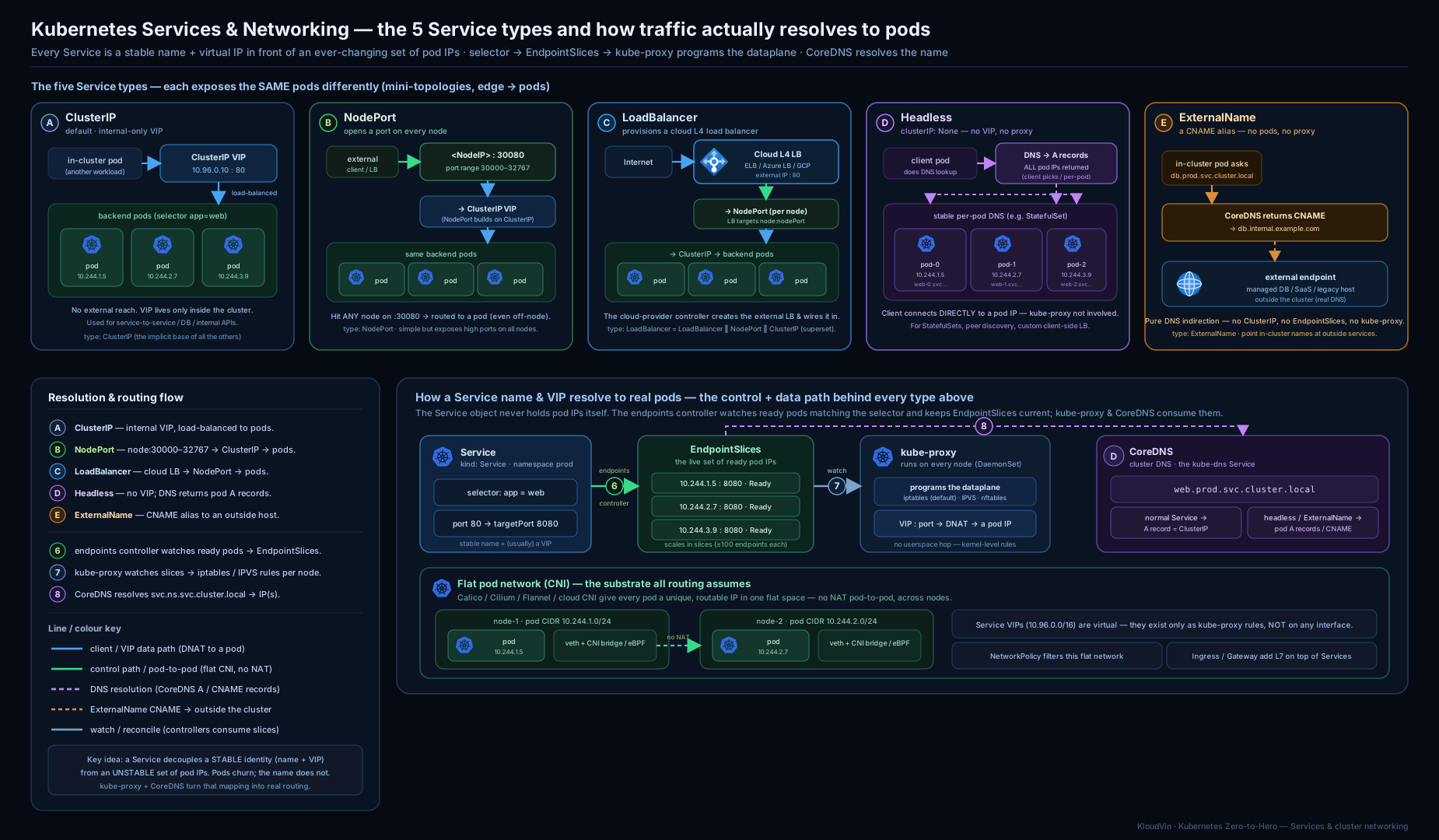
The diagram traces a request from an external client through a LoadBalancer to a node’s NodePort, where kube-proxy DNATs it onto the flat Pod network to a ready endpoint — and, alongside, an in-cluster Pod resolving a Service name via CoreDNS and hitting the ClusterIP directly.
Hands-on lab
Everything here runs free on a local cluster (kind, minikube or k3d). We will create a Deployment, put each Service type in front of it, watch EndpointSlices update live, and prove DNS works — then clean up.
1. A cluster and a backing Deployment
# Create a multi-node kind cluster so NodePort/topology behave realistically
cat <<'EOF' | kind create cluster --name svc-lab --config -
kind: Cluster
apiVersion: kind.x-k8s.io/v1alpha4
nodes:
  - role: control-plane
  - role: worker
  - role: worker
EOF

# A simple web Deployment that serves on port 80, 3 replicas
kubectl create deployment web --image=nginx:1.27 --replicas=3
kubectl set resources deployment web --requests=cpu=50m,memory=32Mi
kubectl rollout status deployment/web
kubectl get pods -l app=web -o wide   # note each Pod's IP and node
2. ClusterIP + watch the EndpointSlices
kubectl expose deployment web --port=80 --target-port=80 --name=web   # creates a ClusterIP Service
kubectl get svc web
kubectl get endpointslices -l kubernetes.io/service-name=web
kubectl describe endpointslice -l kubernetes.io/service-name=web | grep -E 'Addresses|Conditions|Hostname|Zone'

# Prove it resolves and load-balances from inside the cluster:
kubectl run client --image=nicolaka/netshoot --rm -it --restart=Never -- \
  sh -c 'for i in 1 2 3 4 5; do curl -s -o /dev/null -w "%{http_code}\n" http://web; done'
# Expected: 200 five times. Now scale and watch the slice change:
In a second terminal, watch the endpoints update live as you scale:
kubectl get endpointslices -l kubernetes.io/service-name=web -w &
kubectl scale deployment web --replicas=5     # slice gains 2 endpoints
kubectl scale deployment web --replicas=2     # slice loses 3 endpoints
3. DNS: the search path and ndots in action
kubectl run dnsdemo --image=nicolaka/netshoot --rm -it --restart=Never -- sh -c '
  cat /etc/resolv.conf;
  echo "--- short name (search list resolves it) ---";
  nslookup web;
  echo "--- FQDN ---";
  nslookup web.default.svc.cluster.local;
  echo "--- SRV record for the named port (expose used default port name) ---";
  nslookup -type=SRV _80._tcp.web.default.svc.cluster.local || true
'
4. NodePort
kubectl patch svc web -p '{"spec":{"type":"NodePort"}}'
kubectl get svc web -o wide          # note the 3xxxx nodePort
NODEPORT=$(kubectl get svc web -o jsonpath='{.spec.ports[0].nodePort}')
# With kind, reach a node via 'docker exec'; on minikube use 'minikube service web --url'
docker exec svc-lab-worker curl -s -o /dev/null -w "node-local hit: %{http_code}\n" localhost:$NODEPORT
5. Headless Service — DNS returns Pod IPs
kubectl create service clusterip web-hl --clusterip="None" --tcp=80:80 || \
  kubectl apply -f - <<'EOF'
apiVersion: v1
kind: Service
metadata: { name: web-hl }
spec:
  clusterIP: None
  selector: { app: web }
  ports: [{ port: 80, targetPort: 80 }]
EOF
# A headless lookup returns MULTIPLE A records (one per ready Pod), not a single ClusterIP:
kubectl run dnsdemo2 --image=nicolaka/netshoot --rm -it --restart=Never -- \
  nslookup web-hl.default.svc.cluster.local
6. ExternalName — a CNAME alias
kubectl apply -f - <<'EOF'
apiVersion: v1
kind: Service
metadata: { name: example-ext }
spec:
  type: ExternalName
  externalName: example.com
EOF
kubectl run dnsdemo3 --image=nicolaka/netshoot --rm -it --restart=Never -- \
  nslookup example-ext.default.svc.cluster.local      # resolves via CNAME to example.com
Validation
kubectl get svc webshows aCLUSTER-IPand (after the patch) aPORT(S)like80:3xxxx/TCP.- The EndpointSlice endpoint count tracks
replicasexactly as you scale. nslookup webresolves to the ClusterIP;nslookup web-hl...returns several Pod IPs;nslookup example-ext...returns a CNAME toexample.com.- All
curlcalls return200.
Cleanup
kubectl delete svc web web-hl example-ext
kubectl delete deployment web
kind delete cluster --name svc-lab
Cost note
Everything above is ₹0 — it runs entirely in local containers. The only thing that would cost money is type: LoadBalancer on a real cloud (each provisions a billable cloud load balancer); we deliberately demonstrate that type with YAML only, because a local cluster has no cloud LB to fulfil it (the Service would sit in <pending>).
Common mistakes & troubleshooting
| Symptom | Likely cause | Fix |
|---|---|---|
EndpointSlice has no endpoints; Service times out |
selector labels don’t match any Pod’s labels |
kubectl get pods --show-labels and compare to kubectl get svc <svc> -o yaml selector; align them |
| Endpoints exist but connections refuse | targetPort doesn’t match the port the container actually listens on |
Confirm containerPort/the app’s real port; set targetPort to it |
| Service works sometimes, fails on some nodes | externalTrafficPolicy: Local with Pods not on every node |
Use Cluster, or spread Pods (topology spread / DaemonSet) so every node has one |
| Backing Pods exist but get no traffic | Pods are not ready (readiness probe failing) — only ready Pods are endpoints | kubectl describe pod; fix the readiness probe / the app’s health |
| External calls are slow from Pods | ndots:5 causing 4 extra failed lookups per external name |
Use FQDN with trailing dot, deploy NodeLocal DNSCache, or tune dnsConfig |
type: LoadBalancer stuck in <pending> |
No cloud-controller / MetalLB to provision the LB | Install MetalLB (bare metal) or run on a cloud; locally, use NodePort instead |
| Backend always loses the client IP | Default Cluster policy SNATs external traffic |
Set externalTrafficPolicy: Local (accepting the empty-node trade-off) |
| Two NodePort Services clash | Both pinned the same nodePort |
Let one auto-assign, or pick distinct values in 30000–32767 |
| DNS resolves but to the wrong namespace | Short name resolved via search path in the caller’s namespace | Use svc.ns or the FQDN to be explicit |
Best practices
- Default to ClusterIP. Expose externally only at the edge — one Ingress/Gateway behind a single LoadBalancer, not a LoadBalancer per app (cost and IP sprawl).
- Always name your ports (even with one), and prefer named
targetPorts so you can change container ports without editing every Service. - Lean on DNS, never on IPs. Address Services by name; let CoreDNS and the search path do the work. Use FQDNs for external names to dodge the
ndotspenalty. - Right-size the data plane. iptables mode is fine up to hundreds of Services; move to IPVS (or an eBPF CNI) only when scale demands it — measure first.
- Use
externalTrafficPolicy: Localwhen you need real client IPs (rate limiting, geo, audit) — and ensure backends are spread so no node is empty. - Use topology-aware routing in multi-zone clusters to cut cross-zone traffic and cloud egress charges.
- For StatefulSets, pair a headless Service with the workload so peers get stable per-Pod DNS names.
- Keep readiness probes honest — they are the gate for endpoint membership; a too-eager probe sends traffic to Pods that aren’t ready, a too-strict one starves a healthy Service.
Security notes
- NodePort opens a port on every node, reachable by anyone who can reach a node IP. Restrict with node-level firewalls/NSGs, and prefer Ingress/LoadBalancer with
loadBalancerSourceRangesfor anything internet-facing. - A Service does not restrict which Pods may call it — by default any Pod can reach any ClusterIP. Use NetworkPolicies (a CNI feature) to enforce who-talks-to-whom; the Service is addressing/LB, not authorisation.
externalIPsis powerful and unauthenticated routing — a Service claiming an arbitrary external IP can hijack traffic for it. Treat the permission to setexternalIPsas sensitive and restrict it via admission control.- ExternalName returns whatever CNAME you specify; an attacker who can edit such a Service can silently redirect an in-cluster name to a hostile host. Guard write access to Services with RBAC.
- CoreDNS is a high-value target and a SPOF for discovery. Run multiple replicas, set sensible resource requests, and consider NodeLocal DNSCache for resilience and performance.
publishNotReadyAddresses: truesends traffic to not-ready Pods — use it only for deliberate peer-discovery cases, never for normal serving.
Interview & exam questions
-
Why do Services exist — what problem do they solve? Pods are ephemeral and get new IPs on every recreation, there are many of them, and some are not ready. A Service provides a stable virtual IP and DNS name, continuously discovers the ready backing Pods via a label selector, and load-balances across them — decoupling clients from individual Pod lifecycles.
-
Walk through what happens when a Pod sends a packet to a ClusterIP. The ClusterIP is virtual — nothing listens on it. On the sending Pod’s node, kube-proxy has programmed kernel rules (iptables/IPVS) that DNAT the packet’s destination from the ClusterIP to one of the ready backing Pod IPs (from the EndpointSlices), and the packet is delivered over the flat CNI network. No central proxy is involved.
-
Explain
portvstargetPortvsnodePort.portis the port the ClusterIP answers on;targetPortis the Pod’s port traffic is forwarded to (can be a named port);nodePortis the port opened on every node’s IP for NodePort/LoadBalancer types (30000–32767). They are independent numbers. -
What changed with EndpointSlices, and why? The old single Endpoints object held all addresses, so any one Pod change rewrote and re-pushed the whole object — a scaling disaster. EndpointSlices shard the list (≤100 endpoints each by default), so updates are small and targeted, and they carry per-endpoint zone/node/topology and readiness/serving/terminating conditions that enable topology-aware routing and graceful drain.
-
Compare kube-proxy iptables and IPVS modes. iptables is the default and simple, but rule updates scale roughly linearly with the number of Services, so very large clusters see control-plane churn; backend choice is effectively random. IPVS uses kernel hash tables for near-constant lookups, scales to thousands of Services, updates faster, and offers real LB algorithms (rr, lc, sh, …). nftables is the emerging successor; eBPF CNIs like Cilium can replace kube-proxy entirely.
-
What is a headless Service and when do you use one? A Service with
clusterIP: None— no virtual IP, no load balancing. DNS returns the Pod IPs directly (one A record per ready Pod). Used for StatefulSets (stable per-Pod DNS likedb-0.db...), client-side load balancing (e.g. gRPC), and discovering individual backends. -
Explain the
ndots:5behaviour and the performance gotcha.ndots:5tells the resolver to try the search suffixes first for any name with fewer than 5 dots. This makes short in-cluster names resolve nicely, but an external name likeapi.github.com(2 dots) triggers 4 failed cluster lookups before the real one — adding latency. Fix with a trailing-dot FQDN, NodeLocal DNSCache, or a customndotsindnsConfig. -
What does
externalTrafficPolicy: Localdo, and its trade-off? It makes a node forward external (NodePort/LB) traffic only to Pods on that same node, with no SNAT, so the backend sees the real client IP. The trade-off: nodes with no local Pod drop the traffic (the LB must health-check and avoid them), and load can be uneven. -
Difference between the Pod network and Services — who provides each? The CNI plugin (Calico/Cilium/Flannel/cloud) provides the flat, NAT-free Pod network (IP-per-Pod, Pod-to-Pod reachability). kube-proxy provides Service load balancing (VIP → backend DNAT) on top of that network. Different layers, different components.
-
A new Deployment’s Service times out with no endpoints. How do you debug? Check that the Service selector matches the Pods’ labels (
kubectl get pods --show-labelsvs the Service’sselector); confirm the Pods are ready (only ready Pods become endpoints); verifytargetPortmatches the container’s actual port. Inspectkubectl get endpointslices -l kubernetes.io/service-name=<svc>. -
How do you give Pods a stable in-cluster name for an external database? Either an ExternalName Service (CNAME to the DB’s DNS name — no IPs), or a Service without a selector plus a manually-created EndpointSlice pointing at the DB’s IP when you must alias a raw address.
-
What is topology-aware routing and why use it? With the
service.kubernetes.io/topology-mode: Autoannotation, the control plane adds zone hints to EndpointSlices and kube-proxy prefers same-zone endpoints, reducing cross-zone latency and cloud egress charges — falling back to cluster-wide routing when the distribution is too imbalanced to be safe.
Quick check
- Which Service type has no ClusterIP and no proxying, returning only a CNAME?
- What is the default
nodePortrange, and on how many nodes is the port opened? - Name two things an EndpointSlice records per endpoint that the legacy Endpoints object did not.
- Which component programs the kernel rules that make a ClusterIP work, and on which nodes?
- From a Pod in namespace
app, what full name doeswebresolve to first, and why?
Answers
- ExternalName — it is a pure DNS CNAME to
externalName, with no ClusterIP, selector, endpoints or kube-proxy involvement. - 30000–32767, and the port is opened on every node in the cluster (even ones running none of the backing Pods).
- Any two of: the endpoint’s zone and node (topology), and its separate readiness/serving/terminating conditions (also the
hostname) — used for topology-aware routing and graceful drain. - kube-proxy, running as a DaemonSet on every node; it installs iptables/IPVS rules and the kernel does the per-packet DNAT.
web.app.svc.cluster.localfirst, because the Pod’sresolv.conflistsapp.svc.cluster.localfirst in itssearchpath andndots:5makes the short name try the search suffixes before treating it as absolute.
Exercise
On your local lab cluster, build the whole picture and prove each layer:
- Create a 3-replica Deployment and a ClusterIP Service. From a
netshootPod,curlthe Service name 10 times and confirm200s. Thenkubectl get endpointslices -l kubernetes.io/service-name=<svc> -o yamland annotate, for one endpoint, what itsconditions,nodeNameandzonemean. - Scale the Deployment up and down while watching the EndpointSlice with
-w. In one sentence, explain why this is cheaper than the old Endpoints object would have been at 5,000 replicas. - Patch the Service to
NodePort, then toexternalTrafficPolicy: Local. Hit a node that runs a backing Pod and one that does not, and record what happens to each request — then explain the result. - Reproduce the
ndotsgotcha: from a Pod, runnslookup api.github.comwith+search-style tracing (or read/etc/resolv.confand reason it through), count the failed lookups, then re-run with a trailing dot (api.github.com.) and compare. - Create a headless Service over the same Deployment and a
nslookupof its name. Explain, in two sentences, how the result differs from the ClusterIP Service and when you would want it.
Certification mapping
- CKAD (Certified Kubernetes Application Developer): the Services & Networking domain is exactly this lesson — defining ClusterIP/NodePort/LoadBalancer Services, understanding endpoints, using DNS to connect applications, and choosing Service types. Expect to write Service YAML and wire apps together by name under time pressure.
- CKA (Certified Kubernetes Administrator): Services & Networking here means the operator’s view — kube-proxy modes, the cluster network model and CNI, CoreDNS configuration and troubleshooting, and debugging a Service with no endpoints. You will diagnose broken connectivity from first principles.
- KCNA: the networking fundamentals — what a Service is, the Pod network model, and CoreDNS at a conceptual level — map to its “Kubernetes Fundamentals” and networking objectives.
Glossary
- Service — an API object giving a set of Pods a stable virtual IP, DNS name and load balancing via a label selector.
- ClusterIP — the default Service type; a virtual IP reachable only inside the cluster.
- NodePort — a Service that also opens a port (30000–32767) on every node’s IP.
- LoadBalancer — a Service that additionally provisions an external (cloud/MetalLB) load balancer.
- ExternalName — a Service that is a DNS CNAME to an external name, with no ClusterIP or proxying.
- Headless Service —
clusterIP: None; DNS returns the backing Pod IPs directly, with no load balancing. - ClusterIP (the address) — the virtual IP allocated from the Service CIDR, distinct from Pod IPs.
- Service CIDR — the IP range Service virtual IPs are allocated from (e.g.
10.96.0.0/12). - Pod CIDR — the IP range Pod IPs are allocated from by the CNI, distinct from the Service CIDR.
- Endpoints — the legacy single object listing all
IP:portbacking a Service. - EndpointSlice — the scalable, sharded replacement (≤100 endpoints/slice) with per-endpoint topology and conditions.
- Selector — the label query a Service uses to find its backing Pods.
port/targetPort/nodePort— the Service’s listening port / the Pod’s port / the node-wide port.- kube-proxy — the per-node agent that programs kernel rules (iptables/IPVS/nftables) to implement Service VIPs.
- iptables / IPVS / nftables — kube-proxy data-plane backends; IPVS scales better, nftables is the successor.
- CoreDNS — the cluster DNS server that resolves Service and Pod names.
- A/AAAA record — name → IP (the ClusterIP, or per-Pod IPs for headless).
- SRV record — name → service port + host, keyed by named port and protocol.
ndots— resolver option controlling when the DNS search list is tried;5in clusters.- search domains — the suffixes appended to short names (
<ns>.svc.cluster.local, …). - dnsPolicy — how a Pod’s resolv.conf is built (ClusterFirst, Default, None, …).
- externalTrafficPolicy / internalTrafficPolicy — Cluster (any node, may hop + SNAT) vs Local (node-local, preserves client IP).
- sessionAffinity — ClientIP stickiness by source IP (L4), default None.
- Topology-aware routing — preferring same-zone endpoints via EndpointSlice hints.
- CNI (Container Network Interface) — the plugin standard that provides the flat Pod network and IP-per-Pod.
- Flat network — the model where every Pod reaches every other Pod directly with no NAT.
Next steps
You can now give any workload a stable address and reason about every packet’s path. Next, learn how apps get their configuration and secrets injected — the other half of running a real service: Kubernetes ConfigMaps & Secrets, In Depth: Injection, Mounting, Immutability & Encryption. After that, the Ingress and Gateway API lesson builds directly on the LoadBalancer and Service foundations from here to do host/path routing and TLS at the cluster edge.