It is 9:00 a.m. on the first day of final exams, and a national online-learning provider running a Moodle estate for 1.2 million university students is about to find out whether its architecture holds. At 8:58 the dashboards are calm. At 9:00, every student in three time zones logs in at once to start the same proctored exam, and traffic to the Moodle web tier goes from a few thousand requests per second to forty thousand in under a minute. If a single server in the pool gets all of that, it falls over; if students get routed to a server mid-deploy, they see a 502 and a support queue explodes; if the login surge looks like a denial-of-service attack and nothing absorbs it, the whole platform browns out during the one hour of the year it absolutely cannot.
The component standing between “calm dashboards” and “trending on social media for the wrong reason” is the load balancer. This article is the junior-engineer’s guide to what a load balancer really does, the single most important distinction in the field — Layer 4 versus Layer 7 — and how that maps onto the concrete services you will actually click on in AWS, Azure, and Google Cloud. We will keep the Moodle platform as our running example, because every abstract choice below has a very real consequence for those 1.2 million students.
What a load balancer actually does
Strip away the marketing and a load balancer does three jobs. First, distribution: it takes incoming connections and spreads them across a pool of identical backend servers so no single one is overwhelmed. Second, health checking: it continuously probes each backend and stops sending traffic to any server that fails, so a crashed node quietly drops out instead of returning errors to users. Third, a stable front door: clients connect to one address — the load balancer — and never need to know how many servers are behind it, which ones exist today, or that you replaced all of them last night during a deploy.
That third job is what makes everything else in modern infrastructure possible. Because clients only ever talk to the load balancer, you can add servers on a busy morning, remove them when traffic drops, and roll out a new version one server at a time — all without a single student changing a bookmark or noticing. The load balancer is the seam that lets the fleet behind it change shape constantly while the address in front stays fixed.
The “Layer 4 vs Layer 7” question is simply: how deep into the traffic does the load balancer look before it decides where to send a connection? And that depends on which layer of the network stack it operates at.
The OSI layers, just the two that matter here
The OSI model has seven layers, but for load balancing you only need two of them clearly in your head.
Layer 4 is the transport layer — TCP and UDP. At Layer 4, the unit of work is a connection defined by a 4-tuple: source IP, source port, destination IP, destination port. A Layer 4 load balancer reads those addresses and ports, picks a backend, and then shovels bytes back and forth between client and server without ever looking inside them. It does not know if the traffic is HTTP, a database protocol, or video — and it does not care. It is fast, protocol-agnostic, and a little bit dumb on purpose.
Layer 7 is the application layer — for the web, that means HTTP and HTTPS. A Layer 7 load balancer terminates the connection itself, reads the actual HTTP request — the URL path, the Host header, cookies, the method — and makes routing decisions based on content. It can send /api/grades to one pool and /video/lecture-42 to another, all on the same public address. It understands the conversation, which lets it be smart, but that understanding costs CPU and adds a little latency.
| Dimension | Layer 4 (transport) | Layer 7 (application) |
|---|---|---|
| Looks at | IP addresses + TCP/UDP ports | URL path, headers, cookies, method |
| Protocols | Any TCP/UDP (HTTP, MQTT, game, DB…) | HTTP / HTTPS (and gRPC, WebSocket) |
| TLS | Usually passes encrypted bytes through | Terminates TLS; can re-encrypt to backend |
| Routing smarts | Connection-level only | Content-based, path/host routing |
| Typical latency add | Microseconds | Low milliseconds |
| Can do WAF / cookies | No | Yes |
| Mental model | A very fast traffic cop at an intersection | A receptionist who reads your request and routes you |
Hold onto the analogy: a Layer 4 balancer is a traffic cop who waves cars down one of four lanes based purely on which lane they came from — fast, never opens a door. A Layer 7 balancer is a receptionist who reads what you actually want and walks you to the right department — slower per person, but can send “billing questions” and “tech support” to completely different floors.
The cloud services, mapped
Every major cloud gives you both a Layer 4 and a Layer 7 option, and the naming is the part that trips up new engineers. Here is the map.
| Cloud | Layer 4 (network LB) | Layer 7 (application LB) |
|---|---|---|
| AWS | Network Load Balancer (NLB) | Application Load Balancer (ALB) |
| Azure | Azure Load Balancer | Application Gateway (+ optional WAF) |
| GCP | External passthrough Network LB | Global external Application LB |
On AWS, the NLB operates at Layer 4: it handles raw TCP/UDP, preserves the client’s source IP, and scales to millions of connections with almost no added latency — ideal for non-HTTP protocols or when you need extreme throughput. The ALB operates at Layer 7: it terminates HTTPS, routes by path and host to target groups, and integrates a Web Application Firewall. For our Moodle web tier, the ALB is the natural front door; an NLB would be the choice if we were balancing, say, a fleet of game servers or a custom TCP protocol.
On Azure, the regional Azure Load Balancer is the Layer 4 device — fast, cheap, protocol-agnostic. Application Gateway is the Layer 7 device, and it bundles an optional managed WAF, cookie-based session affinity, and URL-path routing. The naming is mercifully descriptive: “Load Balancer” = L4, “Application Gateway” = L7.
On GCP, the distinction is framed as passthrough versus proxy. The external passthrough Network Load Balancer is Layer 4 and passes packets through unchanged. The global external Application Load Balancer is a Layer 7 proxy with a genuinely useful trick: it is global, fronted by a single anycast IP, so a student in one region and a student in another hit the same address and Google routes each to the nearest healthy backend.
A pattern worth internalizing early: it is extremely common to stack them — a Layer 4 balancer out front for raw speed and static IPs, fronting Layer 7 balancers that do the smart content routing. We will use exactly that shape below.
Architecture overview
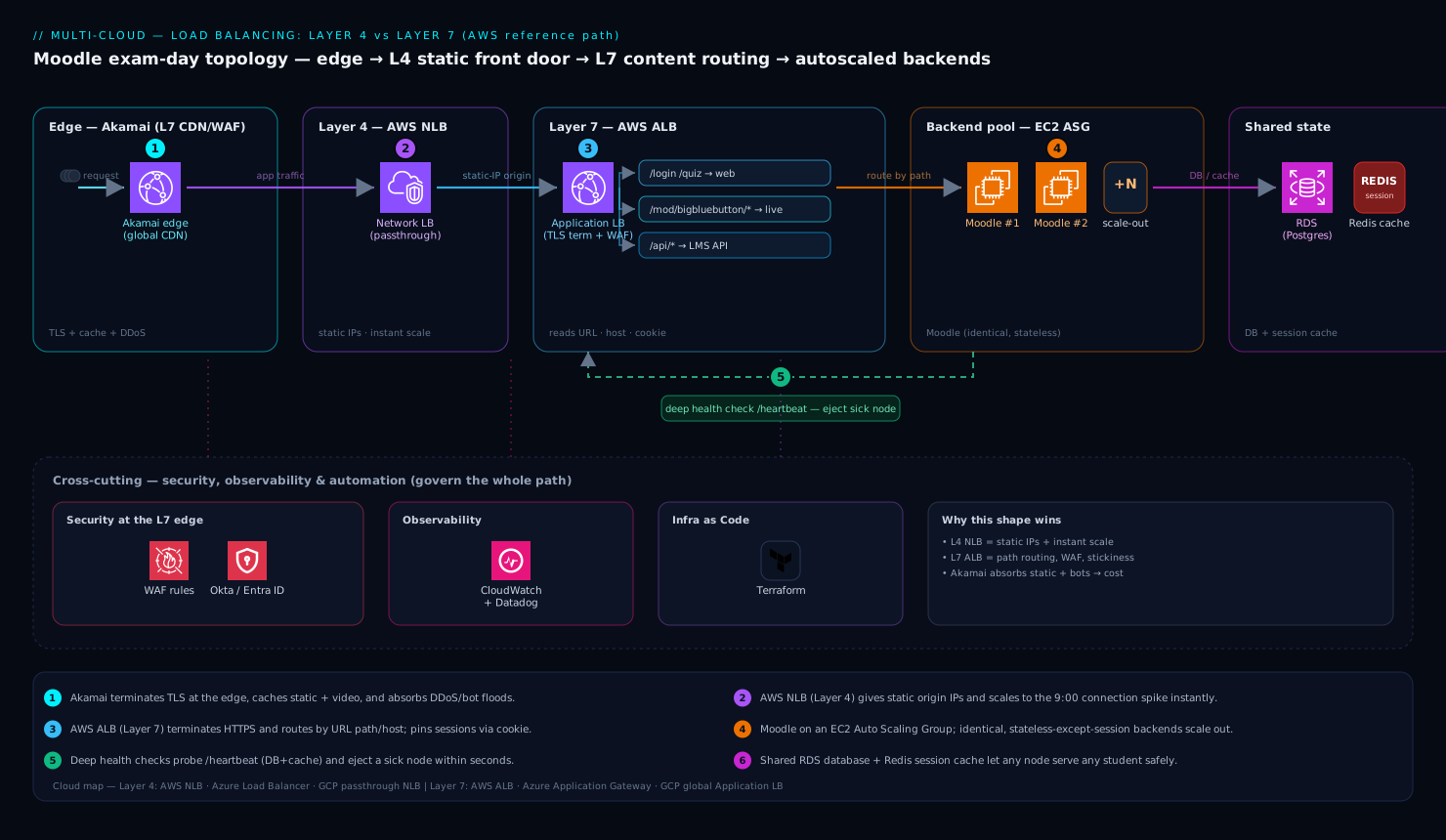
Here is the Moodle platform’s load-balancing topology, following a student’s request from their browser all the way to a Moodle server and back. We will assume AWS for concreteness, then note the Azure and GCP equivalents inline, because the shape is identical across clouds even though the service names change.
The data path, hop by hop:
-
The edge — Akamai. A student’s request first hits Akamai, the global content delivery network and edge platform sitting in front of everything. Akamai terminates the student’s TLS connection close to them for speed, serves all the static assets — course images, CSS, JavaScript, lecture PDFs, video — straight from its edge cache so they never touch our servers, and absorbs volumetric DDoS and bot traffic at the perimeter. On exam morning this is the first pressure valve: tens of thousands of asset requests per second are answered by Akamai, and only the genuine application requests (logging in, loading a quiz, submitting an answer) are forwarded to our cloud. Akamai is doing Layer 7 work of its own out at the edge — it reads URLs to decide what is cacheable.
-
The regional Layer 4 front door — AWS NLB. Traffic Akamai forwards lands on a Network Load Balancer. Why an L4 device here, when we are clearly serving HTTP? Because the NLB gives us a small set of static IP addresses we can hand to Akamai as the origin and lock down, it scales to the exam-morning connection spike instantly with no “warm-up,” and it is the cleanest place to terminate the connection from the edge. (On Azure this is Azure Load Balancer; on GCP, the passthrough Network LB.)
-
The Layer 7 brains — AWS ALB. The NLB forwards to an Application Load Balancer, and this is where intelligent routing happens. The ALB terminates HTTPS and reads each request’s path and host. It sends
/loginand quiz traffic to the Moodle web target group, routes/mod/bigbluebutton/*live-session calls to a separate pool, and serves/api/*LMS-integration calls to an API pool — three backends, one address, decided by reading the URL. The ALB also enforces sticky sessions via a cookie so a student stays pinned to the same Moodle server for the life of their exam, which matters because Moodle keeps per-session state. (On Azure this is Application Gateway; on GCP, the global Application LB.) -
The backend pool — Moodle on autoscaling compute. Behind the ALB sits a pool of identical Moodle application servers — on AWS, an Auto Scaling Group of EC2 instances or ECS tasks. Each runs the same PHP application, mounts the same shared file store, and talks to the same managed database and Redis cache. Because they are identical and stateless-except-for-session, the ALB can add or drain them freely. When the 9:00 surge hits, the Auto Scaling Group launches more Moodle servers; the ALB health-checks each new one and only starts routing to it once it passes.
-
Health checks closing the loop. The ALB probes each Moodle server on a real application endpoint — not just “is the port open,” but a Moodle health URL that confirms PHP, the database connection, and the cache are all working. A server that fails the probe (say, its database connections are exhausted) is pulled from rotation in seconds, so students stop being routed to it before they see an error. This is the single most important behavior on exam morning.
The return path is the mirror image: the Moodle server’s response goes back through the ALB, back through the NLB, and Akamai delivers it to the student — caching anything cacheable on the way out.
When to use Layer 4 vs Layer 7 — the decision
Junior engineers want a rule they can apply, so here it is in plain terms.
Reach for Layer 7 when you need to understand the request. Routing by URL path or hostname, terminating HTTPS centrally, sticky sessions by cookie, a Web Application Firewall, header rewriting, redirecting HTTP to HTTPS — all of these require reading the HTTP conversation, so they are Layer 7 features. For almost any web application, including our Moodle tier, the smart front door is Layer 7.
Reach for Layer 4 when you need raw speed, a non-HTTP protocol, or static IPs. Balancing a database protocol, a game server, MQTT for IoT, or any custom TCP/UDP traffic; needing the absolute lowest latency and highest connection throughput; needing fixed IP addresses to put on an allow-list; or wanting to preserve the client’s true source IP without tricks — these point to Layer 4. The NLB does not care what is inside the packets, which is exactly why it is fast and universal.
And very often, use both. Our architecture stacks an L4 NLB (static IPs, instant scale, edge origin) in front of L7 ALBs (content routing, WAF, sticky sessions). This is a mainstream pattern, not an exotic one.
One more concept that confuses newcomers: SSL/TLS termination versus passthrough. A Layer 7 balancer normally terminates TLS — it decrypts the request so it can read the URL, then optionally re-encrypts to the backend. A Layer 4 balancer normally passes through the encrypted bytes untouched. Termination is what lets the ALB do its smart routing and run a WAF; passthrough is what you choose when, for compliance reasons, traffic must stay encrypted end-to-end and the backend itself holds the certificate.
Health checks: the feature that earns its keep
Distribution gets the headlines, but health checking is what actually keeps the platform up, and it is the part beginners most often misconfigure. Two probe types matter.
A shallow check (Layer 4) just confirms the TCP port is open — fast, but it will happily route students to a server whose web process has hung while the port stays open. A deep check (Layer 7) hits a real application URL and inspects the response, so it catches the hung-but-port-open case. Our Moodle ALB uses a deep check against a health endpoint that verifies the database and cache, not just the port.
The tuning parameters decide how fast a sick server is ejected and how jumpy the system is:
# Conceptual ALB target-group health check for the Moodle pool
health_check:
  protocol: HTTPS
  path: /admin/tool/heartbeat/   # returns 200 only if DB + cache are healthy
  interval: 10        # probe every 10 seconds
  timeout: 5          # a probe is "failed" if no answer in 5s
  healthy_threshold: 2    # 2 good probes in a row → back in rotation
  unhealthy_threshold: 3  # 3 bad probes in a row → pulled from rotation
The balance is the classic one: probe too aggressively and a brief GC pause yanks a healthy server out, causing needless churn; probe too leniently and students keep hitting a dead server for a minute before it is removed. For exam morning we tune toward fast ejection — a few seconds of bad responses and the server is gone — accepting a little extra churn as the cost of never leaving students stranded on a broken node.
Scaling, failure modes, and security
Scaling. The cloud-managed load balancers (NLB, ALB, Azure Load Balancer/Application Gateway, GCP’s LBs) scale themselves, but with an important asterisk. NLB-class L4 balancers scale essentially instantly. L7 balancers like the ALB and Application Gateway scale up very well but can lag a truly vertical spike by a minute or two — exactly the shape of a 9:00 exam surge. The defenses are: pre-warm or pre-scale ahead of a known event (you know exam day’s schedule), let Akamai absorb the static and bot share so the L7 tier only sees genuine app traffic, and front the L7 tier with the instantly-scaling L4 NLB. For the backends, the load balancer and the autoscaler are partners: the autoscaler changes how many Moodle servers exist; the load balancer notices via health checks and routes accordingly.
Failure modes to name before they page you:
- Unhealthy backend not ejected — health checks too lenient (or only shallow), so students keep landing on a dead server. Mitigation: deep health checks and a fast unhealthy threshold.
- The load balancer is a single point of failure — true of a self-managed appliance, less so of cloud-managed ones. Mitigation: use the multi-AZ managed service; for virtual appliances (a self-managed NGINX, HAProxy, or an F5 BIG-IP VE you run yourself), deploy an active/standby HA pair across availability zones, never a single instance.
- Session loss on scale-in — when the autoscaler removes a Moodle server mid-exam, in-flight students get logged out. Mitigation: enable connection draining / deregistration delay so the LB stops sending new connections to a departing server but lets existing exam sessions finish; and store session state in shared Redis so it survives the loss of any one node.
- Cross-zone imbalance — one availability zone ends up with more load than its share. Mitigation: enable cross-zone load balancing so traffic spreads evenly across zones.
Security. Centralizing traffic through the load balancer makes it the right place to enforce security, and several enterprise tools plug in here. The Web Application Firewall on the ALB or Application Gateway inspects Layer 7 requests and blocks SQL injection, cross-site scripting, and the exam-cheating bots that try to scrape question banks — only possible because the L7 balancer can read the request. Okta (or Microsoft Entra ID) sits in front as the identity provider: students authenticate via single sign-on, and the application trusts the resulting token, so the load balancer fronts an already-authenticated request rather than guarding the door alone. The TLS certificates the ALB and Application Gateway present are stored and rotated out of HashiCorp Vault, the secrets manager, so no private key is ever baked into an image or config file. Wiz (with Wiz Code) runs cloud-security posture management across the account and scans the infrastructure-as-code before it ships, flagging the classic misconfigurations — a load balancer accidentally exposing an admin port, a security group left wide open, an unencrypted listener — before they reach production. CrowdStrike Falcon runs as the runtime endpoint-protection agent on every Moodle backend node, catching anything that slips past the perimeter. Together these mean the load balancer is one well-watched layer of defense in depth, not a lonely gatekeeper.
Observability, automation, and cost
Observability. You cannot operate what you cannot see, and exam morning is no time to be blind. Datadog (or Dynatrace) ingests the load-balancer metrics that matter — request count, target response time, healthy-host count, HTTP 5xx rate, and rejected/surge counts — and the on-call team watches a single dashboard where a spike in 502s or a drop in healthy hosts is obvious in seconds. The golden signals to alert on: healthy host count falling, 5xx error rate rising, and target latency climbing. When an alert fires, ServiceNow automatically opens an incident ticket so there is a tracked record and a clear owner, not just a pager buzz lost in a channel.
Automation and IaC. None of this is clicked together by hand. The NLB, ALB, target groups, health checks, listener rules, and WAF policies are all declared in Terraform, so the entire load-balancing tier is version-controlled, reviewable, and reproducible in a DR region. Ansible handles the configuration inside the Moodle servers — PHP tuning, the agents, the health endpoint. The pipeline that ships changes runs in GitHub Actions (or Jenkins): it plans the Terraform, runs the Wiz Code scan as a gate, and only then applies. For the Kubernetes-hosted slices of the platform, Argo CD continuously reconciles the deployed state against Git, so a new Moodle version rolls out one healthy pod at a time behind the load balancer with no manual steps.
Cost. Cloud load balancers are billed on two axes — an hourly charge per balancer plus a data-processing charge per gigabyte (on AWS, ALB pricing also uses “LCU” capacity units that fold in connections, new connections per second, and rule evaluations). The practical cost levers for our platform: let Akamai serve and cache the heavy static and video traffic at the edge so it never incurs ALB data-processing charges (the single biggest saver here); consolidate many hostnames behind one ALB using host-based routing rather than running a balancer per app; and right-size the WAF rule set, since every rule evaluated on every request adds to the bill. The honest tradeoff: a Layer 7 balancer costs more per gigabyte than a Layer 4 one because it is doing real work reading every request — you pay for the intelligence, and for a web platform that intelligence is worth it.
Explicit tradeoffs
Layer 7 buys you smarts and costs you speed and money. Reading every HTTP request enables path routing, WAF, sticky sessions, and TLS termination — and adds a few milliseconds of latency and a higher per-gigabyte price than Layer 4. For a web platform that is a trade you happily make; for a high-throughput non-HTTP service it is overhead you should avoid.
Layer 4 buys you speed and universality and costs you visibility. The NLB is blisteringly fast and protocol-agnostic, but it cannot route by URL, cannot run a WAF, and cannot do cookie stickiness, because it never looks inside the packets. It is the right tool only when you do not need to look inside.
Managed beats self-managed for most teams — until it doesn’t. Cloud-managed balancers remove the burden of patching, HA, and scaling, which is why our Moodle platform uses them. A self-managed virtual appliance like an F5 BIG-IP VE, NGINX, or HAProxy is the right call only when you need a capability the cloud-native option lacks — exotic protocol handling, very advanced traffic policies, the F5 iRules ecosystem, or a single consistent load-balancing layer spanning on-prem and multiple clouds — and you must then own its high availability (always an active/standby pair across zones) and patching yourself. For a junior engineer starting out: reach for the managed cloud service first, and only graduate to a self-managed appliance when a concrete requirement forces it.
The shape of the win
At 9:00 a.m. on exam day, the architecture holds. Akamai swallows the asset and bot flood at the edge; the NLB takes the connection spike on static IPs without flinching; the ALB reads each request and routes logins, quizzes, and live sessions to the right pool while pinning every student to a stable session; the Auto Scaling Group adds Moodle servers and the ALB’s deep health checks fold each new one in only once it is genuinely ready; and when one backend chokes on database connections, it is ejected in seconds and no student ever sees it. A million-plus students start their exams, the dashboards in Datadog stay green, and nobody on the platform team has to do anything heroic.
That is the whole point of load balancing, and the reason the Layer 4 versus Layer 7 distinction is worth understanding cold: Layer 4 is the fast, dumb traffic cop you put where you need raw throughput and static IPs; Layer 7 is the smart receptionist you put where you need to read and route the request. Knowing which one each cloud service is — NLB and ALB on AWS, Load Balancer and Application Gateway on Azure, passthrough and Application LB on GCP — and knowing when to stack them, is one of the most leveraged pieces of foundational knowledge a cloud engineer can carry into a room.