There is a secret hiding in most production incidents, and it is, quite literally, a secret. A connection string in an app setting. A client secret that expired at 2 a.m. on a Saturday. A storage account key checked into a config file three jobs ago and never rotated. Every one of these is a credential your app carries so it can prove who it is to another Azure service — and every one is a liability you store, protect, rotate, and eventually leak. A managed identity is Azure’s answer to making that whole category of pain disappear: an identity in Microsoft Entra ID (formerly Azure Active Directory) that Azure creates and manages for a resource, so your App Service, VM, Function, or container can call Key Vault, Storage, or SQL with no password in your code at all.
The catch — and the reason this article exists — is that there are two flavours, and people reach for the wrong one constantly. A system-assigned managed identity is born with one resource and dies with it: tightly bound, automatically cleaned up, ideal for a single workload that owns its own access. A user-assigned managed identity is a standalone resource you create on its own, then attach to one or many workloads: shareable, reusable, able to outlive any single app. Pick system-assigned when you should have used user-assigned and you re-grant RBAC roles on every redeploy. Pick user-assigned when system-assigned would have done and you leave orphaned identities across your subscription.
This is the concept article that makes the choice obvious. You will get a clean mental model of what a managed identity actually is (a service principal plus a token endpoint, nothing more mysterious), a side-by-side comparison of the two types, a decision table you can apply in seconds, an architecture walkthrough of the token flow from your code to Entra ID to the target, and a short troubleshooting section for the errors everyone hits the first time. No invented features, real az and Bicep, and the honest answer on cost (spoiler: the identities are free).
What problem this solves
Before managed identities, an app that needed to read a secret from Key Vault or write a blob to Storage had to authenticate — and authentication needs a credential. So teams stored one: in an app setting, a .env file, a pipeline variable, a Kubernetes secret, or worst of all hard-coded in source. That credential then became a permanent chore — rotate it before it expires, restrict who can read it, scrub it from logs, and pray it never lands in a public repo. The number-one cause of cloud data breaches in the wild is not a clever exploit; it is a leaked long-lived credential.
Managed identities remove the credential entirely. Instead of your app holding a secret, the Azure platform vouches for the resource itself. When your code asks for a token, a local endpoint on the host (the IMDS — Instance Metadata Service — on a VM, or an injected endpoint in App Service) hands back a short-lived OAuth 2.0 access token that Entra ID issued to the resource’s identity. There is no secret to store because the platform proves the resource’s identity using infrastructure you can’t see and can’t leak. The token lives minutes to a couple of hours and is refreshed automatically. You never see a password, never rotate one, and can never accidentally commit one.
Who hits the problem this solves: essentially every team running workloads on Azure — the App Service that needs a database, the Function that reads a config secret, the VM that pulls an image from a private registry, the Logic App that posts to Service Bus. Any time one Azure resource calls another and you reach for a key, connection string, or client secret, a managed identity is almost always the better answer. The friction it removes — secret storage, rotation, leak risk, the 2 a.m. expiry page — is exactly the friction that quietly eats senior-engineer time.
| Old way (credential-bearing) | The pain it created | Managed-identity way |
|---|---|---|
| Storage account key in app setting | Rotate manually; full-account access; leaks in logs | Identity + Storage Blob Data Reader RBAC |
| SQL connection string with password | Password expiry; stored in config; shared widely | Entra auth via the identity; no password |
| Key Vault accessed with a client secret | A secret to read your secrets (chicken-and-egg) | Identity granted Key Vault Secrets User |
| Service principal + client secret in pipeline | Secret expires; someone owns rotation | Federated identity / managed identity |
| ACR pull credentials baked into the host | Long-lived registry password on disk | Identity granted AcrPull |
Learning objectives
By the end of this article you can:
- Explain in one sentence what a managed identity is and why it removes stored credentials.
- Describe the token flow — how your code gets an access token from the local endpoint without ever handling a secret.
- State the precise differences between system-assigned and user-assigned identities: lifecycle, sharing, and limits.
- Apply a decision table to pick the right type for a workload in seconds, and justify it.
- Grant an identity access to Key Vault, Storage, or SQL using Azure RBAC with both
azCLI and Bicep. - Wire an identity into code with
DefaultAzureCredentialand know what it tries, in order. - Diagnose the first-time failures —
ManagedIdentityCredential authentication unavailable, 403 from Key Vault, the wrong-identity trap — and fix each.
Prerequisites & where this fits
You should be comfortable with the idea that Azure resources live in a subscription and resource group, and that Microsoft Entra ID is the identity directory behind every Azure tenant. It helps to know what Azure RBAC is at a high level — that you grant a principal (a user, group, or in this case an identity) a role (like Reader or Storage Blob Data Reader) at a scope (a resource, resource group, or subscription). You do not need to know OAuth deeply; this article explains the parts that matter.
This topic sits at the foundation of the Identity & access track and is upstream of almost everything you build securely on Azure. The natural next reads are Azure Key Vault: secrets, keys & certificates — the most common target a managed identity is granted access to — and Entra app registration vs enterprise application explained, which clears up how managed identities relate to the other principal types in Entra. For the Kubernetes angle, AKS managed identity vs service principal for cluster auth builds directly on these concepts; when you outgrow the basics, Entra managed identities deep dive: user-assigned, federated credentials & RBAC goes the full distance. The one new idea this article adds to what you already know is small but powerful: a resource can have its own grantable identity in Entra, and that identity is a service principal Azure manages for you — credentials and all.
Core concepts
Four mental models make every later decision obvious. Read them once and the comparison tables read themselves.
A managed identity is a service principal Azure babysits. When you enable a managed identity, Azure creates a service principal in your Entra tenant — the same identity object an app registration gets, with an object ID (a principalId) and a client ID. The difference from a normal service principal is that you never get or manage its credentials: no client secret, no certificate to rotate. The platform holds the proof of identity internally and renews it on a schedule you never see. So everything you know about granting a service principal an RBAC role applies — you just skip the credential-management half.
Your code asks a local endpoint for a token; it never sees a secret. Getting an access token is a local HTTP call. On a VM it is the IMDS endpoint at http://169.254.169.254/metadata/identity/oauth2/token (a link-local address only reachable from that VM); in App Service and Functions it is an injected endpoint exposed via environment variables. You ask for a token for a specific resource (e.g. https://vault.azure.net for Key Vault), get back a short-lived OAuth 2.0 bearer token, and send it to the target in the Authorization: Bearer … header. No password crosses your code’s hands — and in practice you don’t even write the call, because the SDK’s DefaultAzureCredential does it for you.
System-assigned is one-to-one and tied to a resource’s life. A system-assigned identity is enabled on a resource (a flag you flip). Azure creates the service principal, ties it to exactly that resource, and — critically — deletes it automatically when the resource is deleted. One resource, one system-assigned identity; you cannot share it. It is the cleanest model when a single workload owns its own access and you never want a dangling identity left behind.
User-assigned is a standalone resource you attach to many. A user-assigned identity is a first-class Azure resource (Microsoft.ManagedIdentity/userAssignedIdentities) in a resource group, with its own lifecycle. You assign it to one or more workloads. Because it exists independently, it survives any resource you detach it from, can be shared across many (so they present the same identity and inherit the same RBAC grants), and can be created and granted access before the workload using it exists. The trade-off: you now own its lifecycle — Azure won’t clean it up.
The vocabulary in one table
Pin down every moving part before the comparison. The glossary at the end repeats these for lookup; this is the mental model side by side.
| Term | One-line definition | Why it matters |
|---|---|---|
| Managed identity | An Entra identity Azure creates & manages for a resource | The thing that replaces stored credentials |
| Service principal | The identity object in Entra a managed identity is | Why RBAC grants work the same as for apps |
| System-assigned | Identity bound 1:1 to a resource, auto-deleted with it | Clean, scoped, no orphans |
| User-assigned | Standalone identity resource, attachable to many | Shareable, pre-creatable, you own its lifecycle |
principalId (object ID) |
The identity’s GUID you grant RBAC to | The value you put in a role assignment |
clientId |
The identity’s app/client GUID | How code selects which user-assigned identity |
| IMDS | Link-local endpoint (169.254.169.254) that mints tokens |
Where the token comes from on a VM |
| Access token | Short-lived OAuth 2.0 bearer token | What your code sends to the target service |
| RBAC role assignment | Principal + role + scope grant | How the identity is allowed to do anything |
DefaultAzureCredential |
SDK helper that finds a credential automatically | What you actually call in code |
| Federated identity credential | Trust link letting external tokens act as an identity | How GitHub/AKS workloads use one (advanced) |
System-assigned vs user-assigned: the core comparison
Here is the heart of the article — the two types side by side on every axis that matters. Read it top to bottom, then keep it open while you decide.
| Dimension | System-assigned | User-assigned |
|---|---|---|
| What it is | A flag on a resource | A standalone Azure resource |
| Lifecycle | Created & deleted with the resource | Independent; you create & delete it |
| Sharing | One resource only (1:1) | Many resources (1:many) |
| Identity stays the same across redeploys? | No — delete the resource, the identity (and its RBAC) is gone | Yes — same principalId survives |
| Can exist before the workload? | No | Yes — pre-create and pre-grant |
| Who cleans it up | Azure (automatic) | You (manual) — risk of orphans |
clientId needed in code? |
No (only one identity) | Yes, if a resource has more than one |
| Resource can hold how many? | At most one system-assigned | Many user-assigned at once |
| RBAC re-grant on rebuild? | Yes — new identity each time | No — re-attach the same one |
| Best for | A single app owning its own access | Shared/fleet access, pre-provisioning, IaC |
A subtle but important point hides in row four. When you tear down and recreate a resource with a system-assigned identity (common in blue/green deploys, or a terraform destroy/apply), the old identity is gone and a brand-new service principal appears with a different principalId — every RBAC role you granted the old one no longer applies, so you must re-grant. With a user-assigned identity you simply re-attach the same separate resource; its principalId and all its role assignments persist. This single behaviour is why long-lived, frequently-redeployed, or fleet workloads lean user-assigned.
When the two genuinely differ in practice
The table above is the what; this is the so what. Three patterns show the divergence.
A resource that holds many identities. A single VM or App Service can carry multiple user-assigned identities at once, plus optionally its system-assigned one — occasionally useful (different identities for different downstreams), but it introduces the must-specify-which problem below. A resource holds at most one system-assigned identity, ever.
Pre-provisioning access. A platform team that wants the Key Vault grant in place before the app team deploys can, with user-assigned, create the identity, grant it Key Vault Secrets User, and hand over the clientId; the app team attaches it and it works from first boot. System-assigned can’t — the identity doesn’t exist until the resource does, so the first deploy always has a window with no RBAC.
The fleet. Twenty Functions needing the same read access to one Storage account: system-assigned means twenty grants (re-granted on every redeploy); one shared user-assigned identity means you grant once, attach to all twenty, and they present a single principal — one grant, one audit subject, one thing to revoke.
| Scenario | System-assigned cost | User-assigned cost |
|---|---|---|
| Single app, owns its access, rarely rebuilt | Ideal — zero cleanup, scoped | Overkill — extra resource to manage |
| Blue/green or frequent destroy/recreate | RBAC re-granted every cycle (toil) | Same identity persists — no re-grant |
| 20 workloads needing the same access | 20 grants, 20 audit subjects | 1 grant, 1 audit subject |
| Access needed before workload exists | Impossible (no identity yet) | Pre-create + pre-grant — clean |
| Hard requirement: no orphaned identities | Guaranteed clean | You must remember to delete it |
How a managed identity actually authenticates
It helps to see the whole path once, because every later error maps to a hop on it. The flow has four steps, and your code only participates in one of them.
Step 1 — your code asks for a token. You call the SDK (DefaultAzureCredential in Python/.NET/etc.), naming the target’s scope — for Key Vault, https://vault.azure.net/.default. The SDK turns that into a request to the local token endpoint.
Step 2 — the platform mints the token. The request goes to IMDS at 169.254.169.254 on a VM, or the injected endpoint in App Service/Functions. The platform authenticates the resource to Entra ID using internal proof you never handle, and Entra issues a short-lived access token scoped to the target audience and carrying the identity’s object ID. With multiple user-assigned identities you must say which one (by clientId or resource ID) or the request is ambiguous.
Step 3 — your code calls the target with the token. The SDK attaches Authorization: Bearer <token> and calls Key Vault / Storage / SQL — you never assembled that header by hand.
Step 4 — the target authorises via RBAC. The service validates the token (real Entra-issued, not expired, right audience), then checks Azure RBAC: does this principalId hold a role permitting this action at this scope? If yes, you get your secret/blob/row; if no, 403 — authentication succeeded, authorisation failed. This authn-vs-authz split is the single most useful distinction when debugging.
| Step | Who acts | What moves | Failure here looks like |
|---|---|---|---|
| 1. Request token | Your code (SDK) | Scope/resource name | ManagedIdentityCredential authentication unavailable |
| 2. Mint token | Azure platform + Entra | Resource → access token | Ambiguous identity; identity not enabled |
| 3. Call target | Your code (SDK) | Bearer token to API |
401 if token malformed/expired |
| 4. Authorise | Target service (RBAC) | Role check at scope | 403 Forbidden — missing role assignment |
What DefaultAzureCredential tries, in order
You will almost always use DefaultAzureCredential rather than calling IMDS by hand: the same code then works on your laptop (via az login) and in Azure (via the managed identity). It walks a chain of credential sources and uses the first that works. The order explains a classic confusion — “works locally but not in Azure” (or vice versa) usually means a different link in the chain answered.
| Order | Credential source | Used when | Common gotcha |
|---|---|---|---|
| 1 | Environment variables (SPN) | AZURE_CLIENT_ID/SECRET/TENANT_ID set |
Stale env vars override the identity |
| 2 | Workload Identity (federated) | AKS workload identity configured | Needs the federated credential set up |
| 3 | Managed identity (IMDS/injected) | Running in Azure with an identity | The path that should win in production |
| 4 | Azure CLI (az login) |
Local dev | Works on laptop, absent in Azure |
| 5 | Azure Developer CLI / PowerShell / interactive | Local dev fallbacks | Won’t exist on a headless host |
The practical rule: in production you want step 3 to answer. If step 1 is accidentally satisfied by leftover environment variables, your app authenticates as the wrong principal and you chase a 403 unrelated to the identity you attached. Clear stray AZURE_* env vars in production.
Architecture at a glance
Walk the diagram left to right and you have the whole system in your head. On the far left sits your workload — an App Service web app here — with a user-assigned identity attached (a system-assigned alternative is shown too). The workload’s SDK makes a local call to the token endpoint (IMDS on a VM, the injected endpoint here), which talks to Microsoft Entra ID to mint a short-lived access token for the identity’s principalId. No secret ever leaves the workload — the platform proves the resource’s identity internally.
From there the token flows right to the target services: Key Vault, where the identity must hold Key Vault Secrets User to read a secret; Storage, needing Storage Blob Data Reader for a blob; and Azure SQL, where the identity is mapped to a contained database user for passwordless Entra auth. The numbered badges mark where the common failures bite — requesting the token, picking the right identity when several are attached, and the RBAC check that returns 403 when a role is missing. Read the legend as a mini runbook: symptom, confirm, fix.
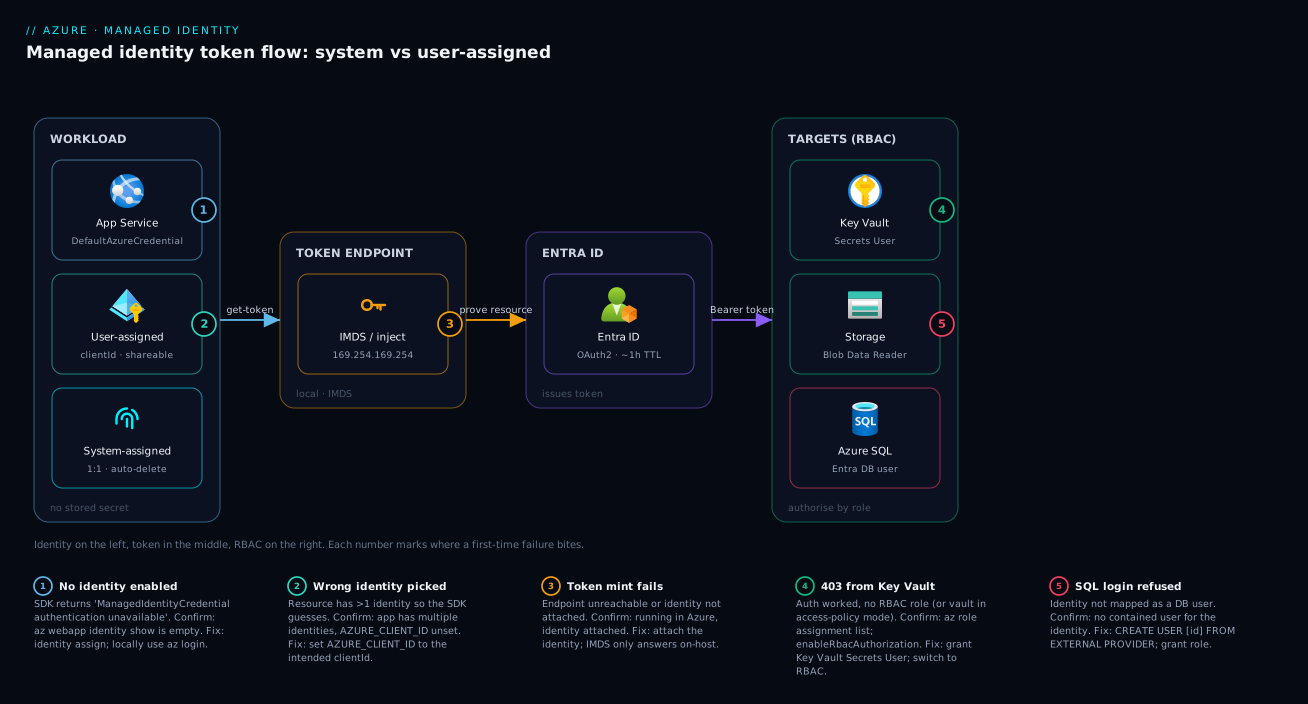
The shape to remember: identity on the left, token in the middle, RBAC on the right. Authentication is the platform’s job (left and middle); authorisation is your job (right) — you must grant the role, or every call ends in 403 no matter how perfectly the identity is wired.
Real-world scenario
Northstar Retail runs a storefront on Azure App Service plus fourteen background Azure Functions that process orders, sync inventory, and email receipts. Each reads secrets from a shared Key Vault (payment keys, an SMTP password) and read/writes blobs in a shared Storage account. As first built, the team stored the Key Vault URL, a service-principal client secret, and the Storage account key in every app’s settings: fifteen workloads, two long-lived credentials each, thirty secrets to rotate.
The breaking point came on a Sunday when the service-principal client secret expired. Because it was the same secret pasted into fifteen apps, all fifteen failed Key Vault calls at once — the storefront couldn’t load payment config, orders stopped, receipts stopped. The on-call engineer spent forty minutes discovering the expiry (a generic AADSTS7000215: Invalid client secret), then an hour minting a new secret and updating fifteen app settings by hand. A two-hour outage from a calendar event nobody owned.
The fix was a single user-assigned managed identity. The platform team created one identity, id-northstar-shared, and granted it exactly two roles — Key Vault Secrets User on the vault and Storage Blob Data Contributor on the account — two role assignments total, scoped precisely. They attached that one identity to the App Service and all fourteen Functions. Every workload already used DefaultAzureCredential, so the only change was deleting the stored secrets and setting AZURE_CLIENT_ID to the shared identity’s clientId so the SDK selected it unambiguously.
The outcome: zero stored credentials, zero rotation, one audit subject. When security later asked “which workloads can read this Key Vault?”, the answer was one role assignment to one identity — not a spreadsheet of fifteen service principals. And because the identity is user-assigned, the nightly blue/green redeploy of the storefront no longer wipes its access; the identity simply re-attaches. The one thing they got wrong first, fixed in review: they gave the identity Storage Blob Data **Owner** “to be safe”, then downgraded to Contributor and split the read-only Functions onto a second identity with only Storage Blob Data Reader — least privilege by workload class, still just two identities.
Advantages and disadvantages
Managed identities are close to a free win, but not the right tool in every case, and the two types each carry trade-offs. The headline comparison first.
| Advantages | Disadvantages / limits |
|---|---|
| No credential to store, rotate, or leak | Only works for Azure (and Entra-aware) targets |
| Short-lived tokens, refreshed automatically | RBAC propagation can lag minutes after a grant |
Same DefaultAzureCredential code locally and in Azure |
Local dev relies on a different credential (your az login) |
| Free — the identities cost nothing | Multiple identities on one resource need explicit selection |
| Auditable: a real Entra principal you can review | System-assigned RBAC is lost on resource recreate |
| Works with most Azure PaaS and IaaS hosts | Not every Azure service supports it (check support) |
When each type wins is the practical layer. System-assigned shines for a self-contained workload that owns its access and is rarely torn down — a single internal API reading its own Key Vault, where you never want a dangling identity and the 1:1 binding is the security boundary. User-assigned shines whenever access must be shared, pre-provisioned, or survive redeploys: fleets of Functions, blue/green pipelines, platform-grants-before-app-deploys, and anything in IaC where you want the identity and its RBAC to be a stable, separately-versioned resource.
| Choose system-assigned when… | Choose user-assigned when… |
|---|---|
| One workload owns its access end to end | Many workloads share the same access |
| You never want an orphaned identity | You need the identity before the workload exists |
| The resource is rarely destroyed/recreated | Blue/green or frequent rebuilds (keep RBAC) |
| Simplicity beats reuse | RBAC is managed centrally / in IaC |
| You want the tightest 1:1 audit binding | You want one audit subject for a fleet |
Hands-on lab
This lab is free — managed identities cost nothing, and you can use a free-tier App Service plan and the always-free Key Vault operations within limits. You will create both kinds of identity, grant access to a Key Vault secret, and read it back, all without storing a single credential. Replace names and regions to suit; commands are copy-pasteable into Cloud Shell.
Step 1 — set variables and create a resource group.
RG=rg-mi-lab
LOC=eastus
VAULT=kv-mi-lab-$RANDOM       # Key Vault names are globally unique
APP=app-mi-lab-$RANDOM
PLAN=plan-mi-lab
az group create --name $RG --location $LOC -o table
Step 2 — create a Key Vault (RBAC authorization mode) and a secret.
az keyvault create --name $VAULT --resource-group $RG --location $LOC \
  --enable-rbac-authorization true -o table
# Grant YOURSELF permission to write the secret (RBAC mode needs a role)
ME=$(az ad signed-in-user show --query id -o tsv)
az role assignment create --assignee-object-id $ME --assignee-principal-type User \
  --role "Key Vault Secrets Officer" \
  --scope $(az keyvault show -n $VAULT -g $RG --query id -o tsv)
az keyvault secret set --vault-name $VAULT --name demo-secret --value "hello-from-managed-identity"
Step 3 — create an App Service with a SYSTEM-assigned identity.
az appservice plan create --name $PLAN --resource-group $RG --sku B1 --is-linux -o table
az webapp create --name $APP --resource-group $RG --plan $PLAN \
  --runtime "PYTHON:3.12" -o table
# Enable the system-assigned identity (one flag) and capture its principalId
SA_PID=$(az webapp identity assign --name $APP --resource-group $RG --query principalId -o tsv)
echo "System-assigned principalId: $SA_PID"
Step 4 — grant the system-assigned identity read access to secrets.
az role assignment create --assignee-object-id $SA_PID --assignee-principal-type ServicePrincipal \
  --role "Key Vault Secrets User" \
  --scope $(az keyvault show -n $VAULT -g $RG --query id -o tsv)
Step 5 — create a USER-assigned identity and attach it too.
az identity create --name id-mi-lab --resource-group $RG -o table
UA_PID=$(az identity show --name id-mi-lab --resource-group $RG --query principalId -o tsv)
UA_CID=$(az identity show --name id-mi-lab --resource-group $RG --query clientId -o tsv)
UA_ID=$(az identity show --name id-mi-lab --resource-group $RG --query id -o tsv)
# Attach the user-assigned identity to the same web app
az webapp identity assign --name $APP --resource-group $RG --identities $UA_ID -o table
# Grant the user-assigned identity the same read role
az role assignment create --assignee-object-id $UA_PID --assignee-principal-type ServicePrincipal \
  --role "Key Vault Secrets User" \
  --scope $(az keyvault show -n $VAULT -g $RG --query id -o tsv)
Step 6 — tell the app WHICH identity to use, then read the secret in code. Because the app now has two identities, set AZURE_CLIENT_ID so DefaultAzureCredential picks the user-assigned one deterministically.
az webapp config appsettings set --name $APP --resource-group $RG \
  --settings AZURE_CLIENT_ID=$UA_CID KEY_VAULT_NAME=$VAULT
Application code (Python) that reads the secret with no stored credential:
import os
from azure.identity import DefaultAzureCredential
from azure.keyvault.secrets import SecretClient

vault_url = f"https://{os.environ['KEY_VAULT_NAME']}.vault.azure.net"
# DefaultAzureCredential uses AZURE_CLIENT_ID to select the user-assigned identity
client = SecretClient(vault_url=vault_url, credential=DefaultAzureCredential())
print(client.get_secret("demo-secret").value)   # -> hello-from-managed-identity
Step 7 — the same wiring as Bicep, for repeatable deploys. This declares a user-assigned identity, attaches it to a web app, and grants the Key Vault role in one file.
param location string = resourceGroup().location
param vaultName string

resource uami 'Microsoft.ManagedIdentity/userAssignedIdentities@2023-01-31' = {
  name: 'id-mi-lab'
  location: location
}

resource site 'Microsoft.Web/sites@2023-12-01' = {
  name: 'app-mi-lab'
  location: location
  identity: {
    type: 'SystemAssigned, UserAssigned'   // both kinds at once is legal
    userAssignedIdentities: { '${uami.id}': {} }
  }
  properties: { serverFarmId: plan.id }
}

resource plan 'Microsoft.Web/serverfarms@2023-12-01' = {
  name: 'plan-mi-lab'
  location: location
  sku: { name: 'B1' }
  properties: { reserved: true } // Linux
}

resource vault 'Microsoft.KeyVault/vaults@2023-07-01' existing = { name: vaultName }

// Key Vault Secrets User role definition GUID is fixed across all tenants
var secretsUserRoleId = '4633458b-17de-408a-b874-0445c86b69e6'
resource grant 'Microsoft.Authorization/roleAssignments@2022-04-01' = {
  scope: vault
  name: guid(vault.id, uami.id, secretsUserRoleId)
  properties: {
    principalId: uami.properties.principalId
    principalType: 'ServicePrincipal'
    roleDefinitionId: subscriptionResourceId('Microsoft.Authorization/roleDefinitions', secretsUserRoleId)
  }
}
Step 8 — teardown. Deleting the resource group removes everything, including the system-assigned identity (automatic) and the user-assigned identity (because it lives in this group).
az group delete --name $RG --yes --no-wait
What you just proved: the app read a secret with zero stored credentials, you saw both identity types coexist, and you used AZURE_CLIENT_ID to disambiguate. The user-assigned identity would have survived recreating the web app; the system-assigned one would not.
Common mistakes & troubleshooting
Almost everyone hits the same five or six failures the first time. Each is a symptom you can map to one hop on the token flow, with an exact confirm and fix.
| # | Symptom | Root cause | How to confirm | Fix |
|---|---|---|---|---|
| 1 | ManagedIdentityCredential authentication unavailable |
No identity enabled on the resource, or running off-Azure | az webapp identity show -n <app> -g <rg> returns empty |
Enable the identity (identity assign); locally use az login |
| 2 | 403 Forbidden from Key Vault/Storage | Identity authenticated but has no RBAC role | Check role assignments for the principalId at the scope |
Grant the right data-plane role (e.g. Key Vault Secrets User) |
| 3 | Wrong identity used → unexpected 403 | Multiple identities attached; SDK picked another | App has >1 identity; AZURE_CLIENT_ID unset/wrong |
Set AZURE_CLIENT_ID to the intended clientId |
| 4 | Worked for 10 min, then 403 after a fresh grant | RBAC propagation lag | Grant exists but is recent | Wait a few minutes; retry; don’t re-grant in a loop |
| 5 | Key Vault 403 despite a role assignment | Vault is in access-policy mode, not RBAC | az keyvault show --query properties.enableRbacAuthorization is false |
Switch to RBAC, or add a Key Vault access policy instead |
| 6 | Local works, Azure fails (or vice versa) | A different link in the credential chain answered | Compare which credential succeeded in each env | Clear stray AZURE_* env vars; ensure managed identity wins in prod |
A few of these deserve the detail behind the table.
“It authenticates but I get 403” — the authn/authz split
This is the most common confusion, and it is good news: a 403 means the identity worked. Entra issued a token, the target accepted it, then the RBAC check failed — the identity holds no role permitting this action at this scope. Confirm by listing the assignments (az role assignment list --assignee <principalId> --all) against the scope you are actually hitting.
Grant the correct data-plane role at the correct scope — and note that data-plane roles (Key Vault Secrets User, Storage Blob Data Reader) differ from the management-plane Contributor. Being Contributor on a Key Vault lets you manage the vault; it does not let you read a secret’s value. This trips up many first-timers.
Key Vault in the wrong authorization mode
Key Vault has two access models: legacy access policies and modern Azure RBAC. In access-policy mode your RBAC assignment is simply ignored and you get 403 forever. Check and switch:
az keyvault show -n <vault> -g <rg> --query "properties.enableRbacAuthorization"
# If false, either switch to RBAC:
az keyvault update -n <vault> -g <rg> --enable-rbac-authorization true
# ...or, if you must stay on access policies, add one for the identity:
az keyvault set-policy -n <vault> --object-id <principalId> --secret-permissions get list
The multiple-identities ambiguity
If a resource has more than one user-assigned identity (or one user-assigned and the system-assigned), DefaultAzureCredential cannot guess which you mean — the request is ambiguous and you may get an auth failure or the wrong principal. Always set AZURE_CLIENT_ID to the intended identity’s clientId when more than one is attached; with exactly one, you can leave it unset.
Quick diagnostic commands
The five checks that resolve almost every managed-identity ticket — does the resource have an identity, what are its IDs, what roles does it hold, is Key Vault in RBAC mode, and is the right env var set:
az webapp identity show -n <app> -g <rg> -o json                       # is an identity attached?
az identity show -n <id> -g <rg> --query "{p:principalId,c:clientId}"   # its principalId / clientId
az role assignment list --assignee <id> --all -o table                 # what roles, at what scope?
az keyvault show -n <v> -g <rg> --query properties.enableRbacAuthorization  # RBAC vs access-policy?
az webapp config appsettings list -n <app> -g <rg> -o table            # is AZURE_CLIENT_ID set?
Best practices
Crisp, production-grade rules distilled from the patterns above.
- Default to managed identities anywhere one Azure resource calls another. Reach for a stored key, connection string, or client secret only when the target genuinely doesn’t support identity-based auth.
- System-assigned for self-contained, user-assigned for shared or pre-provisioned. Make the choice with the decision table, not by habit.
- Grant data-plane roles, not
Contributor. Read a secret withKey Vault Secrets User, read a blob withStorage Blob Data Reader— never blanketContributor/Owner“to be safe”. - Scope as tightly as the workload allows — a specific Key Vault or Storage account, not the whole resource group or subscription.
- Always set
AZURE_CLIENT_IDwhen a resource has more than one identity so credential selection is deterministic. - Use
DefaultAzureCredentialso the same code runs locally (youraz login) and in Azure (the managed identity) with no branching. - Express identities and their RBAC in IaC (Bicep/Terraform) so the grant is reviewable, versioned, and reproducible — especially for user-assigned identities.
- Prefer a shared user-assigned identity for a fleet so you grant and audit one principal, not twenty.
- Clean up orphaned user-assigned identities — they don’t auto-delete; a periodic review catches identities no longer attached to anything.
- Don’t re-grant in a retry loop after a fresh role assignment — RBAC propagation can take minutes; wait, then retry.
- Clear stray
AZURE_*environment variables in production so the managed-identity link of the chain wins, not a leftover service principal.
Security notes
Managed identities are a security upgrade over stored credentials, but they are not a blank cheque — they shift the question from “is the secret safe?” to “is the grant minimal?”.
The biggest win is the elimination of long-lived secrets — nothing to leak, nothing to rotate, tokens short-lived and auto-refreshed — which removes the single most common breach vector. But the identity is only as safe as the roles you assign it. An over-privileged identity is a worse blast radius than a scoped secret, because anything that can run code in the workload can mint a token as that identity. So least privilege matters more here, not less: grant the narrowest data-plane role at the narrowest scope, and split read-only from read/write workloads onto different identities when it’s cheap.
Three cautions. The workload host is part of the trust boundary — any process that can reach the local token endpoint can act as the identity, so a compromised app is a compromised identity. User-assigned identities can be attached by anyone with the right permission on both the identity and the target, so control who can attach a privileged shared one (the Managed Identity Operator role governs this). And because each identity is a real Entra principal, you can review what it can access and what it has done via sign-in and resource logs — use that.
| Risk | Why it matters | Mitigation |
|---|---|---|
| Over-privileged identity | Code in the workload can act as it | Least-privilege data-plane roles, tight scope |
| Shared identity sprawl | One identity grants many workloads | Control who can attach (Managed Identity Operator) |
| Orphaned user-assigned identity | Lingering grants nobody owns | Periodic review; delete when unattached |
| Wrong-identity confusion | Acting as an unintended principal | Pin AZURE_CLIENT_ID; clear stray env SPN vars |
| Host compromise | Token endpoint reachable from the host | Standard workload hardening; isolate sensitive apps |
Cost & sizing
The pleasant part: managed identities themselves are free. Both types cost nothing to create or use — no per-identity charge, no per-token charge, no meter on the identity resource. Create thousands of user-assigned identities and the bill for the identities is zero; it is one of the few Azure features with no direct cost.
What you do pay for is the surrounding services, exactly as before: Key Vault operations are billed per the transaction model, Storage and SQL normally. Switching from stored credentials to managed identities doesn’t change those bills — it removes the operational cost of managing secrets, the part that is expensive in engineer-hours.
There is no “sizing” in the capacity sense, but a couple of soft limits are worth knowing so you design within them. These are real Azure limits; treat them as planning guidance and check current docs for exact figures, as they can rise over time.
| Item | Cost / limit | Notes |
|---|---|---|
| System-assigned identity | Free | One per resource, auto-managed |
| User-assigned identity | Free | Standalone resource; create as many as you need |
| Token requests | Free | No per-token charge; SDK caches and refreshes |
| User-assigned identities per resource | A bounded number (e.g. dozens) | Plenty for normal use; don’t attach hundreds |
| RBAC role assignments per subscription | A large but finite cap | Fleet-of-one-identity keeps you well under it |
| Key Vault / Storage / SQL operations | Billed normally | Unchanged by using an identity vs a key |
The cost lesson for a budget-conscious team: moving to managed identities is free and reduces total cost of ownership by deleting rotation toil and the breach risk of stored secrets. There is no scenario where the identity itself is the line item that hurts.
Interview & exam questions
These map to AZ-104 (Administrator), AZ-204 (Developer), and SC-300 (Identity & Access Administrator) objectives around managed identities and RBAC.
1. What is a managed identity, in one sentence? An identity in Entra ID that Azure creates and manages for a resource, so the resource authenticates to other Azure services without you storing or rotating any credential.
2. Difference between system-assigned and user-assigned? System-assigned is bound 1:1 to one resource and deleted automatically with it; user-assigned is a standalone resource you create independently and attach to one or many resources, surviving any of them.
3. Your app is recreated nightly and keeps losing its Key Vault access. Why, and what fixes it?
It uses a system-assigned identity, destroyed and recreated with the resource — a new principalId, losing all RBAC each time. Switch to a user-assigned identity, which persists across rebuilds and keeps its role assignments.
4. A managed identity authenticates but gets 403 from Storage. What’s wrong?
Authentication worked, authorisation failed — the identity holds no RBAC role for the action at that scope. Grant the correct data-plane role (e.g. Storage Blob Data Reader) on the account.
5. Why doesn’t Contributor on a Key Vault let the identity read a secret?
Contributor is management-plane (manage the vault); reading a secret value is a data-plane operation needing a role like Key Vault Secrets User, and only if the vault is in RBAC authorization mode.
6. A resource has two user-assigned identities. How does code choose one?
Set AZURE_CLIENT_ID to the intended identity’s clientId (or pass the client/resource ID to the credential) so DefaultAzureCredential selects it; otherwise the request is ambiguous.
7. What does DefaultAzureCredential do, and why use it?
It walks an ordered chain (environment SPN, workload identity, managed identity, Azure CLI, …) and uses the first that works, so identical code authenticates via az login locally and the managed identity in Azure.
8. Where does the access token come from on a VM?
From IMDS at http://169.254.169.254/metadata/identity/oauth2/token, a link-local address reachable only from that VM; the platform mints a short-lived OAuth 2.0 token via Entra ID.
9. Do managed identities cost anything? No — both types are free, with no per-identity or per-token charge. You pay only for the target services as normal.
10. When is system-assigned the better choice? When one workload owns its access, is rarely recreated, and you want a clean 1:1 binding with automatic cleanup so no orphaned identity is left behind.
11. How do you grant a managed identity passwordless access to Azure SQL?
Map it as a contained user (CREATE USER [<identity-name>] FROM EXTERNAL PROVIDER), grant database roles, and connect with Entra authentication — no SQL password involved.
12. What governs who can attach a shared user-assigned identity?
The Managed Identity Operator role on the identity (plus write on the target); without it a user cannot assign that identity, which prevents privileged-identity sprawl.
Quick check
- Which identity type is automatically deleted when its resource is deleted?
- You need the same access shared across fifteen Functions with a single RBAC grant. Which type?
- A managed identity gets a 403 from Key Vault. Did authentication succeed?
- What environment variable disambiguates which user-assigned identity the SDK uses?
- True or false: managed identities incur a per-token charge.
Answers
- System-assigned — it is bound 1:1 to the resource and cleaned up with it.
- User-assigned — create one identity, grant it once, attach it to all fifteen.
- Yes — a 403 means authentication worked but the identity lacks the required RBAC role (authorisation failed).
AZURE_CLIENT_ID, set to the intended identity’sclientId.- False — both types and their token requests are free; you pay only for the target services.
Glossary
- Managed identity — An Entra ID identity that Azure creates and manages for a resource so it can authenticate without stored credentials.
- System-assigned identity — A managed identity tied 1:1 to one resource and deleted automatically with it.
- User-assigned identity — A standalone managed-identity resource that can be attached to many resources and outlives any of them.
- Service principal — The identity object in Entra ID that a managed identity actually is; RBAC grants target it.
principalId(object ID) — The GUID of the identity’s service principal; the value you grant an RBAC role to.clientId— The identity’s application/client GUID; how code selects a specific user-assigned identity.- IMDS — Instance Metadata Service; the link-local endpoint (
169.254.169.254) that mints tokens on a VM. - Access token — A short-lived OAuth 2.0 bearer token issued by Entra ID and presented to the target service.
- RBAC role assignment — A grant of a role to a principal at a scope; what authorises the identity to do anything.
- Data-plane role — A role that permits operations on the data inside a service (e.g.
Key Vault Secrets User), distinct from management-plane roles. DefaultAzureCredential— An Azure SDK helper that tries an ordered chain of credential sources and uses the first that works.- Federated identity credential — A trust link that lets an external token (e.g. from GitHub or an AKS workload) act as a managed identity, without a secret.
- Entra ID — Microsoft’s cloud identity directory (formerly Azure Active Directory) behind every Azure tenant.
Next steps
- Azure Key Vault: secrets, keys & certificates — the service a managed identity is most often granted access to; learn its RBAC and access models.
- Entra app registration vs enterprise application explained — how managed identities relate to the other principal types in Entra.
- AKS managed identity vs service principal for cluster auth — the Kubernetes-specific application of these concepts.
- Workload identity federation for secretless CI/CD — extend the no-secret idea to pipelines with federated credentials.
- Entra managed identities deep dive: user-assigned, federated credentials & RBAC — go the full distance once these fundamentals click.