A regional polytechnic with 38,000 enrolled students runs every formative quiz, every coursework submission, and — twice a year — every summative end-of-semester exam through Moodle. For 50 weeks of the year the platform idles along at a few hundred concurrent users and nobody thinks about it. Then, on a published exam morning, the registrar’s office schedules 9,000 students to start a proctored online exam at 09:00 sharp. They do not trickle in; they all hit “Start attempt” inside a ninety-second window because the exam has a hard start time and a countdown timer. Last year the institution’s self-managed Moodle — two fixed virtual machines and a single database — fell over at 09:01. The database connection pool saturated, PHP-FPM workers blocked, the load balancer started returning 502s, and 9,000 students saw a spinning browser tab during a graded exam. The academic appeals that followed cost the registrar a month, and the vice-chancellor made the requirement for this year non-negotiable: the platform must absorb a simultaneous exam start without a single student locked out, and it must not cost a fortune to run for the 50 quiet weeks in between.
That second clause is what makes this an architecture problem and not a “buy bigger servers” problem. The load is extraordinarily spiky — a 30x to 50x surge that lasts an hour, a handful of times a year — sitting on top of a baseline that would be wasteful to provision for the peak. This article is the reference architecture for running Moodle on Azure App Service in exactly that shape: scale-to-the-spike during exam windows, scale-back-to-cheap the rest of the time, and never drop a student mid-attempt. It is written for the people who have to sign it — the IT director who owns the budget, the security team that owns the data, and the on-call engineer who will be awake at 08:55 on exam morning.
Why Moodle makes this hard
Moodle is a mature PHP application, and its architecture dictates the cloud design more than any Azure preference does. Three properties matter.
First, Moodle keeps a shared filesystem — the moodledata directory — that every application node must read and write: uploaded assignments, question-bank images, session files if you let it, and a large cache tree. You cannot just run stateless replicas behind a load balancer and call it done; they all need the same mounted volume, and that volume becomes a first-class scaling and reliability concern.
Second, Moodle is database-heavy. A single page load can fire dozens of queries, and an exam start is the worst case: thousands of users simultaneously creating quiz-attempt rows, reading question definitions, and writing state. The database is the component most likely to be the bottleneck, and the one that scales least gracefully under a vertical-only model.
Third, Moodle has a strong, well-documented caching contract. It expects an application cache (MUC — the Moodle Universal Cache) and benefits enormously from an external session store. Get caching right and you remove most of the database pressure that killed last year’s exam; get it wrong and no amount of compute saves you.
The design that follows is, in effect, a careful answer to those three properties on Azure PaaS, plus the autoscale and security machinery an enterprise needs around it.
Architecture overview
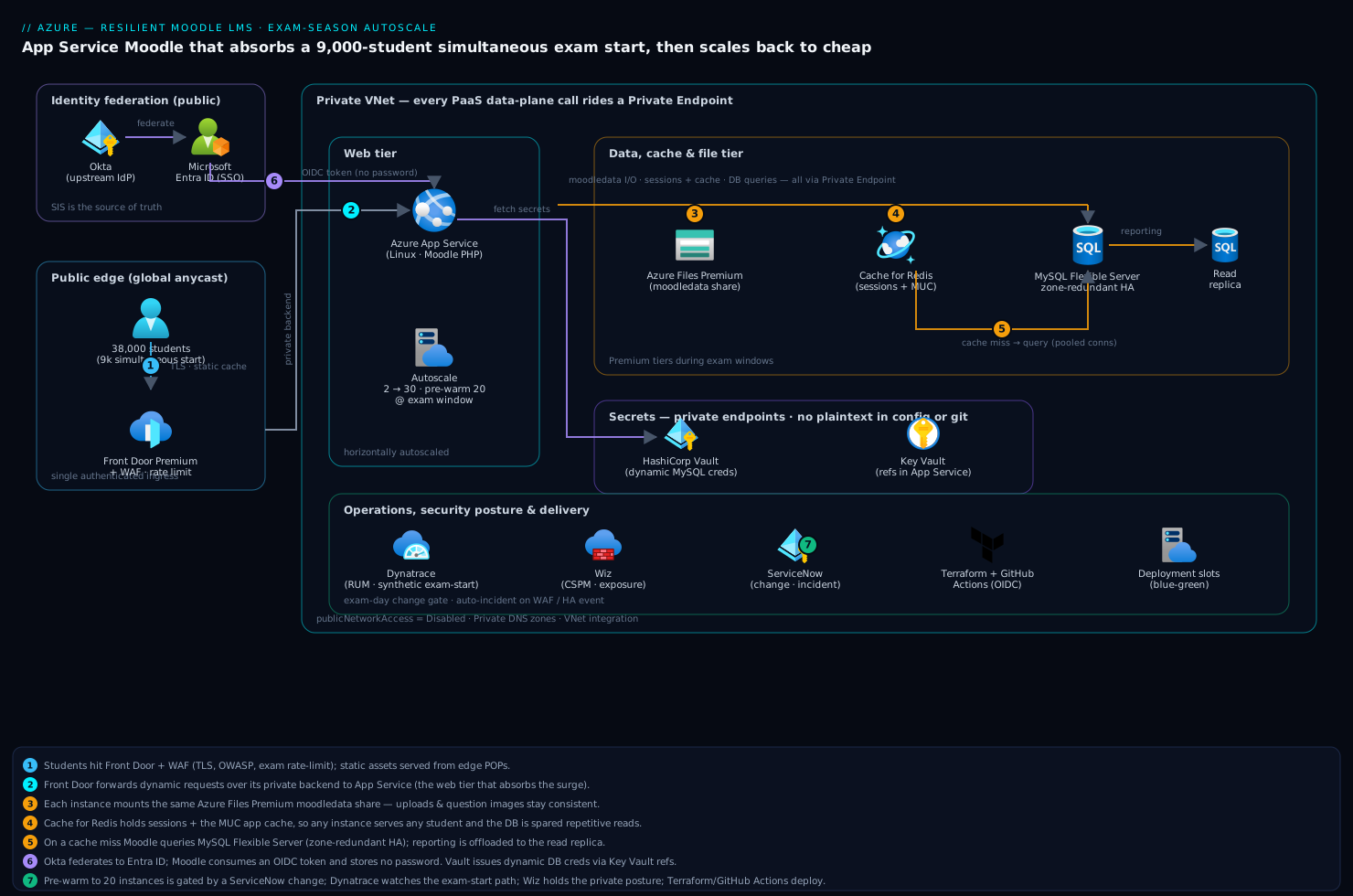
The platform is a classic three-tier web application, deliberately built from managed Azure services so the institution’s small IT team is not patching OS images and tuning MySQL by hand. Traffic flows edge → web tier → data tier, with a shared file tier and a cache tier hanging off the web tier, and the entire data plane locked inside a virtual network behind Private Endpoints.
Following the request path on a normal page load:
- A student browses to the learning portal. DNS resolves to Azure Front Door, Microsoft’s global edge. Front Door terminates TLS, serves cacheable static assets (theme CSS, JavaScript, course images) from its global POPs so they never touch the origin, and runs the Web Application Firewall with the OWASP managed rule set plus custom rules. During exams, a Front Door rate-limit rule throttles abusive IPs without touching legitimate exam traffic.
- Front Door forwards dynamic requests over its private backend connection to Azure App Service running the Moodle PHP application on a Linux plan. App Service is the web tier: a pool of instances behind a built-in load balancer that Azure scales horizontally for us. This is where the surge is absorbed.
- The Moodle code on each App Service instance reads and writes the shared
moodledatadirectory, which lives on Azure Files Premium mounted into the app. Every instance — whether there are 3 of them or 30 — sees the identical file share, so an assignment uploaded through one instance is instantly visible through another. - Moodle consults Azure Cache for Redis for the application cache and the session store. User sessions live in Redis, not on local disk, which is precisely what lets any instance serve any user’s next request — the prerequisite for horizontal scaling. Hot configuration and question-bank lookups are served from Redis instead of hammering the database.
- For data the cache cannot answer, Moodle queries Azure Database for MySQL Flexible Server, the system of record for users, courses, grades, and quiz attempts. It runs zone-redundant high availability with a hot standby in a second availability zone, and a read replica offloads heavy reporting and gradebook reads.
- Identity is federated. Staff and students authenticate through Microsoft Entra ID as the SSO provider, brokered from the institution’s existing Okta tenant so the student information system’s identity remains the source of truth; Moodle consumes OpenID Connect and never stores a password.
Every data-tier call — MySQL, Redis, Azure Files, Key Vault — rides a Private Endpoint inside the VNet; the public endpoints on those services are disabled. Only Front Door reaches the App Service, and only over its authenticated private backend. That posture is what lets the security team sign off on holding 38,000 students’ graded work.
Component breakdown
| Component | Service / tool | Role in the platform | Key configuration choices |
|---|---|---|---|
| Edge & WAF | Azure Front Door (Premium) | TLS, global static caching, OWASP WAF, rate limiting, DDoS | Managed rule set + custom exam rate rule; Private Link to App Service origin |
| Web tier | Azure App Service (Linux, P-series) | Runs Moodle PHP; horizontally autoscaled | PHP 8.x; “Always On”; health-check path; VNet integration |
| Shared files | Azure Files Premium | The moodledata share mounted on every instance |
Premium (SSD) tier; provisioned IOPS; Private Endpoint |
| Cache & sessions | Azure Cache for Redis | MUC application cache + external session store | Premium tier for exams; clustering for shard throughput |
| Database | Azure Database for MySQL Flexible Server | System of record: users, courses, grades, attempts | Zone-redundant HA; read replica; tuned for connections |
| Identity / SSO | Microsoft Entra ID + Okta | OIDC SSO to Moodle; Okta as upstream IdP | Okta → Entra federation; group-based role mapping; MFA for staff |
| Secrets | HashiCorp Vault + Key Vault | DB credentials, OIDC client secret, signing keys | Vault dynamic MySQL creds; Key Vault references in App Service |
| CSPM / posture | Wiz | Cloud posture, exposure, attack-path analysis | Agentless scan; alert on any public-data-plane drift or open NSG |
| Runtime security | CrowdStrike Falcon | Runtime threat detection on any VM-based components | Sensor on jump host / proctoring appliance; SOC integration |
| Observability | Dynatrace | RUM, traces, DB and PHP telemetry, exam-window dashboards | OneAgent; synthetic exam-start check; Davis anomaly detection |
| ITSM / change | ServiceNow | Exam-event change records, incident tickets, on-call routing | Change gate before exam-day scale-up; auto-incident on WAF/HA event |
| CI / IaC | GitHub Actions + Terraform | Build/deploy Moodle; provision all infrastructure | OIDC to Azure (no stored creds); blue-green slot deploys |
A few choices deserve the why, because they are the ones institutions get wrong and then blame the cloud for.
Why App Service and not a VM scale set or AKS. All three can scale, but App Service gives the most platform for the least operations, which is decisive for a lean education IT team. There is no OS to patch, deployment slots give blue-green releases for free, autoscale is a few rules, and VNet integration plus Private Endpoints cover the security story. A VM scale set means owning the image, the PHP build, and the patch cadence; AKS means owning a cluster the team does not have the staff to run well. For a single well-understood PHP app with a brutal but predictable load profile, App Service is the right altitude. (If the institution were running a multi-tenant Moodle SaaS for dozens of clients, the calculus would shift toward Kubernetes — but that is a different article.)
Why Azure Files Premium for moodledata, with eyes open. Moodle’s shared directory has to be a network file share that every instance mounts, and Azure Files (SMB) is the managed answer that App Service can mount natively. The Premium (SSD) tier is mandatory, not optional — the Standard tier’s latency and IOPS will not survive thousands of concurrent file operations at exam start, and provisioned IOPS scale with the provisioned share size, so you sometimes over-provision capacity simply to buy throughput. This is the single most common Moodle-on-Azure performance trap. The mitigation that matters most is below: keep Moodle’s hot caches and sessions in Redis, not on the file share, so the share carries durable content (uploads, question images) rather than per-request churn.
Why Redis is load-bearing, not a nice-to-have. Point Moodle’s session handler and its application cache (MUC) at Azure Cache for Redis. Sessions in Redis are what make instances interchangeable — any instance can serve any student’s next click — which is the entire premise of horizontal autoscaling. The application cache in Redis absorbs the repetitive reads (course settings, question definitions, user preferences) that would otherwise flood MySQL at exam start. In direct terms: Redis is the component that takes the exam-start pressure off the database that died last year. Size it to the Premium tier for exam windows so it has the memory and connection headroom for the peak.
Implementation guidance
Provision with Terraform, and treat the network and the file share as the first deliverables. The dependency order matters: the VNet, subnets, and Private DNS zones come first, then the data services with public access disabled, then App Service with VNet integration, then Front Door pointing at the App Service private origin. Getting Private DNS wrong is the classic silent failure — the app deploys clean but cannot resolve MySQL’s private name and every page errors on database connect.
A minimal Terraform shape for the App Service plan and the autoscale rule communicates the intent — scale on the signal that actually predicts a Moodle meltdown:
resource "azurerm_service_plan" "moodle" {
  name     = "asp-moodle-prod"
  os_type  = "Linux"
  sku_name = "P2v3"          # baseline; autoscale adds instances for exams
}

resource "azurerm_monitor_autoscale_setting" "moodle" {
  name                = "moodle-exam-autoscale"
  target_resource_id  = azurerm_service_plan.moodle.id

  profile {
    name = "default"
    capacity { minimum = 2  default = 2  maximum = 30 }

    rule {                    # scale OUT on sustained CPU
      metric_trigger {
        metric_name      = "CpuPercentage"
        time_grain       = "PT1M"
        statistic        = "Average"
        time_window      = "PT5M"
        time_aggregation = "Average"
        operator         = "GreaterThan"
        threshold        = 65
      }
      scale_action { direction = "Increase"  type = "ChangeCount"  value = 4  cooldown = "PT5M" }
    }
  }
}
CPU is a reasonable trigger, but it is reactive — by the time CPU crosses the threshold the surge is already underway, and App Service takes a minute or two to warm new instances. For a known exam at a known time, reactive autoscale alone is a gamble. The fix is below.
Pre-warm for scheduled exams — do not rely on reactive autoscale alone. Because exams are scheduled events, treat them as scheduled infrastructure events. Add a time-based autoscale profile that raises the minimum instance count for the exam window — say, to 20 instances from 08:30 to 11:00 on a published exam morning — so the capacity is already hot when 9,000 students hit “Start attempt” at 09:00, with the CPU rule layered on top to catch any underestimate. The same scheduled window scales Azure Cache for Redis and MySQL Flexible Server up a tier and back down afterward. This pre-warm is driven from a pipeline, and crucially it is gated by a ServiceNow change record tied to the exam timetable, so a documented human approves the scale-up, the cost is attributed to the exam event, and the on-call engineer has a ticket rather than a surprise bill. After the exam, a scheduled scale-down returns the platform to its cheap baseline.
Tune MySQL for connections, not just CPU. The exam-start failure mode is connection exhaustion, so size max_connections for the peak instance count multiplied by each instance’s PHP-FPM worker count, and put a connection-pooling layer (ProxySQL or Moodle’s own pooling configuration) in front so idle App Service workers do not each hold an open database connection. Route gradebook exports and analytics queries to the read replica so reporting never competes with live exam writes. Enable zone-redundant HA so a zone failure during an exam fails over to the standby in another availability zone with the database intact.
Identity: federate the humans, hold the secrets properly. Configure Moodle’s OpenID Connect authentication against Microsoft Entra ID, with the institution’s Okta tenant as the upstream identity provider so the existing student-information-system identity stays authoritative; Okta federates to Entra, Entra issues the OIDC token Moodle consumes, and Moodle stores no passwords. Map Entra/Okta groups to Moodle roles (student, teacher, manager) so role assignment is driven by the directory, not maintained by hand. The database credential and the OIDC client secret are the sensitive material: issue the MySQL credential dynamically from HashiCorp Vault so it is short-lived and rotated, and surface it (and the OIDC secret) to App Service as Key Vault references rather than plaintext app settings, so nothing sensitive sits in the configuration blade or in source control.
Enterprise considerations
Security & Zero Trust. The data plane is private by construction — MySQL, Redis, Azure Files, and Key Vault are all reachable only over Private Endpoints, public network access disabled, with Front Door as the single authenticated ingress. On top of that perimeter: Azure Front Door’s WAF runs the OWASP rule set to block injection and common web attacks, with a custom exam-window rate-limit rule that throttles credential-stuffing and scripted abuse without tripping legitimate exam bursts. Wiz runs continuous posture and exposure scanning across the subscription, alerting the instant any resource drifts to public exposure or an NSG opens too wide — the independent backstop that the private posture is actually holding. Where the proctoring solution requires a VM-based virtual appliance or a jump host, CrowdStrike Falcon provides runtime threat detection on it, feeding the institution’s SOC. A WAF block storm or an HA failover during an exam auto-raises a ServiceNow incident so security and on-call get a ticket, not just a buried log line. Student exam data is protected at rest with platform encryption and in transit over TLS end to end, and academic records carry data-protection obligations that this posture is built to satisfy.
Cost optimization. The entire point of this design is to pay for the spike only when it happens. The levers:
| Lever | Mechanism | Typical effect |
|---|---|---|
| Scheduled scale-down | Drop App Service min to 2 instances outside exam windows | Pays peak rate only for exam hours |
| Tier-up Redis/MySQL on schedule | Premium Redis + larger MySQL only during exams | Avoids running peak tiers 50 weeks a year |
| Reserved baseline | 1-year reservation on the steady App Service / MySQL baseline | ~30–40% off the always-on floor |
| Front Door static offload | Serve theme/JS/images from edge POPs | Removes static load from the origin entirely |
| Azure Files right-sizing | Provision IOPS for exam peak; trim share size off-peak | Caps the most over-provisioned line item |
Tag every resource to the education-IT cost centre and exam-season events, and surface the spend in Dynatrace so the IT director sees exactly what an exam morning costs versus the quiet baseline.
Scalability. Each tier scales on its own axis. The web tier scales horizontally on App Service — the surge axis — pre-warmed for scheduled exams and CPU-reactive for the rest. Redis scales by tier and by clustering to add shard throughput and connection headroom. MySQL scales vertically (compute tier) for write throughput and horizontally via read replicas for read-heavy reporting — the write path is the genuine ceiling, which is why caching and connection pooling matter so much. Azure Files Premium scales IOPS with provisioned size. Front Door is effectively unbounded at the edge and shields the origin from static and abusive traffic. The honest hard limit is the database write path under a simultaneous exam start; the architecture’s job is to keep as much load as possible off it through Redis and the read replica.
Failure modes, and what each one looks like. Name them before exam morning.
- Database connection exhaustion at exam start — the original sin; PHP workers block waiting for a connection and pages time out. Mitigation: connection pooling,
max_connectionssized to peak, Redis absorbing repetitive reads, and the read replica offloading reporting. - Azure Files latency under file-op storms — Standard-tier (or under-provisioned Premium) share latency spikes and every page that touches
moodledatacrawls. Mitigation: Premium tier with provisioned IOPS, and Redis holding sessions and cache so the share carries durable content only. - Reactive autoscale lag — CPU crosses threshold after the surge has begun and new instances are still warming. Mitigation: scheduled pre-warm to a high minimum for the exam window.
- Redis saturation — sessions and cache outgrow a too-small Redis and evictions cascade into database load. Mitigation: Premium tier sized for the peak during exam windows, clustering for headroom.
- A missing Private DNS link — a data service resolves to a firewalled public IP and every database connect hangs. Mitigation: assert all zone links in Terraform plus a post-deploy smoke test.
- Zone outage during an exam — see DR below.
Reliability & DR (RTO/RPO). Decide the numbers per tier. MySQL Flexible Server zone-redundant HA keeps a hot standby in a second availability zone with automatic failover, giving near-zero data loss and a sub-minute database failover for the common zone-failure case — the scenario most likely to strike mid-exam. For regional disaster recovery, configure cross-region read replicas of MySQL and geo-redundant backup of both the database and the Azure Files share, so a region loss is recoverable. Azure Cache for Redis is rebuildable (it is a cache and session store, not the source of truth), so DR for Redis is “stand a new one up and let it repopulate,” with the understanding that in-flight sessions are lost on a hard regional failover — an acceptable trade for a cache tier. A pragmatic target for this platform: RTO 15 minutes, RPO 5 minutes for the database of record, with zone-level failover handled automatically and near-invisibly during exams. Front Door health probes drive ingress failover automatically. Document and rehearse the failover runbook before exam season, not during it.
Observability. Instrument the platform in Dynatrace with the metrics that actually predict an exam meltdown, not just generic CPU. Capture real-user monitoring on the exam-start page, PHP and database span timing so you can see whether a slow page is the app, Redis, the file share, or MySQL, and MySQL connection-pool saturation and Redis hit-rate as the leading indicators of the failure modes above. Run a synthetic exam-start check — a scripted “log in, open exam, start attempt” — every few minutes, and especially in the hour before a scheduled exam, so the on-call engineer knows the path is healthy before 9,000 students prove it is not. Davis anomaly detection flags a latency or error regression on its own, and a breach of the exam-window SLO routes through ServiceNow to the on-call rotation.
Governance & delivery. Provision everything with Terraform and deploy the Moodle application through GitHub Actions, authenticating to Azure via OIDC federation so there is no stored service-principal secret to leak. Use App Service deployment slots for blue-green Moodle upgrades — stage the new version and its plugin set on a slot, smoke-test it, and swap — so a Moodle point release or plugin update never takes the live platform down, and a bad swap rolls back in seconds. Moodle major upgrades and any database schema migration go through a ServiceNow change record scheduled well clear of exam windows, with the eval and smoke tests as required gates. Pin the Moodle version and plugin set explicitly in source control so the environment is reproducible and an upgrade is a deliberate, reviewed act.
Explicit tradeoffs
Accept these or do not build it this way. The managed-PaaS path trades some control for a dramatically smaller operations burden: you do not tune the OS or own the MySQL binary, which is the point for a lean team, but it also means you live within the platform’s knobs. Azure Files for moodledata is the genuine soft spot — it is the right managed choice, but its latency under heavy concurrent file operations is the thing most likely to bite, which is why Premium tier and aggressive Redis caching are non-negotiable rather than optional. The pre-warm strategy assumes exams are scheduled and known; it does not help with a genuinely unpredictable surge, where you fall back to reactive autoscale and its inherent lag. And the Okta-to-Entra federation adds a hop and a token-translation step that an institution already standardized on a single IdP would not need — though most universities running an existing Okta or AD estate will want exactly this bridge rather than a second identity silo.
The alternatives, and when they win. If the institution had the platform-engineering staff and was running Moodle for many tenants, AKS (the GKE/EKS-class option) would give finer control over scaling, packing, and multi-tenancy — at the cost of owning a cluster. If the load were steady rather than spiky, a couple of right-sized reserved VMs would be cheaper than autoscaling machinery you rarely exercise. If the requirement were a turnkey hosted LMS with no infrastructure at all, a Moodle managed-hosting partner removes this entire problem — and removes the control, the private-networking posture, and the Azure-native integration that a security-conscious institution with its own cloud estate wants. This App Service design is the sweet spot for the common case: one Moodle instance, a small IT team, a brutal but predictable exam-season spike, and a security team that needs the data to stay private.
The shape of the win
For the polytechnic, the payoff is not “Moodle in the cloud.” It is that on the next published exam morning, 9,000 students hit “Start attempt” inside the same ninety-second window — and nothing happens. No 502s, no spinning tabs, no academic appeals, because the web tier was already warmed to 20 instances, Redis was holding the sessions and the cache so the database was never asked the questions that killed it last year, and the WAF was quietly shedding the scripted abuse at the edge. The registrar does not get a flood of “I was locked out” emails, the vice-chancellor’s one requirement is met, and — because every data-plane call stayed inside the VNet behind Private Endpoints, with Wiz watching the posture and Dynatrace watching the exam-start path — the security team and the data-protection officer both signed it. The 50 quiet weeks cost the institution almost nothing, the exam hours cost exactly what an exam hour should, and the on-call engineer at 08:55 is watching a green synthetic check instead of bracing for impact. That is the difference between surviving exam season and dreading it.