A corporate-training company — call it the kind of vendor that sells “compliance and upskilling courses, branded as your own LMS” to 180 enterprise customers — has hit the wall its founders always knew was coming. Each customer today gets a hand-built Moodle on its own VM, and the platform team is now drowning: 180 servers to patch every time Moodle ships a security release, 180 cron jobs that nobody is quite sure are running, and a sales team promising a new client a live, branded learning portal “by Monday” while provisioning actually takes nine working days. The board’s ask is blunt: turn this into a real SaaS — one platform, many tenants, onboard a customer in under an hour, isolate every customer’s learner data hard enough to pass their security questionnaires, and survive the Monday-morning login stampede when a Fortune-500 client assigns mandatory compliance training to 40,000 staff at once. The constraint is equally blunt: a breach where Customer A can see Customer B’s learners is an extinction-level event for a B2B training vendor, and the finance team wants a per-customer cost number so they can price each contract. This article is the reference architecture for that platform on Google Cloud — Moodle run as a genuinely multi-tenant SaaS on GKE, with the isolation, identity, and observability a B2B buyer’s procurement team will actually sign off on.
The pressures here are the classic SaaS-platform pressures, sharpened by the fact that the workload is an LMS. Isolation is the existential one: training data is employee PII (names, completion records, sometimes disciplinary-linked courses), and the whole sales motion depends on telling each enterprise buyer “your learners’ data lives in its own database, not commingled.” Elasticity matters because LMS load is brutally spiky — quiet for weeks, then one customer opens an exam window or a compliance deadline lands and a single tenant goes from 50 to 40,000 concurrent users in minutes. Per-tenant cost visibility is a commercial requirement, not a nicety: with 180 tenants on shared compute, finance cannot price a renewal without knowing what each tenant actually consumes. And operational leverage is the entire reason to do this at all — the platform team has to patch Moodle once and have it apply to every tenant, not 180 times.
Why not the obvious shortcuts
Three tempting designs each fail in a way someone on the project will have to be talked out of.
One giant shared Moodle with a tenant column (pooled everything, soft isolation by a tenantid filter in application code) is the cheapest to run and the easiest to breach. Moodle was not built as a multi-tenant application; bolting tenancy onto its data model means every query in a 4-million-line codebase must remember to filter, and a single missed WHERE tenantid = ? leaks one customer’s learners to another. No enterprise security questionnaire survives “isolation is enforced by us remembering to filter.”
A VM per tenant (full silo, what they have today) gives perfect isolation and zero leverage — it is exactly the 180-server patching treadmill the board is trying to escape, and it scales the ops headcount linearly with sales.
A separate Kubernetes cluster per tenant is silo isolation with a Kubernetes bill: 180 control planes, 180 ingress stacks, 180 node pools mostly sitting idle. The isolation is real but the economics are upside down for tenants that are individually small.
The design that threads the needle is pooled compute, siloed data: all tenants share a single GKE cluster and a pool of Moodle pods, but each tenant gets its own Cloud SQL database, its own moodledata directory on Filestore, and its own logical cache space in Memorystore. Compute is shared for leverage; the data — the thing that actually has to be isolated to pass procurement — is physically separated per tenant. One Moodle codebase to patch, but a learner from Customer A literally cannot be returned by a query against Customer B’s database, because it is a different database with different credentials the pod only obtains after it has authenticated the tenant.
Architecture overview
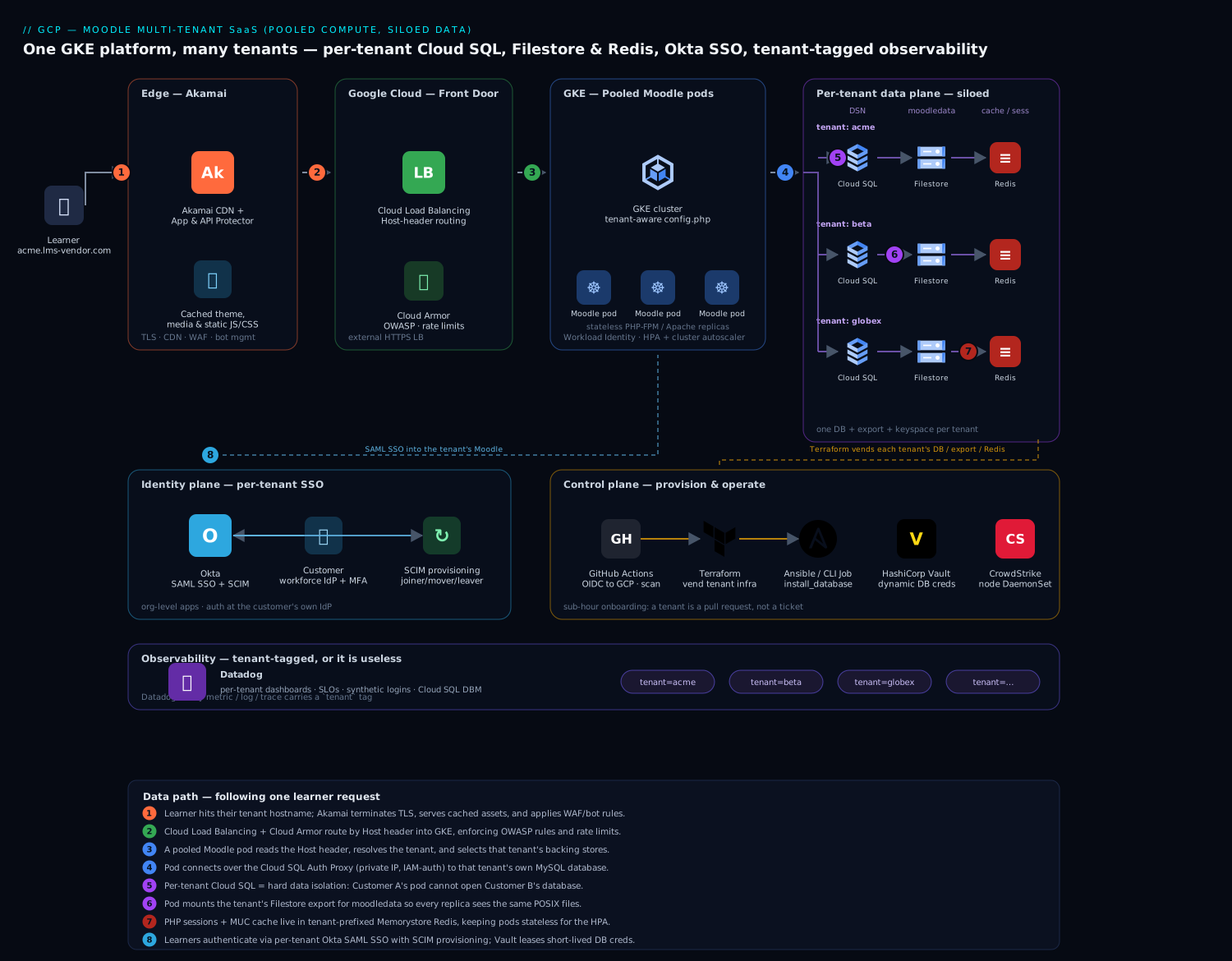
The platform runs two distinct planes that share a cluster but live on different schedules: a data plane that serves learners (the running Moodle), and a control plane that onboards and operates tenants (provisioning, patching, billing). Keeping them separate in your head is the first step to operating this well, because they fail differently and scale differently.
The defining property of the topology is tenant routing at the edge driving credential selection at the core. A learner reaches acme.lms-vendor.com; that hostname is the tenant identity, and it determines — deterministically, with no per-query filtering — which Cloud SQL database, which Filestore export, and which Redis keyspace the serving pod uses for that request. Isolation is a property of which backing store the request is wired to, established once at the front door, not a filter the application has to remember on every read.
Data path, following a learner request:
- A learner hits the platform at their tenant hostname. Traffic terminates at Akamai at the edge — TLS, global anycast, CDN for Moodle’s static theme/JS/CSS assets and course media, and App & API Protector WAF to absorb the credential-stuffing and bot traffic an internet-facing LMS attracts. Akamai’s origin is the GCP load balancer.
- Cloud Load Balancing (external HTTPS) with Cloud Armor fronts the GKE cluster, terminating the connection from Akamai, enforcing rate limits and OWASP rules as defense-in-depth, and routing by Host header through the GKE Gateway / Ingress to the Moodle service.
- The request lands on a Moodle pod on GKE. The pod reads the
Hostheader, resolves it to a tenant, and selects that tenant’s database DSN, moodledata path, and Redis prefix from its tenant-config map. Moodle’s ownconfig.phpis templated to be tenant-aware: the bootstrap picks the connection by hostname before any course or user data is touched. - For dynamic data, the pod connects to that tenant’s Cloud SQL for MySQL database over the Cloud SQL Auth Proxy (private IP, IAM-authenticated), so the credential is short-lived and the connection never crosses the public internet.
- For files — uploaded assignments, SCORM packages, course backups, the
moodledataroot Moodle cannot run without — the pod mounts the tenant’s Filestore export, a shared POSIX filesystem so every pod replica sees the same files (the thing a plain block volume cannot give you across replicas). - For sessions and caching — Moodle’s MUC (Muc) application cache and PHP sessions — the pod talks to Memorystore for Redis using a tenant-scoped key prefix, so a cache flush or a session lookup for one tenant cannot touch another’s. Session state in Redis is also what lets any pod serve any of a tenant’s users, which is what makes horizontal scaling work.
Identity path: learners and trainers do not get Moodle-local passwords. Each enterprise tenant federates its own workforce IdP into Okta, and Okta brokers SAML SSO into that tenant’s Moodle plus SCIM provisioning so joiners/movers/leavers in the customer’s HR system create, update, and deactivate Moodle accounts automatically. Org-level Okta means Customer A’s identity configuration is wholly separate from Customer B’s; a user authenticated against Acme’s IdP can only ever land in Acme’s Moodle.
Control path (onboarding a tenant): a sales-completed deal triggers a provisioning workflow — Terraform stands up the tenant’s Cloud SQL database, Filestore export, Redis namespace, DNS record, and Okta SAML/SCIM app; Ansible (or a Moodle CLI Job) runs the Moodle install against the new database, seeds the org theme and admin, and registers the tenant in the platform’s tenant registry. What was nine days of manual work becomes a sub-hour pipeline.
Component breakdown
| Component | Service / tool | Role in the platform | Key configuration choices |
|---|---|---|---|
| Edge | Akamai | TLS, anycast, CDN for static assets/media, WAF, bot mitigation | Cache Moodle theme/pluginfile assets; bot rules for credential stuffing; origin = GCLB |
| L7 LB / WAF | Cloud Load Balancing + Cloud Armor | Host-based routing into GKE, OWASP rules, rate limiting | Host-header routing per tenant; Armor preconfigured WAF rules; per-tenant rate ceilings |
| Compute | GKE (Moodle pods) | Pooled, tenant-aware PHP-FPM/Apache Moodle workers | Tenant-aware config.php; HPA on CPU + concurrency; Workload Identity |
| Per-tenant DB | Cloud SQL for MySQL | One database (or instance) per tenant — hard data isolation | Private IP; Auth Proxy; HA (regional) for premium tenants; PITR enabled |
| Shared files | Filestore | Per-tenant moodledata on a POSIX share all replicas mount |
Export per tenant; Enterprise tier for HA tenants; snapshot schedule |
| Cache & sessions | Memorystore for Redis | MUC application cache + PHP sessions, tenant-prefixed | Key prefix per tenant; Standard HA tier; maxmemory-policy allkeys-lru for cache, separate instance for sessions |
| Identity / SSO | Okta | Per-tenant SAML SSO + SCIM provisioning and deprovisioning | Org-level apps; SCIM JIT; deactivate-on-leaver; MFA at the tenant’s IdP |
| Provisioning | Terraform + Ansible | Vend per-tenant infra and run the Moodle install | Tenant module; pipeline-driven; state per environment |
| Observability | Datadog | Per-tenant performance dashboards, SLOs, alerts | tenant tag on every metric/log/trace; per-tenant dashboards & monitors; DBM on Cloud SQL |
| Secrets | HashiCorp Vault | Per-tenant DB credentials, SAML signing keys, API tokens | Dynamic MySQL creds per tenant; short leases; GKE auth method |
| Async work | GKE CronJobs / Jobs | Moodle cron and scheduled tasks, run per tenant | One schedule per tenant DB; backups; SCORM/grade processing |
| CI / IaC | GitHub Actions | Build the Moodle image, run the tenant pipeline, deploy | OIDC to GCP (no stored keys); image scan; canary one tenant first |
| Runtime security | CrowdStrike Falcon | Runtime threat detection on GKE nodes | Sensor as DaemonSet; detections to the SOC |
A few of these choices deserve the why, because they are the ones teams get wrong.
Why a database per tenant, not a schema or a row filter. This is the single most important decision in the design, and it is driven by procurement, not engineering taste. A B2B training buyer’s security team will ask “is our data physically isolated from your other customers?” and the only answer that wins the deal is “yes — separate database, separate credentials, your pod cannot even open a connection to another tenant’s data.” A shared schema with a tenantid column cannot make that claim honestly. The tradeoff is real and discussed below (connection count, per-DB overhead), but for a vendor whose business is trust, database-per-tenant is the price of entry. For very small tenants you can pack many databases onto one Cloud SQL instance to control cost; for large or premium tenants, give them a dedicated instance so a noisy neighbor cannot starve them.
Why Filestore and not a bucket or a block disk for moodledata. Moodle assumes a POSIX moodledata directory and writes to it constantly — session files (if not in Redis), caches, uploaded files, course backups. A block disk (Persistent Disk) cannot be mounted read-write by multiple pods at once, so it breaks the moment you scale past one replica. Cloud Storage is object, not POSIX, and Moodle’s core file API expects a filesystem. Filestore is a managed NFS share: every Moodle pod for a tenant mounts the same moodledata, so a file uploaded by a request served on pod 3 is instantly visible to pod 7. You can offload the served files to GCS via a Moodle object-storage plugin later for cost, but the live moodledata wants Filestore.
Why Redis carries sessions, not the pods. If sessions lived on a pod’s local disk, a learner would have to be pinned to one pod (sticky sessions) and would be logged out whenever that pod was rescheduled — fatal during an exam. Putting PHP sessions and the MUC cache in Memorystore for Redis makes the pods stateless: any replica can serve any of a tenant’s requests, the HPA can add and remove pods freely under exam load, and a node failure does not log anyone out. The tenant key-prefix keeps one tenant’s cache invalidations and session reads from ever touching another’s.
Tenant isolation: defense in depth
Isolation is the product, so it is enforced at every layer rather than trusted to any single control:
| Layer | Isolation mechanism | What a failure here would mean |
|---|---|---|
| Network / edge | Per-tenant hostname; Cloud Armor per-tenant rate rules | A flood against one tenant cannot drown the others |
| Data | Separate Cloud SQL database + separate credentials per tenant | Customer A’s pod cannot connect to Customer B’s data, full stop |
| Files | Separate Filestore export per tenant | One tenant’s moodledata is a different mount, not a subfolder to mis-path into |
| Cache / sessions | Tenant key-prefix in Redis (or separate instances for premium) | A cache flush or session lookup is scoped to one tenant |
| Identity | Org-level Okta SAML/SCIM per tenant | A user authenticated for Acme can only land in Acme’s Moodle |
| Secrets | Vault dynamic DB creds leased per tenant | A leaked credential is short-lived and scoped to one tenant’s database |
| Observability | tenant tag on every metric/log/trace |
Per-tenant blast-radius is visible, and one tenant’s noise is separable |
The principle is that isolation is structural — a property of which database the request is wired to and which credential the pod holds — not procedural, never “the code remembered to filter.” The serving pod obtains a tenant’s database credential from HashiCorp Vault after it has resolved the tenant from the hostname, using Vault’s dynamic MySQL secrets engine so the credential is generated on demand, scoped to that one tenant’s database, and leased for minutes. A pod handling an Acme request never holds a credential that would open Beta Corp’s database.
Implementation guidance
Make Moodle tenant-aware at bootstrap. The heart of the data-plane is a config.php that resolves the tenant from the request host before touching any data. Keep the per-tenant facts in a config map (or a tiny lookup the pod caches), and pull the database password from Vault, never from the manifest:
<?php
// Resolve tenant from the Host header set by the load balancer.
$host   = $_SERVER['HTTP_HOST'] ?? 'default';
$tenant = require('/etc/moodle/tenant-map.php')[$host] ?? null;
if ($tenant === null) { http_response_code(404); exit; }

$CFG->dbtype   = 'mysqli';
$CFG->dbhost   = '127.0.0.1';                 // Cloud SQL Auth Proxy sidecar
$CFG->dbname   = $tenant['db'];               // per-tenant database
$CFG->dbuser   = $tenant['db_user'];          // per-tenant user
$CFG->dbpass   = getenv('TENANT_DB_PASS');    // injected by Vault Agent, short-lived

$CFG->dataroot = $tenant['dataroot'];         // per-tenant Filestore export mount
$CFG->wwwroot  = 'https://' . $host;

// Tenant-scoped Redis: prefix isolates cache + sessions per tenant.
$CFG->session_handler_class = '\core\session\redis';
$CFG->session_redis_host    = $tenant['redis_host'];
$CFG->session_redis_prefix  = $tenant['id'] . ':sess:';
Provision a tenant as code. Onboarding is a Terraform module invoked per tenant, so a new customer is a pull request, not a ticket queue. The module’s shape communicates the intent — one database, one export, one Okta app, all stamped with the tenant id:
module "tenant" {
  source      = "./modules/moodle-tenant"
  tenant_id   = "acme"
  hostname    = "acme.lms-vendor.com"
  db_instance = google_sql_database_instance.shared_pool_a.name  # pack small tenants
  db_tier     = "small"        # premium tenants get a dedicated HA instance instead
  filestore   = "shared"       # or a dedicated export for large tenants
  redis_prefix = "acme"
  okta_app    = "saml-scim"    # provisions the per-tenant Okta SAML + SCIM app
}
The pipeline that applies this runs in GitHub Actions, authenticating to GCP via OIDC (Workload Identity Federation) so there is no long-lived service-account key to leak — a lesson the platform team intends never to repeat. After Terraform, an Ansible play (or a Moodle CLI Job) runs admin/cli/install_database.php against the new database, applies the tenant’s theme and admin, wires the Okta SAML auth plugin, and registers the tenant in the registry the load balancer routes from. A canary step brings up the tenant, runs a synthetic login through Datadog, and only then flips DNS live.
Patch once, roll everywhere — carefully. The operational payoff of pooled compute is that a Moodle security release is a single new container image. But the database schema upgrade Moodle runs on first hit after an upgrade must run per tenant database, and it must not run 180 times simultaneously and saturate Cloud SQL. The pattern: build and scan the new image in GitHub Actions, deploy it to a canary tenant first, run the schema upgrade as a controlled Job against that one database, validate, then roll the image fleet-wide and drive the per-tenant admin/cli/upgrade.php in batches (a few tenants at a time) rather than letting every pod stampede the upgrade on its own.
Enterprise considerations
Security & Zero Trust. The platform is identity-first and least-privilege by construction: pods authenticate to Cloud SQL with Workload Identity and the Auth Proxy (no static DB password in any manifest), tenant database credentials are Vault-issued, short-lived, and scoped to one database, and every tenant data-plane connection rides private IP, never the public internet. Human access to a tenant’s Moodle is Okta SAML only, with the customer’s own MFA and conditional access enforced at their IdP, and SCIM deprovisioning is the control that actually matters for an LMS — when a customer offboards an employee, that learner’s Moodle account deactivates automatically, closing the “ex-employee still has training-portal access” gap that manual user management always leaves open. Layer on CrowdStrike Falcon as a DaemonSet for runtime threat detection on the GKE nodes, feeding the SOC, and use Cloud Armor plus Akamai’s bot management to blunt the credential-stuffing that any internet-facing learner login attracts. Secrets — per-tenant DB creds, SAML signing keys, SCIM bearer tokens — live in Vault, never in a Kubernetes Secret.
Per-tenant cost visibility. Finance needs a number per tenant, and the architecture is built to give it. The siloed costs (each tenant’s Cloud SQL database, its Filestore export, its Redis allocation) are directly attributable. The shared cost (the GKE compute pool, the load balancer, Akamai) is allocated by usage: tag every metric, log, and trace with tenant and let Datadog apportion shared compute by each tenant’s share of CPU-seconds and request volume.
| Cost lever | Mechanism | Typical effect |
|---|---|---|
| Tenant packing | Many small-tenant databases on one Cloud SQL instance | Avoids paying instance overhead per small customer |
| Tiered tenancy | Dedicated HA instance only for premium/large tenants | Cost matches the contract value |
| Cluster autoscaling | GKE scales nodes down between spikes; spot nodes for async/cron | Pay for exam-day peaks, not the quiet weeks |
| CDN offload | Akamai caches theme/media; GCS object plugin for served files | Cuts origin egress and pod load |
| Right-sized Memorystore | Separate small session instance vs larger cache instance | Stop over-provisioning one Redis for both jobs |
Tag-based showback per tenant, surfaced in Datadog, is what lets the renewal conversation be “this customer costs us X to serve” instead of a guess.
Scalability — the exam-day stampede. LMS load is the textbook spiky workload, and each tier scales independently to absorb it. The GKE HPA scales Moodle pods on CPU and concurrent-request metrics, and because sessions live in Redis the new pods are immediately useful — any pod serves any user. The cluster autoscaler adds nodes (including spot nodes for tolerant async work) when a tenant opens an exam window. Cloud SQL read replicas absorb the read-heavy load of thousands of learners pulling course content and quiz questions; Moodle’s dbhandlesoptions/read-replica support directs reads to replicas and writes (quiz submissions, grades) to the primary. Memorystore scales by tier and by sharding the heaviest tenants onto their own instance. The natural ceiling is per-tenant Cloud SQL write throughput during a synchronized quiz submission burst — which is why premium tenants expecting 40,000 simultaneous learners get a dedicated, vertically generous instance and a tested capacity plan, not a slice of a shared one.
Failure modes, and what each one looks like. Name them before they page you.
- A noisy-neighbor tenant on a shared Cloud SQL instance — one customer’s exam-day load starves the small tenants packed alongside it. Mitigation: per-tenant rate limits at Cloud Armor, connection caps per tenant DB user, and a “graduate to dedicated instance” trigger when a tenant crosses a usage threshold.
- Filestore as a single point of failure for a tenant — if a tenant’s export degrades, every pod serving that tenant loses
moodledata. Mitigation: Enterprise-tier Filestore (HA) for premium tenants, scheduled snapshots, and a documented restore. - Cloud SQL connection exhaustion — database-per-tenant multiplies connections, and pooled pods can blow past
max_connections. Mitigation: a connection pooler (ProxySQL/PgBouncer-equivalent) or tight per-pod pool sizing, and packing fewer tenants per instance than the connection math allows. - A schema upgrade run fleet-wide at once — every pod racing
upgrade.phpsaturates databases and corrupts nobody but pages everybody. Mitigation: canary-then-batch upgrades driven by the control plane, never by pod startup. - A cross-tenant config error — a mis-mapped hostname routes Acme’s traffic at Beta’s database. Mitigation: the tenant map is generated by Terraform (not hand-edited), validated in CI, and a synthetic per-tenant login in Datadog catches a mis-route before users do.
Reliability & DR (RTO/RPO). Decide the numbers per tenant tier, because a free-trial tenant and a flagship enterprise do not deserve the same spend. Premium tenants get regional (HA) Cloud SQL with automatic failover and point-in-time recovery (binlog) for a low RPO, Enterprise Filestore with snapshots, and Standard-tier Memorystore with replication. Standard tenants get zonal Cloud SQL with daily backups + PITR and basic Filestore snapshots. A pragmatic target: RTO 30 minutes, RPO 15 minutes for premium tenants; RTO a few hours, RPO 24 hours for standard tenants, with backups for every tenant tested by an automated monthly restore into a scratch project. Because tenants are independent, a DR event is almost always scoped to one tenant’s stores, not the whole platform — which is itself a resilience win over the shared-everything design.
Observability — per-tenant or it is useless. The single most important observability decision is to tag everything with tenant at the source, so Datadog can slice every metric, log, and trace by customer. Build a per-tenant dashboard (p95 page latency, login success rate, active learners, quiz-submission rate, Cloud SQL query latency via Database Monitoring) and per-tenant SLOs and monitors, so when Acme’s training manager emails “the platform is slow,” support pulls up Acme’s dashboard and sees whether it is Acme’s database, Acme’s exam spike, or the shared cluster — in seconds, not after an hour of log-grepping a shared stream. Synthetic logins per tenant catch a broken SAML config or a mis-routed hostname before the customer does. Cloud SQL Database Monitoring surfaces the slow queries Moodle is notorious for under load, attributed to the right tenant.
Governance. Pin the Moodle image to an explicit, scanned version and promote it through the canary-then-batch process — never a floating latest. Keep config.php templates, the Terraform tenant module, and the Okta app definitions in version control so a tenant’s entire configuration is reviewable and revertable. Apply org-level GCP policy to deny public IP on Cloud SQL and require Workload Identity, with the CI pipeline running Checkov/Wiz Code-style IaC scanning on the tenant module so a misconfiguration is caught at pull-request time rather than in production.
Explicit tradeoffs
Accept these or do not build it. Database-per-tenant is the right isolation story and it is genuinely more expensive and more complex than a shared schema: more instances (or careful packing) to manage, a real connection-count problem to engineer around, and per-tenant backups and upgrades to orchestrate. Pooled compute gives you patch-once leverage but reintroduces the noisy-neighbor problem that a VM-per-tenant world did not have, so you pay for it in rate limits, connection caps, and tenant-tiering logic. The control plane — the Terraform tenant module, the canary-and-batch upgrade machinery, the tenant registry the router reads — is real software you must build and maintain before the SaaS economics arrive; for the first handful of tenants it is pure overhead, and it only pays back at scale. And running Moodle, an application never designed to be multi-tenant, as a multi-tenant SaaS means you are imposing tenancy from the outside (hostname routing, per-tenant backing stores) rather than getting it from the app, which puts the burden of correctness on the platform, not on Moodle.
The alternatives, and when they win. If you have only a few large, well-funded customers, a dedicated stack per tenant (the silo model, automated with the same Terraform) is simpler to reason about and isolates perfectly — the leverage loss only hurts once tenant count climbs. If your customers are tiny and price-sensitive and your data-sensitivity bar is lower, a fully pooled shared Moodle with application-level tenancy (or one of the Moodle “multi-tenancy” plugins / Moodle Workplace) is cheaper to run — but be honest that you are trading away the isolation story your enterprise buyers will demand. And if learning content delivery, not the full LMS feature set, is the actual need, a headless content platform sidesteps Moodle’s tenancy awkwardness entirely. Graduate to this pooled-compute, siloed-data GKE platform when you have enough tenants that patch-once leverage matters, and customers whose procurement teams demand provable per-tenant data isolation.
The shape of the win
For the training vendor, the payoff is not “Moodle in Kubernetes.” It is that sales closes a Fortune-500 deal on Tuesday, a Terraform pipeline stands up bigclient.lms-vendor.com with its own database, its own files, and its own Okta SSO before the kickoff call on Wednesday, 40,000 of the client’s staff log in for mandatory compliance training on Monday without a stampede taking down anyone else’s portal, and when the client’s security team sends the inevitable questionnaire, the honest answer to “is our learners’ data isolated from your other customers” is yes, in its own database with its own credentials your platform cannot cross. That last answer is the one that wins enterprise B2B deals. Everything upstream — the per-tenant Cloud SQL, the Filestore exports, the tenant-prefixed Redis, the org-level Okta, the Vault-leased credentials, the tenant-tagged Datadog dashboards — exists to let that vendor onboard fast, isolate hard, and price honestly. The architecture here is the destination; start with a handful of tenants on the same pattern, but this is where a real Moodle SaaS has to land.