Most multi-region postmortems are not about a region going dark. They are about writes that quietly never arrived in the surviving region, or two regions that both accepted edits to the same row and silently picked a winner. Routing is the easy half of going global; the data plane is where you actually lose money. This article walks through choosing replication topology and consistency levels on Azure so that your stated RPO matches reality.
The CAP and PACELC tradeoffs that frame every choice
CAP gets quoted to death, so here is the version that actually drives decisions: during a network partition between regions, you choose either consistency (refuse writes that cannot be coordinated) or availability (accept local writes and reconcile later). You do not get both. Every “active-active database” claim resolves to one of those two postures the moment a link drops.
PACELC is the more useful framing because partitions are rare and the tradeoff you live with daily is the else clause: when there is no partition, you still choose between Latency and Consistency. A strongly consistent global read pays a cross-region round trip; a low-latency local read may serve stale data. You are tuning that dial on every single request, not just during disasters.
The practical takeaway: there is no globally consistent, low-latency, always-available datastore. Pick the two properties each category of data needs and accept the third is bounded, not eliminated.
Step 1 - Classify data by consistency and latency requirements
Do not pick a consistency level for “the database.” Pick one per data class. Inventory your entities and sort them into a small number of buckets. A workable taxonomy:
| Data class | Example | Tolerable staleness | Conflicting concurrent writes? |
|---|---|---|---|
| Money / ledger | balances, payments, inventory decrements | none | unacceptable - must serialize |
| Identity / auth | credentials, roles, sessions | seconds | rare, last-write acceptable |
| User content | profiles, documents, comments | seconds | possible, mergeable |
| Reference data | catalogs, pricing tables | minutes | writes are single-region |
| Telemetry / events | clicks, logs, metrics | minutes | append-only, no conflict |
The two questions that decide everything: how stale a read can be before the business is wrong, and whether two regions can legitimately write the same key at the same time. Money fails the first test, so it cannot live behind eventual consistency. Telemetry passes both trivially, so paying for strong consistency on it is pure waste. Everything between is a judgement call you must make explicitly and write down.
Step 2 - Cosmos DB consistency levels and what each costs you
Azure Cosmos DB exposes five well-defined consistency levels, and the account default can be overridden per request to relax (never tighten) it. From strongest to weakest:
- Strong - linearizable. A read sees the latest committed write. Only available when writes are confined to a single region (you cannot run Strong with multi-region writes), and reads pay quorum latency.
- Bounded Staleness - reads lag the latest write by at most K versions or T seconds, whichever comes first, and ordering is preserved. This is the strongest level that works across multiple read regions.
- Session (the default) - read-your-own-writes and monotonic reads within a session token. Excellent fit for per-user workloads; the cheapest level that still feels correct to a single user.
- Consistent Prefix - you never see writes out of order, but you may not see the most recent ones.
- Eventual - no ordering guarantee, lowest latency and RU cost.
Set the default explicitly rather than inheriting it:
az cosmosdb create \
  --name kv-orders-cosmos \
  --resource-group kv-data-rg \
  --locations regionName=eastus failoverPriority=0 isZoneRedundant=true \
  --locations regionName=westus2 failoverPriority=1 isZoneRedundant=true \
  --default-consistency-level BoundedStaleness \
  --max-staleness-prefix 100000 \
  --max-interval 300
A request can downgrade consistency to save latency and RUs where the read tolerates it. With the .NET SDK:
var items = container.GetItemQueryIterator<Order>(
    "SELECT * FROM c WHERE c.status = 'shipped'",
    requestOptions: new QueryRequestOptions
    {
        ConsistencyLevel = ConsistencyLevel.Eventual
    });
Cost reality: stronger consistency does not change the per-operation RU rate card directly, but it forces more regions into the read/write path and reduces how aggressively requests can be served locally, which raises effective latency and provisioned throughput. Bounded Staleness and Strong also consume roughly double the RUs of weaker levels for reads because they read from a quorum. Budget for that.
Step 3 - Single-write vs multi-write regions and conflict resolution
This is the decision that most directly governs whether you can lose writes.
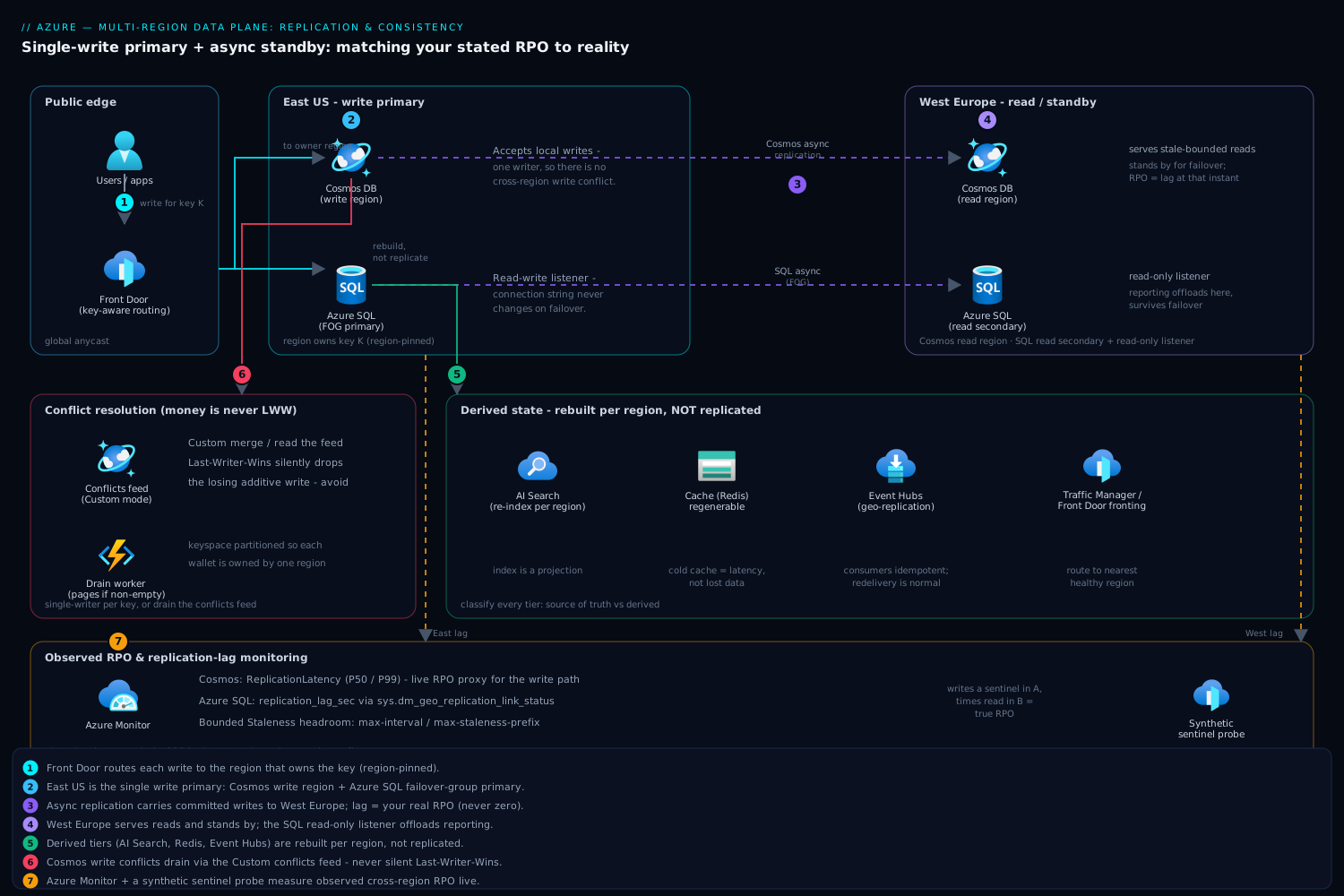
Single write region (multiple read regions). One region owns writes; others serve reads and stand by for failover. There are no write conflicts because there is only one writer. RPO on a hard failure of the write region equals your replication lag at that instant - typically single-digit seconds, never zero, because replication to the read regions is asynchronous. This is the right default for ledger-like data when you cannot tolerate conflict resolution picking a loser.
Multi-write (multi-master). Every region accepts writes locally with single-digit-millisecond latency and no cross-region hop. The price is that two regions can write the same item concurrently, and Cosmos DB will produce a conflict it has to resolve. You own that resolution policy.
Enable multi-region writes and choose a conflict resolution policy at the container level:
# Turn on multi-write at the account level
az cosmosdb update \
  --name kv-orders-cosmos \
  --resource-group kv-data-rg \
  --enable-multiple-write-locations true
Cosmos DB offers two conflict resolution modes:
- Last Writer Wins (LWW) on a numeric or timestamp property. Simple, deterministic, and silently discards the losing write. Acceptable for idempotent or naturally-newer-wins data (a profile update), dangerous for anything additive.
- Custom (merge procedure) - a stored procedure runs on conflict so you can merge, or you read from the conflicts feed and resolve in application code. This is the only safe option when a discarded write means lost money.
resource "azurerm_cosmosdb_sql_container" "orders" {
  name                = "orders"
  resource_group_name = azurerm_cosmosdb_account.this.resource_group_name
  account_name        = azurerm_cosmosdb_account.this.name
  database_name       = azurerm_cosmosdb_sql_database.this.name
  partition_key_paths = ["/customerId"]

  conflict_resolution_policy {
    mode                     = "LastWriterWins"
    conflict_resolution_path = "/_ts"
  }
}
For custom resolution, set mode = "Custom" and either name a stored procedure via conflict_resolution_procedure or leave it empty to drain the conflicts feed yourself. The conflicts feed is the part teams forget: if you choose Custom with no procedure and never read the feed, conflicts pile up unresolved. Drain it.
Rule of thumb: use multi-write only for data classes that are conflict-free by construction (per-region ownership, append-only) or genuinely mergeable. For money, prefer single-write with fast failover, or partition the keyspace so each region owns a disjoint set of keys and conflicts cannot occur.
Step 4 - Azure SQL active geo-replication and auto-failover groups
Relational data does not get multi-master on Azure SQL. You get asynchronous replication to readable secondaries, and the question is how failover is orchestrated.
- Active geo-replication creates readable secondary databases in other regions. Replication is asynchronous, so RPO is non-zero (target on the order of seconds). Failover is per-database and you point connection strings at the new primary yourself.
- Auto-failover groups wrap one or more databases with a pair of stable listener endpoints - a read-write listener and a read-only listener - so your connection string never changes on failover. The group fails over together, which keeps related databases consistent with each other.
Create a failover group with the CLI:
az sql failover-group create \
  --name kv-sql-fog \
  --resource-group kv-data-rg \
  --server kv-sql-primary \
  --partner-server kv-sql-secondary \
  --partner-resource-group kv-data-rg \
  --failover-policy Automatic \
  --grace-period 1 \
  --add-db kv-orders-db kv-billing-db
Two flags carry real weight. --failover-policy Automatic lets Azure initiate failover after a sustained outage; Manual keeps a human in the loop. --grace-period (hours, minimum 1) is how long the service tolerates the outage before automatic failover triggers. A longer grace period reduces false failovers but extends your outage; a shorter one fails over fast but risks flapping on transient blips. There is no universally right number - it follows from your RTO budget.
Critical nuance most miss: automatic failover with Automatic policy is allowed to lose committed transactions up to your RPO, because replication is async. If you need zero data loss, you must issue a planned failover (which synchronizes first) for maintenance, and accept potential loss only on unplanned events. Wire your application connection string to the listener, never to the server name:
Server=tcp:kv-sql-fog.database.windows.net,1433;Database=kv-orders-db;...
Send read-only workloads to the read-only listener (same name with the read-only intent) so reporting traffic offloads to the secondary and survives failover automatically.
Step 5 - Cache, search, and event-store replication across regions
The primary store is rarely the whole story. Three supporting tiers each need a deliberate cross-region decision.
Cache (Azure Cache for Redis). Active geo-replication for Redis is available on the Enterprise tiers and links caches into a geo-replication group with active-active writes; the Premium tier’s older passive geo-replication is read-only on the secondary. Treat cache as derived, regenerable state regardless. Do not let a cache become a system of record - on regional failover, a cold cache costs latency, not correctness, and that is the right tradeoff.
Search (Azure AI Search). There is no built-in cross-region replication of an index. The standard pattern is to deploy an independent search service per region and re-index from the source of truth in each region, fronted by Traffic Manager or Front Door. The index is a projection; rebuild it regionally rather than trying to replicate it.
Event store / streaming (Event Hubs). Use Event Hubs geo-replication (or the older Geo-DR pairing, which replicates metadata and provides an alias for failover). Be precise about which you enable: Geo-DR replicates the namespace configuration, not the event data, whereas the newer geo-replication feature replicates data with a measurable lag. Consumers must be idempotent because at-least-once delivery plus failover means redelivery is normal, not exceptional.
The unifying principle: classify each tier as source of truth or derived. Replicate sources of truth carefully; rebuild derived state regionally and stop paying to replicate it.
Step 6 - Measuring real RPO and detecting silent replication lag
Your configured RPO is a target. Your actual RPO is whatever the replication lag was at the instant the region failed. The only way to know it is to measure lag continuously.
For Azure SQL, query replication lag and link status directly:
SELECT
    link_guid,
    partner_server,
    partner_database,
    replication_state_desc,
    last_replication,
    replication_lag_sec
FROM sys.dm_geo_replication_link_status;
Alert when replication_lag_sec exceeds your RPO budget. A link in CATCH_UP with rising lag is your early warning that a failover right now would breach RPO - that is the signal to throttle writes or hold off on a planned failover.
For Cosmos DB, watch these in Azure Monitor and alert on them:
- Replication Latency (P50/P99 between regions) - your live RPO proxy for the write path.
- Service Availability per region.
- For Bounded Staleness, track how close you run to your configured
max-intervalandmax-staleness-prefix; approaching the bound means reads are about to block.
az monitor metrics list \
  --resource "$COSMOS_RESOURCE_ID" \
  --metric "ReplicationLatency" \
  --interval PT1M \
  --aggregation Average Maximum
The failure mode that hurts most is silent lag: replication is technically “healthy” but minutes behind because of a throughput throttle or a hot partition. Synthetic probes catch this. Write a sentinel record with a timestamp in region A every few seconds and measure when it becomes readable in region B. That observed delay is your true RPO - trust it over the config.
Step 7 - Idempotency and outbox patterns to survive partial failure
Replication lag and failover guarantee that, eventually, an operation will be retried or partially applied. Two patterns make that survivable rather than corrupting.
Idempotency. Every state-changing operation carries a client-generated idempotency key, and the server deduplicates on it. A retry after a failover then becomes a no-op instead of a double charge. In Cosmos DB, model the idempotency key as (part of) the item id or a unique key so a duplicate insert fails cleanly:
{
  "id": "order-9f2c1a7e-3b4d-4e8a-9c10-7d2f5b6e1a44",
  "customerId": "cust-42",
  "idempotencyKey": "9f2c1a7e-3b4d-4e8a-9c10-7d2f5b6e1a44",
  "amount": 129.00,
  "status": "pending"
}
Transactional outbox. The classic dual-write bug: you commit to the database, then publish an event, and the process dies in between - now the database and the event stream disagree, and replication propagates the inconsistency. The outbox pattern fixes it by writing the business change and the outbox event in the same transaction (or same Cosmos partition via a transactional batch), then a separate relay reads the outbox and publishes. Because the event is committed atomically with the data, it cannot be lost; because the relay is at-least-once, the consumer must be idempotent - which closes the loop with the pattern above.
With Cosmos DB, the outbox row and the aggregate must share a partition key for the batch to be atomic:
var batch = container.CreateTransactionalBatch(
    new PartitionKey(order.CustomerId));
batch.CreateItem(order);
batch.CreateItem(outboxEvent);   // same partition key (CustomerId)
await batch.ExecuteAsync();
Outbox plus idempotency is what turns “we replicate” into “we do not lose or duplicate writes across a failover.” Without them, async replication will eventually hand you a corrupted invariant.
Enterprise scenario
A payments platform ran Cosmos DB multi-write across East US and West Europe so checkout latency stayed local on both continents. The wallet ledger used mode = "LastWriterWins" on /_ts because nobody had revisited the container policy since the single-region days. A customer with a flaky connection double-submitted a top-up; the retry landed in West Europe while the original was still replicating from East US. Both writes carried near-identical timestamps, LWW kept the later one, and one of two legitimate balance increments vanished. The reconciliation job caught a 50-euro drift the next morning - one of dozens that quarter.
The root cause was treating an additive, conflict-prone value as last-write-wins. The fix was not weaker consistency, it was removing the conflict surface entirely. We partitioned the keyspace so each wallet is owned by exactly one region (region pinned in the partition key prefix), routed every write for a wallet to its owner via Front Door, and switched the container to Custom resolution so the conflicts feed would surface anything that still slipped through instead of silently discarding it.
conflict_resolution_policy {
  mode = "Custom"   # drain the conflicts feed; never silently drop
}
A drain worker reads container.Conflicts.GetConflictQueryIterator<...>() every few seconds and pages anyone if it is ever non-empty. After the change, the morning drift went to zero. The lesson the team wrote into the ADR: money is never LWW - either single-writer per key, or you read the conflicts feed.
Verify
Confirm the data plane behaves as designed before you depend on it:
# 1. Confirm Cosmos consistency and write topology
az cosmosdb show \
  --name kv-orders-cosmos --resource-group kv-data-rg \
  --query "{consistency:consistencyPolicy.defaultConsistencyLevel, multiWrite:enableMultipleWriteLocations, regions:writeLocations[].locationName}"

# 2. Confirm the SQL failover group is synced and its current primary
az sql failover-group show \
  --name kv-sql-fog --server kv-sql-primary --resource-group kv-data-rg \
  --query "{role:replicationRole, state:replicationState, policy:readWriteEndpoint.failoverPolicy}"
- Run the SQL
sys.dm_geo_replication_link_statusquery on the primary and confirmreplication_lag_secis within budget. - Trigger a planned failover group failover in a maintenance window and confirm the application reconnects via the listener with zero connection-string changes and zero lost rows.
- Force a Cosmos write conflict (concurrent writes to one id in two regions) and confirm your policy resolves it the way you expect - and that the conflicts feed is empty afterward.
- Confirm your synthetic lag probe is emitting an observed cross-region RPO metric and that an alert fires when you inject artificial lag.
Pre-production checklist
Pitfalls
The recurring ways teams lose writes: assuming “geo-replication enabled” means RPO zero (it is async - it never does); choosing Last Writer Wins for additive data and silently dropping the loser; enabling Custom conflict resolution and never reading the conflicts feed; pointing the application at a server name instead of the failover-group listener, so failover requires a redeploy; and treating a cache or search index as a system of record. Fix the data plane first - elegant global routing in front of a data layer that drops writes during failover is a worse outcome than a single healthy region, because it fails silently.
Next steps: instrument observed RPO as a first-class SLI, automate a quarterly failover game day that measures real data loss, and revisit each data class’s consistency decision whenever its access pattern or business criticality changes.