A regional hospital network — eleven sites, an electronic health record system, a PACS imaging archive, a patient portal, and a back office that runs partly on AWS, partly on Azure, with analytics on GCP — gets a 6 a.m. call no CIO wants. The overnight ransomware gang did not just encrypt the production EHR database. They spent three weeks living quietly inside the estate first, and on the way to the payload they found the backup console, deleted the retention chain, and encrypted the backup repository too. Now the hospital is diverting ambulances, charting on paper, and discovering that “we have backups” and “we can recover from this attack” are very different statements. The board’s question to the architecture team afterward is blunt: build us a backup platform that survives the attacker who is already inside and specifically hunting our backups. This article is that platform — a Veeam-centric, multi-cloud, ransomware-resilient backup and recovery design built so the last line of defense cannot be deleted, cannot be encrypted, and can be restored into an environment the attacker has never touched.
The pressures here are specific to the threat. Modern ransomware is not a smash-and-grab; it is a dwell-and-destroy campaign that targets backups first because attackers know that a victim with working backups does not pay. Healthcare is the most-attacked sector because downtime is measured in patient safety, which makes the ransom note credible. Compliance (HIPAA, and the breach-notification clock that starts ticking the moment exfiltration is suspected) means recovery has to be auditable and the recovered data has to be proven clean. And multi-cloud means there is no single native backup tool that covers everything — the EHR’s EC2 and RDS on AWS, the portal’s Azure VMs and Azure SQL, and the BigQuery-fed analytics on GCP all need one coherent recovery story, not three disconnected ones.
Why the obvious backup setup fails against ransomware
Three common postures each fail predictably, and naming why matters because the hospital had all three before the incident.
Cloud-native snapshots alone (EBS snapshots, Azure disk snapshots, GCP persistent-disk snapshots) live in the same cloud account as the workload. An attacker who compromises the account — or the IAM role the backup automation uses — can delete every snapshot with one API call, and many ransomware crews now script exactly that. Snapshots are a fast-recovery convenience, not a defense against an adversary with control-plane access.
A single backup repository, even off-box, fails the moment the attacker reaches it. If the backup server can write and delete in the repository, so can whoever owns the backup server’s credentials after lateral movement. The hospital’s repository was deleted precisely because it was reachable and mutable from a compromised admin host.
Backups with no tested recovery are a spreadsheet entry, not a capability. Restoring an entire EHR estate into production while the production environment is still compromised simply re-infects the restore. Without a clean place to recover into and a rehearsed sequence, “we have backups” collapses into days of improvisation under maximum pressure.
The design that survives all three is built on a principle older than the cloud — 3-2-1-1-0 — modernized for ransomware: three copies of the data, on two different media, with one copy off-site, one copy immutable or air-gapped, and zero recovery errors verified by testing. Veeam is the engine that implements it across all three clouds, and immutability plus a clean room are the two ideas that turn a backup into a recovery.
Architecture overview
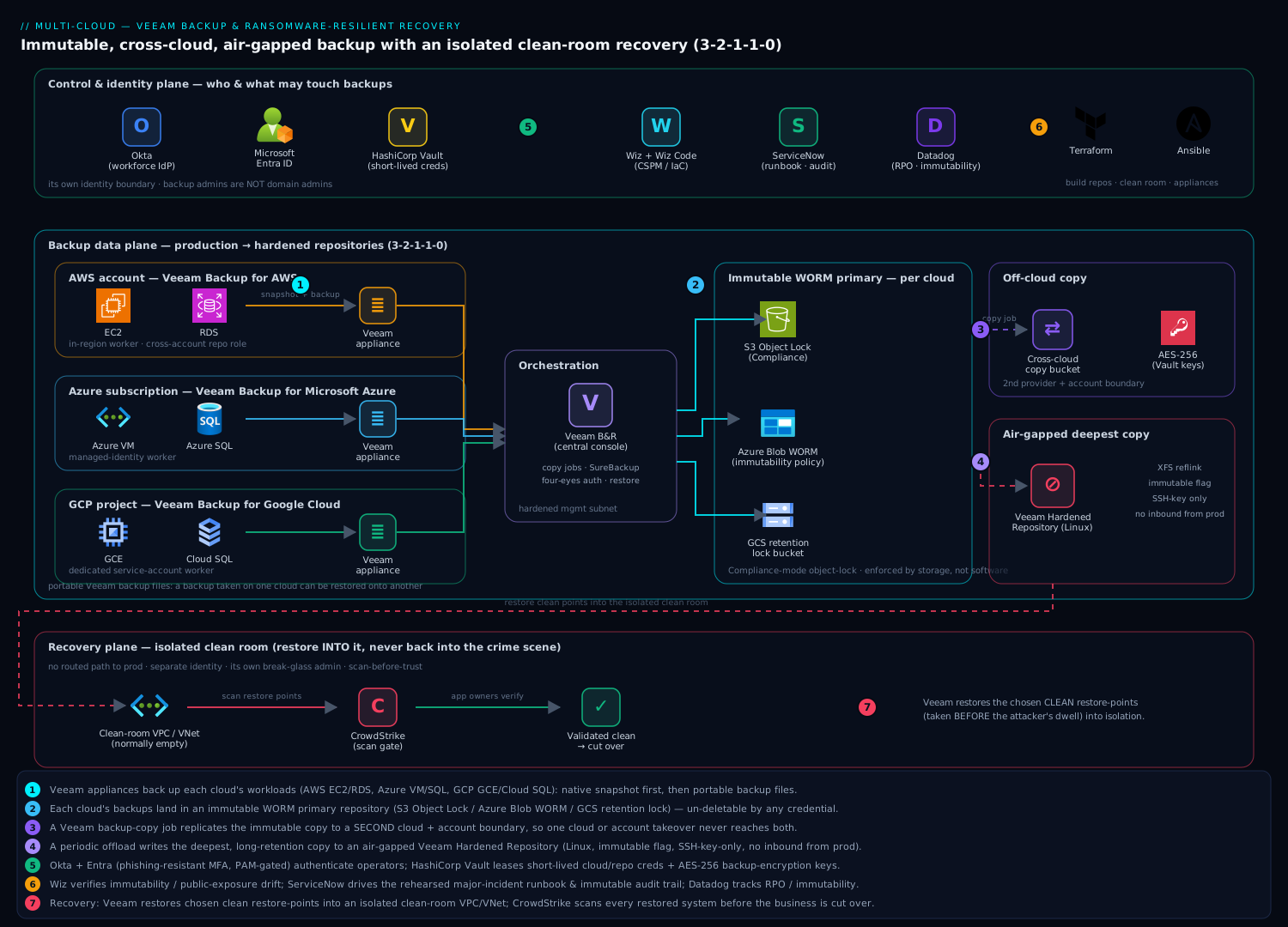
The platform has three logical planes that you must keep distinct in your head: a backup data plane that moves data from production into hardened repositories, a control and identity plane that decides who and what may touch backups, and a recovery plane — an isolated clean room — that exists only to bring the business back after an attack.
The defining property of the whole design is the one the board cares about most: the immutable copy of the backup cannot be modified or deleted by anyone — not an attacker, not a rogue admin, not the backup server itself — until its retention clock expires. That single guarantee, enforced by object-lock at the storage layer rather than by a setting in the backup software, is what makes the platform survive an adversary with full administrative control of the production estate.
Backup data plane, following the flow:
- In each cloud, a Veeam transport appliance runs close to the workloads. Veeam Backup for AWS snapshots EC2 and RDS and reads them through a worker in the same region; Veeam Backup for Microsoft Azure does the same for Azure VMs and Azure SQL; Veeam Backup for Google Cloud covers GCE and Cloud SQL. These cloud-native plug-ins, plus classic Veeam Backup & Replication (VBR) for any VMs and file shares, are orchestrated as one estate from a central VBR server.
- Each appliance takes a fast cloud-native snapshot first (low RPO, quick operational restores) and then copies that data into a Veeam backup repository as portable Veeam backup files — the format that lets a backup taken on AWS be restored onto Azure or GCP, which is the property that makes multi-cloud recovery possible at all.
- The primary repository is an immutable object-lock bucket: Amazon S3 with Object Lock in Compliance mode, Azure Blob with an immutability policy / version-level WORM, or GCS with a bucket retention lock. Veeam writes backups here with a hardened retention so that for the lock period, the objects are write-once-read-many — un-deletable by any credential, including Veeam’s own.
- A backup copy job then replicates that immutable backup to a second repository in a different cloud and a different account boundary — Azure’s copy lands on AWS, AWS’s copy lands on GCP — so a single-cloud compromise or single-account takeover never reaches both the primary and the copy.
- A periodic job offloads the long-retention, end-of-chain copy to an air-gapped target: either a Veeam Hardened Repository (a Linux box with immutable flags and SSH-key-only access, on a network segment unreachable from the production planes) or rotated/offline media for the deepest archive. This is the copy that exists for the worst day — the one the attacker provably cannot reach over the network.
Control and identity plane: the central VBR console and all three cloud appliances authenticate operators through Okta as the workforce IdP, federated to Microsoft Entra ID for the Azure-side resources, with phishing-resistant MFA and a privileged-access role required for any backup or restore operation — because in this design the backup admin is the single most valuable identity in the company. The credentials Veeam itself needs — cloud API keys for the snapshot workers, the repository service accounts, the encryption passwords for the backup files — are not stored in Veeam’s database; they are issued and rotated by HashiCorp Vault, leased short-lived so a stolen backup-server image yields no usable long-term secret. Backup files are AES-256 encrypted at rest with keys held in Vault, so even an attacker who somehow exfiltrates a repository copy gets ciphertext.
Recovery plane (the clean room): a pre-built, normally-empty isolated recovery VPC/VNet with no routed path to production, no shared identity, and its own break-glass admin. After an incident, Veeam restores into this clean room first, the restored data is scanned, and only then is the business cut back over. The clean room is the difference between recovering from the attack and recovering into it.
Component breakdown
| Component | Tool / service | Role in the platform | Key configuration choices |
|---|---|---|---|
| AWS backups | Veeam Backup for AWS | EC2/RDS snapshot + backup to repository | In-region worker; cross-account repository role; snapshot + backup tiers |
| Azure backups | Veeam Backup for Microsoft Azure | Azure VM / Azure SQL backup | Managed-identity worker; backup to immutable Blob |
| GCP backups | Veeam Backup for Google Cloud | GCE / Cloud SQL backup | Service-account worker; backup to GCS retention-lock bucket |
| Orchestration | Veeam Backup & Replication (VBR) | Single console, copy jobs, SureBackup, restore | Central server in a hardened management subnet |
| Immutable primary | S3 Object Lock / Azure WORM / GCS retention lock | Un-deletable WORM backup copy | Compliance-mode lock; retention ≥ longest recovery need |
| Off-cloud copy | Backup copy job to a second cloud | Survives single-cloud/account compromise | Different provider + different account boundary |
| Air-gapped copy | Veeam Hardened Repository (Linux, immutable) | Offline/unreachable deepest copy | XFS reflink; immutable flag; SSH-key only; no inbound from prod |
| Identity / SSO | Okta + Microsoft Entra ID | Operator SSO, MFA, privileged access for backup ops | Phishing-resistant MFA; PAM role gating restores |
| Secrets / keys | HashiCorp Vault | Cloud API keys, repo creds, AES backup-encryption keys | Dynamic short-lived leases; KMS-backed key storage |
| Recovery target | Isolated clean-room VPC/VNet | Malware-free environment to restore into and validate | No routed path to prod; separate identity; break-glass admin |
| Posture / CSPM | Wiz + Wiz Code | Verify immutability, public-exposure drift, IaC guardrails | Alert if a bucket loses Object Lock or goes public; scan Terraform pre-merge |
| Threat detection | CrowdStrike Falcon | Detect the dwell phase + scan restored data in the clean room | Sensors on prod + clean-room hosts; on-restore malware scan gate |
| Observability | Datadog (or Dynatrace) | Backup success, immutability state, RPO drift, job latency | Veeam metrics; alert on missed/failed/altered jobs |
| ITSM / runbook | ServiceNow | Declares the disaster, drives the recovery runbook, audit trail | Major-incident workflow; approval gates; immutable record |
| Automation / IaC | Terraform + Ansible | Build repositories, clean room, appliances repeatably | Locked-down state; clean room deployable on demand |
| CI for IaC | GitHub Actions (or Jenkins) | Apply infrastructure with no stored cloud creds | OIDC to clouds; Wiz Code gate before apply |
A few of these choices carry the whole design, and they are the ones teams get wrong.
Why immutability has to live in storage, not in Veeam. It is tempting to rely on Veeam’s “deleted backups stay in the recycle bin” feature and call it immutable. Do not. A setting enforced by the backup application is only as strong as the backup application’s own credentials — exactly what the attacker steals. Object Lock in Compliance mode is enforced by the cloud storage service itself, which will refuse a delete or overwrite from any principal, including the root account and Veeam’s own service identity, until the retention timestamp passes. That is the property that survives a fully-compromised backup server. The trade is real: in Compliance mode you genuinely cannot shorten retention or delete early even when you want to, so you size the lock period deliberately.
Why a copy in a different cloud, not just a second bucket. A second S3 bucket in the same AWS account dies with the account. The backup copy job deliberately lands the second copy across a provider and account boundary, so the blast radius of a single cloud compromise, a single billing/account takeover, or even a regional outage never includes both your primary and your copy. This is also where multi-cloud stops being a backup problem and becomes a backup advantage — three independent control planes are three independent failure domains.
Why a clean room is non-negotiable. Restoring straight into production after ransomware re-introduces the malware that is still resident there and re-encrypts the restore — a documented way that recoveries fail twice. The clean room is a pre-staged, isolated environment with no trust relationship to production; you restore there, scan the restored data with CrowdStrike before it is trusted, validate the application comes up, and only then cut the business over to clean infrastructure rather than to the crime scene.
Implementation guidance
Build the repositories and the clean room with Terraform first — they are the deliverable, not the workloads. The order matters because immutability must be on before the first backup lands; a bucket that gets Object Lock added later still contains earlier, deletable objects.
- Create the immutable primary bucket per cloud with object-lock/WORM enabled at creation, plus the cross-cloud copy bucket and the hardened-repository host on its isolated segment.
- Stand up the cloud-native Veeam appliances with least-privilege roles — the AWS worker role can snapshot and write to the repository but cannot delete from the immutable bucket; the Azure worker uses a managed identity; the GCP worker a dedicated service account.
- Pre-build the clean-room VPC/VNet as code so it can be deployed empty and brought to life only during a test or a real incident — paying for nothing until needed.
- Wire Vault as the source of every cloud credential and the AES backup-encryption keys, and point VBR, the appliances, and the repositories at it.
A minimal Terraform shape for the immutable AWS primary communicates the intent — locked at creation, compliance mode:
resource "aws_s3_bucket" "veeam_immutable" {
  bucket              = "hospital-veeam-immutable-use1"
  object_lock_enabled = true                    # must be set at creation
}

resource "aws_s3_bucket_object_lock_configuration" "lock" {
  bucket = aws_s3_bucket.veeam_immutable.id
  rule {
    default_retention {
      mode = "COMPLIANCE"                        # un-deletable by ANY principal
      days = 30                                  # WORM window for operational copies
    }
  }
}

resource "aws_s3_bucket_public_access_block" "block" {
  bucket                  = aws_s3_bucket.veeam_immutable.id
  block_public_acls       = true
  block_public_policy     = true
  ignore_public_acls      = true
  restrict_public_buckets = true
}
The pipeline that applies this runs in GitHub Actions authenticating to each cloud via OIDC federation, so there is no long-lived cloud secret stored in CI to steal — and Wiz Code scans the Terraform on every pull request to fail the build if a repository is declared without object-lock or with public access. Ansible then configures the Veeam appliances and the hardened repository (the immutable filesystem flag, SSH-key-only login, the single-use service account) so the hardened box is reproducible and auditable rather than a hand-built pet.
Set immutability on the Veeam jobs to match the storage lock, and turn on four-eyes authorization in VBR so a single compromised admin cannot disable backup jobs or alter retention alone:
# Veeam backup repository (immutable object storage)
Make recent backups immutable for: 30 days     # matches the S3 Compliance lock
Backup encryption: Enabled (AES-256, key from HashiCorp Vault)
Storage-level corruption guard: Enabled (weekly health check)
# VBR security
Four-eyes authorization: Required for delete / retention change
MFA for console + Okta SSO: Required
Enterprise considerations
Security: protect the backups like the crown jewels they are. In a ransomware design the threat model is an attacker already inside with admin rights, so the controls are inverted from normal least-privilege thinking — the goal is that even a fully-trusted insider account cannot destroy the recovery path. Concretely: (a) the immutable object-lock copy and the air-gapped hardened repository mean the un-deletable copies survive any credential compromise; (b) Okta + Entra with phishing-resistant MFA and a PAM-gated privileged role make the backup-admin identity hard to take over and impossible to use quietly; © HashiCorp Vault issues short-lived, rotated credentials so a stolen backup-server image yields no durable keys, and holds the AES keys so an exfiltrated repository is ciphertext; (d) CrowdStrike Falcon sensors watch production for the weeks-long dwell phase — the lateral movement and the reconnaissance against the backup console — to catch the attack before the payload, and run the mandatory malware scan on restored data inside the clean room; (e) Wiz continuously verifies that no repository has drifted to public, lost its object-lock policy, or had its retention weakened, and raises a ServiceNow incident the instant it does. The single most important hardening rule: the backup infrastructure has its own identity boundary — backup admins are not domain admins, and a compromise of production Active Directory / Entra does not grant any standing access to the repositories.
Reliability & DR — set the numbers per tier. Not every workload deserves the same recovery effort, and pretending otherwise wastes money and slows the real recovery.
| Tier | Example workload | RPO target | RTO target | Mechanism |
|---|---|---|---|---|
| Tier 0 (life-critical) | EHR database, PACS imaging | ~15 min | < 2 hr | Frequent cloud-native snapshots + immutable backup; clean-room restore rehearsed |
| Tier 1 (business-critical) | Patient portal, scheduling | ~1 hr | < 8 hr | Hourly backups; cross-cloud copy |
| Tier 2 (standard) | Back-office, internal apps | ~24 hr | < 48 hr | Daily backup to immutable + air-gap |
| Tier 3 (archive) | Compliance retention, logs | N/A | Days | Air-gapped long-retention copy only |
The recovery for Tier 0 is the one you rehearse until it is boring. Veeam SureBackup boots restored machines in an isolated sandbox on a schedule and runs automated tests — does the OS start, does the database accept a connection, does the application respond — which is how you achieve the “0” in 3-2-1-1-0: recoverability verified by testing, not assumed. A backup you have never restored is a hypothesis.
The ransomware recovery runbook — the deliverable the board actually asked for. When the call comes, improvisation is the enemy; the runbook lives in ServiceNow and is rehearsed quarterly:
- Declare and isolate. Open a major-incident record in ServiceNow; segment or sever the affected networks so the attacker loses reach; do not touch the immutable or air-gapped copies — they are already protected and are now evidence.
- Determine clean recovery points. Using CrowdStrike’s timeline and Veeam’s restore-point history, identify the last backup taken before the attacker’s dwell began — recovering to a point after intrusion just restores a primed system. The deep retention on the air-gapped copy exists precisely so a weeks-long dwell does not expire your clean point.
- Deploy the clean room. Terraform-apply the isolated recovery VPC/VNet from scratch, with fresh credentials and no trust to production.
- Restore into isolation and scan. Veeam restores the chosen clean points into the clean room; CrowdStrike scans every restored system and dataset; only scanned-clean data is promoted.
- Validate, then cut over. Bring up the EHR and portal in the clean room, validate with the application owners, then fail the business over to the clean environment — not back to the contaminated one — and rebuild production from clean images behind it.
- Audit. ServiceNow holds the immutable timeline for the HIPAA breach report and the post-incident review.
Cost optimization. Immutable, multi-cloud, air-gapped backups are not free, so engineer the spend.
| Lever | Mechanism | Effect |
|---|---|---|
| Tier the retention | Long immutability only on Tier 0/archive; short on the rest | Avoids paying WORM storage for everything |
| Storage classes | Move end-of-chain copies to S3 Glacier / Azure Archive / GCS Coldline | Deep archive at a fraction of hot-storage cost |
| Right-size the lock window | Compliance-mode days = real recovery need, not “max” | You pay for every locked day; do not over-lock |
| Clean room on demand | Terraform the recovery VPC only during test/incident | Pay near-zero until the day you need it |
| Dedup + compression | Veeam block dedup and compression to the repositories | Cuts stored and egress bytes materially |
| Watch egress | Keep each cloud’s primary copy in-cloud; cross-cloud copy is the one egress hop | Avoids surprise data-transfer bills |
Meter backup storage and job health in Datadog and alert on RPO drift (a job whose last good point is older than its tier allows) and on any change to immutability state — a silently failing or silently weakened backup is the failure that only surfaces on the worst day.
Scalability. Each cloud’s appliances scale independently — add Veeam workers per region to parallelize snapshots as the estate grows, and scale the repository by adding object storage, which is effectively unbounded. The orchestration is the part to plan: one VBR console can drive thousands of workloads, but for a large multi-site estate you size the copy-job concurrency and the network paths so the cross-cloud copy keeps pace with the daily change rate. The natural ceiling is backup-window throughput vs. data change rate — if daily change outgrows what you can copy off-cloud overnight, you add workers and parallel streams, or move the heaviest workloads to more frequent incremental forever chains.
Observability. Instrument the full backup lifecycle in Datadog: per-job success/failure, immutability-flag state, restore-point age vs. tier RPO, copy-job lag, and SureBackup verification results. The metrics the business cares about are recoverability (when did each Tier 0 workload last pass a SureBackup test) and immutability assurance (is every required copy provably locked right now) — surfaced on a dashboard the CISO reviews, because the only acceptable time to discover a broken backup is on a Tuesday during a test, never at 6 a.m. during an attack.
Explicit tradeoffs
Accept these or do not build it. Compliance-mode immutability means you genuinely cannot delete early — not to save money, not to fix a mistake, not even with root — so a fat-fingered huge retention is expensive and permanent; you mitigate with careful lock-window sizing and four-eyes change control, not with the ability to undo. The air-gapped hardened repository adds operational friction precisely because it is hard to reach — that is the point, and it means restores from the deepest copy are slower by design. Multi-cloud copies add egress cost and a second cloud’s worth of operational surface, the price of not having all your recovery eggs in one provider’s basket. The clean room adds a whole isolated environment to build and rehearse, and a real recovery is slower than a naive restore-in-place because you scan before you trust — which is exactly why it works. And running three clouds’ worth of Veeam plug-ins under one console is more moving parts than a single-cloud shop will ever need.
The alternatives, and when they win. If you are single-cloud, that cloud’s native backup vault with immutability plus a logically-air-gapped copy (AWS Backup Vault Lock, Azure Backup immutable vault, GCP Backup and DR) is simpler and may be enough — you reach for Veeam when you genuinely span clouds or need a single recovery model across them. If you are a small team with low-criticality data, full 3-2-1-1-0 with a clean room is over-engineering; a immutable copy and an occasional test restore may suffice. And if your recovery objective is seconds, not hours, backup is the wrong tool entirely — you want replication / continuous DR for the hot path and treat immutable backup as the ransomware-survivable floor beneath it. The two compose: replicate for speed, keep an immutable air-gapped backup for the day the replica is encrypted too.
The shape of the win
For the hospital, the payoff is not “we have backups” — they had backups before, and the attacker deleted them. The payoff is the sentence the CISO can finally say to the board: when the adversary is already inside with admin rights and goes hunting for our backups, the copy that brings the hospital back is one they provably cannot reach, encrypt, or delete, and we restore it into an environment they have never touched — and we know it works because we rehearse it every quarter. Everything upstream — the object-lock immutability enforced by storage rather than software, the cross-cloud copy across an account boundary, the air-gapped hardened repository, the Okta/Entra-gated and Vault-keyed access, the CrowdStrike dwell detection and clean-room scan, the ServiceNow runbook — exists to make that one sentence true. Start with immutability on your most critical workload if you must, but in a sector where downtime is a patient-safety event, this is where ransomware resilience has to land.