A mid-size online education company — call it the kind of outfit that runs courses for a few hundred thousand learners on Moodle — has a storage bill that doubled in eighteen months, and nobody can explain why. The platform lead pulls the numbers and the answer is almost embarrassing: every lecture video, every PDF handout, every learner-uploaded assignment, every thumbnail, and every nightly database export is sitting in the same place, on the most expensive storage tier the cloud sells, forever. A 2019 cohort’s submitted assignments that no human will ever open again cost exactly as much per gigabyte as last night’s freshly recorded lecture. There is no versioning, so when a content editor overwrote the wrong course manifest last month, the only recovery was a frantic Slack thread. And the videos are served straight from storage to learners worldwide, so a popular launch hammers a single region’s bucket and the egress charges spike like a heart monitor.
None of these are exotic problems. They are the default problems you get when a team treats object storage as a magic infinite folder and never learns the three controls that make it cheap, safe, and fast: storage classes (tiers), lifecycle policies, and versioning with soft delete. This article is object storage from the ground up — what a bucket actually is, how the three big clouds name the same ideas differently, and how to wire it into a real platform so that the education company’s bill stops doubling and its content stops disappearing. It is a Junior-level tour, but everything in it is what a senior architect actually configures on day one.
What object storage actually is
Start with what it is not. It is not a disk you mount, and it is not a file system with folders. There are no real directories, no file handles, no partial in-place edits, and no POSIX permissions. Object storage is closer to a giant hash map: you PUT an object under a key and you GET it back by that key. That single design choice is why it scales to trillions of objects and eleven-nines of durability while a traditional file server falls over at a few million files.
An object is three things bundled together:
- Data — the bytes themselves: a 4 GB lecture video, a 200 KB PDF, a one-line JSON manifest.
- A key — the unique name, like
videos/course-204/lecture-07.mp4. The slashes look like folders, but they are just characters in a flat key; the “folder” is a UI convenience, not a real thing on disk. - Metadata — system metadata (size, last-modified, content-type, storage class) plus your own custom key-value tags.
A bucket (AWS S3 and Google Cloud Storage call it a bucket; Azure calls it a container, living inside a storage account) is the top-level namespace that holds objects. It is where you attach the policies that matter: which region the data lives in, who can read it, whether versioning is on, and what lifecycle rules apply. Get the bucket right and most other decisions follow.
Three properties define the whole product category, and a beginner should internalize them before touching a console:
- Durability is extreme, availability is merely good. The major clouds design for eleven nines (99.999999999%) of durability — they replicate each object across multiple devices and availability zones so the practical chance of losing a stored object is vanishingly small. Availability (the chance it answers right now) is a separate, lower number, and it varies by tier. Durability protects you from hardware; it does not protect you from you deleting or overwriting the wrong thing — that is what versioning is for.
- It speaks HTTP, not a file protocol. Every object has a URL and you talk to it with
GET/PUT/DELETEover HTTPS. That is exactly why it pairs so naturally with a CDN and with browsers. - You pay for three different things. Storage (per GB-month), requests (per thousand operations), and egress (per GB leaving the cloud to the internet). Beginners watch only the first number; the bill that doubled was driven by the third.
The three clouds, one mental model
The single most useful thing for a newcomer is to see that S3, Azure Blob, and Google Cloud Storage are the same idea with different vocabulary. Learn one and you have learned all three; only the names and a few defaults change.
| Concept | AWS S3 | Azure Blob Storage | Google Cloud Storage |
|---|---|---|---|
| Top-level container | Bucket | Container (in a Storage Account) | Bucket |
| The stored thing | Object | Blob | Object |
| “Hot” / frequent tier | S3 Standard | Hot | Standard |
| Infrequent tier | Standard-IA / One Zone-IA | Cool | Nearline (30d) / Coldline (90d) |
| Archive tier | Glacier Flexible / Deep Archive | Archive | Archive (365d) |
| Automatic tiering | S3 Intelligent-Tiering | (lifecycle rules / access tiers) | Autoclass |
| Lifecycle engine | S3 Lifecycle | Blob lifecycle management | Object Lifecycle Management |
| Keep old versions | S3 Versioning | Blob versioning | Object Versioning |
| Recover deletes | Versioning + MFA Delete | Soft delete (blob & container) | Soft delete + versioning |
| Pre-signed access | Pre-signed URL | SAS (Shared Access Signature) | Signed URL |
| Server-side encryption key | SSE-S3 / SSE-KMS | Microsoft-managed / CMK | Google-managed / CMEK |
The shape is identical everywhere: a container holds objects, objects live in a class/tier, a lifecycle engine moves them between tiers and eventually deletes them, versioning keeps history, and a signed URL hands out scoped temporary access. The education company happens to run primarily on AWS for its Moodle deployment, so the worked example below uses S3 names — but every rule maps one-for-one to Azure and GCP via the table.
Storage classes: pay for the access pattern, not the bytes
The first lever that fixes the bill is storage classes, also called tiers. The insight is simple: not all data is accessed the same way, so you should not pay the same for all of it. Clouds offer a spectrum, and you trade retrieval cost and latency for cheaper storage.
- Hot / Standard — millisecond access, highest storage price, no retrieval fee. For data read often: this week’s lecture videos, the live course catalog, active thumbnails.
- Infrequent / Cool / Nearline — same millisecond access, ~40–50% cheaper storage, but you pay a small per-GB retrieval fee and usually commit to a minimum storage duration (30 days). For data read occasionally: last term’s recordings, completed-course materials.
- Archive / Coldline / Deep Archive — the cheapest storage by far (often 1/20th of hot), but retrieval takes minutes to hours and costs more, with 90–365 day minimums. For data you must keep but almost never read: 2019’s assignment submissions, year-old database exports kept for compliance.
The trap that beginners and the education company both fell into: leaving everything in the hot tier “to be safe.” The fix is not to manually move objects — nobody has time — it is to let lifecycle policies do it automatically, and for genuinely unpredictable access patterns, to use the automatic tiers.
When you cannot predict access, let the cloud decide. S3 Intelligent-Tiering and GCP Autoclass monitor each object’s access and move it between tiers automatically, with no retrieval fees for the moves. For a Moodle media library where some old courses suddenly trend again when an instructor re-shares them, Intelligent-Tiering is often the safest default — you stop guessing. The tradeoff is a small per-object monitoring fee, which is negligible for big videos and wasteful for millions of tiny files, so do not point it at your thumbnail bucket.
Lifecycle policies: the rule engine that fixes the bill
A lifecycle policy is a set of declarative rules the storage service evaluates daily: “objects matching this filter, once they are this old, should transition to a cheaper tier or be deleted.” This is the single highest-leverage thing the education company can turn on, and it is free.
Here is a lifecycle configuration for the lecture-video bucket, expressed as S3 JSON. Read it as plain English: keep new videos hot for a quarter, cool them, deep-archive them after a year, and clean up half-finished multipart uploads that otherwise silently accrue charges.
{
  "Rules": [
    {
      "ID": "tier-down-course-videos",
      "Filter": { "Prefix": "videos/" },
      "Status": "Enabled",
      "Transitions": [
        { "Days": 90,  "StorageClass": "STANDARD_IA" },
        { "Days": 365, "StorageClass": "DEEP_ARCHIVE" }
      ],
      "AbortIncompleteMultipartUpload": { "DaysAfterInitiation": 7 }
    },
    {
      "ID": "expire-nightly-db-exports",
      "Filter": { "Prefix": "backups/moodle-db/" },
      "Status": "Enabled",
      "Expiration": { "Days": 35 }
    }
  ]
}
The same intent in Azure is a JSON policy with tierToCool / tierToArchive / delete actions keyed on daysAfterModificationGreaterThan; in GCP it is a lifecycle block with SetStorageClass and Delete actions gated by age conditions. Different syntax, identical behavior.
Two rules above quietly solve two real money leaks. The expire rule on backups/moodle-db/ means database exports delete themselves after 35 days instead of piling up for years — the unbounded-backup problem nearly every team has. The AbortIncompleteMultipartUpload rule matters more than it looks: large video uploads happen in parts, and a failed upload leaves orphaned parts that you are billed for but cannot see in the normal object listing. Without this rule, that is a slow, invisible leak. Turning these on across the existing buckets is what stops the bill from doubling.
A subtlety worth knowing early: transitions are not free in the moment. Each transition is a per-object operation with a small cost, and moving a billion tiny files to a cheaper tier can cost more in transition fees than it ever saves in storage. Lifecycle tiering pays off for fewer, larger objects (videos, exports), not for swarms of kilobyte-sized thumbnails — for those, just pick the right tier at write time.
Versioning and soft delete: the undo button
The overwritten-course-manifest incident has a one-line fix: versioning. With versioning enabled on a bucket, every PUT to an existing key creates a new version and retains the old one; a DELETE just adds a “delete marker” and hides the object rather than destroying it. Recovery becomes “list versions, restore the previous one” instead of “restore from last night’s backup and lose a day.”
Soft delete is the closely related safety net. Azure Blob soft delete (and GCP soft delete, and S3’s delete markers under versioning) keeps deleted objects recoverable for a retention window you set — 7, 14, 30 days — before they are permanently purged. It is the difference between “an intern ran a bad cleanup script” being a five-minute restore versus a resume-updating event.
The two controls work together, and the lifecycle engine ties them off so old versions do not become a new cost problem:
{
  "ID": "prune-old-versions",
  "Filter": { "Prefix": "course-content/" },
  "Status": "Enabled",
  "NoncurrentVersionTransitions": [
    { "NoncurrentDays": 30, "StorageClass": "STANDARD_IA" }
  ],
  "NoncurrentVersionExpiration": { "NoncurrentDays": 180 }
}
That rule says: keep every old version for safety, cheapen it after 30 days, and delete it after 180 — so versioning gives you an undo button without quietly tripling your storage. For genuinely critical, compliance-bound data (financial exports, audit logs), the next step up is Object Lock / immutability (WORM), which prevents anyone — including an admin or attacker with stolen credentials — from deleting an object before a retention date. That is your ransomware backstop, and it is worth turning on for the backup bucket specifically.
Architecture overview
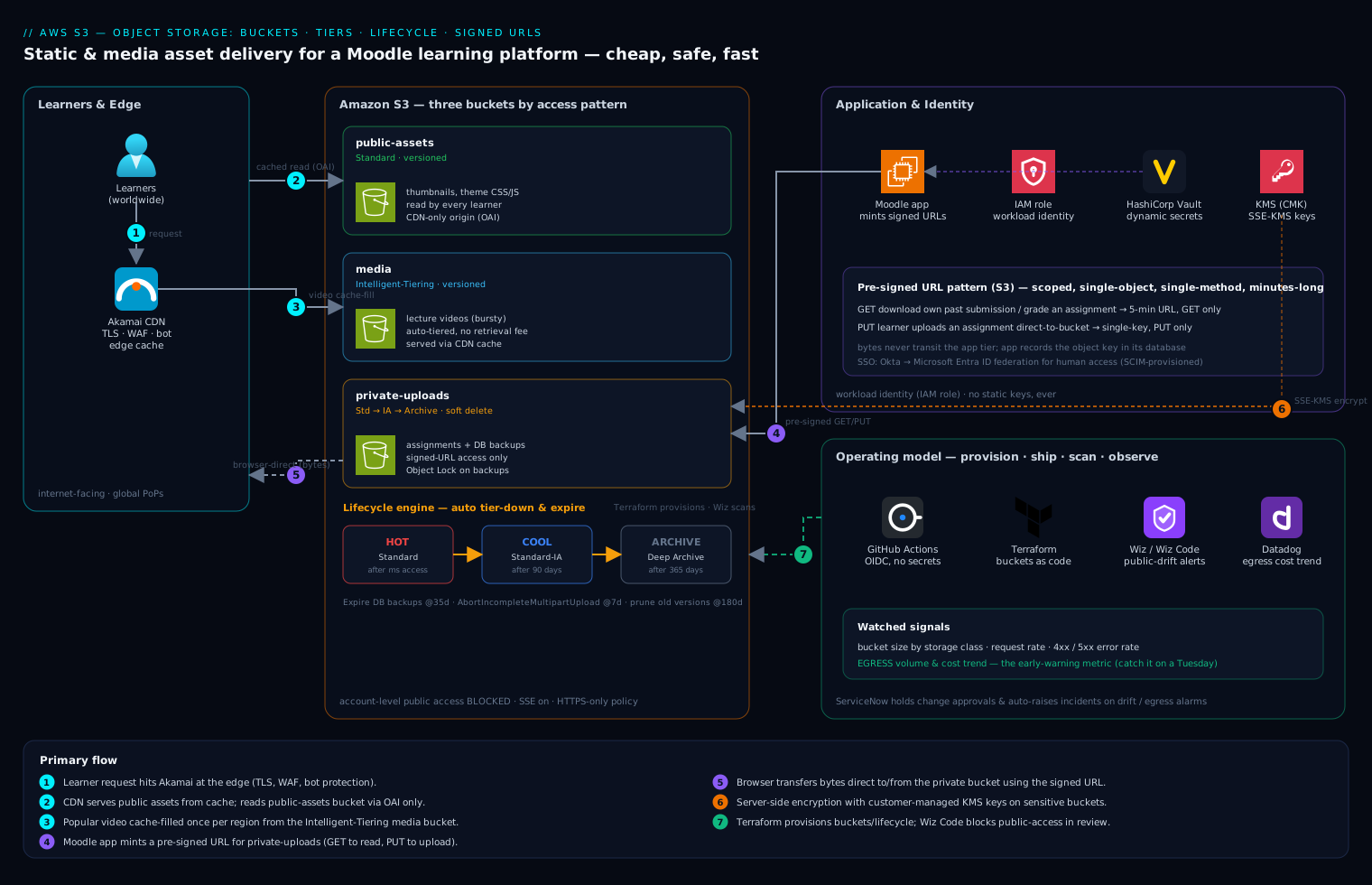
Now the worked example: serving the education company’s static and media assets — course thumbnails, CSS/JS bundles for the Moodle theme, downloadable PDFs, and lecture videos — to learners worldwide, cheaply and safely. The naive design that caused the egress spike was “browser → S3 bucket, directly.” The corrected architecture has three buckets with different jobs and a CDN in front, and it weaves object storage into the platform’s real operating model.
The bucket layout — separate by access pattern, not by convenience:
- A public-assets bucket (Standard tier, versioned) for thumbnails, theme bundles, and other content every learner reads constantly. This bucket is never exposed to the internet directly — public access is blocked at the account level; only the CDN may read it.
- A media bucket (Intelligent-Tiering, versioned) for lecture videos, where access is bursty and unpredictable and the automatic tiering earns its keep.
- A private-uploads bucket (Standard → lifecycle to cool/archive, versioned, soft delete on) for learner-submitted assignments and database backups — sensitive data that only authenticated, authorized requests may ever touch, with the archive lifecycle that the old 2019-submissions cost problem demanded.
The control and data flow, end to end:
-
Edge and CDN. Learners hit Akamai at the edge, which terminates TLS, serves cached objects from points of presence close to each learner, and provides WAF and bot protection. The CDN — not the bucket — faces the internet. This is the move that kills the egress bill: a popular video is fetched from the bucket once per region and then served thousands of times from cache, so origin egress collapses and learners get lower latency. The bucket trusts only the CDN’s identity (an origin access identity / signed origin request), so there is no way to bypass the cache and hammer storage directly.
-
Reading public assets. For thumbnails and theme bundles, the CDN reads from the public-assets bucket over a private origin connection and caches aggressively. The objects carry long
Cache-Controlmax-age values so the CDN and browsers hold them for weeks; a content change uses a new key (a content hash in the filename) so caches never serve stale bytes. No credentials are involved on the read path at all — these assets are public-by-design, just not public-by-origin. -
Reading private uploads — signed URLs. When a learner downloads their own past submission or an instructor pulls an assignment to grade, the asset is in the private bucket and must not be world-readable. The Moodle application (the only component holding storage credentials) generates a pre-signed URL (S3) / SAS token (Azure) / signed URL (GCP): a time-limited, single-object, often single-method URL, signed with the app’s credentials, that grants exactly “this one user, this one object, GET only, for the next 5 minutes.” The browser then fetches directly from storage with that URL — the bytes never pass back through the application server, which keeps the app stateless and cheap. When the clock runs out, the URL is dead. This is the pattern for serving private user content from object storage, and getting it wrong (URLs too long-lived, or scoped to a whole bucket) is a classic finding.
-
Writing uploads. A learner submitting an assignment also gets a signed URL — this time scoped to
PUTa single key — so the upload goes browser-direct to the private bucket without streaming gigabytes through Moodle’s web tier. The application records the resulting object key in its database; the bytes and the metadata-of-record stay cleanly separated. -
Identity and credentials. Human access to the platform is SSO via Okta (federated to Microsoft Entra ID where Azure resources are in play) — learners and staff log into Moodle once, and Okta’s SCIM provisioning keeps accounts in step with enrollment. The application’s own access to S3 uses a workload identity / IAM role, not a static access key, so there is no long-lived secret to leak. The few secrets that cannot be a role — a third-party transcoding API key, the database password Moodle needs — live in HashiCorp Vault, leased dynamically and short-lived, never baked into an AMI or a config file. This directly honors the platform’s standing rule after an old credential leak: no static storage keys, ever.
-
Server-side encryption. Every bucket has server-side encryption on by default. For the sensitive private-uploads and backup buckets, that means customer-managed keys (SSE-KMS / CMK / CMEK) so key rotation and access are auditable and revocable; the public-assets bucket can use cloud-managed keys since the content is non-sensitive by design. Encryption in transit (HTTPS only, enforced by a bucket policy that denies non-TLS requests) is universal.
Wiring it into the operating model
Object storage is never just the bucket; it is the buckets plus the guardrails that keep them safe and observable as the team grows.
- Provision with Terraform, configure with Ansible. The buckets, their lifecycle rules, versioning, public-access blocks, and KMS keys are all defined in Terraform so the configuration is reviewable, version-controlled, and reproducible across dev/stage/prod — no click-ops drift. Ansible handles the host-side pieces where media virtual appliances (a transcoding worker fleet, for example) need their mount and agent configuration applied consistently.
- CI/CD. Changes ship through GitHub Actions (or Jenkins in shops that already run it), authenticating to the cloud via OIDC so no credentials are stored in the pipeline; Argo CD reconciles the Kubernetes side of the platform if Moodle runs on a cluster. A storage change — say tightening a lifecycle rule — is a pull request, reviewed and applied like code.
- Posture and IaC scanning. Wiz runs continuous cloud security posture management across the buckets, and the alert everyone cares about fires the instant a bucket drifts to public or an ACL widens unexpectedly — the single most common and most damaging object-storage misconfiguration. Wiz Code scans the Terraform in the pull request before it merges, so a bucket about to be created with public access is blocked at review time, not discovered in production.
- Runtime security. CrowdStrike Falcon sensors run on the transcoding and upload-processing workloads, detecting if a compromised host starts exfiltrating bucket contents or mining the credentials the workload holds.
- Observability. Datadog (or Dynatrace) ingests the storage metrics that actually predict the bill and the outages: bucket size by storage class, request rates, 4xx/5xx error rates, and — the early-warning metric the education company most needed — egress volume and cost trend. A dashboard that shows egress climbing before the invoice does is what turns “why did the bill double?” into “we caught it on a Tuesday.”
- ITSM. ServiceNow holds the change approvals (a new lifecycle policy or a bucket-policy change goes through a change ticket) and auto-raises an incident when Wiz flags a public-exposure drift or Datadog trips an egress alarm — so security and operations get a ticket with an owner, not just a notification someone might glance at.
Failure modes, scaling, and the tradeoffs
Failure modes worth naming before they bite:
- The public-bucket leak. The infamous one: a bucket set public “just to test,” and now learner submissions are crawlable on the internet. Mitigation: account-level public-access block on by default, Wiz alerting on drift, and Wiz Code blocking it in the pull request. Treat any public-write or public-list bucket as an incident.
- Eventual consistency surprises. Modern S3 is now strongly read-after-write consistent, but list operations and cross-region replication still lag, and apps that assume “I wrote it, so a list will show it instantly” hit subtle bugs. Design around the key you wrote, not around listing.
- The hot-key / single-prefix bottleneck. Object storage scales massively across keys but a single object served directly to a viral audience can still throttle. The CDN is the fix — it absorbs the fan-out so the origin sees one request per region.
- Accidental deletion / ransomware. Mitigated by versioning, soft delete, and — for backups — Object Lock immutability so even stolen admin credentials cannot purge the recovery copy before its retention date.
- Runaway egress. The original sin here. Mitigated structurally by the CDN, and operationally by the Datadog egress dashboard and ServiceNow alarm.
Scaling. Object storage itself is effectively infinite — you do not provision capacity, you just write more objects, and the clouds design for trillions of them. What scales with effort is everything around it: request rate (spread load across key prefixes and front it with a CDN), cross-region serving (replicate buckets to a paired region or rely on the CDN’s global cache), and cost-at-scale (lifecycle tiering and Intelligent-Tiering keep the per-GB number falling as the corpus grows). For a global learner base, the realistic posture is one authoritative region per bucket plus an aggressive CDN, escalating to cross-region replication only when you need regional read latency or DR on the storage layer itself.
Cost — the levers, ranked by impact for this platform:
| Lever | Mechanism | Typical effect |
|---|---|---|
| CDN in front of storage | Serve cached objects from the edge, not the bucket | Egress collapses; often the single biggest line-item drop |
| Lifecycle tiering | Auto-transition cold data to IA/Archive | 40–95% cheaper storage on aged data |
| Intelligent-Tiering / Autoclass | Automatic tiering for unpredictable access | Right tier with no guesswork or retrieval-fee surprises |
| Expire backups & abort multipart | Lifecycle Expiration + AbortIncompleteMultipartUpload |
Stops unbounded and invisible growth |
| Prune noncurrent versions | Lifecycle on old versions | Keeps the undo button from tripling storage |
| Block egress bypass | Origin access identity; deny direct public reads | Forces all traffic through the cheap, cached path |
Explicit tradeoffs — accept these or you have not understood object storage:
- Cheaper tiers cost more to read. Archive is 1/20th the storage price but charges retrieval fees and adds minutes-to-hours of latency. Tier down data you are confident is cold; if you are wrong and have to restore an archived course mid-term, you pay for that mistake in both money and time. When in doubt, Intelligent-Tiering trades a tiny monitoring fee for never having to guess.
- Object storage is not a database or a file system. No transactions, no partial updates, no rename (a “rename” is copy-then-delete), and list operations are slow and paginated. If your access pattern needs locking, queries, or in-place edits, object storage is the wrong tool — keep the bytes here and the index in a database, exactly as the upload flow above does.
- Signed URLs are a sharp tool. They are the right way to serve private content, but a URL scoped too broadly or living too long is a leak with a timer. Keep them single-object, single-method, and minutes-long, and never log them.
- Versioning and soft delete cost storage. Every retained version and every soft-deleted object is billed until it is pruned. The safety is real and worth it — but pair it with noncurrent-version lifecycle rules or the undo button quietly becomes a cost problem of its own.
The shape of the win
Six weeks after turning these controls on, the education company’s storage story is unrecognizable. The bill stopped doubling and actually fell, because a year of cold lecture videos and ancient assignment submissions now sit in archive tiers at a fraction of the price, multipart orphans and stale backups expire themselves, and the CDN means a viral course launch is served from the edge instead of melting a bucket’s egress budget. The overwritten-manifest panic cannot recur, because versioning and soft delete make recovery a thirty-second restore. Learner submissions are no longer one careless ACL away from the open internet, because public access is blocked by default, Wiz Code catches it in review, and Wiz watches for drift in production. And every one of these controls is declared in Terraform, gated through ServiceNow, and watched in Datadog — so the platform is not just cheaper and safer today, it stays that way as it grows.
None of this required exotic technology. It required understanding the three controls that object storage has offered all along — tiers, lifecycle, and versioning — and the handful of patterns (a CDN at the edge, signed URLs for private content, workload identity instead of static keys) that turn an infinite magic folder into a real, governed foundation. That is object storage done right, and it is the same on AWS, Azure, and GCP — the names change, the model does not.