A national hospital network — eleven facilities, 19,000 clinicians, nurses, billing staff and rotating residents — fails its HIPAA access-review audit two quarters running. The finding is always the same: dozens of accounts in Epic, in the AWS data lake that feeds the readmission models, and in the ServiceNow ticketing system that still belong to people who left months ago, or to residents whose three-month rotation ended in March and who somehow still have standing access in June. Every termination is supposed to be handled by the help desk, manually, across nineteen separate admin consoles. It is not, because no human team can keep nineteen consoles consistent against a workforce that turns over by the week. The CISO’s mandate after the second audit is blunt: one source of truth for who exists, one place they log in, and access that appears and disappears automatically the day Workday says someone joins, changes role, or leaves.
This article is the working manual for the platform that answers that mandate: Okta as the enterprise identity hub. Okta is a cloud identity provider (IdP) — a SaaS control plane that authenticates your workforce once and then federates that authenticated identity into every downstream cloud and SaaS application, while provisioning the accounts in those apps from a single directory. The value proposition is a topology inversion: instead of every application owning its own users, passwords and off-boarding, every application trusts one IdP, every account is projected from one directory, and every login runs one adaptive policy. This piece is not a sales overview — it is the model, the admin objects, the protocols, the SCIM payloads, the agent architecture and the decision tables you need to run Okta as that hub, told through the hospital that just failed its audit.
By the end you will be able to reason about Okta the way a senior identity architect does: which object holds what (org, Universal Directory, apps, users, groups), how SAML and OIDC SSO actually flow through the Okta Integration Network and where SWA fits, how SCIM plus group push plus profile mappings drive joiner-mover-leaver lifecycle from an HR system, how the AD and LDAP agents fold on-prem directories in, how adaptive policy and Okta Verify FastPass make MFA phishing-resistant without punishing every login, how API Access Management turns Okta into an OAuth authorization server for your own APIs, and — the question every enterprise eventually asks — when Okta is the right hub and when Entra ID already is one.
What problem this solves
Identity sprawl is the disease; the audit finding is only its most visible symptom. Left unaddressed, four distinct pains compound.
Deprovisioning gaps. When each application manages its own accounts, off-boarding is N manual steps across N consoles, and the one everybody forgets is the one an auditor finds. A leaver who keeps access — or a contractor whose engagement ended — is the single most common root cause in breach post-mortems. Okta’s answer is that access is a projection: kill the source identity and every downstream account is torn down by protocol within minutes, with one logged event to show the auditor.
Password surface. Every app-local password is a phishable credential, a reset ticket, and an entry in a breach-replay list. Nineteen consoles means nineteen passwords per clinician, which means sticky notes, which is itself an audit finding. A hub eliminates app-local passwords entirely — the app has no login form, it redirects to Okta — so there is nothing app-side to phish or leave behind.
Inconsistent assurance. Without a central policy plane, MFA is on for some apps and off for others, strong here and weak there, and the risk signals never combine. Okta evaluates one adaptive policy per authentication, so the app touching patient data can demand a phishing-resistant factor every session while the cafeteria-menu app stays frictionless — from the same identity, the same login, the same log.
No unified audit trail. “Who logged into what, from where, and was it risky?” is unanswerable when the answer is scattered across nineteen systems in nineteen formats. One IdP means one System Log, exportable to your SIEM, correlating every authentication and every provisioning event across all four clouds and every SaaS app at once. That single trail is, by itself, frequently the business case.
Who hits this: any organisation past a few thousand employees with more than a handful of SaaS and cloud targets, and especially the regulated, multi-cloud, high-churn shop — healthcare, financial services, retail — where the manual model does not merely cost help-desk hours, it fails audits and invites breaches.
Here is the whole field in one frame — every pain, what it costs you without a hub, and the Okta mechanism that closes it:
| Pain without a hub | What it costs | Okta mechanism that closes it | Where it lives in Okta |
|---|---|---|---|
| Deprovisioning gaps (leavers keep access) | Failed audits; breach exposure | SCIM deprovisioning + lifecycle rules | Lifecycle Management + app SCIM connector |
| App-local passwords everywhere | Phishing surface; reset tickets | Federated SSO (no app-local login) | SAML/OIDC app integrations |
| Inconsistent / missing MFA | Weak assurance; risky logins unblocked | Adaptive authentication policies | Global Session + App Sign-On policies |
| No single source of who exists | Ghost accounts; manual reconciliation | Universal Directory + HR-driven import | Universal Directory + Workday integration |
| Scattered audit trail | Unanswerable “who accessed what” | Unified System Log → SIEM | System Log + Log Streaming |
| Point-to-point integration mesh | N(N-1)/2 brittle connectors | Star topology, one IdP | Okta org as the hub |
Learning objectives
By the end of this article you can:
- Name every top-level Okta object — org, Universal Directory, users, groups, apps — and say precisely what each stores and how they relate.
- Configure SAML and OIDC SSO from Okta to a SaaS or cloud app using the Okta Integration Network (OIN), and explain when to fall back to Secure Web Authentication (SWA) for apps that federate neither.
- Drive joiner-mover-leaver lifecycle end to end: HR-sourced import, group-membership rules, SCIM provisioning, group push, and profile mappings, with the exact SCIM payloads that create, update and deactivate downstream accounts.
- Integrate on-prem directories with the Okta AD agent and LDAP agent, choosing delegated authentication, password sync or federation, and know the agent’s failure and HA characteristics.
- Design adaptive MFA with Okta Verify FastPass, factor enrolment, and risk-based authentication policies that escalate only anomalous logins.
- Stand up API Access Management — Okta as an OAuth 2.0 authorization server issuing access tokens with custom scopes and claims to your own APIs.
- Decide Okta-as-hub with hub-and-spoke federation to Entra ID versus Entra ID as the native hub, using a concrete decision matrix rather than vendor preference.
Prerequisites & where this fits
You should be comfortable with the vocabulary of federated identity: what an IdP and a service provider (SP) are, that SAML and OIDC are the two federation protocols, that MFA adds a second factor, and that SSO means authenticating once for many apps. Hands-on Okta helps but is not required — a free Okta Developer tenant (developer.okta.com) reproduces most of what follows. Familiarity with at least one downstream target — AWS IAM Identity Center, Entra ID, Snowflake, or ServiceNow — makes the provisioning sections land harder. If federation itself is new, start with Identity Federation & SSO Concepts for the Cloud and come back.
This sits in the Identity & Access architecture track as the hub piece. Downstream of it are the target-specific deep dives — Okta + AWS IAM Identity Center: Federation & Permission Sets is the canonical AWS spoke. Alongside it, Hybrid Active Directory to Cloud Identity with Okta covers the on-prem-to-Okta modernisation path in depth, and Multi-Cloud Identity Governance with Okta & SailPoint is the governance layer that sits above the hub. The Microsoft-native counterpart — the “when Entra ID is already your hub” world — is Entra Connect Sync Deep Dive and its siblings, which we compare against directly.
A quick map of the planes and who owns each, so you reason about the right clock:
| Plane | Clock | What happens here | Latency budget | Primary owner |
|---|---|---|---|---|
| Authentication | Synchronous, real-time | User logs in, MFA, token minted | < 1 second | Okta (SaaS) |
| Provisioning | Asynchronous, event-driven | Accounts created/updated/deactivated | Minutes | Okta + app connectors |
| Directory sync | Scheduled + near-real-time | AD/LDAP/HR imports | Minutes to hours | Okta agents + HR feed |
| Governance | Periodic | Access reviews, log export, drift | Days to quarterly | GRC + SailPoint/ServiceNow |
Conflating these is the most common design mistake. The authentication plane is latency-sensitive and must never wait on provisioning; the provisioning plane is eventually-consistent and must be monitored, not assumed; governance runs on its own cadence entirely.
Core concepts
Okta’s data model is small — five nouns — and everything else is behaviour attached to them. Pin these down and the rest of the article is elaboration.
The org is the tenant. Your Okta org is your isolated instance — a URL like hospital.okta.com (or a custom domain, login.hospital.example). Everything lives inside it: users, groups, apps, policies, logs. A preview org (*.oktapreview.com) mirrors production for testing platform changes before they hit you. The org is the security boundary and the thing you govern.
Universal Directory is the profile store. Universal Directory (UD) is Okta’s canonical, cloud-native directory of every identity, with an extensible profile — a schema of attributes (firstName, email, department, plus any custom attribute you add: npiNumber, costCenter, licenseExpiry). UD aggregates identities from many sources (imported from Workday and AD, plus contractors created directly) and normalises them into one profile so a nurse’s facility and unit are set once and flow everywhere.
Users are people (and service accounts). A user is one identity with a profile and a lifecycle state. That state machine is load-bearing: users move through STAGED → PROVISIONED → ACTIVE → RECOVERY / PASSWORD_EXPIRED → SUSPENDED → DEPROVISIONED, and provisioning fires on state transitions. Deactivating a user (DEPROVISIONED) is the event that tears down every downstream account — the single most important transition in the whole system.
Groups are the unit of assignment. A group is a named collection of users, and groups — not individual users — are how you assign apps and drive downstream roles. A group can be filled manually, by a group rule (a dynamic membership expression like user.department == "ICU" AND user.employeeType == "Nurse"), or pushed up from AD. A single group nurse-icu-facility-3 becomes an AWS permission set, a Snowflake role, and a ServiceNow responsibility — the same claim consumed three ways.
Apps are the downstream integrations. An app (application integration) is one SaaS/cloud target Okta connects to, carrying two independent capabilities: SSO (how users authenticate — SAML, OIDC or SWA) and optionally provisioning (how accounts are managed — usually SCIM). Assign a group to an app and its members can sign in; enable provisioning and Okta also creates/updates/deactivates their accounts in that app.
The five objects side by side
| Object | What it is | Key contents | Assignment role | Analogy |
|---|---|---|---|---|
| Org | Your isolated tenant | Everything below; policies; logs | The boundary | The building |
| Universal Directory | Canonical profile store | Attributes, custom schema, sources | Holds every identity | The personnel file cabinet |
| User | One identity | Profile + lifecycle state | Gets assigned to groups | A person’s badge |
| Group | Named set of users | Members (manual/rule/pushed) | The unit apps assign to | A role / cost center |
| App | One downstream integration | SSO config + provisioning config | Assigned to groups | A door with a lock |
Two protocols, one distinction that matters
SSO to modern apps is either SAML or OIDC, and knowing which does what removes most confusion:
| Aspect | SAML 2.0 | OIDC (OpenID Connect) |
|---|---|---|
| Era / style | Older, XML, enterprise-web | Newer, JSON/JWT, API + mobile |
| Token | SAML assertion (signed XML) | ID token + access token (JWTs) |
| Best for | Web SaaS, IdP-initiated launch | SPAs, native apps, APIs, modern web |
| Okta emits | Signed assertion with attribute statements | JWTs with claims from UD |
| Group delivery | Attribute statement (group filter) | groups claim |
| Typical targets | ServiceNow, Snowflake, AWS IAM IC | Custom apps, Auth0-style flows |
| Okta plays the role of | IdP | OpenID Provider (OP) / Authorization Server |
The rule of thumb: if the app offers SAML and OIDC, choose OIDC for anything mobile or API-driven and SAML for classic IdP-initiated web SSO where a tile in the Okta dashboard launches the app. When an app supports neither — a legacy web app with only a username/password form — you fall back to SWA (covered below), where Okta stores and replays credentials rather than federating.
The Okta hub model and the topology inversion
The defining principle of the whole platform: Okta’s Universal Directory is the single source of identity, while the HR system (Workday) is the single source of truth about people. Okta does not invent who works at the hospital — it imports that — and every downstream cloud or SaaS account is a projection of an Okta identity, never an independently created login. If it is not in Okta, it should not exist anywhere.
That principle collapses the integration topology from a mesh to a star. With N applications each managing their own users, you have on the order of N(N-1)/2 potential point-to-point integrations, and a schema change anywhere breaks provisioning silently. With a hub, every app has exactly one relationship — to Okta — so the integration count is linear, and the star’s center is the only thing you govern.
Three planes operate on different clocks and must be reasoned about separately:
- Authentication plane — synchronous, latency-sensitive. A clinician clicks an app, Okta authenticates and mints a token in under a second. It must never block on provisioning.
- Provisioning plane — asynchronous, event-driven. Workday emits a hire or termination; accounts appear or vanish across downstream systems within minutes. It is eventually consistent and must be monitored.
- Governance plane — periodic. Access reviews, log export, drift detection, each on its own schedule.
Why not the obvious alternatives? Three candidates always come up on a project like this, and each fails in a way worth naming:
| Alternative proposed | Why it seems attractive | Why it fails as the hub |
|---|---|---|
| “Use AD / Entra ID for everything” | Already own it; federates Windows well | AD never built to SCIM-provision Snowflake or drive SaaS; anchoring workforce identity in one cloud’s IdP couples the access plane to that vendor in a deliberately multi-cloud shop |
| “Let each app manage its own users” | No new platform to buy | Exactly the nineteen-console world that failed the audit — no single deprovisioning point, no consistent MFA, no unified log |
| “Bridge everything point-to-point” | Feels incremental | N(N-1)/2 brittle connectors; one schema change breaks provisioning silently; discovered at the next audit |
| Identity hub (Okta) | — | One IdP trusted by all; every account a projection; one adaptive policy; star topology with a single governed center |
The two paths through the hub
Authentication path, following the flow:
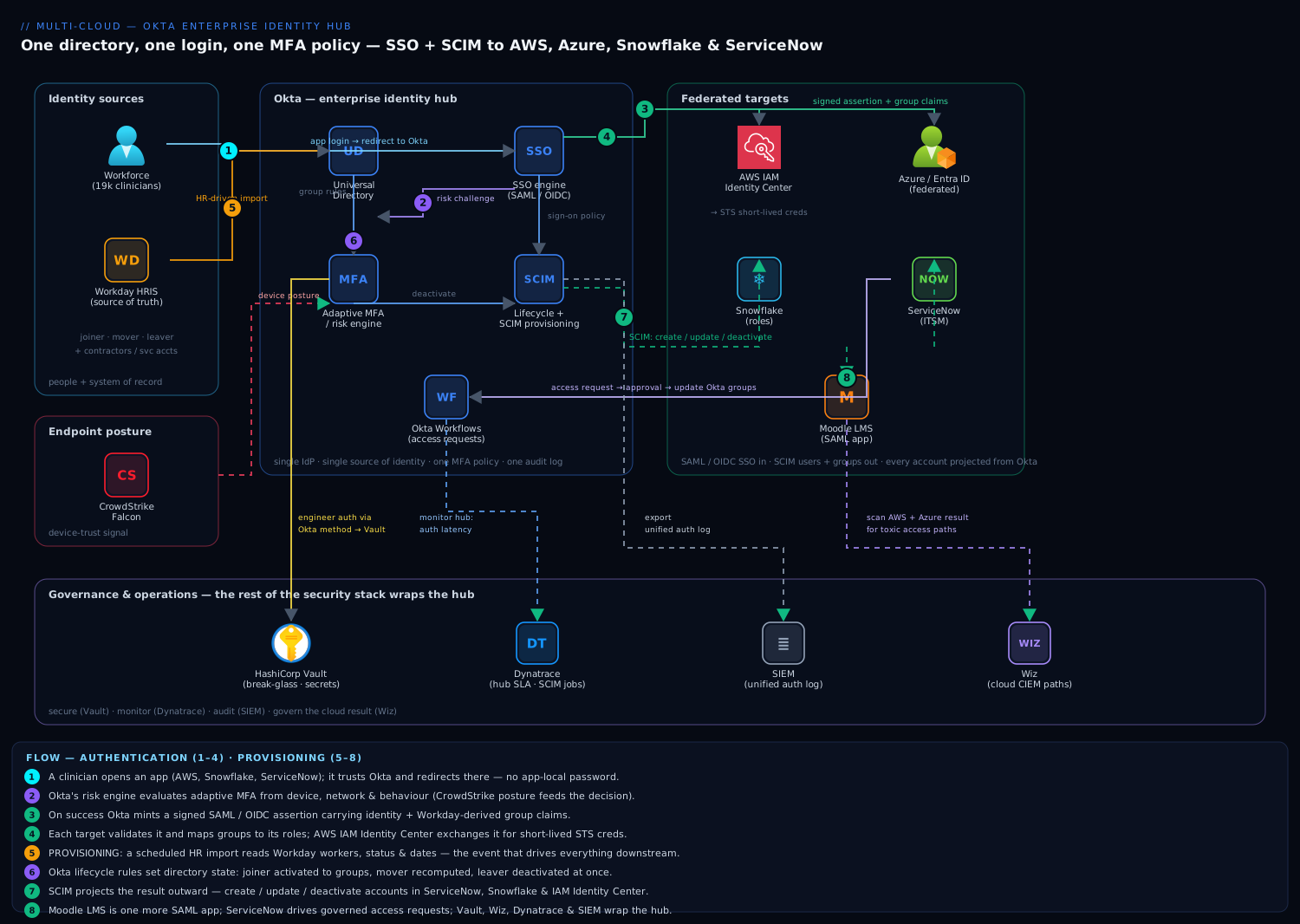
- A clinician opens the AWS console, ServiceNow, or Snowflake. The app is configured to trust Okta as its SAML or OIDC IdP, so the unauthenticated request redirects to Okta rather than a local login form. There is no app-local password to phish, reset, or leave behind.
- Okta evaluates an adaptive authentication policy through its risk engine. Login context — device posture, network zone, impossible-travel signals, behavioural risk — decides the challenge. From a managed device on a hospital network the session may pass on the existing factor; from an unmanaged device or unusual geography Okta demands a phishing-resistant factor (FIDO2/WebAuthn or Okta Verify with number challenge).
- On success Okta mints a signed assertion (SAML) or tokens (OIDC) carrying the identity and group claims derived from Workday attributes. A group named
nurse-icu-facility-3becomes an AWS permission set, a Snowflake role, and a ServiceNow responsibility — all from the same claim. - The app validates the assertion against Okta’s published signing keys and establishes a session. For AWS specifically, the SAML assertion lands at AWS IAM Identity Center, which exchanges it for short-lived STS credentials scoped to a permission set — no long-lived IAM users, no static keys on a laptop.
Provisioning path — the part that actually closes the audit finding:
- Workday is the authoritative source. Okta runs a scheduled HR-driven import reading workers, their attributes, and crucially their employment status and dates. A new hire, transfer, role change, or termination in Workday is the event that drives everything downstream — not a help-desk ticket.
- Okta’s lifecycle rules translate that event into directory state. A joiner becomes an active Okta user assigned to groups by rule; a mover’s memberships recompute when their job code changes; a leaver is deactivated the moment Workday marks them terminated (or, for a resident, the moment their scheduled rotation-end date passes).
- Okta then SCIM-provisions the consequences outward. A deactivation fires SCIM
PATCH active=falsecalls to ServiceNow, Snowflake, and IAM Identity Center near-simultaneously. The leaver who used to linger for months is now gone from all of them within minutes, with a single event to show an auditor.
The two planes meet at exactly one point — the Okta user object — and that single meeting point is the entire value of the hub.
SSO: SAML, OIDC, the OIN, and SWA
An app integration is Okta’s representation of one downstream target. Most enterprise apps you will ever add already exist as pre-built, tested connectors in the Okta Integration Network (OIN) — a catalogue of 7,000+ integrations where ServiceNow, Snowflake, AWS, Salesforce, Zoom and thousands more ship configured for SAML/OIDC SSO and (where supported) SCIM provisioning. Adding an OIN app is configuration, not coding: you pick the app, paste the SP’s ACS URL and entity ID (or the OIN template supplies them), map attributes, and assign groups.
The SSO decision: SAML vs OIDC vs SWA
| SSO mode | How it works | Passwords stored? | Use when | Limitation |
|---|---|---|---|---|
| SAML 2.0 | Okta signs an assertion; app trusts Okta’s cert | No | App supports SAML; classic web SSO, IdP-initiated tiles | XML complexity; assertion size limits |
| OIDC | Okta issues ID/access JWTs via OAuth flow | No | Modern web, SPA, mobile, API-backed apps | App must support OIDC client registration |
| SWA | Okta stores + auto-fills the app’s own credentials | Yes (vaulted) | App supports neither federation protocol | Not true SSO; per-user or shared creds; brittle to UI changes |
Secure Web Authentication (SWA) is the pragmatic fallback for the long tail of legacy web apps that have only a username/password form and no federation support. Okta vaults the credentials (per-user, or a shared set) and the browser plugin / Okta dashboard auto-submits the login form. It gives you the dashboard and centralised assignment benefits — a leaver loses the SWA app on deactivation — but it is not federation: there is a stored password, it breaks if the app changes its login page, and it cannot deliver group claims. Treat SWA as a bridge, not a destination; push vendors toward SAML/OIDC.
Configuring a SAML app (the ServiceNow spoke)
A minimal SAML integration you can read and reason about. In the Okta admin console the fields are a form; the equivalent create call via the Okta management API (Apps API) looks like this:
# Create a SAML 2.0 app integration via the Okta Apps API
curl -s -X POST "https://hospital.okta.com/api/v1/apps" \
  -H "Authorization: SSWS ${OKTA_API_TOKEN}" \
  -H "Content-Type: application/json" \
  -d '{
    "label": "ServiceNow (Prod)",
    "signOnMode": "SAML_2_0",
    "settings": {
      "signOn": {
        "ssoAcsUrl": "https://hospital.service-now.com/navpage.do",
        "audience": "https://hospital.service-now.com",
        "recipient": "https://hospital.service-now.com/navpage.do",
        "destination": "https://hospital.service-now.com/navpage.do",
        "subjectNameIdTemplate": "${user.userName}",
        "subjectNameIdFormat": "urn:oasis:names:tc:SAML:1.1:nameid-format:emailAddress",
        "assertionSigned": true,
        "signatureAlgorithm": "RSA_SHA256",
        "attributeStatements": [
          {
            "type": "GROUP",
            "name": "groups",
            "namespace": "urn:oasis:names:tc:SAML:2.0:attrname-format:basic",
            "filterType": "REGEX",
            "filterValue": ".*"
          }
        ]
      }
    }
  }'
The attribute statement with a GROUP type and a regex filter is what ships the user’s Okta group memberships into the assertion as a groups claim — the mechanism ServiceNow (and AWS, and Snowflake) reads to assign roles. Get the filter right: .* sends every group (noisy, can blow assertion-size limits); a scoped regex like ^snow- sends only the groups relevant to that app.
The SAML fields you will actually touch, and what each controls:
| SAML setting | What it controls | Common value | Gotcha |
|---|---|---|---|
ssoAcsUrl (ACS) |
Where Okta POSTs the assertion | SP-provided endpoint | Wrong URL → assertion rejected, blank error |
audience (Entity ID) |
Who the assertion is for | SP entity ID | Mismatch → “audience restriction” failure |
subjectNameIdTemplate |
The NameID the app keys on | ${user.userName} or ${user.email} |
Must match how the SP identifies users |
subjectNameIdFormat |
NameID format | emailAddress / unspecified | SP-specific; often unspecified for AWS |
assertionSigned |
Sign the assertion | true |
Almost always required |
attributeStatements |
Extra claims (groups, attrs) | groups (GROUP filter) |
Over-broad filter → oversized assertion |
| Signing certificate | Okta’s public cert the SP trusts | rotated periodically | Rotate before expiry or SSO breaks org-wide |
Configuring an OIDC app
For a modern app you register an OIDC client and get a client ID/secret and the scopes/claims it can request:
# Create an OIDC web app integration (authorization code flow)
curl -s -X POST "https://hospital.okta.com/api/v1/apps" \
  -H "Authorization: SSWS ${OKTA_API_TOKEN}" \
  -H "Content-Type: application/json" \
  -d '{
    "label": "Clinician Portal (OIDC)",
    "signOnMode": "OPENID_CONNECT",
    "credentials": { "oauthClient": { "token_endpoint_auth_method": "client_secret_basic" } },
    "settings": {
      "oauthClient": {
        "client_uri": "https://portal.hospital.example",
        "redirect_uris": ["https://portal.hospital.example/authorization-code/callback"],
        "response_types": ["code"],
        "grant_types": ["authorization_code", "refresh_token"],
        "application_type": "web",
        "consent_method": "TRUSTED"
      }
    }
  }'
The critical OIDC knobs and their meaning:
| OIDC setting | What it controls | Choose | Note |
|---|---|---|---|
grant_types |
OAuth flows allowed | authorization_code (+ refresh_token) |
Never implicit for new apps |
redirect_uris |
Allowed callback URLs | Exact HTTPS URLs | Mismatch → redirect_uri error; no wildcards in prod |
token_endpoint_auth_method |
How the client authenticates | client_secret_basic / PKCE for SPAs |
SPAs/native use PKCE, no secret |
application_type |
web / native / SPA / service | matches the app | Drives which flows are valid |
consent_method |
Show a consent screen? | TRUSTED for first-party |
REQUIRED for third-party |
groups claim |
Group delivery | add via claim on the auth server | Not sent by default — configure it |
Lifecycle & provisioning: SCIM, group push, profile mappings
This is the section that closes the audit finding, and it has three cooperating mechanisms. Profile sourcing and mappings decide what attributes an identity has and where they come from. SCIM provisioning decides how accounts are created, updated and deactivated in downstream apps. Group push decides how group structures propagate. Together they implement joiner-mover-leaver.
HR as the source (the inbound side)
Okta connects to Workday (or SuccessFactors, BambooHR, etc.) as a profile source — an authoritative inbound feed. A scheduled import reads workers and, crucially, their employment status and effective dates. This is the inversion that makes access correct by construction: access changes are caused by HR events, so you never have to remember to update them.
The lifecycle states and what triggers each transition:
| Okta lifecycle state | Meaning | Typical trigger | Downstream effect |
|---|---|---|---|
STAGED |
Created, not yet activated | Future-dated hire imported | No app access yet |
PROVISIONED |
Activation pending (e.g. awaiting first login) | Activation email sent | Some apps provisioned |
ACTIVE |
Fully active | Start date reached / activated | Full assigned access |
PASSWORD_EXPIRED / RECOVERY |
Must reset | Policy / self-service | Blocked until reset |
SUSPENDED |
Temporarily disabled | Leave of absence | Access frozen, account kept |
DEPROVISIONED |
Deactivated | Workday termination / rotation end | All downstream accounts torn down |
Profile mappings — the attribute plumbing
A profile mapping is a directional rule that copies/transforms attributes between two profiles — Workday → Okta (inbound) and Okta → each app (outbound). Mappings support Okta Expression Language, so you can compute a value:
# Inbound: Workday → Okta Universal Directory
appuser.department        ->  user.department
appuser.cost_center       ->  user.costCenter
appuser.worker_status     ->  user.employeeStatus

# Transform an email domain and build a display name
String.toLowerCase(appuser.first_name + "." + appuser.last_name + "@hospital.example")  ->  user.email

# Outbound: Okta → Snowflake (SCIM app profile)
user.userName             ->  appuser.userName
user.email                ->  appuser.email
# Derive the Snowflake default role from department
(user.department == "ICU") ? "PHI_LIMITED_READ" : "ANALYST_RO"  ->  appuser.defaultRole
The direction and precedence rules that trip people up:
| Mapping concern | Rule | Consequence if wrong |
|---|---|---|
| Direction | Inbound (source→Okta) vs outbound (Okta→app) are separate | Editing the wrong one has no visible effect |
| Source priority | If a user has multiple sources (AD + Workday), priority decides who wins | Lower-priority source silently overwritten |
Apply mapping on |
Create-and-update vs create-only | Create-only misses movers’ changes |
| Expression errors | A bad expression skips the attribute, logs a warning | Attribute silently blank downstream |
| Override on app profile | Manual edits on the app user profile can be overwritten by mapping | “Why did my manual fix revert?” |
SCIM — the provisioning protocol
SCIM (System for Cross-domain Identity Management) is the open REST+JSON standard Okta uses to create, update, deactivate and (optionally) delete accounts in downstream apps. When you enable provisioning on a SCIM-capable OIN app, Okta becomes a SCIM client calling the app’s SCIM server at /scim/v2/Users and /scim/v2/Groups. The four operations Okta can drive:
| Provisioning action | SCIM operation | Fires when | Reversible? |
|---|---|---|---|
| Create user | POST /Users |
User assigned to app (directly or via group) | Deactivate |
| Update attributes | PATCH /Users/{id} |
Mapped attribute changes | Yes |
| Deactivate | PATCH /Users/{id} active:false |
User unassigned / deactivated in Okta | Reactivate |
| Deprovision (delete) | DELETE /Users/{id} (if enabled) |
Optional; usually deactivate instead | No |
A real SCIM deactivation — the payload that revokes a leaver — is small and is the beating heart of the whole architecture:
PATCH /scim/v2/Users/2819c223-7f76-453a-919d-ab1b HTTP/1.1
Host: hospital.service-now.com
Authorization: Bearer <scim-token>
Content-Type: application/scim+json

{
  "schemas": ["urn:ietf:params:scim:api:messages:2.0:PatchOp"],
  "Operations": [
    { "op": "replace", "path": "active", "value": false }
  ]
}
When a clinician is terminated in Workday, that single PATCH fans out to ServiceNow, Snowflake and IAM Identity Center within minutes — the difference between passing the HIPAA review and failing it a third time. What each app connector actually does on the “To App” provisioning tab:
| Provisioning feature | What it does | Enable when |
|---|---|---|
| Create Users | Provision new accounts on assignment | Always, for managed apps |
| Update User Attributes | Push mapped attribute changes | For movers / attribute-driven roles |
| Deactivate Users | Suspend on unassignment/deactivation | Always — this closes the leaver gap |
| Sync Password | Push Okta password to app | Rarely; prefer federation over password sync |
| Import Users (To Okta) | Read app accounts back into Okta | For matching / reconciliation |
Group push — propagating group structure
Provisioning users is not the same as propagating groups. Group push takes an Okta group and creates/maintains the equivalent group in the downstream app (e.g. pushing snow-analyst to ServiceNow so role assignment there keys off it, or pushing groups into Entra ID). The distinction and when to use each:
| Mechanism | Propagates | Typical use |
|---|---|---|
| SCIM user provisioning | Individual accounts + attributes | Everyone; the account itself |
| Group push | Group objects + their memberships | Apps that assign roles by their own groups (ServiceNow, Entra, Google) |
| Group rules (in Okta) | Membership within Okta | Dynamic assignment before anything is pushed |
A subtle operational rule: decide group ownership per app. If Okta pushes a group to Entra, do not also let admins edit that group directly in Entra — the push is authoritative and manual edits get reverted, generating “who changed my group?” tickets.
Directory integration: the AD and LDAP agents
Most enterprises are not greenfield — there is an on-prem Active Directory (or LDAP) that authenticates Windows and hosts the ground truth for existing employees. Okta folds it in with a lightweight agent: a small service you install on a domain-joined Windows server that makes an outbound TLS connection to your Okta org (no inbound firewall holes) and brokers imports and authentication.
AD integration modes
The single most important AD decision is how authentication happens once AD is connected:
| Mode | Where the password is checked | Password stored in Okta? | Works if AD is down? | Use when |
|---|---|---|---|---|
| Delegated Authentication | On-prem AD, via the agent | No | No — auth fails if agent/DC unreachable | You want AD to stay authoritative for passwords |
| Password Sync (import hash) | In Okta (synced hash) | Yes (hash) | Yes | You want Okta-local auth resilience |
| Federation (AD FS / Okta as SP) | AD FS | No | Depends on AD FS | Legacy AD FS already in place |
| Desktop SSO (IWA / Agentless DSSO) | Kerberos on the corp network | No | On-network only | Seamless silent SSO for domain users |
Delegated authentication is the common starting posture — AD remains the password authority, Okta brokers it — with the honest trade that Okta logins depend on AD/agent availability, which is why you run multiple agents for HA.
Agent architecture and HA
The agent characteristics that matter operationally:
| Concern | Behaviour | Design implication |
|---|---|---|
| Connectivity | Outbound TLS 443 to Okta; polls for work | No inbound firewall changes needed |
| High availability | Install ≥2 agents; Okta load-balances | One agent = a single point of failure for AD auth |
| Import scope | Configurable OUs; incremental + full imports | Scope OUs to avoid importing service/computer accounts |
| Password behaviour | Delegated auth = no hash stored | Meets “no password in cloud” mandates |
| Version / patching | Auto-updates (configurable) | Keep agents current for security fixes |
| JIT provisioning | Create Okta user on first successful AD login | Speeds onboarding for existing AD users |
The LDAP agent is the analogue for non-AD directories (OpenLDAP, Oracle Internet Directory, etc.), same outbound-agent model, mapping an LDAP search base and bind account instead of an AD domain. For the deep modernisation playbook — coexistence, cutover sequencing, and retiring AD FS — see Hybrid Active Directory to Cloud Identity with Okta.
Adaptive MFA, Okta Verify and FastPass
A hub is only a glorified password page unless authentication is strong and adaptive. Okta’s authentication policies score every login and choose a factor accordingly, and its own authenticator — Okta Verify — supports FastPass, a phishing-resistant, passwordless flow.
The factor menu
The authenticators Okta can enrol and challenge, ranked by assurance:
| Factor | Assurance | Phishing-resistant? | User friction | Notes |
|---|---|---|---|---|
| FIDO2 / WebAuthn (security key, platform) | Highest | Yes | Low (touch/biometric) | Hardware or platform (Windows Hello, Touch ID) |
| Okta Verify FastPass | Highest | Yes (device-bound + origin check) | Lowest (often silent) | Passwordless; cryptographic device binding |
| Okta Verify push + number challenge | High | Partially (number defeats blind approval) | Low | Number match blocks push fatigue |
| Okta Verify push (plain) | Medium | No (push-bombing risk) | Low | Prefer number challenge |
| TOTP (Okta Verify / Google Authenticator) | Medium | No | Medium | Better than SMS |
| SMS / Voice OTP | Low | No (SIM-swap, phishable) | Medium | Last resort; avoid for privileged access |
| Security question / password | Lowest | No | — | Knowledge factor; not sufficient alone |
The clear direction for a regulated shop: FastPass and FIDO2 as the primary factors, number-challenge push as the fallback, SMS only for account recovery of last resort.
FastPass — what makes it phishing-resistant
FastPass binds a credential to the enrolled device and verifies the origin of the login request, so a proxy/AiTM (adversary-in-the-middle) phishing page presenting a look-alike domain fails the cryptographic origin check — the user cannot be tricked into approving a login to a site that is not the real one. It is passwordless (device biometric/PIN unlocks the bound key) and often silent on a healthy managed device, which is how you get both stronger auth and less friction than a password + OTP.
Adaptive authentication policies
Okta has two policy layers that combine on every login:
| Policy layer | Scope | Decides | Example rule |
|---|---|---|---|
| Global Session Policy | Org-wide, per group/network | Whether a session is established and its lifetime; primary factor | “Trusted network + managed device → establish session, 8h lifetime” |
| Authentication (App Sign-On) Policy | Per app (or group of apps) | What assurance is required to access this app | “Snowflake → require phishing-resistant factor every 1h” |
The risk inputs the engine evaluates:
| Signal | Source | Effect on the decision |
|---|---|---|
| Network zone | IP / ASN / defined zones | Trusted corp range lowers the bar; blocklist denies |
| Device posture | Okta Verify / MDM / EDR (e.g. CrowdStrike) signal | Managed + healthy → less friction; unmanaged → step up |
| Impossible travel / new geo | Okta ThreatInsight + login history | Anomaly → force phishing-resistant factor |
| Behavioural (new device/IP/location) | Okta behaviour detection | Deviation from baseline → step up |
| Risk score (Identity Threat) | Okta risk engine / third-party signals | Elevated → challenge or deny |
An App Sign-On policy that demands phishing-resistant assurance for the data-lake app looks like this via the API:
# App Sign-On policy rule: require possession + phishing-resistant factor for Snowflake
curl -s -X POST "https://hospital.okta.com/api/v1/policies/${SNOWFLAKE_POLICY_ID}/rules" \
  -H "Authorization: SSWS ${OKTA_API_TOKEN}" \
  -H "Content-Type: application/json" \
  -d '{
    "name": "Snowflake-strong-auth",
    "type": "ACCESS_POLICY",
    "actions": {
      "appSignOn": {
        "access": "ALLOW",
        "verificationMethod": {
          "type": "ASSURANCE",
          "factorMode": "2FA",
          "constraints": [
            { "knowledge": { "reauthenticateIn": "PT1H" },
              "possession": { "hardwareProtection": "REQUIRED", "phishingResistant": "REQUIRED" } }
          ],
          "reauthenticateIn": "PT1H"
        }
      }
    }
  }'
The design principle: make routine logins frictionless and only anomalous ones escalate. A blanket “MFA on everything every time” trains users to click through and does not actually raise assurance where it matters. For the Microsoft-native equivalent of this thinking — personas, authentication context, and step-up — compare Entra Conditional Access at Scale.
API Access Management: Okta as an OAuth authorization server
So far Okta has authenticated humans to apps. API Access Management (AAM) extends it to authorise software to your own APIs — Okta becomes a full OAuth 2.0 authorization server issuing access tokens (JWTs) with the scopes and claims your API enforces. This is distinct from OIDC-for-login: here Okta protects a resource server (your API), not a sign-in.
The building blocks:
| AAM concept | What it is | Example |
|---|---|---|
| Authorization Server | Issues tokens for an audience | default, or a custom api://readmissions |
| Scope | A permission the client can request | patients.read, claims.write |
| Claim | Data embedded in the access token | department, costCenter, groups |
| Access Policy + Rule | Which clients/users get which scopes | “Only the analytics service client may request patients.read” |
| Grant type | How the token is obtained | client_credentials (service), authorization_code (user) |
A service-to-service flow — a batch job requesting a scoped token — uses the client-credentials grant:
# Machine-to-machine: request a scoped access token (client credentials)
curl -s -X POST "https://hospital.okta.com/oauth2/aus1a2b3c/v1/token" \
  -H "Content-Type: application/x-www-form-urlencoded" \
  -u "${CLIENT_ID}:${CLIENT_SECRET}" \
  -d "grant_type=client_credentials&scope=patients.read"

# Response (abbreviated): a signed JWT your API validates against Okta's JWKS
# { "access_token": "eyJraWQi...", "token_type": "Bearer", "expires_in": 3600, "scope": "patients.read" }
Your API validates that JWT against the authorization server’s published JWKS (/oauth2/<id>/v1/keys), checks the aud, iss, exp, and the required scope — and never has to store a credential itself. A custom claim that injects the caller’s department for row-level filtering is added on the authorization server, not hard-coded in every service. When to reach for a custom authorization server rather than the default one:
Use the default auth server when |
Use a custom auth server when |
|---|---|
| Simple, single API surface | Multiple APIs with distinct audiences |
| Okta-standard scopes suffice | You need bespoke scopes/claims and policy per API |
| Getting started / low governance | Regulated APIs needing isolated token policies + rotation |
Okta as IdP vs hub-and-spoke to Entra ID
The most consequential architectural decision in a Microsoft-heavy but multi-cloud enterprise: is Okta the hub and the IdP of record, federating into Entra ID for Azure/M365, or is Entra ID the native hub? These are not competitors so much as two valid topologies, and the choice hinges on where your center of gravity actually is.
In the Okta-as-hub with hub-and-spoke to Entra design, Okta is the primary IdP and source of lifecycle truth; it federates into Entra ID (Entra configured to trust Okta as an external IdP / via WS-Fed or SAML) and provisions Entra users/groups via SCIM, so Azure-native services, Conditional Access and Microsoft 365 still see a first-class Entra identity while the source of truth stays in Okta. Federation can run both ways — Okta can also be a relying party to Entra where a specific Microsoft-first workload needs Entra as its IdP — but a clean design picks one primary direction and sticks to it to avoid loops and double-MFA.
The two-way federation postures, plainly:
| Direction | Who is IdP | Who is SP | Use when |
|---|---|---|---|
| Okta → Entra (Okta primary) | Okta | Entra (as federated domain) | Okta is the workforce hub; M365 is one of many targets |
| Entra → Okta (Entra primary) | Entra | Okta (as SP) | Microsoft-first shop already standardised on Entra |
| Okta ↔ Entra (bi-directional) | Both, per app | Both, per app | Mixed estates mid-migration — transitional only |
The decision matrix: Okta vs Entra as the hub
| Factor | Lean Okta as hub | Lean Entra ID as hub |
|---|---|---|
| Cloud footprint | Genuinely multi-cloud (AWS + Azure + GCP) | Predominantly Azure + Microsoft 365 |
| Existing licensing | No blanket M365 E3/E5 | Already own M365 E5 (Entra P1/P2 included) |
| SaaS breadth | Large, heterogeneous SaaS estate | SaaS estate largely Microsoft-adjacent |
| Vendor-neutrality goal | Want the access plane decoupled from any cloud vendor | Comfortable standardising on Microsoft |
| On-prem AD posture | AD present but modernising away | AD central and staying (Entra Connect native) |
| Provisioning breadth | Need broad, mature SCIM catalogue (OIN) | Entra provisioning covers your targets |
| Conditional Access depth | Okta adaptive policies suffice | Want Entra Conditional Access + Intune + Defender tightly integrated |
| Cost sensitivity | Willing to pay per-user for neutrality | Minimise net-new spend |
The honest summary: if you are single-cloud on Azure and already pay for M365 E5, Entra ID is very likely already your hub and Okta is redundant cost. If you are deliberately multi-cloud, have a large heterogeneous SaaS estate, and value keeping workforce identity out of any one cloud vendor’s plane, Okta earns its per-user fee. The hospital is the second case — AWS and Azure, a SaaS sprawl, and a mandate not to couple clinical identity to a single cloud — so Okta is the hub and Entra is a first-class spoke.
Where the rest of the enterprise stack plugs in
A real identity hub is the connective tissue the rest of the security and operations stack relies on:
| System | Its job | How it meets Okta |
|---|---|---|
| HashiCorp Vault | Secrets identity does not handle — DB creds, API keys, dynamic cloud secrets | Vault Okta auth method; policies key off Okta groups |
| CrowdStrike Falcon | Device-posture / EDR signal | Feeds Okta risk + network-zone decisions (managed/healthy → less friction) |
| Wiz | Governs the result of provisioning in-cloud | Scans AWS/Azure for toxic combinations Okta’s access created; surfaces attack paths |
| ServiceNow | Access-request/review workflows + a provisioned app | On approval, updates Okta group membership (often via Okta Workflows) |
| SailPoint | Identity governance above the hub | Certifications, SoD, entitlement catalog on top of Okta |
| Dynatrace | Monitors the hub itself | Watches auth latency, SCIM job success, the HR import as an SLA-bearing service |
Human-to-app SSO is Okta’s job; app-to-secret is Vault’s; they meet at the Okta identity — see HashiCorp Vault as a Central Secrets Broker for that seam. Governance above the hub — certifications, separation of duties, entitlement catalogs — is Multi-Cloud Identity Governance with Okta & SailPoint.
Architecture at a glance
Read the diagram left to right and top to bottom as two flows crossing at one object. Along the top, the authentication plane: a clinician’s browser hits a downstream app (AWS console, ServiceNow, Snowflake, Entra/M365), the app redirects to the Okta org, Okta’s adaptive authentication policy evaluates device, network and risk and challenges with Okta Verify FastPass / FIDO2 as needed, then mints a SAML assertion or OIDC token carrying groups claims that the app maps to its own roles — AWS exchanging the assertion at IAM Identity Center for short-lived STS credentials. Down the left, the sourcing and directory plane: Workday feeds the authoritative HR import and the on-prem AD/LDAP agents broker existing directory identities, all normalising into Universal Directory. Down the right, the provisioning plane: Okta’s lifecycle rules and profile mappings drive SCIM create/update/deactivate and group push outward to every app, so a Workday termination fans out as PATCH active=false within minutes. The two flows meet at exactly one node — the Okta user object in Universal Directory — and around the edges the supporting stack (Vault, CrowdStrike, Wiz, ServiceNow, Dynatrace) consumes or governs the identity. That single meeting point is the architecture.
Real-world scenario
Meridian Health Network — the eleven-facility system from the opening — runs the rollout over two quarters after the second failed HIPAA access review. The starting state: 19,000 workers, an on-prem AD forest of ~24,000 objects (including stale ones), Workday as HRIS, and downstream access managed by hand across Epic-adjacent web apps, an AWS analytics account, Snowflake for the readmission data mart, ServiceNow for ITSM, and Microsoft 365 for email and Teams.
Phase 1 — connect and source (weeks 1–4). They stand up the Okta org meridian.okta.com, install three AD agents across two data centres for HA, and scope the import to the OU=Employees and OU=Contractors trees only — deliberately excluding service and computer accounts that had been polluting every prior reconciliation. Delegated authentication keeps AD the password authority initially. They connect Workday as the profile source with priority over AD, so employment status and job codes flow from HR, not from whoever last edited AD. The first import surfaces the smoking gun: 312 AD-enabled accounts with no matching active Workday worker — the ghost accounts the auditor had been finding.
Phase 2 — SSO and MFA (weeks 5–9). They add OIN integrations for AWS IAM Identity Center (SAML → permission sets), Snowflake (SAML → roles), ServiceNow (SAML + SCIM), and federate Entra ID for M365. Group rules translate Workday attributes into assignment: department == "ICU" AND employeeType == "Nurse" fills nurse-icu, which maps to a PHI_LIMITED_READ Snowflake role and a scoped AWS permission set. They enrol Okta Verify FastPass as the primary factor and FIDO2 keys for the 400 privileged data-lake users, with an App Sign-On policy requiring phishing-resistant assurance hourly on Snowflake and the AWS console, while the cafeteria and shuttle-schedule apps pass on the established session. Push fatigue attacks — which had generated two near-miss incidents the prior year — become impossible because plain push is retired in favour of number challenge and FastPass.
Phase 3 — lifecycle and proof (weeks 10–16). They flip on Deactivate Users for every SCIM app and wire the resident rotation-end dates into a lifecycle rule so a resident’s access expires automatically on their scheduled last day, not “eventually.” Dynatrace watches the Workday import and SCIM job success; a failed deactivation now pages someone rather than hiding until the next audit. The proof point the CISO wanted: they run a fire drill — terminate a test clinician in Workday at 09:00 — and the System Log shows DEPROVISIONED in Okta at 09:04 and successful SCIM active=false at ServiceNow, Snowflake and IAM Identity Center by 09:07, with one correlated event ID. At the next HIPAA review the finding count for orphaned access goes from dozens to zero, and the auditor is handed a single exportable log instead of nineteen console screenshots. Net new spend: per-user Okta Workforce Identity licensing, offset (partially) by ~1.5 FTE of help-desk time no longer spent on password resets and manual provisioning across nineteen consoles.
Advantages and disadvantages
Centralisation concentrates value, which means it concentrates risk. The honest ledger:
| Advantages (why the hub helps) | Disadvantages (what it costs) |
|---|---|
| One source of identity truth; every account is a projection | The hub becomes a critical dependency; an Okta outage has enterprise-wide blast radius |
Instant, automatic, auditable deprovisioning (SCIM active=false) |
You inherit every error in the HR feed; contractors/service accounts need an exception path |
| One adaptive MFA policy plane, phishing-resistant by default | Adaptive policy is powerful but easy to mis-tune (too strict → lockouts; too loose → risk) |
| Unified System Log → one SIEM view across all clouds/SaaS | Log volume + SIEM ingestion cost; you must actually watch it |
| Star topology, linear integration count, OIN pre-built connectors | Cloud-neutral IdP is a recurring per-user fee (Entra would fold into M365 licensing if single-cloud) |
| Cloud-neutral: workforce identity decoupled from any one cloud vendor | An extra federation hop (and its failure mode) to Entra for Azure/M365 |
| Broad, mature SCIM catalogue automates create and revoke | Connector maintenance; must alert on silent provisioning failure (failed deactivation is the dangerous case) |
The model earns its keep for the regulated, multi-cloud, high-churn enterprise. It is wrong, or at least redundant, for the single-cloud Azure shop already paying for M365 E5, where Entra ID is already the hub. The disadvantages are all manageable — but only if you know they exist and design for them: HA agents, break-glass access, provisioning-failure alerting, and careful policy tuning.
Hands-on lab
Stand up the core of the hub in a free Okta Developer org — a SAML app, group-driven assignment, and (simulated) SCIM lifecycle — without touching production. You need a free tenant from developer.okta.com and its admin console; the API calls use an API token (Security → API → Tokens).
Step 1 — Set variables.
export OKTA_ORG="https://dev-XXXXXX.okta.com"     # your dev org URL
export OKTA_API_TOKEN="00abc...your-token..."      # Security → API → Tokens
Step 2 — Create a group and a group rule. Create the nurse-icu group, then a rule that fills it from a profile attribute.
# Create the group
GROUP_ID=$(curl -s -X POST "$OKTA_ORG/api/v1/groups" \
  -H "Authorization: SSWS $OKTA_API_TOKEN" -H "Content-Type: application/json" \
  -d '{"profile":{"name":"nurse-icu","description":"ICU nurses (rule-driven)"}}' | jq -r '.id')
echo "Group: $GROUP_ID"
Expected: a JSON group object; $GROUP_ID prints a 20-char id like 00g1a2b3c4....
Step 3 — Create a test user and observe lifecycle state.
curl -s -X POST "$OKTA_ORG/api/v1/users?activate=true" \
  -H "Authorization: SSWS $OKTA_API_TOKEN" -H "Content-Type: application/json" \
  -d '{
    "profile": { "firstName":"Test","lastName":"Nurse",
      "email":"test.nurse@example.com","login":"test.nurse@example.com",
      "department":"ICU","employeeType":"Nurse" },
    "credentials": { "password": { "value": "Sup3r-Secret-Passw0rd!" } }
  }' | jq '{id, status, profile: .profile.email}'
Expected: "status": "ACTIVE" and the email echoed — the user is live in Universal Directory.
Step 4 — Create a SAML app integration. Use a SAML tester as the SP (any app that accepts a metadata URL works; a public SAML debugger is fine for a lab).
APP_ID=$(curl -s -X POST "$OKTA_ORG/api/v1/apps" \
  -H "Authorization: SSWS $OKTA_API_TOKEN" -H "Content-Type: application/json" \
  -d '{
    "label":"Lab SAML App","signOnMode":"SAML_2_0",
    "settings":{"signOn":{
      "ssoAcsUrl":"https://example-sp.test/acs",
      "audience":"https://example-sp.test",
      "subjectNameIdTemplate":"${user.email}",
      "subjectNameIdFormat":"urn:oasis:names:tc:SAML:1.1:nameid-format:emailAddress",
      "assertionSigned":true,"signatureAlgorithm":"RSA_SHA256",
      "attributeStatements":[{"type":"GROUP","name":"groups",
        "namespace":"urn:oasis:names:tc:SAML:2.0:attrname-format:basic",
        "filterType":"STARTS_WITH","filterValue":"nurse-"}]
    }}
  }' | jq -r '.id')
echo "App: $APP_ID"
Expected: an app id 0oa...; the group filter STARTS_WITH nurse- means only nurse-* groups ship in the assertion.
Step 5 — Assign the group to the app.
curl -s -X PUT "$OKTA_ORG/api/v1/apps/$APP_ID/groups/$GROUP_ID" \
  -H "Authorization: SSWS $OKTA_API_TOKEN" -H "Content-Type: application/json" -d '{}' \
  | jq '{app: .id, priority}'
Now any user in nurse-icu can launch the app and their nurse-* groups arrive as a SAML claim.
Step 6 — Simulate the leaver event (the whole point). Deactivate the user and watch state change.
USER_ID=$(curl -s "$OKTA_ORG/api/v1/users/test.nurse@example.com" \
  -H "Authorization: SSWS $OKTA_API_TOKEN" | jq -r '.id')
# Deactivate → this is the transition that would fire SCIM active=false to every real app
curl -s -X POST "$OKTA_ORG/api/v1/users/$USER_ID/lifecycle/deactivate" \
  -H "Authorization: SSWS $OKTA_API_TOKEN" -o /dev/null -w "HTTP %{http_code}\n"
curl -s "$OKTA_ORG/api/v1/users/$USER_ID" \
  -H "Authorization: SSWS $OKTA_API_TOKEN" | jq '{status}'
Expected: HTTP 200, then "status": "DEPROVISIONED". In a real org with SCIM apps this single call fans out PATCH active=false to every assigned app — the audit-closing event.
Step 7 — Read the System Log to see the correlated events.
curl -s "$OKTA_ORG/api/v1/logs?filter=eventType+eq+%22user.lifecycle.deactivate%22&limit=5" \
  -H "Authorization: SSWS $OKTA_API_TOKEN" \
  | jq '.[] | {published, event: .eventType, actor: .actor.displayName, target: .target[0].displayName}'
Expected: a log entry for the deactivation with actor, target and timestamp — the single event you would hand an auditor.
Validation checklist: you created a group + rule, a user that landed ACTIVE in UD, a SAML app scoped to nurse-* group claims, group-driven assignment, and then a DEPROVISIONED transition visible in the System Log — the miniature of the entire hub.
Teardown.
# Deactivate (if not already) then delete the user; then delete the app and group
curl -s -X DELETE "$OKTA_ORG/api/v1/users/$USER_ID" -H "Authorization: SSWS $OKTA_API_TOKEN" -o /dev/null -w "user %{http_code}\n"
curl -s -X POST   "$OKTA_ORG/api/v1/apps/$APP_ID/lifecycle/deactivate" -H "Authorization: SSWS $OKTA_API_TOKEN" -o /dev/null -w "app-deact %{http_code}\n"
curl -s -X DELETE "$OKTA_ORG/api/v1/apps/$APP_ID" -H "Authorization: SSWS $OKTA_API_TOKEN" -o /dev/null -w "app %{http_code}\n"
curl -s -X DELETE "$OKTA_ORG/api/v1/groups/$GROUP_ID" -H "Authorization: SSWS $OKTA_API_TOKEN" -o /dev/null -w "group %{http_code}\n"
The Okta Developer org is free and has no per-hour cost — teardown is hygiene, not billing.
Common mistakes & troubleshooting
The failures that bite in production, as a scannable symptom → cause → confirm → fix playbook:
| # | Symptom | Root cause | Confirm (exact path / call) | Fix |
|---|---|---|---|---|
| 1 | SSO to an app returns “audience restriction” / assertion rejected | audience/Entity ID or ACS URL mismatch |
Compare app settings.signOn.audience vs SP metadata; System Log app.saml.assertion errors |
Correct the ACS URL and audience to exactly match the SP |
| 2 | Users log in but get no roles in AWS/Snowflake | Group claim not sent or filter too narrow | Decode the SAML assertion (browser dev tools / SAML tracer) for the groups attribute |
Fix attributeStatements filter (e.g. STARTS_WITH the right prefix) |
| 3 | Leaver still has access in a downstream app | “Deactivate Users” not enabled on that SCIM connector | App → Provisioning → To App: is Deactivate on? | Enable Deactivate Users; run a reconciliation import |
| 4 | New hire has no access despite being in Workday | Group rule not matching (attribute blank/typo) | User profile shows blank department; group rule shows 0 matches |
Fix inbound mapping / rule expression; re-run |
| 5 | Manual attribute fix on an app user keeps reverting | Outbound profile mapping overwrites it on update | App user profile shows mapped source; mapping apply on update |
Fix at the source, or change the mapping; don’t hand-edit |
| 6 | AD-sourced users can’t log in during an AD/agent outage | Delegated auth depends on AD availability | Only one agent installed; agent shows offline in admin | Install ≥2 agents; consider password sync for resilience |
| 7 | SCIM provisioning silently stopped | Connector auth token expired / app API outage | App → Provisioning shows errors; System Log application.provision.* failures |
Rotate SCIM token; re-authorise connector; alert on failures |
| 8 | Push-fatigue / MFA bombing incident | Plain Okta Verify push allowed | Auth policy still permits push without number challenge | Require number challenge / FastPass / FIDO2; retire plain push |
| 9 | Everyone locked out of an app after a policy change | App Sign-On rule too strict (or no factor enrolled) | App access policy rule requires a factor users lack | Loosen the rule; ensure enrolment; keep a break-glass path |
| 10 | Group push edits keep getting reverted in Entra/ServiceNow | Okta owns the pushed group; admins edited it downstream | Group is Okta-pushed; downstream edit reverts on next sync | Decide ownership: edit in Okta only, or stop pushing that group |
| 11 | Duplicate users after connecting a new source | Matching rule didn’t correlate existing vs imported | Two users, same person; import matched on wrong attribute | Configure username/email matching before import; merge duplicates |
| 12 | Oversized SAML assertion / app errors on login | groups filter .* ships hundreds of groups |
Assertion is huge; SP rejects or truncates | Scope the group filter to only that app’s relevant groups |
| 13 | Okta outage takes down all app logins | No break-glass / cached-session strategy | Every federated app fails simultaneously | Break-glass local admins (in Vault); rely on session cache; multi-region SLA |
The three that matter most, expanded:
Failed deactivation is the dangerous case (row 3/7). A created account that fails is loud — the user complains they have no access. A deactivation that fails is silent — the leaver keeps access and nobody notices until an audit. This asymmetry is why you must (a) enable Deactivate Users on every SCIM connector, (b) alert on application.provision.* failures via your monitoring (Dynatrace), and © run a periodic full reconciliation (Okta access report vs Workday roster) so a dropped deprovisioning event cannot hide.
Stale HR data propagates faithfully (row 4). The hub is only as correct as its source. A termination entered late, a mistyped job code — Okta will faithfully propagate the error. Controls: source priority set correctly (Workday over AD for employment status), reconciliation reporting, and an explicit exception queue for the identities that legitimately have no Workday record (contractors, service accounts).
Adaptive policy is a double-edged knob (rows 8/9). Too loose and you ship the risk you bought Okta to stop; too strict and you lock out a shift of nurses mid-code. Roll changes out to a pilot group first, always keep a tested break-glass path, and separate the app policy (per-app strictness) from the global session policy so tightening Snowflake doesn’t accidentally re-MFA the whole org.
Best practices
- Make HR the source, groups the unit, apps the projection. Every downstream account is a projection of an Okta identity driven by HR events — never an independently created login. If it is not in Okta, it should not exist anywhere.
- Enable “Deactivate Users” on every SCIM connector and treat a failed deactivation as a page-worthy incident, not a warning. This single discipline is what closes the leaver gap.
- Scope group claims per app. Never ship
.*in a SAML group filter — send only the groups that app consumes, or you get oversized assertions and leak your whole group taxonomy. - Run ≥2 AD/LDAP agents across fault domains. One agent is a single point of failure for delegated authentication; two make DC maintenance invisible.
- Prefer phishing-resistant factors (FastPass, FIDO2) as primary; use number-challenge push as fallback; reserve SMS for last-resort recovery only. Retire plain push entirely.
- Separate Global Session policy from App Sign-On policy. Per-app strictness (Snowflake = phishing-resistant hourly) belongs on the app policy; session lifetime and primary factor on the global one — so tuning one doesn’t surprise the other.
- Keep a tested break-glass path. A small set of emergency local admin accounts on the most critical systems, stored in Vault, heavily audited, used only when Okta is unreachable. Test it before you need it.
- Reconcile periodically. An Okta access report vs the Workday roster catches dropped provisioning events and orphaned exceptions before an auditor does.
- Decide group ownership per app. If Okta pushes a group downstream, forbid direct edits there — the push is authoritative and manual edits revert.
- Configure matching before your first import (username/email correlation) so connecting a new source doesn’t create duplicate identities.
- Manage app integrations and policies as code where you can (Terraform Okta provider), reviewed in PRs — a wrong ACS URL or an over-broad claim is a config landmine.
- Import incrementally, not full-table. A 19,000-person roster should sync in minutes; keep group rules flat and attribute-driven, because rule complexity (not user count) is what slows reconciliation.
Security notes
- Eliminate app-local passwords. The largest phishing surface is app-local credentials; federated SSO removes them entirely (SWA vaults credentials only for apps that truly cannot federate — a bridge, not a target).
- Phishing-resistant MFA in front of every app. FastPass/FIDO2 defeat AiTM proxy phishing via cryptographic origin binding; a stolen password becomes a dead end.
- Least-privilege on Okta itself. Use Okta’s admin role scoping (super-admin sparingly; delegate app-admin, group-admin, help-desk-admin per team) and require phishing-resistant MFA + PIM-style just-in-time elevation for admin roles.
- Protect the API tokens and SCIM secrets. An Okta API token or a downstream SCIM bearer token is a keys-to-the-kingdom credential — store in Vault, rotate, scope, and never commit. (This corpus has a standing rule: never re-commit leaked credentials.)
- Harden the HR feed and mappings. Source priority and mapping expressions are security controls — a wrong priority lets a stale source overwrite employment status; review them like code.
- Export the System Log to your SIEM. One authentication + provisioning trail across all clouds/SaaS is the unified audit surface; watch it alongside CrowdStrike (device) and Wiz (in-cloud posture) signals.
- Govern the result of provisioning. Okta grants access; Wiz continuously scans the cloud for the toxic combinations that access created (over-permissioned roles, broad-group-reachable public resources) that no single SCIM mapping reveals.
- Design for the hub’s own failure. Centralisation concentrates risk; rely on Okta’s multi-region SLA, cache sessions, and keep the audited break-glass path — plan the outage, don’t wish it away.
For the broader control set this fits into, see Zero Trust Architecture Blueprint: Identity, Network & Data.
Cost & sizing
Okta Workforce Identity is priced per user per month, summed across the SKUs you enable — the base SSO, then add-ons like Adaptive MFA, Lifecycle Management (SCIM/provisioning), API Access Management, and Identity Governance. That makes the bill straightforward to forecast and to charge back by cost center — the same Workday attribute that drives access also drives the bill.
What drives the number, and how to reason about each lever:
| Cost driver | What you pay for | Scales with | How to control |
|---|---|---|---|
| SSO base | Federated login per user | Active users | Right-size active vs inactive; deactivate promptly |
| Adaptive MFA add-on | Risk-based MFA per user | Active users | Enable where assurance is required |
| Lifecycle Management (SCIM) | Provisioning per user | Active users | The add-on that pays for itself in help-desk hours |
| API Access Management | OAuth authorization server | Per platform (not per end-user typically) | Enable only when protecting your own APIs |
| Identity Governance | Reviews/certifications | Active users | Or use SailPoint above the hub |
| SIEM ingestion (indirect) | Log volume to your SIEM | Auth + provisioning events | Sample/route; keep security-relevant events |
| Downstream infra | AWS STS, no long-lived keys | Sessions | Short-lived creds are cheaper and safer |
The honest trade: Okta is not the cheapest possible identity option. If you were single-cloud on Azure, Entra ID (P1/P2) folds into existing M365 licensing and is effectively “free” at the margin — which is exactly why the decision matrix above matters. You are paying a recurring per-user fee and accepting a vendor dependency in exchange for cloud-neutral, automated, auditable identity. For a regulated, multi-cloud enterprise that just failed an access audit, that trade is almost always worth it, and the savings — while real — are indirect: help-desk hours not spent on resets and manual provisioning (Meridian recovered ~1.5 FTE), and, harder to price but very real, audit findings that do not happen. Size the platform by active users, not headcount, and let prompt deactivation (which you now automate) keep the license count honest.
Interview & exam questions
1. What is the difference between Okta’s Universal Directory being the source of identity and Workday being the source of truth about people? Universal Directory is the canonical store of every identity and its normalised profile; Workday is the authoritative feed of who works there and their employment status. Okta imports people from Workday (it does not invent them), and every downstream account is a projection of an Okta identity. The distinction matters because access changes are caused by HR events, making access correct by construction rather than by manual updates.
2. Explain SAML vs OIDC and when Okta uses SWA instead. SAML 2.0 uses signed XML assertions and suits classic enterprise web SSO (IdP-initiated tiles); OIDC uses JSON/JWT tokens over OAuth and suits modern web, SPA, mobile and API apps. SWA (Secure Web Authentication) is the fallback for apps that support neither protocol — Okta vaults and auto-fills the app’s own username/password. SWA gives centralised assignment and off-boarding but is not true federation (a password is stored and it breaks if the login page changes).
3. Walk through what SCIM does when a clinician is terminated in Workday. The Workday import marks the worker terminated; Okta’s lifecycle rule transitions the user to DEPROVISIONED; Okta’s SCIM client sends PATCH /Users/{id} with active:false to every assigned SCIM app (ServiceNow, Snowflake, IAM Identity Center) near-simultaneously. The accounts are deactivated within minutes with one correlated System Log event — the audit-closing behaviour.
4. Why is a failed deactivation more dangerous than a failed creation? A failed creation is loud — the user complains they lack access — so it gets fixed immediately. A failed deactivation is silent — the leaver keeps access and nobody notices until an audit. That asymmetry is why you enable Deactivate Users on every connector, alert on provisioning failures, and run periodic reconciliation.
5. Compare delegated authentication, password sync and desktop SSO for AD integration. Delegated auth checks the password on-prem via the agent (no password in cloud, but Okta login depends on AD/agent availability). Password sync imports the hash so Okta authenticates locally (resilient to AD outage, but a hash lives in Okta). Desktop SSO uses Kerberos on the corp network for silent sign-in (seamless, on-network only). Choose by your password-residency mandate and resilience needs; run ≥2 agents regardless.
6. What makes Okta Verify FastPass phishing-resistant? FastPass binds a credential to the enrolled device and cryptographically verifies the origin of the login request, so an adversary-in-the-middle proxy on a look-alike domain fails the origin check — the user cannot approve a login to a fake site. It is also passwordless and often silent on a healthy managed device, giving stronger auth with less friction than password + OTP.
7. What is the difference between the Global Session policy and the App Sign-On policy? The Global Session policy is org-wide and decides whether a session is established, its lifetime, and the primary factor. The App Sign-On (Authentication) policy is per app and decides what assurance is required to access that app. Separating them lets you demand phishing-resistant MFA hourly on Snowflake without re-MFA-ing the whole org.
8. When would you choose Entra ID as the hub instead of Okta? When you are predominantly Azure + Microsoft 365, already own M365 E5 (Entra P1/P2 included, so it’s near-zero marginal cost), your SaaS estate is Microsoft-adjacent, AD is central and staying, and you want tight Conditional Access + Intune + Defender integration. Okta wins for genuinely multi-cloud shops with a large heterogeneous SaaS estate that value keeping workforce identity out of any one cloud vendor’s plane.
9. What is hub-and-spoke federation to Entra ID and why do it? Okta stays the primary IdP and lifecycle source of truth but federates into Entra ID (Entra trusts Okta) and SCIM-provisions Entra users/groups, so Azure-native services and M365 still see a first-class Entra identity while truth and automation stay in Okta. You do it to be multi-cloud-neutral without giving up Microsoft-native functionality. Pick one primary direction to avoid federation loops and double-MFA.
10. What does Okta API Access Management add on top of OIDC login? AAM makes Okta a full OAuth 2.0 authorization server issuing access tokens (JWTs) with custom scopes and claims to your own APIs — protecting a resource server, not a sign-in. Clients obtain tokens via client-credentials (service-to-service) or authorization-code (user) grants; your API validates them against Okta’s JWKS and enforces scopes. Use a custom authorization server per API when you need isolated token policies and bespoke scopes.
11. How do group push and SCIM user provisioning differ? SCIM user provisioning creates/updates/deactivates individual accounts and their attributes downstream. Group push propagates group objects and their memberships to apps that assign roles by their own groups (ServiceNow, Entra, Google). You often need both — the account via SCIM and the group structure via push — and must decide group ownership so downstream edits don’t fight the push.
12. What is the single biggest risk of the hub model and how do you mitigate it? The hub is a critical dependency — an Okta outage fails every federated login (enterprise-wide blast radius). Mitigate with Okta’s multi-region SLA, session caching so existing sessions survive brief outages, and a tested, heavily-audited break-glass path (emergency local admins stored in Vault) used only when Okta is unreachable.
These map to identity-track certifications and role interviews: Okta Certified Professional / Administrator (org model, SSO, lifecycle, MFA), and cross-map conceptually to Microsoft SC-300 (Identity and Access Administrator) for the federation, provisioning and Conditional-Access comparisons.
Quick check
- A user authenticates successfully but gets no roles in AWS. Which Okta object and which SAML setting do you check first?
- True or false: SWA is a form of SAML federation.
- A leaver still has access in Snowflake a week after termination. Name the two most likely Okta-side causes.
- What transition in the Okta user lifecycle fires the SCIM
active=falsedeprovisioning fan-out? - You are a single-cloud Azure shop already paying for M365 E5. Is Okta likely the right hub, and why or why not?
Answers
- Check the app integration’s
attributeStatements— specifically theGROUPfilter. If the filter is too narrow (or absent) the user’s Okta groups never ship in the assertion, so AWS/IAM Identity Center has nothing to map to a permission set. Decode the assertion to confirm thegroupsclaim is present and correctly scoped. - False. SWA (Secure Web Authentication) is not federation — Okta stores and auto-fills the app’s own username/password. There is a vaulted password and it breaks if the app’s login page changes; it delivers centralised assignment but no signed assertion and no group claims.
- Either “Deactivate Users” is not enabled on the Snowflake SCIM connector (so deactivation never fires), or the SCIM connector’s auth token expired / the provisioning job silently failed (a failed deactivation is the dangerous, quiet case). Confirm via the app’s Provisioning tab and the System Log
application.provision.*events. - The transition to
DEPROVISIONED(deactivating the Okta user) — triggered by a Workday termination or a scheduled rotation-end date via a lifecycle rule — fires SCIMPATCH active=falseto every assigned SCIM app. - Probably not. If you are predominantly Azure and already pay for M365 E5, Entra ID (P1/P2) is included and is effectively your hub at near-zero marginal cost; adding Okta duplicates that capability for a recurring per-user fee. Okta earns its keep for genuinely multi-cloud shops with a large heterogeneous SaaS estate that want cloud-neutral workforce identity.
Glossary
- Org — your isolated Okta tenant (e.g.
hospital.okta.com); the security boundary containing all users, groups, apps, policies and logs. - Universal Directory (UD) — Okta’s cloud-native canonical profile store; aggregates identities from many sources and normalises them into one extensible profile schema.
- User lifecycle state — the state machine (
STAGED → PROVISIONED → ACTIVE → SUSPENDED → DEPROVISIONED, plus recovery states) whose transitions drive provisioning. - Group — a named set of users (manual, rule-driven, or AD-pushed) and the unit apps are assigned to; drives downstream roles via claims.
- Group rule — a dynamic membership expression (e.g.
user.department == "ICU") that fills a group automatically from profile attributes. - App integration — Okta’s representation of one downstream target, carrying independent SSO (SAML/OIDC/SWA) and provisioning (SCIM) capabilities.
- OIN (Okta Integration Network) — the catalogue of 7,000+ pre-built, tested app connectors for SSO and provisioning; adding one is configuration, not coding.
- SAML 2.0 — XML-based federation protocol; Okta (as IdP) signs an assertion the app (SP) trusts; delivers groups via an attribute statement.
- OIDC (OpenID Connect) — JSON/JWT federation over OAuth 2.0; Okta issues ID and access tokens with claims; suited to modern/mobile/API apps.
- SWA (Secure Web Authentication) — fallback for apps supporting neither SAML nor OIDC; Okta vaults and auto-fills the app’s own credentials (not true federation).
- SCIM (System for Cross-domain Identity Management) — the REST+JSON standard Okta uses to create, update and deactivate downstream accounts (
POST/PATCH/DELETE /Users). - Group push — propagates Okta group objects and memberships to downstream apps that assign roles by their own groups (distinct from SCIM user provisioning).
- Profile mapping — a directional (inbound/outbound) rule, with Okta Expression Language, that copies/transforms attributes between two profiles.
- Profile source — an authoritative inbound feed (e.g. Workday) that owns identities and their attributes; source priority resolves multi-source conflicts.
- AD/LDAP agent — a lightweight on-prem service making an outbound TLS connection to Okta to broker imports and delegated authentication for on-prem directories.
- Delegated authentication — AD integration mode where the password is verified on-prem via the agent; no password stored in Okta, but login depends on AD availability.
- Okta Verify / FastPass — Okta’s authenticator app; FastPass is its phishing-resistant, passwordless, device-bound flow with cryptographic origin verification.
- Global Session policy — org-wide policy deciding whether/how a session is established and its lifetime and primary factor.
- App Sign-On (Authentication) policy — per-app policy deciding the assurance level required to access that specific app (e.g. phishing-resistant, hourly).
- API Access Management (AAM) — Okta as an OAuth 2.0 authorization server issuing scoped access tokens (JWTs) to protect your own APIs.
- Hub-and-spoke federation — Okta as primary IdP federating into another IdP (e.g. Entra ID) so that platform’s native identity still works while truth stays in Okta.
- System Log — Okta’s unified authentication + provisioning event log, exportable to a SIEM; the single audit trail across all clouds and SaaS.
Next steps
You can now model, configure and operate Okta as the enterprise identity hub. Build outward:
- Next: Okta + AWS IAM Identity Center: Federation & Permission Sets — the canonical AWS spoke, SAML → permission sets → short-lived STS, in depth.
- Related: Hybrid Active Directory to Cloud Identity with Okta — the on-prem-to-Okta modernisation and AD-retirement playbook.
- Related: Multi-Cloud Identity Governance with Okta & SailPoint — certifications, SoD and entitlement catalogs above the hub.
- Related: Entra Connect Sync Deep Dive: PHS, PTA & Seamless SSO — the Microsoft-native counterpart for the “when Entra is the hub” world.
- Related: Zero Trust Architecture Blueprint: Identity, Network & Data — the broader control set the hub anchors.
- Related: HashiCorp Vault as a Central Secrets Broker for Multi-Cloud — where human-to-app SSO hands off to app-to-secret.