A media-streaming company runs its transcoding fleet on an on-premises OpenStack cloud — the economics of pushing petabytes through a public-cloud egress meter never worked, so the platform team owns the hardware in two colocation halls. The mandate from the new VP of Engineering is blunt: “every tenant network and every VM is built by a pipeline, reviewed in a pull request, and reproducible — no more snowflake instances that someone clicked into existence at 2 a.m. during an incident.” Today the transcoding tenant is a hand-built mess: networks created in Horizon, security groups nobody can explain, and a nova boot runbook that drifts from reality every release. This guide rebuilds that tenant the right way: a declarative footprint in Terraform for the stable infrastructure, Heat for the autoscaling worker group that has to react to queue depth, and a real operating model around both so a CISO and an on-call engineer are equally comfortable with it.
The two tools are not competitors here — they have different jobs. Terraform (with the terraform-provider-openstack) owns the long-lived, cross-resource footprint: the tenant network, router, subnets, key pairs, security groups, and the baseline instances, all in version control with a remote state file and a plan you review before every apply. Heat — OpenStack’s native orchestration service — owns the things that must live inside the cloud and react to it: an autoscaling group of transcoding workers driven by Aodh alarms on queue depth, where the scaling logic belongs next to the resources it scales. You will provision both from one pipeline and end with a tenant where nothing exists that a reviewer did not approve.
Prerequisites
- An OpenStack cloud (this guide targets a 2024.1 “Caracal” or newer release) with Nova (compute), Neutron (networking), Glance (images), Cinder (block storage), Heat (orchestration), and Aodh (alarming) enabled. Confirm with
openstack service list. - A project (tenant) and a user with the
memberrole on it, plus quota for at least 8 instances, 2 routers, 4 networks, and 8 floating IPs (openstack quota show). - The
openstackCLI (python-openstackclient) and thepython-heatclientplugin installed locally. - Terraform 1.7+ and the
terraform-provider-openstack/openstackprovider 2.x. - An external/provider network already created by the cloud operator (commonly named
publicorext-net) that floating IPs are allocated from. Find it withopenstack network list --external. - A pre-uploaded Glance image (e.g.
Ubuntu-22.04-LTS) and a flavor (e.g.m1.large) — list withopenstack image listandopenstack flavor list.
Target topology
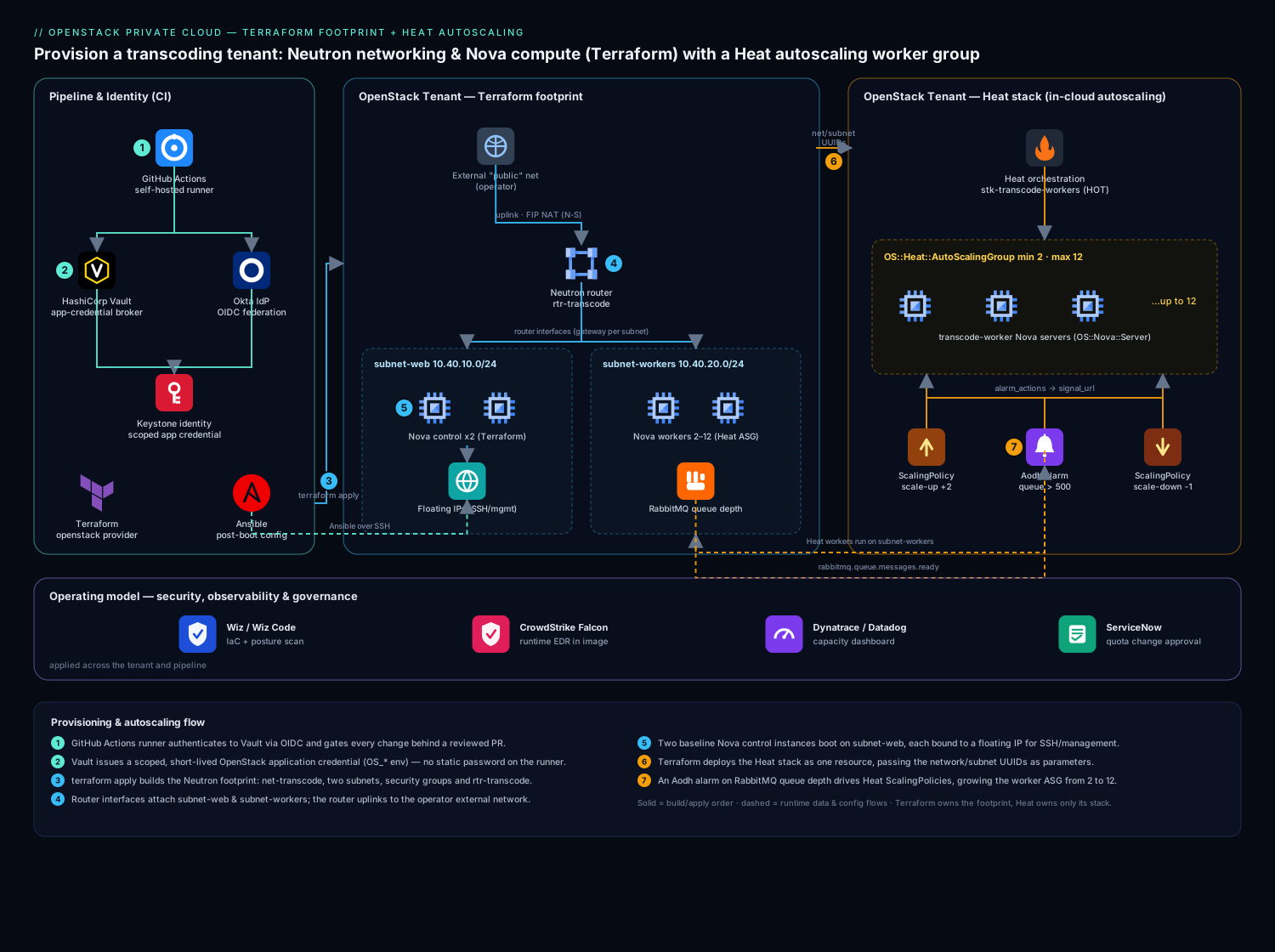
The tenant you build has a clean two-tier shape. A Neutron tenant network (net-transcode) carries two subnets — a web subnet for the control instances and a workers subnet for the transcoding fleet — both behind a single Neutron router that uplinks to the operator’s external network for north-south traffic and floating-IP NAT. Two baseline Nova instances (a control node and a NFS/queue node) are provisioned by Terraform and pinned to the web subnet, each fronted by a floating IP for SSH/management. The transcoding workers are not in Terraform — they are an OS::Heat::AutoScalingGroup managed by a Heat stack on the workers subnet, scaling between 2 and 12 instances based on an Aodh alarm watching RabbitMQ queue depth. Security groups gate every flow: management SSH only from the bastion CIDR, transcoding RPC only between the two subnets, and egress for image pulls. Identity for the humans and pipeline comes from Okta federated into Keystone over OIDC, so an engineer logs in once with corporate credentials and the pipeline assumes a scoped service identity rather than carrying a static password.
1. Lay down credentials and the Terraform provider
Never put OpenStack credentials in a .tf file or a committed clouds.yaml. The pipeline pulls a short-lived application credential from HashiCorp Vault (Vault’s role here is the single broker of all OpenStack and cloud secrets — it issues a scoped, expiring app credential per run so no long-lived password ever lands on a runner or in state). Locally, engineers authenticate through Okta → Keystone OIDC and source the resulting OS_* environment, which terraform-provider-openstack reads natively.
Create an application credential scoped to just this project so the pipeline cannot touch other tenants:
# Authenticated as the human/service user, mint a restricted app credential
openstack application credential create terraform-transcode \
  --role member \
  --description "CI footprint for transcode tenant" \
  --expiration 2026-07-10T00:00:00 \
  --restricted          # cannot create further app credentials

# Output gives id + secret — these are what Vault stores and injects, never committed
Point the provider at the cloud. Configure it from environment variables so the same code runs locally and in CI with zero edits:
# providers.tf
terraform {
  required_version = ">= 1.7.0"
  required_providers {
    openstack = {
      source  = "terraform-provider-openstack/openstack"
      version = "~> 2.1"
    }
  }
  backend "s3" {
    # Swift/Ceph RGW S3-compatible endpoint holds remote state + a DynamoDB-style lock
    bucket = "tfstate-transcode"
    key    = "openstack/footprint.tfstate"
    # endpoint, region, credentials come from backend config / env in CI
  }
}

# All auth (auth_url, application_credential_id/secret, region) is read from
# OS_* env vars injected by Vault — nothing sensitive lives in this file.
provider "openstack" {}
Initialize and confirm the provider can reach Keystone:
export OS_AUTH_TYPE=v3applicationcredential
export OS_AUTH_URL=https://keystone.colo.internal:5000/v3
export OS_APPLICATION_CREDENTIAL_ID=...     # injected by Vault
export OS_APPLICATION_CREDENTIAL_SECRET=... # injected by Vault
export OS_REGION_NAME=ColoEast

terraform init
terraform providers   # should list openstack ~> 2.1
2. Build the Neutron network, subnets, and router in Terraform
This is the load-bearing layer. Define the tenant network with two subnets and a router that uplinks to the operator’s external network. Look up the external network by name with a data source so you never hardcode its UUID:
# network.tf
data "openstack_networking_network_v2" "external" {
  name     = "public"     # the operator's provider/external network
  external = true
}

resource "openstack_networking_network_v2" "transcode" {
  name           = "net-transcode"
  admin_state_up = true
}

resource "openstack_networking_subnet_v2" "web" {
  name            = "subnet-web"
  network_id      = openstack_networking_network_v2.transcode.id
  cidr            = "10.40.10.0/24"
  ip_version      = 4
  dns_nameservers = ["10.40.0.10", "10.40.0.11"]
  enable_dhcp     = true
}

resource "openstack_networking_subnet_v2" "workers" {
  name            = "subnet-workers"
  network_id      = openstack_networking_network_v2.transcode.id
  cidr            = "10.40.20.0/24"
  ip_version      = 4
  dns_nameservers = ["10.40.0.10", "10.40.0.11"]
  enable_dhcp     = true
}

resource "openstack_networking_router_v2" "transcode" {
  name                = "rtr-transcode"
  admin_state_up      = true
  external_network_id = data.openstack_networking_network_v2.external.id
}

# Attach both subnets to the router so they get a gateway + NAT to the outside
resource "openstack_networking_router_interface_v2" "web" {
  router_id = openstack_networking_router_v2.transcode.id
  subnet_id = openstack_networking_subnet_v2.web.id
}

resource "openstack_networking_router_interface_v2" "workers" {
  router_id = openstack_networking_router_v2.transcode.id
  subnet_id = openstack_networking_subnet_v2.workers.id
}
Run a scoped plan and apply just the network so you can eyeball the topology before any compute exists:
terraform plan  -target=openstack_networking_router_interface_v2.web \
                -target=openstack_networking_router_interface_v2.workers
terraform apply -target=openstack_networking_router_interface_v2.web \
                -target=openstack_networking_router_interface_v2.workers
openstack router show rtr-transcode -c external_gateway_info
3. Define security groups with least-privilege rules
Security groups are where the hand-built tenant rotted, so be explicit. Create two groups — one for management (SSH from the bastion only) and one for the transcoding data plane (RPC between subnets only). Default-deny is implicit in Neutron; you only add the allows you can justify.
# secgroups.tf
variable "bastion_cidr" {
  description = "Jump-host CIDR allowed to SSH"
  type        = string
  default     = "10.40.0.0/28"
}

resource "openstack_networking_secgroup_v2" "mgmt" {
  name        = "sg-transcode-mgmt"
  description = "SSH from bastion only"
}

resource "openstack_networking_secgroup_rule_v2" "ssh_in" {
  direction         = "ingress"
  ethertype         = "IPv4"
  protocol          = "tcp"
  port_range_min    = 22
  port_range_max    = 22
  remote_ip_prefix  = var.bastion_cidr
  security_group_id = openstack_networking_secgroup_v2.mgmt.id
}

resource "openstack_networking_secgroup_v2" "dataplane" {
  name        = "sg-transcode-data"
  description = "Transcoder RPC + queue traffic, intra-tenant only"
}

# Allow AMQP (RabbitMQ) from the worker subnet to the control/queue node
resource "openstack_networking_secgroup_rule_v2" "amqp_in" {
  direction         = "ingress"
  ethertype         = "IPv4"
  protocol          = "tcp"
  port_range_min    = 5672
  port_range_max    = 5672
  remote_ip_prefix  = openstack_networking_subnet_v2.workers.cidr
  security_group_id = openstack_networking_secgroup_v2.dataplane.id
}
A note that saves an outage: Neutron security groups stack, so attach both sg-transcode-mgmt and sg-transcode-data to instances that need each — they are additive, not exclusive.
4. Provision the baseline Nova instances and floating IPs
Now the compute. Look up the image and flavor by name (again, no hardcoded UUIDs), create a key pair, boot two control-tier instances, and allocate a floating IP for each. Use user_data (cloud-init) to baseline the host rather than baking a golden image for every change — Ansible runs the heavier configuration afterward over SSH, so cloud-init only does enough to make the box reachable and Ansible-ready.
# compute.tf
data "openstack_images_image_v2" "base" {
  name        = "Ubuntu-22.04-LTS"
  most_recent = true
}

data "openstack_compute_flavor_v2" "large" {
  name = "m1.large"
}

resource "openstack_compute_keypair_v2" "deploy" {
  name       = "kp-transcode-deploy"
  public_key = file("${path.module}/keys/deploy.pub")  # pubkey only; private key in Vault
}

resource "openstack_compute_instance_v2" "control" {
  count           = 2
  name            = "transcode-control-${count.index}"
  image_id        = data.openstack_images_image_v2.base.id
  flavor_id       = data.openstack_compute_flavor_v2.large.id
  key_pair        = openstack_compute_keypair_v2.deploy.name
  security_groups = ["sg-transcode-mgmt", "sg-transcode-data"]

  network {
    uuid = openstack_networking_network_v2.transcode.id
    fixed_ip_v4 = cidrhost(openstack_networking_subnet_v2.web.cidr, 20 + count.index)
  }

  user_data = <<-EOT
    #cloud-config
    package_update: true
    packages: [python3, qemu-utils]
    runcmd:
      - [ systemctl, enable, --now, qemu-guest-agent ]
  EOT

  depends_on = [openstack_networking_router_interface_v2.web]
}

# Allocate a floating IP from the external pool and bind it to each control node
resource "openstack_networking_floatingip_v2" "control" {
  count = 2
  pool  = data.openstack_networking_network_v2.external.name
}

resource "openstack_compute_floatingip_associate_v2" "control" {
  count       = 2
  floating_ip = openstack_networking_floatingip_v2.control[count.index].address
  instance_id = openstack_compute_instance_v2.control[count.index].id
}
Apply the full footprint and capture the floating IPs as outputs so the next pipeline stage (and Ansible’s inventory) can consume them:
# outputs.tf
output "control_floating_ips" {
  value = openstack_networking_floatingip_v2.control[*].address
}
terraform plan -out=tfplan
terraform apply tfplan
terraform output control_floating_ips
5. Hand the autoscaling workers to Heat
The transcoding fleet must grow when the RabbitMQ queue backs up and shrink when it drains — scaling logic that belongs inside the cloud, next to the alarm. This is exactly what Heat is for, so Terraform deploys the Heat stack as a single resource and Heat owns everything within it. Write the Heat Orchestration Template (HOT):
# heat/workers.yaml
heat_template_version: 2021-04-16
description: Autoscaling transcoding worker group on subnet-workers

parameters:
  image:        { type: string, default: Ubuntu-22.04-LTS }
  flavor:       { type: string, default: m1.large }
  workers_net:  { type: string }   # net-transcode UUID, passed from Terraform
  workers_subnet: { type: string } # subnet-workers UUID
  key_name:     { type: string, default: kp-transcode-deploy }
  data_secgroup: { type: string, default: sg-transcode-data }

resources:
  worker_group:
    type: OS::Heat::AutoScalingGroup
    properties:
      min_size: 2
      max_size: 12
      desired_capacity: 2
      resource:
        type: OS::Nova::Server
        properties:
          image: { get_param: image }
          flavor: { get_param: flavor }
          key_name: { get_param: key_name }
          security_groups: [ { get_param: data_secgroup } ]
          networks:
            - network: { get_param: workers_net }
          metadata: { role: transcode-worker }
          user_data_format: RAW
          user_data: |
            #cloud-config
            runcmd:
              - [ systemctl, enable, --now, transcode-agent ]

  scale_up:
    type: OS::Heat::ScalingPolicy
    properties:
      adjustment_type: change_in_capacity
      auto_scaling_group_id: { get_resource: worker_group }
      cooldown: 120
      scaling_adjustment: 2

  scale_down:
    type: OS::Heat::ScalingPolicy
    properties:
      adjustment_type: change_in_capacity
      auto_scaling_group_id: { get_resource: worker_group }
      cooldown: 300
      scaling_adjustment: -1

  queue_high_alarm:
    type: OS::Aodh::GnocchiAggregationByResourcesAlarm
    properties:
      description: Scale up when RabbitMQ ready messages stay high
      metric: rabbitmq.queue.messages.ready
      aggregation_method: mean
      granularity: 300
      evaluation_periods: 1
      threshold: 500
      comparison_operator: gt
      alarm_actions: [ { get_attr: [scale_up, signal_url] } ]
      query:
        str_replace:
          template: '{"=": {"queue": "transcode_jobs"}}'
          params: {}

outputs:
  worker_group_size:
    value: { get_attr: [worker_group, current_size] }
Wire it into Terraform as an openstack_orchestration_stack_v1 resource, feeding the network UUIDs that Terraform already created — this is the clean handoff between the two tools:
# heat.tf
resource "openstack_orchestration_stack_v1" "workers" {
  name          = "stk-transcode-workers"
  template_opts = { Bin = file("${path.module}/heat/workers.yaml") }

  parameters = {
    workers_net    = openstack_networking_network_v2.transcode.id
    workers_subnet = openstack_networking_subnet_v2.workers.id
  }

  timeout = 30
}
terraform apply -target=openstack_orchestration_stack_v1.workers
# Or drive Heat directly for ad-hoc inspection:
openstack stack list
openstack stack resource list stk-transcode-workers
openstack stack output show stk-transcode-workers worker_group_size
6. Drive it all from one pipeline
The whole footprint runs from GitHub Actions (the runner is what gates every change behind a pull request and a green plan; it authenticates to Vault via its OIDC identity, pulls the OpenStack app credential, and never stores a long-lived secret). For teams already standardized on it, Jenkins plays the identical role — the same plan / apply stages behind a Jenkinsfile. A representative job:
# .github/workflows/footprint.yml  (illustrative — auth/secret wiring lives elsewhere)
jobs:
  terraform:
    runs-on: [self-hosted, colo]
    steps:
      - uses: actions/checkout@v4
      - name: Fetch OpenStack app credential from Vault
        run: ./scripts/vault-fetch-os-creds.sh   # exports OS_* for the run
      - run: terraform init
      - run: terraform validate
      - run: terraform plan -out=tfplan          # surfaced on the PR for review
      - run: terraform apply tfplan              # only on merge to main
The same merge that applies infrastructure triggers an Ansible play (Ansible’s job is post-boot configuration management — installing the transcode agent, distributing RabbitMQ credentials, and enforcing CIS hardening that cloud-init is too blunt for) against the Terraform-emitted inventory of floating IPs.
Validation
After an apply, prove the tenant is actually wired correctly rather than trusting the apply succeeded:
# 1. Network + router uplink exists and has an external gateway
openstack router show rtr-transcode -c external_gateway_info

# 2. Both subnets are attached to the router
openstack port list --router rtr-transcode -c "Fixed IP Addresses"

# 3. Baseline instances are ACTIVE and on the right fixed IPs
openstack server list --name transcode-control -c Name -c Status -c Networks

# 4. Floating IPs are associated, not just allocated
openstack floating ip list -c "Floating IP Address" -c "Fixed IP Address" -c Port

# 5. SSH reachability through the floating IP (from the bastion)
ssh -i deploy.key ubuntu@$(terraform output -raw control_floating_ips | head -1) 'hostname'

# 6. Heat stack is CREATE_COMPLETE and the ASG is at desired size
openstack stack show stk-transcode-workers -c stack_status
openstack stack output show stk-transcode-workers worker_group_size

# 7. The Aodh alarm exists and is in a sane state (ok / insufficient data, not broken)
openstack alarm list --query "type=gnocchi_aggregation_by_resources_threshold"
Force a scale event to confirm the autoscaling loop is live: publish synthetic high queue-depth metrics (or temporarily drop the threshold) and watch worker_group_size climb, then settle back after the cooldown. An alarm that never fires is worse than no alarm — test it.
Rollback and teardown
Because the whole tenant is declarative, rollback is terraform destroy plus letting Heat unwind its own stack — but order matters, or Neutron refuses to delete a router that still has ports.
# 1. Heat first: deleting the stack drains the ASG and removes its servers + alarm
openstack stack delete stk-transcode-workers --wait
#    (or: terraform destroy -target=openstack_orchestration_stack_v1.workers)

# 2. Then the Terraform footprint — provider handles FIP disassociation order
terraform destroy

# If a router interface lingers and blocks deletion, detach it explicitly:
openstack router remove subnet rtr-transcode subnet-workers
openstack router remove subnet rtr-transcode subnet-web
For a partial rollback after a bad change, prefer Terraform’s history: terraform plan against the previous Git commit shows exactly what drifted, and a targeted apply of the prior definition reverts just that resource. Keep the remote state and its lock intact throughout — never rm the state file to “start clean,” which orphans live resources you then pay for and have to hunt down by hand.
Common pitfalls
- Hardcoded UUIDs. Image, flavor, and external-network IDs differ per cloud and per upgrade. Always resolve them with
datasources by name, or the same code fails the moment Glance re-publishes an image. - Forgetting the router interface. Creating a subnet does not connect it — without an
openstack_networking_router_interface_v2, instances boot with no gateway and floating-IP NAT silently fails. This is the single most common “my VM can’t reach the internet” ticket. - Floating IP allocated but not associated.
openstack_networking_floatingip_v2only reserves the address; you still need the_associate_v2(or aport_id) to bind it. An allocated-but-unbound FIP looks healthy in the console and routes nowhere. - Quota walls mid-apply. Heat scaling up into an exhausted instance/RAM quota leaves the stack in
UPDATE_FAILED. Size project quota formax_size, notdesired_capacity, before you ship. - Security groups not stacking as expected. Forgetting that Neutron groups are additive leads people to cram every rule into one giant group; keep them small and composable, and attach multiple.
- Heat vs Terraform overlap. Do not let both tools manage the same resource. Terraform owns the network and baseline; Heat owns only what is inside its stack. Overlap produces fights where each tool reverts the other on every run.
Security notes
Identity is the perimeter. Humans reach Keystone through Okta federated over OIDC (Okta is the corporate IdP; engineers authenticate once and Keystone trusts the assertion), and the pipeline uses scoped, expiring application credentials brokered by HashiCorp Vault so no static OpenStack password ever lands on a runner or in state. Run Wiz / Wiz Code against the repository and the live tenant — Wiz Code scans the Terraform and Heat templates in the pull request for an over-broad remote_ip_prefix of 0.0.0.0/0 or a public-by-default security group before merge, while Wiz’s cloud posture side flags drift on the running instances. Put CrowdStrike Falcon sensors in the base Glance image so every Nova instance and every Heat-scaled worker comes up with runtime threat detection reporting to the SOC from first boot — autoscaled hosts are exactly where unmonitored compute hides. Keep security groups least-privilege (SSH from the bastion CIDR only, never the world), terminate management access at a bastion, and let Terraform — not a console click — be the only thing that opens a port.
Cost notes
Private-cloud cost is capacity, not a usage meter, so the lever is packing density and not stranding hardware. Set Heat’s max_size deliberately and tie scale-down to a real drain signal so the fleet shrinks the moment the queue clears rather than idling on reserved hypervisor RAM you could schedule for another tenant. Right-size flavors against actual transcoder CPU/RAM — an oversized flavor wastes capacity on every autoscaled instance, multiplied across the group. Pipe per-tenant utilization and queue-depth-versus-fleet-size into Dynatrace or Datadog (their job here is the capacity dashboard the platform team uses to prove the tenant is sized honestly and to justify the next hardware buy) so scaling decisions are driven by data, not by the 2 a.m. guess this whole rebuild was meant to kill. Finally, gate quota increases through ServiceNow change requests, giving capacity planning a documented approval trail before a tenant is allowed to grow into shared hardware.