A regional insurer runs three vSphere clusters across two datacentres — production in Mumbai, DR in Pune — and the platform team has a chronic problem: every VM the app teams ask for is hand-built from an ISO, which means each one drifts. One has an old OpenSSH, another never got the CIS partitioning, a third is missing the CrowdStrike sensor the SOC mandates, and nobody can say which is which until an audit finds it. The fix the team commits to is the one this guide walks through end to end: bake a single hardened “golden” VM template once with Packer, version it, and stamp out every cluster’s VMs from that template with Terraform — so a server is a build artifact, not a snowflake. By the end you will have a reproducible ubuntu-2204-hardened template in vCenter and a Terraform module that provisions a three-node cluster from it in minutes, with the same image in production and DR.
This is an Intermediate, infrastructure-focused guide. It assumes you are comfortable on a Linux shell and have seen Terraform before, but it does not assume you have used Packer’s vSphere builder or the vSphere Terraform provider in anger.
Prerequisites
- vCenter 7.0u3 or 8.0, with a cluster that has DRS enabled, a shared datastore, and a port group you can reach. You need a vSphere account (ideally a dedicated service account, e.g.
svc-packer@vsphere.local) with privileges to create/clone VMs, manage content libraries, and mark templates. - Packer 1.10+ and the
packer-plugin-vsphere(thevsphere-isoandvsphere-clonebuilders). - Terraform 1.7+ and the
hashicorp/vsphereprovider (~> 2.7). - A Linux build host or CI runner that can reach vCenter on 443 and serve files to the booting VM over HTTP (Packer’s built-in HTTP server, or an existing Akamai-fronted mirror for the cloud-init/preseed payload).
- An Ubuntu 22.04 LTS server ISO uploaded to a vCenter datastore (or reachable via URL).
- HashiCorp Vault reachable for secrets, and an OIDC identity provider — Okta federated to Microsoft Entra ID — for human and pipeline auth (covered in step 2).
- Network egress from the freshly-booted VM to your package mirror and to the CrowdStrike Falcon, Wiz, and Dynatrace agent download endpoints.
Target topology
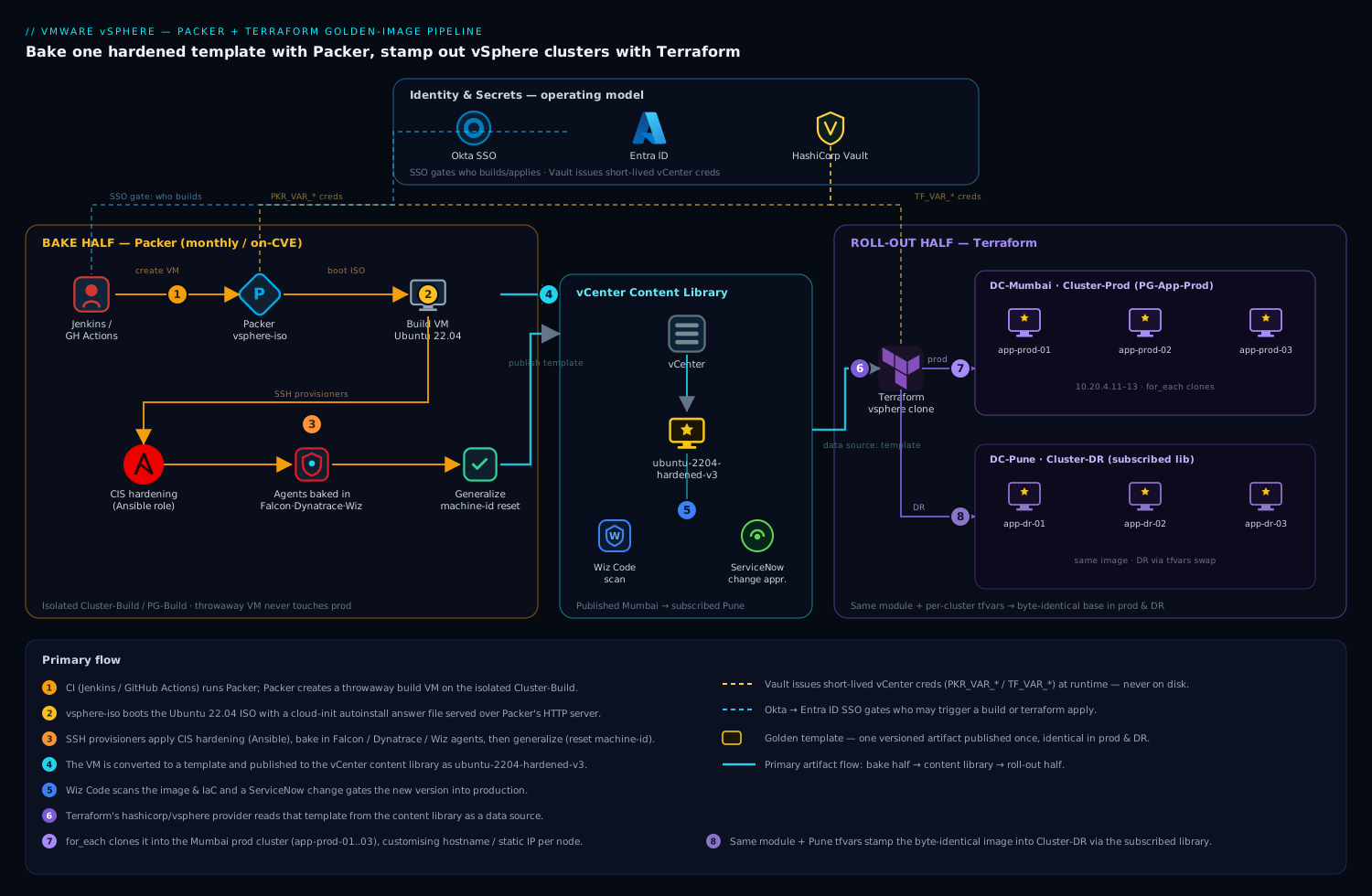
The pipeline has two clean halves that meet at the vCenter content library, and keeping them separate in your head is the key to operating this well.
The bake half runs on a schedule (monthly, or on a CVE alert). A CI job on Jenkins or GitHub Actions runs Packer’s vsphere-iso builder against vCenter: it creates a throwaway VM, boots the Ubuntu ISO with an automated install answer file, runs hardening and agent-install provisioners over SSH, shuts the VM down, and converts it to a template published into a content library. That published template — call it ubuntu-2204-hardened-v<n> — is the only artifact that leaves this half.
The roll-out half is Terraform. The hashicorp/vsphere provider clones that content-library template into N VMs across one or more clusters, customises hostname/IP/identity per VM, and registers them. App teams consume a thin Terraform module; they never see an ISO. Because both halves point at the same versioned template, production in Mumbai and DR in Pune run a byte-identical base image — which is the whole point.
Around those two halves sit the operating-model tools: Vault issues the short-lived vCenter and join credentials both Packer and Terraform need; Okta → Entra ID gates who can trigger a build or apply; Wiz / Wiz Code scans the Packer template (and the Terraform plan) for misconfigurations before it ships; CrowdStrike Falcon and Dynatrace agents are baked into the golden image so every cloned VM is observed and protected from first boot; and ServiceNow holds the change ticket that gates a new image version into production.
1. Lay out the repository and pin tool versions
Keep the bake and the roll-out in one repo but separate directories. Pin every plugin — a floating Packer or provider version is exactly how “reproducible” quietly breaks.
vsphere-golden/
├── packer/
│   ├── ubuntu-2204.pkr.hcl
│   ├── variables.pkr.hcl
│   └── http/
│       └── user-data            # cloud-init autoinstall answer file
│       └── meta-data            # (empty, required by cloud-init)
├── scripts/
│   ├── 10-cis-hardening.sh
│   ├── 20-install-agents.sh
│   └── 90-cleanup.sh
└── terraform/
    ├── main.tf
    ├── variables.tf
    └── clusters.auto.tfvars
Declare the Packer plugin and required version so packer init resolves it deterministically:
# packer/variables.pkr.hcl
packer {
  required_version = ">= 1.10.0"
  required_plugins {
    vsphere = {
      source  = "github.com/hashicorp/vsphere"
      version = "~> 1.4"
    }
  }
}
Initialise once:
cd packer
packer init .
2. Wire identity and secrets (Okta/Entra + Vault)
Never put the vCenter password in a .pkrvars.hcl or terraform.tfvars. Two layers protect it.
Human and pipeline access is gated by Okta as the workforce IdP, federated to Microsoft Entra ID. Engineers and the Jenkins/GitHub Actions service principal authenticate through Okta SSO with conditional access; the resulting Entra token is what authorises who may run a build or a terraform apply. The pipeline itself never holds a long-lived vCenter credential.
The credentials themselves come from HashiCorp Vault. Store the vCenter service-account password as a static or (better) a dynamic secret, and have the CI job read it at runtime so it lives only in process memory:
# Pipeline authenticates to Vault using its Entra/JWT identity, not a static token
export VAULT_ADDR="https://vault.kloudvin.internal:8200"
vault login -method=oidc role=ci-packer >/dev/null

# Pull the vCenter creds into env vars Packer/Terraform read
export PKR_VAR_vsphere_password="$(vault kv get -field=password secret/vsphere/svc-packer)"
export TF_VAR_vsphere_password="$PKR_VAR_vsphere_password"
export PKR_VAR_vsphere_username="svc-packer@vsphere.local"
Packer and Terraform both pick up PKR_VAR_* / TF_VAR_* automatically, so the secret never touches disk. Rotate the Vault lease and the password rotates everywhere.
3. Author the autoinstall answer file
The golden image starts from an unattended OS install. For Ubuntu 22.04, that is a cloud-init autoinstall user-data served over Packer’s HTTP server. This file decides the partition layout — and a CIS-compliant layout (separate /var, /var/log, /var/log/audit, /home, /tmp with nodev,nosuid,noexec) is far easier to bake here than to retrofit later.
# packer/http/user-data
#cloud-config
autoinstall:
  version: 1
  locale: en_US.UTF-8
  keyboard: { layout: us }
  identity:
    hostname: golden-build
    username: ansible
    # hash generated with: mkpasswd -m sha-512  (placeholder swapped in by Packer)
    password: "${SSH_PASSWORD_HASH}"
  ssh:
    install-server: true
    allow-pw: true
  storage:
    config:
      - { type: disk, id: disk0, ptable: gpt, wipe: superblock-recursive, grub_device: true }
      - { type: partition, id: boot, device: disk0, size: 1G, flag: boot }
      - { type: partition, id: root, device: disk0, size: 12G }
      - { type: partition, id: var,  device: disk0, size: 8G }
      - { type: partition, id: varlog, device: disk0, size: 6G }
      - { type: partition, id: audit, device: disk0, size: 4G }
      - { type: format, id: fs-root, volume: root, fstype: ext4 }
      - { type: mount, id: m-root, device: fs-root, path: / }
      - { type: format, id: fs-var, volume: var, fstype: ext4 }
      - { type: mount, id: m-var, device: fs-var, path: /var, options: "nodev" }
      - { type: format, id: fs-varlog, volume: varlog, fstype: ext4 }
      - { type: mount, id: m-varlog, device: fs-varlog, path: /var/log, options: "nodev,nosuid,noexec" }
  packages: [open-vm-tools, openssh-server, curl, jq, chrony]
  late-commands:
    # passwordless sudo for the build user so Packer provisioners can harden the box
    - echo 'ansible ALL=(ALL) NOPASSWD:ALL' > /target/etc/sudoers.d/ansible
The empty meta-data file must exist alongside it or cloud-init refuses to start.
4. Write the Packer template (the vsphere-iso builder)
This is the heart of the bake. The vsphere-iso source talks to vCenter, creates a VM, mounts the ISO, and hands the boot command that tells the installer to fetch the autoinstall file from Packer’s HTTP server.
# packer/ubuntu-2204.pkr.hcl
variable "vsphere_server"   { default = "vcenter.kloudvin.internal" }
variable "vsphere_username" {}
variable "vsphere_password" { sensitive = true }
variable "image_version"    { default = "v3" }

source "vsphere-iso" "ubuntu" {
  vcenter_server      = var.vsphere_server
  username            = var.vsphere_username
  password            = var.vsphere_password
  insecure_connection = false                 # use a real vCenter cert in prod

  # Where the throwaway build VM lives
  datacenter   = "DC-Mumbai"
  cluster      = "Cluster-Build"
  datastore    = "vsanDatastore"
  folder       = "templates/build"

  # Hardware
  guest_os_type = "ubuntu64Guest"
  CPUs          = 2
  RAM           = 4096
  disk_controller_type = ["pvscsi"]
  storage { disk_size = 40960  disk_thin_provisioned = true }
  network_adapters {
    network      = "PG-Build"
    network_card = "vmxnet3"
  }

  # Boot the ISO and point the installer at the autoinstall payload
  iso_paths    = ["[isos] ubuntu/ubuntu-22.04.4-live-server-amd64.iso"]
  http_directory = "http"
  boot_wait    = "5s"
  boot_command = [
    "c<wait>",
    "linux /casper/vmlinuz --- autoinstall ",
    "ds=nocloud-net\\;s=http://{{ .HTTPIP }}:{{ .HTTPPort }}/<enter>",
    "initrd /casper/initrd<enter>",
    "boot<enter>"
  ]

  # How Packer connects after install to run provisioners
  communicator     = "ssh"
  ssh_username     = "ansible"
  ssh_password     = "${SSH_PASSWORD}"
  ssh_timeout      = "30m"
  ssh_handshake_attempts = 100

  shutdown_command = "sudo shutdown -P now"

  # >>> The output: convert to template AND publish to a content library <<<
  convert_to_template = true
  content_library_destination {
    library     = "golden-images"
    name        = "ubuntu-2204-hardened-${var.image_version}"
    ovf         = true
    destroy     = true   # replace an existing same-name item
  }
}

build {
  name    = "ubuntu-2204-hardened"
  sources = ["source.vsphere-iso.ubuntu"]

  # 1) CIS hardening
  provisioner "shell" {
    execute_command = "echo '${var.vsphere_password}' | {{ .Vars }} sudo -S -E bash '{{ .Path }}'"
    script          = "../scripts/10-cis-hardening.sh"
  }
  # 2) Security + observability agents baked in
  provisioner "shell" { script = "../scripts/20-install-agents.sh" }
  # 3) Generalize / cleanup so every clone is unique
  provisioner "shell" { script = "../scripts/90-cleanup.sh" }
}
Two design choices matter here. First, content_library_destination (not just convert_to_template) is what makes the image distributable to other vCenters — a content library can be published and subscribed across your Mumbai and Pune vCenters, so DR gets the same artifact automatically. Second, the build VM lives on a dedicated Cluster-Build/PG-Build, isolated from production traffic while it boots an un-hardened OS.
5. Bake hardening and agents into the image
The provisioner scripts are where a server stops being generic and becomes yours. Keep them small and idempotent.
scripts/10-cis-hardening.sh applies the controls your auditor checks — using the Ubuntu CIS Ansible role if you have Ansible available, or raw commands otherwise:
#!/usr/bin/env bash
set -euo pipefail
export DEBIAN_FRONTEND=noninteractive

# Option A: drive the CIS role with Ansible (recommended — declarative, auditable)
apt-get update && apt-get install -y ansible
ansible-galaxy install ansible-lockdown.ubuntu2204_cis
ansible-pull -U https://git.kloudvin.internal/platform/cis-baseline.git \
             -i localhost, --connection=local hardening.yml

# Option B equivalents if you are not using the role:
systemctl disable --now rpcbind || true          # kill unused services
sed -i 's/^#\?PermitRootLogin.*/PermitRootLogin no/' /etc/ssh/sshd_config
sed -i 's/^#\?PasswordAuthentication.*/PasswordAuthentication no/' /etc/ssh/sshd_config
auditctl -e 1 || true
echo "kernel.randomize_va_space = 2" > /etc/sysctl.d/60-hardening.conf
scripts/20-install-agents.sh bakes in the three agents the operating model mandates, so every cloned VM is protected and observed from its first boot — not days later when someone remembers:
#!/usr/bin/env bash
set -euo pipefail

# CrowdStrike Falcon — endpoint detection & response for the SOC.
# CID is non-secret-ish but pull it from Vault to avoid baking it in clear.
FALCON_CID="$(curl -s --header "X-Vault-Token: $VAULT_TOKEN" \
  "$VAULT_ADDR/v1/secret/data/falcon" | jq -r .data.data.cid)"
curl -sL https://mirror.kloudvin.internal/falcon/falcon-sensor.deb -o /tmp/falcon.deb
dpkg -i /tmp/falcon.deb
/opt/CrowdStrike/falconctl -s --cid="$FALCON_CID"
# NOTE: do NOT start/AID-register here — let it register on first real boot, not on the template

# Dynatrace OneAgent — full-stack observability, traces & host metrics.
wget -O /tmp/oneagent.sh "https://dynatrace.kloudvin.internal/installer/agent/unix/latest"
sh /tmp/oneagent.sh --set-infra-only=false --set-app-log-content-access=true

# Wiz runtime sensor (optional) — runtime threat + drift on the running guest.
curl -sL https://mirror.kloudvin.internal/wiz/wizsensor.deb -o /tmp/wiz.deb && dpkg -i /tmp/wiz.deb
scripts/90-cleanup.sh generalises the image — the single most-skipped step that causes the worst clone-time bugs (duplicate machine-ids, duplicate SSH host keys, every VM claiming the same DHCP lease):
#!/usr/bin/env bash
set -euo pipefail
apt-get clean && rm -rf /var/lib/apt/lists/*
# Truncate machine-id so cloud-init regenerates a unique one per clone
truncate -s 0 /etc/machine-id && rm -f /var/lib/dbus/machine-id
ln -s /etc/machine-id /var/lib/dbus/machine-id
rm -f /etc/ssh/ssh_host_*          # regenerated on first boot
cloud-init clean --logs            # reset cloud-init so customization runs fresh
rm -f /home/ansible/.bash_history /root/.bash_history
6. Build the golden image
With identity exported (step 2) and the template authored, the build is one command. Run it from CI on a schedule so the image stays current with patches and CVE fixes.
cd packer
SSH_PASSWORD='ChangeMe-FromVault'        # pulled from Vault in CI, not literal
packer validate -var "image_version=v3" .
packer build  -var "image_version=v3" -on-error=cleanup .
A clean run ends with the content-library item published:
==> vsphere-iso.ubuntu: Clear boot order...
==> vsphere-iso.ubuntu: Power on VM...
==> vsphere-iso.ubuntu: Waiting for SSH to become available...
==> vsphere-iso.ubuntu: Running hardening + agent provisioners...
==> vsphere-iso.ubuntu: Shutting down VM...
==> vsphere-iso.ubuntu: Creating content library item ubuntu-2204-hardened-v3...
Build 'ubuntu-2204-hardened' finished after 21 minutes.
Gate before promotion. Before this version is allowed into production, Wiz Code scans the image build (and the IaC) for misconfigurations and exposed secrets, and a ServiceNow change request records the new v3 image and its CVE-fix justification. Only an approved change flips production Terraform to the new template version.
7. Roll out clusters with Terraform
Now the easy half. Terraform’s hashicorp/vsphere provider clones the content-library template into real VMs. Define the provider and a data source for the template:
# terraform/main.tf
terraform {
  required_providers {
    vsphere = { source = "hashicorp/vsphere", version = "~> 2.7" }
  }
}

provider "vsphere" {
  vsphere_server       = var.vsphere_server
  user                 = var.vsphere_username
  password             = var.vsphere_password      # from TF_VAR via Vault
  allow_unverified_ssl = false
}

# Look up where to place the VMs
data "vsphere_datacenter"     "dc"   { name = var.datacenter }
data "vsphere_compute_cluster" "cl"  { name = var.cluster  datacenter_id = data.vsphere_datacenter.dc.id }
data "vsphere_datastore"      "ds"   { name = var.datastore  datacenter_id = data.vsphere_datacenter.dc.id }
data "vsphere_network"        "net"  { name = var.port_group datacenter_id = data.vsphere_datacenter.dc.id }

# The golden image, by name, from the content library
data "vsphere_content_library"      "lib" { name = "golden-images" }
data "vsphere_content_library_item" "tpl" {
  name       = var.template_name          # e.g. "ubuntu-2204-hardened-v3"
  type       = "ovf"
  library_id = data.vsphere_content_library.lib.id
}
Then stamp out the cluster with a for_each over a map of nodes, customising each clone’s hostname and static IP:
# terraform/main.tf (continued)
resource "vsphere_virtual_machine" "node" {
  for_each = var.nodes                       # map: { "app-01" = "10.20.4.11", ... }

  name             = each.key
  resource_pool_id = data.vsphere_compute_cluster.cl.resource_pool_id
  datastore_id     = data.vsphere_datastore.ds.id
  num_cpus         = 4
  memory           = 8192
  guest_id         = "ubuntu64Guest"
  firmware         = "efi"

  network_interface { network_id = data.vsphere_network.net.id  adapter_type = "vmxnet3" }
  disk { label = "disk0"  size = 40  thin_provisioned = true }

  clone {
    template_uuid = data.vsphere_content_library_item.tpl.id
    customize {
      linux_options { host_name = each.key  domain = "kloudvin.internal" }
      network_interface {
        ipv4_address = each.value
        ipv4_netmask = 24
      }
      ipv4_gateway    = var.gateway
      dns_server_list = ["10.20.0.10", "10.20.0.11"]
    }
  }

  lifecycle { ignore_changes = [clone] }     # don't re-clone on later image bumps
}
Drive it with per-cluster tfvars so the same module serves Mumbai prod and Pune DR — only the variables change:
# terraform/clusters.auto.tfvars
datacenter    = "DC-Mumbai"
cluster       = "Cluster-Prod"
datastore     = "vsanDatastore"
port_group    = "PG-App-Prod"
gateway       = "10.20.4.1"
template_name = "ubuntu-2204-hardened-v3"
nodes = {
  "app-prod-01" = "10.20.4.11"
  "app-prod-02" = "10.20.4.12"
  "app-prod-03" = "10.20.4.13"
}
Apply through the same Okta/Entra-gated pipeline:
cd terraform
terraform init
terraform plan  -out tfplan          # Wiz Code scans this plan in CI
terraform apply tfplan
Three identical, hardened, agent-equipped VMs come up in a few minutes. Point the tfvars at DC-Pune/Cluster-DR and the same image lands in DR.
Validation
Prove the image and the roll-out actually did what you intended — do not trust the green build alone.
# 1) The template exists in the content library
govc library.ls "golden-images/ubuntu-2204-hardened-v3"

# 2) Terraform converged with the expected count
terraform state list | grep vsphere_virtual_machine | wc -l   # -> 3

# 3) Every node is reachable and uniquely identified (no duplicate machine-id)
for ip in 10.20.4.11 10.20.4.12 10.20.4.13; do
  ssh ansible@$ip 'hostname; cat /etc/machine-id'
done

# 4) Hardening actually applied (spot-check a CIS control)
ssh ansible@10.20.4.11 'sshd -T | grep -E "permitrootlogin|passwordauthentication"'
# expect: permitrootlogin no / passwordauthentication no

# 5) Agents are live, not just installed
ssh ansible@10.20.4.11 'sudo /opt/CrowdStrike/falconctl -g --aid'   # AID present = registered
ssh ansible@10.20.4.11 'systemctl is-active oneagent'              # active = Dynatrace reporting
Confirm in vCenter that each VM shows VMware Tools running (proves open-vm-tools baked in correctly and guest customization completed), and confirm the host appears in the Dynatrace tenant and the CrowdStrike console. A node that is up but missing from both is the failure you most want to catch here.
Rollback and teardown
Two different rollbacks — image-level and infrastructure-level — and you need both.
Roll back a bad image version. Because the template is versioned and ignore_changes = [clone] keeps existing VMs pinned, reverting is just pointing tfvars back at the previous good version for new builds:
template_name = "ubuntu-2204-hardened-v2" # was v3
Existing VMs are untouched; only freshly-provisioned ones use v2. Delete the bad content-library item once nothing references it:
govc library.rm "golden-images/ubuntu-2204-hardened-v3"
Tear down a cluster’s VMs. Terraform owns them, so destroy is clean and scoped to the tfvars in play:
cd terraform
terraform plan  -destroy -out destroy.plan
terraform apply destroy.plan
If a single node is wedged, remove just it: terraform destroy -target='vsphere_virtual_machine.node["app-prod-03"]'. Always run the -destroy plan first — it is the only thing standing between you and accidentally deleting the wrong cluster’s VMs because a tfvars pointed at the wrong datacenter.
Common pitfalls
- Forgetting to generalise (step 5). If you skip the
machine-id/SSH-host-key reset, every clone shares an identity: duplicate DHCP leases, SSH host-key warnings, and Dynatrace/CrowdStrike collapsing many hosts into one. Always truncatemachine-idand removessh_host_*before the template is sealed. - Boot command drift between Ubuntu point releases. The
vmlinuz/initrdpaths and the autoinstall kernel args change between ISO builds. Pin the exact ISO, and when you bump it, re-test theboot_commandinteractively before trusting CI. - HTTP server unreachable from the build VM. Packer serves the autoinstall file on an ephemeral port; if
PG-Buildcannot route back to the Packer host (firewall, wrong VLAN), the install hangs at “waiting for cloud-init.” Usehttp_bind_address/http_port_minto pin a reachable port and open it. - Provisioning against the production cluster. Build VMs are un-hardened while they boot. Keep
cluster/networkin the Packer source pointed at an isolated build cluster, never prod. convert_to_templatewithout a content library. A plain template is stuck in one vCenter. For multi-datacentre DR, you must publish to a content library and subscribe it in the paired vCenter, or your “identical DR image” is a manual copy that drifts.- Terraform re-cloning on image bumps. Without
lifecycle { ignore_changes = [clone] }, bumpingtemplate_namemakes Terraform want to destroy and recreate every running VM. Pin it, and treat image upgrades as a deliberate blue/green roll, not an in-place apply.
Security notes
The image is your security baseline, so harden at bake time, not after deploy. Bake CIS controls, CrowdStrike Falcon (EDR for the SOC), and the Wiz runtime sensor into the template so coverage is universal and immediate — there is no window where a fresh VM is unprotected. Keep every credential out of the artifacts: vCenter and agent secrets come from HashiCorp Vault at runtime; the only people and pipelines that can build or apply are gated by Okta → Entra ID SSO with conditional access. Run Wiz Code against both the Packer build and the Terraform plan in CI so a misconfiguration or a leaked key is caught before the image or the VMs exist, and route a new image version through a ServiceNow change approval so production promotion is auditable. Use a real vCenter TLS certificate (insecure_connection = false, allow_unverified_ssl = false) — skipping verification “just to get it working” is how a build host ends up talking to a spoofed vCenter.
Cost notes
The economics of golden images are mostly about time reclaimed and drift avoided, but a few levers keep the infrastructure cheap too. Thin-provision both the template disk and the clones (disk_thin_provisioned = true) so a 40 GB image only consumes what it uses — across dozens of clones on vSAN that is large. Run the bake on a small build cluster sized for one VM at a time, not on expensive production hosts. Schedule image rebuilds monthly plus on-CVE, not nightly, so you patch promptly without burning CI minutes and vCenter cycles on rebuilds nothing changed. And the biggest saving is indirect: because every VM is identical and observed by Dynatrace from first boot, you size the cluster on real utilisation instead of padding for the unknown drift of hand-built snowflakes — and you stop paying engineers to debug machines that should never have differed.