A mid-sized online learning company — picture an EdTech provider running Moodle for a few hundred universities and corporate training departments — gets the call no engineering team wants. A security researcher emails the CTO: a public GitHub repository belonging to the company contains a working database password, an SMTP key, and an Akamai API token, all sitting in a committed .env file. The repo was made public during a hackathon eighteen months ago and forgotten. By the time the team reacts, those credentials have been in search-indexable git history for a year and a half. Nobody knows if they were used. The database holds student records — names, emails, course progress, in some regions enough to count as protected education data. This is not a hypothetical: leaked credentials in source control are one of the most common ways small and mid-sized companies get breached, and the fix is almost embarrassingly well understood. This article is the foundational version of that fix — what secrets management actually is, why hardcoding is dangerous, and how a modern app gets its credentials without ever having a password written down.
If you are early in your career, this is one of the highest-leverage things you can learn. The pattern is the same whether you are on AWS, Azure, or Google Cloud, and getting it right from your first project saves a future you from writing the incident report above.
What “a secret” actually is, and why hardcoding fails
A secret is any value that grants access or proves identity: a database password, an API key, a TLS private key, an OAuth client secret, a service-account token. The defining property is that possession equals power — whoever holds the value can act as you. That is exactly why scattering them through your code and config is dangerous.
Hardcoding means putting the literal secret somewhere in your codebase — a connection string in appsettings.json, an API key in a constant, a password in a committed .env. It feels convenient. It fails for reasons that are worth stating plainly, because every one of them has burned a real team:
- Git never forgets. Deleting a secret in a later commit does not remove it — it lives forever in history, recoverable with one
git log. Making a repo private later does not help if it was ever public, and forks keep their own copy. - Secrets leak through copies you don’t think about. CI logs, error stack traces, Docker image layers, a laptop backup, a screen-share. A hardcoded value is exposed everywhere the code goes.
- You cannot rotate what is hardcoded. If a password is baked into fifty services, changing it means a code change and redeploy across all fifty — so in practice nobody rotates, and the same credential lives for years.
- No audit trail. You can never answer “who read this secret, and when?” because reading a constant leaves no record.
The .env-in-git case deserves its own emphasis because it is the single most common mistake juniors make. A .env file is fine as a local convenience — but it must be in .gitignore from the first commit, and the secret values must never be the real production ones. The moment a real credential enters git history, treat it as compromised forever and rotate it. This is also exactly why the KloudVin team treats any credential that has ever appeared in source control as burned: you cannot un-leak it, you can only revoke and replace it.
The core idea: a secret store, not a secret in code
The fix is a secrets manager (also called a secret store or vault): a dedicated, encrypted, access-controlled service whose entire job is to hold secrets and hand them out only to identities you have explicitly authorized, while logging every access. Your code stops containing secrets and starts containing a reference — “give me the secret named moodle-db-password” — which is resolved at runtime by an identity the app already has.
The shift in mental model is the whole point:
| Hardcoded (the problem) | Secret store (the fix) | |
|---|---|---|
| Where the secret lives | In code / config, in git | In an encrypted, central store |
| How the app gets it | Reads a constant or .env |
Fetches at runtime via its identity |
| Rotation | Code change + redeploy everywhere | Update once in the store; apps re-fetch |
| Audit | None | Every read is logged |
| Blast radius if code leaks | Full credential exposed | Only a reference leaks; the secret stays put |
Architecture overview
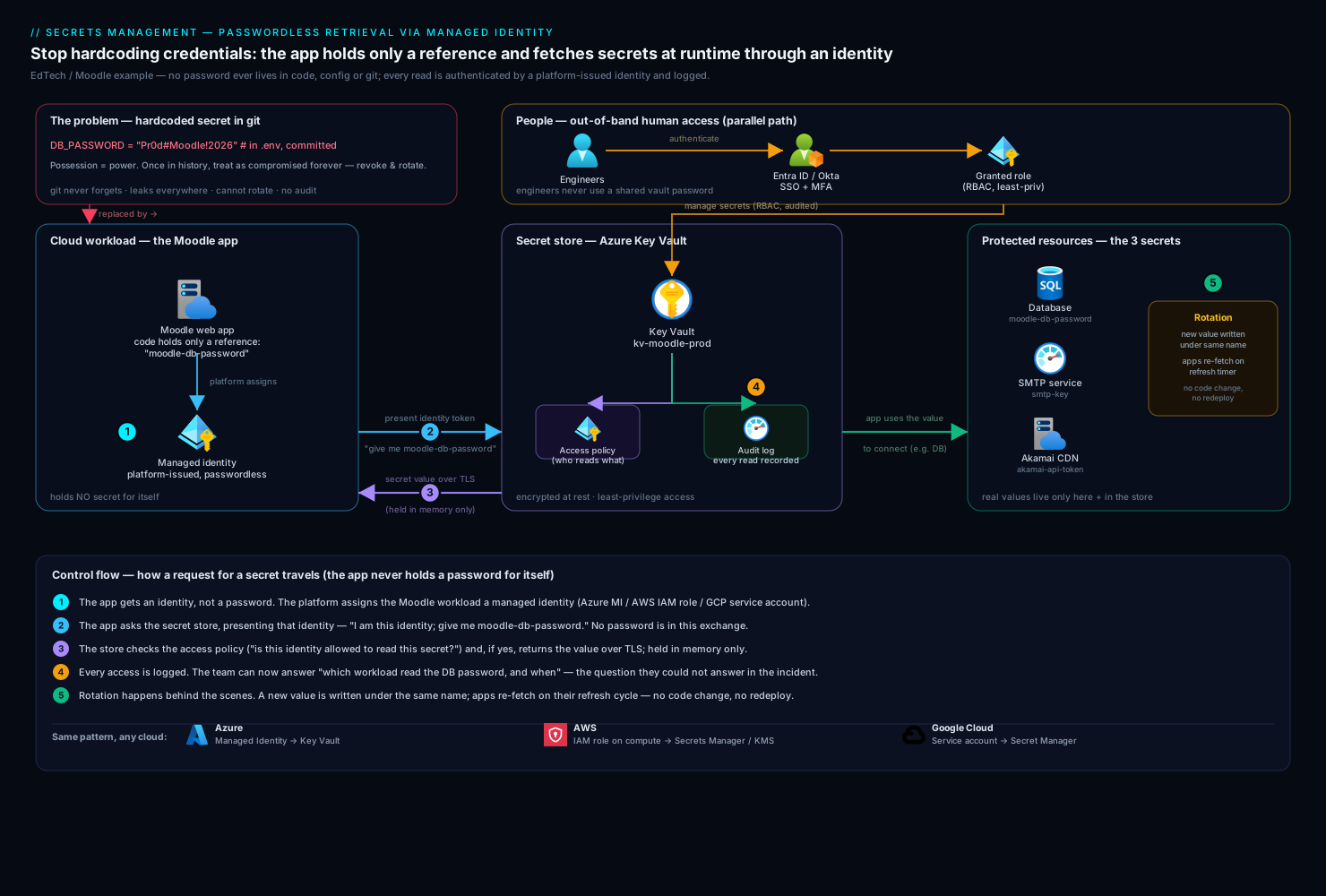
Here is the end-to-end picture for our EdTech company’s Moodle platform after they fix the problem. The Moodle app runs in the cloud and needs three secrets to start: the database password, the SMTP key for sending course-completion emails, and the Akamai API token used to purge the CDN cache when course content changes. None of those values exist anywhere in the codebase.
Walk the control flow the way a request for a secret actually travels:
-
The app gets an identity, not a password. When the Moodle workload boots in the cloud, the platform assigns it a managed identity — a built-in, passwordless identity that the cloud provider vouches for. On Azure this is a Managed Identity; on AWS an IAM role attached to the compute; on Google Cloud a service account bound to the workload. The crucial property: the app never holds a credential for itself. The cloud platform proves who the workload is.
-
The app asks the secret store, presenting that identity. At startup (and on a refresh timer), the app calls the secret store — Azure Key Vault, AWS Secrets Manager, or Google Secret Manager — saying “I am this managed identity; give me
moodle-db-password.” There is no password in this exchange; the request is authenticated by the platform-issued identity token. -
The store checks access policy, then returns the value over TLS. The secret store evaluates its access control — “is this identity allowed to read this secret?” — and if yes, returns the value encrypted in transit. If no, it denies and logs the attempt. The app holds the secret only in memory, for as long as it needs it.
-
Every access is logged. The read is written to an audit log. Now the company can answer “which workload read the DB password, and when” — the question they could not answer during the incident.
-
Rotation happens behind the scenes. When the DB password is rotated (manually or on a schedule), the new value is written to the store under the same name. Apps re-fetch on their refresh cycle and pick up the new value with no code change and no redeploy.
The human side runs in parallel. Engineers do not log into the secret store with shared passwords — they authenticate through the company’s identity provider, Okta or Microsoft Entra ID, which provides single sign-on and multi-factor authentication. Their access to manage secrets is governed by the same role-based rules, and that access is itself audited. Humans and workloads both reach the store through identity, never through a standing password.
Cloud secret store vs HashiCorp Vault
The first real decision a junior engineer will face is which store. There are two families, and the honest guidance is to start with the simpler one.
The native cloud store — Key Vault, Secrets Manager, or Secret Manager — is the managed service built into your cloud. It integrates natively with that cloud’s identities (managed identity / IAM role / service account), needs no servers to run, and is the right default when you live mostly in one cloud. For our Moodle company on a single provider, this is the correct starting point, full stop.
HashiCorp Vault is a more powerful, cloud-agnostic secrets platform you run yourself (or consume as HCP Vault). Its standout capability is dynamic secrets: instead of storing a long-lived database password, Vault can generate a brand-new, short-lived database credential on demand when an app asks, and automatically revoke it when the lease expires. It also does encryption-as-a-service, PKI/certificate issuance, and — critically for a larger shop — it gives you one consistent secrets workflow across AWS, Azure, GCP, and on-prem at once.
| Dimension | Native cloud store (Key Vault / Secrets Manager / Secret Manager) | HashiCorp Vault |
|---|---|---|
| You operate it? | No — fully managed | Yes (or use HCP Vault) |
| Multi-cloud / hybrid | Tied to one cloud | Cloud-agnostic, consistent everywhere |
| Dynamic short-lived secrets | Limited / rotation-based | First-class (generate-on-demand, auto-revoke) |
| Setup effort | Very low | Higher (run, unseal, configure auth) |
| Best for | Single-cloud teams, getting started | Multi-cloud, hybrid, advanced secret lifecycles |
The pragmatic path most teams take: start with the native store, graduate to Vault when you genuinely span clouds or need dynamic secrets. Our EdTech company starts native. If they later run Moodle plugins on one cloud and analytics on another, or want every database credential to be short-lived and auto-expiring, that is the day Vault earns its operational cost.
Managed identity: passwordless retrieval in practice
The piece that makes this click for newcomers is how an app authenticates to the store without a password. The answer is managed identity, and it is worth seeing in code how little there is to it.
With a managed identity, your application uses the cloud SDK’s default credential, which automatically picks up the platform-issued identity — no key, no secret, nothing to store. Here is the shape on Azure, fetching the Moodle DB password from Key Vault:
from azure.identity import DefaultAzureCredential
from azure.keyvault.secrets import SecretClient

# No credential string anywhere — the managed identity is supplied by the platform.
credential = DefaultAzureCredential()
client = SecretClient(
    vault_url="https://kv-moodle-prod.vault.azure.net",
    credential=credential,
)

db_password = client.get_secret("moodle-db-password").value
# Use db_password to build the connection — it lives only in memory.
The same idea on AWS (an IAM role attached to the compute fetches from Secrets Manager):
import boto3, json

# No access keys in code — the attached IAM role authenticates the call.
sm = boto3.client("secretsmanager", region_name="ap-south-1")
secret = json.loads(sm.get_secret_value(SecretId="moodle/db")["SecretString"])
db_password = secret["password"]
Notice what is absent from both: there is no bootstrap password, no API key, nothing to leak. The cloud platform vouches for the workload’s identity, and the secret store trusts that identity. This solves the classic “secret-zero” problem — you do not need a secret to get your secrets.
The local-development version uses the same DefaultAzureCredential (or the AWS profile), which falls back to your logged-in developer identity via Okta/Entra ID SSO. So the code is identical on your laptop and in production — only the underlying identity differs, and at no point is a real production secret on a developer machine.
Rotation basics
Rotation means changing a secret to a new value on a regular cadence, so that even if an old value leaked, it stops working. A hardcoded secret effectively cannot be rotated; a secret in a store can, and that is half the reason the store exists.
There are two levels, and a junior engineer should know both terms:
- Manual / scheduled rotation. You (or a scheduled job) generate a new value, update the database/service to accept it, write the new value into the store under the same name, and let apps re-fetch. Cloud stores can do parts of this automatically — AWS Secrets Manager has built-in rotation with a Lambda for supported databases, for example.
- Dynamic secrets (Vault). The secret is never long-lived to begin with. Vault mints a fresh credential per request with a short lease (say, one hour) and revokes it automatically. There is effectively nothing to rotate because nothing persists.
The non-obvious gotcha that trips people up: rotation needs a brief overlap window where both the old and new credential are valid, so in-flight connections do not break mid-rotation. Plan for old and new to coexist for a few minutes, then retire the old. This is why “rotate the DB password” is a small workflow, not a single click — but it is a workflow your store supports instead of fights.
A sane starting policy for our EdTech team:
| Secret type | Suggested rotation | Notes |
|---|---|---|
| Database password | 90 days, or immediately on suspected leak | Use the store’s rotation feature where available |
| API tokens (Akamai, SMTP) | 90–180 days | Coordinate with the provider’s key model |
| TLS / signing keys | Per provider guidance | Often longer-lived; automate issuance with Vault PKI |
| Anything ever seen in git | Now | Leaked = compromised; rotate before anything else |
Failure modes and how to avoid them
Knowing the ways this goes wrong is as valuable as knowing the happy path:
- The secret leaks into a log. A well-meaning
print(config)or an unhandled exception dumps the secret to stdout, which the platform ships to a log aggregator. Mitigation: never log secret values; mask known secret fields; keep secrets in narrowly-scoped variables, not in a big config object you log wholesale. - Over-broad access policy. Granting every workload read access to every secret means one compromised app exposes all of them. Mitigation: least privilege — each identity can read only the specific secrets it needs.
- Secret-zero reintroduced. Someone stores the “credential to reach the secret store” in a
.env, recreating the original problem one layer up. Mitigation: managed identity, which removes secret-zero entirely. - No detection of new leaks. A future hackathon repo leaks another key and nobody notices. Mitigation: scanning (next section) so a committed secret is caught in minutes, not eighteen months.
- Cache staleness during rotation. An app caches the old secret and keeps using it after rotation. Mitigation: a sensible refresh interval and retry-on-auth-failure so a rotated app re-fetches promptly.
Security and the surrounding controls
Secrets management does not live alone; it sits inside a few practices that catch the mistakes humans inevitably make. A junior engineer should know these exist and roughly what each does:
- Secret scanning catches the leak at the door. A scanner inspects commits and repositories for credential-shaped strings and blocks or alerts on them. GitHub Actions can run secret scanning and pre-commit hooks in the pipeline; Wiz (and its developer-facing Wiz Code) scans both your code/repos and your running cloud for exposed secrets and misconfigurations, flagging, say, a secret committed to a repo or a Key Vault accidentally left publicly reachable. Had the EdTech company had scanning on, the hackathon leak would have been a Slack alert that afternoon, not a researcher’s email eighteen months later.
- Encryption and access control are the store’s job. The secret store encrypts values at rest and enforces who-can-read-what. Your part is to keep the access policies tight (least privilege) and to use private networking where the store supports it, so the secret store is not reachable from the open internet.
- Identity governs the humans. Engineers reach secrets only after SSO + MFA through Okta or Entra ID, and only with the role they have been granted. No shared admin password to the vault.
- Runtime and posture tools watch what code-scanning misses. CrowdStrike Falcon provides runtime protection on the servers and containers running Moodle — if a process starts behaving like it is exfiltrating data, that is a detection. Wiz continuously checks cloud posture: it will alert if the secret store drifts to a public-exposure setting or an access policy widens. These are the backstop behind the secret store, not a replacement for it.
- Workflow and tickets give an audit trail for humans. When a secret must be rotated after a suspected exposure, the change runs through ServiceNow as a tracked change request, so there is a record of who approved rotating the production database credential and when.
How this fits CI/CD and infrastructure-as-code
The same discipline has to extend to the machinery that builds and deploys the app, because that machinery is a juicy target.
Your pipeline — GitHub Actions, Jenkins, or Argo CD for GitOps deploys — must never contain hardcoded credentials in its YAML. Instead it authenticates to the cloud and to the secret store using short-lived, identity-based credentials (OIDC federation from the CI system to the cloud is the modern way, so there is no stored cloud key to leak). The pipeline pulls any deploy-time secrets from the store at run time, uses them, and discards them.
Infrastructure-as-code tools — Terraform and Ansible — provision the secret store, the access policies, and the managed identities themselves, so the whole setup is reviewable and repeatable. The discipline that matters here: never put real secret values in your Terraform .tf files or state in plain text — reference the secret store, mark variables sensitive, and protect the state backend, because Terraform state can otherwise contain secrets in the clear. The same goes for virtual appliances the company runs (a third-party Moodle plugin gateway, a network appliance): their admin credentials belong in the store and are injected at boot, not typed into a config file and committed.
Explicit tradeoffs
Doing secrets right is not free, and pretending otherwise sets juniors up to be surprised.
- A little more setup, far less risk. Wiring up a secret store and managed identity is more work than pasting a password into config — for a one-day throwaway script it is genuine overhead. For anything that touches real data or runs in production, it is non-negotiable, and the cost is front-loaded: once the pattern is in place, new secrets are trivial.
- One more dependency in the boot path. The app now depends on the secret store being reachable at startup. Mitigation: cache fetched secrets in memory, retry with backoff, and rely on the store’s high availability (the managed clouds offer strong SLAs).
- Native simplicity vs Vault power. The native cloud store is dramatically simpler but ties you to one cloud and offers weaker dynamic-secret support. Vault is more powerful and cloud-agnostic but is real software you operate. Choosing native first and Vault later is a perfectly respectable progression, not a failure of planning.
- Rotation requires coordination. Short rotation windows are safer but demand overlap handling and tested automation. The middle path — sensible cadences plus the store’s built-in rotation — captures most of the benefit without a fragile, over-engineered system.
The shape of the win
For the EdTech company, the payoff is concrete. The next time a researcher (or an attacker) scrapes their public repos, there is nothing to find but references — moodle-db-password, not the password. The real values live in an encrypted store, readable only by the specific workload identity that needs them, rotated on a schedule, with every access logged. A leaked credential becomes a non-event: rotate it once in the store, and every app picks up the new value with no redeploy. And when the auditor for a university customer asks “who can read the database password, and how do you know,” the answer is a policy and an access log, not a shrug.
If you remember one sentence from this article, make it this: secrets belong in a secret store, your code holds only a reference, and your app fetches them at runtime through an identity it never had to store. Get that habit on your very first project, and the incident that opened this article is one you will read about happening to someone else.