A regional agribusiness cooperative — 18,000 member farmers selling grain to a network of silos and processors — has a problem that sounds boring and is actually expensive. Every truck that crosses a weighbridge produces a CSV: load weight, moisture, protein, grade, the member ID, the silo, a timestamp. Those files arrive all day from forty sites, by FTP, email attachment, and a phone app, and today they pile up in a shared drive until someone copies them into a spreadsheet on Friday. By the time the cooperative knows that one silo’s moisture readings drifted out of spec, three days of intake have already been mispriced, and a member dispute is already a phone call away. The head of operations asks for something modest and exact: “When a weighbridge file lands, I want it in our reporting database within a minute, validated, and on a dashboard the regional managers can open — and I do not want to hire a data-engineering team to babysit it.”
That last clause is the whole brief. The cooperative has two developers and no appetite for servers to patch. This is the perfect shape for a serverless, event-driven data pipeline on Google Cloud — the canonical starter ETL: a file lands in Cloud Storage, an event fires, a Cloud Function validates and transforms it, the row lands in BigQuery, and Looker Studio draws the picture. No clusters, no nightly cron job, no machine sitting idle at 3 a.m. waiting for work. You pay for the seconds your code runs and the bytes you store and scan, and nothing else. This article builds that pipeline the way a junior engineer should learn it — simple at the core, but with the security and operational habits that keep it from becoming a liability the day it actually matters.
Why event-driven, and why not a cron job
The instinct for a first pipeline is a scheduled script: every fifteen minutes, list the new files, process them, sleep. It works in a demo and fails in three predictable ways. It adds up to fifteen minutes of latency to every file even when the bus is empty — the opposite of “within a minute.” It does redundant work scanning an unchanged bucket, and it is fragile: if one malformed file throws, the whole batch can die, and the next run may reprocess or skip depending on how carefully you wrote it. Worst of all, scaling it means making the schedule tighter, which makes the wasted scanning worse.
Event-driven inverts all of that. The arrival of a file is the trigger. Cloud Storage emits an event the instant an object is finalized; that event runs exactly one function invocation for exactly that one file; and if forty files land in the same second, the platform runs forty invocations in parallel without you configuring a thing. There is nothing running between events, so the idle cost is zero. This is the core lesson of serverless: stop polling for work and let the work announce itself.
| Approach | Latency per file | Idle cost | Behavior under a burst | Failure blast radius |
|---|---|---|---|---|
| Scheduled cron script on a VM | Up to the interval | Pay 24/7 for the VM | Queues behind one worker; slows down | One bad file can kill the batch |
| Event-driven serverless | Seconds | Zero between events | Auto-parallel, one invocation per file | One bad file fails alone, routed to a dead-letter queue |
Architecture overview
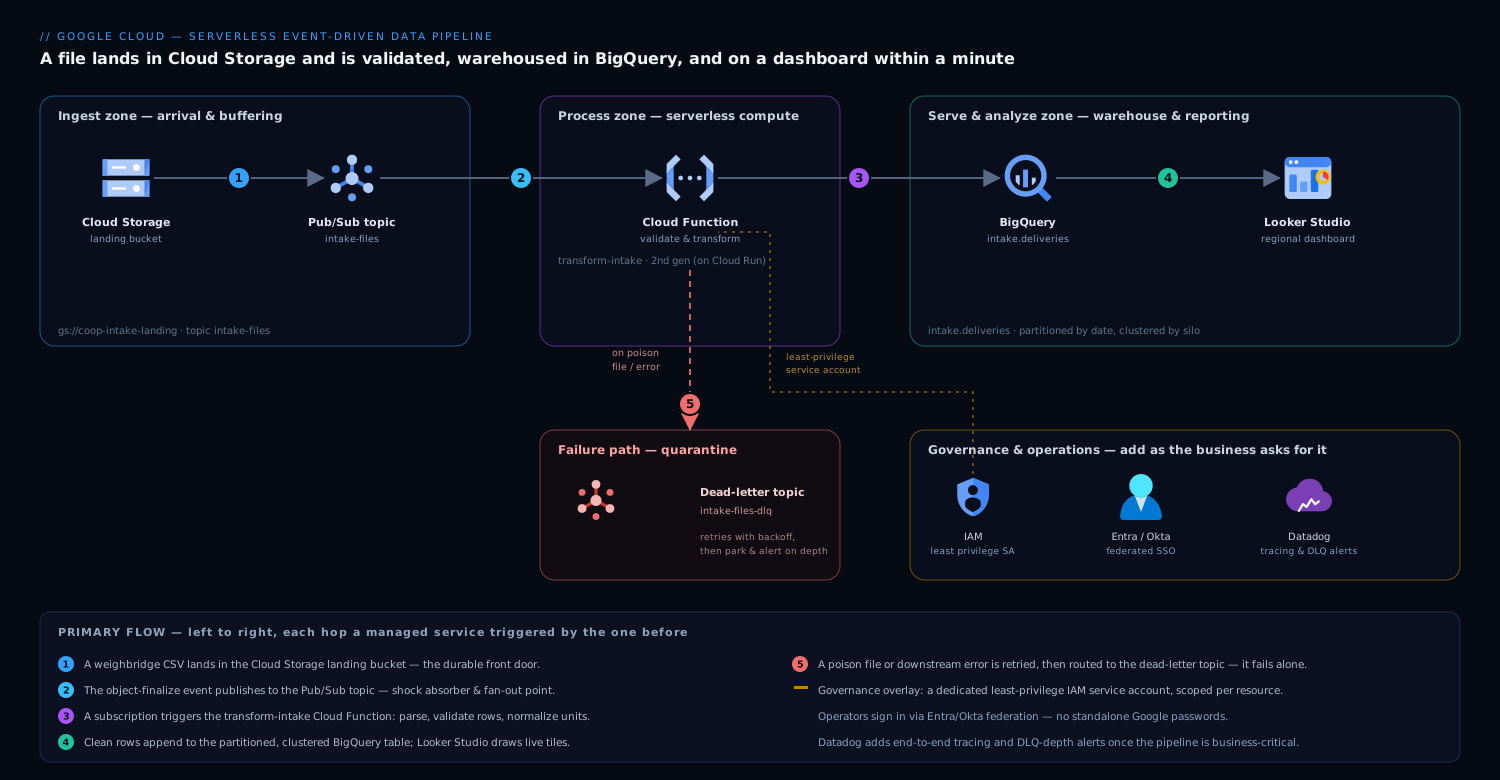
The pipeline is a short, one-directional flow — data moves left to right, and every hop is a managed service you do not run yourself. Read it as a relay race where each runner hands off and stops.
-
A weighbridge file lands in Cloud Storage. Each site’s app or FTP gateway writes its CSV into a single landing bucket, namespaced by site and date (
gs://coop-intake-landing/site=silo-07/dt=2026-06-10/run-1432.csv). The bucket is the front door and the durable record — the raw file is never deleted, only processed. -
The finalize event flows through Pub/Sub. Rather than wiring the bucket directly to a function, the object-finalize notification publishes to a Pub/Sub topic (
intake-files). This single indirection is the most important design choice in the whole pipeline, and we will justify it in its own section. For now: Pub/Sub is the shock absorber and the fan-out point. -
A Cloud Function validates and transforms. A subscription on that topic triggers the
transform-intakeCloud Function (2nd gen, which runs on Cloud Run underneath and gives you concurrency and proper scaling). The function reads the file from Cloud Storage, parses the CSV, checks each row (is moisture a number between 0 and 100? is the member ID known? is the grade in the allowed set?), normalizes units, and shapes each row to match the BigQuery schema. Clean rows go forward; a file that fails parsing is rejected as a unit. -
Clean rows land in BigQuery. The function inserts the validated rows into a BigQuery table (
intake.deliveries), partitioned by delivery date and clustered by silo. BigQuery is the warehouse and the query engine in one — serverless, no instance to size, billed by storage plus bytes scanned per query. -
Looker Studio draws the dashboard. A Looker Studio report connects straight to the BigQuery table. Regional managers open one URL and see live tiles: intake volume by silo today, moisture trend per site, rejected-load count, top members by tonnage. No export, no spreadsheet, no Friday.
-
Bad messages go to a dead-letter topic. If the function throws — a corrupt file, a transient BigQuery error, a bug — Pub/Sub retries with backoff, and after a set number of attempts the message is routed to a dead-letter topic (
intake-files-dlq) instead of being lost or retried forever. That queue is where you look on Monday morning, and it is what lets one bad file fail alone.
The control flow is just as short: there is no orchestrator, no scheduler, no always-on coordinator. Each component is triggered by the one before it and does exactly one job. That is what “event-driven” buys you — the architecture diagram and the runtime behavior are the same shape.
Why Pub/Sub in the middle, not a direct trigger
You can point a Cloud Function straight at a bucket. For a learning exercise that is fine. For the cooperative’s real pipeline, the Pub/Sub hop earns its place, and understanding why is the difference between a toy and a system.
It decouples arrival from processing. If a deploy is mid-flight, or BigQuery has a momentary hiccup, or you simply pushed a bug, a direct trigger can drop or mishandle the event. With Pub/Sub, the message sits durably in the topic until a healthy subscriber acknowledges it. Files that arrive during a thirty-second deploy are processed thirty seconds later, not lost.
It gives you retries and a dead-letter queue for free. Pub/Sub redelivers an unacknowledged message with exponential backoff and, after a configured maximum, parks it in the dead-letter topic. You get at-least-once delivery and a quarantine for poison messages without writing a line of retry logic.
It is the natural fan-out point. Today one function consumes intake-files. Tomorrow the cooperative wants a second consumer that pushes high-moisture alerts to operations, and a third that mirrors raw events to a compliance archive. With Pub/Sub you add a second subscription to the same topic — the new consumer gets its own copy of every event, and the original pipeline never knows or cares. A direct bucket-to-function trigger cannot do this; you would be back to re-architecting. Decoupling now is cheap; retrofitting it later is not.
# transform-intake — Cloud Function (2nd gen), Python, triggered by Pub/Sub
import base64, csv, io, json
from google.cloud import storage, bigquery

storage_client = storage.Client()
bq = bigquery.Client()
TABLE = "coop-data-prod.intake.deliveries"

def handle_event(cloud_event):
    # Pub/Sub delivers the GCS finalize notification as the message payload
    msg = json.loads(base64.b64decode(cloud_event.data["message"]["data"]))
    bucket, name = msg["bucket"], msg["name"]

    raw = storage_client.bucket(bucket).blob(name).download_as_text()
    rows, errors = [], []
    for i, r in enumerate(csv.DictReader(io.StringIO(raw))):
        ok, cleaned = validate_and_normalize(r)        # business rules live here
        (rows if ok else errors).append(cleaned or {"line": i, "raw": r})

    if rows:
        # insert_rows_json fails loudly -> Pub/Sub retries -> DLQ after max attempts
        if bq.insert_rows_json(TABLE, rows):
            raise RuntimeError("BigQuery insert failed; let Pub/Sub retry")
    log_rejects(bucket, name, errors)                  # rejects are data, not crashes
Notice the two failure styles in that snippet. A whole-file failure (cannot download, BigQuery insert errors) raises, so Pub/Sub retries and eventually dead-letters — the right move for transient or systemic problems. A single-row failure (one truck’s moisture is the string “wet”) is data, not a crash: the row is logged to a rejects table and the rest of the file proceeds. Beginners often conflate these and let one bad row kill 500 good ones. Separate them.
IAM and least privilege — the part you cannot skip
The pipeline is small, which makes it tempting to give the function broad permissions “to keep moving.” Resist. The cooperative is handling member-linked commercial data, and the security posture is set here at the start, cheaply, or bolted on later, painfully. The rule is least privilege: every identity gets exactly the permissions it needs and nothing more.
Give the function its own dedicated service account — never the default Compute service account, which is over-permissioned by design. Grant it precisely four things, scoped to the specific resources:
| Identity | Role | Scoped to | Why this and nothing more |
|---|---|---|---|
sa-transform-intake |
roles/storage.objectViewer |
the landing bucket only | Read the file it was told about — not write, not delete, not other buckets |
sa-transform-intake |
roles/pubsub.subscriber |
the intake-files subscription |
Pull and ack its own messages |
sa-transform-intake |
roles/bigquery.dataEditor |
the intake dataset only |
Append rows to its tables — not to every dataset in the project |
sa-transform-intake |
roles/bigquery.jobUser |
the project | Run the insert job |
# Terraform — a function identity that can do its job and nothing else
resource "google_service_account" "transform_intake" {
  account_id   = "sa-transform-intake"
  display_name = "Intake transform function"
}

resource "google_bigquery_dataset_iam_member" "writer" {
  dataset_id = google_bigquery_dataset.intake.dataset_id   # dataset scope, not project
  role       = "roles/bigquery.dataEditor"
  member     = "serviceAccount:${google_service_account.transform_intake.email}"
}

resource "google_storage_bucket_iam_member" "reader" {
  bucket = google_storage_bucket.landing.name              # this bucket only
  role   = "roles/storage.objectViewer"
  member = "serviceAccount:${google_service_account.transform_intake.email}"
}
Two habits make this real. First, define it in Terraform, not by clicking in the console — the access becomes reviewable, diffable, and reproducible, and an over-broad grant shows up in a pull request instead of in an incident. Second, scope at the resource level (this bucket, this dataset), never the project, so a future bug or a leaked token cannot reach beyond the one job. The humans who operate the pipeline get their own access through your corporate identity provider — the cooperative federates Google Cloud sign-in through Microsoft Entra ID (or Okta, the same pattern) so the two developers log in with their managed company accounts and conditional-access rules, and there are no standalone Google passwords to leak or to forget to revoke when someone leaves.
Cost — why this is nearly free at the cooperative’s size
The headline reason a junior team should reach for this architecture is that at low-to-moderate volume it costs almost nothing, because every component bills per use and the per-use rates are tiny.
- Cloud Storage charges for bytes stored. A few hundred MB of daily CSVs is cents a month; lifecycle-tier the raw files to cheaper storage after 30 days.
- Pub/Sub bills per message volume. Tens of thousands of small intake events a day sit comfortably inside the free tier or just past it — single-digit currency.
- Cloud Functions (2nd gen) bills per invocation and per GB-second of compute, with a generous free tier. A function that runs for two seconds, a few tens of thousands of times a month, is again single-digit cost. There is no charge while no files are arriving — the defining economic property versus an always-on VM.
- BigQuery bills for storage plus bytes scanned per query. This is the one line that can surprise you, and the mitigations are simple and central to the design.
The reason the table is partitioned by delivery date and clustered by silo is cost, not just tidiness. A Looker Studio tile asking for “today’s intake at silo-07” scans only today’s partition for that silo — kilobytes — instead of the entire history. Without partitioning, every dashboard refresh scans the whole table and the bill scales with your data’s age, not the question. Partition-and-cluster on day one and the cooperative’s BigQuery cost stays measured in coins even as years of intake accumulate. As scale grows toward steady, high-volume querying, switch BigQuery from on-demand to a capacity/slot model for predictable spend — but that is a later optimization, not a starting concern.
Scaling, failure modes, and what they look like
Scaling is mostly automatic, with two knobs you must set. Cloud Functions scale out by running more concurrent instances as Pub/Sub delivers more messages — a forty-file burst becomes parallel invocations with no configuration. The catch is the thing downstream of the function: BigQuery streaming inserts and any external system have limits, and an unbounded swarm of function instances can overwhelm them. So set a maximum instance count on the function as a safety valve, and set a sane Pub/Sub acknowledgment deadline so a slow invocation is retried rather than double-counted. These two limits are the difference between graceful load and a self-inflicted stampede.
Name the failure modes before they page you:
- A poison file — a CSV with a wrong delimiter or a header the parser chokes on. The function raises, Pub/Sub retries a few times, and the message lands in the dead-letter topic
intake-files-dlq. Mitigation: alert on DLQ depth so a human triages it Monday morning, and keep the raw file in the bucket so it can be reprocessed after a fix. - A duplicate event — Pub/Sub guarantees at-least-once, not exactly-once, so a function can occasionally see the same file twice. Mitigation: make the load idempotent — derive a deterministic row ID from the file name plus a line hash, or stage-then-
MERGEinto BigQuery, so a replay overwrites rather than duplicates. This is the single most important correctness habit in event-driven pipelines, and beginners skip it. - A schema drift — a site updates its app and adds a column. Mitigation: validate against an explicit schema and route unexpected shapes to the rejects table rather than letting them silently corrupt the warehouse.
- A downstream outage — BigQuery is briefly unavailable. Mitigation: you already have it — the insert raises, Pub/Sub holds the message durably and redelivers, and nothing is lost. This is precisely what the Pub/Sub hop bought you.
How this grows up — where the enterprise tools fit
The pipeline above is genuinely production-ready at the cooperative’s scale. The honest beginner question is “what changes when this matters more?” — and the answer is that you add capabilities around the same core, you do not rebuild it. Here is the map, naming what each tool actually does so a junior engineer knows where the lines are:
- CI/CD instead of console deploys. Move the function and Terraform into a repo and let GitHub Actions build, test, and deploy on every merge, authenticating to Google Cloud via Workload Identity Federation so there is no service-account key sitting in a secret store waiting to leak. For Kubernetes-hosted variants, Argo CD does GitOps continuous delivery and Jenkins is the on-prem alternative; the cooperative’s two-developer team starts with GitHub Actions and grows into the rest.
- Infrastructure as code. Everything you provisioned by hand — buckets, topics, the function, IAM — lives in Terraform so it is reviewable and reproducible; Ansible handles configuration management on any VMs or appliances that sneighbor the pipeline (an FTP ingest gateway, say).
- Real secrets management. When the function needs credentials to a third-party system — a processor’s API, a payments feed — those belong in HashiCorp Vault (or Secret Manager), leased and rotated, never hard-coded in the function or committed to git.
- Security posture and code scanning. Wiz continuously scans the cloud posture and flags the exact mistake this article warns against — an over-permissioned service account, a bucket drifting to public, a misconfigured IAM binding — and Wiz Code catches insecure infrastructure-as-code in the pull request before it ever ships. CrowdStrike Falcon provides runtime threat detection on any VMs or containers that sit alongside the serverless core, feeding alerts to the security team.
- Observability beyond the built-in logs. Cloud Monitoring covers the basics, but as the pipeline becomes business-critical, Datadog (or Dynatrace) gives end-to-end tracing across the GCS-to-Pub/Sub-to-Function-to-BigQuery hops, dashboards on intake latency and DLQ depth, and anomaly alerts so a moisture-data outage pages someone in seconds rather than surfacing on Friday.
- Operational workflow. A DLQ alert or a failed load auto-raises a ticket in ServiceNow, so triage is a tracked work item with an owner, not a log line someone hopes to notice.
- Edge and delivery. If the Looker Studio dashboards are ever wrapped in a member-facing portal, Akamai sits at the edge for caching, TLS, and bot/WAF protection in front of that origin.
- Enablement. The cooperative trains its forty site operators on the new file-naming and upload conventions through Moodle courses, so the data arriving at the front door is clean by habit, not by luck.
None of these are required to ship the starter pipeline — and that is the point. You begin with five managed Google Cloud services and a hundred lines of Python, then bolt on identity federation, posture scanning, observability, and ITSM in the order the business actually feels the need, on top of an architecture that never has to change shape.
Explicit tradeoffs
What you accept by going serverless and event-driven. You give up fine-grained control of the runtime — no long-lived process, a cold-start penalty on the first invocation after idle, and execution-time limits that make this pattern wrong for a single job that runs for hours (that is a Dataflow or batch-cluster problem, not a Cloud Function one). You accept at-least-once delivery, which forces you to write idempotent loads — a real engineering discipline, not an optional nicety. And you accept that debugging is reading logs and traces across hops rather than attaching a debugger to one server, which is why the observability investment above arrives the moment the pipeline matters.
When a different shape wins. If files arrive in genuinely large batches and the transformation is heavy — joins across millions of rows, complex windowing — a managed pipeline service like Dataflow is the better tool, and it composes with this one (Pub/Sub can feed Dataflow instead of a function). If the cooperative needed sub-second streaming analytics rather than near-real-time batch-per-file, you would lean harder on streaming inserts and materialized views. And if the data never needed to be queried ad hoc — only moved A-to-B — you might skip BigQuery entirely. The starter pattern here is deliberately the 80% case: discrete files, light-to-moderate transformation, near-real-time freshness, ad-hoc reporting. That is the cooperative’s reality, and it is most organizations’ first data pipeline.
The shape of the win
The payoff for the cooperative is not “a pipeline.” It is that a weighbridge file from silo-07 lands at 2:31 p.m., is validated and in BigQuery by 2:31:40, and the regional manager watching the Looker Studio moisture tile sees the drift that afternoon — in time to flag the silo, re-grade the next loads, and avoid three days of mispriced intake and the member dispute that follows. Two developers built it, no server is patched, and the bill is coins a month at today’s volume. Everything that makes it trustworthy — the dedicated least-privilege service account, the Pub/Sub dead-letter queue, the idempotent load, the partitioned table, and later the Entra-federated sign-in, the Wiz posture scan, and the Datadog traces — is there to let the operations lead, and eventually a security reviewer, say yes. Start with the five Google Cloud services and the hundred lines of Python. The rest you add as the work asks for it, on a core that was right the first time.