A national health-insurance payer runs claims adjudication across two clouds — the member portal and APIs on Azure, the batch settlement engine and a data lake on AWS — and the operations bridge is drowning. On a bad night, a single failing Aurora reader throws CloudWatch alarms, Dynatrace opens a “response time degradation” problem on the dependent service, Azure Monitor fires because the portal’s downstream call is now timing out, and three different humans get paged for what is one root cause. Meanwhile the genuinely urgent page — a claims queue backing up past its regulatory SLA — sits in the same firehose of email alerts, unseen, until a member-services supervisor escalates by phone. The incident commander’s complaint is blunt: “We have five monitoring tools and zero single source of truth for is something on fire, and who owns it.” The fix is not another dashboard. It is making ServiceNow the system of record for incidents, and wiring every cloud signal into ServiceNow Event Management so alerts deduplicate into one incident, attach to the right business service, and route to the on-call engineer automatically. This article is the reference architecture for that integration.
The pressures here are the ones that make ITSM integration non-negotiable rather than nice-to-have. Regulation means a payer must show auditors a timestamped record of every incident affecting protected health information, who responded, and how long it took — a record that lives in ServiceNow, not in a chat thread. Scale means thousands of raw alerts a day across two clouds, the vast majority of which are noise, transient, or symptoms of the same cause. Mean-time-to-acknowledge is a board-level metric because every minute a claims-SLA breach goes unowned is a minute closer to a penalty. And on-call sanity matters: page people for symptoms instead of causes and they burn out, stop trusting the pager, and start ignoring it — the most dangerous failure mode in operations.
Why the obvious approaches fail
Three shortcuts get proposed on every project like this, and each fails predictably.
Email-to-incident. Point every monitoring tool’s email notification at a ServiceNow inbound mailbox that creates an incident per email. This is the status quo on the payer’s bridge, and it is exactly the noise machine described above: no deduplication, no correlation, one alert storm becomes two hundred incidents, and the queue becomes unreadable. Point tools straight at PagerDuty (or Opsgenie) and skip ServiceNow. This gives you good on-call routing but no ITSM system of record — no CMDB linkage, no change correlation, no audit trail, and a second tool the compliance team does not see into. Hand-built webhooks from each tool to the ServiceNow Table API. Tempting, and it works for one tool on a good day, but you reinvent deduplication, correlation, severity mapping, and retry logic five times, and it rots the moment a tool changes its payload.
The pattern that actually scales is an event pipeline with a correlation engine in the middle. Every source emits a normalized event — not an incident — into ServiceNow Event Management. The engine deduplicates identical events, correlates related ones against the CMDB topology, applies alert rules that decide which alerts are incident-worthy, and only then opens an incident bound to the affected business service. On-call routing happens after correlation, so a human is paged once, for a cause, with context. ServiceNow stays the system of record; the on-call tool becomes a notification channel it drives.
Architecture overview
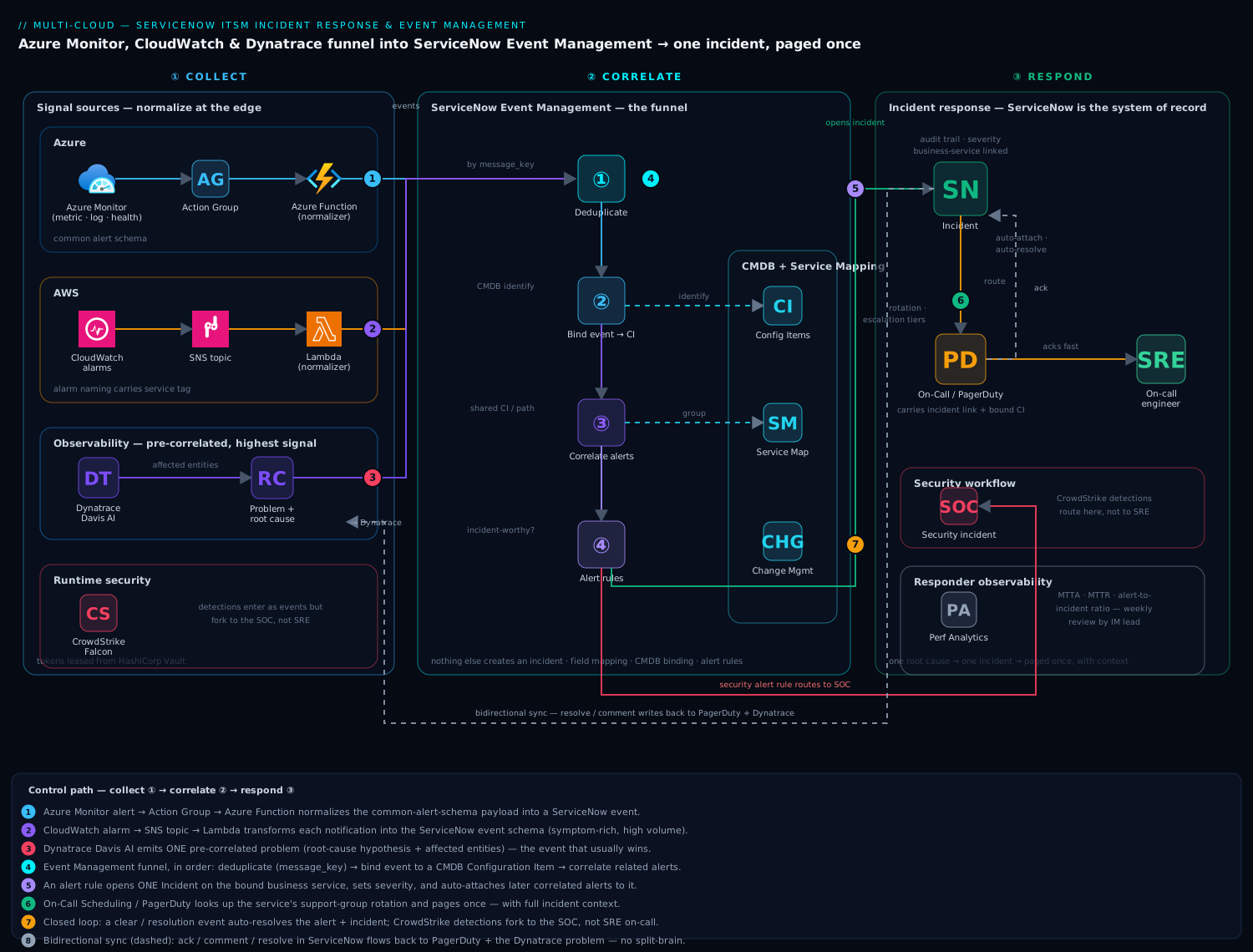
The platform has one job: turn a flood of raw cloud signals into a small number of well-owned incidents, and keep both clouds, the observability stack, and the on-call rotation in sync as those incidents are worked. It runs three logical stages — collect, correlate, respond — and the value lives almost entirely in the correlation stage in the middle.
The defining property is that ServiceNow Event Management is the funnel, and nothing creates an incident except the alert engine. Azure Monitor, CloudWatch, and Dynatrace all emit events; ServiceNow decides what becomes an alert, what an alert correlates to, and what an alert escalates into. That single chokepoint is what lets you deduplicate a storm, suppress symptoms once the cause is known, and present operations with a queue that reflects reality.
Event flow, following the control path:
- Azure side. An Azure Monitor alert (metric, log, or Resource Health) fires and posts to an Action Group. The Action Group’s webhook (or, cleaner, an Azure Function that normalizes the common-alert-schema payload) calls the ServiceNow Event API. The Function exists so that resource IDs, severities, and metric names are mapped to ServiceNow’s
node/type/severityfields before they hit the funnel — normalization belongs at the edge. - AWS side. CloudWatch alarms publish to an SNS topic; a small Lambda subscriber transforms each notification into the ServiceNow event schema and posts it. CloudWatch is symptom-rich (CPU, queue depth, 5xx rates), so this path produces high volume and leans hardest on downstream deduplication.
- Observability side. Dynatrace is the highest-signal source because it has already done causation analysis — its Davis AI opens a single problem with a root-cause hypothesis and an affected-entities list, rather than ten metric alerts. The Dynatrace ServiceNow problem-notification integration pushes that problem in, and because it arrives pre-correlated, it is often the event that should win when several sources describe the same outage.
- The funnel. All three land in ServiceNow Event Management as events. The engine runs, in order: deduplication (collapse identical repeat events by message key), event-to-CI binding (match the event’s
node/resource ID to a Configuration Item in the CMDB), and alert correlation (group alerts that share a CI or sit on the same dependency path in the Service Map). Surviving alerts are evaluated against alert rules. - Incident creation. An alert rule that matches an incident-worthy condition opens an Incident, sets its severity and business-service linkage from the bound CI, and — critically — attaches subsequent correlated alerts to that same incident instead of opening new ones. One root cause, one incident.
- On-call routing. On-Call Scheduling (ServiceNow’s native module) or an integration to PagerDuty/Opsgenie looks up the rotation for the affected service’s support group and notifies the engineer on call, with escalation tiers if unacknowledged. The page carries the incident link, the bound CI, the correlated alerts, and the Dynatrace root-cause hypothesis — context, not just a red light.
- Closed loop. When the underlying condition clears, the source emits a resolution/clear event (Dynatrace problem closed, alarm back to OK). Event Management flips the alert to Closed, and an auto-resolve rule moves the incident toward Resolved — so a self-healing blip does not leave a stale incident, and a human does not chase a ghost.
Bidirectional sync runs alongside this flow. When an engineer acknowledges, comments on, or resolves the incident in ServiceNow, those state changes flow back to the source where useful — a Dynatrace problem comment, a PagerDuty acknowledgement — so the on-call tool and the observability tool reflect the truth that now lives in ServiceNow. Without this, the engineer fixes it in one system and the others keep paging.
Component breakdown
| Stage | Service / tool | Role in the pipeline | Key configuration choices |
|---|---|---|---|
| Azure signals | Azure Monitor + Action Groups | Metric/log/Resource Health alerts → webhook | Common alert schema; Function normalizer; per-resource-group action groups |
| AWS signals | CloudWatch + SNS + Lambda | Alarms → SNS → normalizing Lambda → event API | Alarm naming carries service tag; Lambda maps severity/CI key |
| Observability | Dynatrace (Davis AI) | Pre-correlated problems with root cause | ServiceNow problem-notification integration; send on problem open/close |
| Event funnel | ServiceNow Event Management | Dedup, CI binding, correlation, alert rules | Event field mapping; dedup message key; binding rules to CMDB |
| Topology | ServiceNow CMDB + Service Mapping | Maps CI → business service for correlation + impact | Discovery/Service Graph populated; tag-based CI identification |
| Incident system of record | ServiceNow ITSM (Incident) | The one incident per cause, with audit trail | Severity matrix; auto-create + auto-attach + auto-resolve rules |
| On-call routing | On-Call Scheduling / PagerDuty | Rotation lookup, notify, escalate | Schedules per support group; escalation tiers; ack write-back |
| Change correlation | ServiceNow Change Management | Flags incidents coincident with recent changes | Link CI’s recent changes onto the incident automatically |
| Runtime context | CrowdStrike Falcon | Distinguishes “outage” from “security incident” | Detections raised as events; security-flagged alerts route to SOC |
| Identity / SSO | Okta + Entra ID | SSO into ServiceNow and the consoles; group-driven routing | SAML/OIDC; group claims map to assignment groups |
| Secrets | HashiCorp Vault | Holds the ServiceNow API and integration credentials | Short-lived leases for the normalizer Functions/Lambda |
| Delivery / IaC | GitHub Actions + Terraform | Alarms, action groups, alert rules as code | OIDC to clouds; ServiceNow Update Set or API for rule config |
A few of these choices carry the design and are worth the why.
Why the CMDB is load-bearing, not optional. Correlation and impact both depend on knowing what a CI is and what business service it supports. If the event’s resource ID does not bind to a Configuration Item, the engine cannot group it with related alerts or tell operations which member-facing service is degraded. That is why event identification rules — matching a CloudWatch dimension or an Azure resource ID to a CI — are the first thing you get right. A correlation engine on top of an empty or stale CMDB just produces confidently-wrong groupings. Keep CIs fresh with Service Graph Connectors (or cloud discovery) and identify them with the same tags your IaC already applies.
Why Dynatrace events should usually win the correlation. CloudWatch and Azure Monitor are symptom sources — they tell you CPU is high or latency is up. Dynatrace’s Davis has already walked the dependency graph and named a cause. When three sources describe one outage, the operations queue should show the Dynatrace-rooted incident with the symptom alerts attached beneath it, not five peers. You encode this by giving the Dynatrace-bound alert higher correlation priority and configuring symptom alerts to attach to an existing incident on the same CI path rather than open their own.
Why on-call routing lives after correlation, not at the source. Routing at the source — every CloudWatch alarm paging directly — is the symptom-paging trap. By routing only after Event Management has deduplicated and correlated, you page once per cause, to the team that owns the bound service, with the full incident context attached. The difference between those two designs is the difference between an on-call rotation people trust and one they mute.
Implementation guidance
Normalize at the edge, correlate in the core. Each cloud needs a thin adapter that turns its native alert into the ServiceNow event schema. A CloudWatch-to-event Lambda is small and is the part teams under-invest in — get the field mapping right and the funnel does the hard work:
# Lambda: CloudWatch (via SNS) -> ServiceNow Event API
import json, os, urllib.request

SN_URL = os.environ["SN_EVENT_API"]          # /api/global/em/jsonv2
SN_TOKEN = os.environ["SN_TOKEN"]            # leased from Vault, injected as env

SEV = {"ALARM": 3, "INSUFFICIENT_DATA": 4, "OK": 5}  # SN: 1=crit .. 5=clear

def handler(event, _ctx):
    msg = json.loads(event["Records"][0]["Sns"]["Message"])
    dim = {d["name"]: d["value"] for d in msg["Trigger"]["Dimensions"]}
    payload = {"records": [{
        "source": "AWS-CloudWatch",
        "node": dim.get("DBInstanceIdentifier") or dim.get("InstanceId"),
        "type": msg["Trigger"]["MetricName"],     # e.g. ReadLatency
        "resource": msg["AlarmName"],
        "severity": str(SEV.get(msg["NewStateValue"], 4)),
        "description": msg["NewStateReason"],
        # message_key drives dedup: same key => same alert, not a new one
        "message_key": f'{msg["AlarmName"]}:{dim.get("DBInstanceIdentifier","")}',
        "additional_info": json.dumps({"region": msg["Region"], "account": event["Records"][0]["Sns"]["TopicArn"].split(":")[4]})
    }]}
    req = urllib.request.Request(SN_URL, data=json.dumps(payload).encode(),
        headers={"Content-Type": "application/json", "Authorization": f"Bearer {SN_TOKEN}"})
    urllib.request.urlopen(req, timeout=8)
The message_key is the most important field on the page: identical keys deduplicate into one alert instead of a storm, so design it to carry the resource identity, not the timestamp. On the Azure side an Azure Function does the equivalent translation from the common alert schema. The credential each adapter uses to call ServiceNow is leased from HashiCorp Vault rather than baked into the Function/Lambda config, so a leaked integration token has a short blast radius — and never lands in git.
Encode the alert rules deliberately. In Event Management, three rule types do the work, and the order of operations matters:
| Rule type | What it decides | Example for the payer |
|---|---|---|
| Event rule | Map/transform/filter raw events; bind to a CI | CloudWatch ReadLatency on claims-aurora → bind to “Claims Settlement” service |
| Alert correlation rule | Group alerts sharing a CI or dependency path | Portal-timeout alert attaches to the Aurora-reader alert above it |
| Alert→incident (response) rule | Open/attach/auto-resolve incidents; set severity | Sev-1 if a member-facing service’s claims queue breaches SLA |
Set the severity matrix from business-service impact, not raw metric thresholds: a non-prod alarm is never a Sev-1, and a member-facing claims-SLA breach is never a Sev-3, regardless of the underlying metric. This mapping is where ITSM judgment, not monitoring data, lives.
Wire the bidirectional sync explicitly. Inbound (cloud → ServiceNow) is the event API above. Outbound (ServiceNow → tools) is a Business Rule or Flow that fires on incident state change: post the acknowledgement and resolution back to PagerDuty so the rotation stops escalating, and add a comment to the Dynatrace problem so the observability view agrees with the system of record. Skip the write-back and you get the classic split-brain where the incident is resolved in ServiceNow but PagerDuty keeps paging the next tier.
Correlate change, because most incidents follow one. Configure the response rule to pull the bound CI’s recent Change Requests onto the incident automatically. On the payer’s bridge, “what changed in the last hour on this service” is the single most useful question, and having ServiceNow answer it on the incident — “a Terraform apply via GitHub Actions modified the Aurora parameter group 40 minutes ago” — collapses investigation time. This is the payoff for ServiceNow being the system of record for both change and incident.
Enterprise considerations
Security & access. SSO into ServiceNow and both cloud consoles flows through Okta (federated to Entra ID on the Azure side), and the same group claims that grant console access map to ServiceNow assignment groups — so the engineer who is paged is, by construction, a member of the team authorized to act. The integration accounts (the API user ServiceNow exposes for the event endpoint, the tokens the adapters use) are least-privilege service accounts whose credentials are Vault-leased and rotated, never long-lived keys in a config file. One important boundary: not every alert is an operational incident. CrowdStrike Falcon detections — a suspicious process on a node, a credential-access pattern — are raised as events too, but their alert rule routes them to the SOC and a security incident workflow, not the SRE on-call. Encoding that fork in the funnel keeps a malware detection from waking the database on-call and a slow query from waking a security analyst.
Scalability and noise control. The pipeline is designed to absorb alert storms, not relay them. Three mechanisms do it: deduplication on the message key collapses repeats; flap detection suppresses an alert that opens and clears repeatedly within a window so a borderline threshold does not page every ninety seconds; and maintenance windows suppress event-driven incidents for CIs under a planned change, so a deploy does not generate the very alerts it is expected to. Tune these continuously — the health metric of the whole platform is the alert-to-incident ratio, and a healthy mature pipeline collapses many thousands of raw events into double-digit incidents a day. If that ratio creeps toward 1:1, correlation has broken and the funnel has quietly become the email-to-incident machine you replaced.
Cost. The spend here is modest and the trade is favorable, but name it honestly.
| Lever | Mechanism | Effect |
|---|---|---|
| ITSM licensing | Event Management is a paid ServiceNow module/subscription | The main fixed cost; justified by MTTA/audit, not infra savings |
| Adapter compute | Lambda/Functions are per-invocation | Negligible even at thousands of events/day |
| On-call tooling | Native On-Call Scheduling vs PagerDuty seats | Native module avoids a second per-seat license if you do not already own PagerDuty |
| Noise reduction | Dedup/flap/correlation cut downstream toil | The real saving — hours of misdirected on-call effort, not cloud bill |
The honest framing: this integration does not lower your cloud bill. It lowers MTTA, MTTR, and the human cost of noise, and it produces the audit trail a regulated payer needs — which is where the money actually is.
Failure modes, and what each looks like. Name them before they bite.
- CMDB drift — an event’s resource ID does not bind to a CI, so the alert lands unattributed, cannot correlate, and shows no business impact. Mitigation: tag-based identification kept current by Service Graph Connectors, and an “unidentified alert” report someone owns.
- The integration endpoint is down — ServiceNow maintenance or a network blip, and inbound events are silently lost. Mitigation: SNS/Action-Group retry and a dead-letter queue on the AWS side, plus a heartbeat event so the absence of signal is itself alertable. The monitoring of the monitoring must not depend on the monitoring.
- Correlation too aggressive — two genuinely separate outages get merged into one incident and the second goes unowned. Mitigation: scope correlation to shared CIs/dependency paths only, and review merges.
- Correlation too loose — back to one-incident-per-symptom and the storm returns. Mitigation: the alert-to-incident ratio as a watched SLO.
- Stale incidents — the condition cleared but no resolution event arrived, so the incident lingers. Mitigation: auto-resolve rules driven by clear events, plus a time-based auto-close for alerts with no recent activity.
Reliability of the pipeline itself. Treat the integration as a tier-1 service: the event endpoint, the adapters, and the on-call routing are all in the critical path of knowing you have an outage, so they get their own (independent) health check and their own escalation that does not route through the very pipeline being checked. A dead-letter queue on each cloud’s path means an endpoint outage is recoverable — replay the queued events when ServiceNow returns — rather than a silent gap in the audit record.
Observability of the responders. The metrics that prove this platform works are operational, not infrastructural: MTTA and MTTR per service, alert-to-incident ratio (noise), percentage of incidents auto-created vs manually raised (coverage), and escalation rate (are first-tier on-call engineers equipped to resolve, or just relaying). Surface these on a ServiceNow Performance Analytics dashboard the incident-management lead reviews weekly, and keep Dynatrace dashboards for the technical depth behind any given incident. The two views answer different questions — “how is our response process performing” versus “what exactly broke” — and a mature operation watches both.
Explicit tradeoffs
Accept these or do not build it. Putting a correlation engine between your monitors and your incidents adds real configuration surface — event rules, CI bindings, correlation rules, severity matrices — and that configuration is a living thing you tune forever, not a one-time setup. The whole edifice rests on CMDB quality; an organization that cannot keep its CMDB reasonably current will get bad correlation and should fix discovery first. There is added latency between a raw alert and a page — milliseconds to seconds while the funnel deduplicates and correlates — which is a fine trade for paging once-per-cause-with-context, but it is not zero. And ServiceNow Event Management is a licensed module: you are buying an ITSM platform’s worth of capability, which is overkill for a five-service startup and exactly right for a regulated multi-cloud estate.
The alternatives, and when they win. If you have a handful of services and a small team, PagerDuty or Opsgenie alone — tools pointed straight at on-call, no ITSM funnel — is simpler and entirely adequate; reach for this architecture when you need a system of record, change correlation, and an audit trail. If your stack is single-cloud and you live inside one provider, the native incident manager (Azure Monitor’s action groups with incident features, or AWS Systems Manager Incident Manager) covers a lot without a third-party ITSM, and you can graduate later. And if your observability tool already does strong AI correlation — Dynatrace or Datadog — you can let it be the correlation brain and forward only its problems to ServiceNow for the record, a lighter-weight pattern that trades some cross-tool correlation for less configuration. The full Event-Management funnel earns its keep precisely when signals span multiple clouds and multiple tools and no single one of them sees the whole picture — which is exactly the payer’s situation.
The shape of the win
For the payer’s operations bridge, the payoff is not “fewer dashboards.” It is that the night the Aurora reader fails, one Sev-1 incident opens against the “Claims Settlement” business service, the three symptom alerts from CloudWatch and Azure Monitor attach beneath it, the Dynatrace root-cause hypothesis and the coincident Terraform change are already on the ticket, and the database on-call engineer — the right person, paged once — acknowledges in under two minutes with full context. The claims-SLA breach is no longer buried in a firehose; it is the top incident on a queue that finally reflects reality. And when it clears, the incident auto-resolves with a complete, timestamped record the compliance team can hand an auditor. Everything upstream — the edge normalizers, the dedup keys, the CMDB bindings, the correlation rules, the on-call write-back — exists so that the answer to “is something on fire, and who owns it” is a single, trustworthy line instead of five tools shouting past each other. That is the difference between monitoring and incident response, and it is the destination this architecture is built to reach.