A data-platform team runs forty nightly batch jobs and a dozen CI pipelines, and the seams are showing. The CI lives in a Jenkins controller that one person understands, the batch jobs are a tangle of cron-on-a-VM scripts with no visible dependency graph, and when the 02:00 ingestion job fails nobody knows until the 06:00 report is wrong. Both workloads are already containerised and the cluster is already there — so the team wants one container-native engine that expresses pipelines as a real DAG, passes artifacts between steps without a shared NFS mount, and reacts to events (a Git push, an S3 object landing, a Kafka message) instead of polling on a timer. This guide stands that up with Argo Workflows (the DAG/CI engine) and Argo Events (the event bus and triggers), wired into the identity, secret, and observability stack a regulated platform actually needs.
Prerequisites
- A Kubernetes cluster, v1.28+, with at least 3 worker nodes and the cluster autoscaler enabled. (Examples assume EKS; the same manifests run on AKS or GKE.)
kubectl(matching the cluster minor version),helmv3.14+, and theargoCLI v3.6+ installed locally.- Cluster-admin for the install, plus permission to create an S3 bucket and an IAM role (for IRSA artifact access on EKS).
- An OIDC identity provider for the UI — this guide uses Okta as the workforce IdP (you can substitute Entra ID); SSO is brokered so engineers log into the Argo UI with corporate credentials, not a shared token.
- HashiCorp Vault reachable in-cluster (for pulling registry and API credentials at run time instead of baking them into manifests).
- A container registry and a Git host with webhook support (GitHub here; GitHub Actions stays as the lightweight outer trigger, with Argo doing the heavy in-cluster DAG work).
Target topology
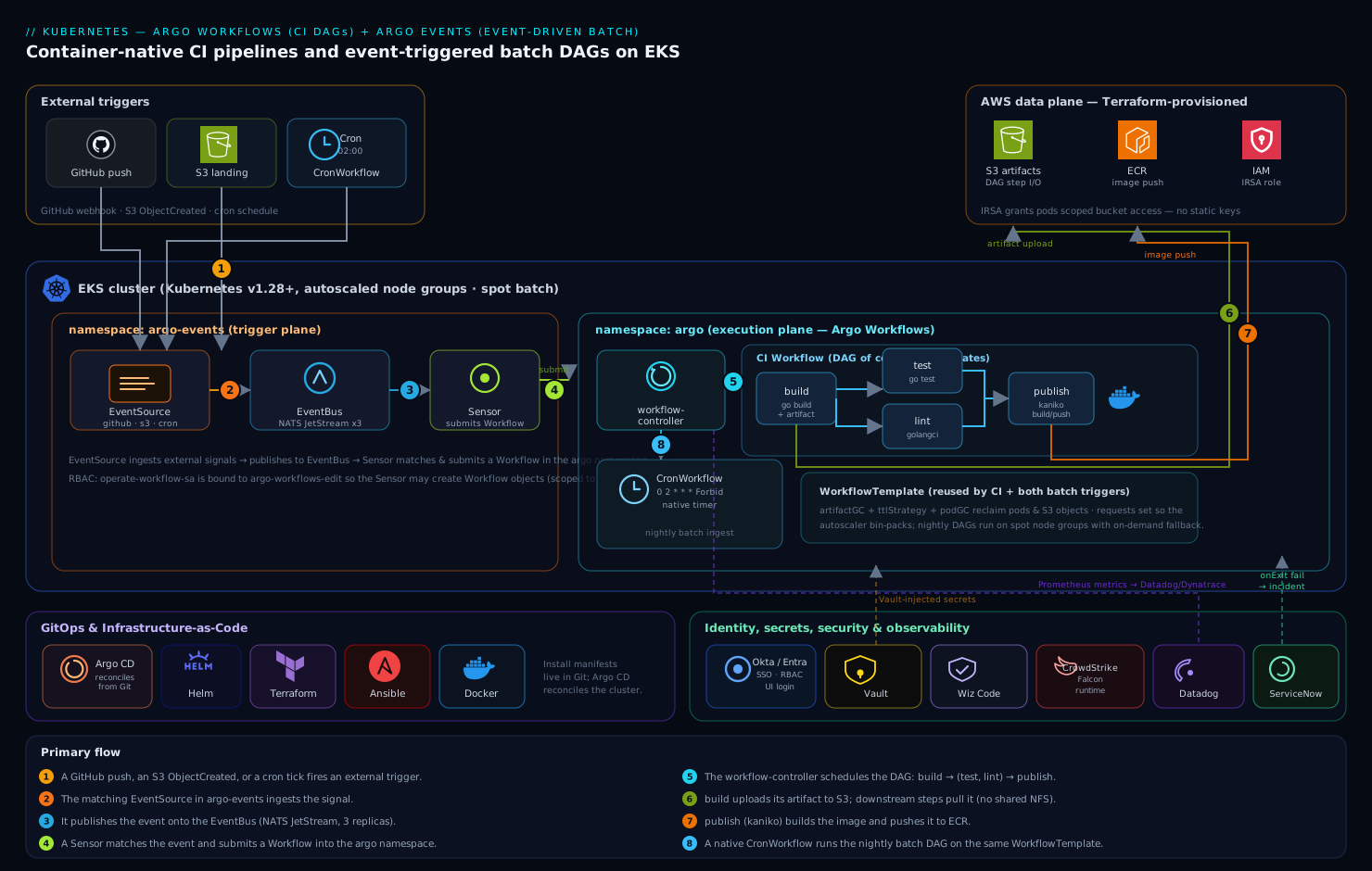
Two cooperating control planes share one cluster. Argo Workflows owns execution: a Workflow is a DAG of templates, each template is a container (a pod), and the workflow-controller schedules steps as their dependencies clear, streaming logs and passing artifacts between steps through an S3 bucket rather than a shared volume. Argo Events owns the trigger side: an EventSource ingests external signals (a GitHub webhook, an S3 ObjectCreated notification, a Kafka topic, or a cron schedule), publishes them onto an EventBus (a NATS JetStream cluster Argo runs for you), and a Sensor matches events and submits a Workflow in response. Around that core sits the operating model: Okta/Entra ID federates UI login, HashiCorp Vault injects run-time secrets, Wiz / Wiz Code scans the manifests and cluster posture, CrowdStrike Falcon watches the workflow pods at runtime, Datadog (or Dynatrace) ingests metrics and traces, and a failed batch DAG auto-raises a ServiceNow incident. Everything below is provisioned declaratively with Argo CD reconciling the install manifests from Git, and the cluster itself is stood up with Terraform (node groups, IAM/IRSA, the S3 bucket) and node-level config applied with Ansible.
1. Create the namespaces and the artifact bucket
Keep the two control planes in their own namespaces so RBAC and quotas stay clean. Create the S3 bucket Argo will use for artifact passing and for the workflow archive.
kubectl create namespace argo
kubectl create namespace argo-events

# Artifact + archive bucket (one bucket, prefixes separate the two uses)
aws s3api create-bucket \
  --bucket kv-argo-artifacts-prod \
  --region ap-south-1 \
  --create-bucket-configuration LocationConstraint=ap-south-1
aws s3api put-bucket-versioning \
  --bucket kv-argo-artifacts-prod \
  --versioning-configuration Status=Enabled
# Lifecycle: expire raw step artifacts after 30 days to control cost
aws s3api put-bucket-lifecycle-configuration \
  --bucket kv-argo-artifacts-prod \
  --lifecycle-configuration file:///tmp/artifact-lifecycle.json
On EKS, give the workflow pods bucket access through IRSA (IAM Roles for Service Accounts) rather than long-lived keys. The Terraform module that builds the cluster also emits this role; the trust policy binds it to the argo namespace service account.
# Annotate the SA Argo runs pods under with the IRSA role ARN
kubectl annotate serviceaccount -n argo argo-workflow \
  eks.amazonaws.com/role-arn=arn:aws:iam::123456789012:role/kv-argo-artifacts-irsa
2. Install Argo Workflows
Install via the official Helm chart so values are versioned in Git and reconciled by Argo CD. Pin the chart version — never track a floating tag on a CI control plane.
helm repo add argo https://argoproj.github.io/argo-helm
helm repo update
Write the values file. The key decisions: run in namespaced mode is tempting but for a shared CI platform use the cluster-scoped controller so any team namespace can submit; turn on the workflow archive (Postgres) so history survives controller restarts; and set the default artifact repository to the S3 bucket from Step 1.
# /tmp/argo-wf-values.yaml
crds:
  install: true
  keep: true
controller:
  workflowNamespaces: []          # watch all namespaces (cluster-scoped)
  persistence:
    archive: true
    postgresql:
      host: kv-argo-pg.internal
      database: argo
      tableName: argo_workflows
      userNameSecret: { name: argo-pg, key: username }
      passwordSecret: { name: argo-pg, key: password }
  metricsConfig:
    enabled: true                 # Prometheus endpoint for Datadog/Dynatrace
artifactRepository:
  s3:
    bucket: kv-argo-artifacts-prod
    region: ap-south-1
    endpoint: s3.amazonaws.com
    useSDKCreds: true             # use the IRSA role, no static keys
server:
  authModes: ["sso"]              # UI auth via Okta/Entra, set up in Step 5
helm upgrade --install argo-workflows argo/argo-workflows \
  --namespace argo --version 0.45.0 \
  -f /tmp/argo-wf-values.yaml
Verify the controller and server come up:
kubectl -n argo rollout status deploy/argo-workflows-workflow-controller
kubectl -n argo rollout status deploy/argo-workflows-server
3. Run a first CI DAG with artifact passing
Prove the engine end-to-end before wiring events. This Workflow is a minimal but realistic CI DAG: build → (test, lint in parallel) → publish, where build produces an artifact (the compiled binary) that the downstream steps consume from S3. This is the pattern that replaces the Jenkins job.
# /tmp/ci-dag.yaml
apiVersion: argoproj.io/v1alpha1
kind: Workflow
metadata:
  generateName: ci-build-
  namespace: argo
spec:
  entrypoint: ci
  serviceAccountName: argo-workflow
  artifactGC:
    strategy: OnWorkflowDeletion        # clean S3 artifacts when WF is deleted
  templates:
    - name: ci
      dag:
        tasks:
          - name: build
            template: build
          - name: test
            template: run
            arguments:
              parameters: [{ name: cmd, value: "go test ./..." }]
              artifacts:
                - { name: bin, from: "{{tasks.build.outputs.artifacts.bin}}" }
            dependencies: [build]
          - name: lint
            template: run
            arguments:
              parameters: [{ name: cmd, value: "golangci-lint run" }]
            dependencies: [build]
          - name: publish
            template: publish
            dependencies: [test, lint]   # fan-in: both must pass
    - name: build
      container:
        image: golang:1.23
        command: [sh, -c]
        args: ["go build -o /out/app ./cmd/app"]
      outputs:
        artifacts:
          - name: bin
            path: /out/app                # auto-uploaded to S3
    - name: run
      inputs:
        parameters: [{ name: cmd }]
        artifacts: [{ name: bin, path: /work/app, optional: true }]
      container:
        image: golang:1.23
        command: [sh, -c]
        args: ["{{inputs.parameters.cmd}}"]
    - name: publish
      container:
        image: gcr.io/kaniko-project/executor:latest
        args: ["--dockerfile=Dockerfile", "--destination=registry.internal/app:$(GIT_SHA)"]
Submit and watch the DAG resolve:
argo submit /tmp/ci-dag.yaml --watch
argo logs @latest          # @latest = most recent workflow
The build artifact lands in s3://kv-argo-artifacts-prod/... and is pulled into the test pod automatically — no shared NFS, no kubectl cp. That artifact passing is the whole reason to prefer Argo over chained cron jobs.
4. Install Argo Events and stand up the EventBus
Now the trigger side. Install the controller, then create the EventBus — Argo runs a NATS JetStream cluster as the durable backbone that EventSources publish to and Sensors subscribe from.
helm upgrade --install argo-events argo/argo-events \
  --namespace argo-events --version 2.4.13

# Durable, replicated event backbone
kubectl apply -n argo-events -f - <<'EOF'
apiVersion: argoproj.io/v1alpha1
kind: EventBus
metadata:
  name: default
spec:
  jetstream:
    version: latest
    replicas: 3
    persistence:
      storageClassName: gp3
      volumeSize: 10Gi
EOF
kubectl -n argo-events get statefulset
The Sensor needs RBAC to create Workflow objects in the argo namespace. Bind a service account to the built-in argo-events-sensor role plus workflow-create rights:
kubectl create serviceaccount operate-workflow-sa -n argo-events
kubectl create rolebinding operate-workflow-rb -n argo \
  --clusterrole=argo-workflows-edit \
  --serviceaccount=argo-events:operate-workflow-sa
5. Wire SSO and Vault before exposing anything
Do this before you put the UI or webhooks on the network — an unauthenticated Argo UI can read every pipeline’s logs and secrets.
UI SSO via Okta/Entra. The Argo Server sso auth mode (set in Step 2) federates login to Okta as the workforce IdP — engineers authenticate with corporate credentials and group claims map to RBAC, so only the platform group can delete workflows. Substitute the Entra ID OIDC endpoint to use Entra ID instead. The OIDC client secret is not hardcoded; it is read from a Kubernetes secret that HashiCorp Vault populates via the Vault Agent injector.
# Argo Server SSO block (added to the Helm values, abbreviated)
server:
  sso:
    issuer: https://kloudvin.okta.com
    clientId: { name: argo-sso, key: client-id }
    clientSecret: { name: argo-sso, key: client-secret }   # Vault-injected
    redirectUrl: https://argo.kloudvin.internal/oauth2/callback
    rbac: { enabled: true }
    scopes: [groups]
Run-time secrets via Vault. Workflow pods that push to a registry or call a third-party API pull those credentials from HashiCorp Vault at run time using the Vault Agent sidecar with Kubernetes auth — short-lived leases, nothing sensitive written into a Workflow manifest or a long-lived Secret. Annotate the workflow pod template:
metadata:
  annotations:
    vault.hashicorp.com/agent-inject: "true"
    vault.hashicorp.com/role: "argo-ci"
    vault.hashicorp.com/agent-inject-secret-registry: "secret/data/ci/registry"
Posture scanning. Run Wiz Code in the GitHub Actions PR check over these manifests to catch a misconfiguration (a public bucket, an over-broad RBAC role) before it merges, and let Wiz continuously scan the running cluster for posture drift. Pair that with CrowdStrike Falcon sensors on the node pool so the ephemeral workflow pods themselves get runtime threat detection feeding the SOC.
6. Trigger a CI pipeline from a GitHub push
Create a webhook EventSource and a Sensor that submits the CI DAG on every push to main. The thin outer GitHub Actions job only needs to fire the webhook (or GitHub fires it directly) — the actual build DAG runs in-cluster under Argo.
# github-eventsource.yaml
apiVersion: argoproj.io/v1alpha1
kind: EventSource
metadata:
  name: github
  namespace: argo-events
spec:
  service:
    ports: [{ port: 12000, targetPort: 12000 }]
  github:
    ci:
      repositories:
        - owner: kloudvin
          names: [platform-app]
      webhook:
        endpoint: /push
        port: "12000"
        method: POST
        url: https://events.kloudvin.internal
      events: [push]
      webhookSecret: { name: github-hook, key: secret }   # Vault-injected
      insecure: false
# github-sensor.yaml
apiVersion: argoproj.io/v1alpha1
kind: Sensor
metadata:
  name: github-ci
  namespace: argo-events
spec:
  template:
    serviceAccountName: operate-workflow-sa
  dependencies:
    - name: push
      eventSourceName: github
      eventName: ci
      filters:
        data:
          - path: body.ref
            type: string
            value: ["refs/heads/main"]      # only main
  triggers:
    - template:
        name: launch-ci
        argoWorkflow:
          operation: submit
          source:
            resource:
              apiVersion: argoproj.io/v1alpha1
              kind: Workflow
              metadata: { generateName: ci-, namespace: argo }
              spec:
                entrypoint: ci
                workflowTemplateRef: { name: ci }   # reuse a WorkflowTemplate
Apply both, then register the resulting endpoint as a webhook in the GitHub repo settings (payload URL https://events.kloudvin.internal/push, content type application/json, the shared secret from Vault). A push to main now lands an event on the EventBus and the Sensor submits the DAG automatically.
kubectl apply -f github-eventsource.yaml
kubectl apply -f github-sensor.yaml
7. Trigger an event-driven batch DAG (S3 + cron)
Replace the cron-on-a-VM batch jobs with two triggers: a scheduled DAG for the deterministic nightly run, and an S3 object-landed DAG for “process this file the moment it arrives.” Both reuse the WorkflowTemplate pattern so the pipeline definition lives in one place.
The scheduled run uses Argo’s native CronWorkflow (no external scheduler, the workflow-controller owns the timer):
# nightly-batch.yaml
apiVersion: argoproj.io/v1alpha1
kind: CronWorkflow
metadata:
  name: nightly-ingest
  namespace: argo
spec:
  schedule: "0 2 * * *"                 # 02:00 daily
  timezone: "Asia/Kolkata"
  concurrencyPolicy: "Forbid"           # never overlap runs
  startingDeadlineSeconds: 300
  workflowSpec:
    entrypoint: ingest
    workflowTemplateRef: { name: batch-ingest }
The event-driven run uses an S3 EventSource (S3 bucket notifications → Argo Events) plus a Sensor:
# s3-eventsource.yaml
apiVersion: argoproj.io/v1alpha1
kind: EventSource
metadata: { name: s3-landing, namespace: argo-events }
spec:
  s3:
    inbound:
      bucket: { name: kv-data-landing-prod }
      region: ap-south-1
      events: ["s3:ObjectCreated:*"]
      filter: { prefix: "incoming/", suffix: ".parquet" }
      metadata: { source: landing-zone }
The matching Sensor passes the landed object’s key straight into the batch DAG as a parameter, so the workflow knows exactly which file to process — true event-driven batch, not a poll:
  triggers:
    - template:
        name: process-file
        argoWorkflow:
          operation: submit
          source:
            resource:
              apiVersion: argoproj.io/v1alpha1
              kind: Workflow
              metadata: { generateName: ingest-, namespace: argo }
              spec:
                entrypoint: ingest
                workflowTemplateRef: { name: batch-ingest }
                arguments:
                  parameters: [{ name: object-key, value: "PLACEHOLDER" }]
          parameters:
            - src: { dependencyName: file, dataKey: body.Records.0.s3.object.key }
              dest: spec.arguments.parameters.0.value
8. Observability and ITSM hooks
Point the controller’s Prometheus metrics endpoint at Datadog (or Dynatrace) so you have a dashboard of DAG success rate, queue depth, step duration, and pod pending time — the signals that tell you a batch run is slipping before the downstream report breaks.
# Datadog Agent autodiscovery annotation on the controller pod
ad.datadoghq.com/controller.checks: |
  { "openmetrics": { "instances": [{
    "openmetrics_endpoint": "http://%%host%%:9090/metrics",
    "namespace": "argo", "metrics": ["argo_workflows_*"] }] } }
Wire failure to ServiceNow with a Workflow exit handler (onExit) that fires only on failure and opens an incident through the ServiceNow REST API — so a 02:00 batch failure becomes a ticket on the on-call queue, not a silent log line discovered at 06:00.
onExit: notify
templates:
  - name: notify
    container:
      image: curlimages/curl:8.10.1
      command: [sh, -c]
      args:
        - |
          if [ "{{workflow.status}}" != "Succeeded" ]; then
            curl -s -u "$SNOW_USER:$SNOW_PASS" -X POST \
              https://kloudvin.service-now.com/api/now/table/incident \
              -H 'Content-Type: application/json' \
              -d '{"short_description":"Argo DAG failed: {{workflow.name}}",
                   "urgency":"2","assignment_group":"platform-oncall"}'
          fi
The $SNOW_* credentials are Vault-injected, never inline.
Validation
Run these after each step group; all should pass before you call the platform live.
# Controllers healthy
kubectl -n argo get pods
kubectl -n argo-events get pods,eventbus

# A manual CI DAG goes green end-to-end
argo submit /tmp/ci-dag.yaml --watch
argo list -n argo                       # STATUS = Succeeded

# Artifact actually landed in S3
aws s3 ls s3://kv-argo-artifacts-prod/ --recursive | head

# Event path works: push to main, then confirm a WF was auto-created
git -C platform-app commit --allow-empty -m "trigger" && git push
kubectl -n argo get wf --sort-by=.metadata.creationTimestamp | tail

# CronWorkflow registered and scheduling
argo cron list -n argo

# SSO enforced (should redirect/401, never serve the UI anonymously)
curl -sI https://argo.kloudvin.internal | grep -i location
Rollback / teardown
Argo is declarative, so teardown is clean. Drain in reverse install order — triggers first so nothing fires mid-rollback, then the engine.
# 1. Stop new triggers
kubectl delete sensor,eventsource --all -n argo-events
kubectl delete cronworkflow --all -n argo

# 2. Let in-flight workflows finish, or stop them
argo stop --all -n argo            # graceful; use 'argo terminate' to force

# 3. Remove the control planes (CRDs kept if 'crds.keep: true')
helm uninstall argo-events -n argo-events
helm uninstall argo-workflows -n argo
kubectl delete namespace argo argo-events

# 4. (Optional) drop CRDs and the bucket — irreversible
kubectl get crd -o name | grep argoproj.io | xargs kubectl delete
aws s3 rb s3://kv-argo-artifacts-prod --force
Because the install lives in Git under Argo CD, the real rollback is reverting the commit and letting Argo CD reconcile — the cluster returns to the prior known-good state without anyone running helm by hand.
Common pitfalls
- Artifact repository not configured, so steps can’t pass data. Without the
artifactRepositoryS3 block (Step 2) or with a broken IRSA role,outputs.artifactssilently fail to upload and downstream steps get nothing. Test the bucket round-trip first. - The Sensor service account lacks workflow-create RBAC. The most common “events fire but no workflow appears” cause. Confirm the
operate-workflow-sarolebinding in theargonamespace. - EventBus with one replica. A single-replica NATS loses events on a node failure. Always run 3 JetStream replicas in production.
concurrencyPolicyunset on CronWorkflows. A slow nightly run overlaps the next, doubling load and corrupting state. SetForbid(orReplace).- Unbounded workflow history. Without the archive TTL and a
podGC, completed pods and CRD objects pile up and choke the API server. SetttlStrategyandpodGC: { strategy: OnPodCompletion }on long-lived templates. - Webhook exposed without secret validation. An open
EventSourceendpoint lets anyone trigger your CI. Always setwebhookSecretand terminate TLS at the edge (front the endpoint with Akamai for WAF and TLS if it must face the internet).
Security notes
The threat model for a CI/CD control plane is that it holds the keys to production. Keep the UI behind Okta/Entra ID SSO with group-mapped RBAC (read-only for most, delete rights only for the platform group). Pull every run-time credential from HashiCorp Vault with short leases — registry creds, the GitHub webhook secret, the ServiceNow token — so no secret ever lives in a manifest or a static Secret. Scope the artifact bucket IAM role to exactly the prefixes Argo uses via IRSA, never a wildcard. Gate manifests in PR with Wiz Code and scan the live cluster continuously with Wiz; run CrowdStrike Falcon on the nodes so the short-lived workflow pods still get runtime detection. Keep CRD-level RBAC tight: a Sensor that can create arbitrary resources is a privilege-escalation path, so bind it only to Workflow create in one namespace.
Cost notes
The dominant cost is compute for workflow pods, and Argo’s model makes it controllable. Set CPU/memory requests honestly on every template so the cluster autoscaler bin-packs instead of over-provisioning, and run batch DAGs on spot/Spot-priced node groups with on-demand fallback — interruptible nightly jobs are the ideal spot workload. Apply an S3 lifecycle rule (Step 1) to expire step artifacts after 30 days and enable artifactGC so deleted workflows reclaim their S3 objects. Use podGC and a ttlStrategy to stop dead pods from holding reserved capacity. Replacing an always-on Jenkins controller (and the idle batch VMs) with on-demand, autoscaled pods is itself the biggest saving — you pay for DAG execution, not for an idle scheduler waiting for 02:00.