At 02:14 a platform engineer runs a routine etcdctl defrag on the wrong member of a three-node, self-managed kubeadm control plane, the member’s data directory corrupts mid-compaction, and within ninety seconds two of the three etcd peers are flapping and the API server is returning etcdserver: request timed out. No new pods schedule, no Deployment rolls, and the GitOps controller is stuck because the API it writes to is unavailable. The cluster’s workloads are still running — kubelets keep the existing pods alive — but the control plane is brain-dead, and nobody on the bridge can answer the only question that matters: where is the last good etcd snapshot, and has anyone ever actually restored from one? This runbook exists so that question has a boring answer. etcd is the single source of truth for every Kubernetes object — every Secret, every Deployment, every RBAC binding — and on a self-managed cluster (no cloud-provider managed control plane to fall back on), protecting etcd is protecting the cluster. We will set up scheduled etcdctl snapshot save via a Kubernetes CronJob, ship the snapshots off-cluster, and rehearse two restores end to end: a single corrupted member, and a full quorum-loss rebuild.
Prerequisites
- A self-managed Kubernetes cluster (this guide assumes
kubeadmwith a stacked etcd topology — etcd runs as a static pod on each control-plane node), v1.27+ with a 3-node control plane. The same commands work for an external etcd topology; only the host paths differ. - Root /
sudoSSH access to all control-plane nodes, plus a workingkubectlcontext withcluster-admin. etcdctlandetcdutl(the v3.5+ restore tool) available — they ship inside theregistry.k8s.io/etcdimage, so you rarely install them on the host.- The etcd PKI on each control-plane node at
/etc/kubernetes/pki/etcd/(ca.crt,server.crt,server.key). - An off-cluster object store for snapshots — this guide uses an S3-compatible bucket. Write access is brokered by HashiCorp Vault (a short-lived AWS secrets-engine lease), never a static long-lived key baked into a manifest.
- Terraform to provision the bucket, its lifecycle/retention policy, and the IAM role the Vault AWS engine assumes; Ansible to lay down the on-host PKI and the local snapshot directory consistently across all three nodes.
Target topology
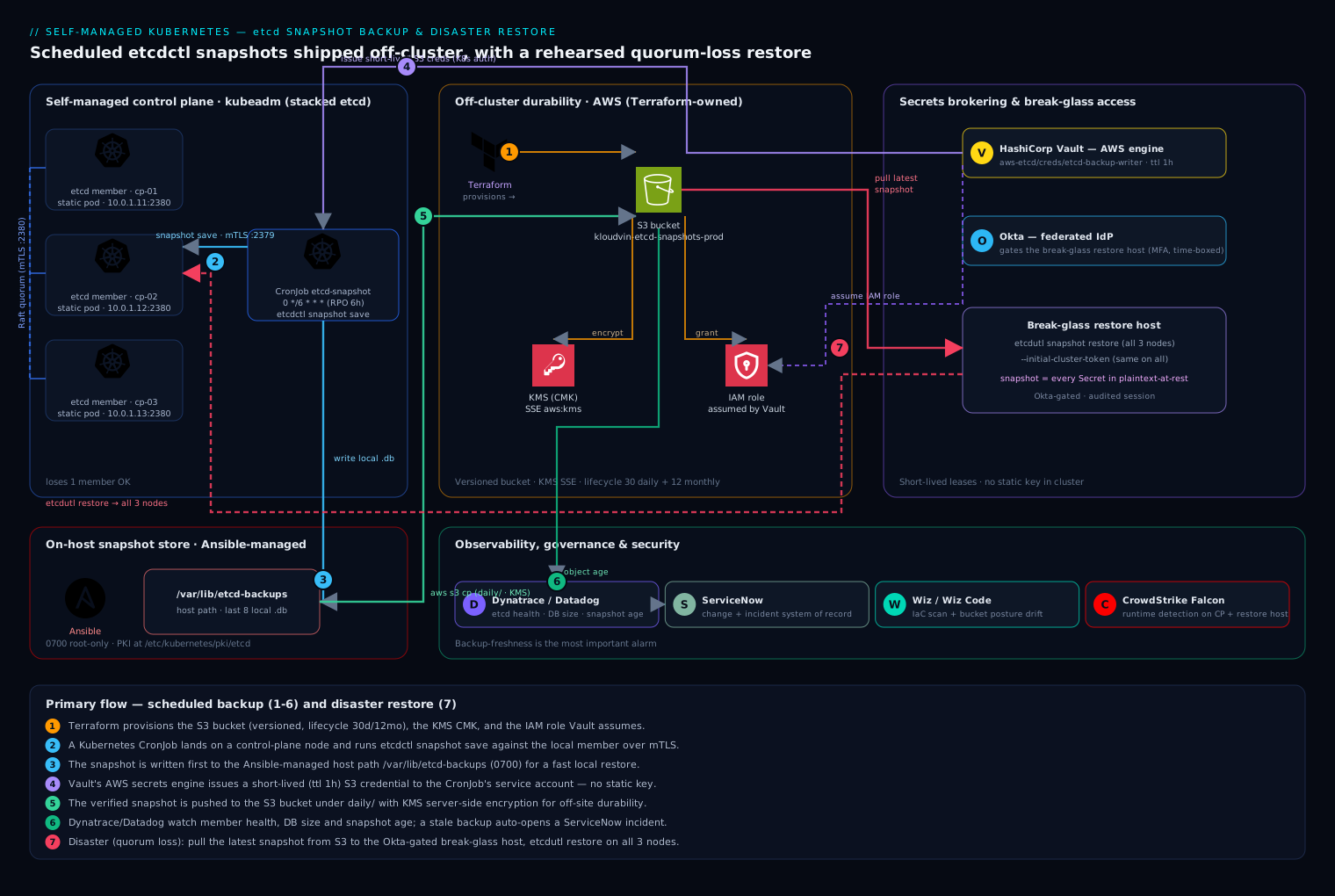
The control plane is three nodes, each running an etcd member as a static pod, forming a single Raft quorum (a 3-member cluster tolerates the loss of one member and keeps quorum at two). A Kubernetes CronJob, pinned by node affinity and a control-plane toleration to land on a control-plane node, runs etcdctl snapshot save on a schedule against the local member’s client endpoint over mTLS. Each snapshot is written first to a host path (/var/lib/etcd-backups) for a fast local restore, then pushed to an S3-compatible bucket off-cluster for durability and off-site retention. Vault issues the bucket credentials on demand to the CronJob’s service account, so no permanent secret lives in the cluster. Terraform owns the bucket, its versioning, and a lifecycle rule that keeps 30 daily + 12 monthly snapshots; Ansible owns the on-host directories and PKI. Dynatrace (or Datadog) watches the etcd member health, Raft leader changes, DB size, and — critically — the age of the newest snapshot in the bucket, so a silently failing backup pages someone instead of being discovered during an outage. ServiceNow is the system of record: every DR rehearsal and every real restore opens a change/incident record, and the post-restore validation gets attached to it. Restores run from a tightly controlled break-glass host whose access is gated by Okta federated to your IdP and time-boxed, because the snapshot contains every Kubernetes Secret in plaintext-at-rest terms.
1. Provision the off-cluster bucket and credential path
Stand up the durable target before you generate a single snapshot — a backup you cannot store off the failing cluster is not a backup. Use Terraform so the bucket, its versioning, retention lifecycle, and the IAM role that Vault will assume are all code-reviewed and reproducible.
# etcd-backup-bucket.tf
resource "aws_s3_bucket" "etcd_backups" {
  bucket = "kloudvin-etcd-snapshots-prod"
}

resource "aws_s3_bucket_versioning" "etcd_backups" {
  bucket = aws_s3_bucket.etcd_backups.id
  versioning_configuration { status = "Enabled" }
}

resource "aws_s3_bucket_lifecycle_configuration" "retention" {
  bucket = aws_s3_bucket.etcd_backups.id
  rule {
    id     = "daily-30d"
    status = "Enabled"
    filter { prefix = "daily/" }
    expiration { days = 30 }
  }
  rule {
    id     = "monthly-365d"
    status = "Enabled"
    filter { prefix = "monthly/" }
    expiration { days = 365 }
  }
}

# Server-side encryption with a CMK so snapshots (which contain every Secret) are encrypted at rest
resource "aws_s3_bucket_server_side_encryption_configuration" "enc" {
  bucket = aws_s3_bucket.etcd_backups.id
  rule {
    apply_server_side_encryption_by_default { sse_algorithm = "aws:kms" }
  }
}
Configure the Vault AWS secrets engine to mint short-lived credentials scoped to only this bucket, so the CronJob never holds a static key:
vault secrets enable -path=aws-etcd aws
vault write aws-etcd/roles/etcd-backup-writer \
  credential_type=iam_user \
  policy_document=-<<'EOF'
{ "Version": "2012-10-17",
  "Statement": [{ "Effect": "Allow",
    "Action": ["s3:PutObject","s3:GetObject","s3:ListBucket"],
    "Resource": ["arn:aws:s3:::kloudvin-etcd-snapshots-prod",
                 "arn:aws:s3:::kloudvin-etcd-snapshots-prod/*"] }] }
EOF
# 1h lease — far longer than a backup run, far shorter than useful to an attacker
vault write aws-etcd/roles/etcd-backup-writer ttl=1h max_ttl=2h
The CronJob’s service account authenticates to Vault via the Kubernetes auth method and reads aws-etcd/creds/etcd-backup-writer at runtime; the Vault Agent injector writes the lease into the pod’s memory, not a Secret object.
2. Lay down host paths and verify the etcd endpoint
Use Ansible so all three control-plane nodes are identical — drift here is what makes a 02:14 restore fail.
# roles/etcd-backup/tasks/main.yml
- name: Ensure local snapshot directory exists
  ansible.builtin.file:
    path: /var/lib/etcd-backups
    state: directory
    owner: root
    group: root
    mode: "0700"        # snapshots are sensitive; lock them down
Confirm etcdctl can talk to the local member over mTLS before automating anything. Run this on a control-plane node — it execs into the running etcd static pod, so you use the exact client certs and CA the cluster already trusts:
sudo ETCDCTL_API=3 etcdctl \
  --endpoints=https://127.0.0.1:2379 \
  --cacert=/etc/kubernetes/pki/etcd/ca.crt \
  --cert=/etc/kubernetes/pki/etcd/server.crt \
  --key=/etc/kubernetes/pki/etcd/server.key \
  endpoint health
# https://127.0.0.1:2379 is healthy: successfully committed proposal: took = 7.4ms

# Capture the member list and the current DB size — you will compare these after restore:
sudo ETCDCTL_API=3 etcdctl --endpoints=https://127.0.0.1:2379 \
  --cacert=/etc/kubernetes/pki/etcd/ca.crt \
  --cert=/etc/kubernetes/pki/etcd/server.crt \
  --key=/etc/kubernetes/pki/etcd/server.key \
  endpoint status --write-out=table
3. Take a manual snapshot (prove the mechanism by hand first)
Never schedule something you have not run manually. etcdctl snapshot save writes a consistent point-in-time copy of the keyspace:
sudo ETCDCTL_API=3 etcdctl \
  --endpoints=https://127.0.0.1:2379 \
  --cacert=/etc/kubernetes/pki/etcd/ca.crt \
  --cert=/etc/kubernetes/pki/etcd/server.crt \
  --key=/etc/kubernetes/pki/etcd/server.key \
  snapshot save /var/lib/etcd-backups/snapshot-$(date +%Y%m%dT%H%M%SZ).db
# {"level":"info","msg":"saved","path":"/var/lib/etcd-backups/snapshot-20260610T021400Z.db"}
Then verify the snapshot’s integrity with etcdutl (the v3.5+ successor to etcdctl snapshot status). A snapshot you cannot verify is a snapshot you cannot trust:
sudo etcdutl snapshot status \
  /var/lib/etcd-backups/snapshot-20260610T021400Z.db --write-out=table
# +----------+----------+------------+------------+
# |   HASH   | REVISION | TOTAL KEYS | TOTAL SIZE |
# +----------+----------+------------+------------+
# | a1b2c3d4 |   480213 |       9471 |      82 MB |
# +----------+----------+------------+------------+
TOTAL KEYS and TOTAL SIZE in the right ballpark for your cluster is your first sanity gate — a near-empty snapshot means you backed up the wrong endpoint.
4. Schedule the backup as a CronJob
Now automate it. The CronJob runs the same etcdctl snapshot save inside the etcd image (which already contains etcdctl/etcdutl), mounts the host PKI and the host backup directory, and is pinned to a control-plane node. The container then verifies the snapshot and pushes it to S3 using the Vault-issued credentials.
apiVersion: batch/v1
kind: CronJob
metadata:
  name: etcd-snapshot
  namespace: kube-system
spec:
  schedule: "0 */6 * * *"          # every 6 hours -> RPO ceiling of 6h
  concurrencyPolicy: Forbid         # never overlap a slow run with the next
  successfulJobsHistoryLimit: 3
  failedJobsHistoryLimit: 3
  jobTemplate:
    spec:
      backoffLimit: 2
      template:
        metadata:
          annotations:
            vault.hashicorp.com/agent-inject: "true"
            vault.hashicorp.com/role: "etcd-backup"
            vault.hashicorp.com/agent-inject-secret-s3: "aws-etcd/creds/etcd-backup-writer"
        spec:
          serviceAccountName: etcd-backup
          # Land on a control-plane node and tolerate its taint
          nodeSelector:
            node-role.kubernetes.io/control-plane: ""
          tolerations:
            - key: node-role.kubernetes.io/control-plane
              operator: Exists
              effect: NoSchedule
          hostNetwork: true          # reach the local member on 127.0.0.1:2379
          restartPolicy: OnFailure
          containers:
            - name: snapshot
              image: registry.k8s.io/etcd:3.5.16-0
              command: ["/bin/sh","-c"]
              args:
                - |
                  set -euo pipefail
                  TS=$(date +%Y%m%dT%H%M%SZ)
                  F=/backups/snapshot-${TS}.db
                  ETCDCTL_API=3 etcdctl \
                    --endpoints=https://127.0.0.1:2379 \
                    --cacert=/etc/kubernetes/pki/etcd/ca.crt \
                    --cert=/etc/kubernetes/pki/etcd/server.crt \
                    --key=/etc/kubernetes/pki/etcd/server.key \
                    snapshot save "$F"
                  etcdutl snapshot status "$F" --write-out=table
                  # Vault Agent wrote creds to /vault/secrets/s3 as shell exports
                  . /vault/secrets/s3
                  aws s3 cp "$F" "s3://kloudvin-etcd-snapshots-prod/daily/snapshot-${TS}.db" \
                    --sse aws:kms
                  # Keep only the last 8 local copies; S3 lifecycle owns long-term retention
                  ls -1t /backups/snapshot-*.db | tail -n +9 | xargs -r rm -f
              volumeMounts:
                - { name: pki,     mountPath: /etc/kubernetes/pki/etcd, readOnly: true }
                - { name: backups, mountPath: /backups }
          volumes:
            - name: pki
              hostPath: { path: /etc/kubernetes/pki/etcd, type: Directory }
            - name: backups
              hostPath: { path: /var/lib/etcd-backups, type: DirectoryOrCreate }
Manage this manifest in Git and let Argo CD sync it (or apply it from a GitHub Actions / Jenkins pipeline) — the backup job is cluster infrastructure and belongs in the same GitOps flow as everything else, so a change to the schedule or retention is reviewed, not hand-edited on a node. Trigger one run immediately instead of waiting six hours:
kubectl -n kube-system create job --from=cronjob/etcd-snapshot etcd-snapshot-manual-001
kubectl -n kube-system logs job/etcd-snapshot-manual-001
5. Wire monitoring and alerting on backup freshness
A backup system fails silently by default — the job errors, nobody notices, and you find out during the outage. Dynatrace (or Datadog) scrapes etcd’s own Prometheus metrics from https://127.0.0.1:2381/metrics and the bucket’s object metadata. Alert on the three things that actually predict a bad restore:
# Alert 1 — backup freshness (the most important alarm in this whole guide)
ALERT EtcdSnapshotStale
  WHEN  time() - max(s3_object_last_modified{prefix="daily/"}) > 25200   # >7h (one missed 6h run + buffer)
  THEN  page platform-oncall; open ServiceNow incident "etcd backups stale"

# Alert 2 — etcd is unhealthy *before* it loses quorum
ALERT EtcdMemberDown
  WHEN  etcd_server_has_leader == 0  FOR 1m

# Alert 3 — DB approaching the space quota (a full etcd goes read-only and corrupts restores)
ALERT EtcdDbSizeHigh
  WHEN  etcd_mvcc_db_total_size_in_bytes / etcd_server_quota_backend_bytes > 0.80
Route Alert 1 to auto-open a ServiceNow incident so a stale-backup condition becomes a tracked ticket with an owner, not a Slack message that scrolls away.
6. Restore drill A — recover a single corrupted member
This is the common case from the opening scenario: one member’s data dir is corrupt, the other two still hold quorum. You do not restore from snapshot here — you let Raft re-replicate. Restoring a single member from an old snapshot would inject stale data and split-brain the cluster.
On the healthy control-plane nodes, remove the broken member from the cluster, then on the broken node wipe its data dir and rejoin:
# On a HEALTHY node: find and remove the broken member
sudo ETCDCTL_API=3 etcdctl --endpoints=https://127.0.0.1:2379 \
  --cacert=/etc/kubernetes/pki/etcd/ca.crt \
  --cert=/etc/kubernetes/pki/etcd/server.crt \
  --key=/etc/kubernetes/pki/etcd/server.key member list
# 8e9f...: name=cp-03 peerURLs=https://10.0.1.13:2380   <-- the broken one
sudo ETCDCTL_API=3 etcdctl --endpoints=https://127.0.0.1:2379 \
  --cacert=/etc/kubernetes/pki/etcd/ca.crt \
  --cert=/etc/kubernetes/pki/etcd/server.crt \
  --key=/etc/kubernetes/pki/etcd/server.key member remove 8e9f...

# Re-add it as a new member, getting back the initial-cluster string to use on cp-03
sudo ETCDCTL_API=3 etcdctl --endpoints=https://127.0.0.1:2379 \
  --cacert=/etc/kubernetes/pki/etcd/ca.crt \
  --cert=/etc/kubernetes/pki/etcd/server.crt \
  --key=/etc/kubernetes/pki/etcd/server.key \
  member add cp-03 --peer-urls=https://10.0.1.13:2380
On the broken node cp-03, stop the static pod, clear the data, set --initial-cluster-state=existing in the etcd manifest, and let it resync:
# Stop etcd by moving its static-pod manifest out of the watched dir
sudo mv /etc/kubernetes/manifests/etcd.yaml /tmp/etcd.yaml.bak
sudo rm -rf /var/lib/etcd/member        # wipe the corrupt data dir only
# Edit /tmp/etcd.yaml.bak: set --initial-cluster-state=existing and the
# --initial-cluster value returned by 'member add' above, then restore it:
sudo mv /tmp/etcd.yaml.bak /etc/kubernetes/manifests/etcd.yaml
# kubelet re-creates the etcd pod; it joins and re-replicates from the leader.
Within a minute member list shows three healthy members again, and no API objects were lost because quorum was never broken.
7. Restore drill B — full quorum loss (the snapshot restore)
This is the disaster: two or three members gone, quorum lost, API server down. Now you restore from a snapshot onto a fresh data directory using etcdutl snapshot restore, on every control-plane node, with matching flags. Rehearse this on a throwaway cluster first — it is the procedure you will be running under pressure.
Pull the most recent verified snapshot from the bucket to all three nodes:
. /vault/secrets/s3 2>/dev/null || aws configure   # use a Vault-issued read lease
LATEST=$(aws s3 ls s3://kloudvin-etcd-snapshots-prod/daily/ | sort | tail -1 | awk '{print $4}')
aws s3 cp "s3://kloudvin-etcd-snapshots-prod/daily/${LATEST}" /var/lib/etcd-backups/restore.db
sudo etcdutl snapshot status /var/lib/etcd-backups/restore.db --write-out=table   # verify FIRST
Stop the control plane on all three nodes (move the static-pod manifests aside) and wipe the old etcd data:
sudo mkdir -p /tmp/manifests-bak
sudo mv /etc/kubernetes/manifests/*.yaml /tmp/manifests-bak/   # stops etcd + apiserver
sudo mv /var/lib/etcd /var/lib/etcd.corrupt.$(date +%s)        # keep the old dir, don't delete yet
Now restore on each node. The --initial-cluster, --name, and --initial-advertise-peer-urls must exactly match that node’s identity and the cluster’s membership, or the members will refuse to form quorum:
# Run the matching block on each node (values shown for cp-01)
sudo etcdutl snapshot restore /var/lib/etcd-backups/restore.db \
  --name=cp-01 \
  --initial-cluster=cp-01=https://10.0.1.11:2380,cp-02=https://10.0.1.12:2380,cp-03=https://10.0.1.13:2380 \
  --initial-cluster-token=etcd-cluster-restore-20260610 \
  --initial-advertise-peer-urls=https://10.0.1.11:2380 \
  --data-dir=/var/lib/etcd
sudo chown -R root:root /var/lib/etcd
The --initial-cluster-token must be the same string on all three nodes (it isolates this restored cluster from any stragglers). Once all three data dirs are restored, bring the control plane back — etcd first, then the rest:
sudo mv /tmp/manifests-bak/etcd.yaml /etc/kubernetes/manifests/      # start etcd everywhere
# wait for endpoint health, then restore the remaining manifests:
sudo mv /tmp/manifests-bak/*.yaml /etc/kubernetes/manifests/
Validation
A restore is not done when etcd starts — it is done when you have proven the cluster matches the snapshot. Run all of these and attach the output to the ServiceNow record:
# 1. All three members healthy and one leader elected
sudo ETCDCTL_API=3 etcdctl --endpoints=https://127.0.0.1:2379 \
  --cacert=/etc/kubernetes/pki/etcd/ca.crt --cert=/etc/kubernetes/pki/etcd/server.crt \
  --key=/etc/kubernetes/pki/etcd/server.key endpoint status --cluster --write-out=table

# 2. API server is serving and core components are up
kubectl get --raw='/readyz?verbose'
kubectl get nodes
kubectl -n kube-system get pods

# 3. Spot-check that real objects came back at the expected revision
kubectl get deploy -A | wc -l        # compare to your pre-incident inventory
kubectl get secrets -A | wc -l       # the data that justified the encryption in step 1

# 4. Confirm the GitOps controller reconciles against the restored API
kubectl -n argocd get applications    # Argo CD should report Synced/Healthy, not Unknown
Crucially, validate workload reality, not just object counts: deploy a canary, confirm Ingress routes resolve, and confirm DNS/CoreDNS answers. Object presence proves etcd restored; a passing canary proves the cluster restored.
Rollback / teardown
If a restore goes wrong, you preserved the escape hatch by moving — not deleting — the old data in step 7:
# Abort a bad restore: stop the control plane and swap the corrupt dir back
sudo mv /etc/kubernetes/manifests/*.yaml /tmp/manifests-bak/
sudo rm -rf /var/lib/etcd
sudo mv /var/lib/etcd.corrupt.<ts> /var/lib/etcd     # the dir you set aside
sudo mv /tmp/manifests-bak/*.yaml /etc/kubernetes/manifests/
To tear down the backup pipeline itself (e.g. decommissioning a cluster), suspend then delete the CronJob, then let Terraform retire the bucket once retention has lapsed — never delete the bucket while it is the only copy of a live cluster’s state:
kubectl -n kube-system patch cronjob etcd-snapshot -p '{"spec":{"suspend":true}}'
kubectl -n kube-system delete cronjob etcd-snapshot
# terraform destroy -target=aws_s3_bucket.etcd_backups   # ONLY after cluster is gone + retention met
Common pitfalls
- Restoring a single member from a snapshot. When you still have quorum, never snapshot-restore one member — remove and re-add it (drill A) and let Raft resync. Snapshot-restoring a live member injects stale revisions and split-brains the cluster.
- Mismatched restore flags. A wrong
--name,--initial-cluster, or a different--initial-cluster-tokenper node is the most common reason a restored cluster never forms quorum. Script the per-node values; do not type them at 02:14. - Backing up the wrong endpoint. Pointing
etcdctlat a non-leader proxy or the wrong port yields a tiny or empty snapshot. Theetcdutl snapshot statuskey-count gate in step 3 catches this. - Never rehearsing. An untested backup is a hope. Schedule drill B quarterly on a throwaway cluster with a real snapshot, under a ServiceNow change record, and time it — your measured restore time is your real RTO.
- DB hitting the space quota. etcd defaults to an 8 GB backend quota; cross it and etcd goes read-only (
mvcc: database space exceeded) and snapshots taken in that state are suspect. Alert at 80% (step 5) and run periodicetcdctl defragin a maintenance window. - Version skew on restore. Restore with an
etcdutlwhose minor version matches the snapshot’s etcd. Using the in-clusterregistry.k8s.io/etcdimage guarantees this; a random host-installedetcdctlmay not.
Security notes
An etcd snapshot is the single most sensitive artifact in your infrastructure: it contains every Kubernetes Secret, service-account token, and TLS key, stored at rest with only base64 framing. Treat it accordingly. Encrypt snapshots at rest (the KMS SSE in step 1) and in transit (the bucket enforces TLS). Lock the local directory to 0700 root-only. Issue bucket credentials through Vault as short-lived leases scoped to a single bucket — never a static long-lived key in a manifest, which is exactly the kind of leaked credential that turns a backup store into a breach. Gate access to the break-glass restore host through Okta (federated to your IdP) with time-boxed, MFA-enforced, audited sessions, since whoever can pull a snapshot can read every Secret in the cluster. Run Wiz (and Wiz Code) continuously: Wiz Code scans the Terraform and CronJob manifests in the pull request for a public-bucket or unencrypted-storage misconfiguration before merge, and Wiz’s cloud posture scanning alerts if the live bucket ever drifts to public or its policy widens. Put CrowdStrike Falcon sensors on the control-plane nodes and the restore host so an attacker exfiltrating snapshots or tampering with the etcd data dir trips a runtime detection that reaches the SOC. Finally, if you also enable Kubernetes encryption-at-rest for Secrets (an EncryptionConfiguration with a KMS provider), remember that the encryption key must be restored/available too, or a snapshot restore yields ciphertext you cannot read.
Cost notes
This pipeline is deliberately cheap relative to what it protects. The dominant line items are S3 storage and request costs, both trivial: a typical control-plane etcd snapshot is tens to low-hundreds of MB, and at a 6-hour cadence with the 30-daily/12-monthly retention from step 1 you store on the order of a few GB — single-digit dollars a month including KMS and PUT requests, and the Terraform lifecycle rule prevents unbounded growth that would otherwise creep up on you. The CronJob itself consumes a few seconds of CPU on an existing control-plane node every six hours — effectively free. The Vault AWS engine adds no per-credential cost. The real, non-obvious cost lever is observability cardinality: scraping etcd’s full metric set into Dynatrace/Datadog at high frequency can cost more than the backups do, so keep the etcd scrape interval at 30–60s and alert on the handful of signals in step 5 rather than dashboarding every histogram bucket. And the cost that dwarfs all of these is the one you avoid: an unrecoverable self-managed control plane is a full cluster rebuild and a workload-restore project measured in days — which is the entire reason the few dollars a month and the quarterly rehearsal are non-negotiable.