A 40-engineer platform team has Grafana dashboards everyone loves and an on-call process nobody trusts. Alerts fan out to a shared #alerts Slack channel that 200 people have muted; the “who is on call this week” answer lives in a pinned spreadsheet that goes stale every holiday; and when a Dynatrace anomaly and a Grafana alert fire for the same database outage at 3 a.m., two different people get paged, neither knows the other is looking, and the post-incident review records a 22-minute “who’s got it?” gap before anyone touched a keyboard. The head of SRE wants three concrete things: a single alerting brain, an escalation chain that guarantees a human acknowledges within minutes or escalates to the next person, and a rotation that updates itself. This guide builds exactly that with Grafana OnCall (the paging, scheduling, and escalation engine) fed by Grafana Alerting (the rule engine that decides when to fire), deployed on Kubernetes, integrated with chat, and slotted into the team’s existing identity and ITSM stack.
Prerequisites
- A Kubernetes cluster (1.27+) with
kubectland Helm 3.12+ configured. Examples assume a managed cluster (AKS/EKS/GKE) but any conformant cluster works. - A reachable Grafana 11.x instance (this guide deploys one via Helm; an existing OSS or Enterprise install works too). OnCall needs to call Grafana’s API, and Grafana needs to reach OnCall.
- A PostgreSQL 14+ database and a Redis 7 instance for OnCall’s state and Celery task queue. Managed services (Azure Database for PostgreSQL, ElastiCache) are recommended over in-cluster for production.
- An SMTP relay (for email escalation) and a chat workspace — Slack or Microsoft Teams — where you can install an app/webhook.
- Identity: a Microsoft Entra ID (or Okta) tenant for SSO. We federate operator logins through it rather than using local Grafana passwords.
- HashiCorp Vault reachable from the cluster for secret injection (Slack tokens, SMTP creds, the OnCall–Grafana API key). A
kubectl create secretfallback is shown for non-Vault shops. - A Prometheus or Mimir datasource already wired into Grafana so there is something real to alert on.
Target topology
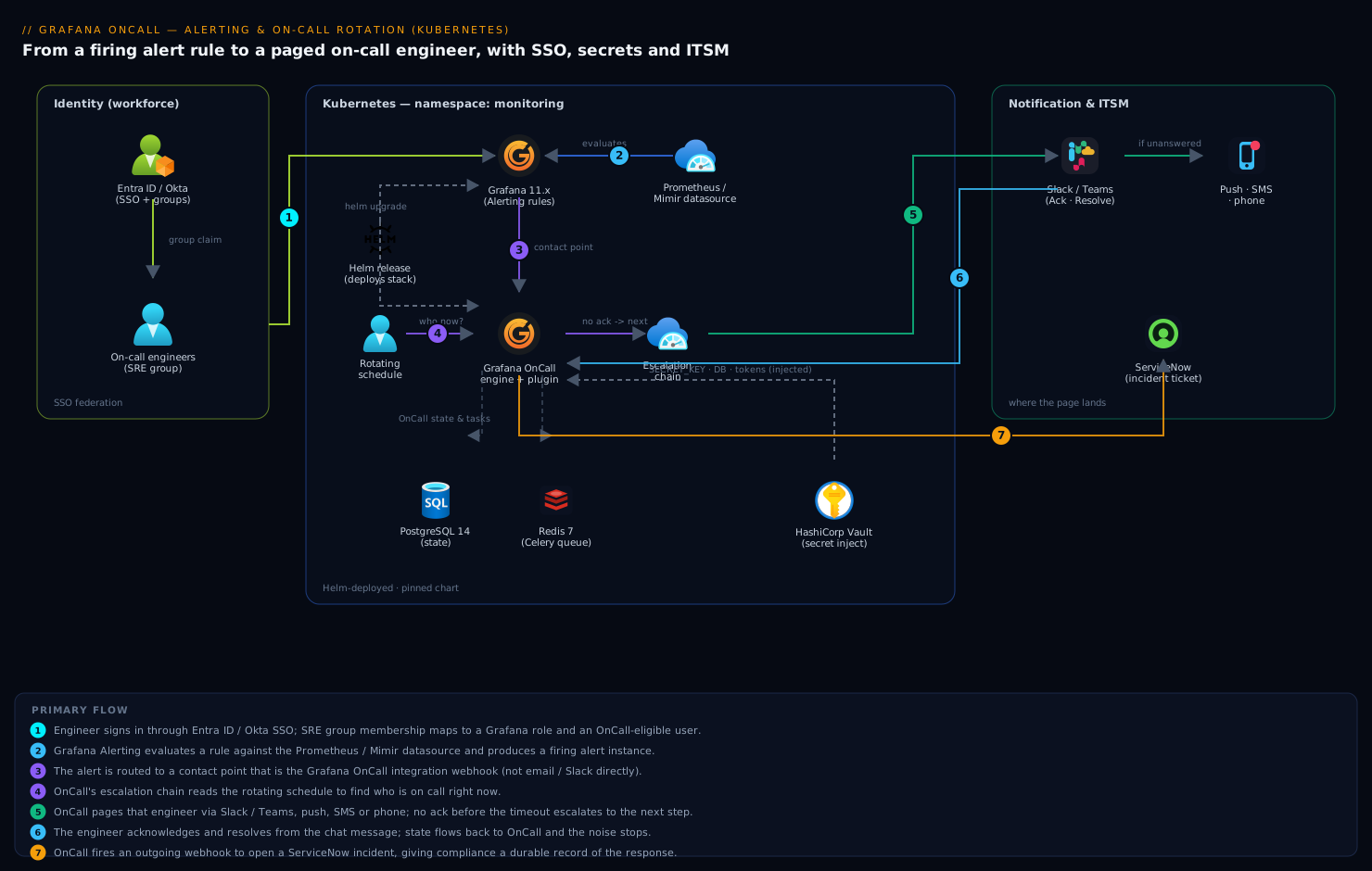
The flow has a clean separation of duties worth fixing in your head before you touch a YAML file. Grafana Alerting is the rule engine: it evaluates queries against your datasources on a schedule, and when a condition holds it produces a firing alert instance. That instance is routed — not to email, not to Slack directly, but to a contact point that is an OnCall integration webhook. Grafana OnCall is the human-routing engine: it receives the alert, groups it, and runs it through an escalation chain that knows who is on call right now by reading a schedule (a rotating roster, possibly synced from a calendar). OnCall notifies that person across Slack, push, SMS, and phone, and if nobody acknowledges within the chain’s timeout, it escalates to the next step. Acknowledgement and resolution flow back so the noise stops. Around this core sit the enterprise pieces: Entra ID / Okta for who-can-log-in, HashiCorp Vault for the secrets the pods need, and ServiceNow for the incident ticket that compliance wants to exist for every page.
This guide builds it in order: deploy OnCall, connect it to Grafana, define an alert rule, build an escalation chain and a rotating schedule, wire chat, then validate and harden.
1. Add the Helm repo and prepare namespaces
Grafana publishes both Grafana and OnCall in its Helm repo. Create a dedicated namespace so RBAC and network policy stay scoped.
helm repo add grafana https://grafana.github.io/helm-charts
helm repo update

kubectl create namespace monitoring
kubectl label namespace monitoring app.kubernetes.io/part-of=observability
Verify the OnCall chart is visible and pin a version — never deploy a floating latest into a paging system you will be woken by.
helm search repo grafana/oncall --versions | head -5
# pin the chart version you tested, e.g. 1.10.x
2. Provision secrets via Vault (or a sealed fallback)
OnCall needs a Django SECRET_KEY, database and Redis credentials, and later a Grafana API token. Pull these from HashiCorp Vault so they are never written into values.yaml or a git-tracked file — the platform team’s standing rule after a credential leak. Enable the Kubernetes auth method and write a policy that grants the OnCall service account read on one path:
# Vault: define a KV path and a policy the OnCall SA can read
vault kv put secret/oncall \
  SECRET_KEY="$(openssl rand -hex 32)" \
  POSTGRES_PASSWORD='<db-password>' \
  REDIS_PASSWORD='<redis-password>'

vault policy write oncall-read - <<'EOF'
path "secret/data/oncall" { capabilities = ["read"] }
EOF

vault write auth/kubernetes/role/oncall \
  bound_service_account_names=oncall \
  bound_service_account_namespaces=monitoring \
  policies=oncall-read ttl=1h
The Vault Agent injector mounts those values into the pod at deploy time, so they live in tmpfs, not in etcd as a long-lived Kubernetes Secret. If you have no Vault, the minimal fallback is an explicit secret you create out-of-band and reference — acceptable for a pilot, not for the regulated production path:
kubectl -n monitoring create secret generic oncall-secrets \
  --from-literal=SECRET_KEY="$(openssl rand -hex 32)" \
  --from-literal=POSTGRES_PASSWORD='<db-password>' \
  --from-literal=REDIS_PASSWORD='<redis-password>'
3. Deploy Grafana OnCall with Helm
Write a values.yaml that points OnCall at your external PostgreSQL and Redis, sets the public base URL OnCall advertises to itself (critical — it bakes this into webhook links and Slack callbacks), and references the secret. Keep the file in git without the secret values; pull those from the env the injector provides.
# oncall-values.yaml
base_url: oncall.kloudvin.internal      # the externally reachable host
oncall:
  secrets:
    existingSecret: oncall-secrets       # from Vault injector or step 2 fallback
    secretKey: SECRET_KEY

database:
  type: postgresql
externalPostgresql:
  host: pg-oncall.privatelink.postgres.database.azure.com
  port: 5432
  db_name: oncall
  user: oncall
  existingSecret: oncall-secrets
  passwordKey: POSTGRES_PASSWORD

externalRedis:
  host: redis-oncall.internal
  port: 6379
  existingSecret: oncall-secrets
  passwordKey: REDIS_PASSWORD

celery:
  replicas: 2                            # task workers for notifications/escalations
ingress:
  enabled: true
  className: nginx
  hosts: [ host: oncall.kloudvin.internal ]
Install it:
helm upgrade --install oncall grafana/oncall \
  --namespace monitoring \
  --version 1.10.5 \
  --values oncall-values.yaml \
  --wait --timeout 10m
Watch the engine and Celery workers come up — the migration job must complete before the API is healthy:
kubectl -n monitoring rollout status deploy/oncall-engine
kubectl -n monitoring get pods -l app.kubernetes.io/instance=oncall
kubectl -n monitoring logs job/oncall-migrate --tail=20
4. Install and configure the OnCall plugin in Grafana
OnCall is operated through a Grafana app plugin; the plugin is the UI and the OnCall engine is the backend. Install the plugin into your Grafana and tell it where the OnCall engine lives. If you deploy Grafana via Helm, set this in its values so it is reproducible:
# grafana-values.yaml (excerpt)
plugins:
  - grafana-oncall-app
grafana.ini:
  feature_toggles:
    enable: externalServiceAccounts
env:
  GF_PLUGIN_GRAFANA_ONCALL_APP_ONCALL_API_URL: http://oncall-engine.monitoring:8080
Then, in Grafana → Administration → Plugins → Grafana OnCall → Configuration, click Connect. The plugin provisions a Grafana service-account token and posts it to the OnCall engine, establishing the two-way trust: Grafana can send alerts to OnCall, and OnCall can read Grafana users for the on-call roster. Confirm the handshake from the CLI:
# OnCall stores the linked Grafana instance once /api/v1/ is reachable
kubectl -n monitoring exec deploy/oncall-engine -- \
  python manage.py shell -c \
  "from apps.user_management.models import Organization; print(Organization.objects.values_list('stack_slug','grafana_url'))"
5. Federate operator login through Entra ID / Okta
Do not let on-call engineers authenticate with local Grafana passwords — when someone leaves, you want their access gone by removing them from a group, not by remembering to delete a Grafana user. Configure Grafana’s generic OAuth against Microsoft Entra ID (workforce IdP; Okta is identical with its own endpoints). Group claims map to Grafana roles, and OnCall inherits those users automatically.
# grafana.ini — Entra ID OIDC
[auth.azuread]
enabled = true
allow_sign_up = true
client_id = ${ENTRA_CLIENT_ID}
client_secret = ${ENTRA_CLIENT_SECRET}      # injected from Vault
auth_url = https://login.microsoftonline.com/${TENANT_ID}/oauth2/v2.0/authorize
token_url = https://login.microsoftonline.com/${TENANT_ID}/oauth2/v2.0/token
scopes = openid email profile
role_attribute_path = contains(groups[*], '<SRE_GROUP_GUID>') && 'Editor' || 'Viewer'
Now an engineer added to the SRE group in Entra (or Okta) appears as an OnCall-eligible user on next login, with no manual provisioning. This is the join that makes the rotation self-maintaining as the team changes.
6. Create an OnCall integration and route a Grafana alert into it
In OnCall, create an integration of type Grafana Alerting. OnCall returns a unique webhook URL — this is the contact point Grafana Alerting will push to. Capture it:
ONCALL_URL=https://oncall.kloudvin.internal
ONCALL_TOKEN=<oncall-api-token>   # generated in OnCall → Settings → API Tokens

curl -s -X POST "$ONCALL_URL/api/v1/integrations/" \
  -H "Authorization: $ONCALL_TOKEN" -H 'Content-Type: application/json' \
  -d '{"type":"grafana_alerting","name":"prod-platform"}' | jq '.id, .link'
# .link is the webhook, e.g. https://oncall.kloudvin.internal/integrations/v1/grafana_alerting/abc123/
Register that webhook in Grafana as a contact point, then write a real alert rule and a notification policy that routes to it. Below is provisioning-as-code so the alerting config is reviewable in git, not clicked into a UI. First the contact point and policy:
# provisioning/alerting/contactpoints.yaml
apiVersion: 1
contactPoints:
  - orgId: 1
    name: oncall-prod-platform
    receivers:
      - uid: oncall-prod
        type: webhook
        settings:
          url: https://oncall.kloudvin.internal/integrations/v1/grafana_alerting/abc123/
          httpMethod: POST
---
# provisioning/alerting/policies.yaml
apiVersion: 1
policies:
  - orgId: 1
    receiver: oncall-prod-platform
    group_by: ['alertname', 'cluster']
    matchers: ['severity = critical']
    group_wait: 30s
    group_interval: 5m
    repeat_interval: 4h
Then the rule itself — a genuine condition, here API error-rate over 5% for 5 minutes:
# provisioning/alerting/rules.yaml
apiVersion: 1
groups:
  - orgId: 1
    name: platform-slo
    folder: Alerts
    interval: 1m
    rules:
      - uid: api-error-rate
        title: API 5xx error rate high
        condition: C
        data:
          - refId: A
            datasourceUid: prometheus
            model:
              expr: sum(rate(http_requests_total{code=~"5.."}[5m])) / sum(rate(http_requests_total[5m]))
          - refId: C
            datasourceUid: __expr__
            model: { type: threshold, expression: A, conditions: [ { evaluator: { type: gt, params: [0.05] } } ] }
        for: 5m
        labels: { severity: critical }
        annotations: { summary: '5xx error rate above 5% for 5m' }
Mount these files into Grafana under /etc/grafana/provisioning/alerting/ (Helm: the extraConfigmapMounts or chart-native alerting: block). On restart, Grafana loads the rule, and any firing instance now flows to OnCall.
7. Build the escalation chain
In OnCall, an escalation chain is the ladder a page climbs until acknowledged. Attach it to the integration from step 6. The semantics that matter: each step has a timeout, and if no one acknowledges before the timeout, OnCall advances to the next step. A sane production chain notifies the current on-call person, waits, escalates to a secondary, then to a manager, and only then opens a ticket.
# create the chain, then add ordered steps
CHAIN=$(curl -s -X POST "$ONCALL_URL/api/v1/escalation_chains/" \
  -H "Authorization: $ONCALL_TOKEN" -H 'Content-Type: application/json' \
  -d '{"name":"prod-platform-critical"}' | jq -r .id)

# Step 1: notify whoever is on call on the primary schedule (schedule id from step 8)
curl -s -X POST "$ONCALL_URL/api/v1/escalation_policies/" \
  -H "Authorization: $ONCALL_TOKEN" -H 'Content-Type: application/json' \
  -d "{\"escalation_chain_id\":\"$CHAIN\",\"type\":\"notify_on_call_from_schedule\",\"notify_on_call_from_schedule\":\"$SCHEDULE_ID\"}"

# Step 2: wait 5 minutes for an ack
curl -s -X POST "$ONCALL_URL/api/v1/escalation_policies/" \
  -H "Authorization: $ONCALL_TOKEN" -H 'Content-Type: application/json' \
  -d "{\"escalation_chain_id\":\"$CHAIN\",\"type\":\"wait\",\"duration\":300}"

# Step 3: escalate to the secondary schedule, then (Step 4) to the EM user group.
In the UI this is a drag-and-drop ladder, but provisioning it via API keeps the on-call policy in version control alongside the alert rules. Set the integration’s default route to use prod-platform-critical.
8. Create a rotating on-call schedule
The schedule is what makes “who is on call” a live fact instead of a spreadsheet. OnCall supports both web-based rotations (define the team and a cadence; OnCall computes the calendar) and calendar-synced schedules (point OnCall at an iCal URL from Google Calendar or Outlook so a non-engineer can manage the roster). For a self-maintaining weekly hand-off across four engineers, a web rotation is cleanest:
# a weekly rotation starting Monday 10:00, rotating through the team
curl -s -X POST "$ONCALL_URL/api/v1/on_call_shifts/" \
  -H "Authorization: $ONCALL_TOKEN" -H 'Content-Type: application/json' \
  -d '{
    "name":"primary-weekly",
    "type":"rolling_users",
    "frequency":"weekly",
    "interval":1,
    "start":"2026-06-15T10:00:00",
    "duration":604800,
    "rolling_users":[["u_alice"],["u_bob"],["u_carol"],["u_dave"]]
  }' | jq .id

# attach the shift to a schedule
curl -s -X POST "$ONCALL_URL/api/v1/schedules/" \
  -H "Authorization: $ONCALL_TOKEN" -H 'Content-Type: application/json' \
  -d '{"name":"prod-platform-primary","type":"web","shifts":["<shift_id_above>"],"time_zone":"Asia/Kolkata"}'
Capture the returned schedule id as SCHEDULE_ID and reference it from the escalation chain (step 7). For teams that prefer to manage the roster in a shared calendar, create the schedule with "type":"ical" and an ical_url_primary pointing at a published Outlook/Google calendar feed — OnCall re-reads it and the rotation follows the calendar with no API calls.
9. Wire OnCall to chat (Slack / Teams)
Paging is useless if the page lands in a muted channel. OnCall’s Slack app posts each alert as an interactive message with Acknowledge and Resolve buttons, DMs the on-call person, and mirrors escalation. Install it from OnCall → Settings → Chat Ops → Slack → Install, which runs the OAuth install into your workspace. Store the resulting bot token in Vault, not in the values file:
vault kv patch secret/oncall \
  SLACK_BOT_TOKEN='xoxb-...' \
  SLACK_SIGNING_SECRET='...'
Then in OnCall, set the integration’s default Slack channel for unrouted alerts and let the escalation chain DM the on-call user directly. For Microsoft Teams, OnCall ships a Teams app you upload to your tenant’s app catalog; the message-card actions are equivalent. The win: an alert now arrives as an actionable, attributed message — “Carol is on call, she has it, ack’d at 03:01” — instead of a line in a firehose.
10. Open a ServiceNow incident for every page
Compliance wants a durable record that a human responded, separate from the chat thread. Use an OnCall outgoing webhook that fires on alert-group creation and POSTs to the ServiceNow Table API, creating an incident record linked back to the OnCall alert. This keeps the SRE workflow in OnCall while satisfying ITSM.
curl -s -X POST "$ONCALL_URL/api/v1/webhooks/" \
  -H "Authorization: $ONCALL_TOKEN" -H 'Content-Type: application/json' \
  -d '{
    "name":"servicenow-incident",
    "trigger_type":"alert group created",
    "http_method":"POST",
    "url":"https://kloudvin.service-now.com/api/now/table/incident",
    "headers":"{\"Content-Type\":\"application/json\"}",
    "username":"svc_oncall",
    "password":"{{ vault_servicenow_password }}",
    "data":"{\"short_description\":\"{{ alert_group.title }}\",\"urgency\":\"1\"}"
  }'
Use a dedicated ServiceNow integration user (svc_oncall) with a scoped role, and keep its password in Vault, injected like every other secret.
Validation
Prove the whole chain end to end before you trust it at 3 a.m.
# 1. Fire a synthetic alert straight at the OnCall integration webhook
curl -s -X POST \
  https://oncall.kloudvin.internal/integrations/v1/grafana_alerting/abc123/ \
  -H 'Content-Type: application/json' \
  -d '{"alerts":[{"status":"firing","labels":{"alertname":"synthetic-test","severity":"critical"}}]}'

# 2. Confirm the alert group was created and routed to the chain
curl -s "$ONCALL_URL/api/v1/alert_groups/?state=firing" \
  -H "Authorization: $ONCALL_TOKEN" | jq '.results[0] | {title, state, escalation_chain}'
Then verify the human-facing path manually:
- The on-call person (per the schedule) receives a Slack DM / push within seconds; the channel message shows Ack/Resolve buttons.
- Do not acknowledge. After the step-1 wait (5 min) the page escalates to the secondary — confirming the timeout logic is live.
- Acknowledge, then resolve; the Slack message updates and the ServiceNow incident is created and then closed.
- In Grafana, use Alerting → test on the
api-error-raterule to confirm the real rule (not just the synthetic webhook) reaches OnCall.
Check the schedule renders the right person for “now”:
curl -s "$ONCALL_URL/api/v1/schedules/$SCHEDULE_ID/final_shifts/?start_date=2026-06-15&end_date=2026-06-22" \
  -H "Authorization: $ONCALL_TOKEN" | jq '.results[] | {user, start, end}'
Rollback / teardown
OnCall changes are layered, so unwind in reverse and the blast radius stays small.
- Pause paging without deleting config: in OnCall, mute the integration or set its escalation chain to a no-op, or in Grafana silence the notification policy. This stops pages while you debug, with zero data loss.
- Roll back the alerting rules: since they are provisioned from git,
git revertthe change and restart Grafana — the rule reverts to the prior reviewed state. - Remove the chat app: uninstall the Slack/Teams app from the workspace and
vault kv delete secret/oncallfor the bot token. - Full uninstall of OnCall:
helm uninstall oncall -n monitoring
# external PG/Redis persist on purpose — drop them explicitly if intended
kubectl -n monitoring delete secret oncall-secrets   # only if you used the fallback
Because PostgreSQL and Redis are external, a helm uninstall removes the engine but preserves history; you can reinstall and reconnect without losing alert-group records.
Common pitfalls
base_urlmismatch. If OnCall’s advertised URL does not match how Slack and Grafana actually reach it, Slack button callbacks 404 and webhook links are wrong. Setbase_urlto the real externally reachable host, full stop.- Notification policy never matches. A rule fires but no page arrives because the policy
matchers(severity = critical) do not match the rule’slabels. Align the label set; test with Alerting → notification policies → preview routing. - Celery workers under-scaled. Notifications and escalations run on Celery; one replica under a storm queues pages and they arrive late — the worst failure mode for paging. Run ≥2
celery.replicasand watch the queue depth in Redis. - Schedule timezone drift. A rotation defined in UTC hands off at the wrong local hour; set
time_zoneexplicitly (hereAsia/Kolkata) so 10:00 means 10:00 for the team. - Local Grafana users bypass SSO. Leaving local login enabled means an offboarded engineer can still ack pages. Disable local auth once Entra/Okta federation is confirmed working.
- Grouping too aggressive. A
group_bythat is too coarse collapses distinct incidents into one alert group and one page; too fine spams. Tunegroup_byandgroup_intervalagainst a real noisy week.
Security notes
Federate every operator login through Entra ID or Okta and disable local Grafana passwords, so access is granted and revoked by group membership, not manual user management — the property that keeps the rotation honest as people join and leave. Keep every secret OnCall touches — the Django SECRET_KEY, database and Redis credentials, the Slack bot token, the ServiceNow service-account password — in HashiCorp Vault, injected at runtime into pod tmpfs rather than committed to values.yaml or stored as a long-lived Kubernetes Secret; this is the direct lesson from the credential leak the team refuses to repeat. Scope OnCall API tokens to the minimum and rotate them. Keep PostgreSQL and Redis on private endpoints with no public access, and put the OnCall ingress behind your edge/WAF so the integration webhooks are not an open, unauthenticated POST target on the public internet. If your security stack includes Wiz for cloud-posture scanning or CrowdStrike Falcon for node runtime protection, the OnCall namespace and its node pool are in scope like any other workload — a misconfigured public Redis here is exactly the drift Wiz should flag.
Cost notes
Grafana OnCall OSS is free to run; your spend is the infrastructure under it — a small PostgreSQL, a Redis, and two or three modest pods, comfortably a few thousand rupees a month on a managed cluster you already operate. The real cost lever is notification channel choice: Slack/Teams and mobile push are free, while SMS and voice calls are billed per message through the provider OnCall is configured with. Reserve SMS/phone for the later, critical steps of the escalation chain (when a push has already gone unanswered) rather than the first notification, and you cut paging spend sharply without weakening the guarantee that a true emergency reaches a human. Right-size Celery and the database to the alert volume — paging traffic is bursty but low-throughput, so over-provisioning here is wasted money. The larger saving is organizational: a working escalation chain and live schedule shrink mean-time-to-acknowledge, and the 22-minute “who’s got it?” gap that opened this guide — the most expensive line item of all — simply stops happening.